The Smell of Molten Projects in the Morning

Ed Nisley's Blog: Shop notes, electronics, firmware, machinery, 3D printing, laser cuttery, and curiosities. Contents: 100% human thinking, 0% AI slop.

Tag: M2

Using and tweaking a Makergear M2 3D printer

  • Bafang BBS02: Drop-bar Display Adapter

    Bafang BBS02: Drop-bar Display Adapter

    All of the Bafang BBS02 displays have a compression clamp intended for more-or-less standard 22.2 mm handlebars, as found on typical upright BMX-ish bikes suitable for conversion to e-bikes and, oddly, our Tour Easy recumbents. My friend’s bike has drop-bar handlebars with a 25.4 mm (yes, exactly 1 inch) center section that just isn’t going to fit through that hole.

    The least awful solution involved summoning an adapter from the vasty digital deep:
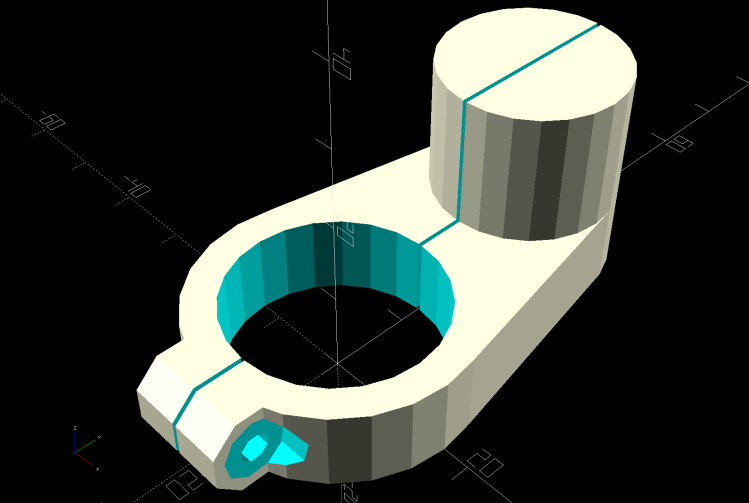
    Display adapter mount - solid model
    Display adapter mount – solid model

    The hole clamps around the handlebar with an M3 SHCS pulling it snug and the display clamps around the peg to hold everything together:
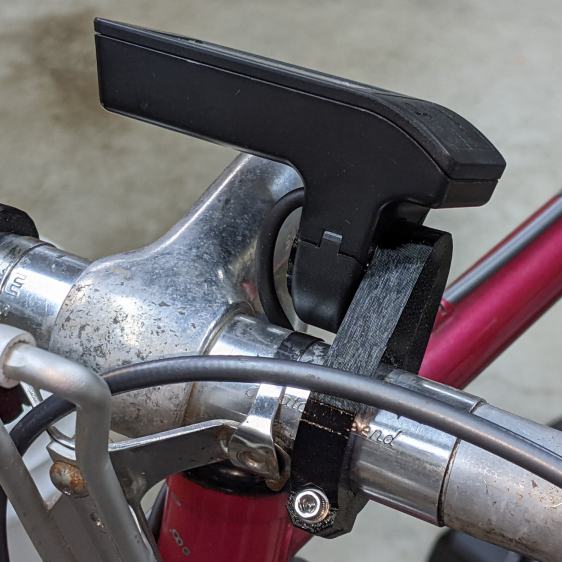
    Bafang Display adapter - front view
    Bafang Display adapter – front view

    There’s not much to see from the side:
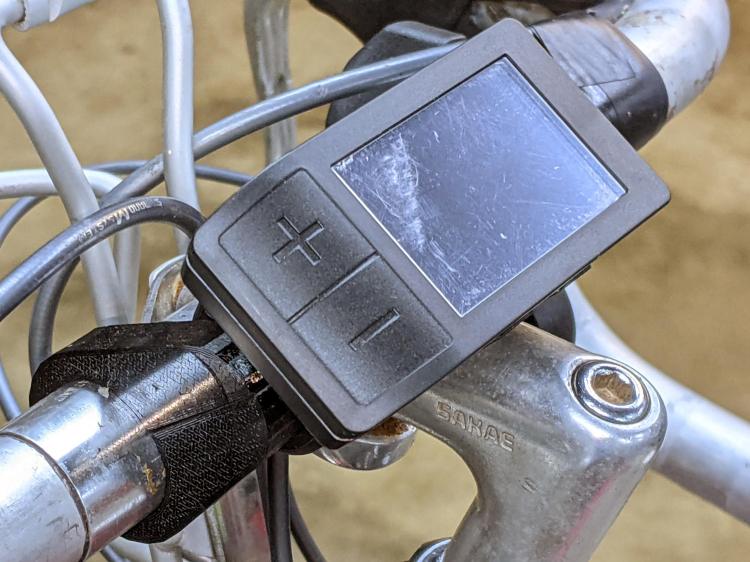
    Bafang Display adapter - left view
    Bafang Display adapter – left view

    Those scuffs arrived on the protective plastic film!

    The OpenSCAD source code includes some cruft from an idea that didn’t work out quite right:

    HandlebarMax = 1*inch;                      // middle handlebar diameter
    HandlebarMin = 24.0;                        //  .. tape section
    
    BafangClampID = 22.3;                       // new handlebar diameter
    
    
    … snippage …
    
    // Handlebar mount for controller
    
    module DispMount() {
    
    ClampRing = [HandlebarMax,HandlebarMax + 2*WallThick,10.0];
    ClampOffset = (HandlebarMax + BafangClampID)/2 + 6.0;
    
    DispStudLenth = 16.5;
    
    NumSides = 24;
    
    Tilt = 0*atan2((ClampRing[OD] - BafangClampID)/2,ClampOffset);
    echo(str("Tilt: ",Tilt));
    
        difference() {
            union() {
                hull() {
                    cylinder(d=ClampRing[OD],h=ClampRing[LENGTH],$fn=NumSides);
                    translate([0,ClampOffset,0])
                        cylinder(d=BafangClampID,h=ClampRing[LENGTH],$fn=NumSides);
                }
                translate([0,ClampOffset,0])
                    cylinder(d=BafangClampID,h=ClampRing[LENGTH] + DispStudLenth,$fn=NumSides);
                translate([-ClampRing[ID]/4,-(ClampRing[OD]/2),ClampRing[LENGTH]/2])
                    rotate([0,90,0]) rotate(180/8)
                        cylinder(d=ClampRing[LENGTH]/cos(180/8),h=ClampRing[ID]/2,$fn=8);
            }
            cube([Kerf,4*ClampOffset,4*DispStudLenth],center=true);
            translate([0,0,-Protrusion])
                cylinder(d=ClampRing[ID],h=ClampRing[LENGTH] + 2*Protrusion,$fn=NumSides);
            translate([-ClampRing[ID]/2,-(ClampRing[OD]/2),ClampRing[LENGTH]/2])
                rotate([0,90,0]) rotate(180/8)
                    PolyCyl(Screw3[ID],ClampRing[ID],8);
            for (i=[-1,1])
                translate([i*ClampRing[ID]/4,-(ClampRing[OD]/2),ClampRing[LENGTH]/2])
                    rotate([0,i*90,0]) rotate(180/8)
                        PolyCyl(Washer3[OD],ClampRing[ID],$fn=8);
    
            translate([-5,25,EmbossDepth/2 - Protrusion/2])
                rotate(Tilt)
                    cube([4.5,21.5,EmbossDepth + Protrusion],center=true);
    
        }
    
        translate([-5,25,0])
            linear_extrude(height=EmbossDepth)
                rotate(90 + Tilt) mirror([0,1,0])
                  text(text="KE4ZNU",size=3.3,spacing=1.05,font="Bitstream Vera Sans:style=Bold",
                       halign="center",valign="center");
    
    }
    

    It’s rock-solid stable: pushing the buttons doesn’t budge it in the least.
  • Bafang BBS02: Speed Sensor Nut Reshaping

    Bafang BBS02: Speed Sensor Nut Reshaping

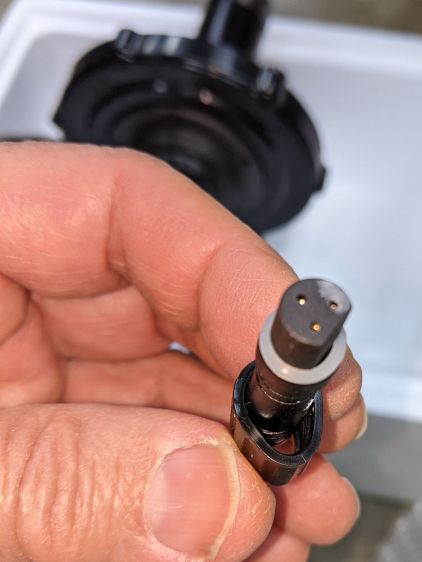
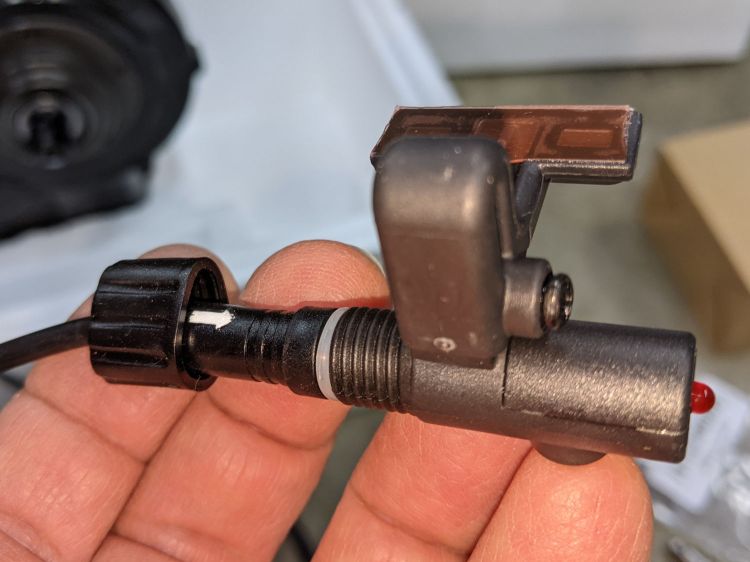
    A Bafang BBS02 (for a friend’s upright bike) arrived with a deformed speed sensor nut:

    Bafang BBS02 - Deformed speed sensor nut - end view
    Bafang BBS02 – Deformed speed sensor nut – end view

    It traveled halfway around the planet while trapped underneath the motor and, if it rode in the top layer or two of containers, the combination of pressure and heat would be irresistible.

    The plastic was stiff and I couldn’t force the nut over the connector using as much force as seemed reasonable:

    Bafang BBS02 - Deformed speed sensor nut - test assembly
    Bafang BBS02 – Deformed speed sensor nut – test assembly

    On the upside, the nut just compresses the silicone washer between the connector and the sensor to make a waterproof joint, so it need not have perfect threads or a uniform shape. Once the nut is in place, it will likely never be removed and should never bother anyone else.

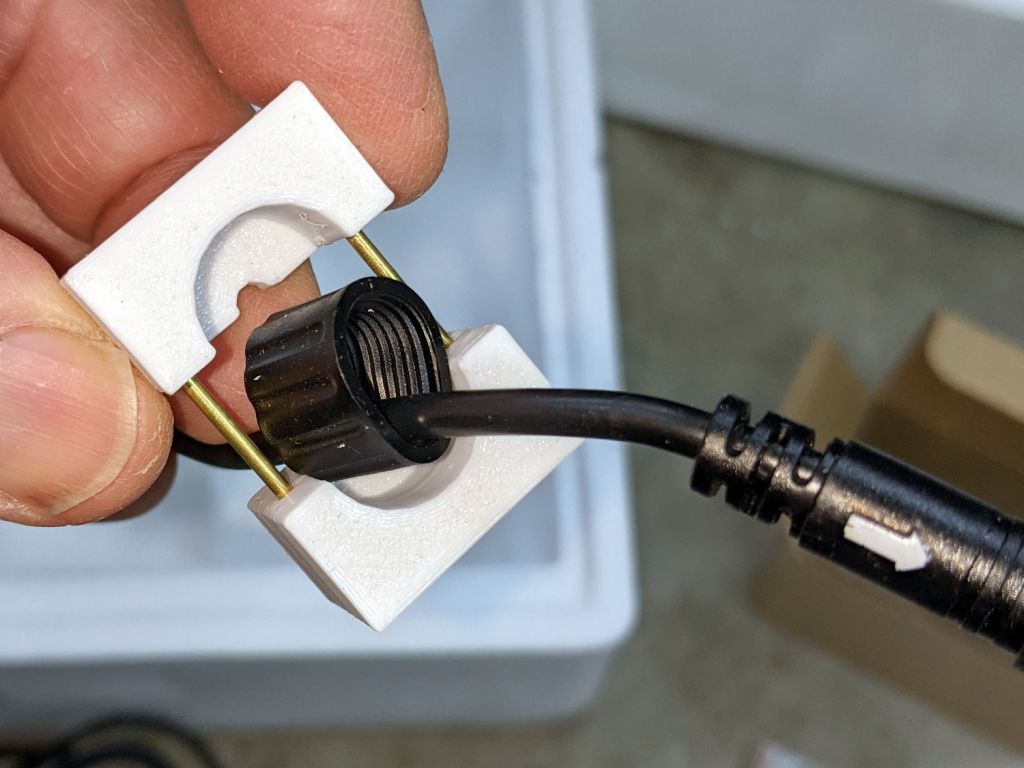
    Being unwilling to apply a hot-air gun near the cable, I decided to try slowly cold-forming the nut inside a mold:

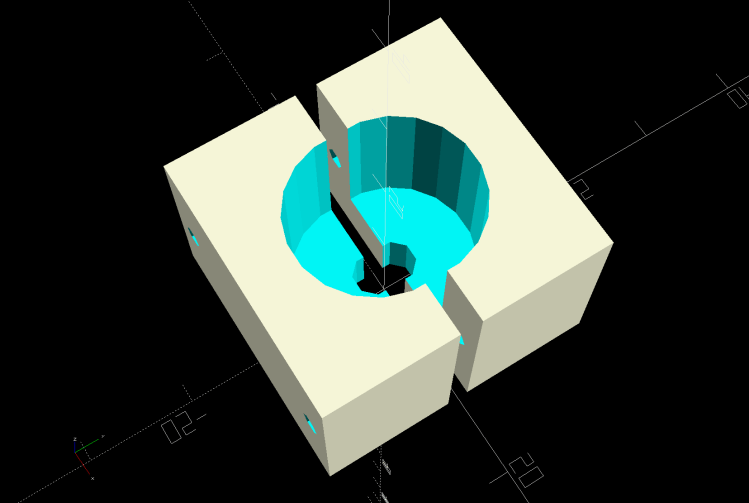
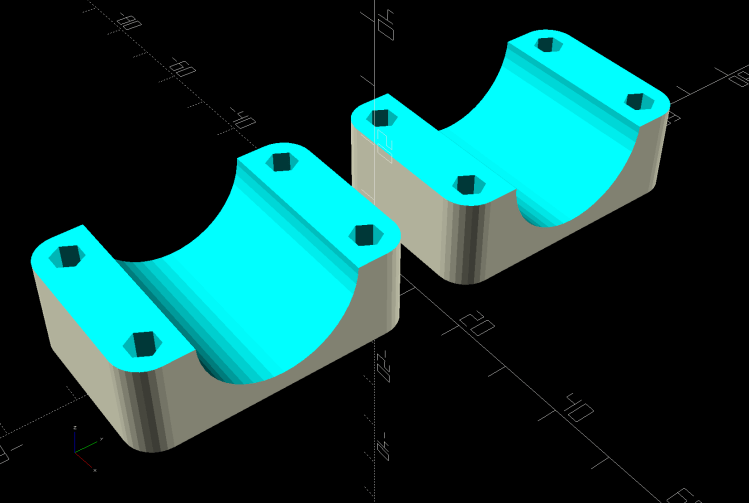
    Sensor Nut mold - solid model
    Sensor Nut mold – solid model

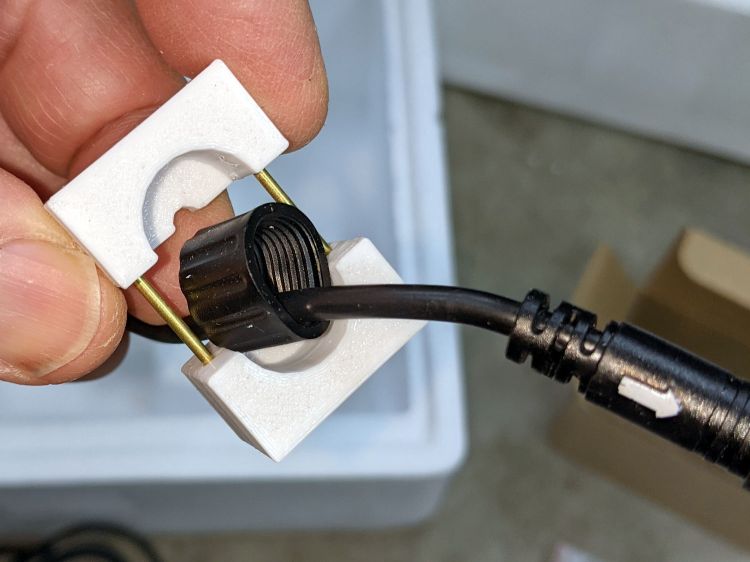
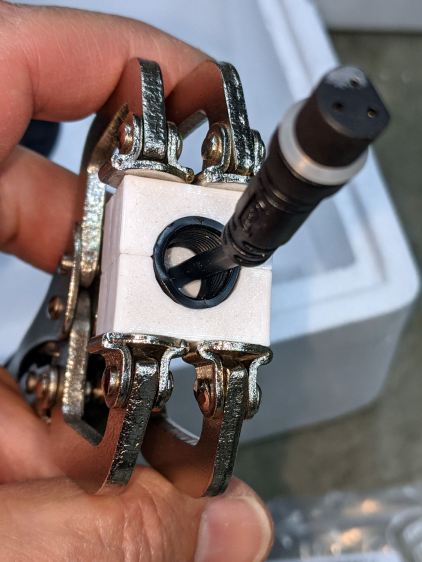
    The gap isn’t a kerf: the two halves meet to form a cylindrical pocket. The smaller holes fit a pair of brass tubes keeping the halves lined up while I arrange things:

    Bafang BBS02 - Deformed speed sensor nut - clamp detail
    Bafang BBS02 – Deformed speed sensor nut – clamp detail

    A pair of swivel-pad clamps apply the pressure:

    Bafang BBS02 - Deformed speed sensor nut - compression clamp
    Bafang BBS02 – Deformed speed sensor nut – compression clamp

    A few days of squashing made it round-er, whereupon I applied the clamp directly against the remaining high point with the other side cradled in the mold. It still doesn’t slide over the connector body, but I’m not in a rush.

    Bafang tech support generously sent a speed sensor extension cable from which I can extract a good nut, which will require cutting and splicing the cable from the motor.

    I’m still hoping gentle suasion will prevail.

    The OpenSCAD source code tucks into the overall file producing various useful bits:

    // Mold to reshape speed sensor nut
    
    SensorNut = [0,14.4,13.0];
    SensorMold = [SensorNut[OD] + 2*WallThick,SensorNut[OD] + 2*WallThick,SensorNut[LENGTH] + WallThick];
    MoldSides = 20;
    RodOD = 1.6;
    
    module NutMoldBlock() {
    
        difference() {
    
            translate([0,0,SensorMold.z/2])
                cube(SensorMold,center=true);
    
            translate([0,0,WallThick])
                rotate(180/MoldSides)
                    PolyCyl(SensorNut[OD],2*SensorNut[LENGTH],MoldSides);
            translate([0,0,-Protrusion])
                rotate(180/8)
                    PolyCyl(SpeedOD,2*SensorMold.z,8);
    
            for (i=[-1,1])
                translate([i*(SensorMold.x/2 - WallThick/2),SensorMold.y,SensorMold.z/2])
                    rotate([90,0,0])
                        PolyCyl(RodOD,2*SensorMold.y,6);
        }
    }
    
    module NutMold() {
        gap = 1.0;
    
        for (j=[-1,1])
            translate([0,j*gap,0])
                intersection() {
                    translate([0,j*SensorMold.y,0])
                        cube(2*SensorMold,center=true);
                    NutMoldBlock();
                }
    }
    
    … snippage …
    
    if (Layout == "NutMold")
        NutMold();


    I haven’t worked on a safety bike in years!

  • Dripworks Mainline Pipe Clamp

    Dripworks Mainline Pipe Clamp

    This is laid in against a need I hope never occurs:

    Dripworks 0.75 inch pipe clamp
    Dripworks 0.75 inch pipe clamp

    It’s intended to clamp around one of the Dripworks mainline pipes carrying water from the pressure regulator to the driplines in the raised beds, should an errant shovel or fork find the pipe.

    It descends from a long line of soaker hose clamps, with a 25 mm ID allowing for a silicone tape wrap as a water barrier.

    The solid model has no surprises:

    Dripworks Mainline Clamp - build view
    Dripworks Mainline Clamp – build view

    The OpenSCAD source code as a GitHub Gist:

    // Dripworks 3/4 inch mainline clamp
    // Ed Nisley KE4ZNU 2021-06
    Layout = "Build"; // [Hose,Block,Show,Build]
    HoseOD = 25.0;
    TestFit = false; // true to build test fit slice from center
    //- Extrusion parameters must match reality!
    /* [Hidden] */
    ThreadThick = 0.25;
    ThreadWidth = 0.40;
    HoleWindage = 0.2;
    Protrusion = 0.1; // make holes end cleanly
    inch = 25.4;
    function IntegerMultiple(Size,Unit) = Unit * ceil(Size / Unit);
    ID = 0;
    OD = 1;
    LENGTH = 2;
    //———-
    // Dimensions
    // Hose lies along X axis
    Hose = [200,HoseOD,HoseOD]; // X = longer than anything else
    NumScrews = 2; // screws along each side of cable
    WallThick = 3.0; // Thinnest printed wall
    PlateThick = 1.5; // Stiffening plate thickness
    // 8-32 stainless screws
    Screw = [4.1,8.0,50.0]; // OD = head LENGTH = thread length
    Washer = [4.4,9.5,1.0];
    Nut = [4.1,9.7,3.3];
    Block = [30.0,Hose.y + 2*Washer[OD],HoseOD + 2*WallThick]; // overall splice block size
    echo(str("Block: ",Block));
    ScrewMinLength = Block.z + 2*PlateThick + 2*Washer.z + Nut.z; // minimum screw length
    echo(str("Screw min length: ",ScrewMinLength));
    Kerf = 1.0; // cut through middle to apply compression
    CornerRadius = Washer[OD]/2;
    ScrewOC = [(Block.x – 2*CornerRadius) / (NumScrews – 1),
    Block.y – 2*CornerRadius,
    2*Block.z // ensure complete holes
    ];
    echo(str("Screw OC: x=",ScrewOC.x," y=",ScrewOC.y));
    //———————-
    // Useful routines
    module PolyCyl(Dia,Height,ForceSides=0) { // based on nophead's polyholes
    Sides = (ForceSides != 0) ? ForceSides : (ceil(Dia) + 2);
    FixDia = Dia / cos(180/Sides);
    cylinder(d=(FixDia + HoleWindage),h=Height,$fn=Sides);
    }
    // Hose shape
    // This includes magic numbers measured from reality
    module HoseProfile() {
    NumSides = 12*4;
    rotate([0,-90,0])
    translate([0,0,-Hose.x/2])
    resize([Hose.z,Hose.y,0])
    cylinder(d=Hose.z,h=Hose.x,$fn=NumSides);
    }
    // Outside shape of splice Block
    // Z centered on hose rim circles, not overall thickness through center ridge
    module SpliceBlock() {
    difference() {
    hull()
    for (i=[-1,1], j=[-1,1]) // rounded block
    translate([i*(Block.x/2 – CornerRadius),j*(Block.y/2 – CornerRadius),-Block.z/2])
    cylinder(r=CornerRadius,h=Block.z,$fn=4*8);
    for (i = [0:NumScrews – 1], j=[-1,1]) // screw holes
    translate([-(Block.x/2 – CornerRadius) + i*ScrewOC.x,
    j*ScrewOC.y/2,
    -(Block.z/2 + Protrusion)])
    PolyCyl(Screw[ID],Block.z + 2*Protrusion,6);
    cube([2*Block.x,2*Block.y,Kerf],center=true); // slice through center
    }
    }
    // Splice block less hose
    module ShapedBlock() {
    difference() {
    SpliceBlock();
    HoseProfile();
    }
    }
    //———-
    // Build them
    if (Layout == "Hose")
    HoseProfile();
    if (Layout == "Block")
    SpliceBlock();
    if (Layout == "Show") {
    difference() {
    SpliceBlock();
    HoseProfile();
    }
    color("Green",0.25)
    HoseProfile();
    }
    if (Layout == "Build") {
    SliceOffset = TestFit && !(NumScrews % 2) ? ScrewOC.x/2 : 0;
    intersection() {
    translate([SliceOffset,0,Block.z/4])
    if (TestFit)
    cube([ScrewOC.x/2,4*Block.y,Block.z/2],center=true);
    else
    cube([4*Block.x,4*Block.y,Block.z/2],center=true);
    union() {
    translate([0,0.6*Block.y,Block.z/2])
    ShapedBlock();
    translate([0,-0.6*Block.y,Block.z/2])
    rotate([0,180,0])
    ShapedBlock();
    }
    }
    }

  • Microscope Stage Positioner: Rigid MakerBeam Edition

    Microscope Stage Positioner: Rigid MakerBeam Edition

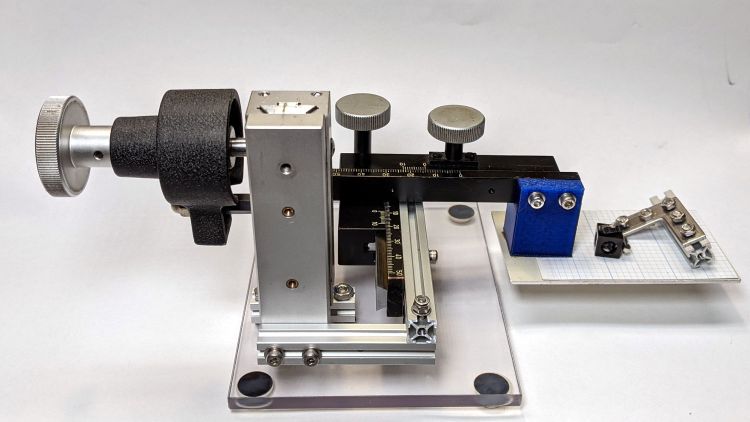
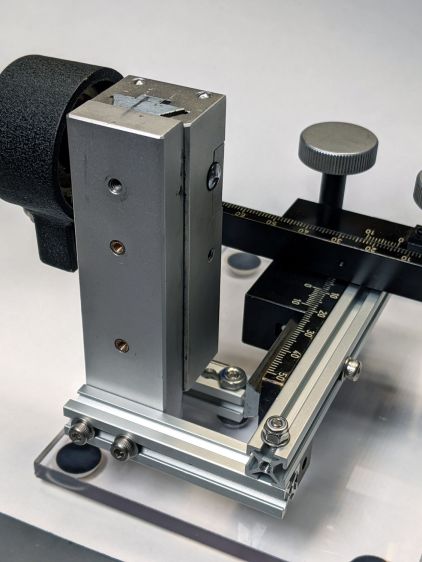
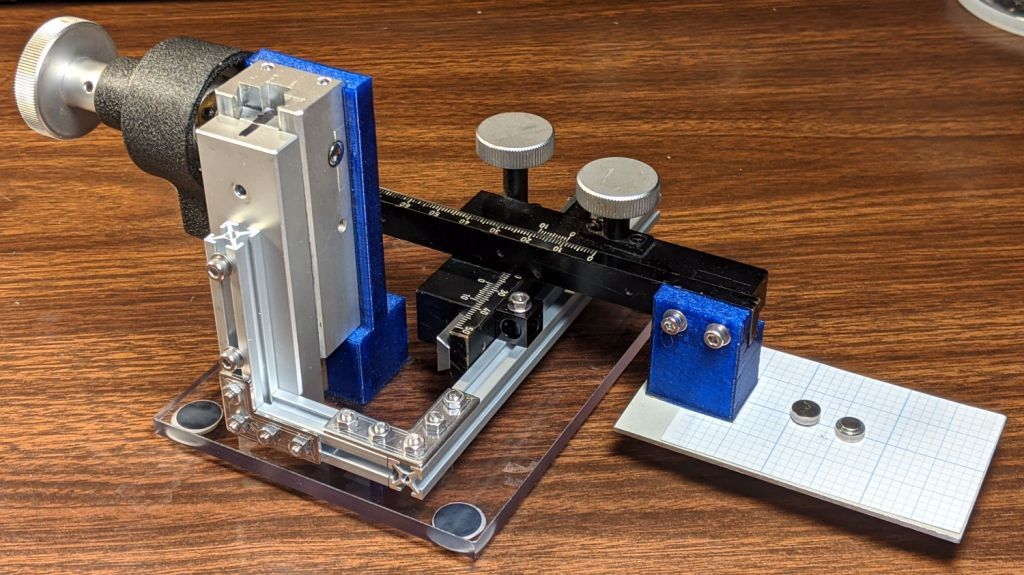
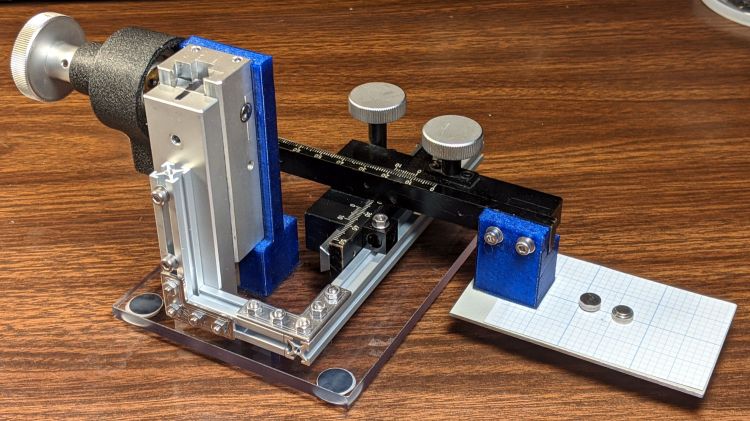
    Rebuilding the XYZ stage positioner with MakerBeam aluminum struts, but without the steel brackets, produce a much more rigid result:

    Microscope Stage Positioner - rigid Makerbeam
    Microscope Stage Positioner – rigid Makerbeam

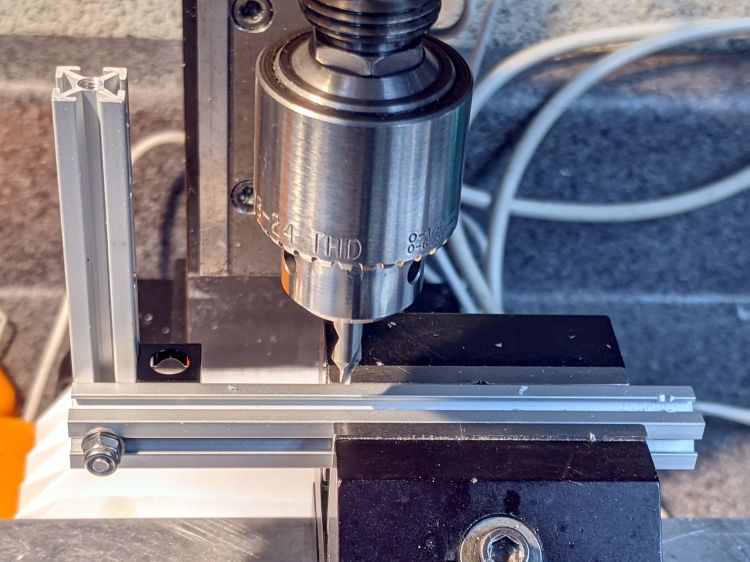
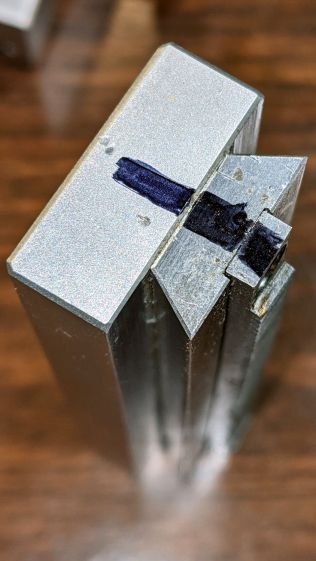
    This requires drilling holes through the extrusions:

    Microscope Stage Positioner - Makerbeam drilling
    Microscope Stage Positioner – Makerbeam drilling

    Running the center drill down until it just nicks the sides produces enough of a pilot hole through the center section to capture the 3 mm drill. If I had to drill enough holes to make a fixture worthwhile, I could probably eliminate the divots.

    Two more holes + epoxied M3 brass inserts attached the 60 mm beam directly to the Z Axis stage, thereby eliminating the vertical beam and a steel bracket:

    Microscope Stage Positioner - Makerbeam joints
    Microscope Stage Positioner – Makerbeam joints

    The M3 SHCS attaching the 100 mm beam goes through both beams. I think you could get the same result with a Tee Nut or a 12 mm Square Head bolt, should you have those lying around and don’t want to drill another hole. The Corner Cube screwed into both beams prevents rotation and helps ensure perpendicularity.

    The Y stage now attaches directly to the beam, rather than through a pair of Corner Cubes, because I realized I wasn’t ever going to adjust its position.

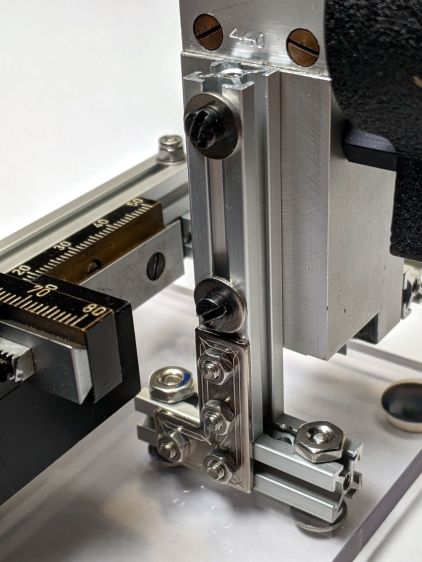
    The Z Axis stage stands on the plastic plate through a hellish mixture of metric and USA-ian screws. Basically, the 6-40 screws into the stage were long enough, the 6-32 screws through the plate fit the existing holes, and M3 screws are for MakerBeam:

    Microscope Stage Positioner - Z Axis base
    Microscope Stage Positioner – Z Axis base

    To my utter astonishment, the threads in the end of the vertical beam had the proper alignment to let a Square Head bolt snug the beam against the 40 mm beam on the plate. As a result, the L Bracket just prevents the vertical beam from turning on the screw and the combination is as rigid as you (well, I) could want.

    The 40 mm beam has two spurious holes, because I thought I could avoid drilling another hole in the baseplate. Nobody will ever notice.

    After squaring and tightening everything, the 100 mm beam along the Y Axis is now horizontal within 0.2 mm and the X Axis is horizontal to better than I can measure.

    It’s definitely Good Enough™ for me:

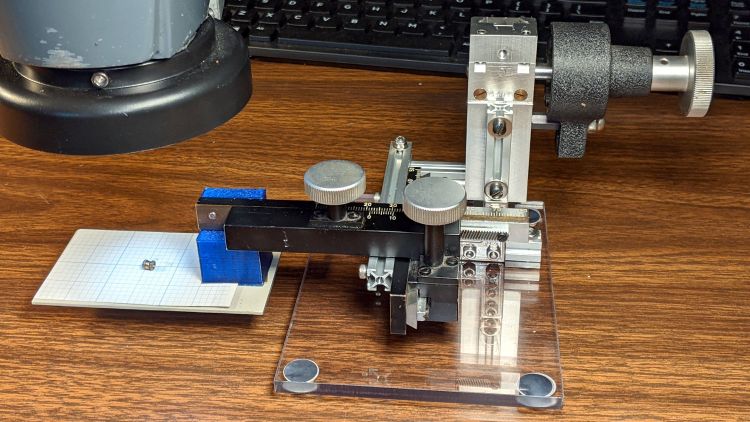
    Microscope Stage Positioner - in use
    Microscope Stage Positioner – in use

    Remember, nothing exceeds like excess …

  • Microscope Stage Positioner: MakerBeam Rebuild MVP

    Microscope Stage Positioner: MakerBeam Rebuild MVP

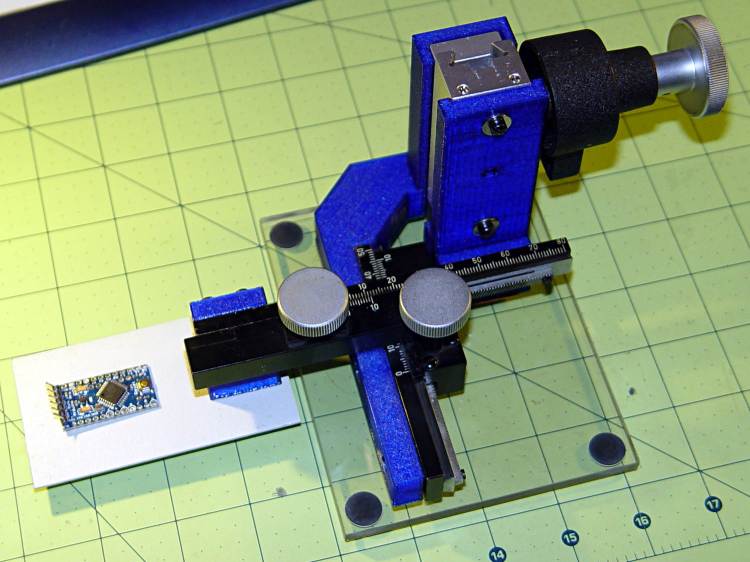
    Over the course of half a decade (!), the 3D printed arm on the XYZ positioner I use with the stereo zoom microscope sagged:

    Microscope Stage Positioner - PETG creep angle
    Microscope Stage Positioner – PETG creep angle

    It’s about what you’d expect from a plastic beam carrying a big lump of brass and steel:

    Microscope Stage Positioner
    Microscope Stage Positioner

    The near side of that arm (the -Y end) drooped about 5 mm below than the side nearest the Z axis slide, so it was time for an update.

    Having some MakerBeam ready to hand, this didn’t take long:

    Microscope Stage Positioner - Makerbeam overview
    Microscope Stage Positioner – Makerbeam overview

    Protip: before dismantling a fitted slide, mark one end so you know how to put it back together. Bonus points for taking a picture:

    Microscope Stage Positioner - slide marking
    Microscope Stage Positioner – slide marking

    Double bonus points for writing a blog post.

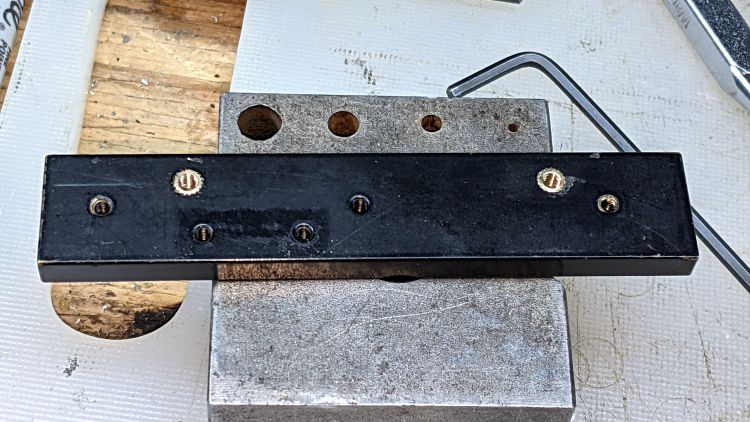
    Rather than fight with the existing fine-pitch USA-ian screws, I drilled out their threaded holes:

    Microscope Stage Positioner - Y slide drilling
    Microscope Stage Positioner – Y slide drilling

    And epoxied 3 mm brass inserts in their place:

    Microscope Stage Positioner - Y slide M3 inserts
    Microscope Stage Positioner – Y slide M3 inserts

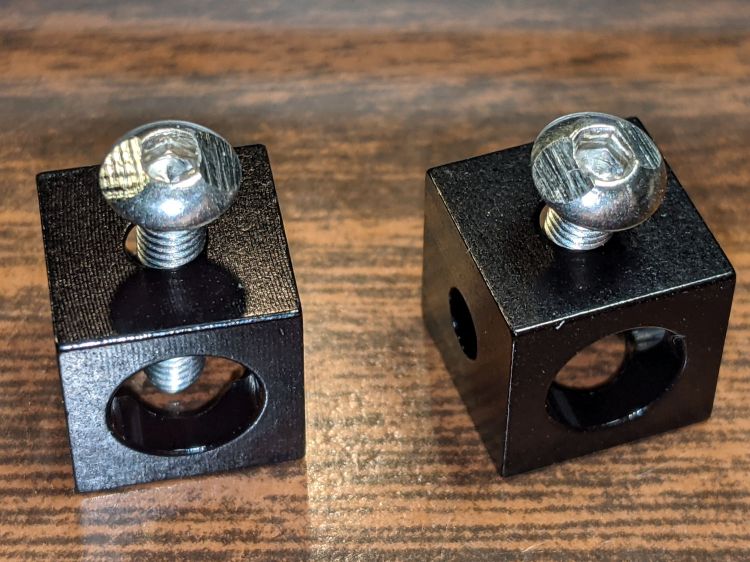
    Those holes match up with a pair of corner cubes normally appearing on the end of the beams:

    Microscope Stage Positioner - BHCS mods for Makerbeam
    Microscope Stage Positioner – BHCS mods for Makerbeam

    It turns out M3 button head cap screws will slide into the beams if you file the slightest angle on opposite sides of the button, although a small bag of tiny tee nuts should arrive in a while.

    Then a variety of brackets spliced everything together:

    Microscope Stage Positioner - Makerbeam detail
    Microscope Stage Positioner – Makerbeam detail

    Although it looks strictly from industrial, it actually wasn’t much better than the plastic edition and, in fact, the beam supporting the XY slides sagged about the same 5 mm. The plastic upright post also contributed a bit of wobble.

    It turns out that the extruded aluminum beams have plenty of longitudinal and torsional stiffness, but all those flat steel fittings don’t.

    There’s a way to work with the beam strengths, rather than against them, but that’s a story for another day …

  • Sticky Trap Screen Frames

    Sticky Trap Screen Frames

    The objective being to reduce the number of onion maggots in Mary’s Vassar Farm plot without chemical agents, I conjured sticky trap screen frames from the vasty digital deep:

    Sticky Trap - first production run
    Sticky Trap – first production run

    Each one contains half a sheet of yellow sticky plastic, which is easy enough to cut before peeling off the protective covering sheets. The cage is half-inch galvanized hardware cloth snipped with hardened diagonal cutters. A bead of acrylic adhesive around the base holds the cage in place

    Although you can deploy sticky sheets without cages, they tend to attract and affix beneficial critters: butterflies, small birds, furry critters, toads, gardeners, and the like. We don’t know how effective the cages will be, but they seemed better than nothing.

    They mount on ski poles cut in half:

    Sticky Trap - ski pole installed
    Sticky Trap – ski pole installed

    And on fence posts around the perimeter:

    Sticky Trap - angle bracket installed
    Sticky Trap – angle bracket installed

    To my untrained eye, some of those doomed critters are, indeed, onion maggot flies. The rest seem to be gnats and other nuisances, so IMO we’re applying population pressure in the right direction.

    Each base-and-cap frame takes about three hours to print, so I did them one at a time over the course of a few days while applying continuous product improvement.

    The sheets rest on small V blocks intended to keep them centered within the cage:

    Sticky Sheet Cage - angle bracket - solid model
    Sticky Sheet Cage – angle bracket – solid model

    The ski pole attachment must build with the cap on top, but it bridges well enough for the purpose:

    Sticky Sheet Cage - ski pole - solid model
    Sticky Sheet Cage – ski pole – solid model

    The overhanging hooks on the blocks (just barely) engage the grid to keep the lid in place, while remaining short enough to not droop too badly. You could probably delete the hooks from the bottom plate, but they align the cage while the adhesive cures.

    The sheets tend to bend in the middle, so I’ll stick a thin slat or two vertically to keep them straight.

    The OpenSCAD source code as a GitHub Gist:

    // Sticky Sheet Cage
    // Ed Nisley KE4ZNU May 2021
    Layout = "Build"; // [Build, Show, Cap, Attachment]
    Bracket = "Ski"; // [Angle, Ski, Post]
    //- Extrusion parameters must match reality!
    /* [Hidden] */
    ThreadThick = 0.25;
    ThreadWidth = 0.40;
    HoleWindage = 0.2;
    Protrusion = 0.1; // make holes end cleanly
    inch = 25.4;
    ID = 0;
    OD = 1;
    LENGTH = 2;
    function IntegerMultiple(Size,Unit) = Unit * ceil(Size / Unit);
    //———————-
    // Dimensions
    Sheet = [1,100,150]; // sticky sheet
    Grid = 0.5*inch;
    Cage = [2*Grid + 5.0, 8*Grid + 5.0, 12*Grid + 2.0]; // grid wire cage bent around sheet
    CageRad = 2.5; // wire bending radius
    CageThick = 2.0; // grid thickness
    WallThick = 3.0; // min wall and bottom thickness
    Recess = 5.0; // inset to capture cage edge
    Plate = [Cage.x,Cage.y,Recess] + [2*WallThick,2*WallThick,WallThick];
    PlateRad = 5.0;
    SkiPole = [20.0,20.0 + 2*WallThick,50];
    AnglePlate = [30,30,50];
    ScrewClear = 5.0;
    BuildGap = 5.0;
    //———————-
    // Useful routines
    module PolyCyl(Dia,Height,ForceSides=0) { // based on nophead's polyholes
    Sides = (ForceSides != 0) ? ForceSides : (ceil(Dia) + 2);
    FixDia = Dia / cos(180/Sides);
    cylinder(r=(FixDia + HoleWindage)/2,
    h=Height,
    $fn=Sides);
    }
    //———————-
    // Pieces
    module Cap() {
    union() {
    difference() {
    hull()
    for (i=[-1,1], j=[-1,1])
    translate([i*(Plate.x/2 – PlateRad),j*(Plate.y/2 – PlateRad),0])
    cylinder(r=PlateRad,h=Plate.z,$fn=12);
    translate([0,0,Plate.z – Recess])
    hull()
    for (i=[-1,1], j=[-1,1])
    translate([i*(Cage.x/2 – CageRad),j*(Cage.y/2 – CageRad),0])
    cylinder(r=CageRad,h=Plate.z,$fn=12);
    }
    difference() {
    Strut = Cage.x – 2*CageThick;
    Latch = [Cage.x,WallThick,0.75*Plate.z];
    union() {
    for (j=[-1,1])
    translate([0,j*2.5*Grid,Plate.z])
    cube([Strut,WallThick,2*Plate.z],center=true);
    for (j=[-1,1])
    translate([0,j*2.5*Grid,2*Plate.z – Latch.z/2])
    cube(Latch,center=true);
    }
    translate([0,0,2*Plate.z + (Cage.z – Sheet.z)/4])
    rotate([0,45,0])
    cube([Strut/sqrt(2),Plate.y,Strut/sqrt(2)],center=true);
    }
    }
    }
    module Attachment() {
    if (Bracket == "Angle") {
    translate([0,Plate.y/2,0])
    rotate(45)
    difference() {
    union() {
    cube(AnglePlate,center=false);
    rotate(-45)
    translate([0,WallThick,Plate.z/2])
    cube([Plate.x – 2*PlateRad,4*WallThick,Plate.z],center=true);
    }
    translate([WallThick,WallThick,-Protrusion])
    cube(AnglePlate + [0,0,2*Protrusion],center=false);
    translate([AnglePlate.x/2,-Protrusion,2*AnglePlate.z/3])
    rotate([-90,0,0])
    PolyCyl(ScrewClear,2*AnglePlate.x,6);
    translate([-Protrusion,AnglePlate.x/2,1*AnglePlate.z/3])
    rotate([90,0,90])
    PolyCyl(ScrewClear,2*AnglePlate.x,6);
    }
    }
    else if (Bracket == "Ski") {
    translate([0,Plate.y/2 + SkiPole[OD]/2,0])
    difference() {
    union() {
    PolyCyl(SkiPole[OD],SkiPole[LENGTH],24);
    translate([0,-3*WallThick,Plate.z/2])
    cube([Plate.x – 2*PlateRad,4*WallThick,Plate.z],center=true);
    }
    translate([0,0,-2*WallThick])
    PolyCyl(SkiPole[ID],SkiPole[LENGTH],24);
    }
    }
    }
    //———————-
    // Build it
    if (Layout == "Cap")
    Cap();
    if (Layout == "Attachment") {
    Attachment();
    }
    if (Layout == "Show") {
    translate([0,0,Sheet.z/2 + Plate.z])
    color("Yellow")
    cube(Sheet,center=true);
    Cap();
    Attachment();
    translate([0,0,Sheet.z + 2*Plate.z])
    rotate([180,0,0])
    Cap();
    }
    if (Layout == "Build") {
    translate([-(Plate.x/2 + BuildGap),0,0]) {
    Cap();
    Attachment();
    }
    translate([(Plate.x/2 + BuildGap),0,0])
    Cap();
    }

  • Tour Easy: Another Rear Fender Bracket

    Tour Easy: Another Rear Fender Bracket

    All the work on Mary’s bike reminded me of the rear fender bracket I meant to install on mine, with more clearance for the strut stabilizing the under-seat packs:

    Tour Easy Rear Fender Bracket - long setback - solid model - show
    Tour Easy Rear Fender Bracket – long setback – solid model – show

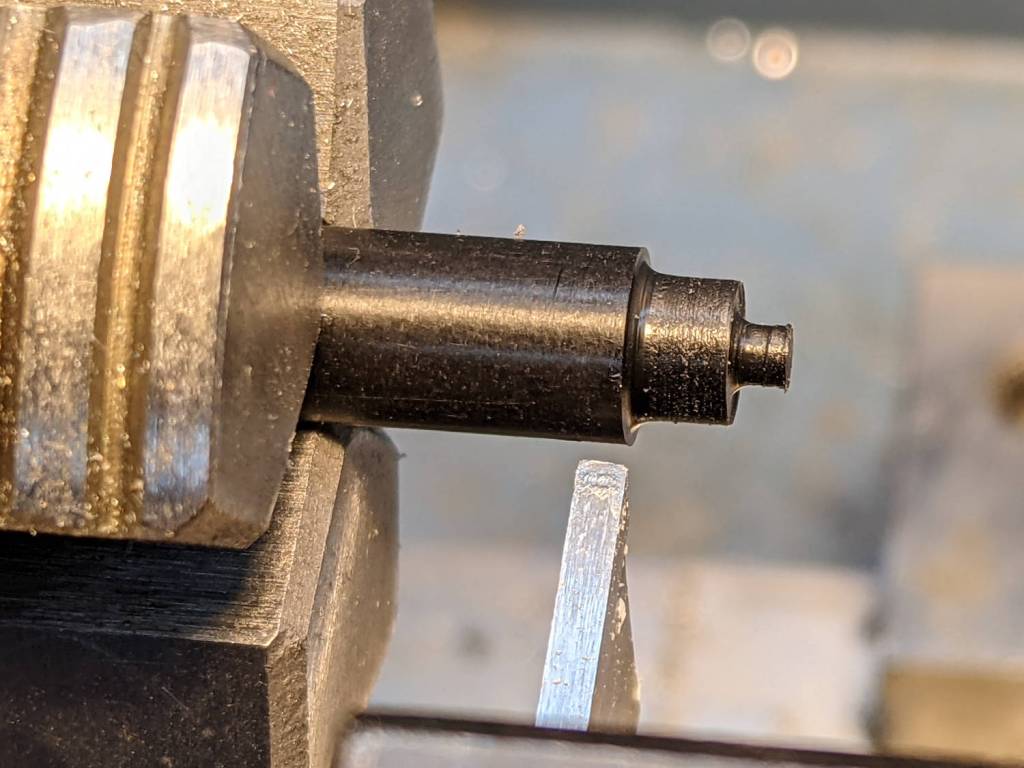
    Rather than glue a PETG filament snippet into a screw, I turned a little Delrin plug:

    Tour Easy Rear Fender Bracket - screw insert
    Tour Easy Rear Fender Bracket – screw insert

    It’s ready for installation when I’m willing to put the bike up on the rack and pull the rear wheel:

    Tour Easy Rear Fender Bracket - screw detail
    Tour Easy Rear Fender Bracket – screw detail

    That’s actually the second iteration for the screw, as the first suffered a lethal encounter with the Greater Shopvac. I know exactly where it is, but I’m not going there …