The Smell of Molten Projects in the Morning

Ed Nisley's Blog: Shop notes, electronics, firmware, machinery, 3D printing, laser cuttery, and curiosities. Contents: 100% human thinking, 0% AI slop.

Tag: CNC

Making parts with mathematics

  • EMC2 HAL Configuration by Eagle Schematics: The Code

    As part of that renaming adventure with the Logitech Gamepad configuration, I realized I hadn’t put my version of Martin Shoeneck’s Eagle-to-HAL conversion script anywhere useful.

    Herewith, the script that you’ll apply to schematics built with parts from the hal-config-2.4.lbr.odt library (which you must rename to get ride of the ODT extension):

    /******************************************************************************
     * HAL-Configurator
     *
     * Author: Martin Schoeneck 2008
     * Additional gates and tweaks: Ed Nisley KE4ZNU 2010
     *****************************************************************************/
    #usage "<h1>HAL-Configurator</h1>Start from a Schematic where symbols from hal-config.lbr are used!";
    
    string output_path =    "./";
    string dev_loadrt =     "LOADRT";
    string dev_loadusr =    "LOADUSR";
    string dev_thread =     "THREAD";
    string dev_parameter =  "PARAMETER";
    
    string dev_names[] = {
    "CONSTANT",								// must be first entry to make set_constants() work
    "ABS",				// 2.4
    "AND2",
    "BLEND",			// 2.4
    "CHARGE-PUMP",		// 2.4
    "COMP",
    "CONV_S32_FLOAT",	// 2.4
    "DDT",				// 2.4
    "DEADZONE",			// 2.4
    "DEBOUNCE",			// 2.4
    "EDGE",
    "ENCODER",			// 2.4
    "ENCODER-RATIO",	// 2.4
    "ESTOP-LATCH",
    "FLIPFLOP",
    "FREQGEN",			// 2.4
    "LOWPASS",
    "MULT2",			// 2.4
    "MUX2",
    "MUX4",				// 2.4
    "MUX8",				// 2.4
    "NEAR",				// 2.4
    "NOT",
    "ONESHOT",
    "OR2",
    "SAMPLER",			// 2.4
    "SCALE",			// 2.4
    "SELECT8",			// 2.4
    "SUM2",
    "TIMEDELAY",		// 2.4
    "TOGGLE",			// 2.4
    "WCOMP",			// 2.4
    "XOR2",				// 2.4
    ""					// end flag
    };
    
    /*******************************************************************************
     * Global Stuff
     ******************************************************************************/
    
    string FileName;
    string ProjectPath;
    string ProjectName;
    
    void Info(string Message) {
    	dlgMessageBox(";<b>Info</b><p>\n" + Message);
    }
    
    void Warn(string Message) {
    	dlgMessageBox("!<b>Warning</b><p>\n" + Message + "<p>see usage");
    }
    
    void Error(string Message) {
    	dlgMessageBox(":<hr><b>Error</b><p>\n" + Message + "<p>see usage");
    	exit(1);
    }
    
    string replace(string str, char a, char b) {
    	// in string str replace a with b
    	int pos = -1;
    	do {
    		// find that character
    		pos = strchr(str, a);
    		// replace if found
    		if(pos >= 0) {
    			str[pos] = b;
    		}
    	} while(pos >= 0);
    
    	return str;
    }
    
    // the part name contains an index and is written in capital letters
    string get_module_name(UL_PART P) {
    	// check module name, syntax: INDEX:NAME
    	string mod_name = strlwr(P.name);
    	// split string at the : if exists
    	string a[];
    	int c = strsplit(a, mod_name, ':');
    	mod_name = a[c-1];
    	// if name starts with '[' we need uppercase letters
    	if(mod_name[0] == '[') {
    		mod_name = strupr(mod_name);
    	}
    
    	return mod_name;
    }
    
    string comment(string mess) {
    	string str = "\n\n####################################################\n";
    	if(mess != "") {
    		str += "# " + mess + "\n";
    	}
    
    	return str;
    }
    
    // if this is a device for loading a module, load it (usr/rt)
    string load_module(UL_PART P) {
    	string str = "";
    
    	// it's a module if the device's name starts with LOADRT/LOADUSR
    	if((strstr(P.device.name, dev_loadrt) == 0) ||
    	   (strstr(P.device.name, dev_loadusr) == 0)) {
    
    		// now add the string to our script
    		str += P.value + "\n";
    	}
    
    	return str;
    }
    
    // count used digital gates (and, or, etc) and load module if neccessary
    string load_blocks() {
    	string str = "";
    
    	int index;
    
    	int dev_counters[];
    	string dname[];
    
    	// count the gates that are used
    	schematic(S) { S.parts(P) {
    		strsplit(dname,P.device.name,'.');		// extract first part of name
    		if ("" != lookup(dev_names,dname[0],0)) {
    			for (index = 0;  (dname[0] != dev_names[index]) ; index++) {
    				continue;
    			}
    			dev_counters[index]++;
    		}
    	} }
    
    // force lowercase module names...
    
    	for (index = 0; ("" != dev_names[index]) ; index++) {
    		if (dev_counters[index]) {
    			sprintf(str,"%sloadrt %s\t\tcount=%d\n",str,strlwr(dev_names[index]),dev_counters[index]);
    		}
    	}
    
    	return str;
    }
    
    string hook_function(UL_NET N) {
    	string str = "";
    
    	// is this net connected to a thread (work as functions here)?
    	int    noclkpins       = 0;
    	string thread_name     = "";  // this net should be connected to a thread
    	string thread_position = "";
    	N.pinrefs(PR) {
    		// this net is connected to a clk-pin
    		if(PR.pin.function == PIN_FUNCTION_FLAG_CLK) {
    			// check the part: is it a thread-device?
    			if(strstr(PR.part.device.name, dev_thread) == 0) {
    				// we need the name of the thread
    				thread_name = strlwr(PR.part.name);
    				// and we need the position (position _ is ignored)
    				thread_position = strlwr(PR.pin.name);
    				thread_position = replace(thread_position, '_', ' ');
    			}
    		} else {
    			// no clk-pin, this is no function-net
    			noclkpins++;
    			break;
    		}
    	}
    
    	// found a thread?
    	if(noclkpins == 0 && thread_name != "") {
    		// all the other pins are interesting now
    		N.pinrefs(PR) {
    			// this pin does not belong to the thread
    			if(strstr(PR.part.device.name, dev_thread) != 0) {
    				// name of the pin is name of the function
    				//string function_name = strlwr(PR.pin.name);
    				string function_name = strlwr(PR.instance.gate.name);
    				// if functionname starts with a '.', it will be appended to the modulename
    				if(function_name[0] == '.') {
    					// if the name is only a point, it will be ignored
    					if(strlen(function_name) == 1) {
    						function_name = "";
    					}
    					function_name = get_module_name(PR.part) + function_name;
    				}
    				str += "addf " + function_name + "\t\t" + thread_name + "\t" + thread_position + "\n";
    			}
    		}
    	}
    
    	return str;
    }
    
    string set_parameter(UL_NET N) {
    	string str = "";
    
    	// is this net connected to a parameter-device?
    	int    nodotpins       = 0;
    	string parameter_value = "";
    	N.pinrefs(PR) {
    		// this net is connected to a dot-pin
    		if(PR.pin.function == PIN_FUNCTION_FLAG_DOT) {
    			// check the part: is it a parameter-device?
    //			str += "** dev name [" + PR.part.device.name + "] [" + dev_parameter + "]\n";
    			if(strstr(PR.part.device.name, dev_parameter) == 0) {
    				// we need the value of that parameter
    				parameter_value = PR.part.value;
    //				str += "**  value [" + PR.part.value +"]\n";
    			}
    		} else {
    			// no clk-pin, this is no function-net
    			nodotpins++;
    			break;
    		}
    	}
    
    	// found a parameter?
    	if(nodotpins == 0 && parameter_value != "") {
    		// all the other pins are interesting now
    		N.pinrefs(PR) {
    //			str += "** dev name [" + PR.part.device.name + "] [" + dev_parameter + "]\n";
    			// this pin does not belong to the parameter-device
    			if(strstr(PR.part.device.name, dev_parameter) != 0) {
    				// name of the pin is name of the function
    				//string parameter_name = strlwr(PR.pin.name);
    				string parameter_name = strlwr(PR.instance.gate.name);
    				// if functionname starts with a '.', it will be appended to the modulename
    //				str += "** param (gate) name [" + parameter_name + "]\n";
    				if(parameter_name[0] == '.') {
    					// if the name is only a point, it will be ignored
    					if(strlen(parameter_name) == 1) {
    						parameter_name = "";
    					}
    					parameter_name = get_module_name(PR.part) + parameter_name;
    //					str += "** param (part) name [" + parameter_name + "]\n";
    				}
    				str += "setp " + parameter_name + "\t" + parameter_value + "\n";
    			}
    		}
    	}
    
    	return str;
    }
    
    // if this is a 'constant'-device, set its value
    // NOTE: this is hardcoded to use the first entry in the dev_names[] array!
    string set_constants(UL_PART P) {
    	string str = "";
    
    	// 'constant'-device?
    	if(strstr(P.device.name, dev_names[0]) == 0) {
    		str += "setp " + get_module_name(P) + ".value\t" + P.value + "\n";
    	}
    
    	return str;
    }
    
    string connect_net(UL_NET N) {
    	string str = "";
    
    	// find all neccessary net-members
    	string pins = "";
    	N.pinrefs(P) {
    		// only non-functional pins are connected
    		if(P.pin.function == PIN_FUNCTION_FLAG_NONE) {
    			string pin_name =  strlwr(P.pin.name);
    			string part_name = strlwr(P.part.name);
    			pin_name =  replace(pin_name,  '$', '_');
    			part_name = replace(part_name, '$', '_');
    			pins += part_name + "." + pin_name + " ";
    		}
    	}
    
    	if(pins != "") {
    		string net_name = strlwr(N.name);
    		net_name = replace(net_name, '$', '_');
    		str += "net " + net_name + " " + pins + "\n";
    	}
    
    	return str;
    }
    
    /*******************************************************************************
     * Main program.
     ******************************************************************************/
    // is the schematic editor running?
    if (!schematic) {
    	Error("No Schematic!<br>This program will only work in the schematic editor.");
    }
    
    schematic(S) {
    	ProjectPath = filedir(S.name);
    	ProjectName = filesetext(filename(S.name), "");
    }
    
    // build configuration
    
    string cs = "# HAL config file automatically generated by Eagle-CAD ULP:\n";
    cs += "# [" + argv[0] + "]\n";
    cs += "# (C) Martin Schoeneck.de 2008\n";
    cs += "# Mods Ed Nisley 2010\n";
    
    FileName = ProjectPath + ProjectName + ".hal";
    
    cs += "# Path        [" + ProjectPath + "]\n";
    cs += "# ProjectName [" + ProjectName + "]\n";
    
    //cs += "# File name: [" + FileName + "]\n\n";
    
    // ask for a filename: where should we write the configuration?
    
    FileName = dlgFileSave("Save Configuration", FileName, "*.hal");
    
    if(!FileName) {
    	exit(0);
    }
    
    cs += "# File name   [" + FileName + "]\n";
    cs += "# Created     [" + t2string(time(),"hh:mm:ss dd-MMM-yyyy") + "]\n\n";
    
    schematic(S) {
    	// load modules
    	cs += comment("Load realtime and userspace modules");
    	S.parts(P) {
    		cs += load_module(P);
    	}
    
    	// load blocks
    	cs += load_blocks();
    
    	// add functions
    	cs += comment("Hook functions into threads");
    	S.nets(N) {
    		cs += hook_function(N);
    	}
    
    	// set parameters
    	cs += comment("Set parameters");
    	S.nets(N) {
    		cs += set_parameter(N);
    	}
    
    	// set constant values
    	cs += comment("Set constants");
    	S.parts(P) {
    		cs += set_constants(P);
    	}
    
    	// build nets and connect them
    	cs += comment("Connect Modules with nets");
    	S.nets(N) {
    		cs += connect_net(N);
    	}
    }
    
    // open/overwrite the target file to save the configuration
    output(FileName, "wt") {
    	printf(cs);
    }
    
  • EMC2 Logitech GamePad: Triggger Button Name Change

    I just updated EMC2 on the Sherline CNC mill from 2.4.6 to 2.4.7 (which mis-identifies itself as 2.4.6 on the splash screen) and the Axis UI failed to start. A bit of digging shows that the name of Button 1 (the left button in the right-hand quad, clearly labeled 1) has inexplicably changed from btn-trigger to btn-joystick.

    Logitech Gamepad Pendant
    Logitech Gamepad Pendant

    Most likely the change has nothing to do with EMC2, because (I think) those names bubble up from the HID driver that actually talks to the hardware and that stuff has also been updated; this is all on Ubuntu 10.04 LTS. But in any event, the name is now different.

    That requires a tweak to the Eagle schematics, which will regenerate Logitech_Gamepad.hal, but you can just edit the latter file and change btn-trigger to btn-joystick.

    As nearly as I can tell, changing the pin name in the Logitech library component, saving the library, then updating the library in the schematic doesn’t do squat. Evidently, Eagle keeps track of which components you’ve used and won’t update them unless you do some manual gymnatistics, which makes a certain amount of sense.

    That means one must:

    • Delete both “gates” of the old component (INPUT.0.BUTTONS first, then INPUT.0)
    • Make sure you’re on Page 2 where the basic gate will go
    • Add the revised LOGITECH_DUAL_ACTION_GAMEPAD to get the INPUT.1 “gate”
    • Rename it to INPUT.0
    • Use Move to jiggle it around a bit to ensure its pins get hitched up to the existing nets
    • Switch to Page 1 where the button nets lie in wait
    • Type invoke input.0 into the Eagle command line
    • Pick -BUTTONS from the list to select that “gate”
    • Position that gate appropriately
    • Use Move to jiggle the gate
    • Save everything
    • Run the Eagle2Hal ULP to get a new HAL output file
    • Put that file where it’ll do the most good

    There, now, wasn’t that obvious?

    The modified Logitech_Gamepad.hal file:

    # HAL config file automatically generated by Eagle-CAD ULP:
    # [/mnt/bulkdata/Project Files/eagle/ulp/hal-write-2.4.ulp]
    # (C) Martin Schoeneck.de 2008
    # Mods Ed Nisley 2010
    # Path        [/mnt/bulkdata/Project Files/eagle/projects/EMC2 HAL Configuration/]
    # ProjectName [Logitech Gamepad - 2.4.7]
    # File name   [/mnt/bulkdata/Project Files/eagle/projects/EMC2 HAL Configuration/Logitech Gamepad - 2.4.7.hal]
    # Created     [10:40:31 11-Nov-2011]
    
    ####################################################
    # Load realtime and userspace modules
    loadrt constant		count=16
    loadrt and2		count=17
    loadrt flipflop		count=4
    loadrt mux2		count=5
    loadrt mux4		count=1
    loadrt not		count=8
    loadrt or2		count=10
    loadrt scale		count=7
    loadrt timedelay		count=1
    loadrt toggle		count=1
    loadrt wcomp		count=6
    
    ####################################################
    # Hook functions into threads
    addf toggle.0		servo-thread
    addf wcomp.1		servo-thread
    addf wcomp.2		servo-thread
    addf wcomp.3		servo-thread
    addf and2.0		servo-thread
    addf and2.4		servo-thread
    addf and2.3		servo-thread
    addf and2.2		servo-thread
    addf and2.1		servo-thread
    addf constant.6		servo-thread
    addf constant.5		servo-thread
    addf constant.4		servo-thread
    addf constant.3		servo-thread
    addf constant.2		servo-thread
    addf constant.1		servo-thread
    addf constant.0		servo-thread
    addf constant.7		servo-thread
    addf constant.8		servo-thread
    addf scale.1		servo-thread
    addf scale.2		servo-thread
    addf scale.3		servo-thread
    addf mux4.0		servo-thread
    addf mux2.0		servo-thread
    addf scale.4		servo-thread
    addf scale.0		servo-thread
    addf wcomp.5		servo-thread
    addf wcomp.4		servo-thread
    addf wcomp.0		servo-thread
    addf flipflop.1		servo-thread
    addf flipflop.0		servo-thread
    addf and2.5		servo-thread
    addf and2.6		servo-thread
    addf and2.7		servo-thread
    addf and2.8		servo-thread
    addf flipflop.2		servo-thread
    addf flipflop.3		servo-thread
    addf or2.4		servo-thread
    addf or2.8		servo-thread
    addf or2.7		servo-thread
    addf or2.6		servo-thread
    addf or2.5		servo-thread
    addf or2.3		servo-thread
    addf or2.2		servo-thread
    addf or2.1		servo-thread
    addf or2.0		servo-thread
    addf not.1		servo-thread
    addf not.2		servo-thread
    addf not.3		servo-thread
    addf not.4		servo-thread
    addf not.5		servo-thread
    addf not.6		servo-thread
    addf not.7		servo-thread
    addf not.0		servo-thread
    addf constant.9		servo-thread
    addf mux2.1		servo-thread
    addf mux2.2		servo-thread
    addf mux2.3		servo-thread
    addf mux2.4		servo-thread
    addf constant.10		servo-thread
    addf constant.11		servo-thread
    addf scale.5		servo-thread
    addf scale.6		servo-thread
    addf constant.12		servo-thread
    addf constant.13		servo-thread
    addf timedelay.0		servo-thread
    addf constant.14		servo-thread
    addf constant.15		servo-thread
    addf and2.16		servo-thread
    addf and2.15		servo-thread
    addf and2.14		servo-thread
    addf and2.13		servo-thread
    addf and2.12		servo-thread
    addf and2.11		servo-thread
    addf and2.10		servo-thread
    addf and2.9		servo-thread
    addf or2.9		servo-thread
    
    ####################################################
    # Set parameters
    
    ####################################################
    # Set constants
    setp constant.0.value	+0.02
    setp constant.1.value	-0.02
    setp constant.2.value	60
    setp constant.3.value	1.00
    setp constant.4.value	0.10
    setp constant.5.value	0.50
    setp constant.6.value	0.10
    setp constant.7.value	+0.5
    setp constant.8.value	-0.5
    setp constant.9.value	0.0
    setp constant.10.value	[TRAJ]MAX_LINEAR_VELOCITY
    setp constant.11.value	[TRAJ]MAX_ANGULAR_VELOCITY
    setp constant.12.value	-1.0
    setp constant.13.value	0.1
    setp constant.14.value	0.020
    setp constant.15.value	0.000
    
    ####################################################
    # Connect Modules with nets
    net a-button-minus or2.2.in0 input.0.btn-joystick and2.15.in0
    net a-button-plus or2.2.in1 input.0.btn-thumb2 and2.16.in0
    net a-buttons-active or2.2.out or2.3.in0 or2.4.in1
    net a-disable not.7.out and2.5.in1
    net a-enable or2.4.in0 flipflop.3.out not.7.in mux2.4.sel
    net a-jog wcomp.2.in input.0.abs-z-position mux2.4.in1
    net a-knob-active not.2.out and2.7.in1
    net a-knob-inactive wcomp.2.out not.2.in and2.6.in1
    net a-select and2.8.in0 and2.7.out
    net a-set flipflop.3.set and2.8.out
    net angular_motion or2.4.out mux2.0.sel
    net any-buttons-active mux4.0.sel0 or2.8.out
    net az-buttons-active or2.3.out or2.8.in1 or2.9.in0
    net az-reset flipflop.2.reset and2.6.out flipflop.3.reset
    net button-crawl scale.4.out mux4.0.in3
    net button-fast scale.2.out mux4.0.in1 scale.4.in
    net jog-crawl toggle.0.out mux4.0.sel1
    net jog-speed halui.jog-speed mux4.0.out
    net knob-crawl mux4.0.in2 scale.3.out
    net knob-fast mux4.0.in0 scale.1.out scale.3.in
    net n_1 constant.10.out mux2.0.in0
    net n_2 and2.0.in0 input.0.btn-top2
    net n_3 and2.0.in1 input.0.btn-base
    net n_4 and2.0.out halui.abort
    net n_5 halui.mode.manual input.0.btn-base3
    net n_6 wcomp.0.max wcomp.1.max wcomp.2.max wcomp.3.max constant.0.out
    net n_7 halui.program.resume input.0.btn-base4
    net n_8 wcomp.0.min wcomp.1.min wcomp.2.min wcomp.3.min constant.1.out
    net n_9 mux2.0.in1 constant.11.out
    net n_10 constant.12.out scale.5.gain scale.6.gain
    net n_11 or2.0.in0 input.0.btn-base5
    net n_12 or2.0.in1 input.0.btn-base6
    net n_13 constant.9.out mux2.1.in0 mux2.2.in0 mux2.3.in0 mux2.4.in0
    net n_14 mux2.1.out halui.jog.0.analog
    net n_15 toggle.0.in or2.0.out
    net n_16 constant.2.out scale.0.gain
    net n_17 constant.5.out scale.1.gain
    net n_18 constant.3.out scale.2.gain
    net n_19 constant.4.out scale.3.gain
    net n_20 scale.4.gain constant.6.out
    net n_21 halui.jog.1.analog mux2.2.out
    net n_22 mux2.2.in1 scale.5.out
    net n_23 scale.6.out mux2.3.in1
    net n_24 constant.13.out halui.jog-deadband
    net n_25 wcomp.4.max constant.7.out wcomp.5.max
    net n_26 constant.8.out wcomp.4.min wcomp.5.min
    net n_27 mux2.3.out halui.jog.2.analog
    net n_28 halui.jog.3.analog mux2.4.out
    net n_29 timedelay.0.out and2.9.in1 and2.10.in1 and2.12.in1 and2.11.in1 and2.13.in1 and2.14.in1 and2.16.in1 and2.15.in1
    net n_30 and2.9.out halui.jog.0.minus
    net n_31 or2.9.out timedelay.0.in
    net n_32 constant.14.out timedelay.0.on-delay
    net n_33 constant.15.out timedelay.0.off-delay
    net n_34 and2.10.out halui.jog.0.plus
    net n_35 and2.11.out halui.jog.1.minus
    net n_36 halui.jog.1.plus and2.12.out
    net n_37 and2.13.out halui.jog.2.minus
    net n_38 and2.14.out halui.jog.2.plus
    net n_39 and2.15.out halui.jog.3.minus
    net n_40 and2.16.out halui.jog.3.plus
    net vel-per-minute scale.0.out scale.1.in scale.2.in
    net vel-per-second mux2.0.out scale.0.in
    net x-buttons-active or2.7.in0 or2.5.out
    net x-disable not.4.out and2.4.in1
    net x-enable not.4.in flipflop.0.out mux2.1.sel
    net x-hat-jog wcomp.4.in input.0.abs-hat0x-position
    net x-hat-minus wcomp.4.under or2.5.in1 and2.9.in0
    net x-hat-plus or2.5.in0 wcomp.4.over and2.10.in0
    net x-jog wcomp.0.in input.0.abs-x-position mux2.1.in1
    net x-knob-active not.0.out and2.1.in0
    net x-knob-inactive wcomp.0.out not.0.in and2.2.in0 and2.3.in0
    net x-set and2.1.out flipflop.0.set
    net xy-buttons-active or2.7.out or2.8.in0 or2.9.in1
    net xy-reset flipflop.0.reset and2.2.out flipflop.1.reset
    net y-buttons-active or2.6.out or2.7.in1
    net y-disable not.5.out and2.1.in1
    net y-enable flipflop.1.out not.5.in mux2.2.sel
    net y-hat-jog wcomp.5.in input.0.abs-hat0y-position
    net y-hat-minus wcomp.5.under or2.6.in1 and2.12.in0
    net y-hat-plus or2.6.in0 wcomp.5.over and2.11.in0
    net y-jog wcomp.1.in input.0.abs-y-position scale.5.in
    net y-knob-active not.1.out and2.3.in1
    net y-knob-inactive not.1.in wcomp.1.out and2.2.in1
    net y-select and2.4.in0 and2.3.out
    net y-set flipflop.1.set and2.4.out
    net z-button-minus or2.1.in0 input.0.btn-thumb and2.13.in0
    net z-button-plus or2.1.in1 input.0.btn-top and2.14.in0
    net z-buttons-active or2.1.out or2.3.in1
    net z-disable not.6.out and2.8.in1
    net z-enable not.6.in flipflop.2.out mux2.3.sel
    net z-jog wcomp.3.in input.0.abs-rz-position scale.6.in
    net z-knob-active not.3.out and2.5.in0
    net z-knob-inactive not.3.in wcomp.3.out and2.7.in0 and2.6.in0
    net z-set and2.5.out flipflop.2.set
    
  • OpenSCAD: Useful Sizes file

    My Useful Sizes.scad file has been accumulating the dimensions of nuts & bolts & a motor that don’t (seem to) appear elsewhere in the OpenSCAD universe:

    //-- Useful sizes
    
    Tap2_56 = 0.070 * inch;
    Clear2_56 = 0.082 * inch;
    Head2_56 = 0.156 * inch;
    Head2_56Thick = 0.055 * inch;
    Nut2_56Dia = 0.204 * inch;
    Nut2_56Thick = 0.065 * inch;
    
    Tap3_48 = 0.079 * inch;
    Clear3_48 = 0.096 * inch;
    Head3_48 = 0.184 * inch;
    Head3_48Thick = 0.058 * inch;
    Nut3_48Dia = 0.201 * inch;
    Nut3_48Thick = 0.073 * inch;
    
    Tap4_40 = 0.089 * inch;
    Clear4_40 = 0.110 * inch;
    Head4_40 = 0.211 * inch;
    Head4_40Thick = 0.065 * inch;
    Nut4_40Dia = 0.228 * inch;
    Nut4_40Thick = 0.086 * inch;
    
    Tap10_32 = 0.159 * inch;
    Clear10_32 = 0.190 * inch;
    Head10_32 = 0.373 * inch;
    Head10_32Thick = 0.110 * inch;
    Nut10_32Dia = 0.433 * inch;
    Nut10_32Thick = 0.130 * inch;
    
    Tap025_20 = 0.201 * inch;
    Clear025_20 = 0.2660 * inch;
    Head025_20 = 0.492 * inch;
    Head025_20Thick = 0.144 * inch;
    Nut025_20Dia = 0.505 *inch;
    Nut025_20Thick = 0.161 * inch;
    
    NEMA17_ShaftDia = 5.0;
    NEMA17_ShaftLength = 24.0;
    NEMA17_PilotDia = 0.866 * inch;
    NEMA17_PilotLength = 0.080 * inch;
    NEMA17_BCD = 1.725 * inch;
    NEMA17_BoltDia = 3.5;
    NEMA17_BoltOC = 1.220 * inch;
    

    It seems I’m among the few CamelCase holdouts…

  • Thing-O-Matic: Triple Cylinder Thing

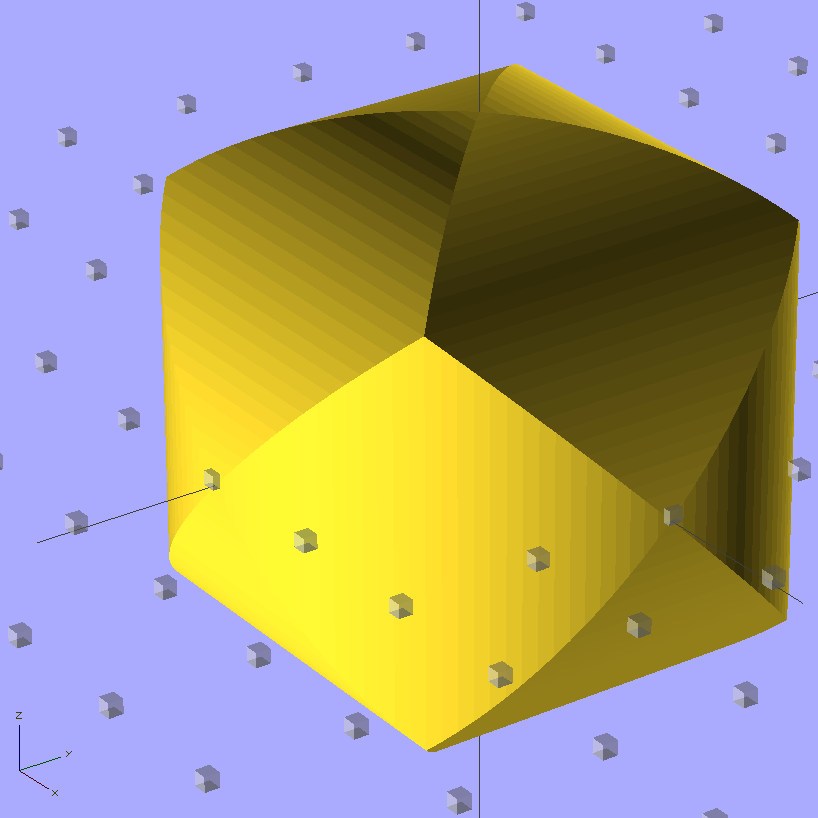
    My buddy Mark One asked me to make a golf-ball sized Thing that’s the intersection of three mutually orthogonal cylinders. He claims I (subtractively) machined one from solid plastic, many many years ago, but I cannot imagine I ever had that level of machine shop fu; right now, I’m not sure how I’d fixture the thing.

    Cylinder Thing - solid model
    Cylinder Thing – solid model

    It’s much easier with a 3D printer…

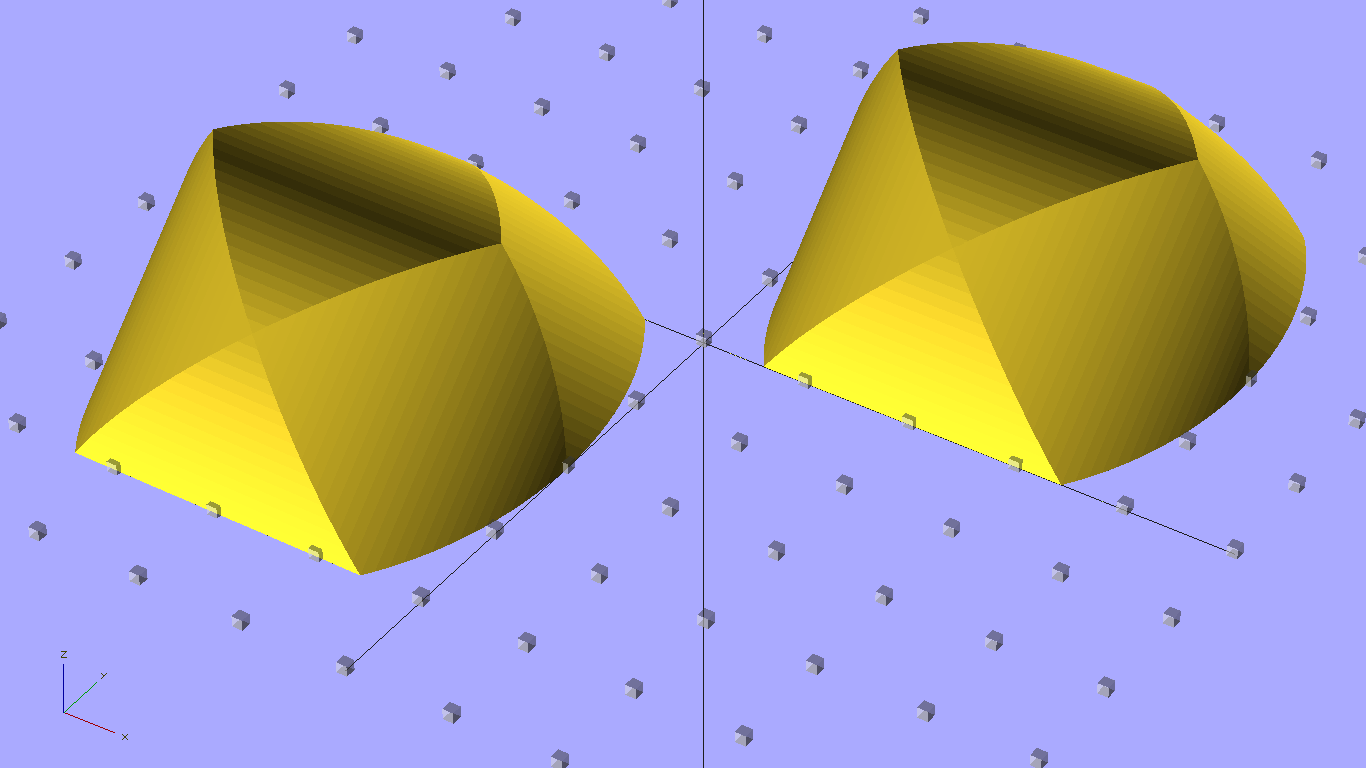
    Of course, spheroids aren’t printable without support, but you can chop one in half to reveal the nice, flat interior surfaces, then add holes for alignment pegs. Using 0.50 infill makes for a compact mesh inside the ball:

    Cylinder Thing - building
    Cylinder Thing – building

    Smooth a few imperfections from the mating surfaces and add four pegs (the other two are busy propping the right-hand half off the countertop). Somewhat to my surprise, the alignment holes came out a perfect push fit for the 2.9 mm actual-OD filament with my more-or-less standard 0.2 mm HoleWindage Finagle Constant. This also uses the 1.005 XY scale factor to adjust for ABS shrinkage, not that that matters in this case:

    Cylinder Thing - alignment pegs
    Cylinder Thing – alignment pegs

    Then solvent-bond everything together forever more:

    Cylinder Thing - clamped
    Cylinder Thing – clamped

    The seam is almost imperceptible around the equator, perhaps because I didn’t slobber solvent right up to the edge. I did print one without the alignment pegs and demonstrated that you (well, I) can’t glue a spheroid without fixturing the halves; that one goes in my Show-n-Tell heap.

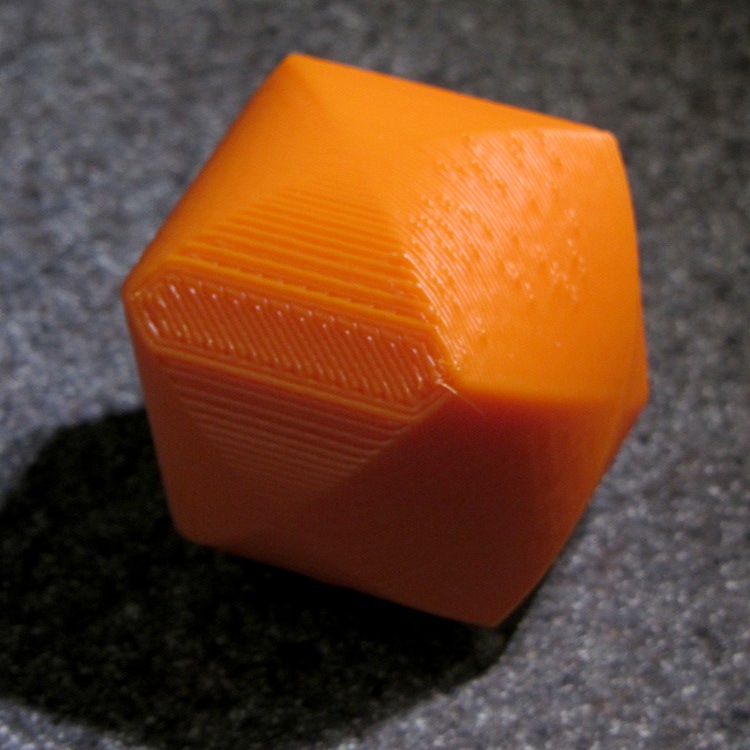
    The 0.33 mm Z resolution produces sucky North and South poles; the East, West, Left, and Right poles are just fine, as are the eight Tropical Vertices. After mulling for a bit, I rotated a cylindrical profile upward:

    Cylinder Thing Rotated - solid model
    Cylinder Thing Rotated – solid model

    The obvious contour lines fit the cylinder much better, although you can see where better Z resolution would pay off:

    Cylinder Thing - rotated
    Cylinder Thing – rotated

    This was at 0.33 mm x 0.66 mm, 200 °C, 30 & 100 mm/s, 2 rpm. No delamination problems; I applied a wood chisel to persuade those big flat surfaces to part company with the Kapton tape.

    The OpenSCAD source code:

    // Three intersecting cylinders
    // Ed Nisley KE4ZNU - Oct 2011
    
    Layout = "Build";			// Show Build
    
    //- Extrusion parameters must match reality!
    //  Print with +1 shells and 3 solid layers
    //  Use infill solidity = 0.5 or more...
    
    ThreadThick = 0.33;
    ThreadWidth = 2.0 * ThreadThick;
    
    HoleWindage = 0.2;
    
    Protrusion = 0.1;			// make holes end cleanly
    
    //------ Model dimensions
    
    CylDia = 2*IntegerMultiple(40.0/2,ThreadThick);
    CylRad = CylDia/2;
    
    echo(str("Actual diameter: ",CylDia));
    
    Angle = [45,0,0];			// rotate to choose build orientation
    
    $fn=128;
    
    AlignPegDia = 2.90;
    
    //-------
    
    function IntegerMultiple(Size,Unit) = Unit * ceil(Size / Unit);
    
    module PolyCyl(Dia,Height,ForceSides=0) {			// based on nophead's polyholes
    
      Sides = (ForceSides != 0) ? ForceSides : (ceil(Dia) + 2);
    
      FixDia = Dia / cos(180/Sides);
    
      cylinder(r=(FixDia + HoleWindage)/2,h=Height,$fn=Sides);
    }
    
    module ShowPegGrid(Space = 10.0,Size = 1.0) {
    
      Range = floor(50 / Space);
    
    	for (x=[-Range:Range])
    	  for (y=[-Range:Range])
    		translate([x*Space,y*Space,Size/2])
    		  %cube(Size,center=true);
    
    }
    
    //------- Model bits & pieces
    
    module OneCyl() {
      cylinder(r=CylRad,h=CylDia,center=true);
    }
    
    module ThreeCyl() {
      intersection() {
    	OneCyl();
    	rotate([90,0,0]) OneCyl();
    	rotate([0,90,0]) OneCyl();
      }
    }
    
    module HemiThing() {
      difference() {
    	rotate(Angle)
    	  ThreeCyl();
    	translate([0,0,-CylRad])
    		cube(CylDia,center=true);
    	for (Index = [0:3])
    	  rotate(Index*90)
    		translate([CylRad/2,0,-Protrusion])
    		  PolyCyl(AlignPegDia,5+Protrusion);
      }
    }
    
    //---------
    
    ShowPegGrid();
    
    if (Layout == "Show")
      ThreeCyl();
    
    if (Layout == "Build") {
      translate([CylRad,CylRad,0])
    	HemiThing();
    
      translate([-CylRad,-CylRad,0])
    	  HemiThing();
    }
    
  • KG-UV3D GPS+Voice: Radio Base Interface

    The Wouxun KG-UV3D has three holes along the base that capture three tabs in the battery case, with tapered edges to align the case with the contacts. After a few passes to get the dimensions right, the plate matching those features came out like this:

    Base plate with tabs
    Base plate with tabs

    The solid model shows the edge tapering down to a single layer:

    Case Tab Base - Solid Model
    Case Tab Base – Solid Model

    The compound taper on the corners must match both the base and the sides of the radio. The bottom plate and shell have corresponding tapers that extend across the glued joints:

    Radio interface tapers
    Radio interface tapers

    That worked out surprisingly well, given the small dimensions and odd angles. The tabs, in particular, bumped right up against the 0.66 mm extrusion width; they’re 2.0 mm thick, so there’s barely one thread width inside the perimeter for fill. A bit of filing & slicing removed the usual enlargement at the end / start of each perimeter thread on the tabs, which is entirely acceptable for something this finicky.

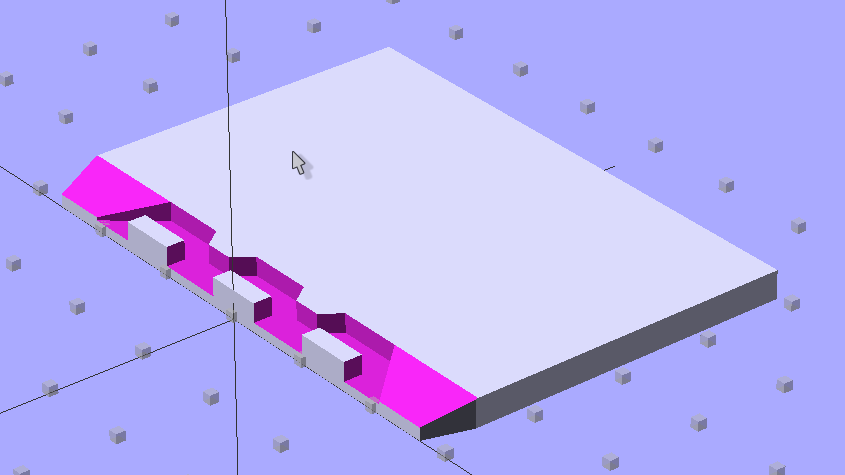
    The OpenSCAD source code with dimensions is all part of that post, but here’s the radio base shape that gets subtracted from the plate to make those tabs:

    Radio Base Polygon - solid model
    Radio Base Polygon – solid model

    This seemed easier than adding a bunch of tiny pegs & triangles, but it’s certainly tedious working around a polygon:

    module RadioBase() {
    
    linear_extrude(height=(BaseOpeningDepth + Protrusion),center=false,convexity=5)
    polygon(points=[
    [-BaseOpeningMax/2,-Protrusion],
    
    [-BaseOpeningMin/2,BaseOpeningY],
    [-(BaseToothOC/2 + BaseToothBase/2),BaseOpeningY],
    
    [-(BaseToothOC/2 + BaseToothTip/2),(BaseOpeningY - BaseToothThick)],
    [-(BaseToothOC/2 - BaseToothTip/2),(BaseOpeningY - BaseToothThick)],
    [-(BaseToothOC/2 - BaseToothBase/2),BaseOpeningY],
    
    [ (BaseToothOC/2 - BaseToothBase/2),BaseOpeningY],
    [ (BaseToothOC/2 - BaseToothTip/2),(BaseOpeningY - BaseToothThick)],
    [ (BaseToothOC/2 + BaseToothTip/2),(BaseOpeningY - BaseToothThick)],
    [ (BaseToothOC/2 + BaseToothBase/2),BaseOpeningY],
    [ BaseOpeningMin/2,BaseOpeningY],
    
    [ BaseOpeningMax/2,-Protrusion],
    
    [ (BaseTabOC + BaseTabWidth/2),-Protrusion],
    [ (BaseTabOC + BaseTabWidth/2),BaseTabThick],
    [ (BaseTabOC - BaseTabWidth/2),BaseTabThick],
    [ (BaseTabOC - BaseTabWidth/2),-Protrusion],
    
    [ BaseTabWidth/2,-Protrusion],
    [ BaseTabWidth/2,BaseTabThick],
    [-BaseTabWidth/2,BaseTabThick],
    [-BaseTabWidth/2,-Protrusion],
    
    [-(BaseTabOC + BaseTabWidth/2),-Protrusion],
    [-(BaseTabOC + BaseTabWidth/2),BaseTabThick],
    [-(BaseTabOC - BaseTabWidth/2),BaseTabThick],
    [-(BaseTabOC - BaseTabWidth/2),-Protrusion],
    ],
    convexity=5
    );
    }
    

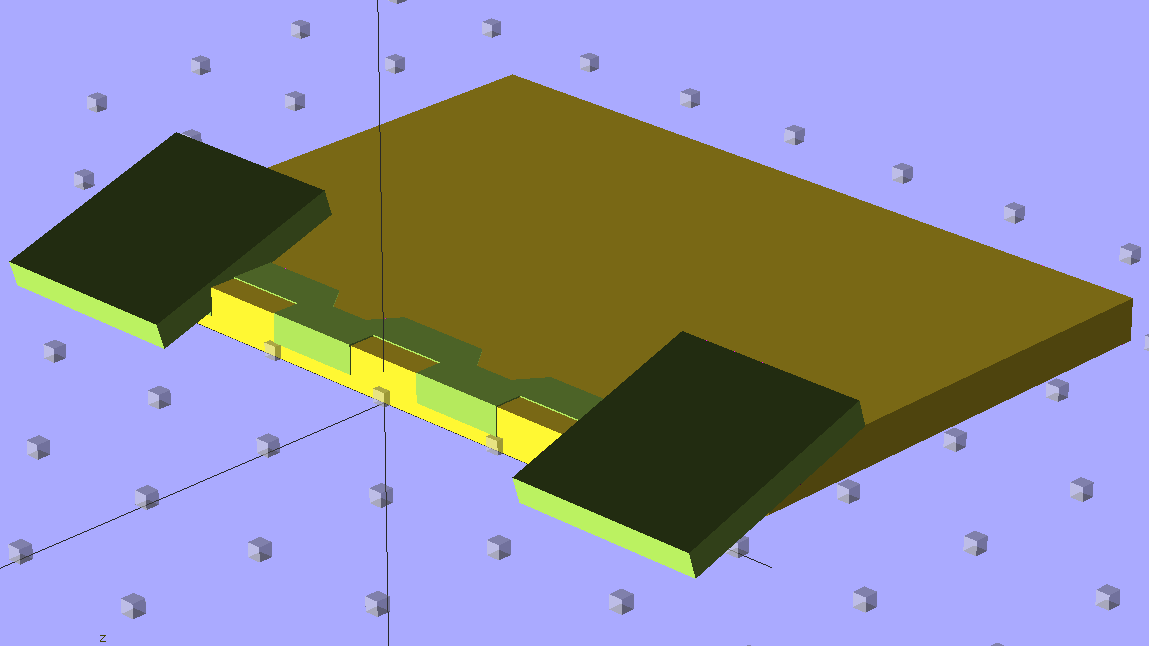
    Then subtracting that shape and some inclines…

    Radio Base Interface - solid model - thrown together
    Radio Base Interface – solid model – thrown together

    … lets the base plate pop out of this code:

    module Base() {
    
      difference() {
    
    	translate([0,0,(BaseThick + BaseOpeningDepth)/2])
    	  rotate([-90,0,0])
    		CaseEnvelope(BaseThick + BaseOpeningDepth);
    
    	translate([0,0,BaseThick])
    	  RadioBase();
    
    	translate([(BaseToothOC + BaseTabWidth/2),
    			  -(BaseThick + BaseEndLip)/tan(BaseEndAngle),
    			  0])
    	  rotate([BaseEndAngle,0,0])
    		cube([BaseEndWidth,3*BaseOpeningY,BaseOpeningDepth],center=false);
    
    	translate([-(BaseToothOC + BaseTabWidth/2 + BaseEndWidth),
    			  -(BaseThick + BaseEndLip)/tan(BaseEndAngle),
    			  0])
    	  rotate([BaseEndAngle,0,0])
    		cube([BaseEndWidth,3*BaseOpeningY,BaseOpeningDepth],center=false);
      }
    }
    

    I’m still doodling the electronics, alas…

  • KG-UV3D GPS+Voice: Plug Mounting Plate

    Unlike my old ICOM IC-Z1A, the Wouxun KG-UV3D radio has mic and speaker jacks recessed into the case, so that a custom plug plate can absorb all the stress from forces applied to the cables without wiggling the plugs. Even better, there’s a removable cover with a mounting screw that can hold the new plate in place!

    Wouxun plug mounting plate - overview
    Wouxun plug mounting plate – overview

    The first pass at the mount required a bit of filing, as the deepest part of the recess turns out to be not exactly rectangular. That’s (probably) fixed in the source code:

    Wouxun plug plate - detail
    Wouxun plug plate – detail

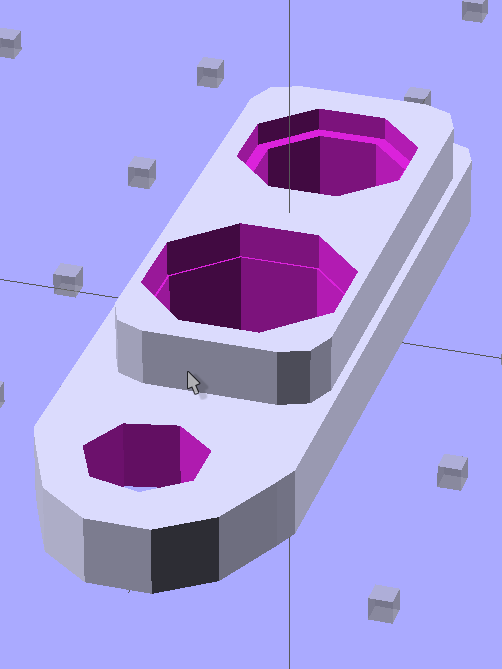
    The solid model looks about like you’d expect, with terribly thin side walls between the plugs and the not-quite-rectangular section. The whole affair is asymmetrical around the long axis; the not-quite-rectangular block and hole really are offset:

    Plug Mount Plate - Solid Model
    Plug Mount Plate – Solid Model

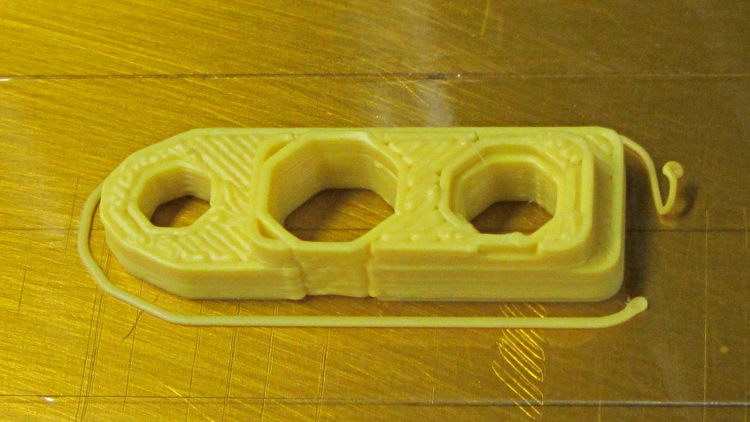
    When printed, the thin sections come out one 0.66 mm plastic thread wide:

    Wouxun plug mounting plate - build
    Wouxun plug mounting plate – build

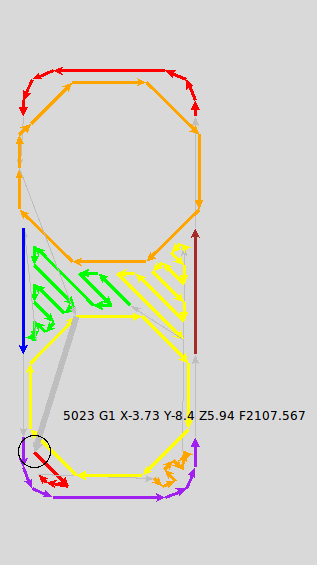
    I spent quite some time iterating through OpenSCAD, RepG, and SkeinLayer to make sure that came out right. This is from a later version with larger recesses around the plugs:

    Plug Mount Plate - skeinlayer
    Plug Mount Plate – skeinlayer

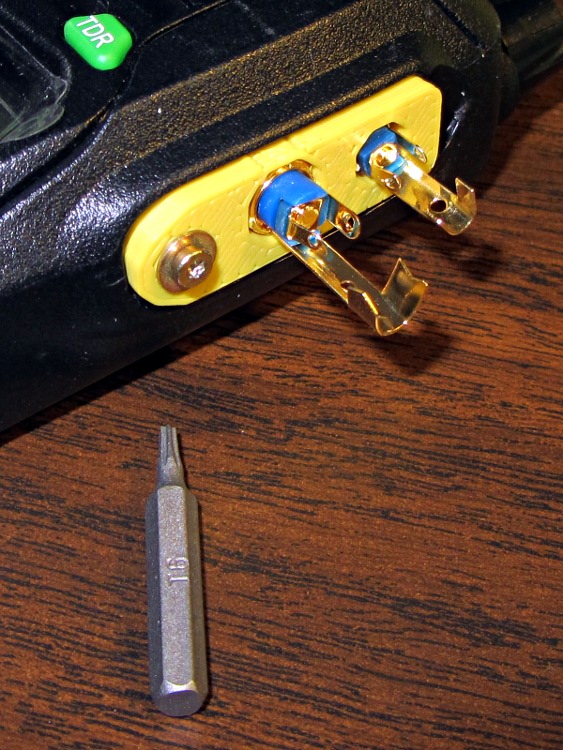
    Some epoxy eased down along the plugs will lock them into the plastic, with an epoxy putty turd over the top to stabilize the cables and terminal connections. That’s a T6 Torx bit to mate with the 2 mm screw (with a captive washer!) pulled from the Small Drawer o’ Salvaged Metric Screws:

    Wouxun plug plate - trial fit
    Wouxun plug plate – trial fit

    The OpenSCAD source code is part of the huge block of code at the bottom of that post, but here’s the relevant section:

    module PlugPlate() {
    
      BaseX = PlugBaseWidth/2 - PlugBaseRadius;
      BaseY = PlugBaseLength/2 - PlugBaseRadius;
    
      difference() {
    	union() {
    	  linear_extrude(height=PlugBaseThick,center=false,convexity=3)
    		hull() {
    		  translate([-BaseX,-BaseY,0])
    			circle(r=PlugBaseRadius,$fn=8);
    		  translate([-BaseX, BaseY,0])
    			circle(r=PlugBaseRadius,$fn=8);
    		  translate([ BaseX, BaseY,0])
    			circle(r=PlugBaseRadius,$fn=8);
    		  translate([ BaseX,-BaseY,0])
    			circle(r=PlugBaseRadius,$fn=8);
    		}
    
    	  translate([PlugFillOffsetX,
    				(PlugFillLength/2 - PlugBaseLength/2 + PlugFillOffsetY),
    				PlugBaseThick])
    		linear_extrude(height=PlugFillThick,center=false,convexity=5)
    		  hull() {
    			translate([0,-(PlugFillLength/2 - PlugFillRadius2),0])
    			  circle(r=PlugFillRadius2,$fn=10);
    			translate([-(PlugFillWidth/2 - PlugFillRadius1),-PlugBaseLength/2,0])
    			  circle(r=PlugFillRadius1,$fn=8);
    			translate([-(PlugFillWidth/2 - PlugFillRadius1),
    					  (PlugFillLength/2 - PlugFillRadius1),0])
    			  circle(r=PlugFillRadius1,$fn=8);
    			translate([(PlugFillWidth/2 - PlugFillRadius1),
    					  (PlugFillLength/2 - PlugFillRadius1),0])
    			  circle(r=PlugFillRadius1,$fn=8);
    			translate([(PlugFillWidth/2 - PlugFillRadius1),-PlugBaseLength/2,0])
    			  circle(r=PlugFillRadius1,$fn=8);
    		  }
    	}
    
    	translate([0,-JackOC/2,-Protrusion])
    	  rotate(360/16) {
    		PolyCyl(Plug3BezelDia,(Plug3BezelThick + Protrusion),8);
    		PolyCyl(Plug3ScrewDia,(PlugBaseThick + PlugFillThick + 2*Protrusion),8);
    	  }
    
    	translate([0,+JackOC/2,-Protrusion])
    	  rotate(360/16) {
    		PolyCyl(Plug2BezelDia,(Plug2BezelThick + Protrusion),8);
    		PolyCyl(Plug2ScrewDia,(PlugBaseThick + PlugFillThick + 2*Protrusion),8);
    	  }
    
    	translate([JackScrewOffsetX,-(PlugBaseLength/2 + JackScrewOffsetY),0])
    	  PolyCyl(JackScrewDia,(PlugBaseThick + PlugFillThick + Protrusion));
      }
    
    }
    
  • Thing-O-Matic: Delamination

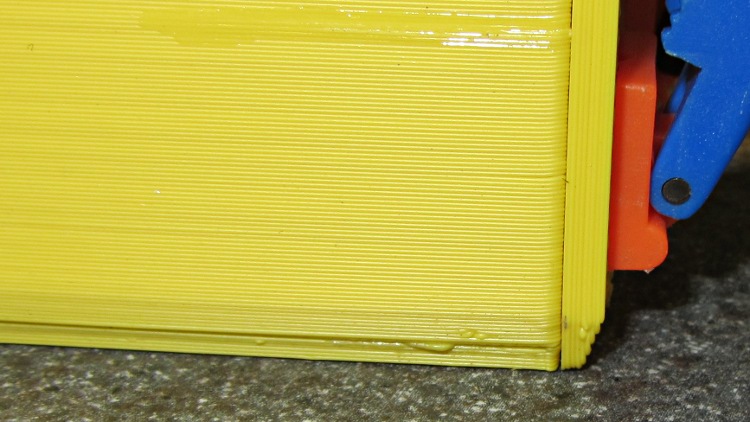
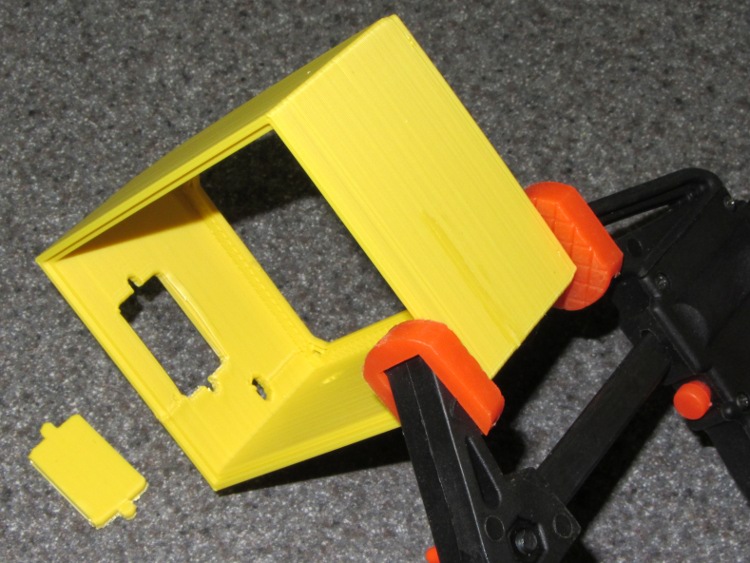
    ABS plastic shrinks as it cools and large objects with thin sections tend to delaminate, as seen in the Barbie Pistol and a few other objects. The box for the GPS+voice interface is four threads thick and 35 mm tall, which provided enough energy to rip the side apart:

    Box wall delamination
    Box wall delamination

    Solvent glue and a clamp shoved it back together again:

    Clamping delamination
    Clamping delamination

    This one was extruded at 190 °C, which works fine for small objects and isn’t quite enough to fuse something like this. I’ll crank it up to 210 °C for the next iteration to see if that improves the result.