Ed Nisley's Blog: Shop notes, electronics, firmware, machinery, 3D printing, laser cuttery, and curiosities. Contents: 100% human thinking, 0% AI slop.
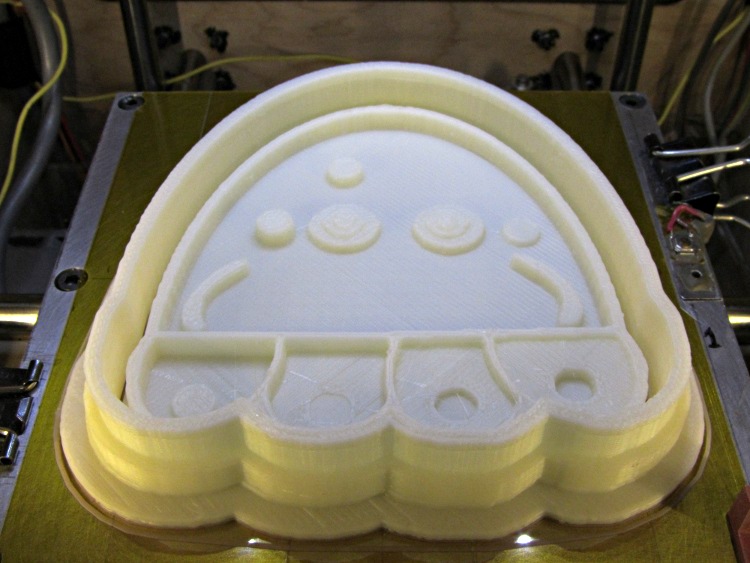
They’re a bit more impressive on the build platform, where the skirt thread around the perimeter extends slightly beyond the usual 100 mm width limit into the no-go zone behind the nozzle wiper. The bizarre lighting from the warm-white front LEDs and the cool-white overhead LED ring emphasizes the 3D features:
Jellyfish Cookie Cutter – on build platform
Somewhat to my surprise, the gritty nature of the bitmap source image didn’t cause a problem. The perimeters consist of many tiny segments, but most of the time goes to filling the interior (20% density, square pattern) and covering the flat surfaces, so the whole thing chugs along at a pretty good pace. Overall, it took something over an hour.
So, given a height-map grayscale image:
Manually tweaked jellyfish-high.png
I (and you!) can automatically create the solid model of a matched cookie cutter and press:
jellyfish-high – Cutter and Press – top view
And then we can produce as many chunks of plastic as needed for our baking session!
Printing that huge block of plastic did, however, uncover two longstanding mechanical problems. More tomorrow…
I assume you’ll pick a workable dots/mm resolution and suchlike for your setup, so they’re hardcoded into the script. You could add them to the command line if you like.
Starting from the same jellyfish.svg file as before, I came up with a slightly different jellyfish-high.png grayscale height map image with more dots (246×260 dots at 3 dot/mm = 82×87 mm). The original 160×169 file required about half an hour to render and, as you’d expect, increasing the number of dots by 1.5 (nearly √2) doubled the time to just over an hour:
Manually tweaked jellyfish-high.png
The first convert step turns that into the basic height map jellyfish_prep.png file:
jellyfish-high_prep.png
The next two convert steps produce two ASCII PGM files:
jellyfish-high_map.pgm
jellyfish-high_plate.pgm
The _map file has the grayscale height map data, which is identical to the prepared PNG image:
jellyfish-high_map
The _plate file defines the outline of the cookie cutter with a completely white interior, which is why the original cookie height map image can’t contain any pure white areas inside the outline (they’d become black here and produce islands). It seems the OpenSCAD minkowski() function runs significantly faster when it doesn’t process a whole bunch of surface detail; all we care about is the outline, so that’s all it gets:
jellyfish-high_plate
I originally composited the height maps on a known-size platen and worked with those dimensions, but it’s easier to just extract the actual image dimensions and feed them into the code as needed. As with all ImageMagick programs, identify has a myriad options.
Those two lines of Bash gibberish reformat the ASCII PGM files into the ASCII DAT arrays required by OpenSCAD’s surface() function.
The MakeSurface.scad script eats a DAT height map file and spits out a corresponding STL file. The Height parameter defines the overall Z-axis size of the slab; the maximum 255 corresponds to pure white in the image file:
// Generate object from image height map
// Ed Nisley - KE4ZNU
// October 2012
// This leaves the rectangular slab below Z=0 over the full image area
//		... reduced in thickness by the Height/255 ratio

FileName = "noname.dat";				// override with -D FileName="whatever.dat"
Height = 255;						// overrride with -D Height=number
DotsPerMM = 2;						// overrride with -D DotsPerMM=number

ScaleXYZ = [1/DotsPerMM,1/DotsPerMM,Height/255];

echo("File: ",FileName);
echo("Height: ",Height);
echo("Dots/mm: ",DotsPerMM);
echo("Scale: ",ScaleXYZ);

module ShowPegGrid(Space = 10.0,Size = 1.0) {
  Range = floor(50 / Space);
	for (x=[-Range:Range])
	  for (y=[-Range:Range])
		translate([x*Space,y*Space,Size/2])
		  %cube(Size,center=true);
}

//- Build it

ShowPegGrid();

scale(ScaleXYZ)
	surface(FileName,center=true,convexity=10);
The grid defining the build platform doesn’t show up in the output file; it’s there just for manual fiddling inside the GUI. When run from the command line, OpenSCAD simply creates the output file.
The _map.stl file has the height map data that will form the cookie press:
jellyfish-high_map – Model
The _plate.stl file is basically a digital bar cookie that will define the cutter:
jellyfish-high_plate – Model
It’s possible to produce the cutter in one shot, starting from the DAT files, but having the two STL files makes it (barely) feasible to experiment interactively within the OpenSCAD GUI.
This OpenSCAD program produces the cutter and press:
// Cookie cutter from grayscale height map using Minkowski sum
// Ed Nisley KE4ZNU - November 2012

//-----------------
// Cookie cutter files

BuildPress = true;
BuildCutter = true;

fnPress = "nofile.stl";					// override with -D 'fnPress="whatever.stl"'
fnPlate = "nofile.stl";					// override with -D 'fnPlate="whatever.stl"'

ImageX = 10;						// overrride with -D ImageX=whatever
ImageY = 10;

MaxConvexity = 5;					// used for F5 previews in OpenSCAD GUI

echo("Press File: ",fnPress);
echo("Plate File: ",fnPlate);
echo("Image X: ",ImageX," Y: ",ImageY);

//- Extrusion parameters - must match reality!

ThreadThick = 0.25;
ThreadWidth = 2.0 * ThreadThick;

//- Cookie cutter parameters

TipHeight = IntegerMultiple(8,ThreadThick);		// cutting edge
TipWidth = 4*ThreadWidth;

WallHeight = IntegerMultiple(7,ThreadThick);		// center section
WallWidth = 8*ThreadWidth;

LipHeight = IntegerMultiple(2.0,ThreadThick);		// cutter handle
LipWidth = IntegerMultiple(8.0,ThreadWidth);

CutterGap = IntegerMultiple(2.0,ThreadWidth);		// gap between cutter and press

PlateThick = IntegerMultiple(3.0,ThreadThick);		// solid plate under press relief

//- Build platform

PlatenX = 100;						// build platform size
PlatenY = 120;
PlatenZ = 120;						// max height for any object
PlatenFuzz = 2;

MaxSize = max(PlatenX,PlatenY);				// larger than any possible dimension ...

ZFuzz = 0.20;						// height of numeric junk left by grayscale conversion
ZCut = 1.20;						// thickness of block below Z=0

//- Useful info

function IntegerMultiple(Size,Unit) = Unit * ceil(Size / Unit);

Protrusion = 0.1;					// make holes and unions work correctly

//-----------------
// Import height map STL, convert to cookie press image

module PressSurface() {

	translate([0,0,-ZFuzz])
		difference() {
			import(fnPress,convexity=MaxConvexity);
			translate([-(ImageX + PlatenFuzz)/2,-(ImageY + PlatenFuzz)/2,-ZCut])
				cube([(ImageX + PlatenFuzz),(ImageY + PlatenFuzz),ZCut+ZFuzz],center=false);
		}
}

//-----------------
// Import plate STL, slice off a slab to define outline

module Slab(Thick=1.0) {
	intersection() {
		translate([0,0,Thick/2])
			cube([(PlatenX+PlatenFuzz),(PlatenY+PlatenFuzz),Thick],center=true);
		translate([0,0,-1])
			import(fnPlate,convexity=MaxConvexity);
	}
}

//- Put peg grid on build surface

module ShowPegGrid(Space = 10.0,Size = 1.0) {

  Range = floor(50 / Space);

	for (x=[-Range:Range])
	  for (y=[-Range:Range])
		translate([x*Space,y*Space,Size/2])
		  %cube(Size,center=true);

}

//- Build it

ShowPegGrid();

if (BuildPress) {
	echo("Building press");
	union() {
		minkowski() {					// fingernail ridge around press
			Slab(LipHeight - 1);			//  ... same thickness as cutter lip
			cylinder(r=CutterGap/2,h=1);
		}
		translate([0,0,(LipHeight - Protrusion)])	// solid plate under press
			Slab(PlateThick - LipHeight + Protrusion);
		translate([0,0,PlateThick])			// cookie press height map
			intersection() {
				import(fnPress,convexity=MaxConvexity);
				translate([0,0,-Protrusion])
					Slab(PlatenZ + Protrusion);
			}

	}
}

if (BuildCutter) {
	echo("Building cutter");
	difference() {
		union() {					// stack cutter layers
			translate([0,0,(WallHeight + LipHeight - 1)])
				minkowski() {
					Slab(TipHeight - 1);
					cylinder(r=(TipWidth + CutterGap),h=1);
				}
			translate([0,0,LipHeight - 1])
				minkowski() {
					Slab(WallHeight - 1);
					cylinder(r=(WallWidth + CutterGap),h=1);
				}
			minkowski() {
				Slab(LipHeight - 1);
				cylinder(r=(LipWidth + CutterGap),h=1);
			}
		}
		minkowski() {					// punch out opening for cookie press
			translate([0,0,-2])
				Slab(PlatenZ);
			cylinder(r=CutterGap,h=1);
		}
	}
}
The top view shows the height map press nested inside the cutter blade, but it’s not obvious they’re two separate pieces:
jellyfish-high – Cutter and Press – top view
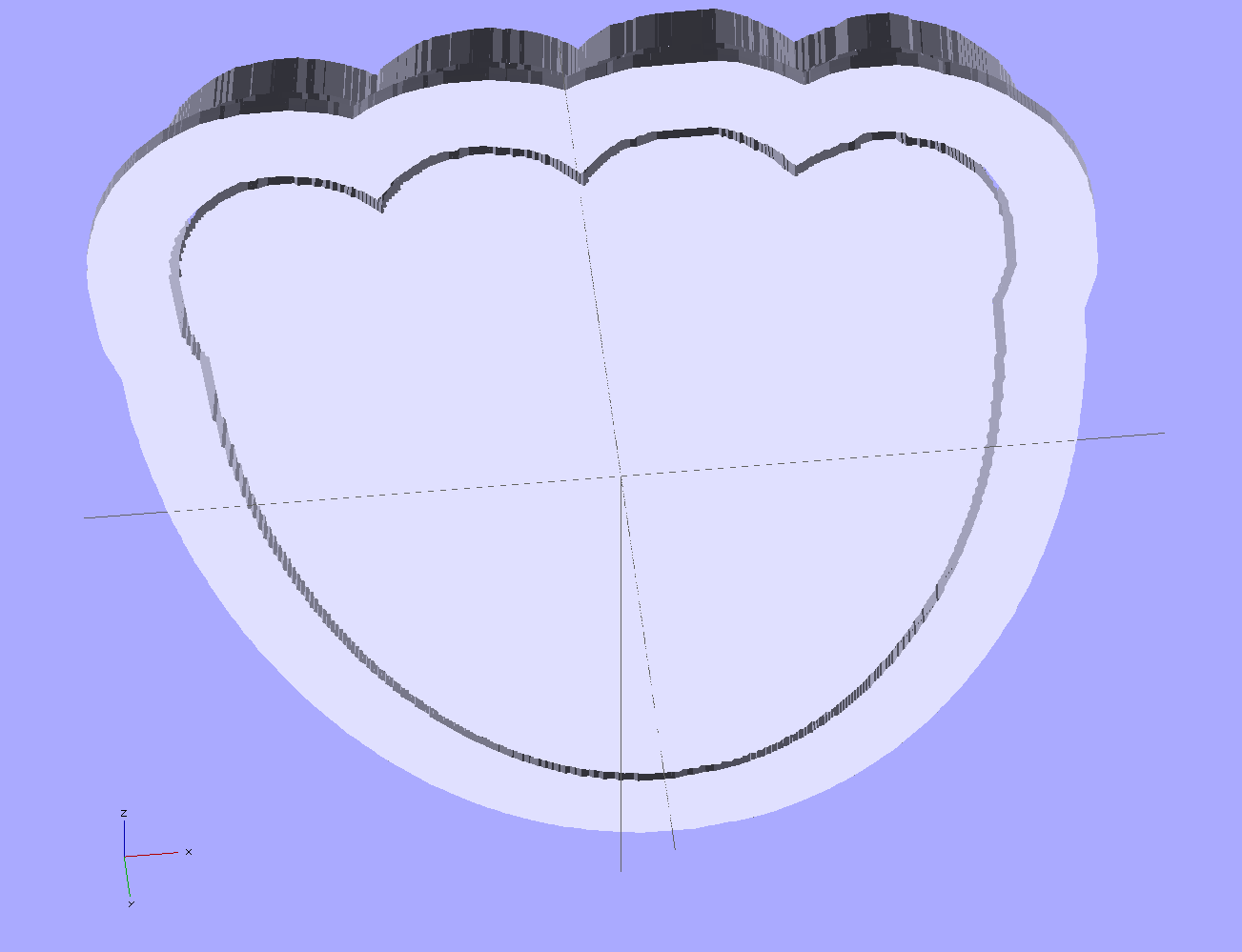
The bottom view shows the 1 mm gap between the two objects:
jellyfish-high – Cutter and Press – bottom view
Now, to print the thing [Update:like that] so I can make some cookies…
Further musings:
Printing separately would allow a tighter fit between the press and the cutter: an exact fit won’t work, but 2 mm may be too much.
A knob glued on the flat surface of the press would be nice; the fingernail ridge may get annoying.
PLA seems more socially acceptable than ABS for foodie projects. Frankly, I doubt that it matters, at least in this application.
That process produces a grayscale height map PNG image in the proper orientation:
Jellyfish – prepared image
OpenSCAD, however, requires a flat ASCII data file to build a 3D model, as described there.
It turns out that a PGM (“Portable Graymap”) file is almost exactly what we need: a fixed format header in ASCII text, followed by the pixel data in either ASCII or binary. To get an ASCII-formatted PGM file from that PNG image:
The data isn’t in the XY array layout that OpenSCAD expects; It Would Be Very Nice If OpenSCAD could read PGM files, including the header describing the array size, but it doesn’t. Fortunately, some Bash-fu can handle the reformatting.
First, store the number of pixels along the X axis in a Bash variable:
Note the backticks around the whole mess that tell Bash to execute what’s inside and return the value. The -format operation returns the width as an integer, which is what we need.
Now, returning our attention to the PGM file, convert multiple blanks and line ends to single line ends, thus putting one entry on each output line with no other whitespace:
cat filename.pgm | tr -s ' \012' '\012'
Nota bene: there’s a leading blank in the first character string and the escape sequences should read “reverse-slash zero one two” to denote the Unix-style line end character (ASCII 10 = newline). I think the meta-markup works around the usual WordPress formatting, but ya never know what can go wrong.
The first four lines then contain the magic number, X size, Y size, and the maximum data value, respectively:
P2
149
159
255
Those values are all known, because:
The magic number is P2 for ASCII PGM files. It would be useful to verify this, but …
The XY values correspond to the image size
The maximum data value will be 255 because of the auto-level operation applied to the image’s 8-bit grayscaleness
Strip off the first four lines and wrap the remaining data into an array corresponding to the image size:
The $((8*${ImageX)) magic comes from the way the column command works: it’s right-aligning each data values in an 8 character column, so you specify the total width of the result in character columns. Think of the parameter as specifying the screen width and you’ll be on the right track.
That fits neatly into a single line of Bash gibberish:
The first complete line of that file goes on basically forever, but it actually has the right stuff. You can examine it thusly:
head -1 filename.dat
The file should then Just Work when sucked into OpenSCAD with the surface() function:
surface("filename.dat",center=true,convexity=10);
And, indeed, it does:
Jellyfish – surface model
Note that it’s oriented with the head in the +Y direction, the tentacles (or whatever) in the -Y direction, and the freckle over the eye on the proper side. Here’s the original PNG image of the cookie for reference:
Jellyfish – height map image
Using center=true centers the object on the XY plate, but the base of the solid remains at Z=-1. That makes some sense, as the “solid” part of the model lies below the Z values set by the data: the model includes a one unit thick slab below Z=0 for all points.
The convexity=10 parameter helps OpenSCAD’s quick rendering code (invoked by hitting F5 in the GUI) determine when it can stop looking for intersections between the visible ray and the object. It doesn’t affect the F6 CGAL compilation & export to STL. Because this routine will eventually be used only from the command line, the value doesn’t matter.
That works and the height map looks OK, but the model is too large in all directions and the slab below Z=0 has got to go. But it’s looking good…
Having established the OpenSCAD can produce a height map from an input array, a bit more doodling showed how to produce such an array from a grayscale image. I certainly didn’t originate all of this, but an hour or two of searching with the usual keywords produced snippets that, with a bit of programming-as-an-experimental-science tinkering, combine into a useful whole.
Not being much of an artist, I picked a suitable SVG image from the Open ClipArt Library:
Jellyfish – color
That’s pretty, but we need a grayscale image. Some Inkscape fiddling eliminated all the nice gradients, changed the outline to a dark gray, made all the interior fills a lighter gray, and tweaked the features:
Jellyfish – gray
Admittedly, it looks rather dour without the big smile, but so it goes. This is still an SVG file, so you have vector-mode lines & areas.
A bit more work changed the grays to produce different heights, duplicated one of the spots for obvious asymmetry, and exported it as a gritty 160×169 pixel PNG image:
Jellyfish – height map image
The low resolution corresponds to a 2 pixel/mm scale factor: 169 pixel = 84.5 mm tall. The cutter wrapped around this image will have a lip that adds about 12 mm, a 1 or 2 mm gap separates the press from the cutter, and there’s a skirt around the whole affair. My Thing-O-Matic build platform measures a scant 120 mm in the Y direction, which puts a real crimp on the proceedings.
That’s assuming the usual 1 unit = 1 mm conversion factor. If your toolchain regards units as inches, then you need a different scale factor.
Low resolution also speeds up the OpenSCAD processing; you can use as many pixel/mm as you wish, but remember that the extruded filament is maybe 0.5 mm wide, so anything beyond 4 pixel/mm might not matter, even if the motion control could benefit from the smoother sides. Features down near the resolution limit of the model may produce unusual effects for thin walls near the thread width, due to interpolation & suchlike (which is why I got rid of the smile). The processing time varies roughly with the number of pixels, so twice the resolution means four times more thumb-twiddling.
Caveats:
You’re looking at a cookie lying on a table: this is the top view
Background surrounding the image should be full white = 255
Highest points should be very light gray, not full white, to avoid creating islands
Lowest points may be black; I use a very dark gray
No need for an outline
Smooth gradients are OK, although they’ll become harshly quantized by the layer thickness
You can probably use JPG instead of PNG, but these aren’t big files
Remember this is a cookie press, not a work of art
With a suitable PNG image file in hand, use ImageMagick to prepare the image:
Crop to just the interesting part: -trim (depends on the four corners having background color)
Convert the image to grayscale: -type Grayscale (in case it’s a color image)
Make it 8 bit/pixel: -depth 8 (more won’t be helpful)
Stretch the contrast: -auto-level (to normalize the grayscale to the full range = full height)
Reverse left-to-right to make a cookie press: -flop (think about it)
Invert the grayscale to make the cookie press surface: -negate (again, think about it)
Reverse top-to-bottom to correct for upcoming OpenSCAD surface() reversal: -flip
Combining -flop and -flip just rotates the image 180° around its center, but I can’t help but believe transposing the bits works out better & faster than actually rotating the array & interpolating the result back to a grid. On the other paw, if there isn’t a special case for (multiples of) right-angle rotation(s), there should be. [grin]
The prepared image is 149×159, because the -trim operation removed the surrounding whitespace. You can do that manually, of course, keeping in mind that the corners must be full white to identify the background.
Next: convert that image to a data array suitable for OpenSCAD’s surface() function…
While pondering the notion of making cookie cutters, it occurred to me that the process could be automated: a grayscale height map image of the cookie should be enough to define the geometry. The existing height map solutions (like William Adams’s fine work) seem entirely too heavyweight, what with custom Windows or Java programs and suchlike. Some doodling indicates that a simpler solution may suffice for my simple needs, although the devil always hides in the details.
The overall problem with a cookie press involves producing a non-rectangular solid with a bumpy upper surface corresponding to the grayscale values of an image: dark pixels = low points of the surface, light pixels = peaks. The image size controls the XY extent of the solid and the pixel values control the Z, with some known value (likely either black or white) acting as a mask around the perimeter. Given such a solid, you can then wrap a cutter blade and handle around the outline, much as I did for the Tux cutter.
OpenSCAD has a lightly documented surface() function that reads an ASCII text file consisting of an array of numeric values. Each array element defines a 1 × 1 unit square of the resulting 3D object; the example in the doc shows a 10 x 10 array producing a 10 x 10 unit object. Each numeric value sets the height of the surface at the center of the square.
This array, slightly modified from the one in the doc, shows how that works:
module ShowPegGrid(Space = 10.0,Size = 1.0) {

  Range = floor(50 / Space);

	for (x=[-Range:Range])
	  for (y=[-Range:Range])
		translate([x*Space,y*Space,Size/2])
		  %cube(Size,center=true);

}

ShowPegGrid();
surface("/tmp/test.dat",center=true,convexity=10);
Produces this object, surrounded by a few non-printing 1 unit alignment cubes on the Z=0 plane for scale:
Example Object
Some things to note:
The text array looks like it builds downward from the upper left, but the solid model builds from the origin toward the +X and +Y directions, with the first line of the array appearing along Y=0. This reverses the object along the Y axis: the first line of the array is the front side of the object.
The “center=true” option centers the object in XY around the Z axis, with a 1 unit thick slab below the entire array; the top surface of that slab (at Z=0) represents the level corresponding to 0 elements in the array.
Each array element becomes a square one unit on a side; the RepRap software chain regards units as millimeters
The center point of each element’s square is at the nominal height
The Z coordinate of the edges of those squares linearly interpolate between adjacent centers
Vertical edges become slanted triangular facets
Remember that STL files contain a triangular tessellation (or whatever you call it in 3D) of the object surface, which means rectangles aren’t natural. The edge interpolation make the whole thing work, because an array of pure square pillars probably won’t be a 2-manifold object: some pillars would share only a common vertical edge. The interpolation does, however, produce a bazillion facets atop the object.
So the problem reduces to generating such an array from a grayscale image, for which some ImageMagick and Bash-fu should suffice, and then manipulating it into a model that will produce a cookie press and cutter. More on that tomorrow…
Our Larval Engineer may have a commission to fit her Speed-Sensing Ground Effect Lighting controller to another longboard. To that end, the case now sports mouse ears to spread the force from the cooling ABS over more of the Kapton tape, in the hope the plastic won’t pull the tape off the aluminum build platform:
Longboard Case Solid Model – mouse ears
That view shows the bottom slice that will hold the battery, but the ears appear on all three layers.
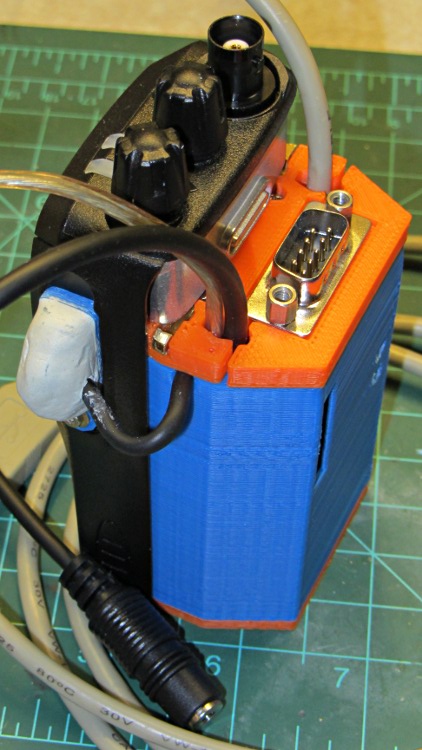
Both of the GPS+voice interfaces for the Wouxun KG-UV3D radios have been working fine for a while, so I should show the whole installation in all its gory detail.
If you haven’t been following the story, the Big Idea boils down to an amateur radio HT wearing a backpack that replaces its battery, combines the audio output of a Byonics TinyTrak3+ GPS encoder with our voice audio for transmission, and routes received audio to an earbud. Setting the radios to the APRS standard frequency (144.39 MHz) routes our GPS position points to the global packet databaseand, with 100 Hz tone squelch, we can use the radios as tactical intercoms without listening to all much of the data traffic.
The local APRS network wizards approved our use of voice on the data channel, seeing as how we’re transmitting brief voice messages using low power through bad antennas from generally terrible locations. This wouldn’t work well in a dense urban environment with more APRS traffic; you’d need one of the newfangled radios that can switch frequencies for packet and voice transmissions.
So, with that in mind, making it work required a lot of parts…
The flat 5 A·h Li-ion battery pack on the rack provides power for the radio; it’s intended for a DVD player and has a 9 V output that’s a trifle hot for the Wouxun radios. Some Genuine Velcro self-adhesive strips hold the packs to the racks and have survived surprisingly well.
Just out of the picture to the left of the battery pack sits a Byonics GPS2 receiver puck atop a fender washer glued to the rack, with a black serial cable passing across the rack and down to the radio bag.
A dual-band mobile antenna screws into the homebrew mount attached to the upper seat rail with another circumferential clamp. It’s on the left side of the rail, just barely out of the way of our helmets, and, yes, the radiating section of the antenna sits too close to our heads. The overly long coax cable has its excess coiled and strapped to the front of the rack; I pretend that’s an inductor to choke RF off the shield braid. The cable terminates in a PL-259 UHF plug, with an adapter to the radio’s reverse-polarity SMA socket.
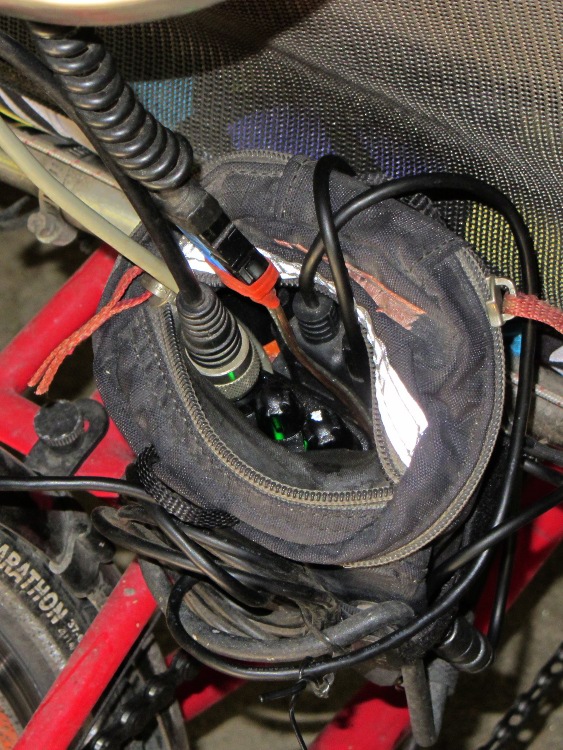
The push-to-talk button on the left handgrip isn’t quite visible in the picture. That cable runs down the handlebar, along the upper frame tube, under the seat, and emerges just in front of the radio bag, where it terminates in a 3.5 mm audio plug.
The white USB cable from the helmet carries the boom mic and earbud audio over the top of the seat, knots around the top frame bar, and continues down to the radio. USB cables aren’t intended for this service and fail every few years, but they’re cheap and work well enough. The USB connector separates easily, which prevents us from being firmly secured to a dropped bike during a crash. I’d like much more supple cables, a trait that’s simply not in the USB cable repertoire. This is not a digital USB connection: I’m just using a cheap & readily available cable.
I long ago lost track of the number of Quality Shop Time hours devoted to all this, which may be the whole point…
In other news, the 3D-printed fairing mounts, blinky light mounts, and helmet mirror mounts continue to work fine; I’m absurdly proud of the mirrors. Mary likes her colorful homebrew seat cover that replaced a worn-out black OEM cover for a minute fraction of the price.












 The Smell of Molten Projects in the Morning