Ed Nisley's Blog: Shop notes, electronics, firmware, machinery, 3D printing, laser cuttery, and curiosities. Contents: 100% human thinking, 0% AI slop.
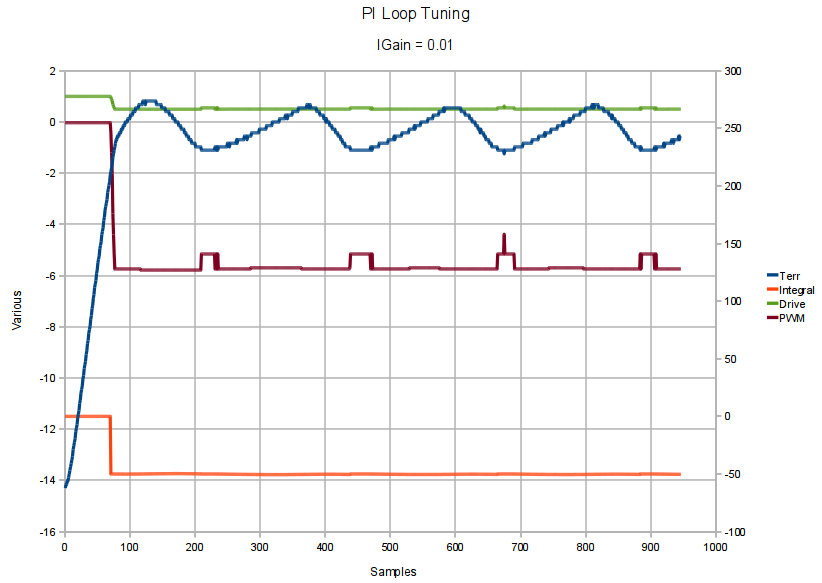
Without much tuning at all the Peltier module holds the MOSFET-under-test block within the ±1 °C deadband for heating to 30 °C:
Bringup Test – Igain 0.01
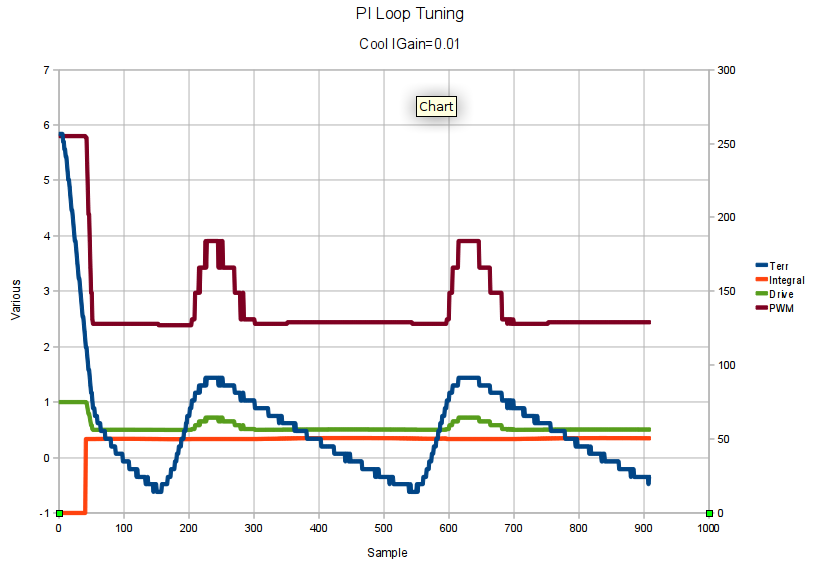
And it’s pretty close for cooling to 10 °C:
Bringup Test – Cool – Igain 0.01
The PWM and Integral traces refer to the right-hand Y axis scale, the rest to the left. The total elapsed time is a bit under 3 minutes, but it’s measured in samples because I’m not going to bother with a formal timebase for this thing.
The Basement Laboratory is around 14 °C right now, so cooling isn’t all that much of a problem.
The code doesn’t really run a PI loop: it switches from P control outside the deadband to I control inside, preloading the integral accumulator to maintain the PWM value at the inbound switchover. That sidesteps the whole integral windup problem, which seems like a Good Idea, but a quick test at 50 °C says the P control may not have enough moxie to reach the deadband and the I control seems overenthusiastic.
More fiddling is definitely in order.
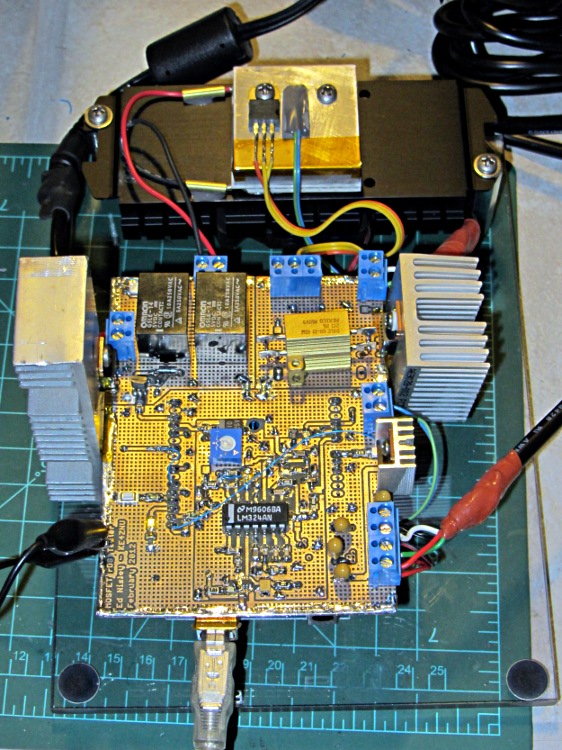
So far, the machinery looks like this:
rDS Tester – Peltier Tests
The aluminum block toward the rear holds the MOSFET and the thermistor atop the Peltier module, all stuck on the black CPU cooler with the fan on the bottom. The various heatsinks are obviously scrounged from the heap and are much too large; some fine tuning is in order now that the temperature’s nailed down.
On the other end of the Peltier driver’s PWM pulse, the MOSFET turns on with a surprisingly lengthy time constant:
Peltier Drain – Turn-On
The upper trace shows the drain voltage drops to nearly 0 V as the transistor turns on, then rises to about 600 mV. The IRLZ14 spec says RDS is 200 mΩ max, so that’s in line with the actual 3.3 A through the Peltier module, and puts the dissipation at 2.2 W.
The lower trace is the gate drive, showing a small Miller effect. The Channel 2 scale readout is off by a factor of 10, as I forgot to tell the scope that I was using a 10x probe. It’s really 5 V/div, not 500 mV/div.
The cursors put the time constant at 1.3 µs. If the inductance is the 5.4 µH indicated by the turn-off resonance, then the total circuit resistance is nearly 4 Ω… which is obviously not the case, given the 5 V supply voltage and the 3.3 A current.
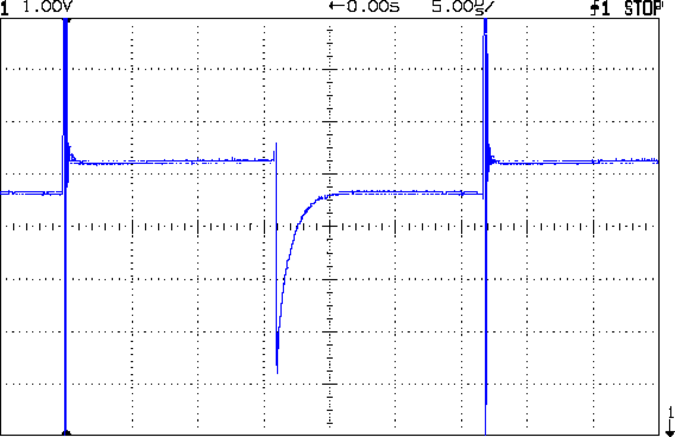
Looking at the Peltier module’s power supply at the board terminal reveals the true cause:
Peltier Supply Transient
The scale is 1 V/div with 0 V at the bottom of the screen , so the switching supply produces 5.2 V with no load and 4.6 V at about 3 A. It’s rated at 5 V and 3.7 A, so the Peltier current is right up near its limit.
The glitch when the MOSFET turns off shows that the supply can’t absorb much transient power in either direction, which is typical of switching supplies. In this day & age, there’s no bulk capacitance to smooth out line-frequency ripples from a full-bridge rectifier.
The total circuit resistance is about 1.8 Ω, figuring the Peltier module at 1.5 Ω, the MOSFET at 0.2 Ω, and everything else at 0.1 Ω. That says the actual current is around 2.6 A, although the fancy Tek Hall Effect probe I mooched from Eks puts it at almost exactly 3 A; I’d tend to trust the Tek probe’s opinion more than my sum of small numbers. With 4.6 V and 3 A, the total resistance is spot on 1.5 Ω. The Peltier module’s resistance is temperature sensitive, so a few tenths of an ohm variation isn’t entirely unexpected.
So that says the L/R time constant is (5.4 µH / 1.5 Ω) = 3.6 µs, which makes more sense: it’s entirely masked by the power supply transient.
A touch of bulk capacitance may be in order. To supply 3 A for 5 µs with 0.5 V droop:
C = IΔT/ΔV = 3•5x10⁻⁶/0.5 = 30 µF
Well, that’s not so bad after all… I’m sure I have a high-voltage cap along those lines.
There’s a reason the MOSFET tester has connectors for three separate supplies: I expected nasty transients from a high-current PWM load. One supply for the Peltier, another for the MOSFET-under-test’s drain, and a triple-output supply for the Arduino and analog circuitry.
The MOSFET resistance tester I’m twiddling up for my next column will hold the transistor-under-test at a more-or-less constant temperature using a PWM-controlled Peltier module. The Peltier driver looks like this:
Peltier Driver
The overall idea is that the relay selects heating or cooling and the MOSFET PWM adjusts the power to keep the module at the right temperature. The feedback comes from a thermistor epoxied to the aluminum block holding the MOSFET, which in turn is epoxied to the module and then to a CPU cooler with a fan. More on that later…
Those fat lines mark the high-current paths: 3.3 A with a 5 V supply, as this Peltier module has about 1.5 Ω resistance. Some early tests show the resulting 17 W can pump the test block down to at least 5 °C and up to at least 40 °C in a few tens of seconds, even without any significant PI (no D) loop tweaking.
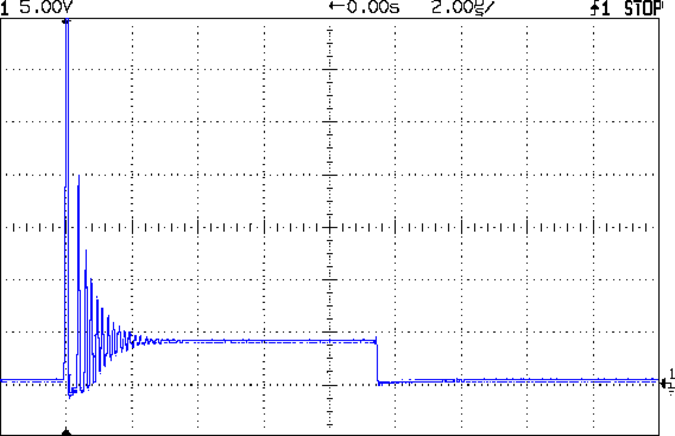
When I fired it up a test program that just cycles the PWM up and down, the green LED lit up properly in cooling mode, but the red LED also glowed dimly. Probing the drain showed this nasty ringing when the IRLZ14 MOSFET turned off:
Peltier Turn-Off Transient
The initial spike happens when the drain current pushes the MOSFET body diode into reverse breakdown at about 70 V (off scale high in the image). The drain goes slightly negative for the next half-cycle as the diode slams into forward conduction, then the energy engages in some serious 5 MHz ringing while it dissipates in the Peltier’s resistance.
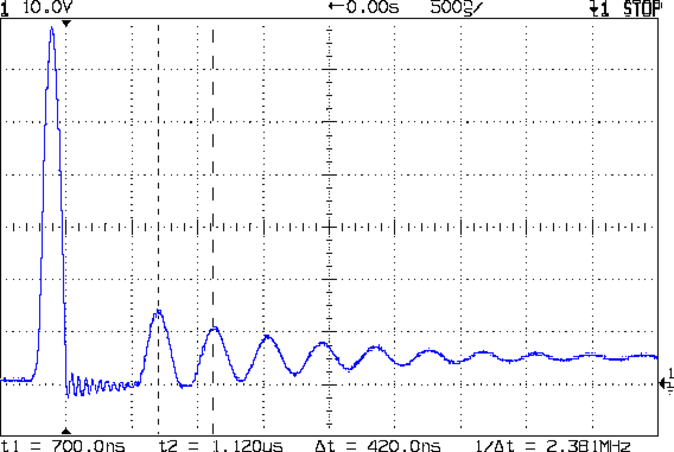
A bit of fiddling revealed that a 1.5 nF cap dropped the ringing to 2.8 MHz and a 2.5 nF cap put it at 2.4 MHz:
Peltier Drain – 2.5 nF
Notice that just putting a capacitor across the MOSFET doesn’t reduce the ringing. What’s needed here is some additional energy dissipation.
Splitting the difference says 2.3 nF would reduce the resonant frequency by a factor of 2, so the original stray capacitance is about (2.3 nF / 3) = 770 pF.
Knowing the resonant frequency and stray capacitance, the stray inductance falls out:
L = 1/[(2∏ 2.5x10⁶)2 770x10-12] = 5.4x10-6 = 5.4 µH
The Peltier module doesn’t have nearly that much inductance, so it’s hidden in the wiring and relays.
Knowing L and C, the characteristic impedance of the circuit is:
Z = √(L/C) = 84 Ω
The snubber cap should be at least a factor of 4 larger than the stray capacitance, which gives 3 nF. Some rummaging produced a small 3.9 nF 100 V Mylar cap (measuring 3.7 nF, close enough) and an 82 Ω resistor, which gave this pleasing result when soldered across the MOSFET source & drain:
Peltier Drain – 82 ohm 3.9 nF snubber
The upper trace shows a pair of 32 kHz PWM pulses. The lower trace gives a magnified view of one pulse; the peak remains at about 70 V just after turn-off, because that 3.3 A must go somewhere: that’s why MOSFETs have husky body diodes with reverse-breakdown specs.
A better view of the snubbed peak shows it’s all over in about 400 ns:
Peltier Drain – 32 kHz PWM snubbed – detail
The lower trace is the MOSFET gate drive pulse at the Arduino pin, showing the Miller capacitance delaying the transition. It turns out that removing the 22 Ω gate damping resistor doesn’t improve things, but, given the speed of the transition, I think it’s good enough.
The MOSFET burns at (3.3 A × 70 V) = 230 W during that 100 ns peak, which works out to a mere 23 µJ (assuming constant current, which isn’t the case). The IRLZ14 has a 40 mJ single-pulse rating, so it’s in good shape.
The DC dissipation is (3.3 A)2 x 20 mΩ = 2 W: the huge heatsink I stuck on the MOSFET doesn’t have a chance to get warm during the short tests so far.
The red LED remains dimly lit, which goes to show how sensitive a human eye can be: the negative transient is barely 100 ns long!
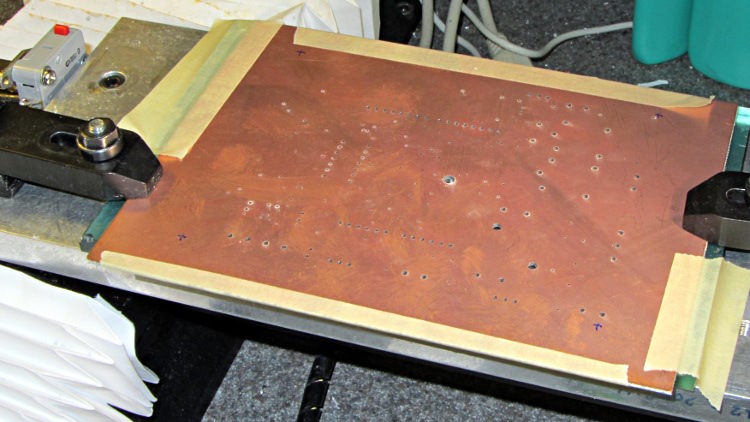
This one came out surprisingly well, apart from the total faceplant with that resistor. With any luck, it’ll measure MOSFET on-state drain resistance over temperature for an upcoming Circuit Cellar column; it’s a honkin’ big Arduino shield, of course.
I think I can epoxy the resistor kinda-sorta in the right spot without having to drill through the PCB into the traces. Maybe nobody will notice?
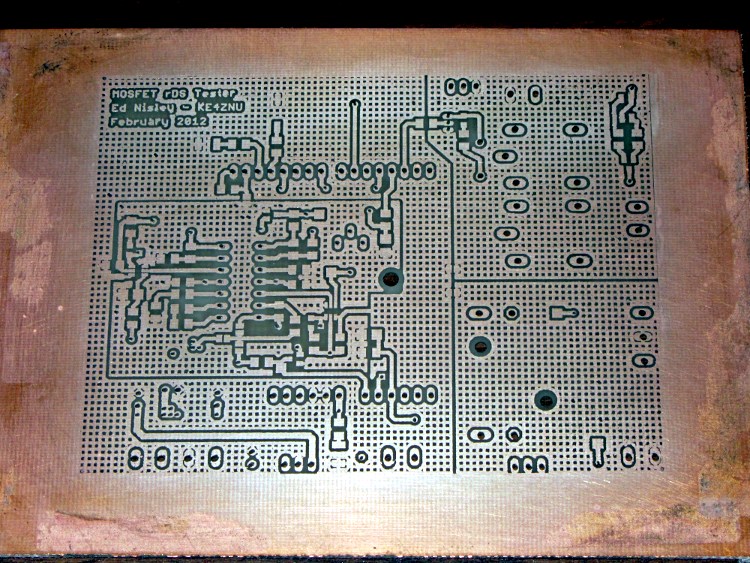
The traces came out fairly well, although I had to do both the top and bottom toner transfer step twice to get good adhesion. Sometimes it works, sometimes it doesn’t, and I can’t pin down any meaningful differences in the process.
And it really does have four distinct ground planes. The upper right carries 8 A PWM Peltier current, the lower right has 3 A drain current, the rectangle in the middle is the analog op-amp circuitry tied to the Analog common, and surrounding that is the usual Arduino bouncy digital ground stuff. The fact that Analog common merges with digital ground on the Arduino PCB is just the way it is…
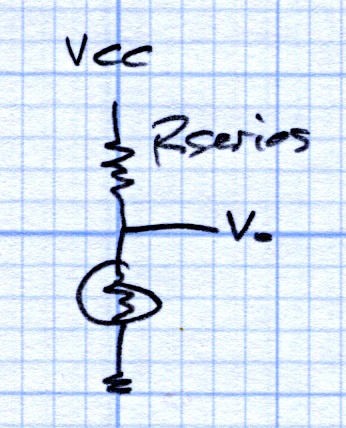
Faced with the need to measure heatsink temperature in an Arduino project and being unwilling to putz around with a MAX6675 thermocouple amp, I found a bag of thermistors in the heap. Unlike most surplus, the bag pedigreed them as Semitec 103CT-4, which led to some relevant parameters:
T0 = 25 °C
R0 = 10 kΩ
B = 3270 K
The equation for a thermistor’s resistance at a given temperature (in K, not °C) is:
Setting Rseries = 10 KΩ and applying a bit of spreadsheet-fu produces this:
Thermistor Linearization – Rseries – Graph
Getting within +2 °C /-1 °C over -20 °C to 60 °C isn’t all that bad, but … I wondered whether there might be an easy way to get better linearization. The heatsink temperature will range from about -10 °C to 60 °C (yes, there will be a Peltier cooler involved), so the range is a bit broader than usual.
A bit of diligent rummaging turned up that description, which led to US Patent 3,316,765 from back in 1967, which teaches the concept of two different thermistors, one for low temperatures and one for high temperatures, with some resistive blending:
Patent 3316765 Fig 3
The patent includes the claim of many different thermistors, each with a series resistor, to cover a much broader temperature range.
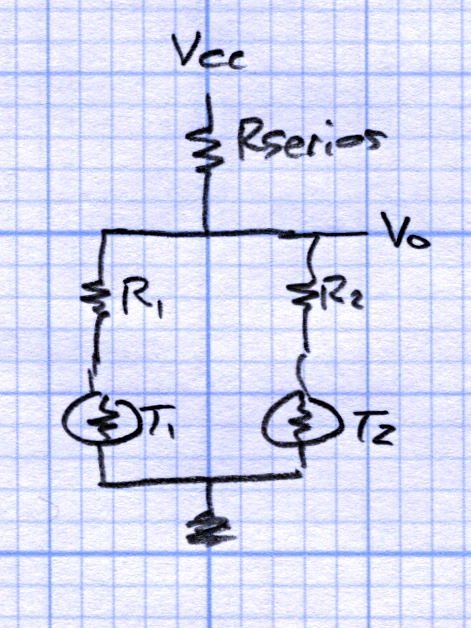
Given a bag of identical thermistors, I wondered what might be possible. A bit more spreadsheet-fu produced this:
Which corresponds to this sketch, with Rseries = 6.2 kΩ, R1 = 27 kΩ, and R2 = 0.0:
Thermistor Linearization – Dual Thermistors
All in all, a nicely centered ±1 °C error from -15 °C to +60 °C can’t be beat. The output voltage even spans 0.13 to 0.71 of Vcc, about 9 of the available 10 ADC bits.
Those two resistors came from hand-tweaking with standard values, so it’s not like there’s a genetic algorithm involved. The value of Rseries wants to be a bit below the parallel combination of the two branches near 30 °C and R1 seems happiest around the 0 °C thermistor resistance. I vaguely thought about using a multivariable solver, but what’s the point?
The result seems good enough that I didn’t try three thermistors. T2, the one with R2=0, already handles the high temperature range and the low end is fine, so it seems there’s not much to be gained. If you had a stash of different thermistors and knew their characteristics, then the results would be different.
Admittedly, one could program the actual logarithmic equation to unbend a single thermistor’s voltage into temperature, but I must kludge up a thermistor mount anyway, so why not entomb two thermistors and an SMD resistor, then use a linear fit? It’s not like fancy math will give the whole lashup any greater accuracy.
The spreadsheet may be of interest. It started out as an OpenOffice spreadsheet, but WordPress doesn’t permit *.ods files, soooo it’s in MS Excel format.
The base of that case makes a good protector to keep an Arduino board out of the conductive clutter on a typical electronics bench. I stopped the printer shortly after it finished the bosses atop the mounting posts:
A small tweak to that code produces a sync pulse for each full sine wave of microstepping current, aligned with the step pulses. The sync pulse occurs on the rising edge of the current waveform (because I set it up that way) and has 50% duty cycle to allow triggering at either zero-current microstep.
Then pix like this happen:
Microstepping Group Sync
The traces:
top = 1/group sync
middle = winding current at 500 mA/div
bottom = step pulse, 1/microstep
The big jump just before the zero-current microstep on the decreasing-current sides of the sine wave indicates that it’s hard to get all the current out of the windings at 12 V. A detail view of those steps shows that the current is 50% higher than it should be at the start of the zero-current microstep, having completely missed the last microstep:
Decreasing Current
Which, of course, is why I’m doing all this: to explore that kind of behavior.
You may find the generated sync pulses are off by ±1 microstep from the expected start of the zero-current microstep, because the optical 1/rev signal threshold may line up perversely with the start of a microstep. You can twist the sync wheel just slightly on the shaft, but it’s pretty much a matter of shaking the dice to see if a better combination comes up. Doesn’t make any real difference to the scope triggering, though, as any stable sync alignment is as good as any other.
The code uses the 1/rev optical sync pulse once, to get the initial alignment, so whacking the wheel as it rotates may cause the generated sync pulses to skip a beat or twenty. The result remains stable, just at a different alignment.
One could argue that you really don’t need the 1/rev optical signal at all, but I find it comforting to use an absolute rotational reference to lock the pulses in (pretty nearly) the same place every time. If you’re stuck with an in-place motor, then you probably don’t have a 1/rev signal and you must wing it.
The Arduino source code:
// Stepper motor driver synchronization
// Ed Nisley KE4ZNU June 2011

//-- Stepper parameters

#define SYNC_OFFSET            8        // steps from 1/rev pulse to start of first 4-full-step group

#define FULL_STEPS_PER_REV    200
#define MICROSTEPPING        8

#define GROUPS_PER_REV (FULL_STEPS_PER_REV / 4)
#define STEPS_PER_GROUP (MICROSTEPPING * 4)

//-- Pin definitions, all of which depend on internal hardware: do *not* change

#define PIN_REV        2                // INT0 = positive 1/rev pulse from optical switch
#define PIN_STEP    5                // T1 = positive 1/step pulse from stepper driver
#define PIN_TRIGGER    9                // OC1A = positive trigger pulse to scope

//-- Trace outputs may be chosen freely

#define PIN_TRACE_A    10
#define PIN_TRACE_B    11
#define PIN_TRACE_C    12

#define PIN_LED        13                // standard Arduino LED

//---------------------
// State Variables

word PulseCounter;

//---------------------
// Useful routines

//--- Input & output pins

void TogglePin(char bitpin) {
digitalWrite(bitpin,!digitalRead(bitpin));    // toggle the bit based on previous output
}

//----------------
// Initializations

void setup() {

pinMode(PIN_REV,INPUT);        // INT0 1/rev pulse from wheel

pinMode(PIN_STEP,INPUT);        // T1 step pulse from stepper driver

pinMode(PIN_LED,OUTPUT);
digitalWrite(PIN_LED,LOW);

pinMode(PIN_TRACE_A,OUTPUT);
pinMode(PIN_TRACE_B,OUTPUT);
pinMode(PIN_TRACE_C,OUTPUT);

//--- Prepare Timer1 to count external stepper drive pulses

TCCR1B = B00001000;                // Timer1: Mode 4 = CTC, TOP = OCR1A, clock stopped

pinMode(PIN_TRIGGER,OUTPUT);        // OC1A to scope trigger

//-- Wait for rising edge of 1/rev pulse from optical switch

TCCR1A = B11000000;                        // COM1A set on compare
TCNT1 = 0;                                // ensure we start from zero
OCR1A = SYNC_OFFSET;                        // set step counter

while(!digitalRead(PIN_REV)) {            // stall until 1/rev input rises
TogglePin(PIN_TRACE_A);
}

//-- Got it, fire up the timer to count steps to start of first group

TCCR1B |= B00000111;                        // enable clock from T1 pin, rising edge

digitalWrite(PIN_LED,HIGH);                // show we got here
digitalWrite(PIN_TRACE_A,LOW);

while(!(TIFR1 & _BV(OCF1A))) {            // wait for compare
digitalWrite(PIN_TRACE_B,digitalRead(PIN_STEP));
continue;
}
TIFR1 |= _BV(OCF1A);                        // clear match flag

//-- Scope sync pulse is now active, we can enter the main loop

}

//----------------
// The main event

void loop() {

//-- Scope sync pulse active

digitalWrite(PIN_LED,LOW);                // show we got here
digitalWrite(PIN_TRACE_B,LOW);

//-- Set up for first half of the group, sync high -> low

TCCR1A = B10000000;                        // COM1A clear on compare
OCR1A = (STEPS_PER_GROUP / 2) - 1;

while(!(TIFR1 & _BV(OCF1A))) {            // wait for compare
digitalWrite(PIN_TRACE_B,digitalRead(PIN_STEP));
continue;
}
TIFR1 |= _BV(OCF1A);                        // clear match flag
digitalWrite(PIN_TRACE_B,LOW);

//-- Set up for the second half, sync low -> high

TCCR1A = B11000000;                        // COM1A set on compare
OCR1A = (STEPS_PER_GROUP - (STEPS_PER_GROUP / 2)) - 1;    // may be odd, so allow for that

while(!(TIFR1 & _BV(OCF1A))) {            // wait for compare
digitalWrite(PIN_TRACE_B,digitalRead(PIN_STEP));
continue;
}
TIFR1 |= _BV(OCF1A);                        // clear match flag
digitalWrite(PIN_TRACE_B,LOW);

//-- Shut down counter and wait for end of 1/rev pulse

#if 0
TCCR1B &= ~B00000111;                        // turn off timer clock

while(digitalRead(PIN_REV)) {                // stall until 1/rev pulse goes low again
TogglePin(PIN_TRACE_C);
}
digitalWrite(PIN_TRACE_B,LOW);
#endif

}









 The Smell of Molten Projects in the Morning