The Smell of Molten Projects in the Morning

Ed Nisley's Blog: Shop notes, electronics, firmware, machinery, 3D printing, laser cuttery, and curiosities. Contents: 100% human thinking, 0% AI slop.

Tag: Arduino

All things Arduino

  • Kenmore 158: Bubble Sorted Motor Current Sampling

    Because the ET227 transistor acts as a current limiter, the motor current waveform has flat tops at the level set by the DAC voltage. However, the current depends strongly on the temperature of all those transistor junctions, with some commutation noise mixed in for good measure, so the firmware must measure the actual current to know what’s going on out there.

    Here’s one way to pull that off:
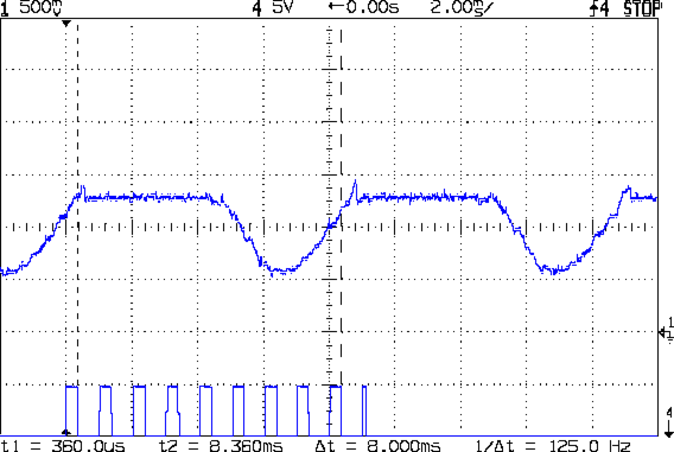
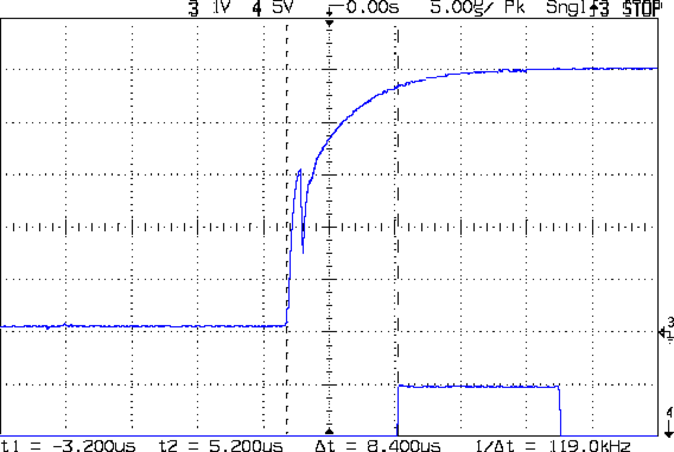
    Motor current - ADC sample timing
    Motor current – ADC sample timing

    The upper waveform shows the motor current sporting flat tops at 650 mA.

    The lower waveform marks the current measurement routine, with samples taken just before the falling edge of the first nine pulses. The (manually tweaked) delay between the samples forces them to span one complete cycle of the waveform, but they’re not synchronized to the power line. Remember that the motor runs from a full wave rectifier, so each “cycle” in that waveform is half of a normal power line cycle.

    Given an array containing those nine samples, the routine must return the maximum value of the waveform, ignoring the little glitch at the start of the flat top and taking into consideration that the waveform won’t have a flat top (or much of a glitch) when the current “limit” exceeds the maximum motor current.

    After a bit of fumbling around with the scope and software, the routine goes like this:

    • Collect samples during one current cycle
    • Sort in descending order
    • Ignore highest sample
    • Return average of next two highest samples

    Given that the array has only nine samples, I used a quick-and-dirty bubble sort. The runt pulse at the end of the series in the bottom waveform brackets the sort routine, so it’s not a real time killer.

    Seeing as how this is one of the very few occasions I’ve had to sort anything, I wheeled out the classic XOR method of exchanging the entries. Go ahead, time XOR against swapping through a temporary variable; it surely doesn’t make any difference at all on an 8-bit microcontroller.

    The sampling code, with all the tracing stuff commented out:

    //------------------
    // Sample current along AC waveform to find maximum value
    //	this is blocking, so don't call it every time around the main loop!
    
    #define NUM_I_SAMPLES	9
    
    unsigned int SampleCurrent(byte PinNum) {
    	
    unsigned int Samples[NUM_I_SAMPLES];
    unsigned int AvgSample;
    byte i,j;
    	
    //	digitalWrite(PIN_SYNC,HIGH);
    	for (i=0; i < NUM_I_SAMPLES; i++) {				// collect samples
    //		digitalWrite(PIN_SYNC,HIGH);
    		Samples[i] = ReadAI(PinNum);
    //		digitalWrite(PIN_SYNC,LOW);
    		delayMicroseconds(640);
    	}
    //	digitalWrite(PIN_SYNC,LOW);
    	
    //	digitalWrite(PIN_SYNC,HIGH);							// mark start of sorting
    	for (i=0; i < (NUM_I_SAMPLES - 1); i++)
    		for (j=0 ; j < (NUM_I_SAMPLES - 1 - i); j++)
    			if (Samples[j] < Samples[j+1]) {
    				Samples[j] ^= Samples[j+1];					// swap entries!
    				Samples[j+1] ^= Samples[j];
    				Samples[j] ^= Samples[j+1];
    			}
    //	digitalWrite(PIN_SYNC,LOW);								// mark end of sorting
    	
    //	printf("Samples: ");
    //	for (i=0; i < NUM_I_SAMPLES; i++)
    //		printf("%5d,",Samples[i]);
    	
    	AvgSample = (Samples[1] + Samples[2])/2;				// discard highest sample
    //	printf(" [%5d]\r\n",AvgSample);
    	
    	return AvgSample;
    
    }
    
  • Kenmore 158: Motor RPM Sensor Deglitching

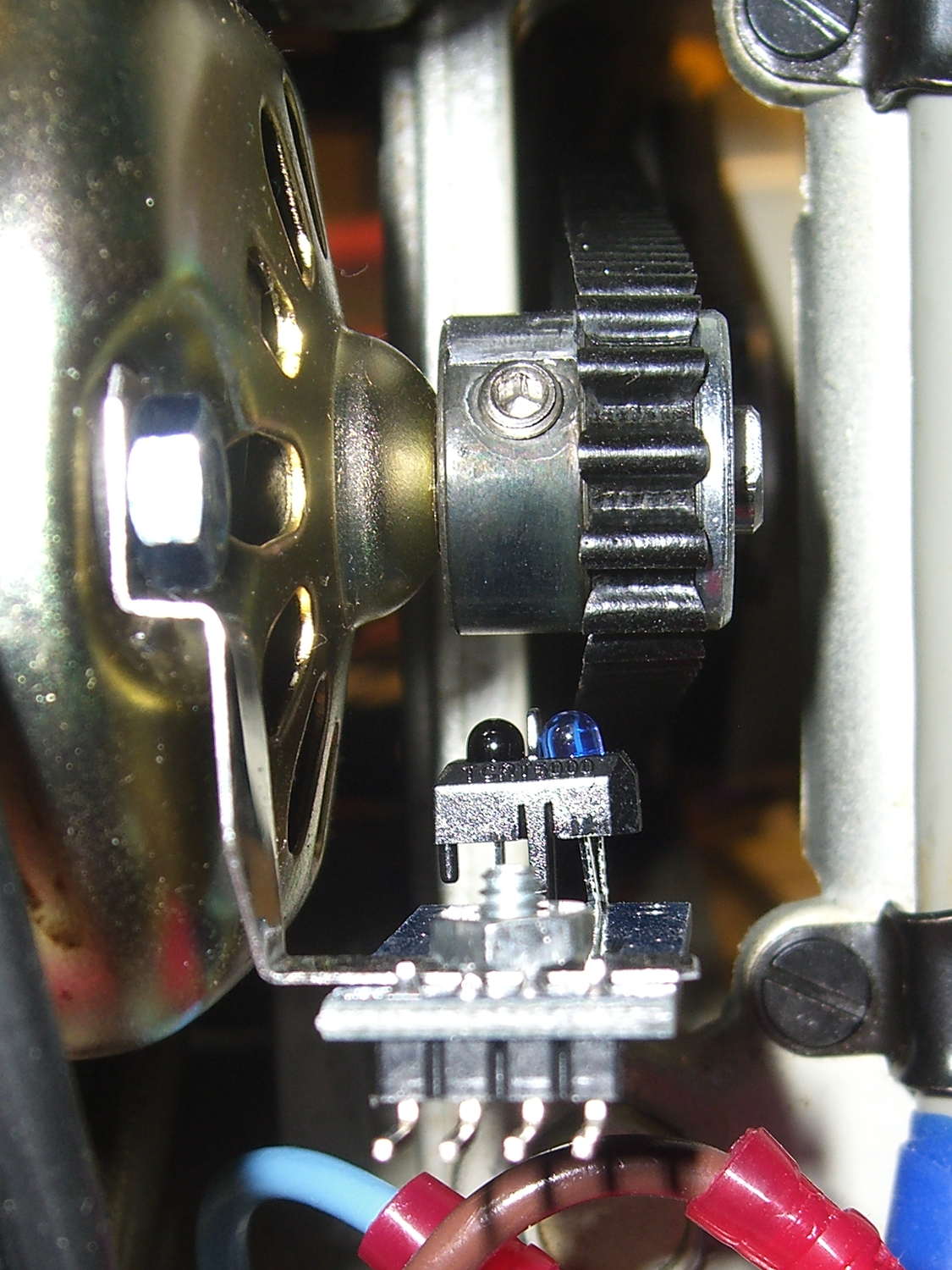
    The setscrew in the motor pulley lies directly in the path of the photosensor:

    TCTR5000 Motor RPM Sensor - side view
    TCTR5000 Motor RPM Sensor – side view

    Which produces a glitch in the rising edge of the digital output as the pulley rotates from the dark to the light section:

    Motor Sensor - Rising Edge Glitch
    Motor Sensor – Rising Edge Glitch

    The RPM signal goes to Arduino pin D2, where each falling edge triggers an interrupt handler:

    const byte PIN_MOTOR_REV = 2;		// DI - IRQ 0 (must be D2)
    
    ... snippage...
    
    void setup() {
    ... snippage ...
    
        pinMode(PIN_MOTOR_REV,INPUT_PULLUP);
        attachInterrupt((PIN_MOTOR_REV - 2),ISR_Motor,FALLING);			// one IRQ / motor revolution
    
     ... snippage ...
    }
    

    The maximum motor speed is about 11 kRPM, so interrupts should be at least 5.5 ms apart and the digital input should be low. If that’s true, then the code updates a bunch of useful information:

    struct pulse_t {
     byte Counter;
     unsigned long TimeThen;
     unsigned long Period;
     word RPM;
     byte State;
    };
    
    struct pulse_t Motor;
    
    ... snippage ...
    
    //------------------
    // ISR to sample motor RPM sensor timing
    
    void ISR_Motor(void) {
    
    static unsigned long Now;
    
    	digitalWrite(PIN_SYNC,HIGH);
    
    	Now = micros();
    
    	if ((5000ul < (Now - Motor.TimeThen)) && !digitalRead(PIN_MOTOR_REV) ) {	// discard glitches
    		Motor.Counter++;
    		Motor.Period = Now - Motor.TimeThen;
    		Motor.TimeThen = Now;
    		Motor.State = digitalRead(PIN_MOTOR_REV);		// always zero in a Physics 1 world
    	}
    
    	digitalWrite(PIN_SYNC,LOW);
    	return;
    }
    

    The scope trace shows that the handler takes about 7 µs to get control after the glitch (the left cursor should be on the falling edge, not the rising edge), so the input read occurs when the sensor output is over 4.5 V, causing the handler to discard this spurious interrupt.

    Because Motor.Period is a four-byte unsigned long, the Arduino’s CPU must handle it in chunks. Rather than disable interrupts around each use, it’s better to read the value until two successive copies come back identical:

    //------------------
    // Return current microsecond period without blocking ISR
    
    unsigned long ReadTime(struct pulse_t *pTime) {
    
    unsigned long Sample;
    
    	do {
    		Sample = pTime->Period;				// get all four bytes
    	} while (Sample != pTime->Period);		//  repeat until not changed by ISR while reading
    
    	pTime->Counter = 0;						// this is a slight race condition
    
    	return Sample;
    }
    

    Because the interrupts don’t happen that often, the loop almost always executes only one time. On rare occasions, it’ll go back for another two values.

    Converting the pulley rotation period into revolutions per minute goes like this:

    		Motor.RPM = 60000000ul/ReadTime(&Motor);		// one (deglitched) pulse / rev
    

    That’s easier than hiding the setscrew and it also discards any other glitches that may creep into D2

  • Kenmore 158: Power Switch Timing

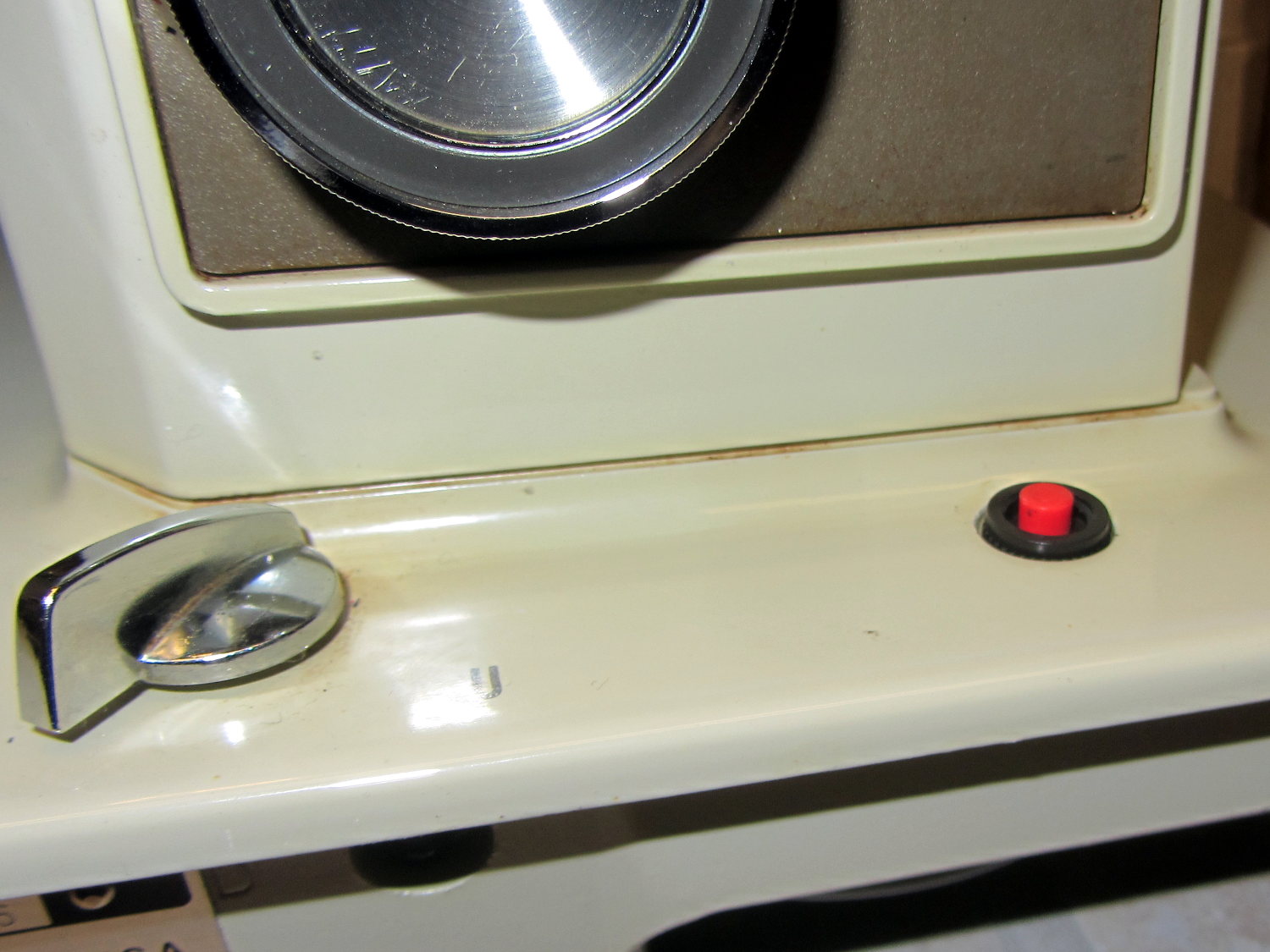
    The crash test dummy sewing machine now has a cheerful red momentary pushbutton in the same spot the original machine sported a 120 VAC push-on/push-off power switch:

    Kenmore 158 - Digital Power Switch
    Kenmore 158 – Digital Power Switch

    It’s held in place by a dab of epoxy on the bottom. The threads aren’t quite long enough to engage the ring, so another dab of epoxy holds that in place. In the unlikely event I must replace the button, I’ll deploy a punch and hammer it out from the top; the slick paint on the sides of the straight-sided hole doesn’t provide much griptivity.

    The button connects in parallel with the GX270’s front-panel button and the one on the Low Voltage Interface Board, so it operates exactly the same way. My original code didn’t include a delay before turning the power off, which meant that brushing the switch while doing something else would kill the power.

    This is not to be tolerated…

    You (well, I) must now hold the button down for one second to turn the power off. Releasing it before the deadline has no effect, other than blinking the green power LED on the front panel a few times.

    The routine maintains a timer that allows it to yield control to the mainline code, rather than depend on a blocking timer that would screw up anything else that’s in progress:

    //------------------
    // Handle shutdown timing when power button closes
    // Called every time around the main loop
    
    void TestShutdown(void) {
    	
    	if (LOW == digitalRead(PIN_BUTTON_SENSE)) {			// power button pressed?
    		if (ShutdownPending) {
    			if (1000ul < (millis() - ShutdownPending)) {
    				printf("Power going off!\r\n");
    				digitalWrite(PIN_ENABLE_AC,LOW);
    				digitalWrite(PIN_ENABLE_ATX,LOW);
    				while(true) {
    					delay(20);
    					TogglePin(PIN_PWR_G);				// show we have shut down
    				}
    			}
    		}
    		else {
    			ShutdownPending = millis();					// record button press time
    			printf("Shutdown pending...\r\n");
    		}
    	}
    	else {
    		if (ShutdownPending) {
    			ShutdownPending = 0ul;						// glitch or button released
    			printf("Shutdown cancelled\r\n");
    		}
    	}
    }
    

    The normal Arduino bootloader imposes a similar delay while turning the power on, which means that you can’t accidentally light the machine up by bumping the switch. All in all, it’s much more user-friendly this way.

  • LV Interface Board: +7 V Regulator

    This takes most of the load off the Arduino Pro Mini’s teeny SMD regulator by knocking the +12 V ATX supply down to +7 V:

    LV Power Interface - 7 V Regulator
    LV Power Interface – 7 V Regulator

    It’s on the heatsink beyond the ATX connector at the right edge of the board:

    Low Voltage Interface Board - detail
    Low Voltage Interface Board – detail

    It also provides a (more) stable voltage for the current sense amp than you can reasonably expect directly from the ATX power supply:

    Current Sense Amp - schematic
    Current Sense Amp – schematic

    Not much to it: the thing Just Works…

  • Kenmore 158: Open-Loop Current Limiting

    Although I plan to servo the motor speed to the pedal position, a quick open-loop test seems in order. The motor requires nigh onto half an amp before it can spin the sewing machine shaft, so this chunk of Arduino code scales-and-offsets ten bits of pedal position voltage into twelve bits of DAC output that produce a corresponding current limit for the motor winding:

    ADCvalue = (word)analogRead(PIN_PEDAL);
    DACvalue = map(ADCvalue,0x0100,0x03ff,0x0800,0x0fff);
    dac.setVoltage(DACvalue,false);
    

    Putting that in the Arduino’s main loop and holding the pedal down produces this pleasant result:

    Current Sense Amp vs Tek - 200 mA-div
    Current Sense Amp vs Tek – 200 mA-div

    The current sense amp output in the top trace is scaled at 525 mA/V = 525 mA/div and the bottom trace is from the Tek current probe at 200 mA/div. Fiddling with the scope’s gain & offset exactly overlays the two traces and they remain overlaid through the full pedal travel, so the ferrite toroid isn’t saturating and the output remains nicely linear.

    The flat tops in that picture show the ET227 transistor limiting the motor current to 600 mA, exactly the way it should.

    Of course, the LM324 has a GBW = 1 MHz and, with a gain of three, a bandwidth of barely 300 kHz, so there’s a distinct lack of fuzz on that trace compared to the Tek probe’s 10 MHz bandwidth.

    It’s easy to hold the sewing machine at a constant speed with a constant load, but touching the handwheel stalls the motor at a constant pedal position. Similarly, releasing the handwheel causes a runaway, unless I let up on the pedal fairly quickly.

    Setting the Tek probe to 500 mA/div and triggering on a somewhat higher current while stomping on the pedal and grabbing the sewing machine’s handwheel shows the current increasing with the motor under heavier load:

    Model 158 - Current sense vs Tek 500 mA-div
    Model 158 – Current sense vs Tek 500 mA-div

    The current limit reaches just under 2 A, over on the right side, for both traces.

    So the hardware works pretty much the way it should.

    Wheee-hooo!

  • Hall Effect Motor Current Sensing

    Given that the motor current amounts to maybe 3 A, absolute maximum, with a locked rotor, those skinny wires on the slit ferrite toroid won’t pose a problem:

    HV Interface board - detail
    HV Interface board – detail

    I really like how that 3D printed armor worked out, even if I still haven’t poured any goop around the windings to lock them down; they’re held in by raw faith and friction.

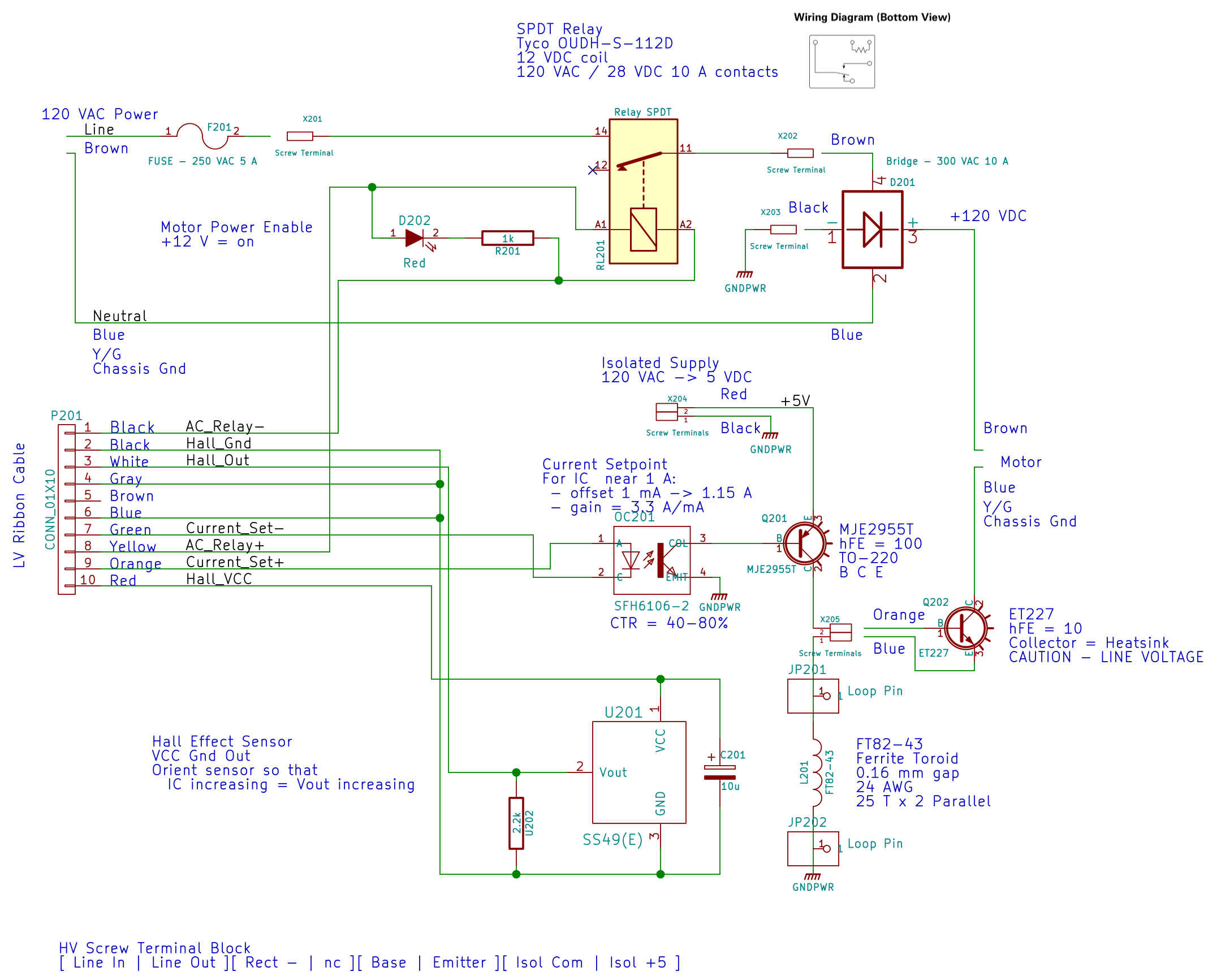
    The current sense circuitry appears along the bottom of the AC Power Interface schematic:

    AC Power Interface
    AC Power Interface

    The differential amplifier lives on the Low Voltage Interface board, forming the clump of parts just in front of the LM324 op amp on the left:

    Low Voltage Interface Board - detail
    Low Voltage Interface Board – detail

    Which has the usual handful of components required to get anything done in the analog realm:

    Current Sense Amp - schematic
    Current Sense Amp – schematic

    The power supplies come directly from the ATX connector. I’m ignoring the whole decoupling issue, because the supplies have essentially no load (and it’s all DC, anyway).

    The trim pot sets the offset voltage to bring the Hall effect sensors’s VCC/2 offset down close to zero; the 100 mV figure is nominal, not actual, but should be a bit over 0 V to allow for a wee bit o’ drift. This time around, I’ll measure and subtract the actual offset, rather than (try to) auto-zero it.

    The voltage gain runs just under 3, set by 1% resistors from the heap. The overall gain works out to about 1.9 V/A or 525 mA/V, setting the high end at 5 V to a scant 2.6 A. Subject to actual calibration with more attention to detail, that’s close enough; we’re more interested in the around-an-amp range where the motor operates under nominal load.

    The nose-to-tail Schottky diodes clamp the op amp output to avoid annoying the Arduino’s ADC input. It has protection circuitry, too, but there’s no point in stressing it.

  • Optoisolated ET227 Transistor Driver

    Because the ET227 transistor operates at power line voltages through a full wave rectifier, the base drive circuit requires an optoisolator. The ET227 is a low-gain device with hFE < 10, so it takes about 100 mA of base drive to control an amp of motor current, soooo the optoisolator needs a current amplifier.

    I used an MJE2955T PNP transistor, with the emitter powered from an isolated +5 V supply to let the optoisolator pull current from the base. You could use an NPN transistor as a Darlington amp, but wiring the collectors together means the driver dissipates way too much power; the PNP seemed all-around easier.

    That circuitry sprawls across the middle of the schematic:

    AC Power Interface
    AC Power Interface

    The ET227 base runs at about 900 mV, so the MJE2955 PNP transistor will dissipate half a watt and needs a little heatsink, seen over on the right (with the hulking ET227 heatsink at the edge):

    HV Interface board - detail
    HV Interface board – detail

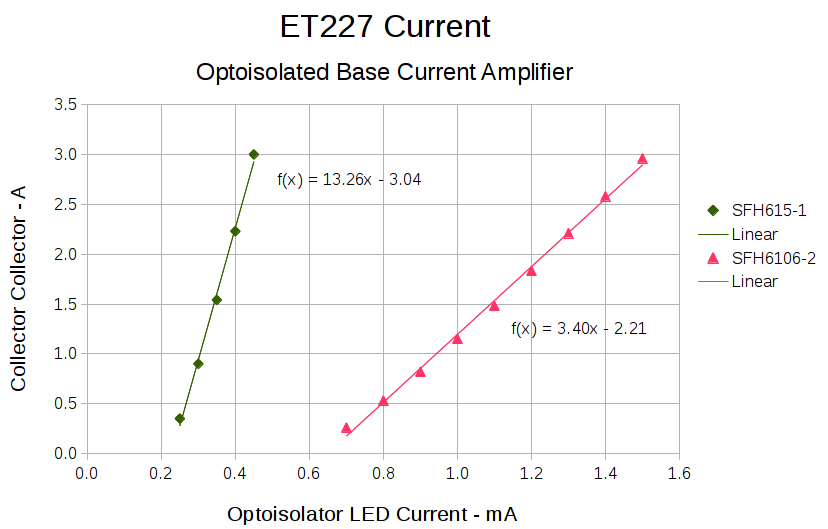
    With all those parts safely secured, I ran some end-to-end current measurements from the optoisolator’s LED to the ET227’s collector current, with a safe 10 VDC applied to the collector:

    ET227 - base drive - optoisolators
    ET227 – base drive – optoisolators

    It’s worth noting that the two optoisolators have different pinouts. The DIP socket has wiring for both of ’em, so I could swap the two without rewiring the board. No, I didn’t notice that the first time around.

    The curves are nicely linear above 250 mA, which is about what you’d expect for bipolar transistors driven from a current source. Below that, the current into the 13 Ω base-emitter resistor starts to overwhelm the actual base junction current and makes the curves all bendy. Given that the motor doesn’t start spinning the sewing machine with less than half an amp, that region doesn’t matter.

    It’s also worth noting that the ET227 normally sees tens of amps (!) into the base terminal to control up to 200 A pulsed collector current with up to 1 kV collector voltage. That puppy loafs along here…

    The ratio between the isolator gains doesn’t match the ratio between the spec sheet values, so maybe they’re mismarked or I (once again) have an outlier. In any event, there’s no point in getting too fussy, because the transistor gains depend strongly on temperature. I picked the lower-gain SFH6106-2 for more headroom, but it probably doesn’t make much difference.

    The voltage-to-current circuitry driving the optoisolator’s LED lives on the Low Voltage Interface board, with the MCP4725 DAC breakout board above the Arduino Pro Mini and the rest just beyond the LM324 op amp over on the left:

    Low Voltage Interface Board - detail
    Low Voltage Interface Board – detail

    There’s nothing much to it:

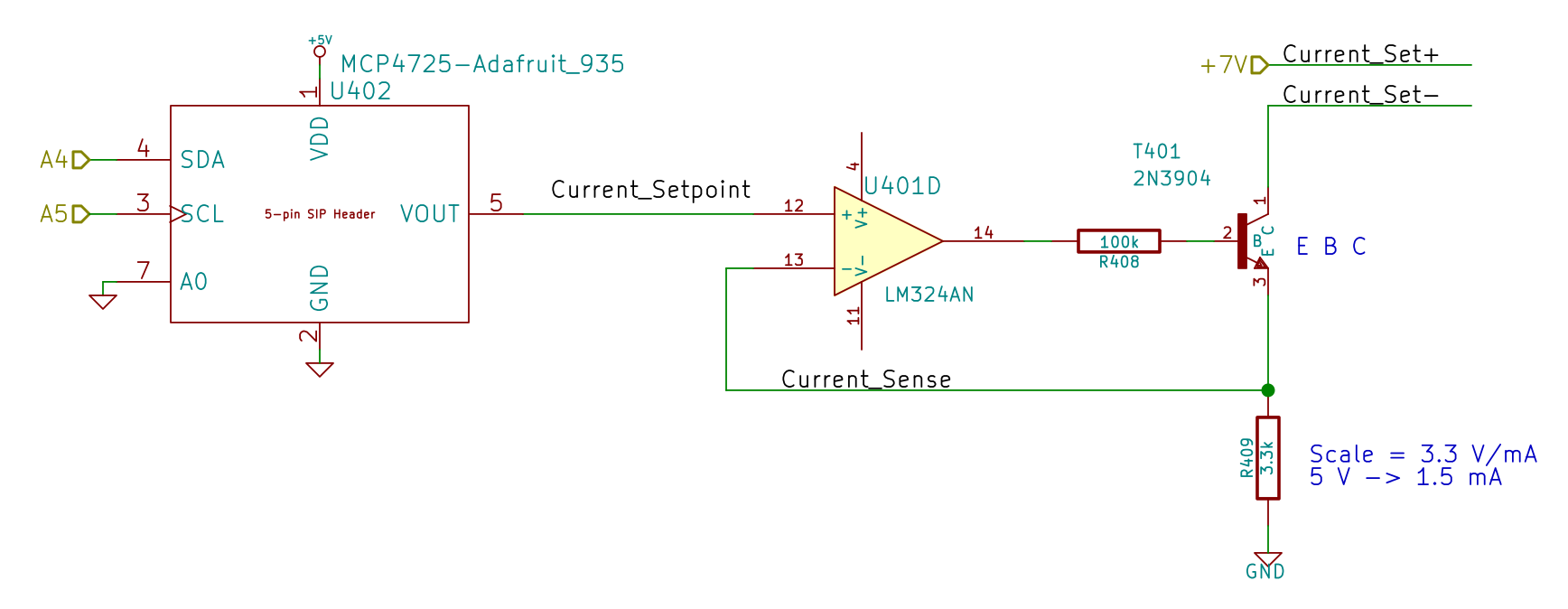
    Current Control DAC and Driver - schematic
    Current Control DAC and Driver – schematic

    I finally broke down and got some of Adafruit’s nice MCP4725 I2C DAC breakout boards: 12 bits, rail-to-rail output, no PWM ripple. What’s not to like?

    R409 scales the gain so that +5 V tops out around 1.5 mA, which should deliver a collector current around 3 A: far more than seems absolutely necessary. R408 lets the op amp develop some voltage while trickling a few dozen microamps into the 2N3904’s base; the hFE runs around 50, so the error due to base current amounts to maybe 2% and, remember, the final current depends on the temperature anyway.

    It’s getting closer to working…