The Smell of Molten Projects in the Morning

Ed Nisley's Blog: Shop notes, electronics, firmware, machinery, 3D printing, laser cuttery, and curiosities. Contents: 100% human thinking, 0% AI slop.

Tag: Arduino

All things Arduino

  • Generic AD9850 DDS Modules: Beware Swapped D7 and GND Pins!

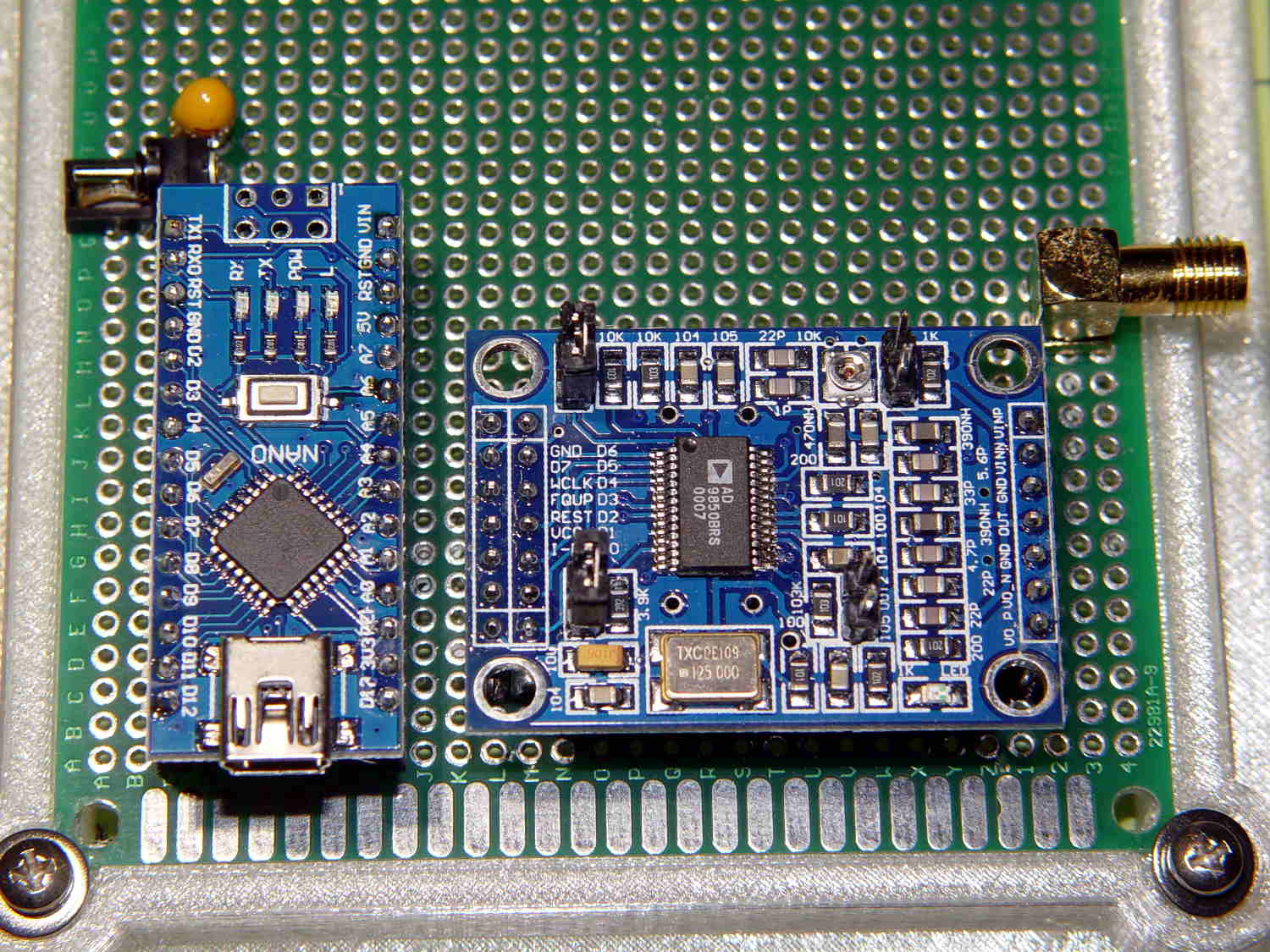
    Compare this picture:

    AD9850 DDS Module - swapped GND D7 pins
    AD9850 DDS Module – swapped GND D7 pins

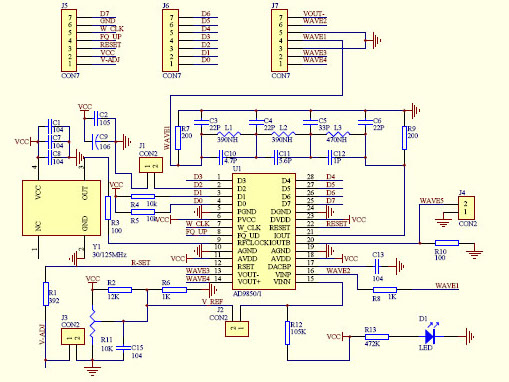
    … with any of the doc for the generic AD8950/51 DDS modules you’ll find out on the Interwebs. This snippet from the seller’s schematic will suffice:

    AD9850 module schematic - cropped
    AD9850 module schematic – cropped

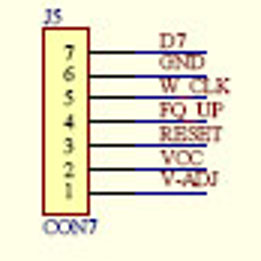
    Here’s a closer look at the 2×7 header in the upper left corner:


    AD9850 module schematic - J5 detail
    AD9850 module schematic – J5 detail

    Don’t blame me for the blur, the schematic is a JPG.

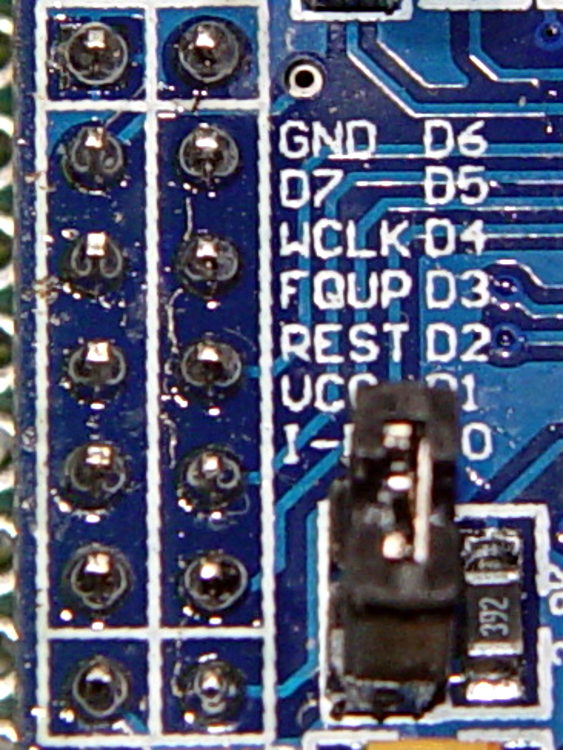
    Compared it with the board in hand:

    AD9850 DDS Module - swapped GND D7 pins - detail
    AD9850 DDS Module – swapped GND D7 pins – detail

    Yup, the D7 and GND pins are reversed.

    Some careful probing showed the silkscreen is correct: the pins are, in fact, correctly labeled.

    Should you be laying out a PCB in the expectation of using any DDS module from the lowest-price supplier, remember this high truth: Hell hath no fury like that of an unjustified assumption.

    Fortunately, I’m hand-wiring the circuit and caught it prior to the smoke test.

  • Arduino Joystick

    A bag of sub-one-dollar resistive joysticks arrived from halfway around the planet:

    Arduino UNO - resistive joystick
    Arduino UNO – resistive joystick

    A quick-and-dirty test routine showed the sticks start out close to VCC/2:

    Welcome to minicom 2.7
    
    OPTIONS: I18n
    Compiled on Feb  7 2016, 13:37:27.
    Port /dev/ttyACM0, 10:23:45
    
    Press CTRL-A Z for help on special keys
    
    Joystick exercise
    Ed Nisley - KE4ZNU - May 2017
    00524 - 00513 - 1
    

    That’s from minicom on the serial port, as the Arduino IDE’s built-in serial monitor ignores bare Carriage Return characters.

    The joystick hat tilts ±25° from its spring-loaded center position, but the active region seems to cover only 15° of that arc, with a 5° dead zone around the center and 5° of overtravel at the limits. This is not a high-resolution instrument intended for fine motor control operations.

    The analog input values range from 0x000 to 0x3FF across the active region. Aim the connector at your tummy to make the axes work the way you’d expect: left / down = minimum, right / up = maximum.

    The delay(100) statements may or may not be needed for good analog input values, depending on some imponderables that seem not to apply for this lashup, but they pace the loop() to a reasonable update rate.

    Pushing the hat toward the PCB activates the simple switch you can see in the picture. It requires an external pullup resistor (hence the INPUT_PULLUP configuration) and reports low = 0 when pressed.

    Those are 0.125 inch (exactly!) holes on a 19.5×26.25 mm grid in a 26.5×34.25 mm PCB. Makes no sense to me, either.

    The trivial Arduino source code as a GitHub Gist:

    // Joystick exercise
    #define JOYX A0
    #define JOYY A1
    #define BUTTON 7
    int JoyX,JoyY;
    boolean Button;
    //– Helper routine for printf()
    int s_putc(char c, FILE *t) {
    Serial.write(c);
    }
    void setup() {
    Serial.begin (9600);
    fdevopen(&s_putc,0); // set up serial output for printf()
    Serial.println ("Joystick exercise");
    Serial.println ("Ed Nisley – KE4ZNU – May 2017");
    pinMode(BUTTON,INPUT_PULLUP);
    }
    void loop() {
    JoyX = analogRead(JOYX);
    delay(100);
    JoyY = analogRead(JOYY);
    delay(100);
    Button = digitalRead(BUTTON);
    printf("%05d – %05d – %1d\r",JoyX,JoyY,Button);
    }
  • Arduino vs. Significant Figures: BigNumber Library

    The BigNumber library wraps the bc arbitrary precision calculator into a set of Arduino routines that seem like a reasonable basis for DDS calculations requiring more than the half-dozen digits of a floating point number or the limited range of scaled fixed point numbers tucked into an long int.

    Treating programming as an experimental science produces some Arduino source code and its output as a GitHub Gist:

    // BigNumber exercise
    #include "BigNumber.h"
    //– Helper routine for printf()
    int s_putc(char c, FILE *t) {
    Serial.write(c);
    }
    void setup ()
    {
    Serial.begin (115200);
    fdevopen(&s_putc,0); // set up serial output for printf()
    Serial.println ("BigNumber exercise");
    Serial.println ("Ed Nisley – KE4ZNU – April 2017");
    #define WHOLES 10
    #define FRACTS 10
    printf("Fraction digits: %d\n",FRACTS);
    BigNumber::begin (FRACTS);
    char *pBigNumber;
    #define BUFFLEN (WHOLES + FRACTS)
    char NumString[BUFFLEN];
    BigNumber Tenth = "0.1"; // useful constants
    BigNumber Half = "0.5";
    BigNumber One = 1;
    BigNumber Two = 2;
    BigNumber ThirtyTwoBits = Two.pow(32);
    Serial.println(ThirtyTwoBits);
    BigNumber Oscillator = "125000000";
    Serial.println(Oscillator);
    BigNumber HertzPerCount;
    HertzPerCount = Oscillator / ThirtyTwoBits;
    Serial.println(HertzPerCount);
    BigNumber CountPerHertz;
    CountPerHertz = ThirtyTwoBits / Oscillator;
    Serial.println(CountPerHertz);
    BigNumber TestFreq = "60000";
    Serial.println(TestFreq);
    BigNumber DeltaPhi;
    DeltaPhi = TestFreq * CountPerHertz;
    Serial.println(DeltaPhi);
    long DeltaPhiL;
    DeltaPhiL = DeltaPhi;
    printf("Long: %ld\n",DeltaPhiL);
    Serial.println("0.1 Hz increment …");
    Serial.println(TestFreq + Tenth);
    DeltaPhi = (TestFreq + Tenth) * CountPerHertz;
    Serial.println(DeltaPhi);
    TestFreq = DeltaPhi * HertzPerCount;
    Serial.println(TestFreq);
    Serial.println("Rounding DeltaPhi up …");
    DeltaPhi += Half;
    Serial.println(DeltaPhi);
    TestFreq = DeltaPhi * HertzPerCount;
    Serial.println(TestFreq);
    pBigNumber = DeltaPhi.toString();
    printf("String: %04x → %s\n",pBigNumber,pBigNumber);
    free(pBigNumber);
    DeltaPhiL = DeltaPhi;
    printf("Unsigned: %ld\n",DeltaPhiL);
    pBigNumber = "59999.9";
    TestFreq = pBigNumber;
    Serial.println(TestFreq);
    DeltaPhi = TestFreq * CountPerHertz;
    Serial.println(DeltaPhi);
    Serial.println("Rounding DeltaPhi up …");
    DeltaPhi = TestFreq * CountPerHertz + Half;
    Serial.println(DeltaPhi);
    DeltaPhiL = DeltaPhi;
    int rc = snprintf(NumString,BUFFLEN,"%ld",DeltaPhiL);
    if (rc > 0 && rc < BUFFLEN) {
    printf("String length: %d\n",rc);
    }
    else {
    printf("Whoops: %d for %ld\n",rc,DeltaPhiL);
    strncpy(NumString,"123456789",sizeof(NumString));
    NumString[BUFFLEN-1] = 0;
    printf(" forced: %s\n",NumString);
    }
    printf("Back from string [%s]\n",NumString);
    DeltaPhi = NumString;
    Serial.println(DeltaPhi);
    TestFreq = DeltaPhi * HertzPerCount;
    Serial.println(TestFreq);
    }
    void loop () {
    }
    view raw BigNumTest.ino hosted with ❤ by GitHub
    BigNumber exercise
    Ed Nisley – KE4ZNU – April 2017
    Fraction digits: 10
    4294967296
    125000000
    0.0291038304
    34.3597383680
    60000
    2061584.3020800000
    Long: 2061584
    0.1 Hz increment …
    60000.1000000000
    2061587.7380538368
    60000.0998830384
    Rounding DeltaPhi up …
    2061588.2380538368
    60000.1144349536
    String: 045e → 2061588.2380538368
    Unsigned: 2061588
    59999.9
    2061580.8661061632
    Rounding DeltaPhi up …
    2061581.3661061632
    String length: 7
    Back from string [2061581]
    2061581
    59999.9037798624
    view raw BigNumTest.txt hosted with ❤ by GitHub

    All that happened incrementally, as you might expect, with the intent of seeing how it works, rather than actually doing anything.

    Some musings, in no particular order:

    The library soaks up quite a hunk of program space:

    Sketch uses 13304 bytes (43%) of program storage space. Maximum is 30720 bytes.
    

    I think you could cut that back a little by eliminating unused bc routines, like square root / exponential / modulus.

    That test code also blots up quite a bit of RAM:

    Global variables use 508 bytes (24%) of dynamic memory, leaving 1540 bytes for local variables. Maximum is 2048 bytes.
    

    All the BigNumber variables live inside the setup() function (or whatever it’s called in Arduino-speak), so they count as local variables. They’re four bytes each, excluding the dynamically allocated storage for the actual numbers at roughly a byte per digit. With 10 decimal places for all numbers, plus (maybe) an average of half a dozen integer digits, those ten BigNumbers soak up 200 = 10 × (4 + 16) bytes of precious RAM.

    You can load a BigNumber from an int (not a long) or a string, then export the results to a long or a string. Given that controlling a DDS frequency with a knob involves mostly adding and subtracting a specific step size, strings would probably work fine, using snprintf() to jam the string equivalent of a long into a BigNumber as needed.

    You must have about ten decimal places to hold enough significant figures in the HertzPerCount and CountPerHertz values. The library scale factor evidently forces all the numbers to have at least that many digits, with the decimal point stuck in front of them during string output conversions.

    The biggest integers happen in the Oscillator and ThirtyTwoBits values, with 9 and 10 digits, respectively.

    It looks useful, although I’m uncomfortable with the program space required. I have no way to estimate the program space for a simpleminded DDS controller, other than knowing it’ll be more than I estimate.

    While poking around, however, I discovered the Arduino compiler does provide (limited) support for long long int variables. Given a 64 bit unit for simple arithmetic operations, a simpler implementation of fixed point numbers may be do-able: 32 bits for the integer and fraction should suffice! More on that shortly.

  • 3D Printer Design Conversation: Part 5

    The final installment of musings about building a large-format 3D printer …

    (Continued from yesterday)

    Perhaps they saw your blog post?

    The old-old (original) high-resistance Kysan motor costs something like $45 and, apart from minor cosmetic differences, looks /exactly/ the same as the old-new low-resistance motor. If you were picking motors and didn’t quite understand why you needed a low-resistance winding, which would you pick? Hence, my insistence on knowing the requirements before plunking down your money.

    To be fair, I didn’t understand that problem until the Thing-O-Matic rubbed my nose in it. With all four motors. Vigorously.

    So, yeah, I think I had a part in that.

    comes back to the same numbers over and over

    The new-new leadscrews have something like half the pitch of the old-new and old-old threads; I don’t recall the number offhand. In any event, that gives you twice the number of motor steps per millimeter of motion and roughly twice the lifting force. This is pretty much all good, even though it may reduce the maximum Z axis speed (depends on your settings & suchlike).

    When it moves upward by, say, 5 mm and downward by 5 mm, you’re measuring position repeatability. That level of repeatability is pretty much a given (for the M2, anyhow), but it doesn’t involve stiction & suchlike.

    Can you move the platform up by 0.01 mm, then down by 0.01 mm, and measure 0.01 mm change after each motion?

    Do larger increments track equally well in both directions?

    Move upward a few millimeters, then step downward by 0.01 mm per step. Does the measurement increase by 0.01 mm after each step?

    Repeat that by moving downward, then upward in 0.01 mm increments.

    If the platform moves without backlash & stiction in both directions with those increments, it’s a definite improvement.

    I wish I knew more
    everything you learned is burned into your head forever

    The way to learn more is exactly what you’re doing.

    Two things I learned a long time ago:

    1. Whenever you have two numbers, divide them and ask whether the ratio makes sense.

    2. Whenever you don’t understand a problem, do any part of it you do understand, then look at it again.

    Also, write everything down. When you come back later, you won’t remember quite how you got those results.

    Which is precisely why I have a blog. I search with Google (site:softsolder.com microstepping) and /wham/ I get a quick refresher on what I was thinking. That’s why I keep link-whoring URLs: that’s my memory out there!

    You’ll sometimes find scans of my scrawled notes & doodles. They won’t mean anything to you, but they remind me what I do to get the answers in that blog post.

    modern controllers utilize much higher voltage and current bursts

    More or less. Microstepping drivers apply a relatively high voltage, far in excess of what the winding can tolerate as a DC voltage, then regulate the current to a value that produces the appropriate waveform.

    This may be helpful:

    https://softsolder.com/2011/05/05/thing-o-matic-mbi-stepper-motor-analysis/

    The mass of the bed APPEARS to be cancelling out any magnetic or mechanical stiction.

    That can’t be true in both directions: the gravity vector points downward and the results aren’t symmetric. I think you’re reading noise. If the sequences of motions I described don’t produce the results I described, then you’re /definitely/ measuring noise.

    From back in the Thing-O-Matic days:

    https://softsolder.com/2011/05/22/thing-o-matic-z-axis-resolution-repeatability-backlash/

    E3D hot end setups vs MakerGear’s?

    No opinion.

    I’d want that groovemount post in an all-metal socket, though, rather than the traditional plastic, to get solid positioning and tolerance control. Makergear has the right idea with the aluminum V4 heater block mount.
  • 3D Printer Design Conversation: Part 4

    Continued musings about building a large-format 3D printer …

    (Continued from yesterday)

    taking your challenge and am starting by cloning the M2

    That gives you an existence theorem: you know exactly what you want to end up with.

    AFAICT, few of the M2’s parts bear standardized numbers you can simply order from a reputable seller. Makergear knows what it’s buying (obviously!), but they’re under no obligation to help out: you must reverse engineer the requirements, find a suitable part, find a supplier, then buy one item.

    Let me know how that works out for cost & performance; “cost” should include a nonzero value for your time and “performance” should have numbers you can verify. I (obviously) think the build will be a dead loss on both counts (*), but good data will be interesting.

    (*) Albeit useful for educational purposes, which I’ve used to justify many absurd projectst!

    How the heck do you read out the current (estimated, obviously) X Y Z position absolute to the machine coordinates?

    Perhaps M114 or M117?

    My overall list may be helpful, although the RepRap Marlin reference has more detail on their command set:

    https://softsolder.com/2013/03/14/g-code-and-m-code-grand-master-list/

    The LinuxCNC (and, perhaps, Machinekit) G-Code languages give you access to built-in variables and extend G-Code into a true scripting language. Marlin evolved differently and doesn’t support that sort of thing.

    G-Code is pretty much a write-only language, but you can do some interesting things:

    https://softsolder.com/2013/07/18/makergear-m2-cnc-platform-corner-clips/

    I use the gcmc compiler whenever I can for actual CNC machining:

    https://softsolder.com/2014/02/21/can-opener-gear-rebuild/

    Works for me, anyhow, although I don’t do much CNC these days.

    move my nozzle up .01 at a time

    Stiction / microstep errors / command resolution prevent that:

    Makergear M2 Z-axis Backlash Numbers

    The only way to measure the nozzle position is to measure a finished part with a known height, because any variation comes from the first layer offset. That’s if you have Z=0 at the platform, of course, rather than whatever offset you get by defining Z=0 at some random height based on jamming business cards / feeler gages / special Japanese rolling papers under the snout. [ptui & similar remarks]

    For example:

    https://softsolder.com/2015/09/14/makergear-m2-platform-stability/

    You need numbers. Lots of numbers. [grin]

    strip basic tools out of the control interface

    Yet another reason I don’t use S3D: that “Simplify” thing gets in the way of my obsessive need for control.

    (Continues tomorrow)

  • 3D Printer Design Conversation: Part 3

    More musings in response to questions about building a large-format 3D printer.

    (Continued from yesterday)

    make a direct clone of the M2. No thinking required.

    The present-day M2 has survived four years of rather fierce Darwininan winnowing, so it’s a much better thought-out product than, ahem, you may think just by looking at it.

    To build a one-off duplicate, you’ll spend as much money collecting the parts as you would to just buy another M2 and start printing.

    Should you buy cheap parts to save money, without considering the requirements, you’ll get, say, the same Z-axis motor Makergear used on the original M2, the complete faceplant of Thing-O-Matic electronics, or crap from eBay described as being kinda-sorta what you want.

    Sometimes crap from eBay can be educational, of course:

    https://softsolder.com/2013/01/24/hall-effect-sensors-from-ebay-variations-on-a-specification/

    I encourage thinking, particularly with numbers, because it leads to understanding, rather than being surprised by the results.

    increase the rigidity of the X and Y axis

    In round numbers, deflection varies as the fourth power of length: enlarge a frame member by 50% and it becomes five times bendier. If your design simply scales up the frame, it won’t hold the tolerances required to produce a good object.

    https://en.wikipedia.org/wiki/Euler%E2%80%93Bernoulli_beam_theory

    If you add more mass (“stiffening”) to the Y axis, then the Z axis motor (probably) can’t accelerate the new load upward with the original firmware settings and the Y axis motor may have trouble, too. Perhaps you should measure the as-built torque to support your design:

    https://softsolder.com/2013/07/02/makergear-m2-better-z-axis-motor-calculations/

    Reduce the acceleration and lower the print speed? Use bigger motors (if you can find a Z motor with the correct leadscrew) and lose vertical space? Make the frame taller and lose stiffness? Use two Z motors (like the RepRap Mendels) and get overconstrained vertical guides? Try building a kinematic slide and lose positioning accuracy? Your choice!

    If your intent is to print more parts at once, buy more M2 printers, which will not only be cheaper, but also give you more throughput, lower the cost of inevitable failures, good redundancy, and generally produce better results. Some of the folks on the forum run a dozen M2s building production parts; they’re not looking for bigger print volumes to wreck more parts at once.

    Conversely, if your intent is to learn how to build a printer, then, by all means, think about the design, run the numbers, collect the parts, then proceed. It sounds like a great project with plenty of opportunity for learning; don’t let me discourage you from proceeding!

    However, I’ll be singularly unhelpful with specific advice, because I’m not the guy building the printer. You must think carefully about what you want to achieve, figure out how to get there, and make it happen.

    To a large extent, searching my blog with appropriate keywords will tell you exactly what I think about 3D printing, generally with numbers to back up the conclusions. Get out your calculator, fire up your pencil, and get started!

    (Continues tomorrow)

  • 3D Printer Design Conversation: Part 2

    Wherein I continue dumping my responses to a large-format 3D printer project …

    (Continued from yesterday)

    What do you mean by 12 hour mean time to failure

    In round numbers, the cries of anguish on the M2 forum seem to increase as parts require more than a dozen hours from start to finish; while you can print things that require 48 hours, that’s not the way to bet. There are more ways for things to go wrong than for them to go right, given the rather rickety collection of software & firmware making everything happen, plus the gummy nature of squeezing hot plastic into precise heaps.

    Most of the time, it works fine.

    much cheaper hardened polished rod system that the taz 6 uses?

    Unless they’re doing something non-obvious to make a kinematic assembly, two rods on four hard mounts with four one-degree-of-freedom slides will be severely overconstrained and, I expect, a continuing hunk o’ trouble:

    https://softsolder.com/2011/02/04/thing-o-matic-x-and-z-axis-rod-alignment/

    FWIW, linear slides don’t eliminate the need for a rigid and well-aligned frame. Even the slab atop an M2 can deform by more than 0.1 mm under belt tension, which is enough to wreck the nozzle-to-platform alignment across the length of the X axis.

    “Arduino-class firmware (Marlin, et. al.) is a dead end” Why is that?

    Marlin is a dead end: they’re trying to jam hard real time motor control, soft real time command parsing, and non real time UI control into an 8 bit microcontroller teleported from the mid 90s. AVR microncontrollers worked really well up through the Cupcake and have held back printer design & performance ever since.

    Which inexpensive all in one board would you go with

    Machinekit on a Beaglebone seems to be the least awful of the current alternatives, but I haven’t examined the field recently enough to have a valid opinion. You’ll find plenty of proprietary “solutions” out there, none of which I’d be interested in.

    Am I wrong?

    I think so, but, then, I may be wrong, too. [grin]

    It’s incredibly easy to slap together a bunch of parts that look like they should become a 3D printer. It’s remarkably difficult to engineer a reliable, stable, accurate device that actually produces dependable results.

    Mooching design cues and parts from here & there doesn’t get you to the goal; if it did, Kickstarter wouldn’t be a graveyard of cheap 3D printer projects.

    design a very rigid system for cheap

    If it’s for your personal satisfaction, have at it, but a one-off large-format printer won’t be any cheaper than, say, a Taz 6. Some diligent searching will uncover any number of homebrew printer projects along the lines of what you’re considering; learning from their mistakes will certainly be edifying.

    Anything is possible, but if you want to end up with a state of the art machine, you must begin with numbers showing how & why it actually meets the requirements. 3D printing now operates at accuracies, speeds, and controls comparable to CNC machines, with corresponding structural demands. There’s a reason high-end CNC machines aren’t made of sheet metal and don’t use 8 bit microcontrollers.

    You might want to start at the beginning of my blog and read through my adventures with the Thing-O-Matic, which will explain why I’m such a curmudgeon …

    (Continues tomorrow)