The Smell of Molten Projects in the Morning

Ed Nisley's Blog: Shop notes, electronics, firmware, machinery, 3D printing, laser cuttery, and curiosities. Contents: 100% human thinking, 0% AI slop.

Category: Software

General-purpose computers doing something specific

  • Raspberry Pi Swap File Size

    As part of some protracted flailing around while trying to get GNU Radio running on a Raspberry Pi 3, I discovered Raspbian defaults to a 100 MB swap file, rather than a swap partition, and everything I thought I knew about swap management seems inoperative. The key hint came from some notes on gr-gsm installation.

    Tweak the /etc/dphys-swapfile config file to set CONF_SWAPFACTOR=2 for a 2 GB swap file = twice the size of the Pi’s 1 GB memory.

    Start it up:

    sudo dphys-swapfile swapoff
    sudo dphys-swapfile setup
    sudo dphys-swapfile swapon
    

    And verify it worked:

    cat /proc/meminfo 
    MemTotal:         949580 kB
    MemFree:          194560 kB
    MemAvailable:     594460 kB
    Buffers:           85684 kB
    Cached:           377276 kB
    SwapCached:            0 kB
    Active:           600332 kB
    Inactive:         104668 kB
    Active(anon):     250408 kB
    Inactive(anon):    20688 kB
    Active(file):     349924 kB
    Inactive(file):    83980 kB
    Unevictable:           0 kB
    Mlocked:               0 kB
    SwapTotal:       1918972 kB
    SwapFree:        1918972 kB
    Dirty:                40 kB
    Writeback:             0 kB
    AnonPages:        242072 kB
    Mapped:           136072 kB
    Shmem:             29060 kB
    Slab:              33992 kB
    SReclaimable:      22104 kB
    SUnreclaim:        11888 kB
    KernelStack:        1728 kB
    PageTables:         3488 kB
    NFS_Unstable:          0 kB
    Bounce:                0 kB
    WritebackTmp:          0 kB
    CommitLimit:     2393760 kB
    Committed_AS:     947048 kB
    VmallocTotal:    1114112 kB
    VmallocUsed:           0 kB
    VmallocChunk:          0 kB
    CmaTotal:           8192 kB
    CmaFree:            6796 kB
    

    Then it became possible to continue flailing …

  • Prototype Board Holder: Now With Mounting Holes and Common Board Sizes

    The folks I’ve been coaching through their plotter build project showed it off at the local MiniMakerFaire this past weekend. Next time around, I’ll insist they secure their circuit boards and use good wiring techniques, so as to avoid destroying more stepper drivers.

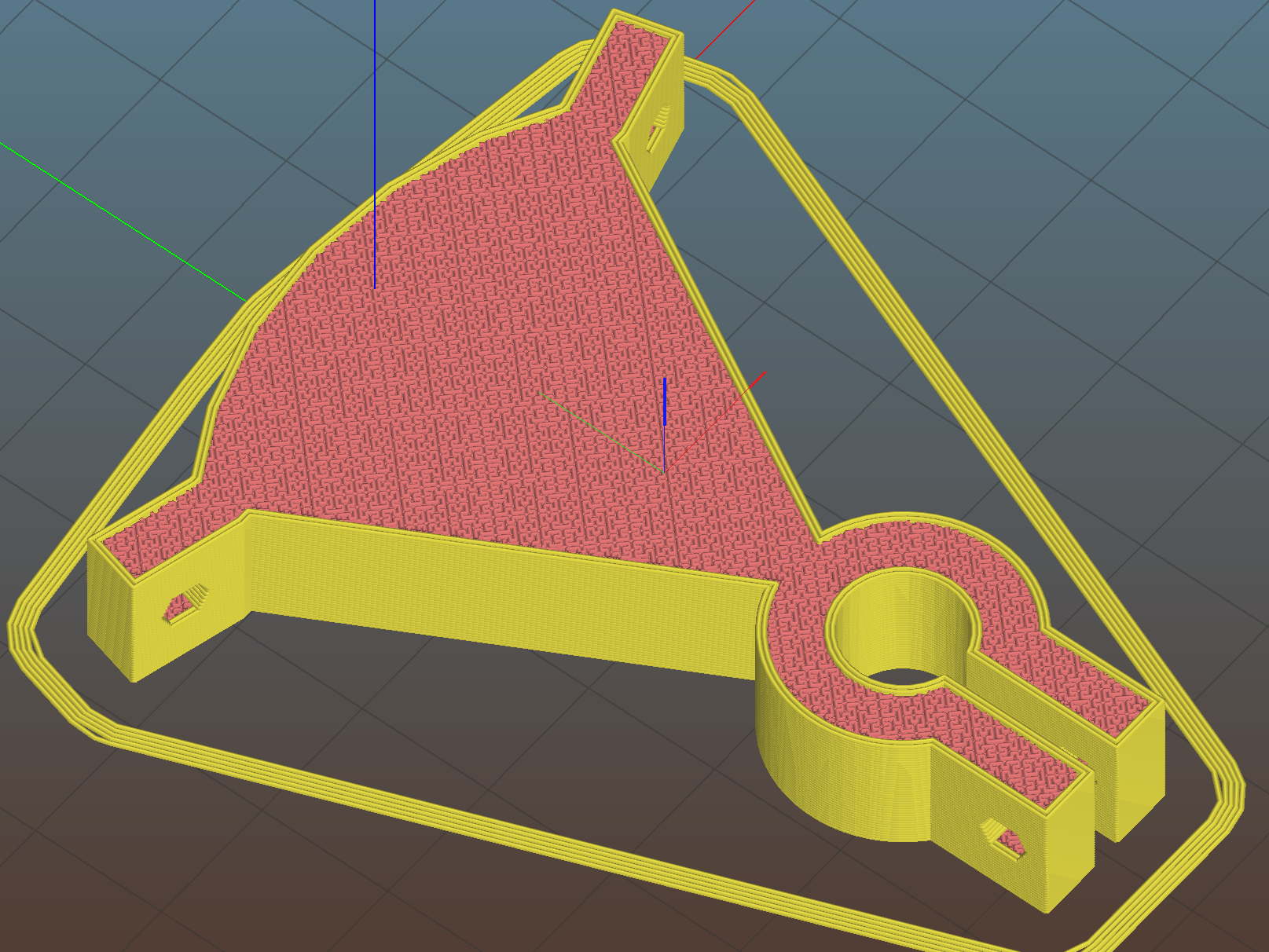
    To that end, adding mounting holes to my proto board holder seems in order:

    Proto Board Holder 90x70 - Flange mounting holes - Slic3r preview
    Proto Board Holder 90×70 – Flange mounting holes – Slic3r preview

    The board dimensions now live in an associative array, so you just pick the board name from a Configurator drop-down list:

    /* [Options] */
    
    PCBSelect = "ArdUno"; // ["20x80","40x60","30x70","50x70","70x90","80x120","ArdDuemil","ArdMega","ArdPro","ArdUno","ProtoneerCNC"]
    
    PCB_NAME = 0;
    PCB_DIMENSION = 1;
    
    PCBSizes = [
      ["40x60",[40,60,1.6]],
      ["30x70",[30,70,1.6]],
      ["50x70",[50,70,1.6]],
      ["20x80",[20,80,1.6]],
      ["70x90",[70,90,1.6]],
      ["80x120",[80,120,1.6]],
      ["ArdDuemil",[69,84,1.6]],
      ["ArdMega",[102,53.5,1.6]],
      ["ArdPro",[53,53.5,1.6]],
      ["ArdUno",[69,53.1,1.6]],
      ["ProtoneerCNC",[69,53.1,1.6]],
    ];
    

    Which seems easier than keeping track of the dimensions in comments.

    You can now put the PCB clamp screws and mounting holes on specific corners & sides, allowing oddball locations for Arduino boards with corner cutouts along the right edge:

    Proto Board Holder ArdUno - Slic3r preview
    Proto Board Holder ArdUno – Slic3r preview

    A “selector” notation separates the hole location from the board dimensions & coordinates:

    ScrewSites = [
    //  [-1,1],[1,1],[1,-1],[-1,-1],        // corners
    //  [-1,0],[1,0],[0,1],[0,-1]           // middles
      [-1,1],[-1,-1],[1,0]                  // Arduinos
    ];
    

    Might not be most obvious way, but it works for me. Most of the time, corner clamps seem just fine, so I’m not sure adding the clamp and mounting hole locations to the dimension array makes sense.

    The OpenSCAD source code as a GitHub Gist:

    // Test support frame for proto boards
    // Ed Nisley KE4ZNU – Jan 2017
    // June 2017 – Add side-mount bracket, inserts into bottom
    // 2017-11 – Selectable board sizes, chassis mounting holes
    /* [Options] */
    PCBSelect = "ArdUno"; // ["20×80","40×60","30×70","50×70","70×90","80×120","ArdDuemil","ArdMega","ArdPro","ArdUno","ProtoneerCNC"]
    Layout = "Frame"; // [Frame, Bracket]
    ClampFlange = true; // external flange
    Mounts = true; // frame to chassis screw holes
    Channel = false; // wiring channel cutout
    WasherRecess = false; // cutout around screw head
    /* [Extrusion parameters] */
    ThreadThick = 0.25; // [0.15, 0.20, 0.25]
    ThreadWidth = 0.40;
    function IntegerMultiple(Size,Unit) = Unit * ceil(Size / Unit);
    /* [Hidden] */
    Protrusion = 0.1;
    HoleWindage = 0.2;
    inch = 25.4;
    Tap4_40 = 0.089 * inch;
    Clear4_40 = 0.110 * inch;
    Head4_40 = 0.211 * inch;
    Head4_40Thick = 0.065 * inch;
    Nut4_40Dia = 0.228 * inch;
    Nut4_40Thick = 0.086 * inch;
    Washer4_40OD = 0.270 * inch;
    Washer4_40ID = 0.123 * inch;
    Tap6_32 = 0.106 * inch;
    Clear6_32 = 0.166 * inch;
    Head6_32 = 0.251 * inch;
    Head6_32Thick = 0.097 * inch;
    Nut6_32Dia = 0.312 * inch;
    Nut6_32Thick = 0.109 * inch;
    Washer6_32OD = 0.361 * inch;
    Washer6_32ID = 0.156 * inch;
    ID = 0;
    OD = 1;
    LENGTH = 2;
    //- PCB sizes
    // the list must contain all the selection names as above
    //* [Hidden] */
    PCB_NAME = 0;
    PCB_DIMENSION = 1;
    PCBSizes = [
    ["40×60",[40,60,1.6]],
    ["30×70",[30,70,1.6]],
    ["50×70",[50,70,1.6]],
    ["20×80",[20,80,1.6]],
    ["70×90",[70,90,1.6]],
    ["80×120",[80,120,1.6]],
    ["ArdDuemil",[69,84,1.6]],
    ["ArdMega",[102,53.5,1.6]],
    ["ArdPro",[53,53.5,1.6]],
    ["ArdUno",[69,53.1,1.6]],
    ["ProtoneerCNC",[69,53.1,1.6]],
    ];
    PCBIndex = search([PCBSelect],PCBSizes)[0];
    PCBSize = PCBSizes[PCBIndex][PCB_DIMENSION];
    //echo(str("PCB Size Table: ",PCBSizes));
    //echo(str("PCB Select: ",PCBSelect));
    //echo(str("PCB Index: ",PCBIndex));
    echo(str("PCB Size: ",PCBSize));
    /* [Sizes] */
    WallThick = 4.0; // basic frame structure
    FrameHeight = 10.0;
    /* [Hidden] */
    Insert = [3.9,4.6,5.8];
    PCBShelf = 1.0; // width of support rim under PCB
    Clearance = 1*[ThreadWidth,ThreadWidth,0]; // around PCB on all sides
    ScrewOffset = ThreadWidth + Insert[OD]/2; // beyond PCB edges
    echo(str("Screw offset: ",ScrewOffset));
    /* [Screw Selectors] */
    // ij selectors for PCB clamp screw holes: -1/0/1 = left/center/right , bottom/center/top
    ScrewSites = [
    // [-1,1],[1,1],[1,-1],[-1,-1], // corners
    // [-1,0],[1,0],[0,1],[0,-1] // middles
    [-1,1],[-1,-1],[1,0] // Arduinos
    ];
    // ij selectors for frame mounting holes
    MountSites = [
    [0,-1],[0,1],
    // [-1,0],[1,0]
    ];
    function ScrewAngle(ij) = (ij[0]*ij[1]) ? ij[0]*ij[1]*15 : ((!ij[1]) ? 30 : 0); // align screw sides
    OAHeight = FrameHeight + Clearance[2] + PCBSize[2]; // total frame height
    echo(str("OAH: ",OAHeight));
    BossOD = 2*Washer4_40OD; // make bosses oversized for washers
    FlangeExtension = 4.0 + Washer6_32OD/2 – WallThick; // beyond frame structure
    FlangeThick = IntegerMultiple(2.0,ThreadThick); // plate under frame
    Flange = PCBSize
    + 2*[ScrewOffset,ScrewOffset,0]
    + [BossOD,BossOD,0]
    + [2*FlangeExtension,2*FlangeExtension,(FlangeThick – PCBSize[2])]
    ;
    FlangeRadius = BossOD/4;
    echo(str("Flange: ",Flange));
    NumSides = 4*5;
    WireChannel = [Flange[0],15.0,3.0 + PCBSize[2]]; // ad-hoc wiring cutout
    WireChannelOffset = [
    Flange[0]/2,0,(FrameHeight + PCBSize[2] – WireChannel[2]/2)
    ];
    //- Adjust hole diameter to make the size come out right
    module PolyCyl(Dia,Height,ForceSides=0) { // based on nophead's polyholes
    Sides = (ForceSides != 0) ? ForceSides : (ceil(Dia) + 2);
    FiiDia = Dia / cos(180/Sides);
    cylinder(r=(FiiDia + HoleWindage)/2,h=Height,$fn=Sides);
    }
    //- Build things
    if (Layout == "Frame")
    difference() {
    union() { // body block
    translate([0,0,OAHeight/2])
    cube(PCBSize + Clearance + [2*WallThick,2*WallThick,FrameHeight],center=true);
    for (ij = ScrewSites) // screw bosses
    if (ij[0] != 0 || ij[1] != 0)
    translate([ij[0]*(PCBSize[0]/2 + ScrewOffset),
    ij[1]*(PCBSize[1]/2 + ScrewOffset),
    0])
    cylinder(d=BossOD,h=OAHeight,$fn=NumSides);
    if (ClampFlange) // flange for work holder & mounting screw holes
    linear_extrude(height=Flange[2])
    hull()
    for (i=[-1,1], j=[-1,1]) {
    translate([i*(Flange[0]/2 – FlangeRadius),j*(Flange[1]/2 – FlangeRadius)])
    circle(r=FlangeRadius,$fn=NumSides); // convenient rounding size
    }
    }
    for (ij = ScrewSites) { // screw position indeies
    if (ij[0] != 0 || ij[1] != 0) {
    translate([ij[0]*(PCBSize[0]/2 + ScrewOffset),
    ij[1]*(PCBSize[1]/2 + ScrewOffset),
    -Protrusion])
    rotate(ScrewAngle(ij))
    PolyCyl(Clear4_40,(OAHeight + 2*Protrusion),6); // screw clearance holes
    translate([ij[0]*(PCBSize[0]/2 + ScrewOffset),
    ij[1]*(PCBSize[1]/2 + ScrewOffset),
    -Protrusion])
    rotate(ScrewAngle(ij))
    PolyCyl(Insert[OD],OAHeight – PCBSize[2] – 3*ThreadThick + Protrusion,6); // inserts
    if (WasherRecess)
    translate([ij[0]*(PCBSize[0]/2 + ScrewOffset),
    ij[1]*(PCBSize[1]/2 + ScrewOffset),
    OAHeight – PCBSize[2]])
    PolyCyl(1.2*Washer4_40OD,(PCBSize[2] + Protrusion),NumSides); // optional washer recess
    }
    }
    if (Mounts)
    for (ij = MountSites)
    translate([ij[0]*(Flange[0]/2 – Washer6_32OD/2),ij[1]*(Flange[1]/2 – Washer6_32OD/2),-Protrusion])
    rotate(ScrewAngle(ij))
    PolyCyl(Clear6_32,(Flange[2] + 2*Protrusion),6);
    translate([0,0,OAHeight/2]) // through hole below PCB
    cube(PCBSize – 2*[PCBShelf,PCBShelf,0] + [0,0,2*OAHeight],center=true);
    translate([0,0,(OAHeight – (PCBSize[2] + Clearance[2])/2 + Protrusion/2)]) // PCB pocket on top
    cube(PCBSize + Clearance + [0,0,Protrusion],center=true);
    if (Channel)
    translate(WireChannelOffset) // opening for wires from bottom side
    cube(WireChannel + [0,0,Protrusion],center=true);
    }
    // Add-on bracket to hold smaller PCB upright at edge
    PCB2Insert = [3.0,4.9,4.1];
    PCB2OC = 45.0;
    if (Layout == "Bracket")
    difference() {
    hull() // frame body block
    for (i=[-1,1]) // bosses around screws
    translate([i*(PCBSize[0]/2 + ScrewOffset),0,0])
    cylinder(r=Washer4_40OD,h=OAHeight,$fn=NumSides);
    for (i=[-1,1]) // frame screw holes
    translate([i*(PCBSize[0]/2 + ScrewOffset),0,-Protrusion])
    rotate(i*180/(2*6))
    PolyCyl(Clear4_40,(OAHeight + 2*Protrusion),6);
    for (i=[-1,1]) // PCB insert holes
    translate([i*PCB2OC/2,(Washer4_40OD + Protrusion),OAHeight/2])
    rotate([90,0,0])
    cylinder(d=PCB2Insert[OD],h=2*(Washer4_40OD + Protrusion),$fn=6);
    }
  • Mostly Printed CNC: Endstop Mount

    Being a big fan of having a CNC machine know where it is, adding endstops (pronounded “home switches” in CNC parlance) to the Mostly Printed CNC axes seemed like a good idea:

    MPCNC - X min endstop - actuator view
    MPCNC – X min endstop – actuator view

    All the mounts I could find fit bare microswitches of various sizes or seemed overly complex & bulky for what they accomplished. Rather than fiddle with screws and nut traps / inserts, a simple cable tie works just fine and makes the whole affair much smaller. Should you think cable ties aren’t secure enough, a strip of double stick tape will assuage your doubts.

    A snippet of aluminum sheet moves the switch trip point out beyond the roller’s ball bearing:

    MPCNC - X min endstop
    MPCNC – X min endstop

    I’m not convinced homing the Z axis at the bottom of its travel is the right thing to do, but it’s a start:

    MPCNC - Z min endstop
    MPCNC – Z min endstop

    Unlike the stationary X and Y axes, the MPCNC’s Z axis rails move vertically in the middle block assembly; the switch moves downward on the rail until the actuator hits the block.

    Perforce, the tooling mounted on the Z axis must stick out below the bottom of the tool carrier, which means the tool will hit the table before the switch hits the block. There should also be a probe input to support tool height setting.

    The first mount fit perfectly, so I printed four more in one pass:

    MPCNC MB Endstop Mounts - Slic3r preview
    MPCNC MB Endstop Mounts – Slic3r preview

    All three endstops plug into the RAMPS board, leaving the maximum endstop connections vacant:

    MPCNC - RAMPS min endstop positions
    MPCNC – RAMPS min endstop positions

    Obviously, bare PCBs attached to the rails in mid-air aren’t compatible with milling metal, which I won’t be doing for quite a while. The electronic parts long to be inside enclosures with ventilation and maybe dust filtering, but …

    The switches operate in normally open mode, closing when tripped. That’s backwards, of course, and defined to be completely irrelevant in the current context.

    Seen from a high level, these switches set the absolute “machine coordinate system” origin, so the firmware travel limits can take effect. Marlin knows nothing about coordinate systems, but GRBL does: it can touch off to a fixture origin and generally do the right thing.

    The OpenSCAD source code as a GitHub Gist:

    // Tour Easy Fairing Endstop Mount for Makerbot PCB
    // Ed Nisley KE4ZNU – 2017-11-07
    /* [Build Options] */
    Layout = "Build"; // [Build, Show, Block]
    Section = false; // show internal details
    /* [Extrusion] */
    ThreadThick = 0.25; // [0.20, 0.25]
    ThreadWidth = 0.40; // [0.40]
    function IntegerMultiple(Size,Unit) = Unit * ceil(Size / Unit);
    /* [Hidden] */
    Protrusion = 0.01; // [0.01, 0.1]
    HoleWindage = 0.2;
    ID = 0;
    OD = 1;
    LENGTH = 2;
    /* [Sizes] */
    RailOD = 23.5;
    Screw = [3.4,6.8,8.0]; // thread dia, head OD, screw length
    HoleOffset = [2.5,19.0/2]; // PCB mounting holes from PCB edge, rail center
    SwitchClear = [6.0,15,3.0]; // clearance around switch pins
    SwitchOffset = [6.0,0]; // center of switch from holes
    Strap = [5.5,50,2.0]; // nylon strap securing block to rail
    Block = [16.4,26.0,RailOD/2 + SwitchClear[2] + Strap[2] + 6*ThreadThick]; // basic block shape
    //- Adjust hole diameter to make the size come out right
    module PolyCyl(Dia,Height,ForceSides=0) { // based on nophead's polyholes
    Sides = (ForceSides != 0) ? ForceSides : (ceil(Dia) + 2);
    FixDia = Dia / cos(180/Sides);
    cylinder(r=(FixDia + HoleWindage)/2,h=Height,$fn=Sides);
    }
    //- Shapes
    module PCBBlock() {
    difference() {
    cube(Block,center=true);
    translate([(SwitchOffset[0] + HoleOffset[0] – Block[0]/2),SwitchOffset[1],(Block[2] – SwitchClear[2] + Protrusion)/2])
    cube(SwitchClear + [0,0,Protrusion],center=true);
    for (j=[-1,1])
    translate([HoleOffset[0] – Block[0]/2,j*HoleOffset[1],(Block[2]/2 – Screw[LENGTH])])
    rotate(180/6)
    if (false) // true = loose fit
    PolyCyl(Screw[ID],Screw[LENGTH] + Protrusion,6);
    else
    cylinder(d=Screw[ID],h=Screw[LENGTH] + Protrusion,$fn=6);
    translate([0,0,Block[2]/2 – SwitchClear[2] – Strap[2]/2 – 3*ThreadThick])
    cube(Strap,center=true);
    if (Section)
    translate([Block[0]/2,0,0])
    cube(Block + [0,2*Protrusion,2*Protrusion],center=true);
    }
    }
    module Mount() {
    difference() {
    translate([0,0,Block[2]/2])
    PCBBlock();
    rotate([0,90,0])
    cylinder(d=RailOD,h=3*Block[0],center=true);
    }
    }
    //- Build things
    if (Layout == "Show") {
    Mount();
    color("Yellow",0.5)
    rotate([0,90,0])
    cylinder(d=RailOD,h=3*Block[0],center=true);
    }
    if (Layout == "Block")
    PCBBlock();
    if (Layout == "Build")
    translate([0,0,Block[2]/2])
    rotate([0,-90,0])
    Mount();
  • Arduino Pseudo-Random White Noise Source

    A reader (you know who you are!) proposed an interesting project that will involve measuring audio passbands and suggested using white noise to show the entire shape on a spectrum analyzer. He pointed me at the NOISE 1B Noise Generator based on a PIC microcontroller, which led to trying out the same idea on an Arduino.

    The first pass used the low bit from the Arduino runtime’s built-in random() function:

    Arduino random function bit timing
    Arduino random function bit timing

    Well, that’s a tad pokey for audio: 54 μs/bit = 18.5 kHz. Turns out they use an algorithm based on multiplication and division to produce nice-looking numbers, but doing that to 32 bit quantities takes quite a while on an 8 bit microcontroller teleported from the mid 1990s.

    The general idea is to send a bit from the end of a linear feedback shift register to an output to produce a randomly switching binary signal. Because successive values involve only shifts and XORs, it should trundle along at a pretty good clip and, indeed, it does:

    Arduino Galois shift reg bit timing
    Arduino Galois shift reg bit timing

    I used the Galois optimization, rather than a traditional LFSR, because I only need one random bit and don’t care about the actual sequence of values. In round numbers, it spits out bits an order of magnitude faster at 6 μs/bit = 160 kHz.

    For lack of anything smarter, I picked the first set of coefficients from the list of 32 bit maximal-length values at https://users.ece.cmu.edu/~koopman/lfsr/index.html:
    0x80000057.

    The spectrum looks pretty good, particularly if you’re only interested in the audio range way over on the left side:

    Arduino Galois bit spectrum
    Arduino Galois bit spectrum

    It’s down 3 dB at 76 kHz, about half the 160 kHz bit flipping pace.

    If you were fussy, you’d turn off the 1 ms timer interrupt to remove a slight jitter in the output.

    It’s built with an old Arduino Pro Mini wired up to a counterfeit FTDI USB converter. Maybe this is the best thing I can do with it: put it in a box with a few audio filters for various noise colors and be done with it.

    It occurs to me I could fire it into the 60 kHz preamp’s snout to measure the response over a fairly broad range while I’m waiting for better RF reception across the continent.

    The Arduino source code as a GitHub Gist:

    // Quick test for random bit generation timing
    // Ed Nisley KE4ZNU – 2017-10-25
    // Observe output bit on an oscilloscope
    // LFSR info https://en.wikipedia.org/wiki/Linear-feedback_shift_register
    // This code uses the Galois implementation
    // Coefficients from https://users.ece.cmu.edu/~koopman/lfsr/index.html
    #define PIN_RND 13
    #include <Entropy.h>
    uint32_t Rnd;
    byte LowBit;
    void setup() {
    Serial.begin(57600);
    Serial.println("Random bit timing");
    Serial.println("Ed Nisley KE4ZNU – 2017-10-25");
    Entropy.initialize();
    pinMode(PIN_RND,OUTPUT);
    uint32_t Seed = Entropy.random();
    Serial.print("Seed: ");
    Serial.println(Seed,HEX);
    randomSeed(Seed);
    do {
    Rnd = random();
    } while (!Rnd); // get nonzero initial value
    }
    void loop() {
    // digitalWrite(PIN_RND,Rnd & 1); // about 55 us/bit
    // Rnd = random();
    LowBit = Rnd & 1;
    digitalWrite(PIN_RND,LowBit); // about 6 us/bit
    Rnd >>= 1;
    Rnd ^= LowBit ? 0x80000057ul : 0ul;
    }
    view raw Random_Time.ino hosted with ❤ by GitHub
  • RAMPS 1.4: Configuration for Generic Motor Control

    Configuring the knockoff RAMPS 1.4 board went reasonably smoothly:

    RAMPS 1.4 - First Light
    RAMPS 1.4 – First Light

    The DC (n.b., not an AC) solid state relay in the foreground switches the 20 V laptop supply brick to the RAMPS shield atop the knockoff Arduino Mega 2560, controlled by the PS_ON pin (black wire), with +5 V from a pin in the AUX header (yellow wire). The SSR includes a ballast resistor limiting the current to 12 mA, with an inconspicuous red LED behind the black dot showing when the output is turned on.

    Because it’s a DC SSR, polarity matters: the supply goes to the + terminal, the RAMPS power inputs to the – terminal.

    I haven’t applied much of a load to to the SSR, but it works as expected. Define POWER_SUPPLY 1 and PS_DEFAULT_OFF so the boards starts up with the SSR turned off, then use M80 / M81 to turn it on / off as needed.

    Remove D1 on the RAMPS board to isolate the Mega power from the +20 V supply. Stuffed as shown, the Mega draws 70 mA from the USB port, although an external 8 V (-ish) supply is always a good idea.

    The stepper is a random NEMA 17 from the heap in a mount intended for a DIY plotter. I adjusted the tiny trimpots on all the boards for 400 mA peak = 250 mA RMS into the windings, after finding 250 mApk didn’t produce nearly enough mojo, even for a demonstration:

    X Axis Stepper Drive
    X Axis Stepper Drive

    Just to get it running, I used DEFAULT_AXIS_STEPS_PER_UNIT = 100 step/mm, MAX_FEEDRATE 100 mm/s, and (for lack of anything better)
    DEFAULT_*_ACCELERATION 1000. Those all depend the torque produced by the motor current, which is still way too low.

    The endstops require X_???_ENDSTOP_INVERTING true.

    I set the ?_BED_SIZE parameters to a generous 2000, with ?_MIN_POS equal to -SIZE/2 to put the origin in the middle where I prefer it, with a similar setting for the Z axis. Obviously, those numbers don’t correspond to any physical reality.

    Three little 100 kΩ thermistors sprout from their header and produce reasonable temperatures, although (being cheap eBay parts) they may not match the Type 4 curve. I don’t have any heaters connected. All the over / under temperature lockouts are disabled, because I don’t care right now.

    The G-Code parser wants uppercase command letters, which means I get to press the Caps Lock key for the first time in nearly forever!

    The header along the right edge of the board connects to the LCD control board, which is another story.

    The diffs for the Configuration.h and Configuration_adv.h files as a GitHub Gist:

    77c77
    < #define STRING_CONFIG_H_AUTHOR "(none, default config)" // Who made the changes.
    > #define STRING_CONFIG_H_AUTHOR "(Ed Nisley – KE4ZNU)" // Who made the changes.
    113c113
    < #define BAUDRATE 250000
    > #define BAUDRATE 115200
    126c126
    < //#define CUSTOM_MACHINE_NAME "3D Printer"
    > #define CUSTOM_MACHINE_NAME "Not a 3D Printer"
    130c130
    < //#define MACHINE_UUID "00000000-0000-0000-0000-000000000000"
    > #define MACHINE_UUID "89647f7b-2575-4809-bc90-5396f4376e02"
    225c225
    < #define POWER_SUPPLY 0
    > #define POWER_SUPPLY 1
    230c230
    < //#define PS_DEFAULT_OFF
    > #define PS_DEFAULT_OFF
    285c285
    < #define TEMP_SENSOR_0 1
    > #define TEMP_SENSOR_0 4
    290c290
    < #define TEMP_SENSOR_BED 0
    > #define TEMP_SENSOR_BED 4
    304c304
    < #define TEMP_WINDOW 1 // (degC) Window around target to start the residency timer x degC early.
    > #define TEMP_WINDOW 2 // (degC) Window around target to start the residency timer x degC early.
    309c309
    < #define TEMP_BED_WINDOW 1 // (degC) Window around target to start the residency timer x degC early.
    > #define TEMP_BED_WINDOW 2 // (degC) Window around target to start the residency timer x degC early.
    324,325c324,325
    < #define HEATER_0_MAXTEMP 275
    < #define HEATER_1_MAXTEMP 275
    > #define HEATER_0_MAXTEMP 75
    > #define HEATER_1_MAXTEMP 75
    329c329
    < #define BED_MAXTEMP 150
    > #define BED_MAXTEMP 75
    417,418c417,418
    < #define PREVENT_COLD_EXTRUSION
    < #define EXTRUDE_MINTEMP 170
    > //#define PREVENT_COLD_EXTRUSION
    > #define EXTRUDE_MINTEMP 50
    422c422
    < #define PREVENT_LENGTHY_EXTRUDE
    > //#define PREVENT_LENGTHY_EXTRUDE
    441,442c441,442
    < #define THERMAL_PROTECTION_HOTENDS // Enable thermal protection for all extruders
    < #define THERMAL_PROTECTION_BED // Enable thermal protection for the heated bed
    > //#define THERMAL_PROTECTION_HOTENDS // Enable thermal protection for all extruders
    > //#define THERMAL_PROTECTION_BED // Enable thermal protection for the heated bed
    476c476
    < #define ENDSTOPPULLUPS // Comment this out (using // at the start of the line) to disable the endstop pullup resistors
    > //#define ENDSTOPPULLUPS // Comment this out (using // at the start of the line) to disable the endstop pullup resistors
    490,495c490,495
    < #define X_MIN_ENDSTOP_INVERTING false // set to true to invert the logic of the endstop.
    < #define Y_MIN_ENDSTOP_INVERTING false // set to true to invert the logic of the endstop.
    < #define Z_MIN_ENDSTOP_INVERTING false // set to true to invert the logic of the endstop.
    < #define X_MAX_ENDSTOP_INVERTING false // set to true to invert the logic of the endstop.
    < #define Y_MAX_ENDSTOP_INVERTING false // set to true to invert the logic of the endstop.
    < #define Z_MAX_ENDSTOP_INVERTING false // set to true to invert the logic of the endstop.
    > #define X_MIN_ENDSTOP_INVERTING true // set to true to invert the logic of the endstop.
    > #define Y_MIN_ENDSTOP_INVERTING true // set to true to invert the logic of the endstop.
    > #define Z_MIN_ENDSTOP_INVERTING true // set to true to invert the logic of the endstop.
    > #define X_MAX_ENDSTOP_INVERTING true // set to true to invert the logic of the endstop.
    > #define Y_MAX_ENDSTOP_INVERTING true // set to true to invert the logic of the endstop.
    > #define Z_MAX_ENDSTOP_INVERTING true // set to true to invert the logic of the endstop.
    527c527
    < #define DEFAULT_AXIS_STEPS_PER_UNIT { 80, 80, 4000, 500 }
    > #define DEFAULT_AXIS_STEPS_PER_UNIT { 100, 100, 100, 100 }
    534c534
    < #define DEFAULT_MAX_FEEDRATE { 300, 300, 5, 25 }
    > #define DEFAULT_MAX_FEEDRATE { 100, 100, 100, 100 }
    542c542
    < #define DEFAULT_MAX_ACCELERATION { 3000, 3000, 100, 10000 }
    > #define DEFAULT_MAX_ACCELERATION { 1000, 1000, 1000, 1000 }
    552,554c552,554
    < #define DEFAULT_ACCELERATION 3000 // X, Y, Z and E acceleration for printing moves
    < #define DEFAULT_RETRACT_ACCELERATION 3000 // E acceleration for retracts
    < #define DEFAULT_TRAVEL_ACCELERATION 3000 // X, Y, Z acceleration for travel (non printing) moves
    > #define DEFAULT_ACCELERATION 1000 // X, Y, Z and E acceleration for printing moves
    > #define DEFAULT_RETRACT_ACCELERATION 1000 // E acceleration for retracts
    > #define DEFAULT_TRAVEL_ACCELERATION 1000 // X, Y, Z acceleration for travel (non printing) moves
    566,567c566,567
    < #define DEFAULT_ZJERK 0.4
    < #define DEFAULT_EJERK 5.0
    > #define DEFAULT_ZJERK 20.0
    > #define DEFAULT_EJERK 20.0
    744c744
    < #define INVERT_X_DIR false
    > #define INVERT_X_DIR true
    746c746
    < #define INVERT_Z_DIR false
    > #define INVERT_Z_DIR true
    774,775c774,775
    < #define X_BED_SIZE 200
    < #define Y_BED_SIZE 200
    > #define X_BED_SIZE 2000
    > #define Y_BED_SIZE 2000
    778,783c778,783
    < #define X_MIN_POS 0
    < #define Y_MIN_POS 0
    < #define Z_MIN_POS 0
    < #define X_MAX_POS X_BED_SIZE
    < #define Y_MAX_POS Y_BED_SIZE
    < #define Z_MAX_POS 200
    > #define X_MIN_POS -X_BED_SIZE/2
    > #define Y_MIN_POS -Y_BED_SIZE/2
    > #define Z_MIN_POS -1000
    > #define X_MAX_POS X_BED_SIZE/2
    > #define Y_MAX_POS Y_BED_SIZE/2
    > #define Z_MAX_POS 1000
    1013c1013
    < //#define EEPROM_SETTINGS // Enable for M500 and M501 commands
    > #define EEPROM_SETTINGS // Enable for M500 and M501 commands
    1023c1023
    < #define HOST_KEEPALIVE_FEATURE // Disable this if your host doesn't like keepalive messages
    > //#define HOST_KEEPALIVE_FEATURE // Disable this if your host doesn't like keepalive messages
    1046,1047c1046,1047
    < #define PREHEAT_1_TEMP_BED 70
    < #define PREHEAT_1_FAN_SPEED 0 // Value from 0 to 255
    > #define PREHEAT_1_TEMP_BED 60
    > #define PREHEAT_1_FAN_SPEED 255 // Value from 0 to 255
    1050,1051c1050,1051
    < #define PREHEAT_2_TEMP_BED 110
    < #define PREHEAT_2_FAN_SPEED 0 // Value from 0 to 255
    > #define PREHEAT_2_TEMP_BED 90
    > #define PREHEAT_2_FAN_SPEED 255 // Value from 0 to 255
    1275c1275
    < //#define REVERSE_ENCODER_DIRECTION
    > #define REVERSE_ENCODER_DIRECTION
    1290c1290
    < //#define INDIVIDUAL_AXIS_HOMING_MENU
    > #define INDIVIDUAL_AXIS_HOMING_MENU
    1307,1308c1307,1308
    < //#define LCD_FEEDBACK_FREQUENCY_DURATION_MS 100
    < //#define LCD_FEEDBACK_FREQUENCY_HZ 1000
    > #define LCD_FEEDBACK_FREQUENCY_DURATION_MS 50
    > #define LCD_FEEDBACK_FREQUENCY_HZ 700
    1379c1379
    < //#define REPRAP_DISCOUNT_FULL_GRAPHIC_SMART_CONTROLLER
    > #define REPRAP_DISCOUNT_FULL_GRAPHIC_SMART_CONTROLLER
    65,66c65,66
    < #define THERMAL_PROTECTION_PERIOD 40 // Seconds
    < #define THERMAL_PROTECTION_HYSTERESIS 4 // Degrees Celsius
    > #define THERMAL_PROTECTION_PERIOD 100 // Seconds
    > #define THERMAL_PROTECTION_HYSTERESIS 5 // Degrees Celsius
    77c77
    < #define WATCH_TEMP_PERIOD 20 // Seconds
    > #define WATCH_TEMP_PERIOD 60 // Seconds
    85c85
    < #define THERMAL_PROTECTION_BED_PERIOD 20 // Seconds
    > #define THERMAL_PROTECTION_BED_PERIOD 120 // Seconds
    97c97
    < #define WATCH_BED_TEMP_PERIOD 60 // Seconds
    > #define WATCH_BED_TEMP_PERIOD 120 // Seconds
    225c225
    < *
    > *
    352c352
    < #define HOMING_BUMP_DIVISOR {2, 2, 4} // Re-Bump Speed Divisor (Divides the Homing Feedrate)
    > #define HOMING_BUMP_DIVISOR {4, 4, 4} // Re-Bump Speed Divisor (Divides the Homing Feedrate)
    374c374
    < #define DEFAULT_STEPPER_DEACTIVE_TIME 120
    > #define DEFAULT_STEPPER_DEACTIVE_TIME 0
    458c458
    < //#define LCD_INFO_MENU
    > #define LCD_INFO_MENU
    461c461
    < //#define STATUS_MESSAGE_SCROLLING
    > #define STATUS_MESSAGE_SCROLLING
    464c464
    < //#define LCD_DECIMAL_SMALL_XY
    > #define LCD_DECIMAL_SMALL_XY
    467c467
    < //#define LCD_TIMEOUT_TO_STATUS 15000
    > #define LCD_TIMEOUT_TO_STATUS 10000
    562c562
    < #define XYZ_HOLLOW_FRAME
    > //#define XYZ_HOLLOW_FRAME
    565c565
    < #define MENU_HOLLOW_FRAME
    > //#define MENU_HOLLOW_FRAME
    573c573
    < //#define USE_SMALL_INFOFONT
    > #define USE_SMALL_INFOFONT
    752c752
    < #define TX_BUFFER_SIZE 0
    > #define TX_BUFFER_SIZE 128
  • Streaming Radio Player: OLED SPI Speed Fix

    The OLED displays on the streaming radio players have SH1106 controllers supported by the Luma library, which works just fine. Digging into the source shows the default SH1106 setup (see the class spi() at the bottom) uses an 8 MHz clock:

        def __init__(self, spi=None, gpio=None, port=0, device=0,
                     bus_speed_hz=8000000, transfer_size=4096,
                     gpio_DC=24, gpio_RST=25):
    assert(bus_speed_hz in [mhz * 1000000 for mhz in [0.5, 1, 2, 4, 8, 16, 32]])
    

    Alas, the SH1106 doc suggests a maximum SPI clock of 2 to 4 MHz, the latter only with fair skies, a tailwind, and a stiff power supply:

    SH1106 OLED Controller - SPI timing
    SH1106 OLED Controller – SPI timing

    The display doesn’t get updated all that often, so there’s no point in rushing things:

    serial = spi(device=0,port=0,bus_speed_hz=1000000)
    device = sh1106(serial)
    

    They’ve been ticking along without mysterious blanking or mirroring for a bit over two weeks, so I’ll call it a fix.

  • Google Pixel vs. USB Mounting

    For reasons undoubtedly making sense at the time, the Google Pixel (and, most likely, current Android devices) don’t support the USB Mass Storage protocol. A bit of poking around suggests the jmtpfs utility supplies the other end of the Pixel’s Media Transfer Protocol and the process goes a little something like this:

    • Once upon a time, create a mountpoint: mkdir /mnt/pixel
    • Unlock the phone
    • Plug in the USB cable
    • Pull down the top menu, tap USB charging this device
    • Select Transfer Files
    • sudo jmtpfs /mnt/pixel -o allow_other,fsname="Pixel"

    The allow_other parameter sets the directory / file permissions so ordinary users can access the files. The fsname is just for pretty.

    The Pixel’s storage then appears as the awkwardly named /mnt/pixel/Internal\ shared\ storage/ directory.

    Despite being somewhat Linuxy under the hood, the mapped storage doesn’t support the usual filesystem attributes, so don’t try to transfer them with, say, rsync -a:

    rsync -rhu --progress /mnt/music/Music\ for\ Programming /mnt/pixel/Internal\ shared\ storage/Music/
    

    When you’re done: sudo umount /mnt/pixel

    This may not be a win over bankshotting off Dropbox or Google Drive, except for sensitive bits like private keys and suchlike.

    Thunar apparently knows how to detect and mount mtp devices automagically and I suppose GUI-fied drag-n-drop works as you’d expect.