The Smell of Molten Projects in the Morning

Ed Nisley's Blog: Shop notes, electronics, firmware, machinery, 3D printing, laser cuttery, and curiosities. Contents: 100% human thinking, 0% AI slop.

Category: Software

General-purpose computers doing something specific

  • LXI-Tools for Siglent SDS2304X Oscilloscope and SDM3045X Multimeter

    For whatever reason, my Siglent SDS2304X Oscilloscope and SDM3045X Multimeter partially implement their documented command sets through partial implementations of the VXI instrumentation driver network protocol. The Linux command-line side comes from lxi-tools, which one must fetch from its repository and compile from source(do liblxi first, then lxi-tools)  through the usual ./configure - make - sudo make install process, after tediously installing whatever dependencies might be revealed by incremental progress through the configuration(s) on your system(s).

    The alternative, of course, is Labview on Windows.

    The SDS2304X scope doesn’t respond to the LXI discover broadcast, so you must know and specify its IP address in the command. It’s easiest to configure the Siglent instruments at fixed IP addresses and be done with it:

    lxi scpi -a 192.168.1.41 "*idn?"
    Siglent Technologies,SDM3045X,SDM34whatever,5.01.01.03
    lxi scpi -a 192.168.1.42 "*idn?"
    *IDN SIGLENT,SDS2304X,SDS2Xwhatever,1.2.2.2 R10
    

    Although the LXI tools also come in a Snap package, installing them that way prevents storing files outside the user’s home directory; having evolved a fairly extensive NFS filesystem, Snaps seem basically useless for my purposes. I don’t see much more security exposure from downloading and running a Snap than from downloading, compiling, and running the source code, but they obviously know what’s best for me.

  • MPCNC: Tweaked GRBL Config

    These GRBL configuration constants seem to work well with the DW660 router in the MPCNC gantry:

    $$
    $0=10
    $1=255
    $2=0
    $3=2
    $4=0
    $5=0
    $6=0
    $10=1
    $11=0.010
    $12=0.002
    $13=0
    $20=1
    $21=1
    $22=1
    $23=0
    $24=500.000
    $25=2500.000
    $26=250
    $27=3.000
    $30=30000
    $31=0
    $32=0
    $100=100.000
    $101=100.000
    $102=400.000
    $110=8000.000
    $111=8000.000
    $112=3000.000
    $120=2000.000
    $121=2000.000
    $122=2000.000
    $130=635.000
    $131=465.000
    $132=103.000
    —–
    $n
    $N0=F150
    $N1=G10L2P1X-633Y-463Z-3
    —–
    $#
    [G54:-633.000,-463.000,-3.000]
    [G55:0.000,0.000,0.000]
    [G56:0.000,0.000,0.000]
    [G57:0.000,0.000,0.000]
    [G58:0.000,0.000,0.000]
    [G59:0.000,0.000,0.000]
    [G28:-418.670,-282.016,-3.000]
    [G30:-628.000,-3.000,-3.000]
    [G92:0.000,0.000,0.000]
    [TLO:0.000]
    [PRB:0.000,0.000,0.000:0]
    view raw MPCNC-GRBL.cfg hosted with ❤ by GitHub

    The overall XY travel is slightly smaller than the initial configuration, because the router sticks out further than the penholder I’d been using. Increasing the $27 Homing Pulloff distance to 3 mm leaves a comfortable space beyond the limit switches after homing to the positive end:

    MPCNC - X-axis endstop - home
    MPCNC – X-axis endstop – home

    Adjusting the $13[01] XY travel distances and switch positions on the other end of the rail leaves a similar comfort zone at the negative end:

    MPCNC - X-axis endstop - X min
    MPCNC – X-axis endstop – X min

    Both switches now live on the rear X-axis rail and appear as seen from behind the bench; they just look backwards. The Y-axis switches are on the left rail and look exactly the same.

    The XY travel works out to 630 × 460 mm = 24.8 × 18.1 inch, which is Good Enough.

    Some fiddling with the Z axis limit switch tape mask produces a nice round 100 mm = 3.9 inch vertical travel. The Z-axis rails just barely clear the table at the lower limit and just barely stay in the bottom bearings at the upper limit, so it’s a near thing. In practical terms, the rails or the tool will smash into the workpiece sitting atop the table before the limit switch trips.

    Setting both $20=1 Soft Limits and $21=1 Hard Limits may be excessive, but I vastly prefer having the firmware detect out-of-range moves and the hardware forcibly shut down if the firmware loses track of its position, rather than letting it grind away until I can slap the BRS. The steppers aren’t powerful enough to damage anything, of course, so it’s a matter of principle.

    The $N0=F150 sets the initial speed, as the default F0 seems to (sometimes) confuse bCNC’s auto-level grid probing.

    The $N1=G10L2P1X-633Y-463Z-3 sets the default G54 coordinate origin to the front-left corner, with Z=0 at the home position up top, so as to prevent surprises. I expect to use G55 for most work holder touchoffs, although we’ll see how that plays out.

    The G28 and G30 settings depend on the tool change location and the Z-axis probe location, so they’re still not cast in concrete.

  • Teensy 3.6 USB Serial Startup

    The Arduino Serial doc says the USB hardware on the (now obsolescent) Leonardo requires a test-for-open before using the serial port:

      Serial.begin(9600);
      while (!Serial) {
        ; // wait for serial port to connect. Needed for native USB
      }
    }
    

    As it happens, you must also use that test on the ARM-based Teensy 3.6.

    The gotcha happens when the USB port doesn’t become available, in which case the conditional remains true and the loop continues forever, which is precisely what happened when I powered the Teensy from a USB battery pack on the Squidwrench Operating Table.

    After some flailing around, this startup snippet falls through after ahem awhile:

    #define BUILTIN_LED 13
    
    ... snippage ...
    
    Serial.begin(115200);
    
    int waited = 0;
    while (!Serial && waited < 3000) {
      delay(1);
      waited++;
      if (! (waited % 50))
        FlipPin(BUILTIN_LED);
    }
    
    ... snippage ...
    
    Serial.printf(" serial wait: %d ms\n\n",waited);
    

    The serial startup delay seems to vary unpredictably between 800 and 1800 ms, so 3000 ms may be too short:

    serial wait: 1033 ms
    serial wait: 899 ms
    serial wait: 907 ms

    The ARM Teensy connects the board's built-in LED to the same SPI clock as on the AVR Arduinos, so it's only useful during startup, but having some hint will come in handy the next time it jams for another reason.

  • FM DDS: SPI Mock 2

    Doing the DDS calculations in full-frontal double floating point turns out to be maybe fast enough:

    DDS Mock - 0 VAC - SPI
    DDS Mock – 0 VAC – SPI

    I set the ADC to HIGH_SPEED conversion and sampling, reducing the time between the start of conversion (first pulse in D1) and the ADC end-of-conversion interrupt (rising edge in D2) from 4.7 μs to 2.6 μs, more-or-less, kinda-sorta.

    The ADC hardware can return the average of several sample taken in quick succession, so I set it to average four samples. The vertical cursors show the combination of fast conversion and averaging requires 7 μs (-ish) from start to finish: long enough to justify separating the two by an interrupt and short enough to allow calculations after fetching the result.

    The purple trace shows the analog input voltage hovering close to a constant VCC/2 (about 1.6+ V), rather than the sine-wave I used earlier, again courtesy of the scope’s arbitrary function generator. The loop() dumps the min and max ADC values (minus half the ADC range (4096/2= 2048):

        -4 to     2
        -3 to     2
        -3 to     2
    

    A span of half a dozen counts = 3 bits means the 12 bit ADC really delivers 9 bits = 0.2% resolution = 54 dB dynamic range = probably not good enough. However, the “circuit” is an open-air hairball on the bench, driven from the scope’s arbitrary waveform generator in high-Z mode, so things can only get better with more any attention to detail.

    The 1.9 μs gap between the first and second burst of SPI clocks contains all the floating-point calculations required to convert an ADC sample to DDS delta-phase bits:

    void adc0_isr(void) {
    
      int Audio;
    
      digitalWriteFast(PIN_ANALOG,HIGH);
    
      AnalogSample = adc->readSingle();             	  // fetch just-finished sample
      Audio = AnalogSample - 2048;                      // convert to AC signal
    
      DDSBuffer.Phase = 0;
    
      SPI.beginTransaction(SPISettings(8000000, MSBFIRST, SPI_MODE0));
      digitalWriteFast(PIN_DDS_FQUD, LOW);
    
      SPI.transfer(DDSBuffer.Phase);
    
      DDSBuffer.DeltaPhase = (uint32_t)((((double)Audio / 2048.0) * Deviation + Crystal) * CountPerHertz);
    
      SPI.transfer((uint8_t)(DDSBuffer.DeltaPhase >> 24));      // MSB first!
    
      if (Audio > AudioMax)                                     // ignore race conditions
        AudioMax = Audio;
      if (Audio < AudioMin) AudioMin = Audio; SPI.transfer((uint8_t)(DDSBuffer.DeltaPhase >> 16));
    
      SPI.transfer((uint8_t)(DDSBuffer.DeltaPhase >>  8));
      SPI.transfer((uint8_t)DDSBuffer.DeltaPhase);
    
      SPI.endTransaction();                         // do not raise FQ_UD until next timer tick!
    
      digitalWriteFast(PIN_ANALOG,LOW);
    }
    

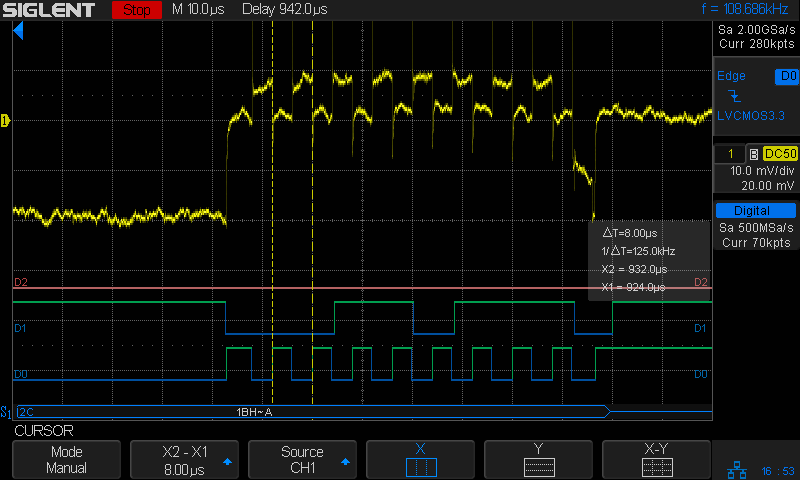
    A closer look lets the scope decode and present the SPI data:

    DDS Mock - 0 VAC - SPI detail
    DDS Mock – 0 VAC – SPI detail

    The program calculates and displays various “constants” I set for convenience:

    FM Modulated DDS
    Ed Nisley KE4ZNU
     serial wait: 890 ms
    
    DDS clock:     180000000.000 Hz
    CountPerHertz:        23.861 ct
    HertzPerCount:         0.042 Hz
    
    Crystal:    20000000.000 Hz
    Deviation:      5000.000 Hz
    

    You can confirm the SPI data by working backwards with a calculator:

    • DDS delta-phase register bytes: 1C 71 C6 E2 = 477218530 decimal
    • Multiply by 180 MHz / 2^32 to get frequency: 1999997.5506 Hz
    • Subtract nominal 20.0 MHz crystal to get modulation: -2.4494 Hz
    • Divide by nominal 5.0 kHz deviation to get fractional modulation: -4.89.9e-6
    • Multiply by half the ADC range (4096/2) to get ADC counts: -1.003
    • Add 2048 to get the actual ADC sample: 2047

    Nicely inside the range of values reported by the main loop, whew.

    Which means I can avoid screwing around with fixed-point arithmetic until such time as clawing back a few microseconds makes a meaningful difference.

    Now, to begin paying attention to those pesky hardware details …

    The TeensyDuino source code as a GitHub Gist:

    // FM DDS
    // Ed Nisley – KE4ZNU
    // 2017-04-19 Demo 1
    #include <IntervalTimer.h>
    #include <ADC.h>
    #include <SPI.h>
    #define PIN_HEART 14
    #define PIN_TIMER 15
    #define PIN_ANALOG 16
    #define PIN_GLITCH 17
    #define PIN_AUDIO A9
    #define PIN_DDS_FQUD 10
    // data to DDS MOSI0 11
    // no data from DDS MISO0 12
    // DDS clock on SCK0 13 — also LED
    #define BUILTIN_LED 13
    //———————
    // Useful constants
    int SamplePeriod = 25; // microseconds per analog sample
    //———————
    // Globals
    ADC *adc = new ADC();
    IntervalTimer timer;
    volatile int AnalogSample;
    volatile int AudioMax = -4096;
    volatile int AudioMin = 4096;
    typedef struct {
    uint8_t Phase;
    uint32_t DeltaPhase; // DDS expects MSB first!
    } DDS;
    DDS DDSBuffer;
    double DDSClock = 180.0e6; // nominal DDS oscillator
    double CountPerHertz, HertzPerCount; // DDS delta-phase increments
    double Crystal = 20.0e6; // nominal DDS frequency
    double Deviation = 5.0e3; // nominal FM signal deviation (one-sided)
    double TestFreq;
    //———————
    // Handy routines
    void FlipPin(int pin) {
    digitalWriteFast(pin,!digitalRead(pin));
    }
    void PulsePin(int p) {
    FlipPin(p);
    FlipPin(p);
    }
    //———————
    // Timer handler
    void timer_callback(void) {
    digitalWriteFast(PIN_TIMER,HIGH);
    digitalWriteFast(PIN_DDS_FQUD,HIGH); // latch previously shifted bits
    adc->startSingleRead(PIN_AUDIO, ADC_0); // start ADC conversion
    analogWriteDAC0(AnalogSample); // show previous audio sample
    digitalWriteFast(PIN_TIMER,LOW);
    }
    //———————
    // Analog read handler
    void adc0_isr(void) {
    int Audio;
    digitalWriteFast(PIN_ANALOG,HIGH);
    AnalogSample = adc->readSingle(); // fetch just-finished sample
    Audio = AnalogSample – 2048; // convert to AC signal
    DDSBuffer.Phase = 0;
    SPI.beginTransaction(SPISettings(8000000, MSBFIRST, SPI_MODE0));
    digitalWriteFast(PIN_DDS_FQUD, LOW);
    SPI.transfer(DDSBuffer.Phase);
    DDSBuffer.DeltaPhase = (uint32_t)((((double)Audio / 2048.0) * Deviation + Crystal) * CountPerHertz);
    SPI.transfer((uint8_t)(DDSBuffer.DeltaPhase >> 24)); // MSB first!
    if (Audio > AudioMax) // ignore race conditions
    AudioMax = Audio;
    if (Audio < AudioMin)
    AudioMin = Audio;
    SPI.transfer((uint8_t)(DDSBuffer.DeltaPhase >> 16));
    SPI.transfer((uint8_t)(DDSBuffer.DeltaPhase >> 8));
    SPI.transfer((uint8_t)DDSBuffer.DeltaPhase);
    SPI.endTransaction(); // do not raise FQ_UD until next timer tick!
    digitalWriteFast(PIN_ANALOG,LOW);
    }
    //———————
    // Hardware setup
    void setup(void) {
    pinMode(BUILTIN_LED,OUTPUT); // will eventually become SCK0
    pinMode(PIN_HEART, OUTPUT); // show we arrived
    digitalWrite(PIN_HEART,LOW);
    PulsePin(PIN_HEART);
    PulsePin(PIN_HEART);
    pinMode(PIN_TIMER,OUTPUT);
    digitalWrite(PIN_TIMER,LOW);
    pinMode(PIN_GLITCH,OUTPUT);
    digitalWrite(PIN_GLITCH,LOW);
    pinMode(PIN_ANALOG,OUTPUT);
    digitalWrite(PIN_ANALOG,LOW);
    pinMode(PIN_AUDIO,INPUT);
    pinMode(PIN_DDS_FQUD,OUTPUT);
    digitalWriteFast(PIN_DDS_FQUD,HIGH);
    Serial.begin(115200);
    int waited = 0;
    while (!Serial && waited < 3000) { // fall out after a few seconds
    delay(1);
    waited++;
    if (! (waited % 50))
    FlipPin(BUILTIN_LED);
    }
    Serial.printf("FM Modulated DDS\nEd Nisley KE4ZNU\n");
    Serial.printf(" serial wait: %d ms\n\n",waited);
    SPI.begin();
    SPI.usingInterrupt(255); // attached through analog IRQs
    adc->setAveraging(4); // choices: 0, 4, 8, 16, 32
    adc->setResolution(12); // choices: 8, 10, 12, 16
    adc->setConversionSpeed(ADC_CONVERSION_SPEED::HIGH_SPEED);
    adc->setSamplingSpeed(ADC_SAMPLING_SPEED::HIGH_SPEED);
    adc->enableInterrupts(ADC_0);
    if (!timer.begin(timer_callback, SamplePeriod)) {
    Serial.printf("Timer start failed\n");
    while (true) {
    FlipPin(BUILTIN_LED);
    delay(75);
    }
    }
    CountPerHertz = (1LL << 32) / DDSClock;
    HertzPerCount = 1.0 / CountPerHertz;
    Serial.printf("DDS clock: %13.3f Hz\n",DDSClock);
    Serial.printf("CountPerHertz: %13.3f ct\n",CountPerHertz);
    Serial.printf("HertzPerCount: %13.3f Hz\n\n",HertzPerCount);
    TestFreq = Crystal;
    Serial.printf("Crystal: %13.3f Hz\n",Crystal);
    Serial.printf("Deviation: %13.3f Hz\n",Deviation);
    Serial.printf("\nSetup done\n");
    }
    //———————
    // Do things forever
    void loop(void) {
    digitalWrite(PIN_HEART,HIGH);
    Serial.printf(" %5d to %5d\n",AudioMin,AudioMax);
    AudioMax = 99*AudioMax/100; // ignore race conditions
    AudioMin = 99*AudioMin/100;
    digitalWrite(PIN_HEART,LOW);
    delay(500);
    }
    view raw FMDDS.ino hosted with ❤ by GitHub
  • FM DDS: Floating Point Timing

    Inserting a few simple floating point operations between the SPI transfers provides a quick-n-dirty look at the timings:

    Math timing - double ops
    Math timing – double ops

    The corresponding code runs in the ADC end-of-conversion handler:

    void adc0_isr(void) {
    
      digitalWriteFast(ANALOG_PIN,HIGH);
    
      AnalogSample = adc->readSingle();                     // fetch just-finished sample
    
      SPI.beginTransaction(SPISettings(8000000, MSBFIRST, SPI_MODE0));
      digitalWriteFast(DDS_FQUD_PIN, LOW);
    
      SPI.transfer(DDSBuffer.Phase);                // interleave with FM calculations
      FlipPin(GLITCH_PIN);
      TestFreq += DDSStepFreq;
      FlipPin(GLITCH_PIN);
      SPI.transfer(DDSBuffer.Bits31_24);
      TestFreq -= DDSStepFreq;
      SPI.transfer(DDSBuffer.Bits23_16);
      TestFreq *= DDSStepFreq;
      SPI.transfer(DDSBuffer.Bits15_8);
      FlipPin(GLITCH_PIN);
      TestFreq /= DDSStepFreq;
      FlipPin(GLITCH_PIN);
      SPI.transfer(DDSBuffer.Bits7_0);
      SPI.endTransaction();                         // do not raise FQ_UD until next timer tick!
    
      digitalWriteFast(ANALOG_PIN,LOW);
    }
    

    The FlipPin() function twiddling the output bit takes a surprising amount of time, as shown by the first two gaps in the blocks of SPI clocks (D4). Some cursor fiddling on a zoomed scale says 300 ns = 50-ish cycles for each call. In round numbers, actual code doing useful work will take longer than that.

    Double precision floating add / subtract / multiply seem to take about 600 ns. That’s entirely survivable if you don’t get carried away.

    Double precision division, on the other paw, eats up 3 μs = 3000 ns, so it’s not something you want to casually plunk into an interrupt handler required to finish before the next audio sample arrives in 20 μs.

    Overall, the CPU utilization seems way too high for comfort, mostly due to the SPI transfers, even without any computation. I must study the SPI-by-DMA examples to see if it’s a win.

  • Frequency Modulated DDS: SPI Mock 1

    The general idea is to frequency modulate the sine wave coming from a DDS, thereby generating a signal suitable for upconverting in amateur repeaters now tied to unobtainable crystals. The crystals run from 4-ish to 20-ish MHz, with frequency multiplication from 3 to 36 producing RF outputs from 30-ish MHz through 900-ish MHz; more details as I work through the choices.

    The demo code runs on a bare Teensy 3.6 as a dipstick test for the overall timing and functionality:

    FM DDS - Teensy 3.6 SPI demo
    FM DDS – Teensy 3.6 SPI demo

    The fugliest thing you’ve seen in a while, eh?

    An overview of the results:

    Analog 4 kHz @ 40 kHz - SPI demo overview
    Analog 4 kHz @ 40 kHz – SPI demo overview

    The pulses in D1 (orange digital) mark timer ticks at a 40 kHz pace, grossly oversampling the 4 kHz audio bandwidth in the hope of trivializing the antialiasing filters. The timer tick raises the DDS latch pin (D6, top trace) to change the DDS frequency, fires off another ADC conversion, and (for now) copies the previous ADC value to the DAC output:

    void timer_callback(void) {
      digitalWriteFast(TIMER_PIN,HIGH);
      digitalWriteFast(DDS_FQUD_PIN,HIGH);                // latch previously shifted bits
      adc->startSingleRead(AUDIO_PIN, ADC_0);             // start ADC conversion
      analogWriteDAC0(AnalogSample);                      // show previous audio sample
      digitalWriteFast(TIMER_PIN,LOW);
    }
    

    The purple analog trace is the input sine wave at 4 kHz. The yellow analog stairstep comes from the DAC, with no hint of a reconstruction filter knocking off the sharp edges.

    The X1 cursor (bold vertical dots) marks the start of the ADC read. I hope triggering it from the timer tick eliminates most of the jitter.

    The Y1 cursor (upper dotted line, intersecting X1 just left of the purple curve) shows the ADC sample apparently happens just slightly after the conversion. The analog scales may be slightly off, so I wouldn’t leap to any conclusions.

    The pulses in D2 mark the ADC end-of-conversion interrupts:

    void adc0_isr(void) {
      digitalWriteFast(ANALOG_PIN,HIGH);
      AnalogSample = adc->readSingle();                     // fetch just-finished sample
      SPI.beginTransaction(SPISettings(8000000, MSBFIRST, SPI_MODE0));
      digitalWriteFast(DDS_FQUD_PIN, LOW);
      SPI.transfer(DDSBuffer.Phase);                // interleave with FM calculations
      SPI.transfer(DDSBuffer.Bits31_24);
      SPI.transfer(DDSBuffer.Bits23_16);
      SPI.transfer(DDSBuffer.Bits15_8);
      SPI.transfer(DDSBuffer.Bits7_0);
      SPI.endTransaction();                         // do not raise FQ_UD until next timer tick!
      digitalWriteFast(ANALOG_PIN,LOW);
    }
    

    The real FM code will multiply the ADC reading by the amplitude-to-frequency-deviation factor, add it to the nominal “crystal” frequency, convert the sum to the DDS delta-phase register value, then send it to the DDS through the SPI port. For now, I just send five constant bytes to get an idea of the minimum timing with the SPI clock ticking along at 8 MHz.

    The tidy blurs in D4 show the SPI clock, with the corresponding data in D5.

    D6 (top trace) shows the DDS FQ_UD (pronounced “frequency update”) signal dropping just before the SPI data transfer begins. Basically, FQ_UD is the DDS Latch Clock: low during the delta-phase value transfer, with the low-to-high transition latching all 40 control + data bits into the DDS to trigger the new frequency.

    A closer look at the sample and transfer:

    Analog 4 kHz @ 40 kHz - SPI demo detail
    Analog 4 kHz @ 40 kHz – SPI demo detail

    For reference, the digital players from bottom to top:

    • D0 – unused here, shows pulses marking main loop
    • D1 – 40 kHz timer ticks = ADC start conversion
    • D2 – ADC end of conversion,”FM calculation”, send DDS data
    • D3 – unused here, shows error conditions
    • D4 – SPI clock = rising edge active
    • D5 – SPI MOSI data to DDS = MSB first
    • D6 – SPI CS = FQ_UD = DDS latch

    Remember, the yellow analog stairstepped trace is just a comfort signal showing the ADC actually samples the intended input.

    The ARM CPU has floating-point hardware, but I suspect fixed-point arithmetic will once again win out over double-precision multiplies & divides.

    Dropping the sampling to 20 kHz would likely work just as well and double the time available for calculations. At least now I can measure what’s going on.

    All in all, it looks feasible.

    And, yes, the scope is a shiny new Siglent SDS2304X with the MSO logic-analyzer option. It has some grievous UX warts & omissions suggesting an architectural botch job, but it’s mostly Good Enough for what I need. More later.

    The TeensyDuino source code as a GitHub Gist:

    // FM DDS
    // Ed Nisley – KE4ZNU
    // 2017-04-19 Demo 1
    #include <IntervalTimer.h>
    #include <ADC.h>
    #include <SPI.h>
    #define HEART_PIN 14
    #define TIMER_PIN 15
    #define ANALOG_PIN 16
    #define GLITCH_PIN 17
    #define AUDIO_PIN A9
    #define DDS_FQUD_PIN 10
    // data to DDS MOSI0 11
    // no data from DDS MISO0 12
    // DDS clock on SCK0 13 — also LED
    #define BUILTIN_LED 13
    //———————
    // Useful constants
    int SamplePeriod = 25; // microseconds per analog sample
    //———————
    // Globals
    ADC *adc = new ADC();
    IntervalTimer timer;
    volatile unsigned int AnalogSample;
    typedef struct {
    uint8_t Phase;
    uint8_t Bits31_24;
    uint8_t Bits23_16;
    uint8_t Bits15_8;
    uint8_t Bits7_0;
    } DDS;
    DDS DDSBuffer = {0x01,0x02,0x04,0x08,0x10};
    double DDSFreq, EpsilonFreq, DDSStepFreq;
    double CenterFreq, TestFreq;
    //———————
    // Handy routines
    void FlipPin(int pin) {
    digitalWriteFast(pin,!digitalRead(pin));
    }
    void PulsePin(int p) {
    FlipPin(p);
    FlipPin(p);
    }
    //———————
    // Timer handler
    void timer_callback(void) {
    digitalWriteFast(TIMER_PIN,HIGH);
    digitalWriteFast(DDS_FQUD_PIN,HIGH); // latch previously shifted bits
    adc->startSingleRead(AUDIO_PIN, ADC_0); // start ADC conversion
    analogWriteDAC0(AnalogSample); // show previous audio sample
    digitalWriteFast(TIMER_PIN,LOW);
    }
    //———————
    // Analog read handler
    void adc0_isr(void) {
    digitalWriteFast(ANALOG_PIN,HIGH);
    AnalogSample = adc->readSingle(); // fetch just-finished sample
    SPI.beginTransaction(SPISettings(8000000, MSBFIRST, SPI_MODE0));
    digitalWriteFast(DDS_FQUD_PIN, LOW);
    SPI.transfer(DDSBuffer.Phase); // interleave with FM calculations
    SPI.transfer(DDSBuffer.Bits31_24);
    SPI.transfer(DDSBuffer.Bits23_16);
    SPI.transfer(DDSBuffer.Bits15_8);
    SPI.transfer(DDSBuffer.Bits7_0);
    SPI.endTransaction(); // do not raise FQ_UD until next timer tick!
    digitalWriteFast(ANALOG_PIN,LOW);
    }
    //———————
    // Hardware setup
    void setup(void) {
    pinMode(BUILTIN_LED,OUTPUT); // will eventually become SCK0
    pinMode(HEART_PIN, OUTPUT); // show we arrived
    digitalWrite(HEART_PIN,LOW);
    PulsePin(HEART_PIN);
    PulsePin(HEART_PIN);
    pinMode(TIMER_PIN,OUTPUT);
    digitalWrite(TIMER_PIN,LOW);
    pinMode(GLITCH_PIN,OUTPUT);
    digitalWrite(GLITCH_PIN,LOW);
    pinMode(ANALOG_PIN,OUTPUT);
    digitalWrite(ANALOG_PIN,LOW);
    pinMode(AUDIO_PIN,INPUT);
    pinMode(DDS_FQUD_PIN,OUTPUT);
    digitalWriteFast(DDS_FQUD_PIN,HIGH);
    Serial.begin(115200);
    int waited = 0;
    while (!Serial && waited < 3000) { // fall out after a few seconds
    delay(1);
    waited++;
    if (! (waited % 50))
    FlipPin(BUILTIN_LED);
    }
    Serial.printf("FM Modulated DDS\nEd Nisley KE4ZNU\n");
    Serial.printf(" serial wait: %d ms\n\n",waited);
    SPI.begin();
    SPI.usingInterrupt(255); // attached through analog IRQs
    adc->setAveraging(0);
    adc->setResolution(12);
    adc->setConversionSpeed(ADC_CONVERSION_SPEED::MED_SPEED);
    adc->setSamplingSpeed(ADC_SAMPLING_SPEED::MED_SPEED);
    adc->enableInterrupts(ADC_0);
    if (!timer.begin(timer_callback, SamplePeriod)) {
    Serial.printf("Timer start failed\n");
    while (true) {
    FlipPin(BUILTIN_LED);
    delay(50);
    }
    }
    DDSFreq = 180.0e6;
    EpsilonFreq = 1.0e-5;
    DDSStepFreq = DDSFreq / (1LL << 32);
    Serial.printf("DDS frequency: %18.7f Hz\n",DDSFreq);
    Serial.printf(" epsilon: %18.7f Hz\n",EpsilonFreq);
    Serial.printf(" step: %18.7f Hz\n\n",DDSStepFreq);
    CenterFreq = 146520000.0;
    TestFreq = CenterFreq;
    Serial.printf("Center frequency: %18.7f Hz\n",CenterFreq);
    Serial.printf("Setup done\n");
    }
    //———————
    // Do things forever
    void loop(void) {
    digitalWrite(HEART_PIN,HIGH);
    if (TestFreq < (CenterFreq + 100*EpsilonFreq))
    TestFreq += EpsilonFreq;
    else
    TestFreq += DDSStepFreq;
    Serial.printf(" %18.7f Hz\n",TestFreq);
    digitalWrite(HEART_PIN,LOW);
    delay(500);
    }
    view raw FMDDS.ino hosted with ❤ by GitHub
  • Teensy 3.6 Double Precision Floats

    Having spent a bit of effort wringing enough precision from an Arduino to make the 60 kHz quartz resonator tester, this came as a relief:

    DDS frequency:  180000000.0000000 Hz
          epsilon:          0.0000001 Hz
             step:          0.0419095 Hz
    
    Center frequency:  146520000.0000000 Hz
      146520000.0000001 Hz
      146520000.0000002 Hz
      146520000.0000003 Hz
      146520000.0000004 Hz
      146520000.0000004 Hz
      146520000.0000005 Hz
      146520000.0000006 Hz
      146520000.0000007 Hz
      146520000.0000008 Hz
      146520000.0000009 Hz
      146520000.0000010 Hz
    
    ... snippage ...
    
      146520000.0000099 Hz
      146520000.0000100 Hz
      146520000.0419195 Hz
      146520000.0838290 Hz
      146520000.1257386 Hz
      146520000.1676481 Hz
      146520000.2095576 Hz
      146520000.2514671 Hz
      146520000.2933766 Hz
      146520000.3352861 Hz
      146520000.3771957 Hz
      146520000.4191052 Hz
      146520000.4610147 Hz
      146520000.5029242 Hz
      146520000.5448337 Hz
      146520000.5867432 Hz
      146520000.6286528 Hz
      146520000.6705623 Hz
      146520000.7124718 Hz
      146520000.7543813 Hz
      146520000.7962908 Hz
      146520000.8382003 Hz
      146520000.8801098 Hz
      146520000.9220194 Hz
      146520000.9639289 Hz
      146520001.0058384 Hz
      146520001.0477479 Hz
      146520001.0896574 Hz
      146520001.1315669 Hz
      146520001.1734765 Hz
    

    Which comes from a PJRC Teensy 3.6 running this code:

    double DDSFreq, EpsilonFreq, DDSStepFreq;
    double CenterFreq, TestFreq;
    
    ... in setup() ...
    
      DDSFreq = 180.0e6;
      EpsilonFreq = 1.0e-7;
      DDSStepFreq = DDSFreq / (1LL << 32);
      Serial.printf("DDS frequency: %18.7f Hz\n",DDSFreq);
      Serial.printf("      epsilon: %18.7f Hz\n",EpsilonFreq);
      Serial.printf("         step: %18.7f Hz\n\n",DDSStepFreq);
    
      CenterFreq = 146520000.0;
      TestFreq = CenterFreq;
      Serial.printf("Center frequency: %18.7f Hz\n",CenterFreq);
    
    ... in loop() ...
    
      if (TestFreq < (CenterFreq + 100*EpsilonFreq))
        TestFreq += EpsilonFreq;
      else
        TestFreq += DDSStepFreq;
    
      Serial.printf(" %18.7f Hz\n",TestFreq);
    

    The IEEE-754 spec says a double floating-point variable carries about 15.9 decimal digits, which agrees with the 9 integer + 7 fraction digits. The highlight lowlight (gray bar) in the first figure shows the slight stumble where adding 1e-7 changes the sum, but not quite enough to affect the displayed fraction.

    In round numbers, an increment of 1e-5 would work just fine:

      
      146520000.0000100 Hz
      146520000.0000200 Hz
      146520000.0000300 Hz
      146520000.0000401 Hz
      146520000.0000501 Hz
      146520000.0000601 Hz
      146520000.0000701 Hz
      146520000.0000801 Hz
      146520000.0000901 Hz
      146520000.0001001 Hz
      146520000.0001101 Hz
      146520000.0001202 Hz
      146520000.0001302 Hz
      146520000.0001402 Hz
      146520000.0001502 Hz
      146520000.0001602 Hz
      146520000.0001702 Hz
      146520000.0001802 Hz
      146520000.0001903 Hz
      146520000.0002003 Hz
      146520000.0002103 Hz
      146520000.0002203 Hz
      146520000.0002303 Hz
    

    You’d use the “smallest of all” epsilon in a multiplied increment, perhaps to tick a value based on a knob or some such. Fine-tuning a VHF frequency with millihertz steps probably doesn’t make much practical sense.

    The DDS frequency increment works out to 41.9095 mHz, slightly larger than with the Arduino, because it’s fot a cheap DDS eBay module with an AD9851 running a 180 MHz (6 × 30 MHz ) clock.