The Smell of Molten Projects in the Morning

Ed Nisley's Blog: Shop notes, electronics, firmware, machinery, 3D printing, laser cuttery, and curiosities. Contents: 100% human thinking, 0% AI slop.

Category: Science

If you measure something often enough, it becomes science

  • Xubuntu 12.10 vs. Dual Monitors: Regression

    It used to be that using two monitors with two separate X sessions in Linux actually worked. Then they improved things so it stopped working out of the box, but you could force it to work with a bit of effort. Further improvements made the workarounds more difficult. Now, with Xubuntu 12.10, it seems impossible.

    This. Is. Not. Progress.

    Experimenting will require considerable restarting of the X server, which nowadays requires, by default, rebooting the box. In the Bad Old Days, you could hit Ctrl-Alt-Backspace to restart the X server (and, en passant, blow away all unsaved data in your session). My suggestions about re-enabling it no longer work and, worse, the suggestions there about:

    • Pressing Right-Alt + Sysreq + K
    • Enabling DontZap

    do not work, either. I’m no longer surprised by any of this.

    Fortunately, as suggested at the same spot, this works:

    • Create if missing: ~/.xprofile
    • Add: setxkbmap -option terminate:ctrl_alt_bksp
    • Make it executable: chmod u+x .xprofile

    But it’s per-user, so it works only while you’re logged in, which means you can’t restart X from the login screen. This is marginally OK.

    So. We begin.

    This box (an off-lease Dell Optiplex 780, Core 2 Duo E8400 3.0 GHz) now has a Jaton GeForce GT430 nVidia video card with two DVI outputs.

    In order to get decent performance, you must use the nVidia proprietary driver. Installing the nvidia-current package pulls in, as of this writing, 304. The nVidia driver now ignores the rotate option and the randrrotation option in xorg.conf. Adding the {Rotation=Left} meta-option to the portrait monitor or enabling Xinerama kills xrandr.

    Not having xrandr used to not be fatal, but now OpenSCAD (among others) requires xrandr to be both present and active. Any solution that doesn’t allow xrandr isn’t feasible.

    Despite notes suggesting that nVidia’s TwinView kills xrandr, it doesn’t (perversely, Xinerama should allow it and doesn’t; perhaps I misunderstand what’s going on). Add another line to .xprofile:
    xrandr --output DVI-I-3 --rotate left
    You discover which output to use by parsing the output of xrandr without any parameters:

    $ xrandr
    Screen 0: minimum 8 x 8, current 2650 x 1680, maximum 16384 x 16384
    DVI-I-0 disconnected (normal left inverted right x axis y axis)
    DVI-I-1 disconnected (normal left inverted right x axis y axis)
    DVI-I-2 connected 1600x1200+0+0 (normal left inverted right x axis y axis) 367mm x 275mm
       1600x1200      60.0*+
       1280x1024      75.0     60.0
       1152x864       75.0
       1024x768       75.0     60.0
       800x600        75.0     60.3
       640x480        75.0     59.9
    DVI-I-3 connected 1050x1680+1600+0 left (normal left inverted right x axis y axis) 434mm x 270mm
       1680x1050      59.9*+
       1280x1024      75.0     60.0
       1152x864       75.0
       1024x768       75.0     60.0
       800x600        75.0     60.3
       640x480        75.0     59.9
    HDMI-0 disconnected (normal left inverted right x axis y axis)
    

    Why DVI-I-0 and DVI-I-1 are disconnected is not explained. There is an HDMI jack that I’m not using, so that one does make sense. The output shows the portrait monitor on DVI-I-3 as rotated.

    This is a single X session, so the two monitors show sections of a larger workspace. The cursor moves freely across the junction, it doesn’t vanish below the landscape montitor, and windows maximize properly to fill the single monitor they start in.

    This is not what I want, because I cannot independently flip the workspaces on the two monitors. It’s possible to force one of the windows on the portrait monitor to “always on top”, but that means I have only one program accessible on that monitor, which isn’t usually the case.

    This. Is. Not. Progress.

    But it seems to be as good as it gets these days…

  • Monthly Science: Data Logging

    Starting in late 2006, I’ve have several Hobo dataloggers recording the temperature / humidity / light at various locations, under the principle that if you observe something long enough, it turns into science. Regrettably, logging the data is one thing, actually processing it into usable information is entirely another; there’s never a good time for the latter. Perhaps if I break it down into monthly chunks, I can actually make some progress on getting it done.

    The first problem is that the Hobo dataloggers lack a convenient user interface: the only way to extract data is through the Hoboware graphical program. Unfortunately, Hoboware stores the extracted data in their proprietary format, locked away from any other program. I eventually discovered the configuration setting that automatically saves the data in CSV format, but I didn’t find that until rather late in the game, didn’t always set it with new versions, and it seems their CSV format has changed slightly over the years. Thus, one of my to-do items is to manually process the remaining Hoboware files to produce the corresponding CSV files, then convert those into a standard format that’s useful with, say, Gnuplot.

    The intent is that I can simply concatenate all the CSV data files for a given sensor, run them through a Bash script to sanitize the data, plot what emerges, and then maybe slice-and-dice the data a few different ways. The less manual processing this requires, the more it will get done…

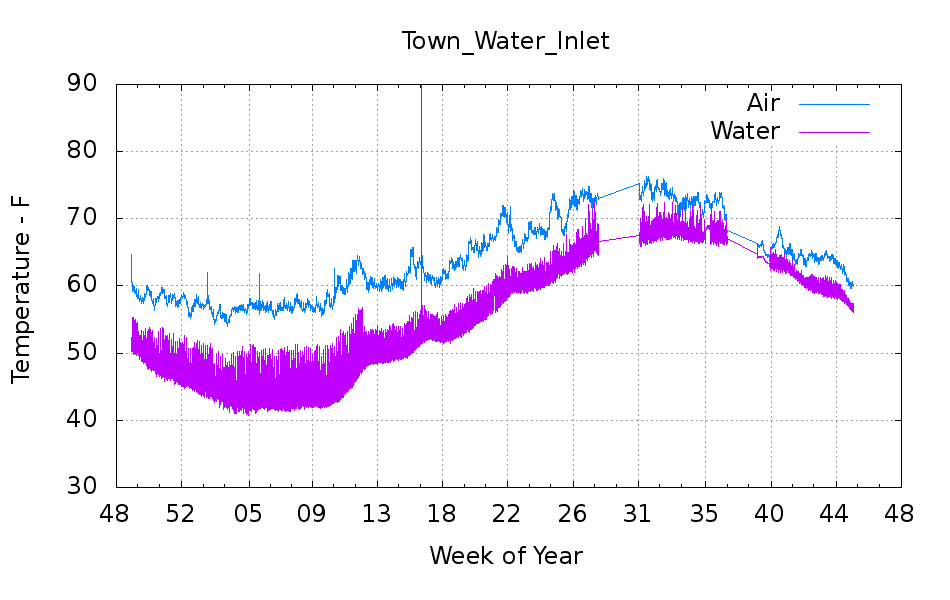
    But the first step is to show that something emerges from the data, so here’s the last year of data (recorded in 2012, which includes a bit of 2011 and not quite up to the end of 2012) from the logger that’s been monitoring the air temperature of the Basement Laboratory and the temperature at the house water inlet. I assume the minimum water temperature on the pipe at the basement wall tracks the ground temperature four or five feet down from the surface; more on the hardware behind the data in a while.

    Town_Water_Inlet
    Town_Water_Inlet

    The fuzz on the purple trace shows the relatively rapid temperature variation as we draw water from the supply: it falls as water moves into the house and rises as still water warms. The inlet always remains cooler than the air temperature, because it’s cemented to the wall, but a closer look (again, in a while) shows a nice exponential curve. The thin straight-line sections show gaps in the data record: sometimes I forget to do my monthly science for a few days or weeks.

    An extract from the CSV files, including some data not plotted above:

    "Plot Title: Town Water Inlet "
    "#","Time, GMT-04:00","Temp, °F","RH, %","Temp, °F","Host Connected","Stopped","End Of File"
    1,09/25/2012 09:20:00,66.344,58.707,64.632,,,
    2,09/25/2012 09:25:00,66.173,57.579,64.459,,,
    -- snippage --
    12962,11/09/2012 09:25:00,60.174,54.301,56.685,,,
    12963,11/09/2012 09:28:48,,,,Logged,,
    12964,11/09/2012 09:28:55,,,,,Logged,Logged
    -- snippage --
    "Plot Title: Town Water Inlet "
    "#","Time, GMT-05:00","Temp, °F()","RH, %()","Temp, °F()","End Of File()"
    1,11/09/12 08:35:00 ,64.247,52.282,56.728,
    2,11/09/12 08:40:00 ,63.304,51.465,56.728,
    -- snippage --
    14473,12/29/12 14:35:00 ,56.599,51.454,48.895,
    14474,12/29/12 14:40:00 ,56.599,51.485,49.116,Logged
    

    A touch of sed can handle the reformatting I’ve seen so far:

    • Convert headers to comments: sed 's/^\"/#&/'
    • Convert non-data events to comments: sed 's/^.*Logged/#&/'
    • Remove spurious trailing blanks in data fields: sed 's/ ,/,/'

    Here’s the Bash and Gnuplot source code that produced the graph, complete with cruft that may come in handy later:

    #!/bin/sh
    #-- overhead
    export GDFONTPATH="/usr/share/fonts/truetype/"
    base="${1%.*}"
    echo Base name: ${base}
    tfile1=$(tempfile)
    tfile2=$(tempfile)
    ofile=${base}.png
    echo Input file: $1
    echo Temporary files: ${tfile1} ${tfile2}
    echo Output file: ${ofile}
    #-- prepare csv Hobo logger file
    sed 's/^\"/#&/' $1 > ${tfile1}
    sed 's/^.*Logged/#&/' ${tfile1} > ${tfile2}
    #-- do it
    gnuplot << EOF
    #set term x11
    set term png font "arialbd.ttf" 18 size 950,600
    set output "${ofile}"
    set title "${base}"
    set key noautotitles
    unset mouse
    set bmargin 4
    set grid xtics ytics
    set timefmt "%m/%d/%Y %H:%M:%S"
    set xdata time
    set xlabel "Week of Year"
    set format x "%W"
    #set xrange [1.8:2.2]
    #set xtics 0,5
    #set mxtics 2
    #set logscale y
    #set ytics nomirror autofreq
    set ylabel "Temperature - F"
    #set format y "%4.0f"
    set yrange [30:90]
    #set mytics 2
    #set y2label "right side variable"
    #set y2tics nomirror autofreq 2
    #set format y2 "%3.0f"
    #set y2range [0:200]
    #set y2tics 32
    #set rmargin 9
    set datafile separator ","
    #set label 1 "label text" at 2.100,110 right font "arialbd,18"
    #set arrow from 2.100,110 to 2.105,103 lt 1 lw 2 lc 0
    plot	\
        "${tfile2}" using 2:3 with lines lt 3 title "Air", \
        "${tfile2}" using 2:5 with lines lt 4 title "Water"
    EOF