Ed Nisley's Blog: Shop notes, electronics, firmware, machinery, 3D printing, laser cuttery, and curiosities. Contents: 100% human thinking, 0% AI slop.
Category: Science
If you measure something often enough, it becomes science
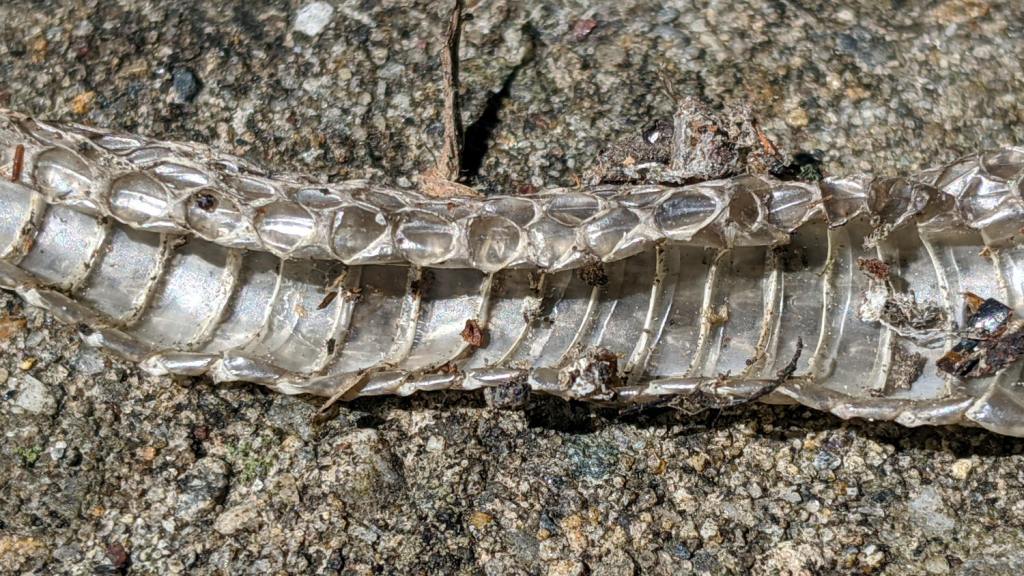
A shed snakeskin appeared when I opened the garage door:
Snakeskin – overview
The skin sits atop the retaining wall next to the door, on a stone(-like) background with poor contrast: even an empty snake has good camouflage!
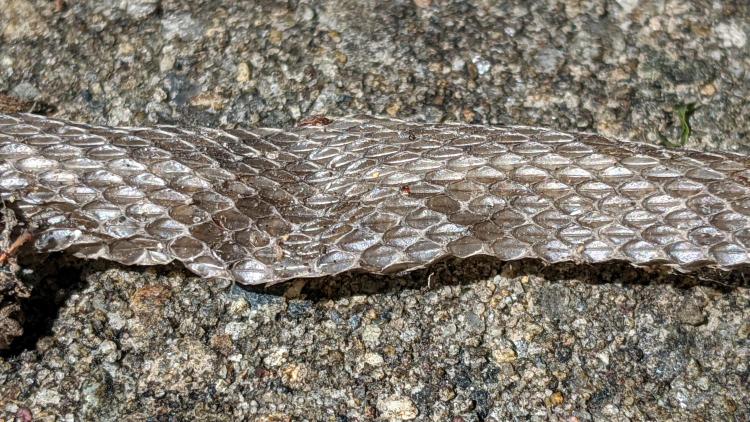
The exterior looks like genuine snakeskin:
Snakeskin – exterior
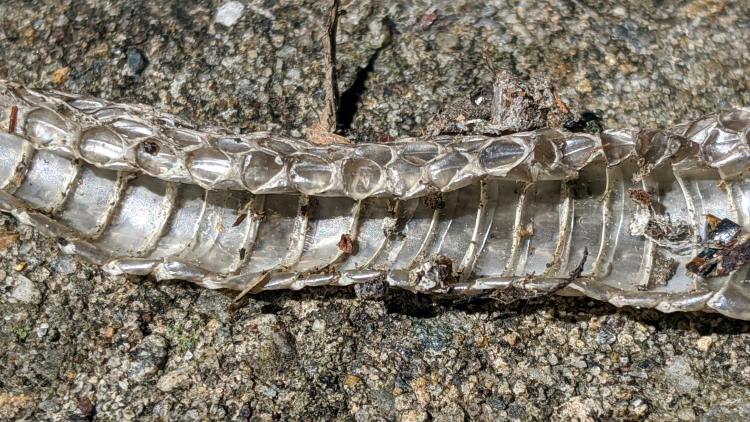
I didn’t know the interior has an entirely different pattern:
Snakeskin – interior
As far as I can tell, the snake was going about its business elsewhere in the yard.
To be fair, there’s some luck involved.
Update: After Mitch nudged me, I found the (somewhat the worse for wear) snakeskin again. The head end was split, much as I described, but the tail end was intact (the snake having pulled out like a finger from a glove) and what I though was the inside of the top was the outside of the bottom, just pushed inward to form a very thin double layer.
The open cells on the back side show the wasps don’t waste any effort on putting mud where it’s not needed:
Organ Pipe Wasp Nest – wall side
Cracking it in half shows the rugged walls between the cell columns:
Organ Pipe Wasp Nest – cross section
Several cells contained three or four (thoroughly dead!) spiders apiece, evidently the result of un-hatched eggs:
Organ Pipe Wasp Nest – failed egg – spiders
Each successful cell contained a brittle capsule wrapped in a thin cocoon, surrounded by fragments of what used to be spiders, with an exit hole chewed in the side:
Organ Pipe Wasp Nest – capsule detail
I regret not weighing the whole affair, as all that mud represents an astonishing amount of heavy hauling and careful work by one or two little wasps!
The fundamental limit comes from the heater’s ability to bring cold plastic up to extrusion temperature inside the 20 mm hot zone.
Using airscape’s example, the extruded thread is 0.5 mm thick × 0.8 mm wide = 0.4 mm², so laying down that thread at 50 mm/s means the extruder is heating plastic at 20 mm³/s and is “pushing it with PLA”.
In round numbers, normal printing speeds with a normal nozzle and normal plastics runs around 10 mm³/s, so a practical upper limit is probably around 15 mm³/s.
As far as thread size goes, the diameter of the flat area around the nozzle orifice sets the maximum thread width, because the nozzle must compress the thread against the previous layer. If the thread is wider than the nozzle, the gooey plastic curls up around the sides of the nozzle and doesn’t bond well. The rule of thumb is to round up the orifice diameter to the next convenient number:
0.35 mm nozzle → 0.4 mm thread
0.75 mm nozzle → 0.8 mm thread
The maximum thread (= layer) thickness should be about 60% of the thread width, which is why a 0.8 mm wide thread calls for a 0.5 mm layer thickness.
Assuming the extruder can heat 15 mm³/s of plastic, the maximum printing speed will be 15 mm³/s / 0.4 mm² = 37.5 mm/s: comfortably under airscape’s “pushing it” 50 mm/s.
Aaaaand, as always, calibrate the Extrusion Multiplier for whatever conditions you’re using to ensure the slicer and the hardware agree on how much plastic is coming out of the nozzle.
We extracted the Praying Mantisoothecae while clearcutting the decorative grasses bracketing the front door. As far as I can tell, they’re still charged up and ready for use.
The masses resemble rigid foam wrapped around grass stems:
Praying Mantis ootheca – stem side
It’s a mechanical joint, not an adhesive bond, and the dried stems slide freely through the openings:
Praying Mantis ootheca – bottom
From one side:
Praying Mantis ootheca – right
And the other:
Praying Mantis ootheca – left
They’re now tied to stems of the bushes along the front of the house, which (I hope) will resemble what the little ones expect to find when they emerge, whenever they do.
We now have enough statistics from the USA to draw some useful graphs, so click the Logarithmic options to make the charts comprehensible:
COVID-19 – USA Total Cases and Total Deaths – 2020-03-25
The penciled lines give an eyeballometric fit, but it’s pretty obvious the USA is now dealing with purely exponential infection rates.
Total Cases, which is the patients tested = people already in the medical system, is growing by a factor of ten every eight days. By next weekend, the USA will have one million Total Cases: average it to 112,000 new cases, every day,over the next eight days.
Which may not happen, if only because we may not have the intake / testing / recording capacity for that number of patients and maybe, just maybe, Social Distancing will have an effect. I expect the Total Cases line bend downward slightly during the week, but it won’t be anywhere near horizontal. Obviously, the extrapolation fails completely within the next 24 days, because we lack a factor of 1000 more people to infect.
The 9,000 patients who will die in the next week are already in the medical system (because you take about two weeks to die) and, at least in downstate NY, have essentially filled all available hospital beds; they’re getting the best care possible from the medical establishment.
Not every new case becomes a patient, but in the USA we seem to be testing only folks with obvious COVID-19 symptoms, so all the optimistic hospitalization estimates of 10% are off the table and 50% seems more believable. Pick any percentage you like.
Eight days from now, the rate will ramp toward 10,000 deaths per day, to reach 100,000 Total Deaths in sixteen days, again, as an average.