Ed Nisley's Blog: Shop notes, electronics, firmware, machinery, 3D printing, laser cuttery, and curiosities. Contents: 100% human thinking, 0% AI slop.
We all know that LED brightness decreases with age. An exit sign in Vassar’s Skinner Hall shows what that looks like in real life:
Exit Sign – LED aging
The LEDs on the other side of the sign look about the same: a few very bright spots, a few very dim ones, and a whole bunch in the middle.
It’s hard to judge by eye, but the brightest LEDs look much more than a factor of two brighter than the dimmest ones.
An LED with a 50,000 hour lifetime will have 50% of its initial brightness at EOL and a year has 8,766 hours, so the LEDs will reach half-brightness in a bit under six years. I think discrete LEDs went out of style around the turn of the millennium, so it’s three half-lives old: the dimmer LEDs must be around 1/8 brightness.
In case of an actual emergency, just follow me out the door, OK?
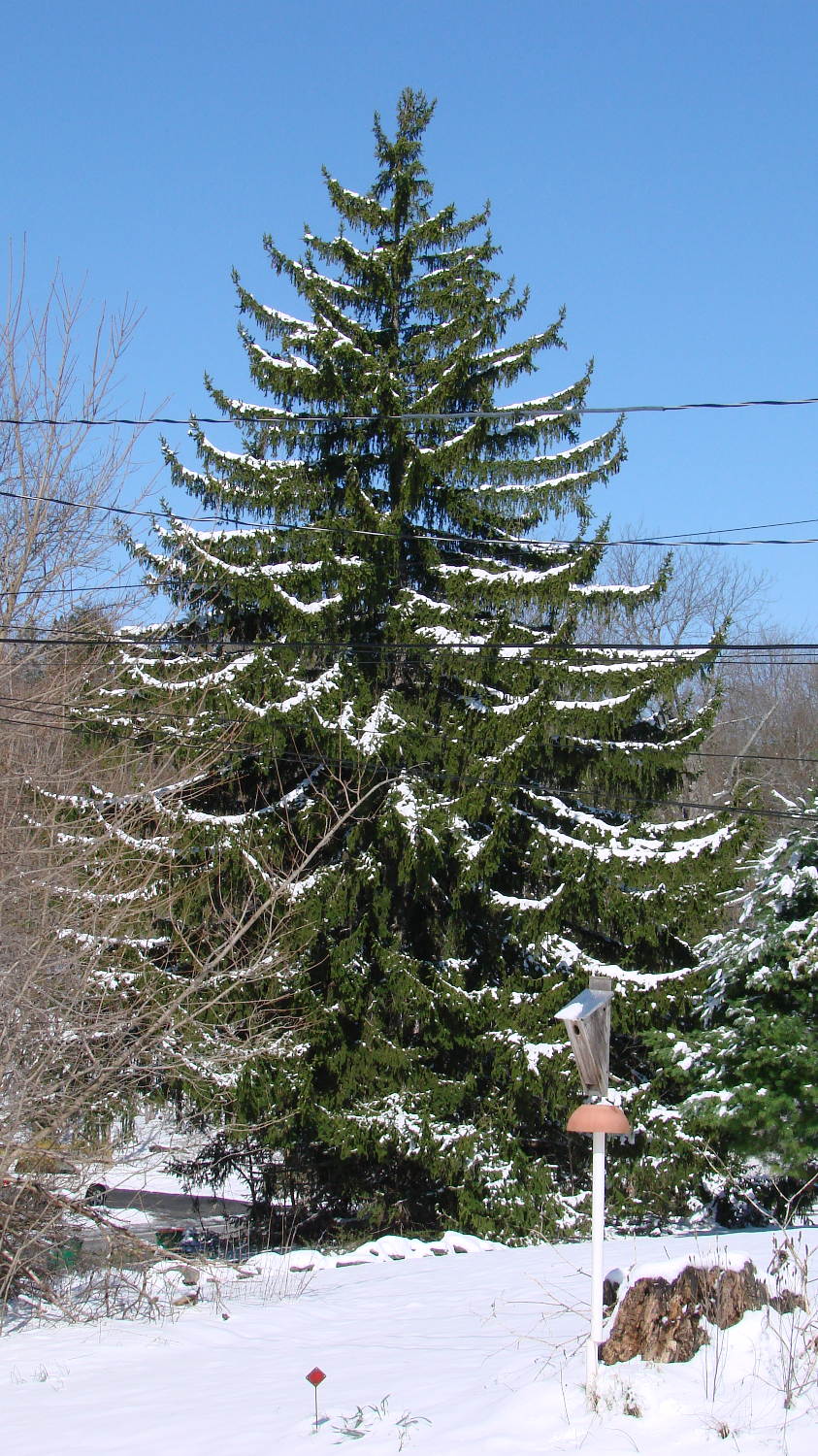
An unusually late two-day snowstorm laid down half a foot of snow starting in the evening of April 3:
Norway Spruce with April snow
Up until then, the weather had been running a bit warmer than usual, which seems to be the new normal, and this snowfall put more snow on the ground than we’d seen all winter.
The snow took some critters by surprise:
Sparrow – nest box in April snow
Most of the snow melted during the sunny 40 °F day after the storm, but overnight lows in the teens wiped out most of the spring flowers and buds.
I’m returning home after accompanying Mary to her morning of volunteering in the Locust Grove veggie gardens. The Locust Grove gate faces predominantly left-turning traffic from Beechwood Avenue, so I’ll be watching the vehicles approaching head-on.
T = 0.000 – Signal turns green:
Rt 9 Locust Grove – Right on Red – front camera – 0135
T = 2.500 – Entering the intersection:
Rt 9 Locust Grove – Right on Red – front camera – 0270
I don’t start pedaling until the signal in my direction actually turns green, because drivers have been known to blow through intersections with a fresh red signal. Two seconds seems like a reasonable delay.
T = 5.500 – Three lanes later, nearing the midline of Rt 9 and still accelerating:
Rt 9 Locust Grove – Right on Red – front camera – 0465
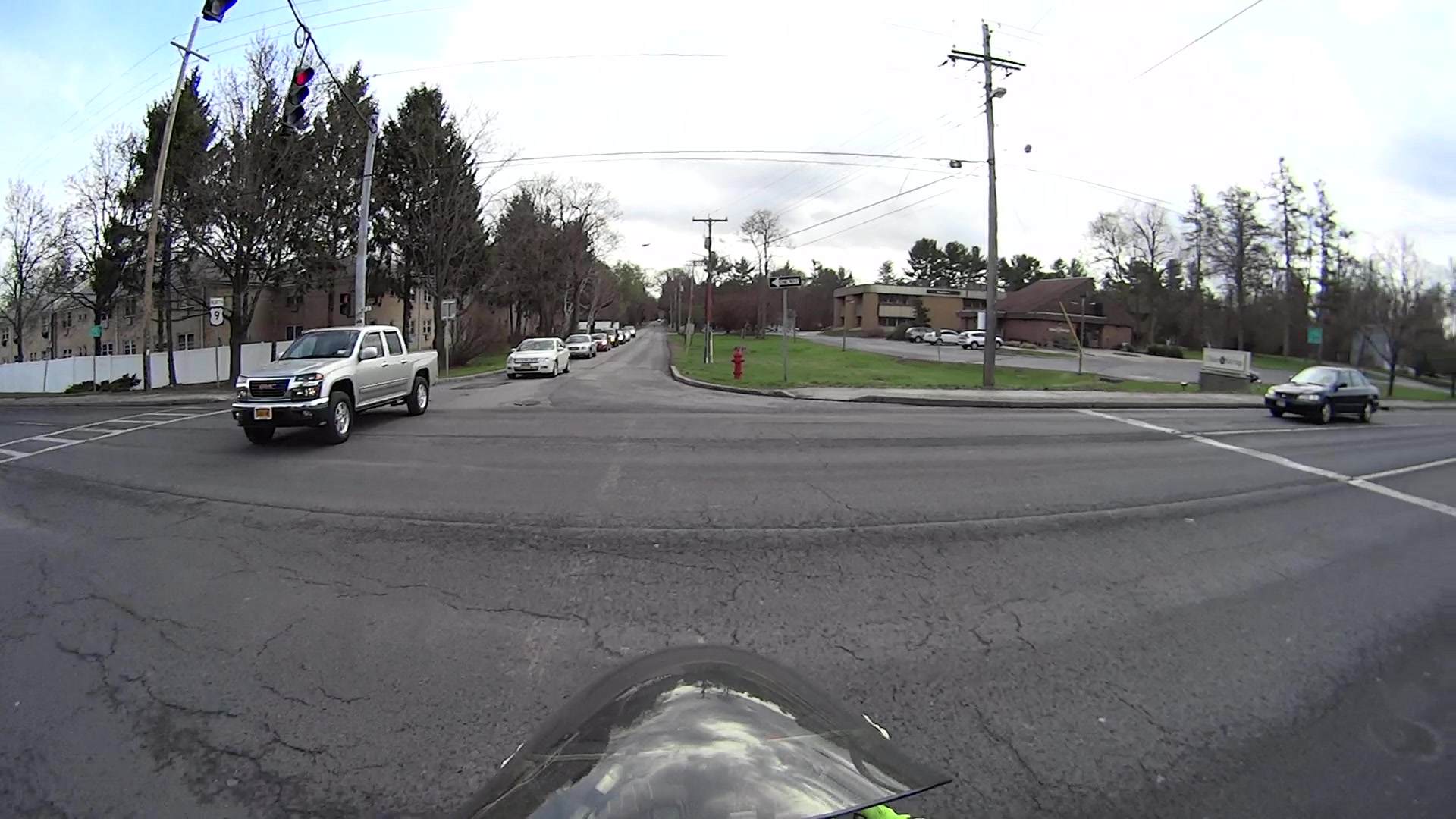
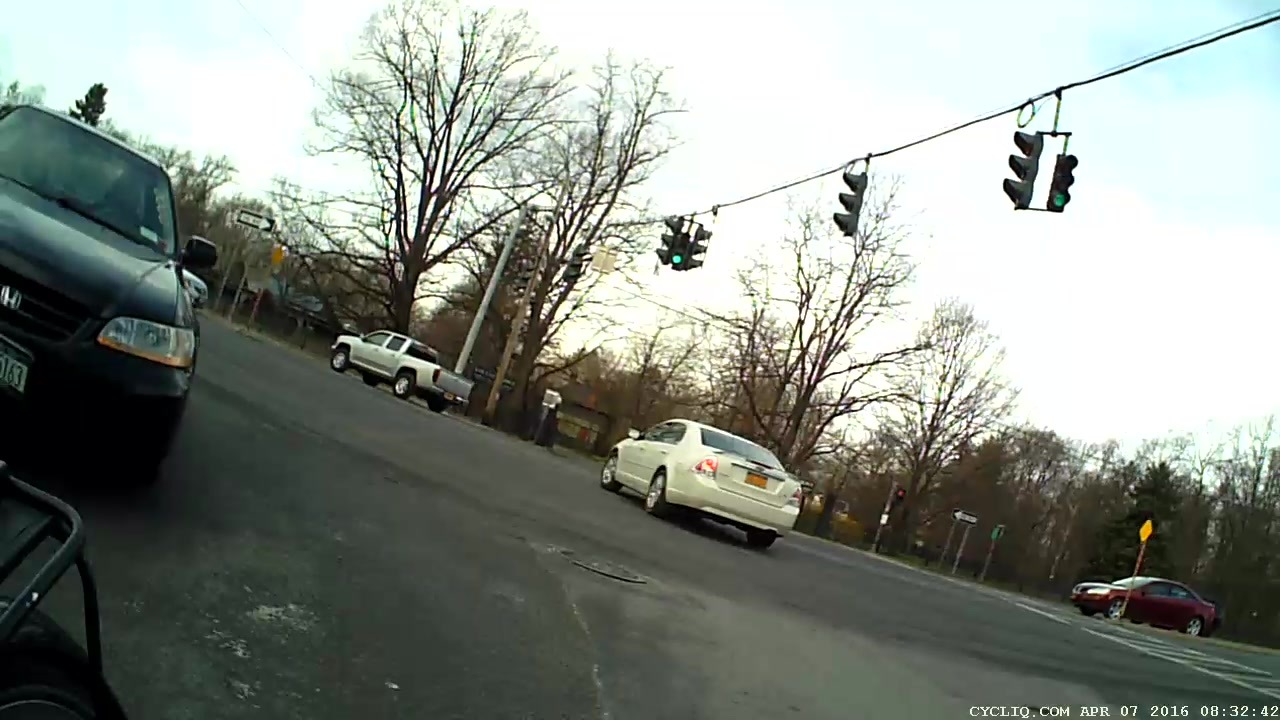
T = 5.917 – The black car in the right lane is moving and I begin to look that way:
Rt 9 Locust Grove – Right on Red – front camera – 0490
I cannot tell from the video whether the driver actually stopped (as you’re required to do for “right on red after stop“, but nobody actually does) or just slowed into a rolling stop for the turn.
Why not slam to a stop in the middle of Rt 9 in front of the left-turning traffic? Come for a ride with me and we’ll try that out. I’ll shout “LOOK OUT!” at some inopportune time when you’re in the middle of traffic and not expecting it, whereupon you must hit the brakes and deal with the consequences.
T = 7.117 – One second later, I’m beginning to veer left, directly toward the stream of oncoming traffic turning toward me:
Rt 9 Locust Grove – Right on Red – front camera – 0562
In round numbers, the black car moved 35 feet in 1.2 s between those frames: 30 feet/s = 20 mph.
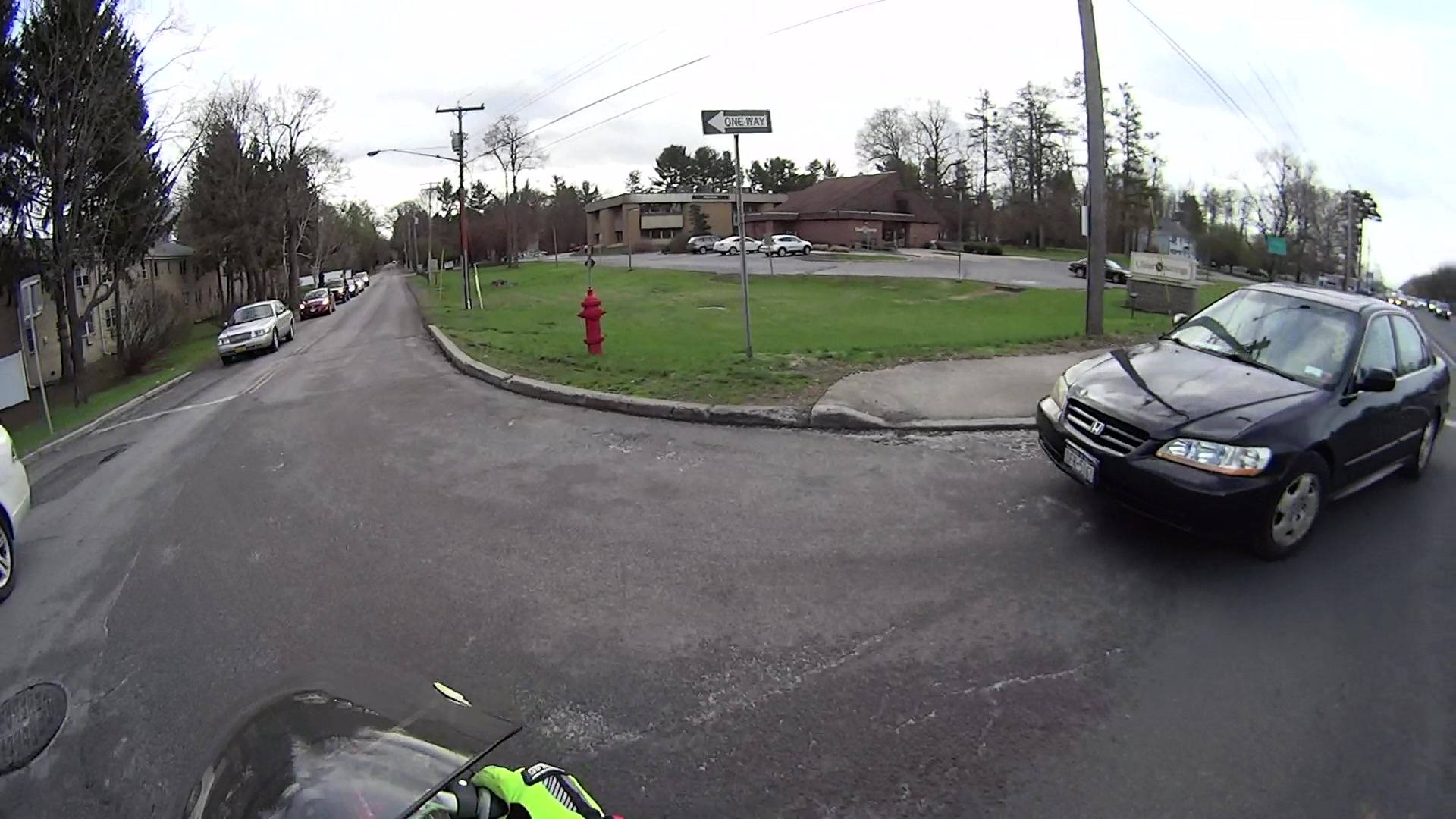
T = 7.750 – The white car on my right continues turning and I’ll definitely clear its rear:
Rt 9 Locust Grove – Right on Red – front camera – 0600
The black car has moved another 15 feet in 633 ms: 24 feet/s = 16 mph.
I’m wearing the vest part of my fluorescent green jacket over a fluorescent green shirt with fluorescent green gloves. By now, I think I’ve been sighted, at ten feet and closing.
T = 8.383 – The only clear area lies directly ahead of the oncoming silver car:
Rt 9 Locust Grove – Right on Red – front camera – 0638
T = 9.000 – I’m approaching the yellow line, probably won’t sideswipe the silver car, and the black car is now braking:
Rt 9 Locust Grove – Right on Red – front camera – 0675
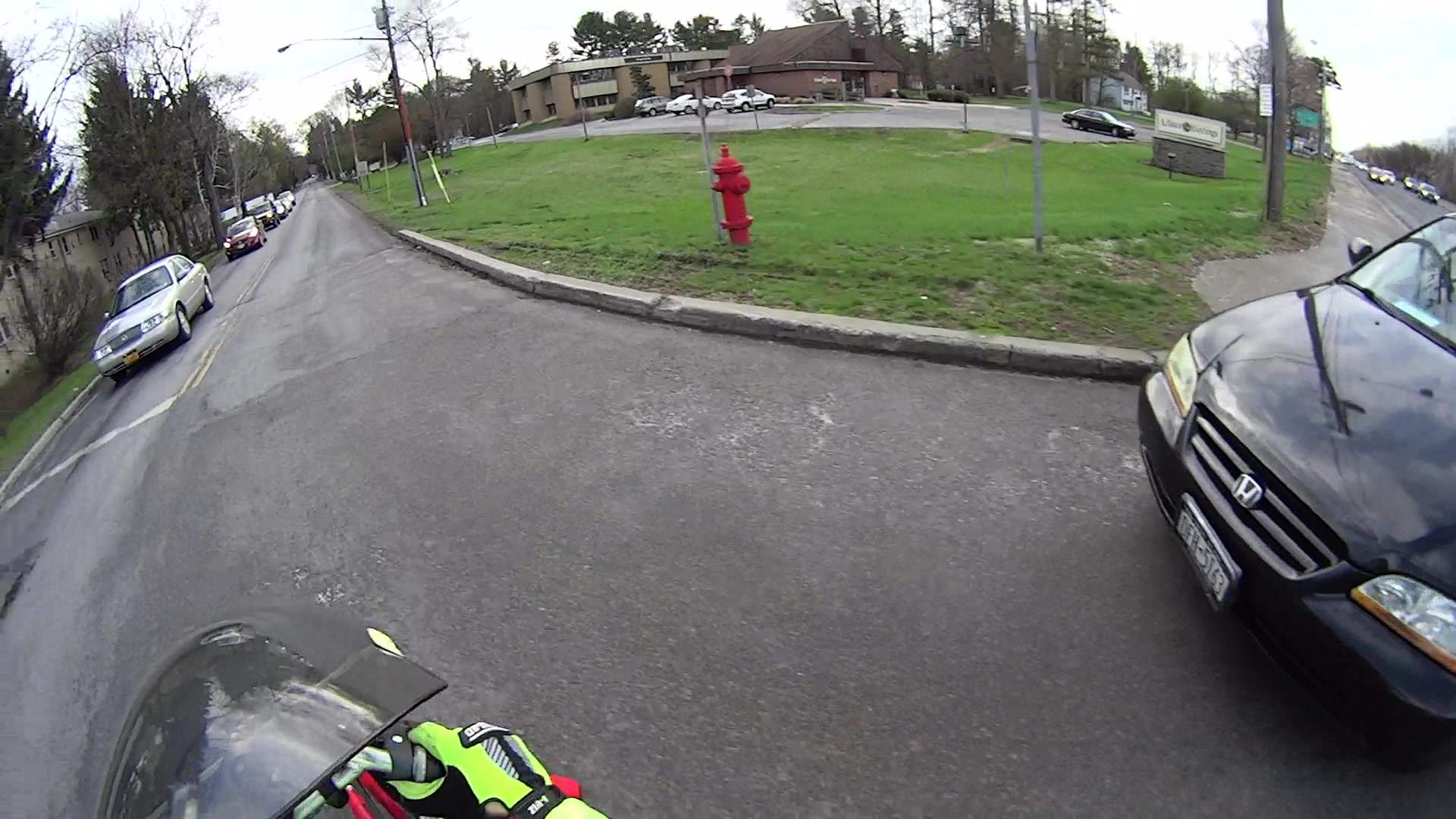
T = 9.583 – The black car has nearly stopped:
Rt 9 Locust Grove – Right on Red – front camera – 0710
The wide-angle lens on the HDR-AS30V makes it look like I had plenty of room. The Fly6 rear camera shows why I had reason for concern:
Rt 9 Locust Grove – Right on Red – rear camera – 0323
I’m still moving, the black car is slowing:
Rt 9 Locust Grove – Right on Red – rear camera – 0332
T = 9.767 – Props to this driver for not starting quickly:
Rt 9 Locust Grove – Right on Red – front camera – 0781
Elapsed time: four seconds from spotting the black car not stopping in the right-turn lane.
I moved back to the right side of the lane and continued the mission, but decided I didn’t need a jaunt across town to the rail trail before the rain set in to get my heart rate up.
All three had 36 working bulbs and, with a bit of good QC, should continue that way for a long, long time.
LED bulbs don’t have the intense point-source brilliance of clear tungsten bulbs and even the warm-white ones tend toward the cool end of the spectrum, but they’re Good Enough …
nnn = a unique, but not necessarily sequential, number
y = last digit of year
mm = month
dd = day
That produces these entries in my NAS hard drive full of bicycle action camera “footage”:
ll /mnt/video/Fly6/DCIM/
total 0
drwxr-xr-x 2 ed root 0 2015-12-10 14:18 10051210
drwxr-xr-x 2 ed root 0 2015-12-21 12:47 10051221
drwxr-xr-x 2 ed root 0 2015-12-24 20:26 10151224
drwxr-xr-x 2 ed root 0 2015-12-25 14:42 10251225
drwxr-xr-x 2 ed root 0 2015-12-26 15:26 10351226
drwxr-xr-x 2 ed root 0 2015-12-31 16:37 10451231
drwxr-xr-x 2 ed root 0 2016-01-16 16:56 10560115
drwxr-xr-x 2 ed root 0 2016-01-16 16:56 10660116
drwxr-xr-x 2 ed root 0 2016-01-31 13:28 10760131
drwxr-xr-x 2 ed root 0 2016-02-04 12:59 10860204
drwxr-xr-x 2 ed root 0 2016-02-07 17:05 10960207
drwxr-xr-x 2 ed root 0 2016-02-20 13:08 11060220
drwxr-xr-x 2 ed root 0 2016-02-21 12:03 11160221
drwxr-xr-x 2 ed root 0 2016-02-22 14:02 11260222
drwxr-xr-x 2 ed root 0 2016-03-06 18:16 11360306
drwxr-xr-x 2 ed root 0 2016-03-07 14:33 11460307
drwxr-xr-x 2 ed root 0 2016-03-08 14:57 11560308
drwxr-xr-x 2 ed root 0 2016-03-09 13:48 11660309
drwxr-xr-x 2 ed root 0 2016-03-10 11:24 11760310
drwxr-xr-x 2 ed root 0 2016-03-11 13:51 11860311
drwxr-xr-x 2 ed root 0 2016-03-12 16:04 11960312
drwxr-xr-x 2 ed root 0 2015-11-22 17:02 12051122
drwxr-xr-x 2 ed root 0 2015-11-25 19:14 12151125
drwxr-xr-x 2 ed root 0 2015-11-29 17:42 12251129
drwxr-xr-x 2 ed root 0 2015-11-30 16:53 12351130
drwxr-xr-x 2 ed root 0 2015-12-05 16:35 12451205
drwxr-xr-x 2 ed root 0 2015-12-07 16:53 12551207
drwxr-xr-x 2 ed root 0 2015-12-08 14:05 12690102
Annoyingly, the first three digits are not in ascending order of date, perhaps because the firmware recycles numbers previously used for now-deleted directories.
The year digit 9 in the last directory (12690102) came from the camera’s default 2009 startup date. You set the camera’s clock by editing its configuration file and rebooting that sucker, which I hadn’t done when I got a new Fly6 as a warranty replacement for the old one; apparently the battery shook itself loose after half a year of riding.
Deleting the directories created last November and December goes a little something like this:
rm -rf /mnt/video/Fly6/DCIM/???51[12]*
You probably want to dry-run that with a directory listing command (perhaps ls -al) just to be sure it will wipe out what you want and nothing else.
Within each directory, the file names follow a more rigid hhmmnnnn format:
hh = hour
mm = minute
nnnn = ascending sequence number
Which produces a set of files like this:
ll /mnt/video/Fly6/DCIM/11960312/
total 6.6G
-rwxr-xr-x 1 ed root 607M 2057-09-06 19:40 13120005.AVI
-rwxr-xr-x 1 ed root 810M 2057-09-06 19:40 13190006.AVI
-rwxr-xr-x 1 ed root 962M 2057-09-06 19:40 13290007.AVI
-rwxr-xr-x 1 ed root 573M 2057-09-06 19:40 13390008.AVI
-rwxr-xr-x 1 ed root 523M 2057-09-06 19:40 13470009.AVI
-rwxr-xr-x 1 ed root 596M 2057-09-06 19:40 13570010.AVI
-rwxr-xr-x 1 ed root 672M 2057-09-06 19:40 14070011.AVI
-rwxr-xr-x 1 ed root 716M 2057-09-06 19:40 14150012.AVI
-rwxr-xr-x 1 ed root 505M 2057-09-06 19:40 14250013.AVI
-rwxr-xr-x 1 ed root 497M 2057-09-06 19:40 14350014.AVI
-rwxr-xr-x 1 ed root 221M 2057-09-06 19:40 14450015.AVI
The NAS drive does not, for reasons I cannot explain, record the actual file creation timestamp; touch-ing the file afterward does update the timestamp correctly. So it goes.
The camera attempts to write the files in 10:00 minute chunks, but, because it deletes files (or, perhaps, entire directories) one-by-one in FIFO style, the actual file duration / size seems limited by the space made available by the deletions. The default 8 GB MicroSD card has something like 6.6 GB available and holds a bit under two hours of video; I should bump that to a 16 GB card to get a complete record of longer rides.
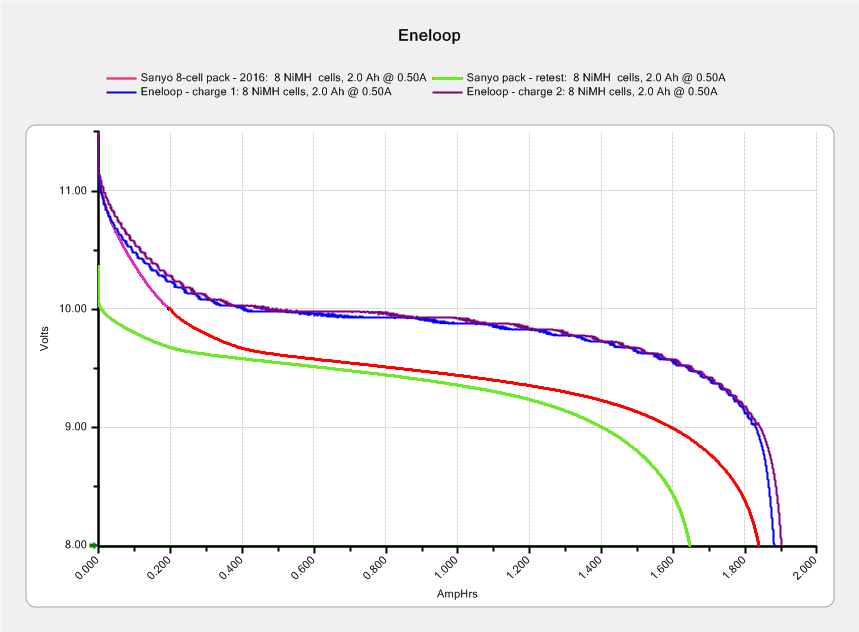
The two upper curves show the first two charges for those eight cells back in 2010.
The lower curve(s) started out with the wrong endpoint voltage (purple part of the middle curve), so I restarted the test (green curve) and edited the graph image to splice the two curves together into the purple/red curve.
Although the capacity measured in mA·h isn’t much lower, the voltage depression reduces the available energy and trips the “low battery” alarm much earlier. In round numbers, the old cells were good for a few pictures, even hot off the charger, and didn’t have much energy left without being recharged before use.
A quartet of Panasonic Eneloop Pro cells just arrived from BatterySpace, a nominally reputable supplier, all sporting a 14-05 date code suggesting they’re just shy of two years old. The packaging claims 85% charge retention after a year, so they should have a bit more than half of their rated 2.45 A·h “minimum” (or 2.55 mA·h “typical”, depending on whether you trust the label on the cell or the big print on the package) capacity remaining (although we don’t know the original state of charge, done from “solar power”). The lower curves say they arrived with 1 A·h remaining:
Panasonic Eneloop – First Charge
However, the terminal voltage on those bottom curves would have any reasonable device reporting them as dead flat almost instantly, so you really can’t store Eneloops for two years: no surprise there.
One pass through the 400 mA Sony charger produced the upper curves, with the dotted red curve from Cell A lagging in the middle. After that test, another pass through the charger brought Cell A back (upper solid red line) with the others, so I’ll assume it took a while to wake up.
A pair of these in the camera will produce 2.2 V through 2.2 A·h, far better than the aged-out Sanyo Eneloops.
Charging them at 400 mA = C/6 certainly counts as a slow charge. I’ve been charging the Sanyo cells in slow chargers in the hope that they’ll remain happier over the long term.
It seems that two years is about as long as the NP-FS11 batteries last, as shown by the two lower curves from the ones I rebuilt in December 2013 with cells from 2011:
Sony NP-FS11 2011-2016 Packs
The two middle curves with those same colors show the “back then” performance of those batteries: they’re shot in both total capacity and terminal voltage.
I bought enough cells back in 2011 to leave two cells unused until now, which I built into a pack and charged. The green curve in the middle shows the result: those cells haven’t lost anything over the last five (!) years, as their performance still matches the other two batteries when they were new.
The red curves come from a pair of batteries made with fresh new cells from batteryspace.com. They’re nominally 650 mA·h cells, so the NP-FS11 configuration (two parallel cells) should produce 1300 mA·h; surprisingly, they show 1500 mA·h with a nice voltage curve.
So, although the 2011 cells work as well as their (now defunct) siblings, that pack can’t deliver the same capacity as the new cells. I expect I’ll rebuild it with 2016 cells in about a year.
For whatever it’s worth, rebuilding these batteries goes much faster when I don’t have to saw them open. The Kapton tape wrapped around the case halves secures them well enough; there’s no need for fancy gluing.
NP-FS11 Battery Rebuilds – 2016-03
Yeah, I should make better labels. It’s hard to form a deep emotional attachment to the poor things, though.
Here’s a case where something performs better than expected; I don’t always buy cheap junk from the usual eBay vendor…










 The Smell of Molten Projects in the Morning