Ed Nisley's Blog: Shop notes, electronics, firmware, machinery, 3D printing, laser cuttery, and curiosities. Contents: 100% human thinking, 0% AI slop.
For obscure reasons, I have a pair of headsets attached to the PC: one USB that’s used for phone calls and one plugged into a sound card for everything else.
They’ve been cluttering up the corner of the desk for far too long, so I bent up a rack from a surplus coat hanger. Nothing critical, as long as it’s tall enough to hold the mics off the desk and wide enough they don’t clunk together.
The trick is to just drill a hole in the top of the desk and poke the end of the rod into it. That works because my desk has a notch along the edge just exactly the right width to hide the hole!
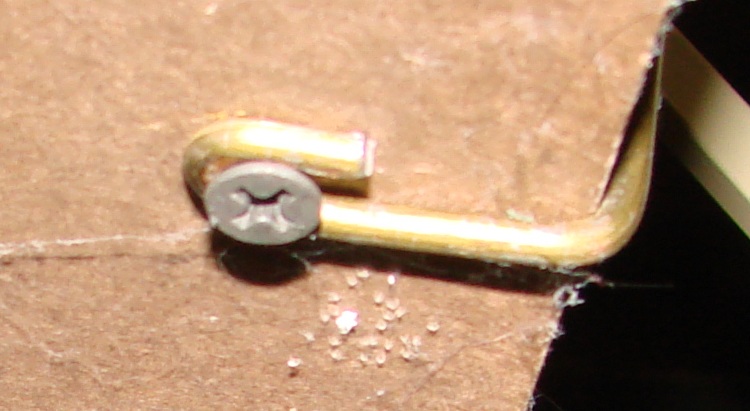
Hanger Mounted Under Desk
Maybe you don’t want to do this to the top of your desk, in which case maybe you can bend the hanger around the edge and put a screw in the bottom or the desktop. If you don’t look under there very often, the spiders will take over; this one is from the basement desk that I haven’t used for far too long.
Details of the hanger, not that you can’t figure it out on your own:
While trying to persuade a Windows program to run under Wine, I stumbled across this useful script: winetricks.
Basically, it downloads & installs the myriad runtime libraries / DLLs / programs that Windows programs generally assume are installed. Those are the things you don’t know are missing and generally can’t figure out how to install on your own.
It didn’t actually help get the program in question running. As nearly as I can tell, if at first you can’t get a program installed & running under Wine, just give up…
The oddly named Kensington “Expert Mouse” (it’s a trackball) sits to the left of my keyboard, where it serves as my main pointer controller; I’m right-handed, but have used a left-hand mouse / trackball for years.
Also, search for Kensington scroll to find other posts. There may be no good fix for scroll ring problems.]
Recently the scroll ring has become balky, stuttering upward & downward rather than actually scrolling. It’s an optical device, so I suspected it had ingested a wad of fuzz that blocked the beam path.
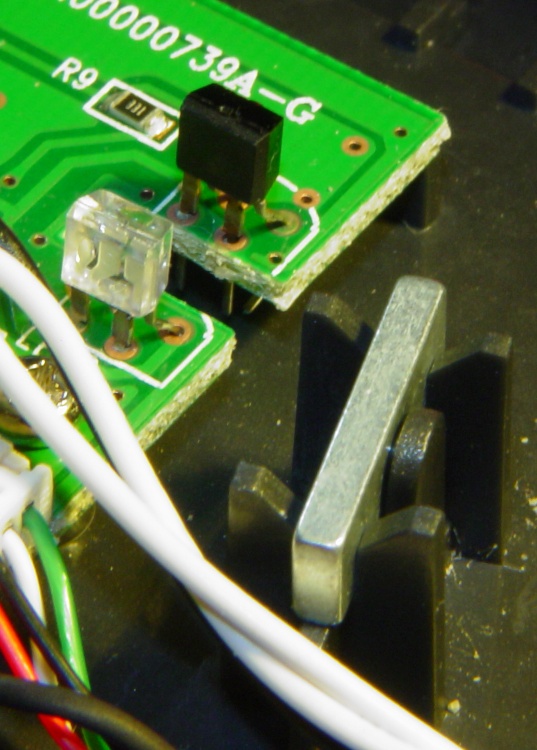
The top photo shows the infra-red emitter adjacent to the scroll ring’s slotted rim. The silver bar to the right of the emitter is the magnet that provides those soft detents. There’s no obvious fuzz.
Disassembly is straightforward.
Tip the ball out into your hand and put it where it can’t possibly roll off the desk.
Peel the four rubber feet off the bottom, remove four screws, and the top half of the body pops off.
Remove three screws from each of the two button cap assemblies and pry the button caps off the case bottom.
Remove two screws from the ball socket, pull it off, and clean any fuzz from the openings.
Surprisingly, I didn’t find much crud at all.
Scroll Ring Emitter and Detector
This photo shows the IR emitter and detector, peering at each other across the electrical isolation gap in the circuit board. Nothing obviously wrong here, either…
They both seem to be dual elements, which makes sense for a quadrature position encoder. Unfortunately, replacing them seems to be really difficult; they don’t look like stock items.
So I put it back together, plugged the USB cable in, restarted the X server (this being Xubuntu 8.10), and it pretty much works again.
Kensington replaced a previous Expert Mouse under warranty when one of the three minuscule red bearing balls that support the trackball went walkaround, but that gadget had been getting erratic, too.
I’m not sure what’s going on, but I have a bad feeling about this.
Scenario: You install the latest Firefox update, restart as requested, and then get stuck in a loop where the popup window at the top of the browser keeps telling you to restart.
That bug (270303 “your browser has been updated and needs to be restarted”) and its ilk have been repeatedly fixed, on every version since about 3.0.2, and (it seems) to no avail.
What worked for me after updating to Firefox 3.0.11 was to close the browser and then:
Setting up serial ports in Wine is evidently automagic for the old-standard-hardware ports that appear as /dev/ttyS0. Unfortunately, that seems to not work for USB serial ports that appear as /dev/ttyUSB0 (or whatever is next in line when it’s plugged in).
The quick-and-dirty solution is to set up symlinks, thusly:
cd ~/.wine/dosdevices
ln -s /dev/ttyUSB0 com3
and so forth. As long as the USB gadget pops up with the same number, that’ll work.
It is best to avoid any built-in hardware ports that already have automagic com1 / com 2 / whatever identifiers. Start with com3 or higher unless you know com1 / com2 are vacant. I suppose some laptop IRDA (remember that?) ports may still show up as com3 / com 4.
Unlike the other devices, there’s no trailing colon. They’re also lowercase, although Windows sort of expects uppercase; that’s evidently handled under the covers.
This would be better handled by UDEV magic that creates the appropriate links on the fly based on the USB device ID, but just hand-creating the links works well enough for my simple needs so far.
I fire up the Token Windows Laptop more or less monthly, to download data from our gaggle of Onset Computer Hobo dataloggers. As a result, the laptop gets broadsided with Windows updates from the Mother Ship and, although I look at ’em before installation to see wassup, I don’t really remember any particular update from month to month.
It seems that, in order to solve the really-disable-Autorun-dammit problem, the patch described in KB967715 must update a registry entry that’s nailed down by some other program. As a result, the patch either doesn’t install, installs-but-fails-quietly, or installs-but-fails-loudly.
It eventually percolated to the front of my dim consciousness that I’d seen all of those outcomes over the last few months…
A bit of trawling turned up the usual collection of uninformed blather, plus what seems to be the Definitive Answer direct from the Mother Ship. Go there for the details.
Update 967715 may be reoffered if the HonorAutorunSetting registry setting that is described in this article is not added to the registry hive. This issue may occur if some other program that is installed on the computer blocks the update from writing the registry entry. Such software may block the update during the installation of the update or may remove the registry entry after the computer is restarted.
(“Registry hive”? WTF?)
Basically, you download the patch as an executable file, save it somewhere convenient, reboot in Safe Mode (hold F8 down as Windows starts up, then pick Safe Mode from the menu), clickety-click on the patch program, and give it permission to have its way with your PC.
So far, it’s all good. Maybe I won’t have to remember this for another month…
Memo to Self: if all else fails, MS doesn’t charge for security-related patch assistance phone support.