Obviously, I haven’t popped the top on this PC for a while:
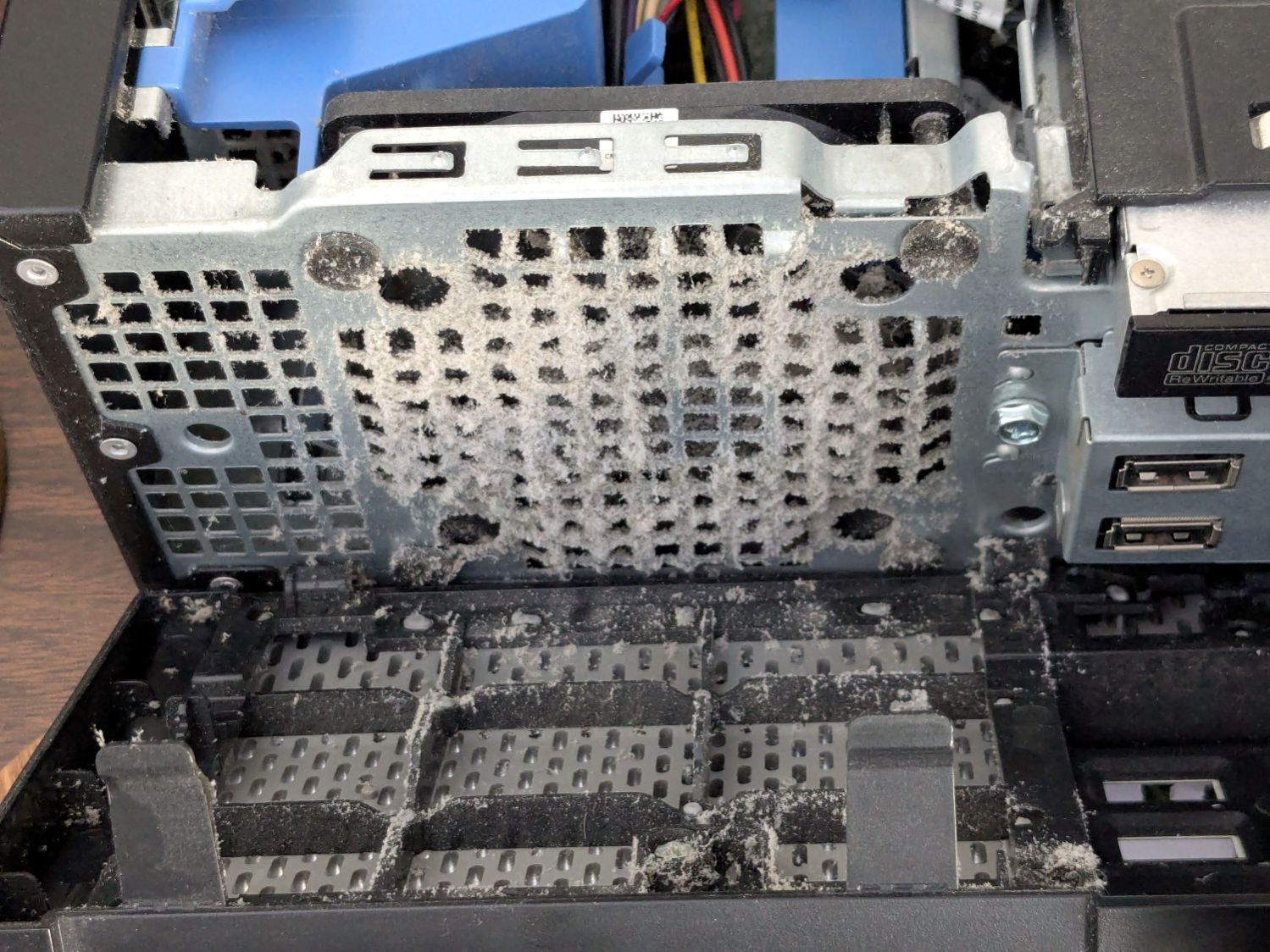
Some fuzz made it past the grille:

PSA: In the unlikely event you still use a desktop PC, it’s time to pop the top on yours, too.
The Smell of Molten Projects in the Morning
Ed Nisley's Blog: Shop notes, electronics, firmware, machinery, 3D printing, laser cuttery, and curiosities. Contents: 100% human thinking, 0% AI slop.
Who’d’a thunk it?
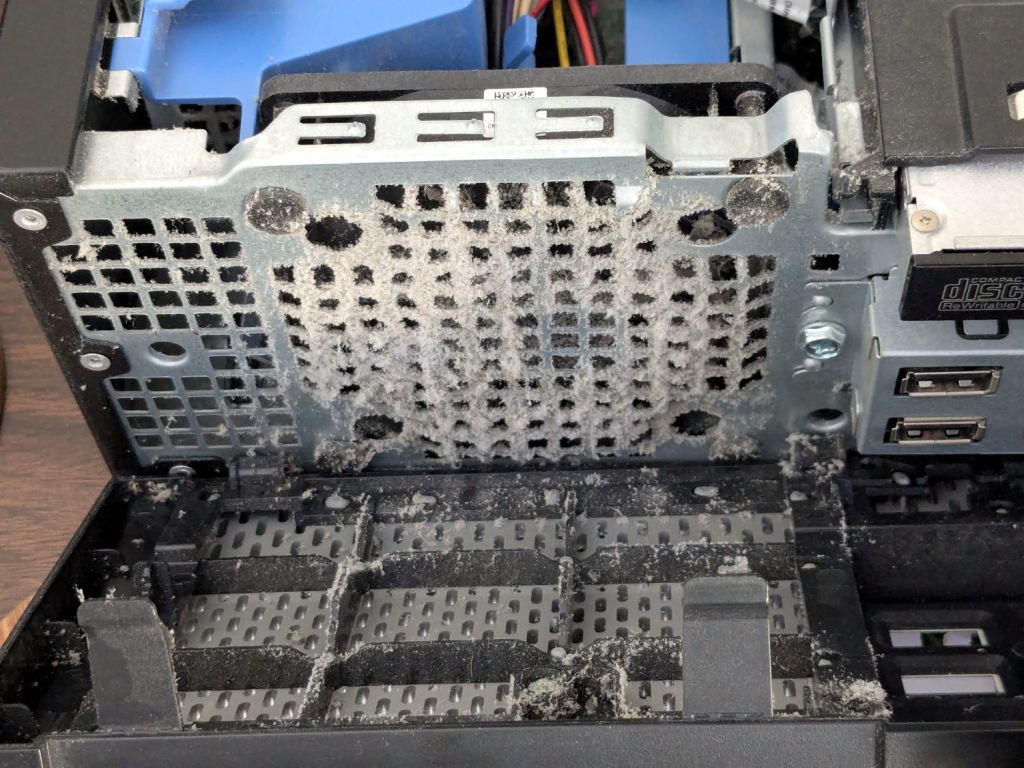
Obviously, I haven’t popped the top on this PC for a while:
Some fuzz made it past the grille:
PSA: In the unlikely event you still use a desktop PC, it’s time to pop the top on yours, too.

Looking at that big smashed-glass coaster from a different angle showed interesting patterns:

Although the larger fragments were still holding together when I laid them in their recesses, they apparently consist of several sub-fragments with larger continuous cracks letting the epoxy flow / ooze inside.
Now that I know what to look for, the original picture also shows them, albeit less distinctly:

They’re not obvious in the scanned image of the fragments, although I could convince myself I see some:

The many smaller fragments I’ve been turning into coasters probably separated from similar large chunks along such cracks, which is why I’ve never seen rivers of crack before.
Apologies if you arrived here expecting a tirade concerning the drug trade … :grin:

Do you see the Cooper’s Hawk?

Neither did I!
(The last three digits in the caption tick along at 60 frame/s. Opening each iamge in a new tab will let you embiggen the details, although the images aren’t all that great.)
The second wingbeat, over on the left, is more visible as the hawk lifts off:

This was about when I figured out what was going on:

A hawk can easily outfly me!

The snake dangling from the hawk’s talons didn’t see it coming, either:

Up and away!

About 2.3 s of elapsed time: plenty for a hawk and not nearly enough for me. Or the snake, for that matter.

A Praying Mantis appeared on the house wall:

The next morning found it huddled against the cold:

It had reached operating temperature and gone about its business a few hours later.
I deployed a cardboard Mantis in its honor as a seasonally appropriate yard decoration, but mine didn’t survive the night nearly as well as the real one:

I doubt a predator was involved …
A site search will reveal previous encounters with their kind.

I discovered this commentary, in several variations in different contexts, after attending the Poughkeepsie No Kings protest last weekend:
You are allowed to say, at any point, “I can’t support this”.
Even if you did.
Even if you were unsure.
You can say, at any point, “This has gone too far.”
And, while the best time to say that was earlier, the second best time is now.
That is relevant, because the Executive branch of the United States government has internalized two facts:
The President and the Executive branch now act with the knowledge that the separation of powers, the checks and balances, and the restrictions written into the US Constitution no longer apply.
Justifications based on Constitutional hairsplitting are irrelevant. The Founding Fathers did not intend the Executive branch to operate as it does now.
Justifications based on “But what about …?” are irrelevant. The scale of current malfeasance dwarfs all precedent; there are no valid comparisons.
Justifications based on “But Congress is dysfunctional!” are irrelevant. It takes only one to dysfunction and the parties have been swapping irresponsibility for decades.
I commend to your attention the Army Talk Orientation Fact Sheet 64 from March 1945. It is straight-up US WWII propaganda with a rosy view of the Soviet Union, but you should fact-check all items in the section “Can We Spot It?” on page 4 against current events.
Should you think your particular identity, institution, tradition, behavior, property, possessions, protection, legality, or beliefs will remain untouched because you’re in a particular group, you are incorrect.
I changed my voter registration to “No Party” several decades ago, when it became evident the Republican Party had lost interest in whatever small-government / low-deficit / personal-responsibility principles it may have once had; thinking it had those principles was likely a misunderstanding on my part.
I cannot support many planks of the Democratic Party’s platform, either, but they remain based in rule-of-law and have some appreciation of what functions a government should perform.
I still vote in every election and intend to continue doing so.
WordPress likes images and this seems appropriate:


My Fitbit Charge 5 exercise tracker estimates my VO2Max as somewhere between 51 and 55. That seems absurd for a guy of my age, where “Excellent” is a bit under 40. I am most certainly not a highly trained athlete at the top of my form, so I wondered what the real value might be.
Fitbit calculates VO2Max from the ratio of my maximum to resting pulse rates, probably according to the Uth formula using a coefficient applicable to a much younger man.
It also computes my maximum heart rate from my age as 220 – 72 = 148, much lower than the values I routinely see while biking around the area. Reviewing a few months of data suggests an actual value around 170, although I did see 185 on one occasion.
Forcing a maximum heart rate of 170 changed the VO2Max estimate to 50-54, which still seemed absurdly high. At least that change made the Fitbit’s “heart rate zones” a little more reasonable, as ordinary bike rides no longer have me in the Peak zone nearly as often.
The Rockport walking test calculates VO2Max from a timed walk over a one mile “track” course, so I laid out a half-mile out-and-back route on Zack’s Way, which is a quarter mile from home.
Maintaining a brisk pace covered the mile in 15:49 and left me with a 110 pulse; it’s obvious I’m not a trained athete. Feeding those numbers and a few other vital details into the Rockport formula gives me a much more realistic VO2Max of 28.5, putting me somewhere between the 50th and 75th percentile.
Which is good, but not extraordinary.
Bottom line: don’t believe the hype.
An obligatory picture and link for enhanced SEO:

For reasons not relevant here, I walked along IBM Rd to the end of Sand Dock Rd and back, passing the switchyard serving the IBM Poughkeepsie site:
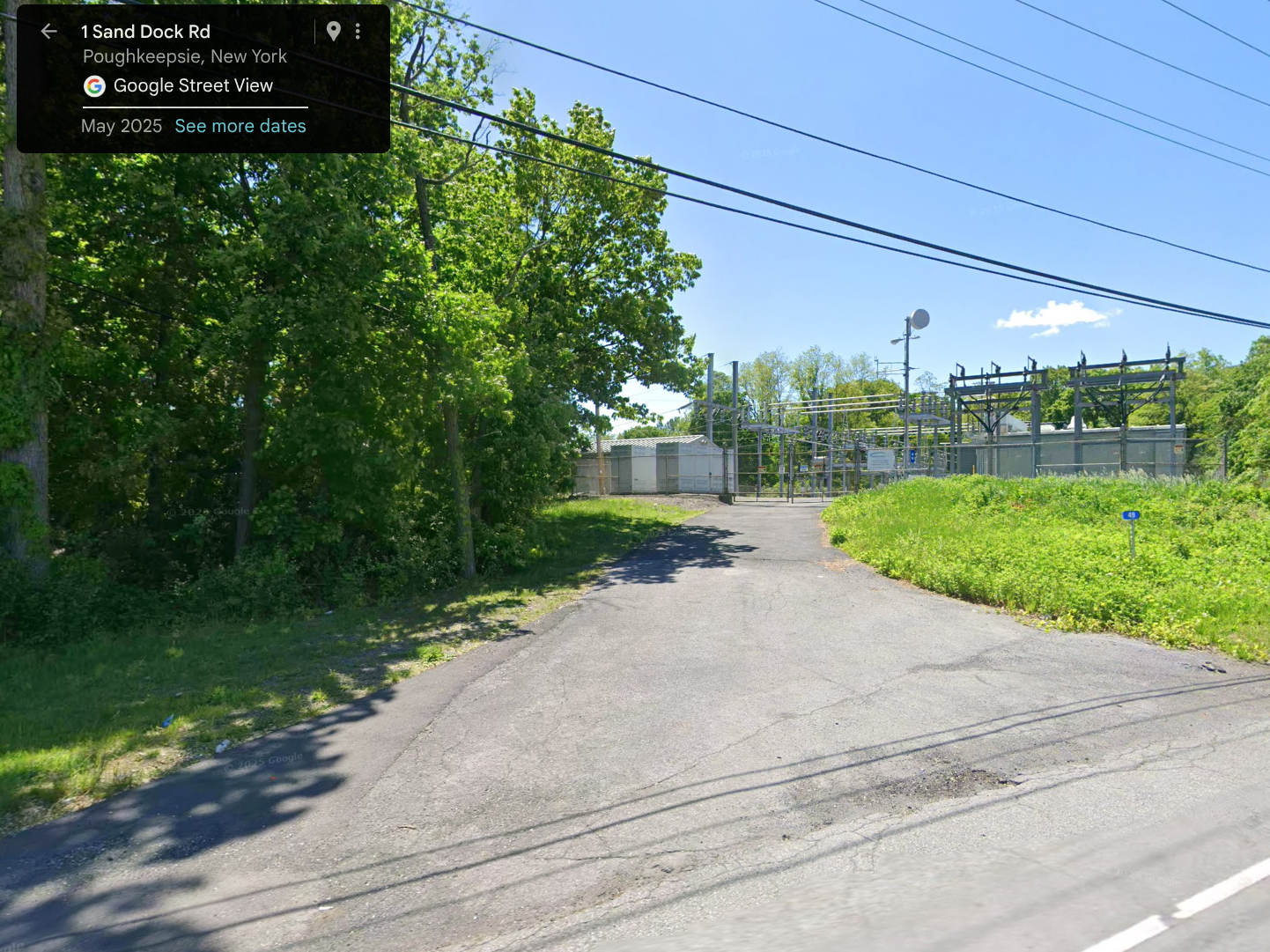
The overall capacity is surely in the tens of megawatts and there’s an overwhelming hum coming down that driveway:
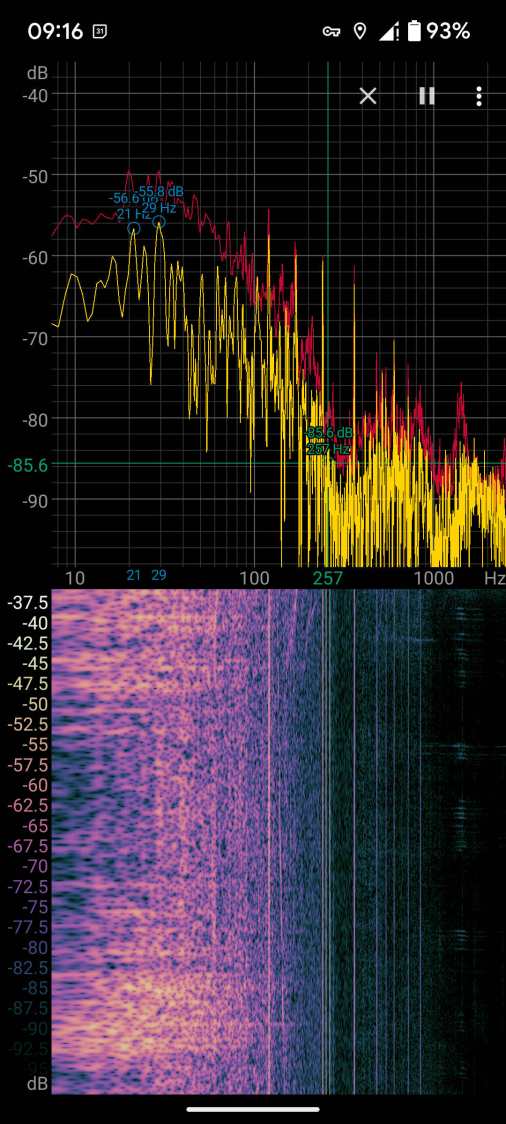
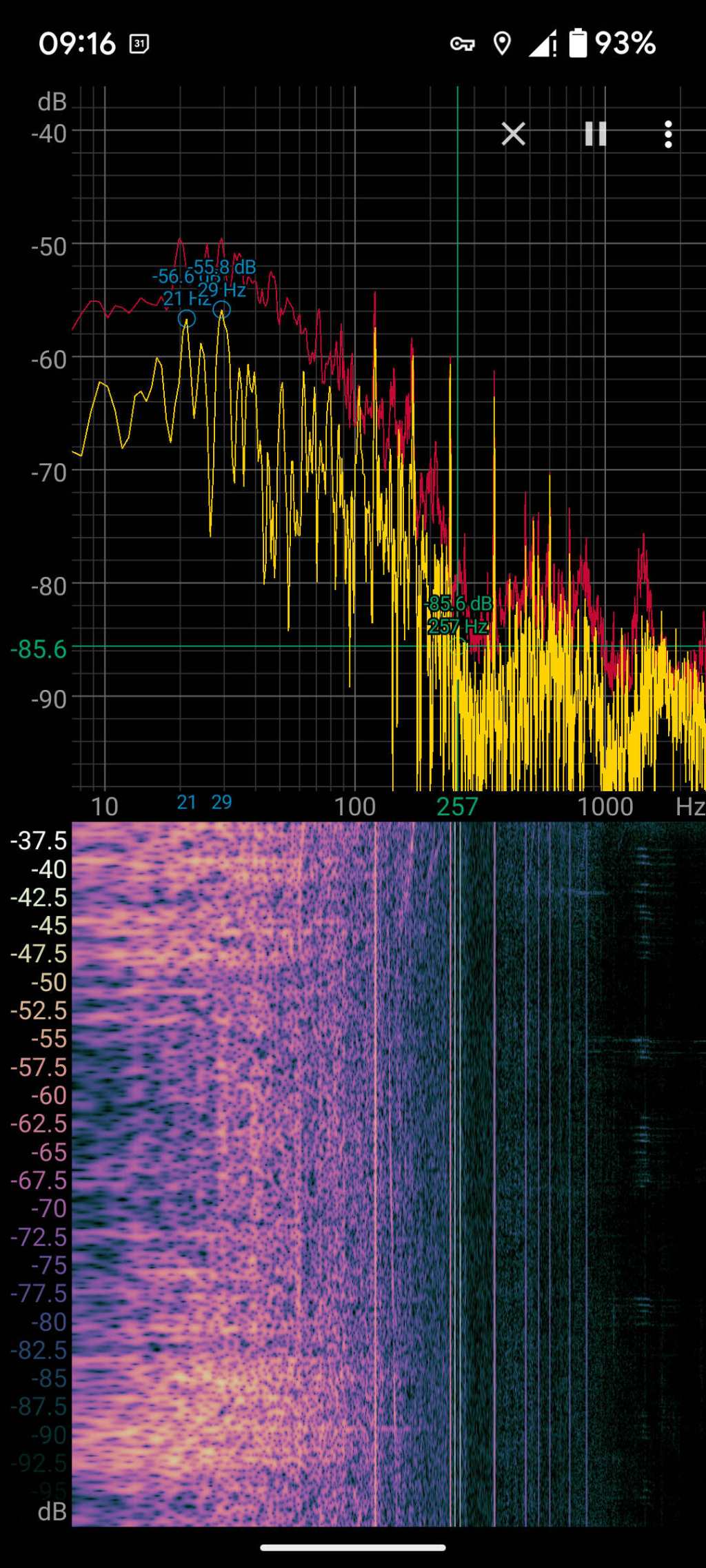
Those peaks and the corresponding lines in the waterfall show the equipment emits acoustic energy all the way up to about 480 Hz, call it the eighth harmonic of 60 Hz.
Transformer steel has low magnetostriction, which produces most of the noise at even harmonics of the 60 Hz power line (because each cycle has two current maxima). The spectrogram shows the switchyard handles enough current to emit plenty of odd harmonic energy, with a notable peak at 180 Hz.
For comparison, standing a few feet from the transformer behind a medical office building along IBM Rd:
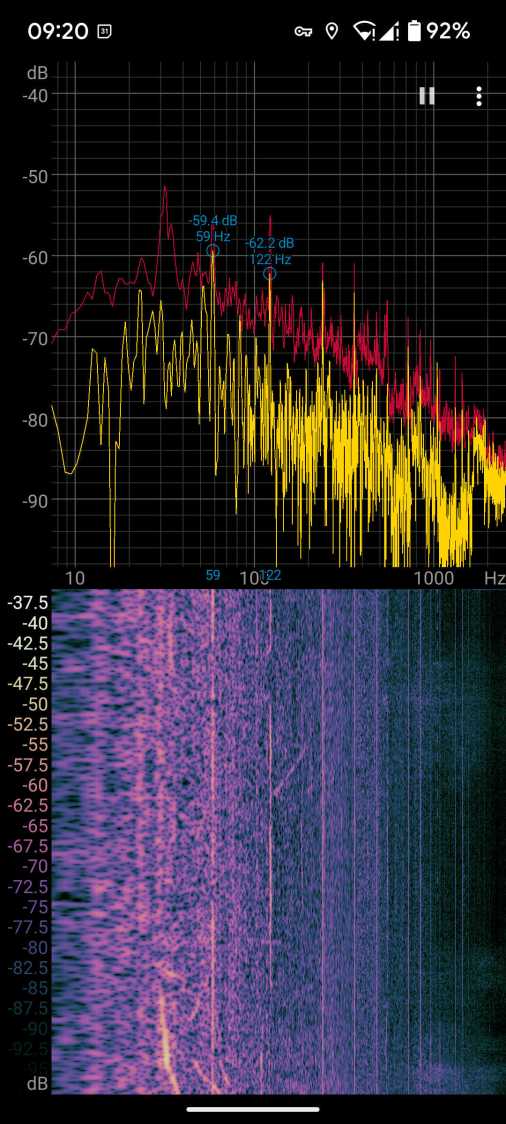
No 180 Hz energy from that transformer!
Moving a few feet further away dropped those peaks into the background.
Even with my deflicted ears, I think can hear the switchyard hum from a considerable distance along the road, so maybe the background isn’t as quiet as I think.

