The Smell of Molten Projects in the Morning

Ed Nisley's Blog: Shop notes, electronics, firmware, machinery, 3D printing, laser cuttery, and curiosities. Contents: 100% human thinking, 0% AI slop.

Category: Machine Shop

Mechanical widgetry

  • Kenmore HE3 Washer: End of Life

    Kenmore HE3 Washer: End of Life

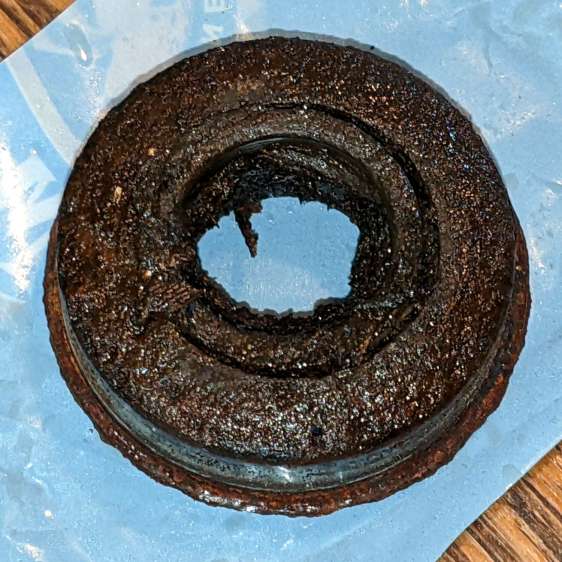
    After eighteen years and one basket / tub replacement, our venerable Kenmore HE3 clothes washer has reached End of Life:

    • Kenmore washer - eroded tub A
    • Kenmore washer - eroded tub B
    • Kenmore washer - eroded tub C

    I had looked in there (between the door gasket and the tub) to find any foreign objects making the horrible noise and again, perhaps a week later, when I replaced the shock absorbers, after which the corroded spider in the back finally broke enough to let the basket flop around continuously during the spin cycle and erode the tub rim.

    In round numbers, we heard the first sign of trouble three weeks ago: a very loud, but only occasional, KLONK due to protrusions on the side of the basket or the fractured part of the spider on its back hitting indentations in the tub. The KLONK remained intermittent during half a dozen loads, until it became pretty much continuous.

    We installed the washer in early 2004, replaced the tub and basket in 2010, and it’s now 2022: the first spider failed after six years and its replacement lasted twelve. After nearly two decades, the tub and basket are no longer available from the usual appliance part sources, so (even if I wanted to) I cannot repair the washer.

    Another washer, also a front-loader, also highly rated, will arrive shortly. For the first time ever, we bought an Extended Service Plan good for five years. The alert reader will note the difference between the first failure and the length of the plan, but reviews of similar new machines suggest having Lemon Replacement coverage. In this situation, I am willing to pay for the talismanic effect of coverage that may never pay off, if that makes any sense.

  • Kenmore HE3 Washer Shock Absorber Shims

    Kenmore HE3 Washer Shock Absorber Shims

    As part of diagnosing a Terrible Sound inside our two decade old washer, I replaced the OEM shock absorber struts with cheap knockoffs. Although it didn’t solve the problem (spoiler: another tub spider bites the dust), the experience may come in handy elsewhere.

    The left rear (as seen from the front) shock stood in a pile of rust on the baseplate that came from a drip in the water feed nozzle to the detergent / bleach / whatever dispenser drawer. The affected parts are no longer available and I have never had any luck finding a replacement O-ring of the proper size, so I just pulled the nozzle out, ran a small bead of acrylic sealant around the O-ring, and squished it back in place:

    Kenmore washer - dispenser nozzle seal
    Kenmore washer – dispenser nozzle seal

    It’s the Y connection between the two black hoses, held in place on the dispenser by a relentless little clip. Release the two hose clamps, remove the hoses, pull it out, apply sealant, squish, reinstall in reverse order.

    As for the shocks, don a pair of work gloves and turn the upper mount (on the tub) counterclockwise as you look along the shock. The tub has molded-in latches that make turning it the wrong way difficult, but not impossible.

    With the shock loose, you can now try to turn the lower mounts counterclockwise as you look along the shock, but I had to deploy the BFW in very cramped quarters to get enough traction. This will likely wreck the little latches holding the mount in place, but you were going to replace it anyway.

    The new left-rear latch snapped firmly into place:

    Kenmore washer shock - left rear
    Kenmore washer shock – left rear

    Yes, that’s after I cleaned off as much of the rust as made sense.

    The remaining three latches did not snap firmly into place, so I made shims to soak up the slop:

    Kenmore washer shock - shim laser cut
    Kenmore washer shock – shim laser cut

    They slip around the central pillar with clearance for the latches, although the thicker shim didn’t leave much engagement:

    Kenmore washer shock - shim installed
    Kenmore washer shock – shim installed

    They ranged from 0.8 mm down to 0.2, based entirely on feel, and I used PETG, LDPE, and polypropylene clamshell of the right thickness.

    The left front got the thickest:

    Kenmore washer shock - left front
    Kenmore washer shock – left front

    Right front thinnest:

    Kenmore washer shock - right front
    Kenmore washer shock – right front

    And right rear in the middle:

    Kenmore washer shock - right rear
    Kenmore washer shock – right rear

    The shims aren’t precisely lined up with the feet, because I couldn’t make that work out, but they definitely prevented the mounts from shaking in their boots during the spin cycle.

    You will inevitably want to take the mounts off the shocks, which will prove surprisingly difficult. The two halves are identical, with triangular latches that snap together with no provision for release:

    Kenmore washer shock - foot internals
    Kenmore washer shock – foot internals

    Brute force applied with a small screwdriver may suffice, but don’t be surprised if strong words are required.

  • Nothing Lasts, Chemical Edition

    Nothing Lasts, Chemical Edition

    Cleanup after painting the hairlines involved opening the cap of the rarely used can of methyl ethyl ketone:

    MEK can - fractured cap
    MEK can – fractured cap

    It seems white-tinted polyethylene deteriorates after a dozen years of exposure to concentrated MEK fumes, suggesting I don’t use nearly enough enamel paint.

    The Container Stockpile disgorged a pair of pure polyethylene jars that should last another decade.

  • Homage Tektronix Circuit Computer: Laser-Engraved Painted Hairline

    Homage Tektronix Circuit Computer: Laser-Engraved Painted Hairline

    Having established that laser-engraving the hairline fuses the protective film to the PETG cursor, I wondered if the bond would allow filling the hairline by painting it with good old Testors enamel:

    Tek CC - Painted Hairline - finished
    Tek CC – Painted Hairline – finished

    Which is, straight up, the best hairline I’ve ever made!

    I use a fine-tipped paintbrush, but there’s no need for finesse:

    Tek CC - Painted Hairline - mask detail
    Tek CC – Painted Hairline – mask detail

    After the paint has cured a bit, peeling the film removes everything that isn’t inside the trench:

    Tek CC - Painted Hairline - mask removal
    Tek CC – Painted Hairline – mask removal

    The clouds on the clear side come from PETG vapor condensing on the transparent film protecting the bottom of the cursor.

    A closer look through the cursor shows bubbles in the bottom of the trench, presumably from boiling PETG:

    Tek CC - Painted Hairline - detail
    Tek CC – Painted Hairline – detail

    The hairline measures 0.3 mm across and, unlike previous attempts, is perfectly consistent from end to end.

    Now I can go into mass production:

    Tek CC - Painted Hairline - production
    Tek CC – Painted Hairline – production

    I love it when a plan comes together …

  • OMTech 60 W Laser: Axis Angle Check

    OMTech 60 W Laser: Axis Angle Check

    After tweaking the OMTech laser’s axis scale calibration, it seemed like a good idea to see whether the axes run perpendicular to each other:

    OMTech Axis Cal - framing square
    OMTech Axis Cal – framing square

    A carpenter’s framing square isn’t the most precise instrument, but the pair in my collection agree on their right-angularity to within my ability to measure the difference.

    Aligning the short arm with the Y axis showed the X axis was off by 1.2 mm in 21 inches = 530 mm, an angle of 0.13°, which is just about as good as it’s ever going to be.

    The honeycomb frame is definitely not a precisely aligned unit, but the front edge is parallel to the X axis within an astonishing 0.03°, measured along the rear edge of the long arm pushed against the front of the frame. The aluminum frame has a distinct outward bow in the middle averaged out by the long arm.

    Unfortunately, the honeycomb frame on the right side is nowhere near that nice. While I had the long scale aligned with the X axis travel, I sleazed a smaller square up against it:

    OMTech Axis Cal - honeycomb frame misalignment
    OMTech Axis Cal – honeycomb frame misalignment

    It’s as bad as it looks:

    OMTech Axis Cal - honeycomb frame vs axis travel - detail
    OMTech Axis Cal – honeycomb frame vs axis travel – detail

    The scale departs from the black square’s arm by 4 mm over 260 mm, for a 0.88° misalignment.

    I think the honeycomb frame is, at best, a parallelogram (and likely a trapezoid), and each side is also bowed by a few millimeters along its length, so any misalignment will depend on where you stand and which way you look.

    In all fairness, it was never intended as an alignment fixture and nobody really cares about angular misalignment as long as the puppy portrait comes out pretty much in the middle of the coaster.

    Angular Alignment meme
    Angular Alignment meme

    Yes, yes I am.

    It’s easy enough to make an alignment fixture:

    OMTech Axis Cal - honeycomb frame angle fixture
    OMTech Axis Cal – honeycomb frame angle fixture

    The cut along the left edge is, by definition, parallel to the Y axis, so the left edge of the larger slice serves to align flat things to be cut and hold them in place:

    Laser cutter deck fixture
    Laser cutter deck fixture

    The upper sheet (a simple chipboard rectangle) sits perpendicular (set with the short square) to the edge, held to the honeycomb with magnets, and kept in alignment with two adjustable stops snugged against it. A few smaller magnets can hold the sheet flat against the honeycomb as needed.

    The sliver cut off the MDF is 7.85 mm at the top and 9.70 mm at the bottom, for an angle of 0.53° over its 210 mm length, a bit less than the angle measured above. It now lives in the tooling pile against future need.

  • DripWorks Valve Fracture

    DripWorks Valve Fracture

    Early in the irrigation season, Mary turned on a DripWorks Micro-Flow Valve, only to have the knob + stem pop out and release a stream of water in the wrong place. Mary jammed it back in place until I could chop out the offending valve and install a known-clear replacement.

    The knob broke off the stem when I tried to pry it out of the valve body:

    Failed Dripworks valve - parts
    Failed Dripworks valve – parts

    The lip around the inside of the cap snaps over the top of the body, which is why I wrecked the stem, but the chip broke off the cap while Mary was turning it just before the stem popped out. Her fingers are barely strong enough to turn the valve, which means something had gone wrong before she started turning.

    A look straight into the valve body:

    Failed Dripworks valve - top view
    Failed Dripworks valve – top view

    The stem has swarf left over from drilling out the mold flash last year:

    Failed Dripworks valve - stem
    Failed Dripworks valve – stem

    All in all, the Dripworks drip irrigation system works well, but their overall attention to QC leaves something to be desired.

  • OMTech 60 W Laser: Axis Scale Check

    OMTech 60 W Laser: Axis Scale Check

    Laying out my longest engraved scale on the honeycomb:

    OMTech Axis Cal - dot positioning
    OMTech Axis Cal – dot positioning

    The zero-th step aligns the scale with the axis travel: slide one end of the scale to put the dot on the edge, jog to the other end, slide to put the dot on the edge, iterate until the dot is the same brightness on both ends.

    The scale lines are a tidy 0.2 mm wide, the red laser dot might be 0.4 (it’s rectangular-ish), and a jog increment of 0.2 mm works well. I can manually align (pronounced “slide”) the scale on the honeycomb to center the dot within a line, whereupon moving the head a known distance to the other end of the scale and counting-while-jogging a few steps until the dot drops into the proper line gives the offset from the correct distance.

    Jogging 590 mm along the X axis produced 589.8 mm of actual travel (one jog step short of the line 590 mm from the start), an error of -340 ppm.

    Jogging 495 mm along the Y axis travels 494.4 mm, an error of 1212 ppm. That’s considerably more than I expected and required a few iterations until I believed it.

    Both axes use steppers with 20 tooth pulleys and 3 mm pitch belts, so the laser head moves 60 mm per motor revolution. The stepper drivers are configured for 5000 steps/rev, so the axes should have a step length of 12 µm = 60 mm / 5000 step. Both axes arrived with Step Length values set to weird numbers very close to 12 µm, but, after a quick check showed incorrect travel distances, I reset them to 12 µm before making real measurements.

    LightBurn provides access to the Ruida controller’s “Vendor Settings” (after a warning to not mess things up) and allows you to change them:

    OMTech Laser - Axis step length settings
    OMTech Laser – Axis step length settings

    The values shown above come from multiplying 12 µm by the ratio of the actual to the intended distance:

    • 11.9959 = 12 × 589.8 / 590
    • 11.9855 = 12 × 494.4 / 495

    Repeating the tests with those slightly smaller step sizes produces motions that are spot on to within my ability to measure them.

    Neither of those changes was large enough to affect the outcome of cutting the Tek Circuit Computer decks, which are much smaller than the full extent of the axes and thus see much smaller errors.