Ed Nisley's Blog: Shop notes, electronics, firmware, machinery, 3D printing, laser cuttery, and curiosities. Contents: 100% human thinking, 0% AI slop.
The Y axis rods seem to be a bit too long for the overall case size; they stuck out the better part of 2 mm.
Y axis rod protrusion
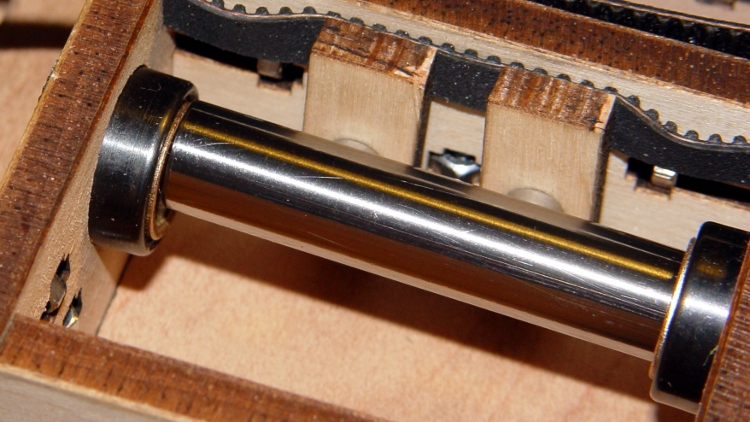
I applied a 3/8-inch Forstner bit to the inside of the rod end caps to make a slightly-too-deep recess, then shimmed the hole with some cardboard to make the answer come out right.
Recessed Y-axis rod caps
The Z axis rods were just barely too long, but I did the same thing to those caps.
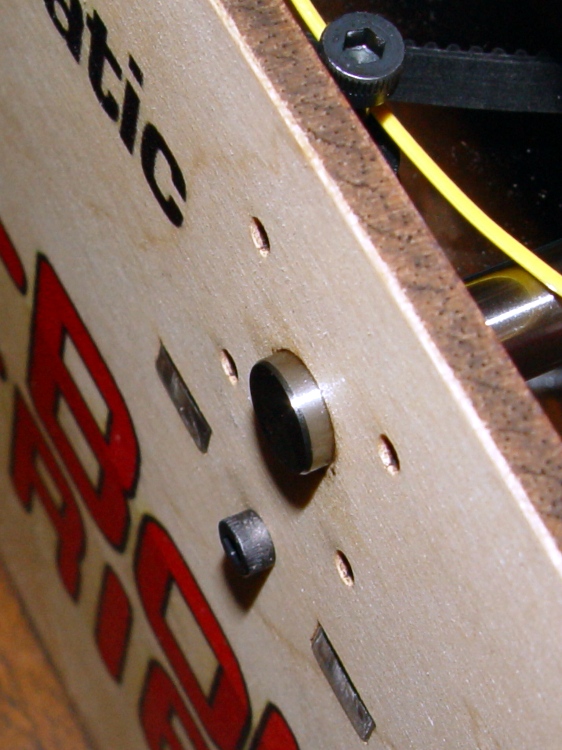
The next time you take your Thing-O-Matic apart, epoxy the damn nuts in place so you’re not going crazy trying to manipulate them.
Inside the ends of the Y axis stage, which makes removing the X axis rod covers trivially easy:
X axis rod cover nuts
Inside the front and back body panels, which makes removing the Y axis rod covers trivially easy:
Y axis rod cover nuts
That’s in addition to applying tape inside the panels at all the most-likely-to-be-removed T-nut locations, of course. I’m loathe to epoxy those nuts in place, but I could overcome that reluctance after bringing a few more of the things to heel under the bench…
The stock MK5 Extruder head assembly instructions suggest wrapping the thermocouple with Kapton tape before capturing it under the washer against the Thermal Core. Alas, as I’ve found, that doesn’t work well: the tape isn’t proof against mechanical forces applied to small objects and the thermocouple bead can punch through the tape to contact the Core.
This isn’t a problem until one of the heating resistors blows out and shorts the +12 V supply to the Thermal Core. The only ground path is through the thermocouple, which leads to the MAX6675 thermocouple interface chip, which generally results in a dead Extruder Controller. The third picture in that thread is chilling, isn’t it?
I cast my thermocouple into a brick of JB Industro Weld epoxy for both mechanical and electrical protection. The epoxy is rated for 500 °F (call it 260 °C), which is barely adequate for the job, but JB Weld is cheap & readily available. Note that this isn’t your really cheap garden-variety clear epoxy, which falls apart at much lower temperatures. That discussion suggests a higher-temperature epoxy from Omega, but I haven’t gone that route yet.
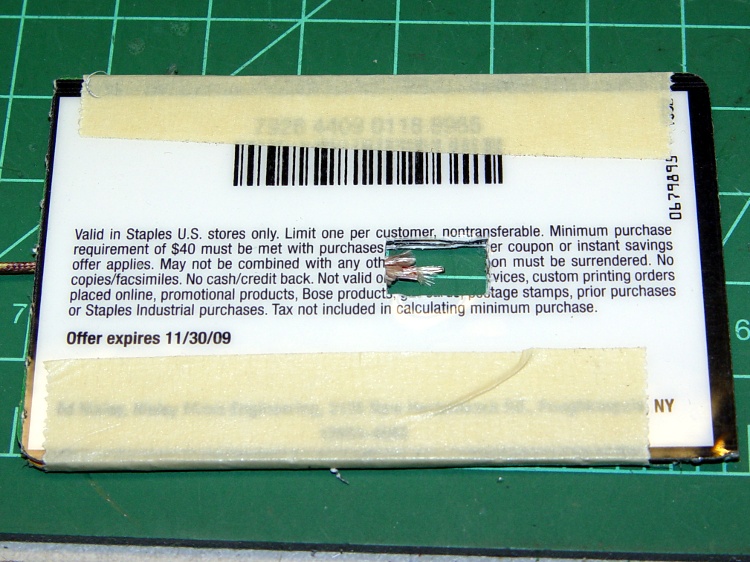
Anyhow, I converted three credit-card-thickness sale coupons from Staples into a brick-shaped mold around the thermocouple. The middle card has a slot for the thermocouple wire, which means the bead is positioned in free space in the middle of the opening.
Thermocouple positioned in mold
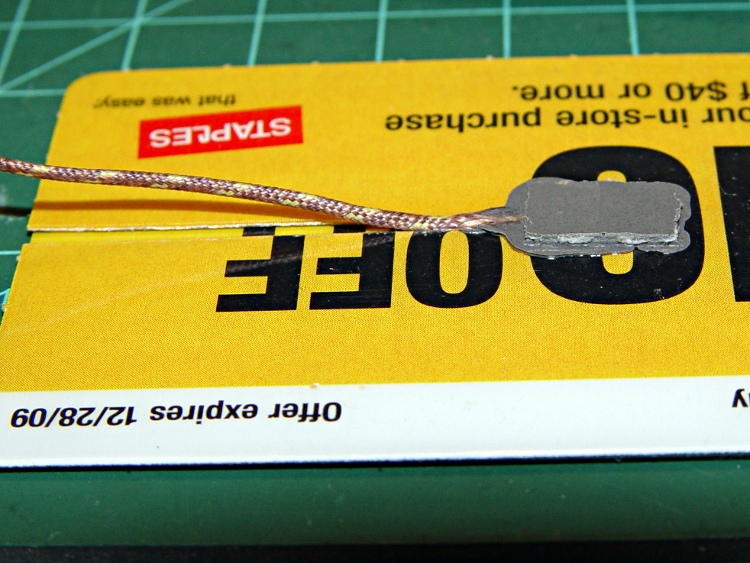
A close-up of the thermocouple bead:
Thermocouple positioned in mold – detail
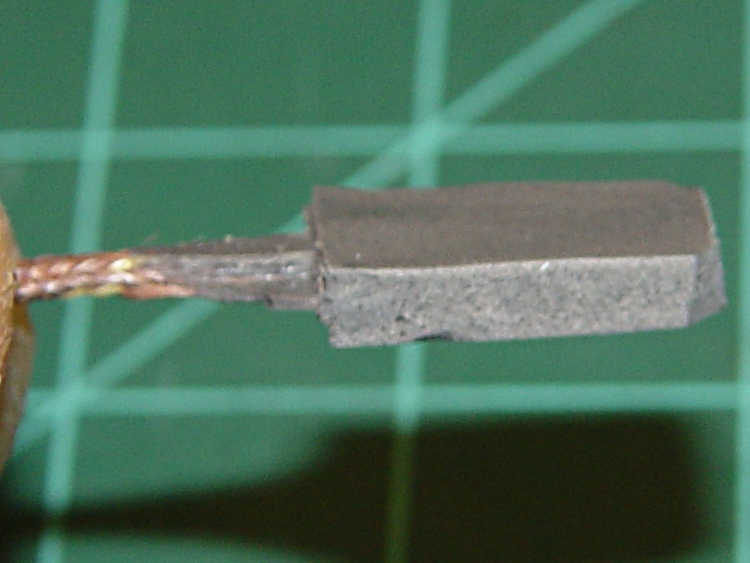
I taped that assembly to another coupon, filled the mold with JB Weld, made sure everything was saturated, and gave it a day to cure. This view shows the brick after peeling off the top coupon, so you can see the cable slot:
Removing thermocouple from mold
A bit of filing and general cleanup made it presentable:
Finished thermocouple brick
A wrap of Kapton around the brick gives the Thermal Core washer something to grab onto:
Thermocouple in place – ceramic insulation jacket
The brick could be much smaller without any penalty. There’s no issue with excessive thermal mass here, however, because the Core itself has a 10-minute time constant, so the thermocouple has plenty of time to tag along.
The red wire in the upper-left corner connects the plate above the Thermal Core directly to the static drain ground point that leads to the ATX power supply case. In the event of a resistor failure that shorts the +12 V supply to the Thermal Core, the power supply should shut down. Whether that will actually happen, I cannot tell, but now a failed resistor won’t destroy the thermistor or the Extruder Controller.
The ceramic wool insulation (from a lifetime supply of furnace chamber lining; it’s rated for direct oil burner flame impingement) may seem excessive, but I wanted measurements from a well-insulated Thermal Core at reduced power: 40 W seems to do the trick.
However, the insulation on the bottom of the Core around the Nozzle tended to catch on the ABP’s silicone wiper. The next iteration used just the original MBI ceramic cloth insulation on the bottom, protected by Kapton tape, with ceramic wool around the rest of the Core. Much better!
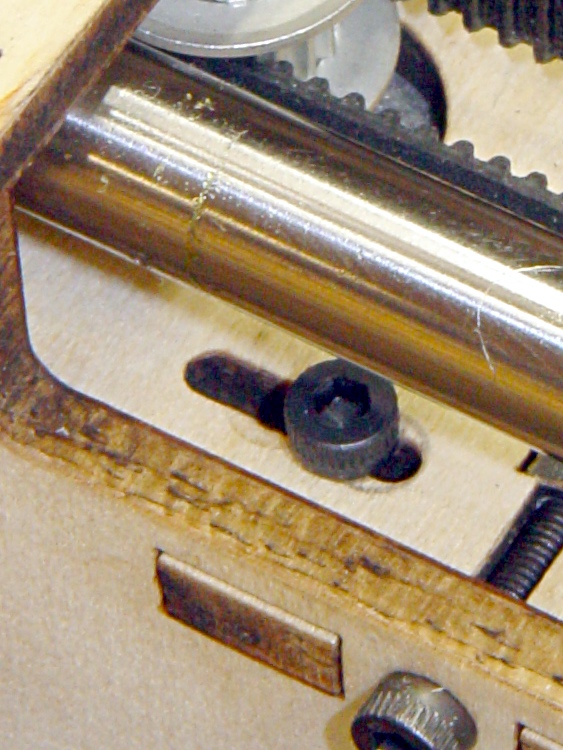
The socket-head cap screws securing the ball bearings that ride on the left-side Y stage rod prevent the X axis motor from sliding rightward along its mounting slots. The rightmost position, as enforced by the SHCS heads, makes the belt far too tight.
This suggests that the ball bearing assembly was an afterthought, perhaps solving the same overconstrained rod problem as I fixed in the X axis stage. The as-built motor position pulls the X axis belt just slightly less taut than a banjo string, which isn’t a Good Thing.
The solution is to replace the four SHCS with pan-head screws to get a bit more clearance. Fortunately, my Parts Heap had some salvaged 3 mm screws of sufficient length, so I avoided a trip to the Big Box retailer. Rather than put everything together and discover the heads were still too tall, I ground them down so just the barest hint of the slot remained:
Modified pan-head screw
That provided enough clearance to make the X axis belt entirely slack, which means I probably didn’t have to grind the heads in the first place. In any event, the proper position looks more like this:
Adjusted X axis motor position
If you look very closely, you can see the marks from the original position near the middle of the slots. Here’s a blown-up and contrast-stretched view:
X axis motor mounting slot – detail
Those few millimeters make all the difference in the world: the belt is now decently tight, the motor responds well, and all is right with the world.
Many of the discussions in the Makerbot Operators Google Group involve bad prints due to “missing steps”, overheated stepper motors, and other motion-related maladies. The proposed cures generally don’t address the real problem, which has nothing to do with slipping belts, inadequate motor current, or general hygene.
The problem is rod alignment, which is not guaranteed by the laser-cut plywood frame.
The Thing-O-Matic guides all its moving parts with bronze bushings sliding on polished steel rods to ensure low friction and exceedingly long life. Unfortunately, you can easily assemble a TOM with X and Z (and sometimes Y) stages you can barely push by hand: I’ve done it!
The symptoms involve the actual position gradually departing from the commanded position: a G0 X10 Y20 command might actually put the extrusion nozzle at X=9.9 Y=20. That error produces a small offset along the X axis that gets worse on successive layers and eventually causes the object to resemble the Leaning Tower of Pisa. The TOM can’t correct the error, because it doesn’t know where the stage actually stops after a command: the steppers run open-loop.
This can’t be due to a slipping belt, because a toothed timing belt can only skip by multiples of the tooth pitch: a one-tooth “skip” means a 2 mm positioning error that’s immediately obvious. In any event, if the belts are that loose, you have other problems.
It could be a loose belt drive pulley on the motor shaft, but that will produce random offsets in both directions as the setscrew gradually chews a slot around the motor shaft. If that’s the symptom, fix it now because you won’t be able to get that pulley off after the setscrew finishes raising a burr around the shaft.
The errors generally happen in the X direction because the X stage slides on two rods, each of which is fixed at four places: both ends of the Y stage and both ends of the X stage. The tech term for this is “overconstrained”: two points determine a line, but here we have a line that must pass through four points.
If the rod-to-rod spacing in those four places isn’t exactly equal, then the X stage bushings will bind on the rods. Alas, tolerance creep in the plywood and maybe a bit of off-center sanding when you fitted the bushings into the plywood can produce exactly that situation.
The Y stage doesn’t have this problem, because the right side rides on bushings and the left side rides on three ball bearings, making it not so sensitive to
horizontal misalignments.
Diagnosing this in an assembled Thing-O-Matic presents a major nuisance, but is well worth the effort. Release the X stage drive belt by loosening the X axis motor bolts (or, if you haven’t modified those bolts, by dismounting the idler pulley, which means extracting the whole XY assembly from the TOM and taking it apart) so the carriage can slide without moving the belt and turning the motor.
If you can move the X stage back and forth along the entire length of its travel by pushing gently with one fingertip, it’s all good. Most likely, you must apply far more force than that, as was the case in my TOM after I first assembled it: moving the X stage required quite a shove and it definitely didn’t slide freely.
Fixing this is straightforward, at least with the entire X and Y assembly out of the TOM. There are two steps:
Align the X stage bushings so the rods move freely
Align the Y stage mounting points to match the X stage spacing
To begin…
Remove the X stage from the Y stage, then remove the base plate so you can see the inside end of all the bushings. Slide each rod out of one bushing, then try to slide it back. I predict it’ll look something like this:
Misaligned X Axis bushing
The rod wants to avoid the hole in the left bushing. Orbit it around in the right-side bushing until it’s well centered on the left bushing. You want it to look like this when it approaches that bushing:
Aligned X Axis bushing
When it’s properly aligned, slide it in. You should then be able to bat the rod back and forth with your fingertips; if it doesn’t slide freely, slide it out of one bushing, apply more wiggly jiggly action, and get it aligned. Bat the rod back and forth a few times to get a feel for free motion, then repeat for the other rod.
About lubrication: the bronze bushings are self-lubricating, but a bit of oil won’t do any harm. Machine oil is good, cooking oil is bad, butter is terrible. If the rods feel nice and slippery, it’s fine.
When both rods slide freely, pop the X stage back into the Y stage. This is actually possible with both rods in the X stage, although now that you know what you’re looking for, you can slide them out, put the X stage inside, then slide the rods back in again. Remember, you want free rod motion within the X stage itself.
With the rod ends captured in the Y stage, put the front end caps on to hold that rod in place. Slide the X carriage to the right end of its travel (hold the loose rear rod!), then push the rear rod out of the one end piece by pushing it into the plywood while supporting the X carriage. Most likely, the rod will go spung a fraction of a millimeter horizontally as it exits the end piece (you control the vertical offset by supporting the carriage).
That’s the rod’s way of telling you that the end hole is in the wrong position. If the rod slides easily in and out of that hole, then it’s all good. If it doesn’t, then sand the offending side of the hole until the rod slides easily into the hole.
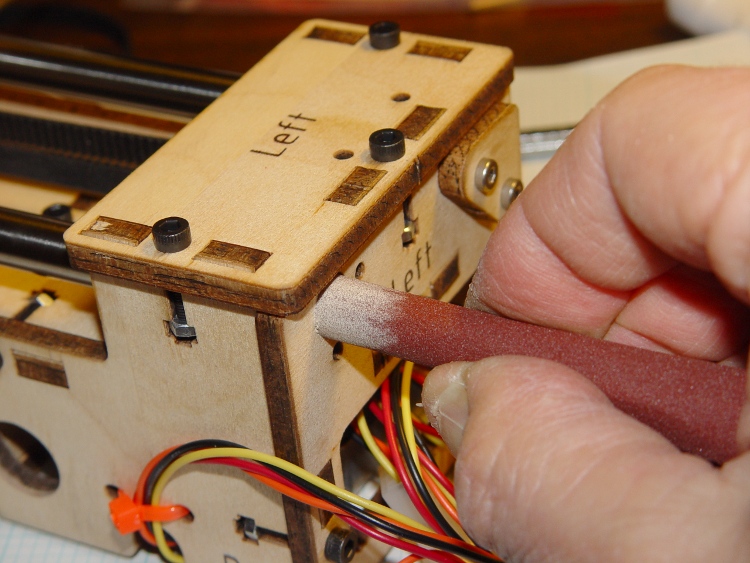
I wrapped a length of sandpaper around a brass tube so the sandpaper formed a cylinder nearly the same diameter as the rod, which prevents sanding a notch into the plywood that makes things worse. Remove wood from the side of the hole, not the top or bottom:
Adjusting rod hole position
When the rod slides freely into the hole with the X stage at that end, slide the stage to the other end and repeat the process. You must do both ends of travel to get all four constraining points lined up properly.
Recheck the rod fit at both ends of travel, then install the end caps.
The X stage should now slide back and forth with just light finger pressure.
If you overdo the sanding, shim the loose side of the hole with aluminum foil and a dab of adhesive. If the rod rattles around, that’s bad; add an all-around shim and put a very thin slice of foam under the end cap to calm it down.
Verily, it is far better to sand a little and check a lot!
You can apply the same process to the Z axis stage and rods. Remove the bolts holding the motor to the top plate, then verify that:
The Z stage freely slides up and down the rods
The rods align with their mounting holes with the Z stage each end
Sand the holes for one of the rods to make that answer come out right, too.
Those bronze bushings work wonderfully well, but only when the rods are
exactly parallel and properly spaced.
[This post is a revised, corrected, and expanded version of a comment I posted on the MBO group.]
All of those thermal tests on the MK5 head gave me plenty of time to ponder the problem of what to do with the filament bundle. Thingiverse has many plans for spools that fit over, under, or beside the printer, but they all seemed complex and fiddly. Besides, I didn’t have the printer running yet, so I couldn’t print up the parts… much less laser-cut anything.
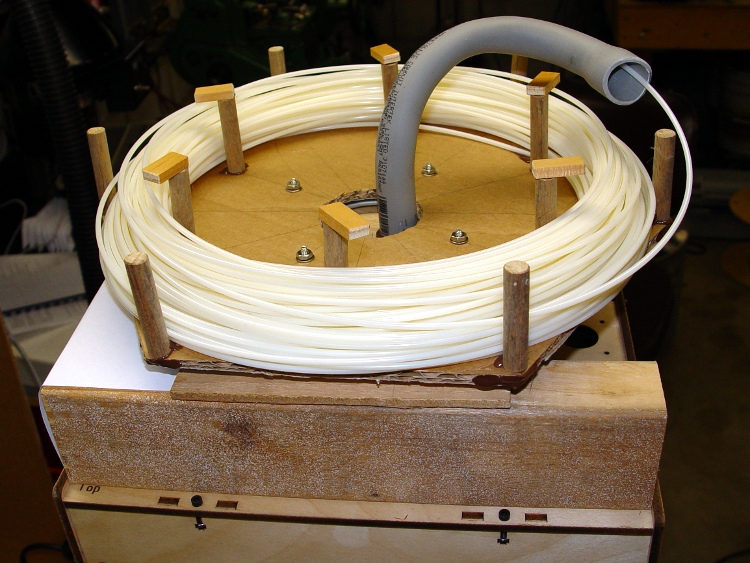
The Parts Heap disgorged a 4-inch Lazy Susan bearing, some double-layer corrugated cardboard, and odd bits of wood. The end result fits neatly atop the Thing-O-Matic printer:
Filament spool – front view
The base is 2 x 3-inch (actually measuring 1.5 x 2.5 inch) lumber, cut to exactly fit between the front and back plates of the printer box. The boards also butt against the socket-head cap screws securing the printer’s side plates, so they’re not moving. A scrap of 1/4-inch plywood bridges the two; it’s held in place with hot-melt glue atop the lumber. The weight of all that wood holds the assembly in place; making it lighter might not be productive.
Filament spool – left side
The filament coil rests on a hexagon of double-thick corrugated cardboard, cut about 12 inches across the flats and 13 inches across the points; you could glue two single-thickness sheets together. I laid it out with compass-and-ruler techniques, but do what you like.
The pegs are 7/16-inch wood about 2 inches tall; the outer ones are on the hexagon points and the inner pegs are on a circle 1.5 inches inside the outer pegs. The rectangular caps on the inner pegs prevent the filament from creeping upward while feeding and are angled to let it slide off into the conduit. They’re held in place with hot-melt glue, of course, and a bit more glue stiffens the hexagon points.
The only store-bought part is the 90-degree PVC elbow originally intended for electrical work: it’s a “1/2-inch Schedule 40 Rigid Nonmetallic Conduit” elbow. I slipped a spring inside the bore to prevent collapse, applied a hot-air gun until it was flexy, bent the second right angle to align the end bell with the incoming filament, and introduced it to Mr Belt Sander to angle the entrance bell more-or-less at right angles to the incoming filament.
The Lazy Susan bearing must be centered on the top of the printer, but the hole for the conduit must be forward of center to align with the MK5 Extruder head’s filament entry. As it turned out, butting the conduit against the forward rim of the bearing (the non-rotating base part) worked perfectly. More hot-melt glue holds it in place.
Filament spool – front detail
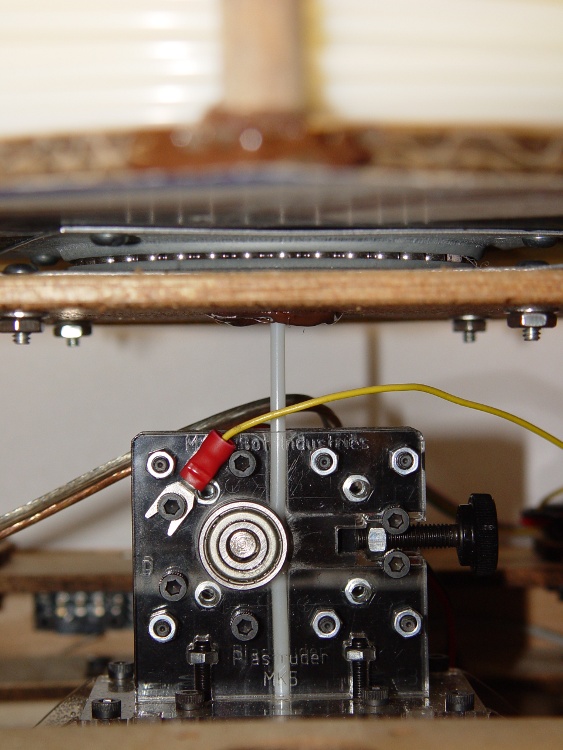
This front view shows an out-of-focus peg and filament pile at the top, the Lazy Susan bearing between the plywood and cardboard, and the filament dropping straight into the MK5 head.
The spool easily rotates backwards when the extruder motor reverses. You can lift the spool off, put it down next to the printer, fiddle with the extruder machinery, then replace the spool without cutting the filament. Trust me on this, I’ve done it a lot.
If I hadn’t dropped the filament bundle, it would probably have slipped right into the spool without any fiddling; the coils are about a foot in diameter as shipped. I devoted a few minutes to feeding the greatly enlarged and somewhat tangled mess neatly into the spool, after securing the bitter end to the cardboard with (wait for it) a dab of hot-melt glue.
If I ever build another spool, I’ll replace the cardboard with either 1/4-inch plywood or acrylic, then print up some better-looking peg-like objects. A shot coat of paint couldn’t possibly hurt its appearance in the least, either…
The Thing-O-Matic instructions suggest crushing the knob heads onto socket-head cap screws using pliers. That’s a desperation move for when you have no alternative.
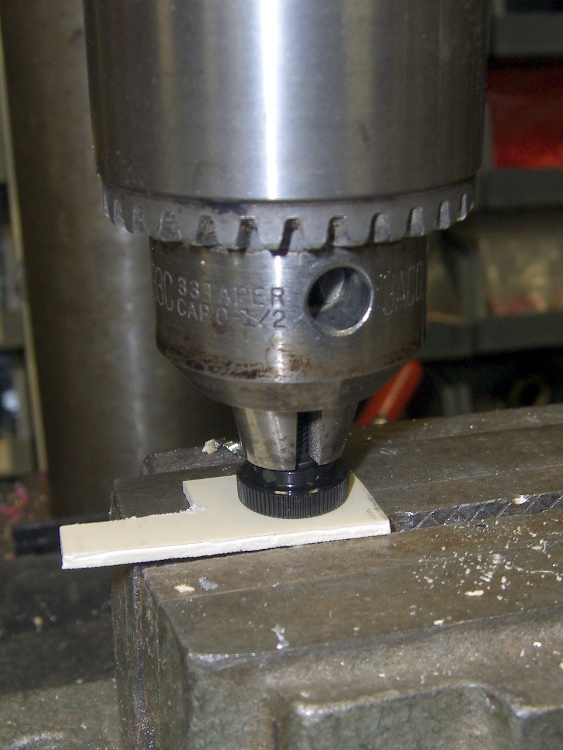
Instead, if you have a drill press (and you should!), do it this way: lightly grab the cap screw threads in the chuck and squash it into the head.
Seating knob head on SHCS
The same trick works for pressing pulleys and drive splines onto motor shafts.
Seating extruder drive on motor shaft
You shouldn’t use your drill press as a heavy-duty arbor press, but for pressing small circular things onto shafts, it’s hard to beat.








 The Smell of Molten Projects in the Morning