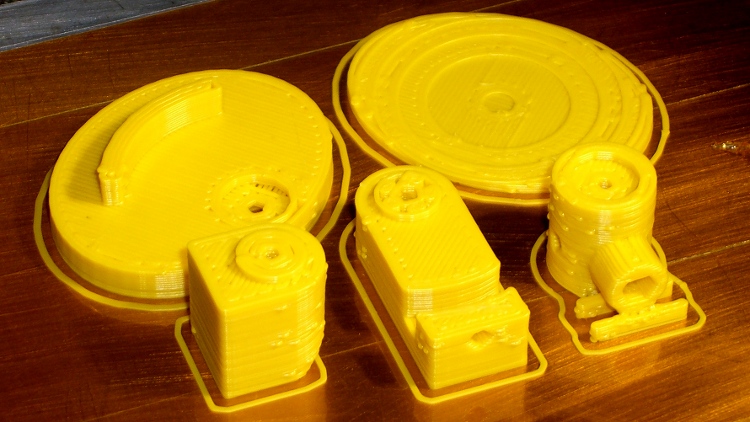
This is the slightly smaller mount corresponding to the OpenSCAD code there for the two-section inspection mirror shaft, hot from the printer:
It’s about the same as the previous version, despite trimming a few millimeters from the diameters and spacings:
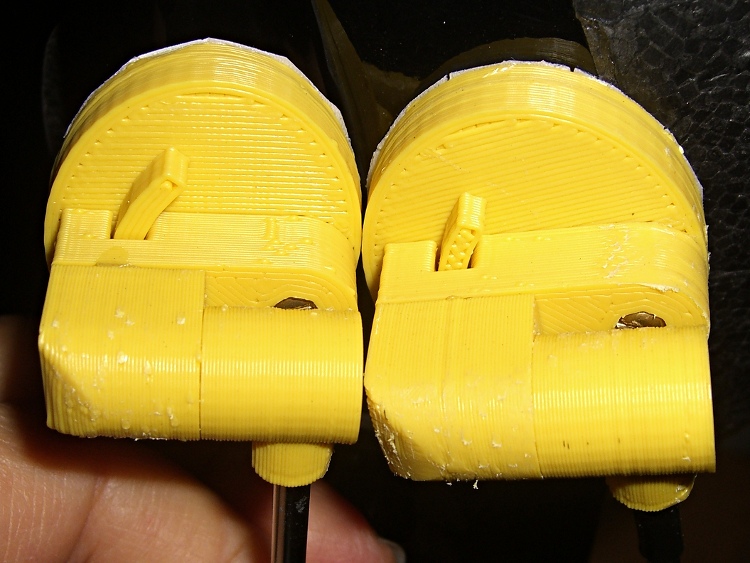
I’ll print the next one in a darker color. At least it’s not pink…
The OpenSCAD source:
// Helmet mirror mount
// Ed Nisley KE4ZNU June 2011

include </home/ed/Thing-O-Matic/lib/MCAD/units.scad>
include </home/ed/Thing-O-Matic/lib/MCAD/boxes.scad>
include </home/ed/Thing-O-Matic/lib/visibone_colors.scad>

//-- Layout Control

Layout = "Build";					// Build Fit Show None

Examine = "None";				// AzMount ElMount ElBody ElPlate HelmetPlate None

//-- Extrusion parameters

ThreadThick = 0.33;
ThreadWT = 2.0;
ThreadWidth = ThreadThick * ThreadWT;

HoleWindage = 0;			// enlarge hole dia by this amount

//-- Useful sizes

Tap2_56 = 0.070 * inch;
Clear2_56 = 0.082 * inch;
Head2_56 = 0.156 * inch;
Head2_56Thick = 0.055 * inch;
Nut2_56Dia = 0.204 * inch;
Nut2_56Thick = 0.065 * inch;

Tap3_48 = 0.079 * inch;
Clear3_48 = 0.096 * inch;
Head3_48 = 0.184 * inch;
Head3_48Thick = 0.058 * inch;
Nut3_48Dia = 0.201 * inch;
Nut3_48Thick = 0.073 * inch;

Tap4_40 = 0.089 * inch;
Clear4_40 = 0.110 * inch;
Head4_40 = 0.211 * inch;
Head4_40Thick = 0.065 * inch;
Nut4_40Dia = 0.228 * inch;
Nut4_40Thick = 0.086 * inch;

//-- Azimuth Mount

AzMountDia = 12.0;
AzMountLength = 14.0;

AzFacets = 30;

echo(str("Azmuth mount dia: ",AzMountDia," length: ",AzMountLength));

//-- Mirror sizes

MirrorShaftDia = 3.60;
MirrorShaftOffset = -1.5;				// vertical offset from center of AzMountBody
MirrorShoulderLen = 3*MirrorShaftDia;
MirrorShoulderDia = min(AzMountDia,MirrorShaftDia + 6*ThreadWidth);

MirrorStudDia = Tap3_48;
MirrorStudLen = 2.0;

//-- Elevation Mount / Body / Plate

ElMountDia = AzMountDia;
ElMountLength = 2.0 + ElMountDia;

ElMountBase = 2.0;

ElMountRounding = 2.0;

ElMountFacets = AzFacets;

ElBodyWidth = ElMountDia;
ElBodyBlockLength = ElMountLength + AzMountLength/2 - MirrorShaftOffset;
ElBodyThick = 8.0;

echo(str("Elevation body overall: ",(ElBodyBlockLength + ElBodyWidth/2)," width: ",ElBodyWidth));

ElPlateTall = ElBodyBlockLength + 0.70*ElBodyWidth;
ElPlateWidth = 1.25 * ElPlateTall;
ElPlateThick = Nut3_48Thick + 3*ThreadThick;

ElPlatePlusX = ElPlateThick + (ElMountDia/2 + ElMountBase) + ElBodyThick;

echo(str("Elevation plate tall: ",ElPlateTall," width: ",ElPlateWidth));

ElArcRadius = (3/4) * ElBodyBlockLength;
ElArcThick = 4*ThreadWidth;
ElArcHeight = (1/2) * ElBodyThick;
ElArcAngle = 35;
ElArcFacets = 32;

ElPlateFacets = 52;

//-- Helmet Interface Plate

HelmetCX = 60.0;
HelmetMX = 4.0;
HelmetRX = (pow(HelmetMX,2) + pow(HelmetCX,2)/4)/(2*HelmetMX);

HelmetPlateC = max(ElPlateTall,ElPlateWidth);
HelmetPlateTheta = atan(HelmetPlateC/HelmetRX);
HelmetPlateM = 2*HelmetRX*pow(sin(HelmetPlateTheta/4),2);

HelmetPlateThick = ThreadThick*(ceil(HelmetPlateM/ThreadThick) + 1);

//-- Bearing Interfaces

BearingWidth = 3*ThreadWidth;

BearingOverlap = 3*ThreadThick;
BearingClearance = 1*ThreadThick;

BearingStudDia = min(AzMountDia,ElBodyWidth) - 2*BearingWidth;

//-- Convenience values

Protrusion = 0.1;		// make holes look good

//----------------------
// Useful routines

module PolyCyl(Dia,Height) {			// based on nophead's polyholes

  Sides = ceil(Dia) + 2;
  FixDia = Dia / cos(180/Sides);

  cylinder(r=(FixDia + HoleWindage)/2,
           h=Height,
	   $fn=Sides);
}

PegSize = 1.0;

module ShowPegGrid(Size) {
	for (x=[-5:5])
	  for (y=[-5:5])
		translate([x*10,y*10,Size/2])
		  cube(Size,center=true);

}

//----------------------
// Azimuth Mount

module AzMount() {

  difference() {
	union() {
	  cylinder(r=AzMountDia/2,h=AzMountLength,$fn=AzFacets);		// body
	  translate([0,0,AzMountLength/2 + MirrorShaftOffset])
		rotate([-90,0,0])
		  cylinder(r=MirrorShoulderDia/2,
				   h=MirrorShoulderLen,$fn=AzFacets);				// mirror shaft shoulder

	  if (Layout != "Fit")
		for (y=[0:1])												// shoulder support
		  translate([-AzMountDia/2,(4*y + AzMountDia/2 + ThreadWidth),0])
			difference() {
			  cube([AzMountDia,2*ThreadWidth,AzMountLength/6]);
			  translate([AzMountDia/2,-Protrusion,AzMountLength/2 + MirrorShaftOffset])
				rotate([-90,0,0])
				  cylinder(r=MirrorShoulderDia/2,h=ThreadWidth + 2*Protrusion);
			}
	}

    translate([0,-Head3_48/2,AzMountLength/2 + MirrorShaftOffset])
      rotate([-90,0,0])
		PolyCyl(MirrorShaftDia,(AzMountDia + MirrorShoulderLen));	// mirror shaft

    translate([0,-(Head3_48/2 - Protrusion),AzMountLength/2 + MirrorShaftOffset])
	  rotate([90,0,0])
		PolyCyl(MirrorStudDia,MirrorStudLen+Protrusion);			// mirror stud

    translate([0,0,
	       Head3_48Thick - (AzMountLength - MirrorShaftDia)/2 + MirrorShaftOffset - Protrusion])
      PolyCyl(Head3_48,AzMountLength + Protrusion);					// mounting screw head

    translate([0,0,-Protrusion])
      cylinder(r=(Clear3_48 + HoleWindage)/2,
	  h=(AzMountLength + 2*Protrusion),
	  $fn=ceil(Clear3_48)+2);										// mounting screw clearance

	translate([0,0,AzMountLength/2 + Head3_48Thick + MirrorShaftDia/2 + MirrorShaftOffset - Protrusion])
	  cylinder(r1=(Head3_48/cos(180/7) + HoleWindage)/2,
			   r2=Clear3_48/2,
			   h=(3*ThreadThick + Protrusion),
			   $fn=7);												// overhang support

    translate([0,0,AzMountLength/2 + MirrorShaftOffset])
      rotate([0,90,0])
		PolyCyl(Tap2_56,AzMountDia/2 + Protrusion);					// setscrew hole

    translate([0,0,AzMountLength - (BearingOverlap + BearingClearance)])
	  PolyCyl(BearingStudDia,
			  BearingOverlap + BearingClearance + Protrusion);		// bearing surface

  }

}

//----------------------
// Elevation Mount

module ElMount() {

  difference() {

	union() {

	  translate([(ElMountDia/4 + ElMountBase/2),0,(ElMountLength/2 + BearingOverlap)])
		rotate([0,90,0])
		  cube([ElMountLength,ElMountDia,(ElMountDia/2 + ElMountBase)],
			  center=true);											// mounting block

	  translate([0,0,BearingOverlap]) {
//		color([0.4,0.3,0.3,0.7])
		cylinder(r=ElMountDia/2,
				 h=ElMountLength - ElMountDia/2,
				 $fn=ElMountFacets);								// cylinder to Az

//		color([0.3,0.4,0.3,0.7])
		translate([0,0,ElMountLength - ElMountDia/2]) {				// curved interface
		  intersection() {
			cylinder(r=ElMountDia/2,h=ElMountDia/2,$fn=ElMountFacets);
			translate([0,ElMountDia/2,0])
			  rotate([90,0,0])
				cylinder(r=ElMountDia/2,h=ElMountDia,$fn=ElMountFacets);
		  }
		}

	  }

	  cylinder(r=(BearingStudDia - HoleWindage)/2,h=BearingOverlap);	// bearing stud
	}

	translate([0,0,-Protrusion])
	  PolyCyl(Tap3_48,(3/4)*ElMountLength + BearingOverlap + Protrusion);	// AzMount screw
  }
}

//----------------------
// Elevation Body

module ElBody() {

  difference() {
	union() {
	  translate([-ElBodyBlockLength,-ElBodyWidth/2,0])
		cube([ElBodyBlockLength,ElBodyWidth,ElBodyThick]);
	  translate([0,0,ElBodyThick])
		cylinder(r=(ElBodyWidth - 2*BearingWidth)/2,h=BearingOverlap);
	  cylinder(r=ElBodyWidth/2,h=ElBodyThick,$fn=ElMountFacets);
	}

	PolyCyl(Clear3_48,ElBodyThick + BearingOverlap + Protrusion);

	translate([0,0,-Protrusion])
	  PolyCyl(Head3_48,Head3_48Thick);

	translate([-ElArcRadius,0,ElBodyThick - ElArcHeight/2])
	  rotate([0,-90,0])
		PolyCyl(Tap2_56,ElBodyBlockLength - ElArcRadius + Protrusion);

	translate([0,0,ElBodyThick - (ElArcHeight + BearingClearance)])
	  difference() {
		cylinder(r=ElArcRadius + (ElArcThick/2 + BearingClearance),
				 h=ElArcHeight + BearingClearance + Protrusion,
				 $fn=ElArcFacets);
		cylinder(r=ElArcRadius - (ElArcThick/2 + BearingClearance),
				 h=ElArcHeight + BearingClearance + Protrusion,
				 $fn=ElArcFacets);
	  }

  }

}

//----------------------
// Elevation Plate

module ElPlate() {

  union() {
	difference() {
	  translate([ElBodyWidth/2 - ElPlateTall/2,0,0])
		scale([ElPlateTall,ElPlateWidth,1.0])
		  cylinder(r=0.5,h=ElPlateThick,$fn=ElPlateFacets);
	  translate([0,0,-Protrusion])
		PolyCyl(Tap3_48,ElPlateThick + 2*Protrusion);
	  translate([0,0,ElPlateThick - (BearingOverlap + BearingClearance)])
		PolyCyl(BearingStudDia,(BearingOverlap + BearingClearance) + Protrusion);
	  translate([0,0,-Protrusion])
		cylinder(r=Nut3_48Dia/2,h=(1.1*Nut3_48Thick + Protrusion),$fn=6);
	}

	translate([0,0,ElPlateThick])
	difference() {
	  cylinder(r=ElArcRadius + ElArcThick/2,
			   h=ElArcHeight,
			   $fn=ElArcFacets);
	  cylinder(r=ElArcRadius - ElArcThick/2,
			   h=ElArcHeight + Protrusion,
			   $fn=ElArcFacets);
	  rotate([0,0,90 - ElArcAngle])
	    translate([ElArcRadius + ElArcThick,0,ElArcHeight/2])
		  cube([2*ElArcRadius + ElArcThick,
				2*ElArcRadius + ElArcThick,
				ElArcHeight + Protrusion],
				center=true);
	  rotate([0,0,-(90 - ElArcAngle)])
	    translate([ElArcRadius + ElArcThick,0,ElArcHeight/2])
		  cube([2*ElArcRadius + ElArcThick,
				2*ElArcRadius + ElArcThick,
				ElArcHeight + Protrusion],
				center=true);
	}
  }
}

//----------------------
// Helmet Interface Plate

module HelmetPlate() {

  difference() {
	scale([ElPlateTall,ElPlateWidth,1.0])
	  cylinder(r=0.5,h=HelmetPlateThick,$fn=ElPlateFacets);

	translate([0,0,HelmetRX + HelmetPlateThick - HelmetPlateM])
	  sphere(r=HelmetRX,$fn=256,$fs=0.1);

  }
}

//----------------------
// Lash it together

if (Examine == "AzMount")
  AzMount();

if (Examine == "ElMount")
  ElMount();

if (Examine == "ElBody")
  ElBody();

if (Examine == "ElPlate")
  ElPlate();

if (Examine == "HelmetPlate")
  HelmetPlate();

if ((Layout == "Build" || Layout == "Show") && Examine == "None") {
  translate([-10,-20,0])
	rotate([0,0,90])					// mis-align top fill from ElMount
	  AzMount();

  translate([-10,20,ElMountLength + BearingOverlap])
	rotate([0,180,-90])
	  ElMount();

  translate([0,0,0])
	rotate([0,0,0])
	  ElBody();

  translate([10,15,0])
	rotate([0,0,215])					// mis-align top fill from ElBody
	  ElPlate();

  translate([20,-20,0])
	rotate([0,0,-45])
	  HelmetPlate();

  if (Layout == "Show")
	ShowPegGrid(PegSize);

}

if ((Layout == "Fit") && Examine == "None") {
  translate([0,0,-(AzMountLength/2 + MirrorShaftOffset)])
	color(MFG) AzMount();

  translate([0,0,AzMountLength/2 - MirrorShaftOffset - BearingOverlap])
	color(DHC) ElMount();
//	color([  0/255, 204/255, 204/255,0.5]) ElMount();

	translate([ElMountDia/2 + ElMountBase,0,0])
	  rotate([0,90,0])
		color(DFC) ElBody();

	translate([ElPlatePlusX,0,0])
	  rotate([180,90,0])
		color(LHC) ElPlate();

	translate([ElPlatePlusX,0,ElPlateTall/2 - ElBodyWidth/2])
	  rotate([0,90,0])
		color(LWM) HelmetPlate();
}







 The Smell of Molten Projects in the Morning