Ed Nisley's Blog: Shop notes, electronics, firmware, machinery, 3D printing, laser cuttery, and curiosities. Contents: 100% human thinking, 0% AI slop.
Unlike my old ICOM IC-Z1A, the Wouxun KG-UV3D radio has mic and speaker jacks recessed into the case, so that a custom plug plate can absorb all the stress from forces applied to the cables without wiggling the plugs. Even better, there’s a removable cover with a mounting screw that can hold the new plate in place!
Wouxun plug mounting plate – overview
The first pass at the mount required a bit of filing, as the deepest part of the recess turns out to be not exactly rectangular. That’s (probably) fixed in the source code:
Wouxun plug plate – detail
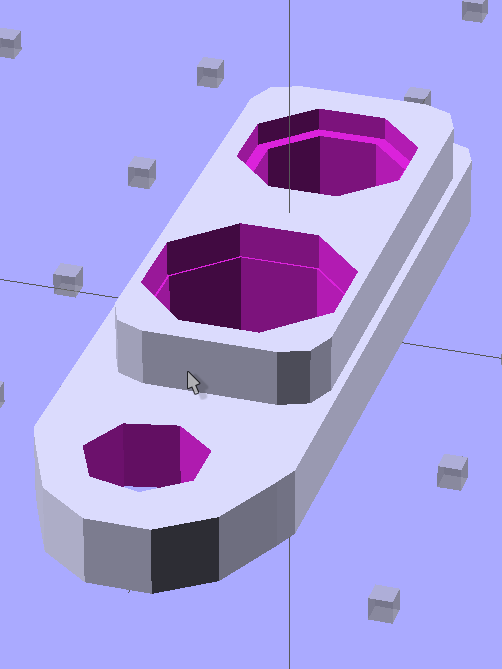
The solid model looks about like you’d expect, with terribly thin side walls between the plugs and the not-quite-rectangular section. The whole affair is asymmetrical around the long axis; the not-quite-rectangular block and hole really are offset:
Plug Mount Plate – Solid Model
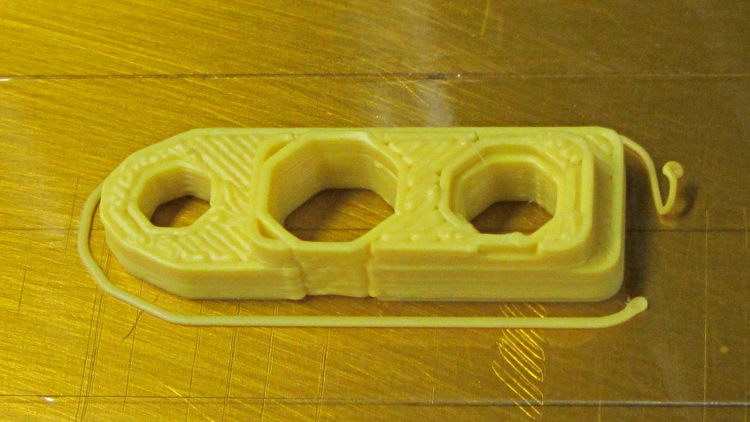
When printed, the thin sections come out one 0.66 mm plastic thread wide:
Wouxun plug mounting plate – build
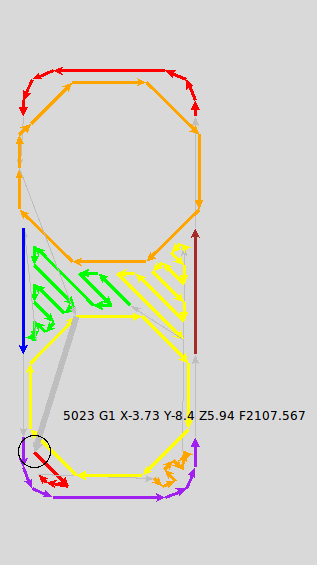
I spent quite some time iterating through OpenSCAD, RepG, and SkeinLayer to make sure that came out right. This is from a later version with larger recesses around the plugs:
Plug Mount Plate – skeinlayer
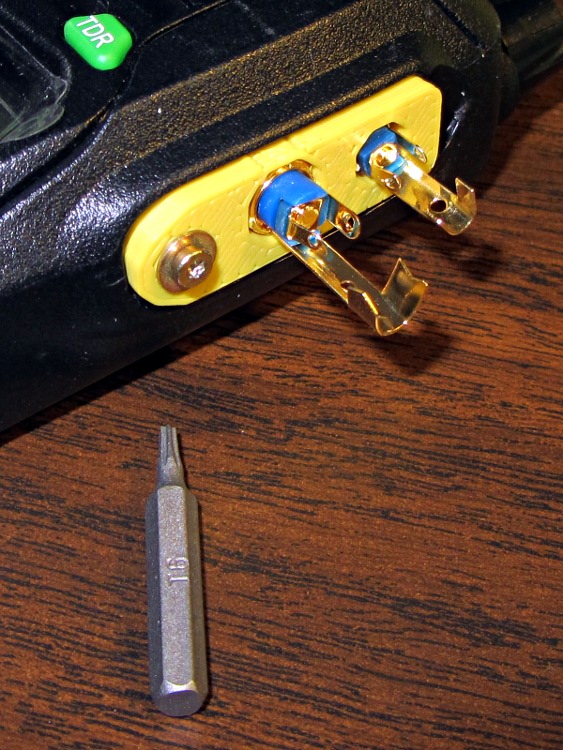
Some epoxy eased down along the plugs will lock them into the plastic, with an epoxy putty turd over the top to stabilize the cables and terminal connections. That’s a T6 Torx bit to mate with the 2 mm screw (with a captive washer!) pulled from the Small Drawer o’ Salvaged Metric Screws:
Wouxun plug plate – trial fit
The OpenSCAD source code is part of the huge block of code at the bottom of that post, but here’s the relevant section:
The keyboard on my trusty HP 48GX calculator finally deteriorated to the point of unusability, so I tore the thing apart following the useful instructions there. The warning about applying force to the rivets that hold the case halves together gives you not the faintest concept of how much force is actually required to pry the mumble thing apart at the battery compartment; I finally invoked force majeure with a chisel scraper…
HP-48GX case rivets
I expected the calculator would not survive this operation and I wasn’t disappointed.
An HP 50g is now in hand. Here in late 2011 I’d expect HP’s top-of-the-line RPN calculator to sport a crisp high-resolution display, but noooo the low-contrast 131×80 LCD seems teleported directly from the latter part of the last millennium. The manuals are PDFs, which is OK, but their content is far inferior to the HP 48GX manuals. In particular, the editing / proofreading is terrible. I infer that the HP calculator division can barely fog a mirror and is on advanced life support; HP’s diverting all their money to, uh, executive buyouts or some other non-productive purpose.
The fact that HP sells new-manufacture HP 15C calculators doesn’t crank my tractor, even though I lived and died by one for many years. A one-line 7-segment display doesn’t cut it any more, even if the new machinery inside allegedly runs like a bat out of hell.
My HP 16C, now, that one you’ll pry out of my cold, dead hands. At one point in the dim past, I’d programmed the Mandelbrot iteration into it to provide bit-for-bit verification of the 8051 firmware for the Mandelbrot Engine array processor I did for Circuit Cellar: slow, but perfect. That calculator has a low duty cycle these days, but when I need it, I need it bad.
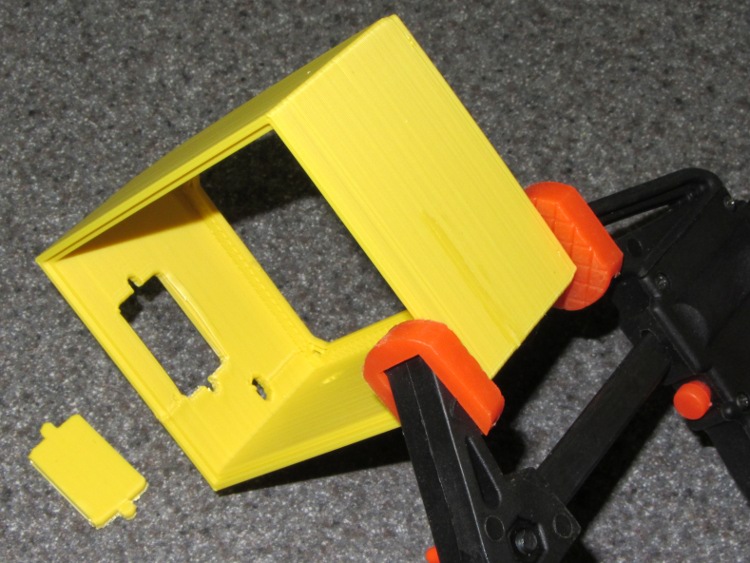
ABS plastic shrinks as it cools and large objects with thin sections tend to delaminate, as seen in the Barbie Pistol and a few other objects. The box for the GPS+voice interface is four threads thick and 35 mm tall, which provided enough energy to rip the side apart:
Box wall delamination
Solvent glue and a clamp shoved it back together again:
Clamping delamination
This one was extruded at 190 °C, which works fine for small objects and isn’t quite enough to fuse something like this. I’ll crank it up to 210 °C for the next iteration to see if that improves the result.
The first pass at the box that will eventually hold the GPS+voice interface for the KG-UV3D radio looks like this, from the end that engages the alignment tabs on the bottom of the radio:
Case Solid Model – Tab End View – Fit
The other end has the opening for the TT3’s serial connector to the GPS receiver, a probably too-small hole for the external battery pack cable / helmet cable / PTT cable, and a hole on the side for the radio mic/speaker cables.
Case Solid Model – Connector End View – Fit
The serial connector opening has a built-in support plate that’s the shape shrunken by 5% so it’s easy to punch out. That worked surprisingly well; the line just above the right edge isn’t a break, it’s a stack of Reversal Zits. This version is rectangular; the solid model shows the proper D shape.
KG-UV3D box – connector hole support removal
The bottom has battery contact recesses and counterbores (if that’s the right term for a molded feature) for the PCB mounting screws. In retrospect, those holes should be tapping diameter and the screws inserted from the top, through the PCB.
Case Solid Model – Battery Contact View – Fit
The colors mark individual pieces that get glued together. I can probably reduce the wall thickness on the top & bottom by three threads, which is in the nature of fine tuning. The latch mechanism that holds this affair to the radio is conspicuous by its absence…
The previous iteration of GPS+voice interface boxes came from the Sherline CNC mill, with a considerable amount of huffing & puffing. I got the Thing-O-Matic to simplify that process…
The general idea is to build a box that clips onto the radio in place of the standard battery pack. External power comes into the box and goes directly to the radio’s battery contacts; this will pose a problem with the Wouxun KG-UV3D, because it wants 7.2 V rather than the stepped-up 9 V from the Li-Ion packs I’ve been using. I think a three-wire power cord is in order: +9 V for the interface, +7.2 V for the radio, and common.
The box also interfaces with the radio’s mic and speaker jacks. Last time around, I made a gluing fixture to keep the plugs in alignment while the epoxy cured around the plugs in the plate, but maybe I can simplify that with 3D printing. Plastic will be better in one respect: the shells of the two plugs must be electrically isolated.
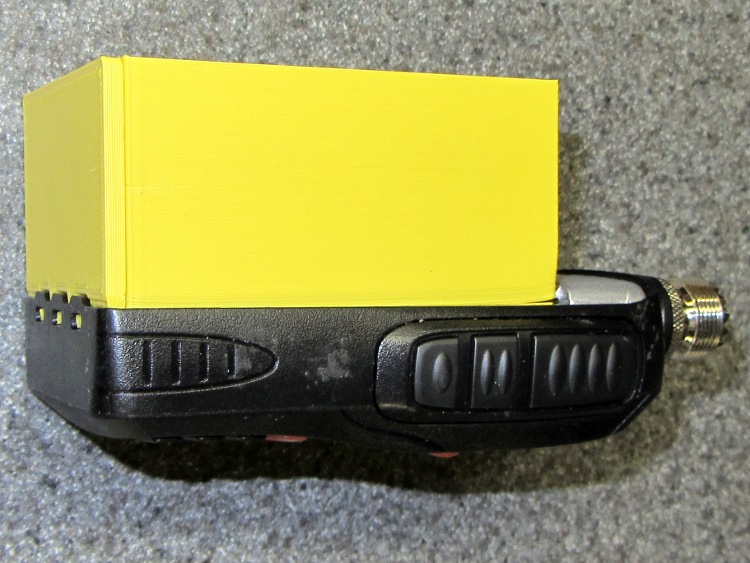
This first-pass (*) approximation shows the three tabs on the pack that engage the radio’s base:
KG-UV3D Interface Box prototype – right side
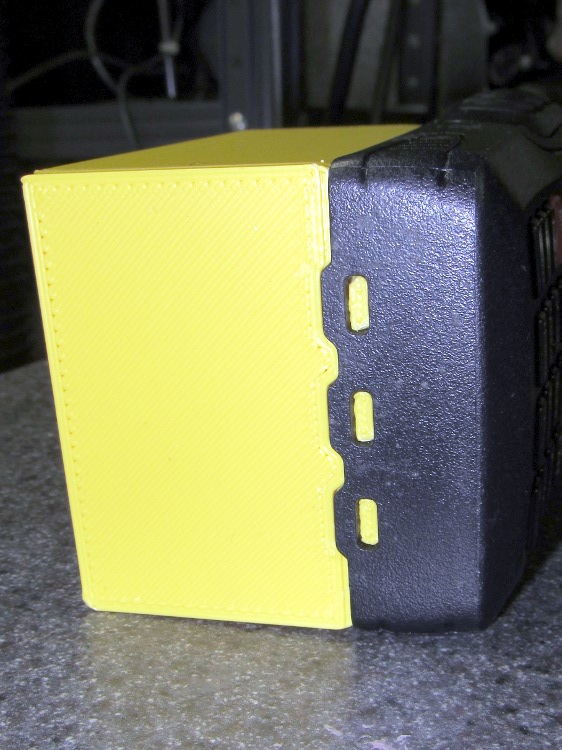
A detail of those tabs, as seen from the bottom:
KG-UV3D Interface Box prototype – end tabs
The ICOM IC-Z1A battery pack had a set of slip-in alignment features that held the pack on the radio, so two strips of tape sufficed to hold the interface box in place. Each Wouxun battery pack includes a spring-loaded latching mechanism that engages a pair of ramped tabs on the radio body that hold the pack against the spring-loaded battery contacts. That means I must come up with an actual latch of some sort to oppose the contact springs, but I haven’t figured that out yet.
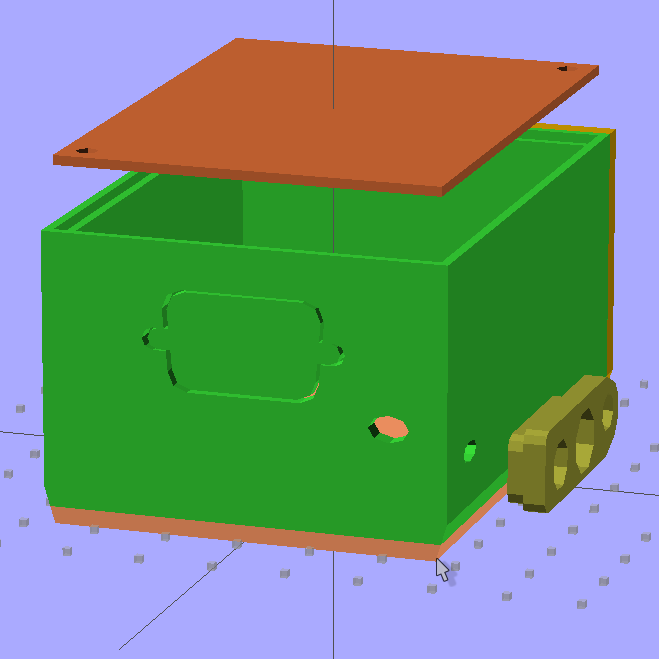
The solid model, with the plug mounting plate floating beside it, looks like this:
Case Solid Model – Tab End View – Fit
Tomorrow, the solid modeling…
* It’s actually the third printing of the bottom plate with the three tabs and the base plate with the battery contacts. That’s how I figured out the 0. 5% shrinkage thing.
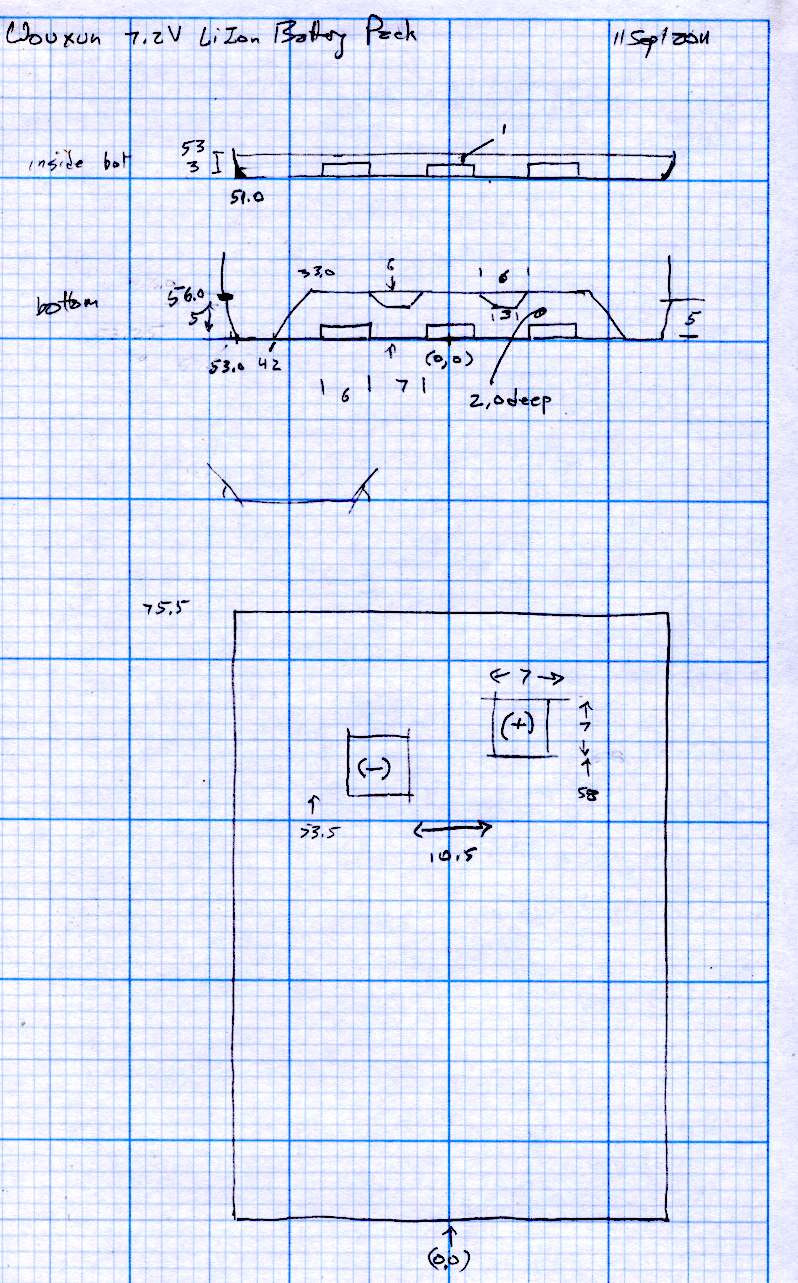
[Update: The sketch with the dimensions emerged from beneath a pile o’ stuff…]
It seems most of the stuff I build with my Thing-O-Matic involves small features and thin sections that bump hard against the minimum possible sizes. I’ve found that forcing critical solid model dimensions to be integer multiples of the the extrusion width or thickness stabilizes the whole idea→model→G-Code→object chain by encouraging Skeinforge to make the choices I prefer.
Or perhaps I’m just constraining my choices to make Skeinforge happiest. One can view reality in many ways…
Anyhow, my OpenSCAD programs tend to have these lines up near the top:
ThreadThick = 0.33;
ThreadWidth = 2.0 * ThreadThick;

function IntegerMultiple(Size,Unit) = Unit * ceil(Size / Unit);
The ThreadThick parameter matches the Skeinforge thread thickness parameter(s) and the 2.0 matches the w/t setting(s). Those correspond quite closely to the actual printed results, as tediously verified through many measurements. Throughout the rest of the OpenSCAD program, I compute the dimensions of key features using those sizes as building blocks.
The IntegerMultiple function returns the next higher multiple of the basic Unit that’s greater-than-or-equal-to the desired Size. Feeding in the thread thickness or width as the Unit ensures that the result will be an integer multiple of the smallest-possible dimension and won’t be smaller. The integer limit happens automagically, because the printer can’t lay down anything else, but a less-than-possible size can cause features to (unpredictably, in my experience) vanish without warning. This way your model reflects the printed reality and Skeinforge seems more likely to produce a predictable result.
So the parameter controlling the thickness of a flat sheet might look like:
PlateThick = IntegerMultiple(2.0,ThreadThick);
Given ThreadThick = 0.33, the sheet will be 7 layers thick = 2.31 mm. If the sheet must not exceed 2.0 mm, however, then you need a similar function with floor(), which may eradicate very small features.
This trick seems most useful for thin wall sections, because the wall width directly affects the fill:
Less than 1 thread width can’t be built
Exactly 1 thread width is the thinnest possible wall
Widths between 1 and 2 thread widths may be either, depending on surrounding features
Exactly 2 thread widths produces a nice wall
Widths between 2 and 3 thread widths can’t fill properly
Exactly 3 thread widths fills perfectly
Over 3 thread widths generally fill properly
So making the rim around a recessed lid become an integral number of thread widths, with a minimum width of 1.0 mm, looks like this:
LidMargin = IntegerMultiple(1.0,ThreadWidth);
With a 0.66 mm thread width, the nominal wall is 1.5 threads wide and could print as either 1 or 2 threads, depending on other factors. Rather than leave the results to chance, I force the solid model wall to be exactly 2 threads wide to make the printed result come out at 1.32 mm. Because I don’t care exactly how wide the lid margin is, as long as it’s at least one thread, that’s fine with me.
Generally, the values come from computations based on other dimensions, so quantizing the results keeps the printed result stable over small variations of those inputs.
If I ever get around to changing the nozzle to from 0.5 mm to 0.4 mm, I’ll probably change the thread dimensions to 0.25 mm x 0.5 mm (keeping the same 2.0 w/t ratio). A 1.0 mm wall would then still be exactly 2 threads wide and come out looking exactly the same, but with a total width of 1.00 mm.








 The Smell of Molten Projects in the Morning