Ed Nisley's Blog: Shop notes, electronics, firmware, machinery, 3D printing, laser cuttery, and curiosities. Contents: 100% human thinking, 0% AI slop.
This brass dragonfly has graced our garden for some years, but what seemed like a gentle tap during fall cleanup knocked both eyeballs out. The original adhesive looked like urethane, so I cleaned the sockets, applied a layer around the rim, and popped the marbles back in place.
Flushed with success on the small-hole front, I conjured up a large hole testpiece using the same HoleAdjust function that proved unnecessary with the little ones:
Circle Calibration – solid model
The first version didn’t have the cross bars, which turned out to be a mistake, because the individual rings distorted even under minimal pressure from the calipers:
Large circle cal – unlinked rings
However, measuring as delicately as I could, the holes seemed a scant 0.20 mm too small, more or less, kinda-sorta:
Nominal
Nom+0.0
10
9.83
20
19.75
30
29.85
40
39.84
50
49.84
60
59.72
70
64.76
80
79.28
90
89.77
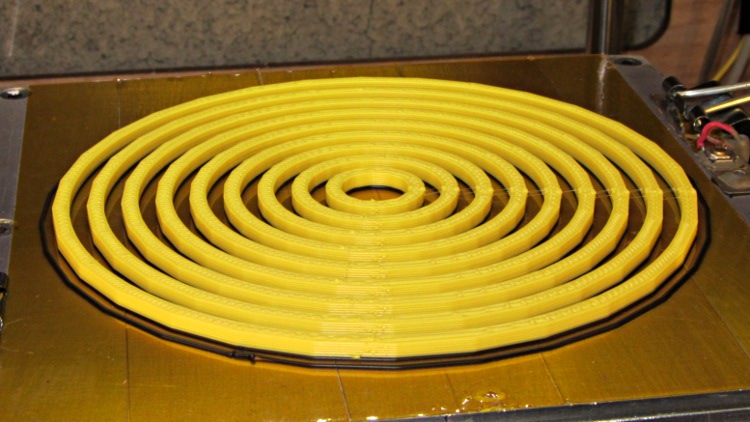
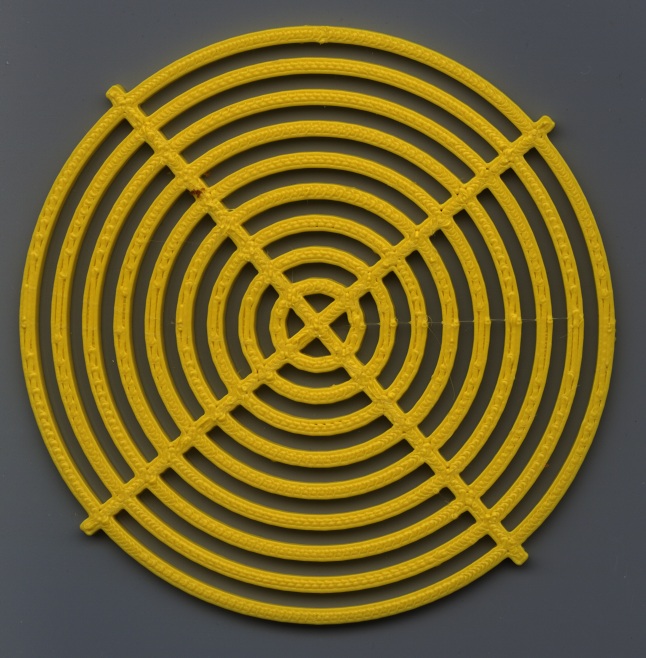
So I fed in HoleFinagle = 0.20 and the second iteration looks like it’d make a great, albeit leaky, coaster:
Large Circle Calibration object – HoleFinagle 0.20
Measuring those holes across the center with the calipers on facets (rather than vertices), produced somewhat more stable results:
Nominal
Nom+0.20
10
10.08
20
20.17
30
30.08
40
40.08
50
50.00
60
60.02
70
70.05
80
79.98
90
90.07
Frankly, I don’t believe those two least-significant digits, either, because a different set of measurements across different facets looked like this:
Nominal
Nom+0.20
10
10.13
20
20.11
30
29.84
40
39.90
50
49.88
60
59.90
70
69.84
80
79.82
90
89.66
I also printed a testpiece with HoleFinagle = 0.25 that averaged, by in-the-head computation, about 0.05 larger than that, so the hole diameter compensation does exactly what it should.
Applying the calipers to the 10.0 mm hole in the small-hole testpiece gives about the same result as in this one. The fact that HoleFinagle is different poses a bit of a mystery…
The only thing I can conclude is that the measurement variation and the printing variation match up pretty closely: the actual diameter depends more on where it’s measured than anything else. The holes are pretty nearly the intended size and, should the exact size matter, you (well, I) must print at least one to throw away.
All in all, a tenth of a millimeter is Good Enough. Selah.
Oh. The ODs are marginally too small, even using PolyCyl.
The OpenSCAD source, with both adjustments set to neutral:
// Large circle diameter calibration
// Ed Nisley KE4ZNU - Nov 2011

//-------
//- Extrusion parameters must match reality!
//  Print with +1 shells, 3 solid layers, 0.2 infill

ThreadThick = 0.33;
ThreadWidth = 2.0 * ThreadThick;

HoleFinagle = 0.00;
HoleFudge = 1.00;

function HoleAdjust(Diameter) = HoleFudge*Diameter + HoleFinagle;

Protrusion = 0.1;			// make holes end cleanly

function IntegerMultiple(Size,Unit) = Unit * ceil(Size / Unit);

//-------
// Dimensions

Width = 2.5;
Thickness = IntegerMultiple(2.0,ThreadThick);

DiaStep = 10.0;

NumCircles = 9;

echo(str("Width: ",Width));
echo(str("Thickness: ",Thickness));

BarLength = (NumCircles + 1)*DiaStep;

//-------

module PolyCyl(Dia,Height,ForceSides=0) {			// based on nophead's polyholes

  Sides = (ForceSides != 0) ? ForceSides : (ceil(Dia) + 2);

  FixDia = Dia / cos(180/Sides);

  cylinder(r=HoleAdjust(FixDia)/2,h=Height,$fn=Sides);
}

module ShowPegGrid(Space = 10.0,Size = 1.0) {

  Range = floor(50 / Space);

	for (x=[-Range:Range])
	  for (y=[-Range:Range])
		translate([x*Space,y*Space,Size/2])
		  %cube(Size,center=true);

}

//------

module Ring(RingID,Width,Thick) {

  difference() {
	PolyCyl((RingID + 2*Width),Thick);
	translate([0,0,-Protrusion])
	  PolyCyl(RingID,(Thick + 2*Protrusion));
  }
}

//------

ShowPegGrid();

union () {
  for (Index = [1:NumCircles])
	Ring(Index*DiaStep,Width,Thickness);
  for (Index = [-1,1])
	rotate(Index*45)
	  translate([-BarLength/2,-Width/2,0])
		cube([BarLength,Width,Thickness]);
}
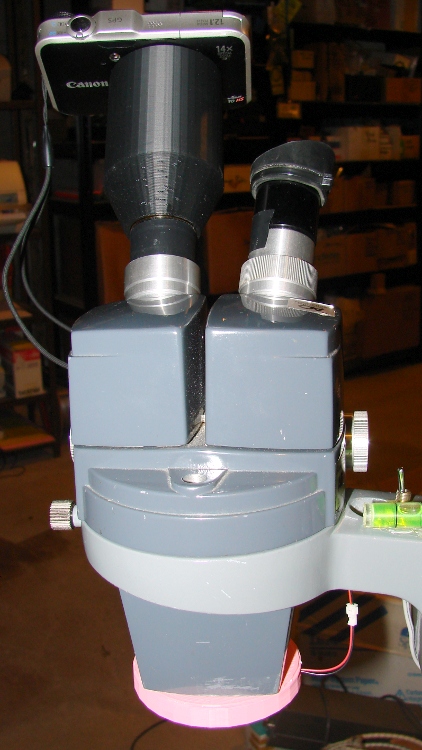
The macro lens & microscope adapters for the Canon SX230HX camera required a bunch of large and fairly precise circles. The first-pass prints of the main tube and snouts came out with diameters about 2% too small, so I changed the hole diameter compensation to include a first-order Fudge Factor as well as the simple zero-order HoleWindage Finagle Constant I’d been using. In the process, I cooked up a simple OpenSCAD function with new coefficient names reflecting their order:
That solved the immediate issue, but I wondered whether I was working on the right problem.
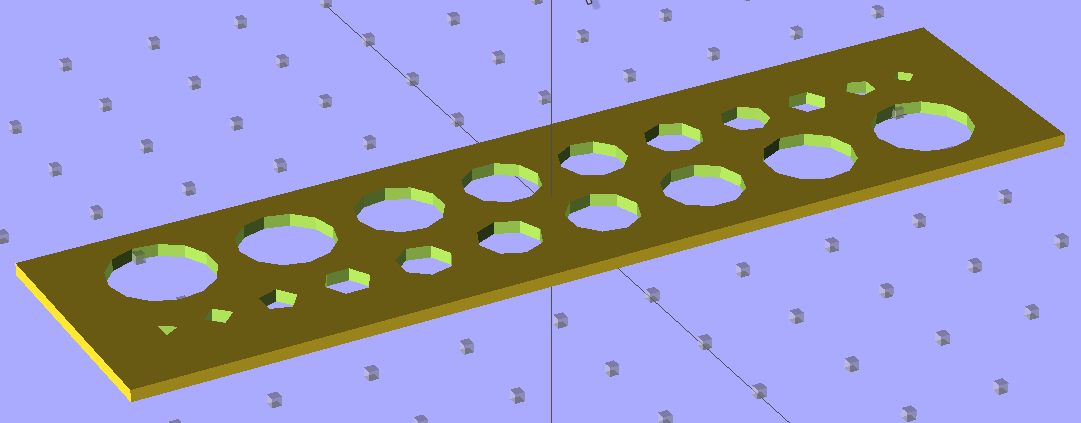
In the past, nophead’s polyholes testpiece showed the need for the 0.2 mm HoleWindage adder to make small holes turn out correctly. I rewrote his code to:
Use my HoleAdjust function
Lay the two rows out nose-to-tail
Add a bit more clearance between the holes
Which came out like this:
Small Hole Calibration – solid model
To find out where I’m starting from, I printed it (0.33 mm x 0.66 mm, 30 mm/s, 200 °C / 110 °C) with both correction factors set to “no change” and got a nice-looking plate that didn’t require any cleanup at all:
Small Hole Calibration object – HoleFinagle 0.00
Note that the similar-looking holes in the two rows aren’t the same size: the row with the tiny triangle has *.0 mm holes, the tiny square marks the *.5 mm holes.
The Skirt thread thickness was 0.31 to 0.38 mm, so this object’s size should be about as good as it gets.
The point of the game is to circumscribe polygonal holes around a cylinder of a given diameter. I don’t have a set of metric drills (or drill rods), so I bracketed the holes with the nearest sizes of hard-inch number and letter drills:
Nominal
Free fit
Snug fit
1.00
0.98
1.04
2.00
2.05
2.18
3.00
2.93
3.03
4.00
3.99
4.04
5.00
5.06
5.13
6.00
6.21
6.23
no-go
7.00
6.98
7.12
8.00
7.50
8.19
9.00
8.77
9.05
10.00
9.92
10.19
tight
The “snug fit” column means the holes are definitely smaller than that measurement, so the maximum hole size comes out just about spot on; an error of 0.1 mm or so seems too small to quibble over.
So, for whatever reason, my previous Finagle Constant of 0.20 seems no longer necessary and, for sure, the Fudge Factor doesn’t bring anything to the table at this scale.
It’s definitely true that the height of the first layer affects the hole size for the next few layers, even with the Z-minimum switch measuring the build plate height. The Skirt threads generally measure within ±0.05 mm of the nominal 0.33 mm and I think much of that variation comes from residual snot on the nozzle when it touches the switch. I have no idea what the firmware’s resolution might be.
Given that I’ve been adding 0.2 mm to small-hole diameters all along, I suspect all these errors are now of the same general size:
The discussion about drying my silica gel stash prompted me to toss a Hobo datalogger into the safe along with the desiccant bag. We now have enough data to spot a trend:
Basement Safe Humidity – Oct-Nov 2011
Verily, one measurement trumps a thousand opinions: I was totally wrong about the door seal. Either that or the safe’s contents started out a lot wetter than I thought.
The basement humidity runs about 55% RH, pumped down by a dehumidifier in the summer and ambient air in the winter, which (I think) sets the upper limit. Modulo having hygroscopic stuff like paper in the safe, I suppose.
I’ll toss a fresh bag in there, tape over the door crack, and see what happens during the next month.
FWIW, the Onset HOBOware program doesn’t run under Wine and Wine doesn’t support USB hardware anyway, which is one of the few reasons I have a Token Windows Laptop. I’ve set it up to automagically export the data into CSV files, from which this went into OpenOffice 3.2 for a quick look. Surprisingly, HOBOware is a Java program, but evidently written specifically to avoid portability; they have Windows and Mac versions and that’s all. Worse, there’s no way to extract data from the loggers without using that program, because Onset doesn’t document the interface protocol. Enough said.
Herewith, the script that you’ll apply to schematics built with parts from the hal-config-2.4.lbr.odt library (which you must rename to get ride of the ODT extension):
/******************************************************************************
 * HAL-Configurator
 *
 * Author: Martin Schoeneck 2008
 * Additional gates and tweaks: Ed Nisley KE4ZNU 2010
 *****************************************************************************/
#usage "<h1>HAL-Configurator</h1>Start from a Schematic where symbols from hal-config.lbr are used!";

string output_path =    "./";
string dev_loadrt =     "LOADRT";
string dev_loadusr =    "LOADUSR";
string dev_thread =     "THREAD";
string dev_parameter =  "PARAMETER";

string dev_names[] = {
"CONSTANT",								// must be first entry to make set_constants() work
"ABS",				// 2.4
"AND2",
"BLEND",			// 2.4
"CHARGE-PUMP",		// 2.4
"COMP",
"CONV_S32_FLOAT",	// 2.4
"DDT",				// 2.4
"DEADZONE",			// 2.4
"DEBOUNCE",			// 2.4
"EDGE",
"ENCODER",			// 2.4
"ENCODER-RATIO",	// 2.4
"ESTOP-LATCH",
"FLIPFLOP",
"FREQGEN",			// 2.4
"LOWPASS",
"MULT2",			// 2.4
"MUX2",
"MUX4",				// 2.4
"MUX8",				// 2.4
"NEAR",				// 2.4
"NOT",
"ONESHOT",
"OR2",
"SAMPLER",			// 2.4
"SCALE",			// 2.4
"SELECT8",			// 2.4
"SUM2",
"TIMEDELAY",		// 2.4
"TOGGLE",			// 2.4
"WCOMP",			// 2.4
"XOR2",				// 2.4
""					// end flag
};

/*******************************************************************************
 * Global Stuff
 ******************************************************************************/

string FileName;
string ProjectPath;
string ProjectName;

void Info(string Message) {
	dlgMessageBox(";<b>Info</b><p>\n" + Message);
}

void Warn(string Message) {
	dlgMessageBox("!<b>Warning</b><p>\n" + Message + "<p>see usage");
}

void Error(string Message) {
	dlgMessageBox(":<hr><b>Error</b><p>\n" + Message + "<p>see usage");
	exit(1);
}

string replace(string str, char a, char b) {
	// in string str replace a with b
	int pos = -1;
	do {
		// find that character
		pos = strchr(str, a);
		// replace if found
		if(pos >= 0) {
			str[pos] = b;
		}
	} while(pos >= 0);

	return str;
}

// the part name contains an index and is written in capital letters
string get_module_name(UL_PART P) {
	// check module name, syntax: INDEX:NAME
	string mod_name = strlwr(P.name);
	// split string at the : if exists
	string a[];
	int c = strsplit(a, mod_name, ':');
	mod_name = a[c-1];
	// if name starts with '[' we need uppercase letters
	if(mod_name[0] == '[') {
		mod_name = strupr(mod_name);
	}

	return mod_name;
}

string comment(string mess) {
	string str = "\n\n####################################################\n";
	if(mess != "") {
		str += "# " + mess + "\n";
	}

	return str;
}

// if this is a device for loading a module, load it (usr/rt)
string load_module(UL_PART P) {
	string str = "";

	// it's a module if the device's name starts with LOADRT/LOADUSR
	if((strstr(P.device.name, dev_loadrt) == 0) ||
	   (strstr(P.device.name, dev_loadusr) == 0)) {

		// now add the string to our script
		str += P.value + "\n";
	}

	return str;
}

// count used digital gates (and, or, etc) and load module if neccessary
string load_blocks() {
	string str = "";

	int index;

	int dev_counters[];
	string dname[];

	// count the gates that are used
	schematic(S) { S.parts(P) {
		strsplit(dname,P.device.name,'.');		// extract first part of name
		if ("" != lookup(dev_names,dname[0],0)) {
			for (index = 0;  (dname[0] != dev_names[index]) ; index++) {
				continue;
			}
			dev_counters[index]++;
		}
	} }

// force lowercase module names...

	for (index = 0; ("" != dev_names[index]) ; index++) {
		if (dev_counters[index]) {
			sprintf(str,"%sloadrt %s\t\tcount=%d\n",str,strlwr(dev_names[index]),dev_counters[index]);
		}
	}

	return str;
}

string hook_function(UL_NET N) {
	string str = "";

	// is this net connected to a thread (work as functions here)?
	int    noclkpins       = 0;
	string thread_name     = "";  // this net should be connected to a thread
	string thread_position = "";
	N.pinrefs(PR) {
		// this net is connected to a clk-pin
		if(PR.pin.function == PIN_FUNCTION_FLAG_CLK) {
			// check the part: is it a thread-device?
			if(strstr(PR.part.device.name, dev_thread) == 0) {
				// we need the name of the thread
				thread_name = strlwr(PR.part.name);
				// and we need the position (position _ is ignored)
				thread_position = strlwr(PR.pin.name);
				thread_position = replace(thread_position, '_', ' ');
			}
		} else {
			// no clk-pin, this is no function-net
			noclkpins++;
			break;
		}
	}

	// found a thread?
	if(noclkpins == 0 && thread_name != "") {
		// all the other pins are interesting now
		N.pinrefs(PR) {
			// this pin does not belong to the thread
			if(strstr(PR.part.device.name, dev_thread) != 0) {
				// name of the pin is name of the function
				//string function_name = strlwr(PR.pin.name);
				string function_name = strlwr(PR.instance.gate.name);
				// if functionname starts with a '.', it will be appended to the modulename
				if(function_name[0] == '.') {
					// if the name is only a point, it will be ignored
					if(strlen(function_name) == 1) {
						function_name = "";
					}
					function_name = get_module_name(PR.part) + function_name;
				}
				str += "addf " + function_name + "\t\t" + thread_name + "\t" + thread_position + "\n";
			}
		}
	}

	return str;
}

string set_parameter(UL_NET N) {
	string str = "";

	// is this net connected to a parameter-device?
	int    nodotpins       = 0;
	string parameter_value = "";
	N.pinrefs(PR) {
		// this net is connected to a dot-pin
		if(PR.pin.function == PIN_FUNCTION_FLAG_DOT) {
			// check the part: is it a parameter-device?
//			str += "** dev name [" + PR.part.device.name + "] [" + dev_parameter + "]\n";
			if(strstr(PR.part.device.name, dev_parameter) == 0) {
				// we need the value of that parameter
				parameter_value = PR.part.value;
//				str += "**  value [" + PR.part.value +"]\n";
			}
		} else {
			// no clk-pin, this is no function-net
			nodotpins++;
			break;
		}
	}

	// found a parameter?
	if(nodotpins == 0 && parameter_value != "") {
		// all the other pins are interesting now
		N.pinrefs(PR) {
//			str += "** dev name [" + PR.part.device.name + "] [" + dev_parameter + "]\n";
			// this pin does not belong to the parameter-device
			if(strstr(PR.part.device.name, dev_parameter) != 0) {
				// name of the pin is name of the function
				//string parameter_name = strlwr(PR.pin.name);
				string parameter_name = strlwr(PR.instance.gate.name);
				// if functionname starts with a '.', it will be appended to the modulename
//				str += "** param (gate) name [" + parameter_name + "]\n";
				if(parameter_name[0] == '.') {
					// if the name is only a point, it will be ignored
					if(strlen(parameter_name) == 1) {
						parameter_name = "";
					}
					parameter_name = get_module_name(PR.part) + parameter_name;
//					str += "** param (part) name [" + parameter_name + "]\n";
				}
				str += "setp " + parameter_name + "\t" + parameter_value + "\n";
			}
		}
	}

	return str;
}

// if this is a 'constant'-device, set its value
// NOTE: this is hardcoded to use the first entry in the dev_names[] array!
string set_constants(UL_PART P) {
	string str = "";

	// 'constant'-device?
	if(strstr(P.device.name, dev_names[0]) == 0) {
		str += "setp " + get_module_name(P) + ".value\t" + P.value + "\n";
	}

	return str;
}

string connect_net(UL_NET N) {
	string str = "";

	// find all neccessary net-members
	string pins = "";
	N.pinrefs(P) {
		// only non-functional pins are connected
		if(P.pin.function == PIN_FUNCTION_FLAG_NONE) {
			string pin_name =  strlwr(P.pin.name);
			string part_name = strlwr(P.part.name);
			pin_name =  replace(pin_name,  '$', '_');
			part_name = replace(part_name, '$', '_');
			pins += part_name + "." + pin_name + " ";
		}
	}

	if(pins != "") {
		string net_name = strlwr(N.name);
		net_name = replace(net_name, '$', '_');
		str += "net " + net_name + " " + pins + "\n";
	}

	return str;
}

/*******************************************************************************
 * Main program.
 ******************************************************************************/
// is the schematic editor running?
if (!schematic) {
	Error("No Schematic!<br>This program will only work in the schematic editor.");
}

schematic(S) {
	ProjectPath = filedir(S.name);
	ProjectName = filesetext(filename(S.name), "");
}

// build configuration

string cs = "# HAL config file automatically generated by Eagle-CAD ULP:\n";
cs += "# [" + argv[0] + "]\n";
cs += "# (C) Martin Schoeneck.de 2008\n";
cs += "# Mods Ed Nisley 2010\n";

FileName = ProjectPath + ProjectName + ".hal";

cs += "# Path        [" + ProjectPath + "]\n";
cs += "# ProjectName [" + ProjectName + "]\n";

//cs += "# File name: [" + FileName + "]\n\n";

// ask for a filename: where should we write the configuration?

FileName = dlgFileSave("Save Configuration", FileName, "*.hal");

if(!FileName) {
	exit(0);
}

cs += "# File name   [" + FileName + "]\n";
cs += "# Created     [" + t2string(time(),"hh:mm:ss dd-MMM-yyyy") + "]\n\n";

schematic(S) {
	// load modules
	cs += comment("Load realtime and userspace modules");
	S.parts(P) {
		cs += load_module(P);
	}

	// load blocks
	cs += load_blocks();

	// add functions
	cs += comment("Hook functions into threads");
	S.nets(N) {
		cs += hook_function(N);
	}

	// set parameters
	cs += comment("Set parameters");
	S.nets(N) {
		cs += set_parameter(N);
	}

	// set constant values
	cs += comment("Set constants");
	S.parts(P) {
		cs += set_constants(P);
	}

	// build nets and connect them
	cs += comment("Connect Modules with nets");
	S.nets(N) {
		cs += connect_net(N);
	}
}

// open/overwrite the target file to save the configuration
output(FileName, "wt") {
	printf(cs);
}
The main tube connects the camera mounting plate and the snout on the front, so it’s a structural element of a sort. The ID fits over the non-moving lens turret base on the camera and the inner length is a few millimeters longer than the maximum lens turret extension:
Camera mount tube – interior
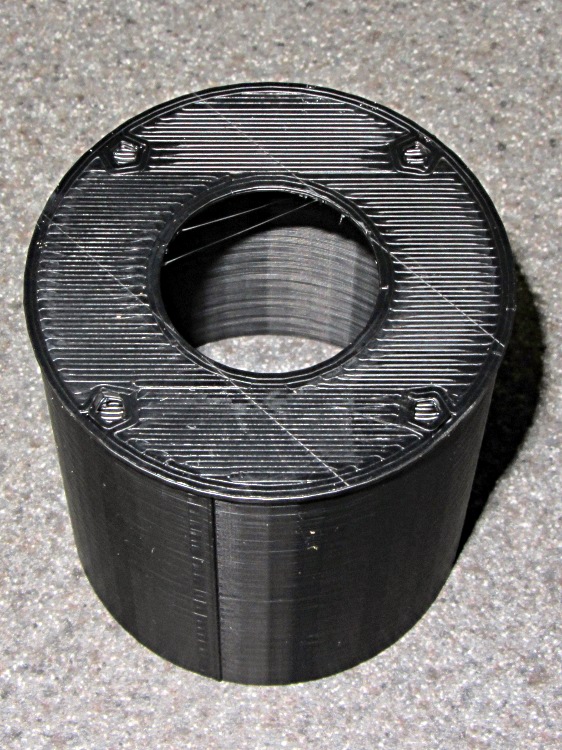
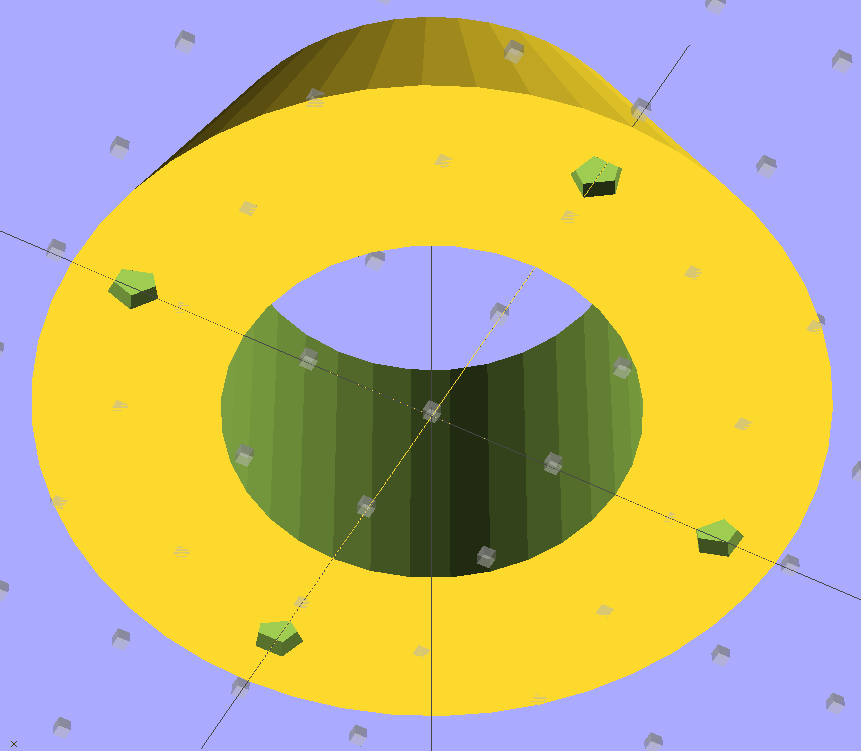
As you might expect by now, the front bulkhead has four alignment peg holes for the snout:
Camera mount tube
The OpenSCAD code sets the wall thickness to 3 thread widths, but Skeinforge prints two adjacent threads with no fill at all. I think the polygon corners eliminate the one-thread-width fill and the perimeter threads wind up near enough to merge properly.
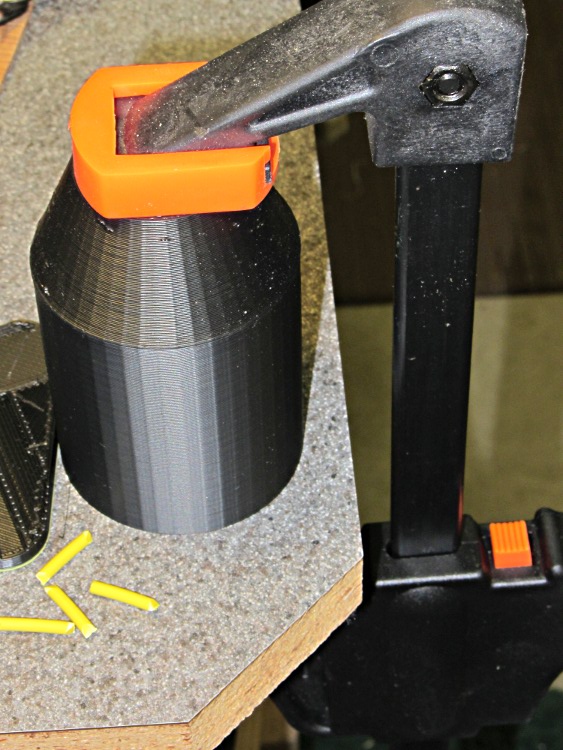
I assembled snouts to main tubes first, because it was easier to clamp bare cylinders to the bench:
Microscope eyepiece adapter – snout clamping
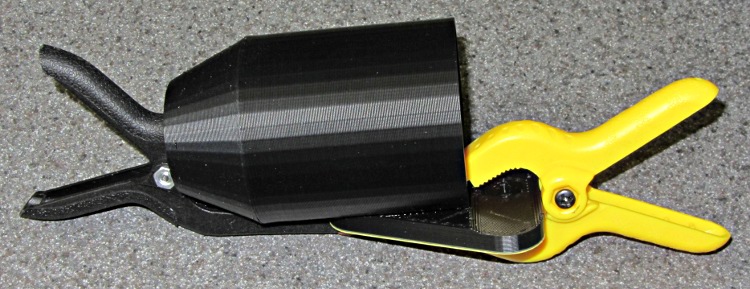
Then glue the tube to the mounting plate using a couple of clamps:
Microscope eyepiece adapter – baseplate clamping
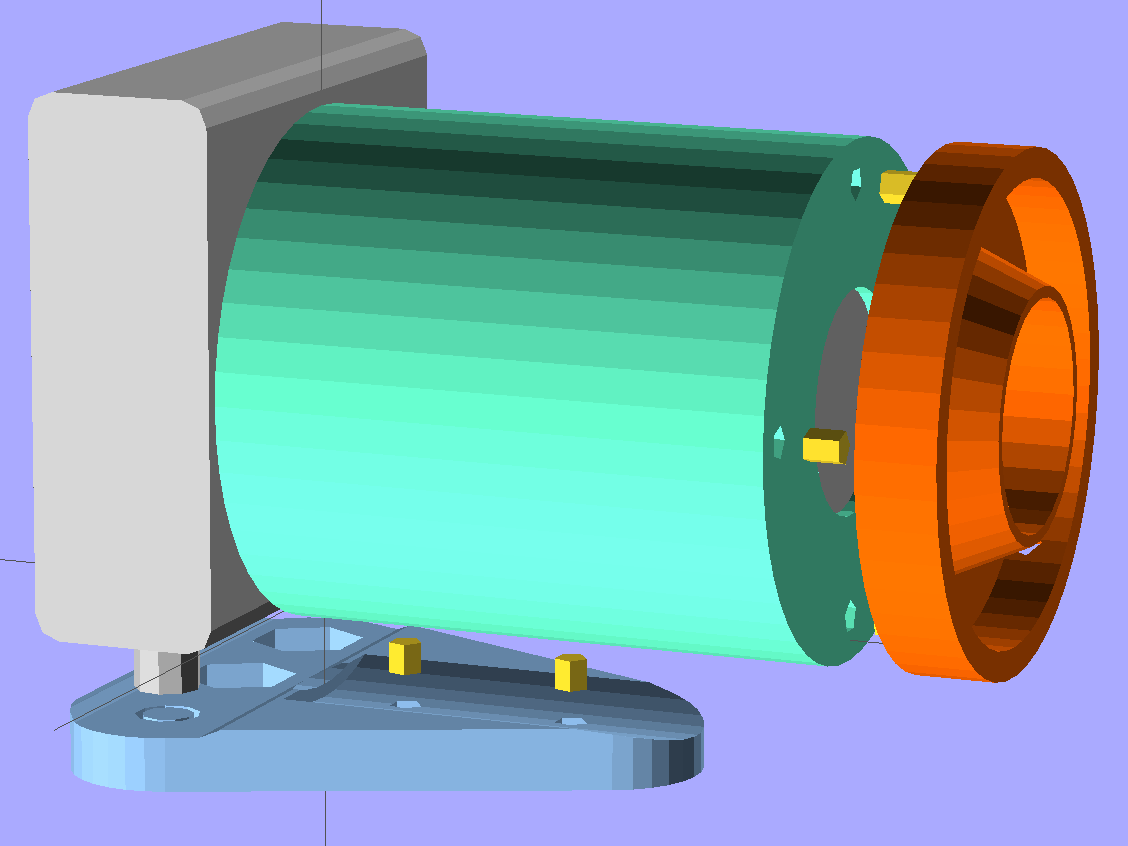
The alignment is pretty close to being right, but if when I do this again I’ll add alignment pegs along the trench in the mounting plate to make sure the tube doesn’t ease slightly to one side, thusly:
SX230HS Macro Lens mount – solid model – exploded with pegs
You can see the entrance pupil isn’t quite filled in the last picture there, so a bit more attention to detail is in order. A bigger doublet lens would help, too.
The current version of the OpenSCAD source code with those pegs:
// Close-up lens mount & Microscope adapter for Canon SX230HS camera
// Ed Nisley KE4ZNU - Nov 2011

Mount = "LEDRing";			// End result: LEDRing Eyepiece

Layout = "Show";			// Assembly: Show
							// Parts: Plate Tube LEDRing Camera Eyepiece
							// Build Plates: Build1..4

Gap = 10;					// between "Show" objects

include </home/ed/Thing-O-Matic/lib/MCAD/units.scad>
include </home/ed/Thing-O-Matic/Useful Sizes.scad>
include </home/ed/Thing-O-Matic/lib/visibone_colors.scad>

//-------
//- Extrusion parameters must match reality!
//  Print with +1 shells, 3 solid layers, 0.2 infill

ThreadThick = 0.33;
ThreadWidth = 2.0 * ThreadThick;

HoleFinagle = 0.2;
HoleFudge = 1.00;

function HoleAdjust(Diameter) = HoleFudge*Diameter + HoleFinagle;

Protrusion = 0.1;			// make holes end cleanly

function IntegerMultiple(Size,Unit) = Unit * ceil(Size / Unit);

//-------
// Dimensions

// doublet lens

LensDia = 25.0;
LensRad = LensDia/2;
LensClearance = 0.2;

LensEdge = 6.7;
LensThick = 8.6;
LensRimThick = IntegerMultiple((2.0 + LensThick),ThreadThick);

// LED ring light

LEDRingOD = 50.0;
LEDRingID = 36.0;
LEDBoardThick = 1.5;
LEDThick = 4.0;
LEDRingClearance = 0.5;
LEDWireHoleDia = 3.0;

// microscope eyepiece

EyepieceOD = 30.0;
EyepieceID = 24.0;
EyepieceLength = 25.0;

// camera
// Origin at base of [0] ring, Z+ along lens axis, X+ toward bottom, Y+ toward left

CameraBodyWidth = 2*10.6;							// 2 x center-to-curve edge
CameraBaseWidth = 15.5;								// flat part of bottom front to back
CameraBaseRadius = (CameraBodyWidth - CameraBaseWidth)/2;	// edge rounding
CameraBaseLength = 60.0;							// centered on lens axis
CameraBaseHeight = 55.0;							// main body height
CameraBaseThick = 0.9;								// downward from lens ring

echo(str("Camera base radius: ",CameraBaseRadius));

TripodHoleOffset = -19.0;							// mount screw wrt lens centerline
TripodHoleDia = Clear025_20;						// clearance hole

TripodScrewHeadDia = 14.5;							// recess for screw mounting camera
TripodScrewHeadRad = TripodScrewHeadDia/2;
TripodScrewHeadThick = 3.0;

// main lens tube

TubeDia = 		[53.0,	44.0,	40.0,	37.6];		// lens rings, [0] is fixed to body
TubeLength = 	[8.1,	20.6,	17.6,	12.7];

TubeEndClearance = 2.0;								// camera lens end to tube end
TubeEndThickness = IntegerMultiple(1.5,ThreadThick);
TubeInnerClearance = 0.5;

TubeInnerLength = TubeLength[0] + TubeLength[1] + TubeLength[2] + TubeLength[3] +
				  TubeEndClearance;
TubeOuterLength = TubeInnerLength + TubeEndThickness;

TubeID = TubeDia[0] + TubeInnerClearance;
TubeOD = TubeID + 6*ThreadWidth;
TubeWall = (TubeOD - TubeID)/2;
TubeSides = 48;

echo(str("Main tube outer length: ",TubeOuterLength));
echo(str("          ID: ",TubeID," OD: ",TubeOD," wall: ",TubeWall));

// camera mounting base

BaseWidth = IntegerMultiple((CameraBaseWidth + 2*CameraBaseRadius),ThreadThick);
BaseLength = 60.0;
BaseThick = IntegerMultiple((1.0 + Nut025_20Thick + CameraBaseThick),ThreadThick);

// LED ring mount

LEDBaseThick = IntegerMultiple(2.0,ThreadThick);	// base under lens + LED ring
LEDBaseRimWidth = IntegerMultiple(6.0,ThreadWidth);
LEDBaseRimThick = IntegerMultiple(LensThick,ThreadThick);

LEDBaseOD = max((LEDRingOD + LEDRingClearance + LEDBaseRimWidth),TubeOD);

echo(str("LED Ring OD: ",LEDBaseOD));

// alignment pins between tube and LED ring / microscope eyepiece

AlignPinOD = 2.9;

SnoutPins = 4;
SnoutPinCircleDia = TubeOD - 2*TubeWall - 2*AlignPinOD;		// 2*PinOD -> more clearance

// alignment pins between tube and base plate

BasePins = 2;
BasePinOffset = 10.0;
BasePinSpacing = BaseLength/3;

//-------

module PolyCyl(Dia,Height,ForceSides=0) {			// based on nophead's polyholes

  Sides = (ForceSides != 0) ? ForceSides : (ceil(Dia) + 2);

  FixDia = Dia / cos(180/Sides);

  cylinder(r=HoleAdjust(FixDia)/2,h=Height,$fn=Sides);
}

module ShowPegGrid(Space = 10.0,Size = 1.0) {

  Range = floor(50 / Space);

	for (x=[-Range:Range])
	  for (y=[-Range:Range])
		translate([x*Space,y*Space,Size/2])
		  %cube(Size,center=true);

}

//-------

//- Camera body segment
//	Including lens base and peg for tripod hole access
//	Z=0 at edge of lens base ring, X=0 along lens axis

module CameraBody() {

  translate([0,0,-CameraBaseThick])
	rotate(90)
	  union() {
		translate([0,0,(CameraBaseHeight/2 + CameraBaseRadius)])
		  minkowski() {
			cube([CameraBaseWidth,
				  (CameraBaseLength + 2*Protrusion),
				  CameraBaseHeight],center=true);
			rotate([90,0,0])
			  cylinder(r=CameraBaseRadius,h=Protrusion,$fn=8);
		  }

		translate([0,0,(TubeDia[0]/2 + CameraBaseThick)])
		  rotate([0,90,0])
			rotate(180/TubeSides)
			  cylinder(r=(TubeDia[0]/2 + CameraBaseThick),
					  h=(CameraBodyWidth/2 + Protrusion),
					  $fn=TubeSides);

		translate([CameraBodyWidth/2,0,(TubeDia[0]/2 + CameraBaseThick)])
		  rotate([0,90,0])
			cylinder(r=TubeDia[0]/2,h=TubeLength[0]);

		translate([(TubeLength[0] + CameraBodyWidth/2),
				  0,(TubeDia[0]/2 + CameraBaseThick)])
		  rotate([0,90,0])
			cylinder(r=TubeDia[1]/2,h=TubeLength[1]);

		translate([(TubeLength[0] + TubeLength[1] + CameraBodyWidth/2),
				  0,(TubeDia[0]/2 + CameraBaseThick)])
		  rotate([0,90,0])
			cylinder(r=TubeDia[2]/2,h=TubeLength[2]);

		translate([(TubeLength[0] + TubeLength[1] + TubeLength[2] + CameraBodyWidth/2),
				  0,(TubeDia[0]/2 + CameraBaseThick)])
		  rotate([0,90,0])
			cylinder(r=TubeDia[3]/2,h=TubeLength[3]);

		translate([0,TripodHoleOffset,-BaseThick])
		  PolyCyl(TripodHoleDia,(BaseThick + 2*Protrusion));

	  }
}

//- Main tube

module Tube() {

  difference() {
	cylinder(r=TubeOD/2,h=TubeOuterLength,$fn=TubeSides);

	translate([0,0,TubeEndThickness])
	  PolyCyl(TubeID,(TubeInnerLength + Protrusion),TubeSides);

	translate([0,0,-Protrusion]) {
	  if (Mount == "LEDRing")
		cylinder(r=LensRad,h=(TubeEndThickness + 2*Protrusion));
	  if (Mount == "Eyepiece")
		cylinder(r=EyepieceID/2,h=(TubeEndThickness + 2*Protrusion));
	}

	for (Index = [0:SnoutPins-1])
	  rotate(Index*90)
		translate([(SnoutPinCircleDia/2),0,-ThreadThick])
		  rotate(180)			// flat sides outward
			PolyCyl(AlignPinOD,TubeEndThickness);

	for (Index = [0:BasePins-1])
		translate([0,-(TubeOD/2 + Protrusion),
				  (TubeOuterLength - BasePinOffset - Index*BasePinSpacing)])
		  rotate([-90,90,0])					// y = flat toward camera
			PolyCyl(AlignPinOD,(TubeWall + 2*Protrusion));
  }

}

//- Base plate

module BasePlate() {

  union() {
	difference() {
		linear_extrude(height=BaseThick)
		  hull() {
			translate([-(BaseLength/2 - BaseWidth/2),0,0])
			  circle(BaseWidth/2);
			translate([ (BaseLength/2 - BaseWidth/2),0,0])
			  circle(BaseWidth/2);
			translate([0,(0.75*BaseLength),0])
			  circle(BaseWidth/2);
		  }

		translate([0,0,BaseThick])
		  CameraBody();

		translate([0,(TubeOuterLength + CameraBodyWidth/2),
				  (BaseThick + TubeDia[0]/2)])
		  rotate([90,0,0])
			PolyCyl(TubeOD,TubeOuterLength,$fn=TubeSides);

		for (Index = [0:BasePins-1])
			translate([0,(CameraBodyWidth/2 + BasePinOffset + Index*BasePinSpacing),
					  3*ThreadThick])
			  rotate(90)										// flat toward camera
				PolyCyl(AlignPinOD,BaseThick);

		translate([0,0,3*ThreadThick])
		  PolyCyl((Nut025_20Dia*sqrt(3)/2),2*Nut025_20Thick,6);	// dia across hex flats

		translate([0,0,-Protrusion])
		  PolyCyl(Clear025_20,(BaseThick + 2*Protrusion));

		translate([TripodHoleOffset,0,3*ThreadThick])
		  PolyCyl((Nut025_20Dia*sqrt(3)/2),2*Nut025_20Thick,6);	// dia across hex flats

		translate([TripodHoleOffset,0,-Protrusion])
		  PolyCyl(Clear025_20,(BaseThick + 2*Protrusion));

		translate([-TripodHoleOffset,0,-Protrusion])
		  PolyCyl(TripodScrewHeadDia,(TripodScrewHeadThick + Protrusion));
	}

	translate([-TripodHoleOffset,0,0]) {				// support for tripod screw hole
	  for (Index=[0:3])
		rotate(Index*45)
		  translate([-ThreadWidth,-TripodScrewHeadRad,0])
			cube([2*ThreadWidth,TripodScrewHeadDia,TripodScrewHeadThick]);

	  cylinder(r=0.4*TripodScrewHeadRad,h=(BaseThick - CameraBaseThick),$fn=9);
	}
  }
}

//- LED mounting ring

module LEDRing() {

  difference() {
	cylinder(r=LEDBaseOD/2,h=LensRimThick,$fn=48);

	translate([0,0,-Protrusion])
	  PolyCyl((LensDia + LensClearance),
			  (LensRimThick + 2*Protrusion));

	translate([0,0,LEDBaseRimThick])
	  difference() {
		PolyCyl(LEDBaseOD,LensThick);
		PolyCyl(LEDRingID,LensThick);
	  }

	translate([0,0,LEDBaseThick])
	  difference() {
		PolyCyl((LEDRingOD + LEDRingClearance),LensThick);
		cylinder(r1=HoleAdjust(LEDRingID - LEDRingClearance)/2,
				 r2=HoleAdjust(LensDia + LensClearance)/2 + 2*ThreadWidth,
				 h=LensThick);
	  }

	for (Index = [0:SnoutPins-1])
	  rotate(Index*90)
		translate([(SnoutPinCircleDia/2),0,-ThreadThick])
		  rotate(180)			// flat sides outward
			PolyCyl(AlignPinOD,LEDBaseThick);

	rotate(45)
	  translate([0,LEDRingID/2,(LEDBaseThick + 1.2*LEDWireHoleDia/2)])
		rotate([0,-90,0])			// flat side down
		  rotate([-90,0,0])
			PolyCyl(LEDWireHoleDia,2*LEDBaseRimWidth);
  }

}

//- Microscope eyepiece adapter

module EyepieceMount() {

  difference() {
	cylinder(r1=TubeOD/2,
			 r2=(EyepieceOD + 8*ThreadWidth)/2,
			 h=EyepieceLength,
			 $fn=TubeSides);

	translate([0,0,-Protrusion])
	  PolyCyl(EyepieceOD,(EyepieceLength + 2*Protrusion));

	for (Index = [0:SnoutPins-1])
	  rotate(Index*90)
		translate([(SnoutPinCircleDia/2),0,-ThreadThick])
		  rotate(180)			// flat sides outward
			PolyCyl(AlignPinOD,6*ThreadThick);
  }

}

//-------
// Build it!

if (Layout != "Show")
  ShowPegGrid();

if (Layout == "Tube")
  Tube();

if (Layout == "LEDRing")
  LEDRing();

if (Layout == "Plate")
  BasePlate();

if (Layout == "Camera")
  CameraBody();

if (Layout == "Eyepiece")
  EyepieceMount();

if (Layout == "Build1")
  translate([0,-BaseLength/3,0])
	BasePlate();

if (Layout == "Build2")
  Tube();

if (Layout == "Build3")
  LEDRing();

if (Layout == "Build4")
  EyepieceMount();

if (Layout == "Show") {
  translate([0,TubeOuterLength,TubeDia[0]/2]) {
	rotate([90,0,0])
	  color(LTC) Tube();
	translate([0,(Gap/2 - TubeEndThickness - Protrusion),0])
	  rotate([-90,0,0])
		for (Index = [0:SnoutPins-1])
		  rotate(Index*90)
			translate([(SnoutPinCircleDia/2),0,0])
			  rotate(180)			// flat sides outward
				PolyCyl(AlignPinOD,(TubeEndThickness + LEDBaseThick));

	translate([0,Gap,0])
	  rotate([-90,0,0]) {
		if (Mount == "LEDRing")
		  color(OOR) LEDRing();
		if (Mount == "Eyepiece")
		  color(OOR) EyepieceMount();
	  }
  }

  translate([0,-CameraBodyWidth/2,0])
	color(PG) CameraBody();

  color(PDA)
	render()
	translate([0,-CameraBodyWidth/2,-(BaseThick + Gap)])
	  BasePlate();

  for (Index = [0:BasePins-1])
	  translate([0,(BasePinOffset + Index*BasePinSpacing),
				-Gap/2])
		rotate([180,0,90])										// flat toward camera
		  PolyCyl(AlignPinOD,BaseThick/2);

}
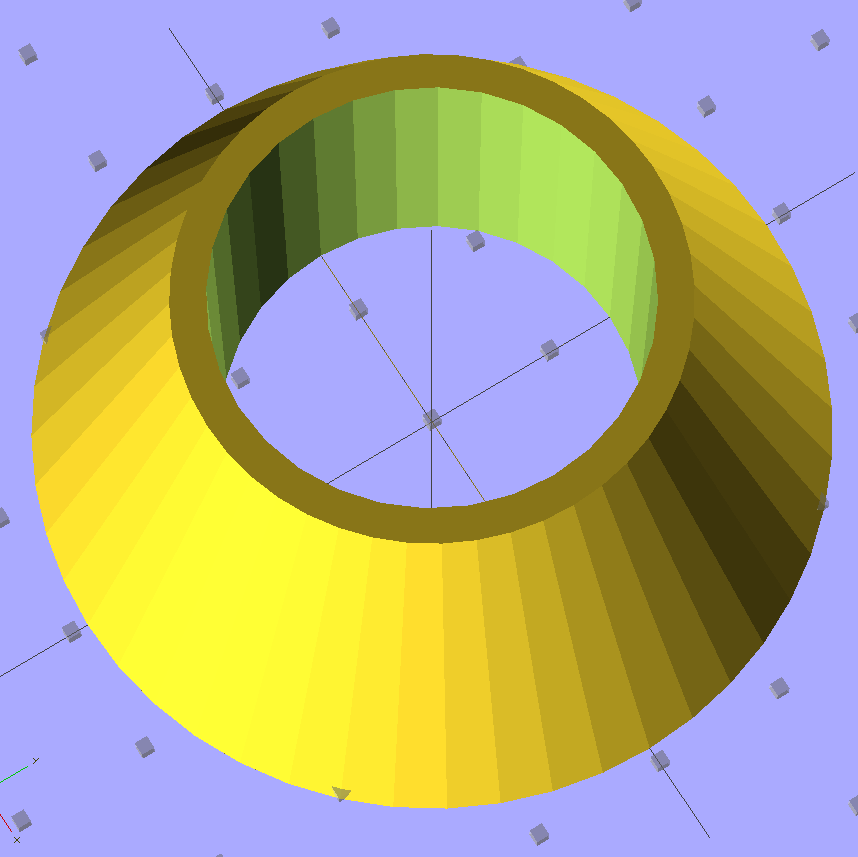
The microscope eyepiece adapter was easy enough: a cone with a cylinder punched out of it:
Microscope eyepiece adapter – front view
The thin part of the tip is four threads wide around the eyepiece OD, which makes for good fill.
The bottom has the usual four alignment pin holes:
Microscope eyepiece adapter – bottom view
The main tube opening ID is equal to the diameter of the flat rim around the microscope eyepiece, which provides a positive stop with plenty of surface area.




 The Smell of Molten Projects in the Morning