Ed Nisley's Blog: Shop notes, electronics, firmware, machinery, 3D printing, laser cuttery, and curiosities. Contents: 100% human thinking, 0% AI slop.
Mary has been quilting up a storm lately and is growing dissatisfied with the special safety pins she’s been using to hold the layers together. Long straight pins are ideal, except that maneuvering a large quilt through her sewing machine resembles stuffing a porcupine into a keyhole. A commercial solution costs nearly half a buck per pin, which seems unreasonably spendy for something you need by the hundreds.
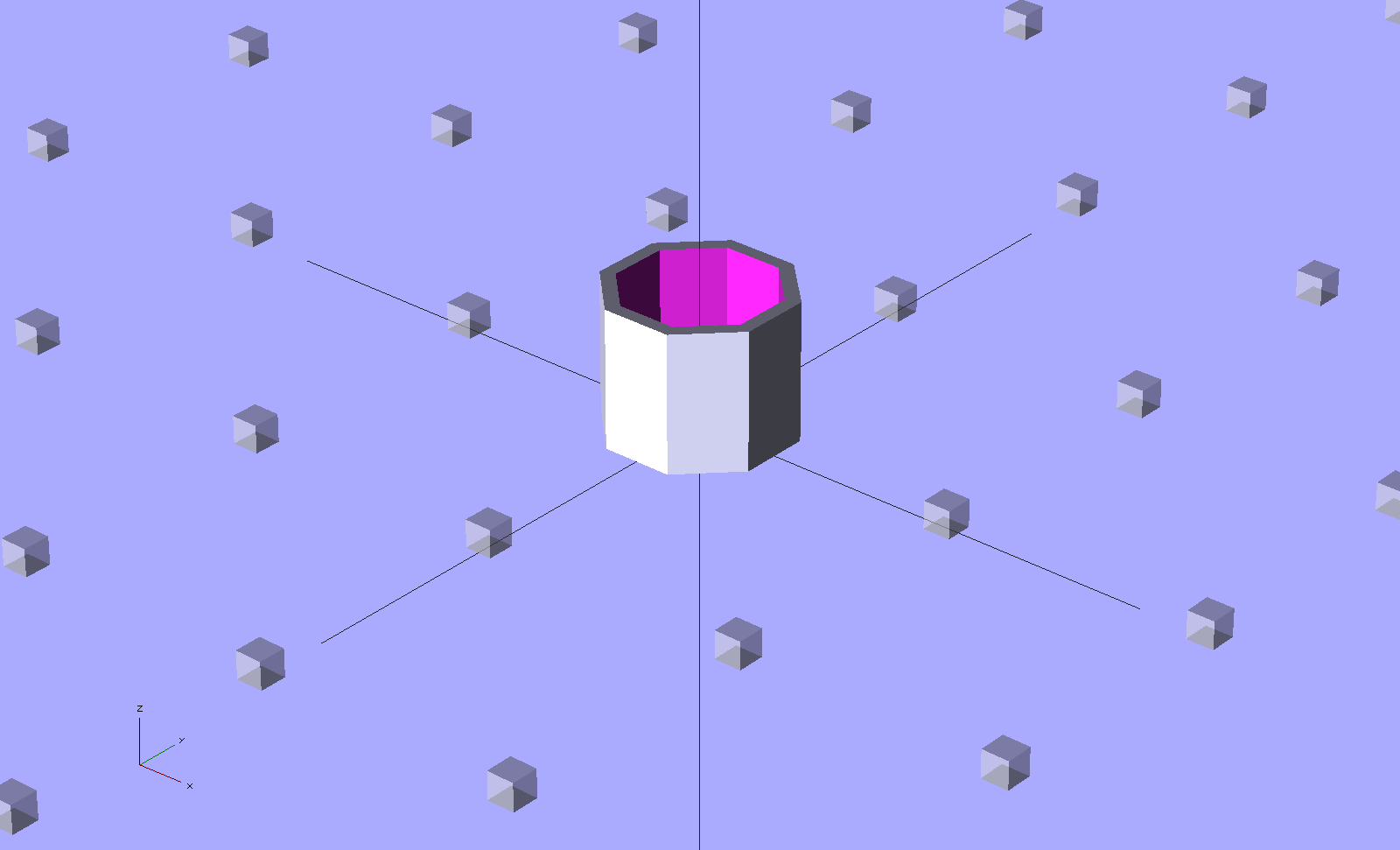
We kicked around some finger- and quilt-friendly dimensions and I cobbled up a solid model:
Quilting Pin Cap
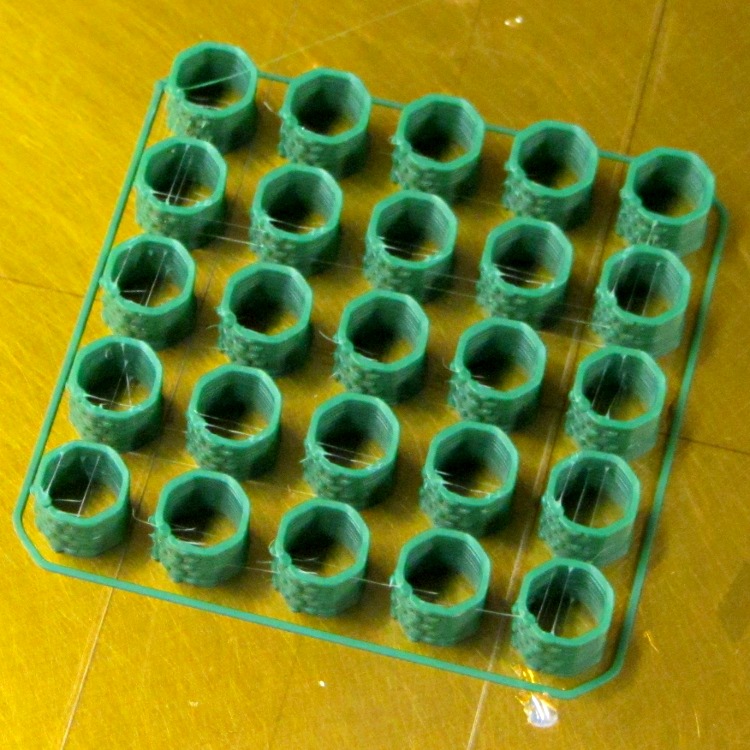
Which turned into an array of small octagons that won’t roll off the table:
Pin cap array on build platform
We figured 25 would be enough to decide if this is workable and whether the dimensions fit fingers, pins, and quilts.
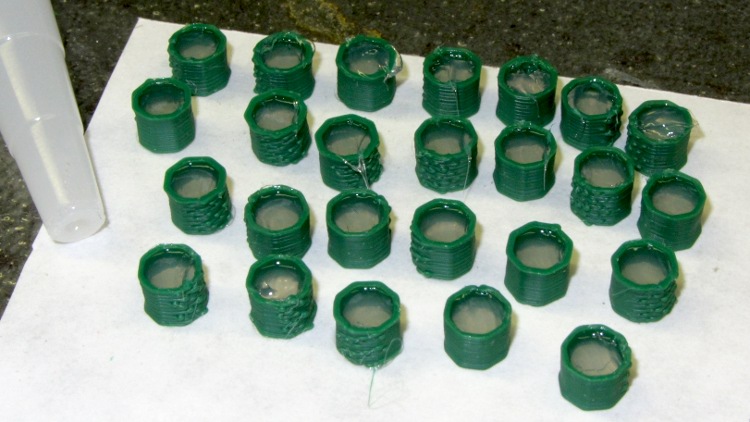
Filling them with silicone rubber required one squirt each:
Filling pin caps with silicone
The trick with the silicone rubber is to cut the snout so it fits flat on the cylinder top. Put the cylinders on a piece of non-stick paper (I used the back of the carrier for some double-sided tape, but wax paper would be better), hold one with tweezers, squirt in enough rubber to fill the cylinder solidly from bottom to top, then slide the snout sideways to smooth the surface.
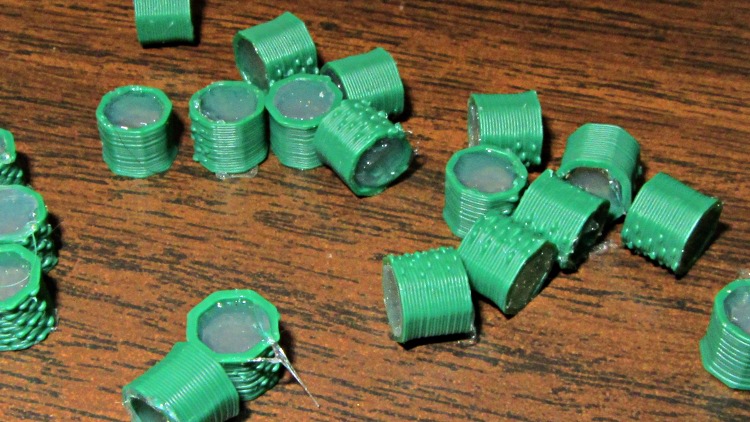
Wait for a day, pop them off, and remove any drool:
Silicone-filled pin caps
It’s garden planting time right now, so it’ll take a while before I tweak the design and run off the next batch.
I don’t know how to compute an actual cost for each of those things. I regard the entire Thing-O-Matic as fully depreciated and pretty much a sunk cost, which means the expense boils down to the incremental cost of plastic and silicone. All the Quality Shop Time is, of course, free… and maybe even therapeutic.
The (trivially simple) OpenSCAD source code:
// Quilting pin caps
// Ed Nisley KE4ZNU April 2012

//- Extrusion parameters must match reality!
//  Print with +1 shells and 3 solid layers

ThreadThick = 0.25;
ThreadWidth = 2.0 * ThreadThick;

HoleWindage = 0.2;

function IntegerMultiple(Size,Unit) = Unit * ceil(Size / Unit);

Protrusion = 0.1;			// make holes end cleanly

//----------------------
// Dimensions

ID = 5.0;
OD = ID + 2*ThreadWidth;
Length = 5.0;
Sides = 8;

//----------------------
// Useful routines

module PolyCyl(Dia,Height,ForceSides=0) {			// based on nophead's polyholes

  Sides = (ForceSides != 0) ? ForceSides : (ceil(Dia) + 2);

  FixDia = Dia / cos(180/Sides);

  cylinder(r=(FixDia + HoleWindage)/2,
           h=Height,
	   $fn=Sides);
}

module ShowPegGrid(Space = 10.0,Size = 1.0) {

  Range = floor(50 / Space);

	for (x=[-Range:Range])
	  for (y=[-Range:Range])
		translate([x*Space,y*Space,Size/2])
		  %cube(Size,center=true);

}

//----------------------
// Build them!

ShowPegGrid();

  rotate(180/Sides) {
	difference() {
	  PolyCyl(OD,Length,8);
	  translate([0,0,-Protrusion])
		PolyCyl(ID,(Length + 2*Protrusion),8);
	}
  }
One of the oven drawer supports in our Sears Kenmore gas range cracked and I finally got around to replacing it:
Cracked oven drawer slide and replacement
I originally thought the drawer slid on the large, blocky, well-supported lump. Nope, that delicate little tab must support half the weight of the drawer; the lump might support the drawer in another oven. Perhaps we shouldn’t store the Lesser and Least Cast Iron Pans in that drawer, but that’s where they fit best. The Greater Cast Iron Pan lives atop the stove, because it get used so often there’s no point in putting it away.
One could, of course, Fire the Thing-O-Matic! to print brightly colored plastic bits (after the usual tedious 3D modeling & trial fitting), but replacement parts cost a buck each from RepairPartsDirect. I bought three, so as to have a complete backup set, and most of the $9 total went to postage & handling.
So here’s the Rest of the Story, reconstructed from my notes…
Having already torn the thing apart and discovered that the repair would include both the drum+spider assembly (not available separately, which may actually make sense given high-speed spin balancing) and the front half of the plastic tub, I priced them at RepairClinic and Sears Parts Direct. In round numbers, this adventure would cost $300-400 just for the parts, a bit less than half the cost of the washer.
As I recall, the Sears price for the drum was roughly twice that for RepairClinic, while the tub was about the same. I suspect Sears deliberately inflates the drum price to make sure nobody actually buys the thing and to pad out the tech’s time to replace it.
The warranty in the front of the Owner’s Manual seemed promising:
Sears Kenmore HE3 Washer Warranty
So I called the Sears Parts & Warranty line, walked the menu tree, explained the situation, asked for a new drum, and was told that they must dispatch a tech to diagnose the problem. Despite the warranty, there would be a labor fee and an additional fee to process the parts order. There was no way to determine those fees before dispatching the tech.
I pointed out that I’d already dismantled the washer, knew exactly what the problem was, and just needed the replacement drum as described in the warranty. I was put on hold to “process my request”, eventually being transferred to a “tech specialist department for further assistance”.
The “tech specialist” was willing to spend as much time as required to convince me that the Lifetime Warranty had expired, based on a deliberate misreading of the terms. As far as they were concerned, the sentence “After the first year, you will be charged for labor” meant that the warranty had expired on a five-year-old washer and that the drum was no longer covered. They would not, under any circumstances, send me the drum. Yes, I asked for a supervisor and, no, I doubt that she really was one; handing the call to the next cubicle is standard call-center subterfuge to placate irate customers.
I eventually decided that this was not a language-barrier issue, but a carefully planned & executed part of their standard script: letting their Indian-subcontinent call center take the heat works wonderfully well for the purpose of getting rid of warranty claims.
So I looked up the phone number of the “interim CEO/President” (I assume he’s long gone by now) at Sears Holding Corporation and gave him a call. Of course, I didn’t expect to actually reach the CEO, but I figured I’d shake the dice a bit to see if a better combination came up.
It turns out that they expect this sort of behavior and immediately connected me to their “Executive Customer Service” department, which was described as “the highest they can go”. So I told my tale, asked her to ship me a drum, and was told that wasn’t possible. What she could do, as a “one time offer”, was to “waive the labor fee” when they dispatched the tech.
I asked if there were any other fees. She refused to answer that question. I asked if there was a charge to order the parts. She refused to answer that question. It being a Friday, I asked when the tech could arrive; she said that they would attempt to schedule it for Monday, but Tuesday was more likely. I asked if he’d arrive with the drum. She said the tech would assess the problem and order the necessary parts, requiring a second appointment later in the week.
I told her that it was obvious Sears had no intention of honoring their warranty. She repeated that this was a one-time offer. We did not part on good terms.
So I ordered the drum & tub from RepairClinic, two huge boxes arrived on Tuesday, I installed everything, buttoned up the machinery, and the washer has worked fine ever since.
Every time I looked at that big drum, I got mad all over again. I never mustered the enthusiasm to take the spider off the back for a post-mortem, which is why there’s no Part 2 after that post. Eventually I hauled the carcasses to the town’s disposal site and bid them good riddance.
Obviously, Sears won: they got rid of me without spending a dime on the warranty. It cost them maybe two hours of phone time, but I doubt the pleasant voice in the “Executive Customer Service” department makes much more than minimum wage and Indian-subcontinent personnel are basically free compared to that.
I’m doing a bunch of appliance repair right now and wonder just how much we’d be spending if we had to go through the Official Channels for repairs. I’m definitely earning my keep… and having much more fun than being jerked around by that corporate structure.
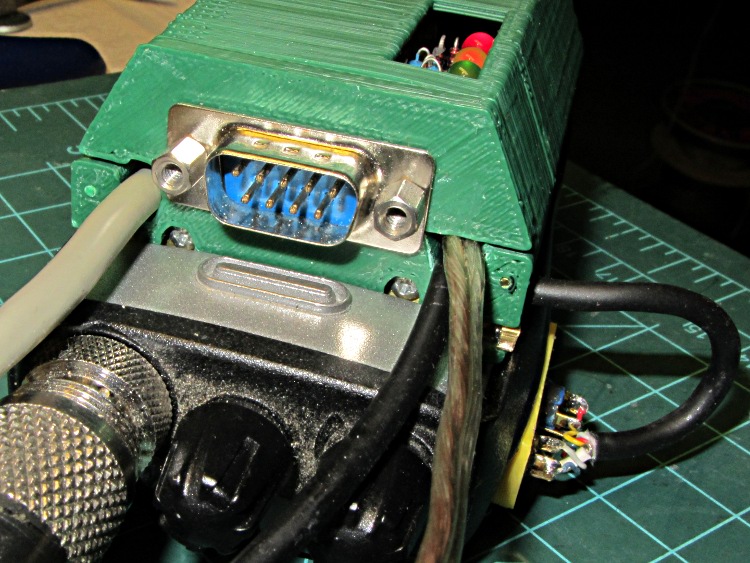
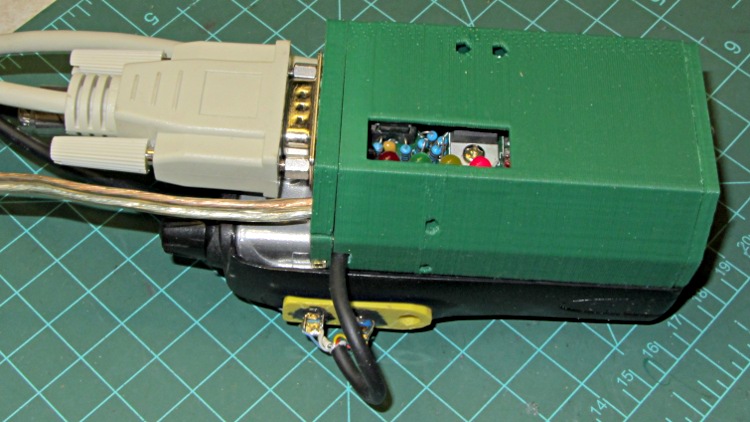
The robust wire I used for the external battery connection required a bit of diagonal cutter work to enlarge the hole in the top plate, but eventually everything fit together and the GPS interface box latched neatly onto the radio:
HT-GPS Case – cabled top view
The skein of cables:
Antenna: reverse SMA to UHF adapter = RG58 coax
GPS: TTL serial data from Byonics GPS2 receiver = DB-9 (OK, DE-9)
After a few rides to verify that this whole affair works, I must print up another case with slightly modified dimensions, add a plastic window over those cheerful LEDs on the TinyTrak3+ board, and mush an epoxy putty blob over the earphone and mic connections on that bright yellow plug plate. I’ve given up on the idea of having a cover for the top part of the battery compartment; there just isn’t enough space for such a thing and it’d be an impossibly delicate shell.
The radio seems happy enough being fed 9 V from a bench supply (to match the upconverted lithium packs I’ve been using on the bikes), rather than 7.4 V from its standard lithium pack. A freshly charged battery comes pretty close to 9 V, so they can’t be too fussy. It idles at about 100 mA, with periodic blips to 140 mA when (I think) the TinyTrak3+ tickles the GPS receiver, regardless of the supply voltage. Goosing it with 13.8 V surely wouldn’t have a happy outcome…
Lashed up like that on the bench, with the GPS receiver hanging out the basement window and the coax hitched to a bicone scanner antenna sitting inside the window, it generated APRS spots and the audio sounds OK, so the innards look good, too.
2012-04-11 20:09:08 EDT: KE4ZNU-9>APT311,WA2YSM-15,WIDE1*,WIDE2-1,qAR,K2MHV-6:>Ed - Bike PL100 UV3D
One downside: the TinyTrak3+ blurts its initial ID message instantly after being powered on, but the radio takes a few seconds to haul itself to its feet. As a result, the ID message never reaches the antenna. So it goes…
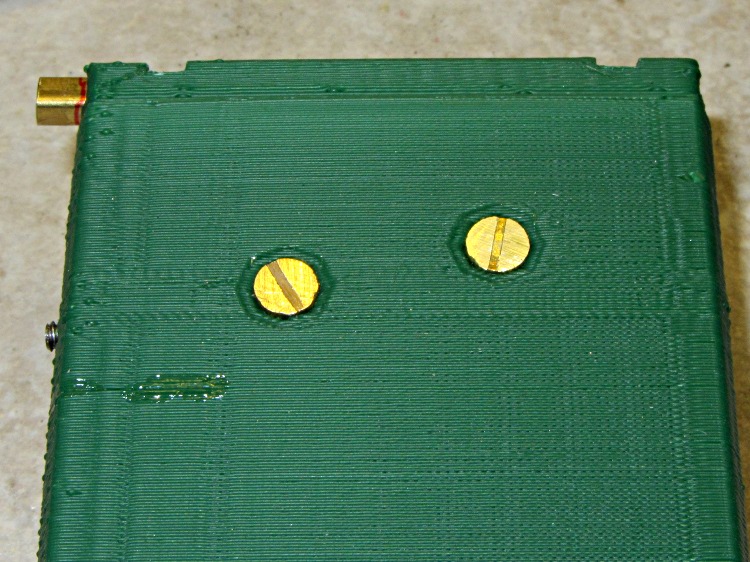
After considerable stalling, I filed the heads of two brass 4-40 screws down to about 1 mm, leaving just a hint of the slots in place. They’re a bit over 5 mm in diameter, smaller than the 7 mm I wanted to use, but have the compelling advantage of being Close Enough to get the rest of the hardware working. The gap between the interface PCB and the case is 3 mm, which turns out to be just about exactly the thickness of a 4-40 nut and flat washer, so I soldered a pair of them together as threaded spacers:
HT-GPS Case – radio battery contacts
The soldering looks worse than it really is; they’re secured all the way around.
For the external battery connectors on the top, I ran a #33 drill through a pair of miniature crimp ring lugs to get a slip fit, then soldered them atop a pair of nickel-plated nuts. In normal use they’d be captured by the nuts, but I can’t figure out how to assemble them inside the case:
HT-GPS Case – external power lugs
Those are stainless steel 4-40 screw cutoffs, which I used because solder doesn’t adhere to stainless… I tinned the nuts and connectors, clamped the screws in a small vise, heated the nuts with a soldering iron, and applied the contacts with a tweezer. They snapped right into place and the solder fillet wrapped neatly around the entire lug.
The heat from the soldering iron relaxed the insulator sleeves enough to remove nearly all trace of the crimping.
With all that in hand, I ran the brass screws through the case, into the spacer nut+washer combo, through the PCB, and into the battery contact nuts. A bit of tedious pliers work snugged the screws and got everything lined up, then I tightened the spacers against the PCB and battery nuts on the other side. That’s completely invisible inside the case, so there aren’t any pictures, but the idea is that the studs sit flush inside their case recesses and clamping the PCB between the nuts shouldn’t put any stress on the PCB. We shall see.
HT-GPS Case – radio contacts in place
The slots became so shallow that a screwdriver doesn’t get any traction…
Well, that fix didn’t take long to fail; they sure don’t make ’em like they used to:
OEM Replacement fan in freezer
The “new” fan’s bearing failure sounded more like an owl than a dog, but it was certainly not what we wanted to hear in the middle of the night. A replacement fan costs on the order of $60, which seems like an absurdly high number for what’s basically a clock motor, a plastic fan blade, and some stamped steel.
After mulling the situation for a bit, I concluded that the refrigerator has reached that age where stuffing more money into it doesn’t make much sense: the compressor will drop dead in fairly short order. It’s time for a gonzo fix that also slightly reduces the clutter in the Basement Laboratory Warehouse: stick a PC case fan and wall wart into the freezer, ignore their temperature ratings, and see what happens.
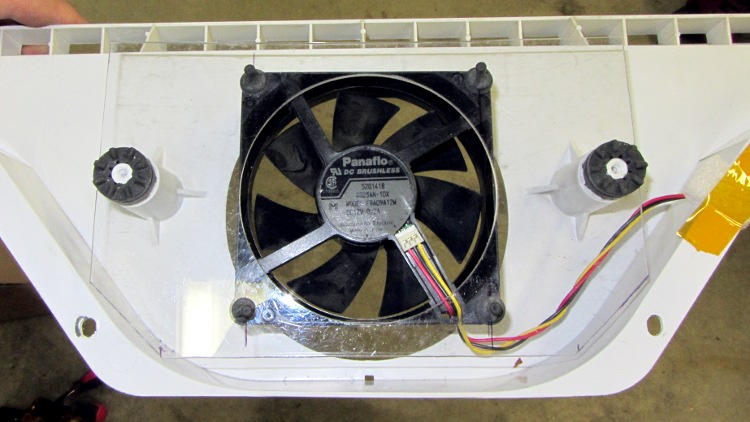
A polycarbonate sheet, a band saw, some step drills, a big hole saw, and an hour of Quality Shop Time produced a perfectly serviceable space transformer to mate the fan to the airflow director:
PC case fan in air flow director
The plate surrounds the squishy foam washers from the OEM motor mount, with the fan on its own rubbery posts: there won’t be any vibration transmitted to the plastic air flow director! The obligatory Kapton tape on the right holds a closed-cell foam wrap around the wires to prevent rattling; I’d done much the same when I tore the thing apart after the first OEM fan failure.
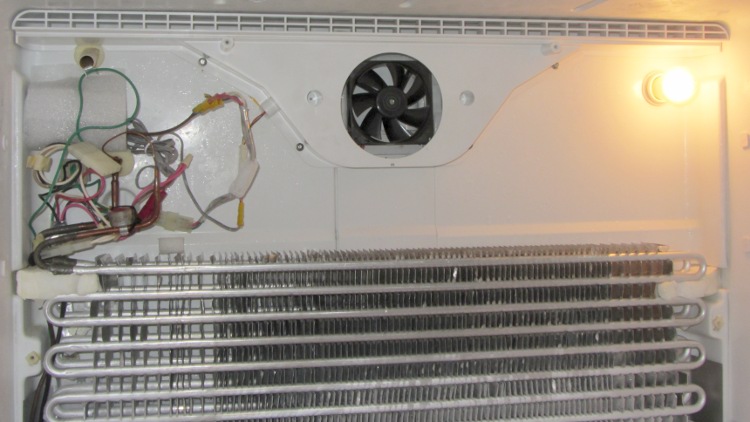
The air flow is toward you out of the screen: the fan draws air from the refrigerator compartment through the evaporator coils, then directly into a square duct that leads back to the refrigerator. Whatever doesn’t make it into the duct flows into the freezer compartment through the row of vents at the top of the picture.
I assume some serious modeling went into choosing the OEM fan blade configuration and spacing so as to optimize the distribution. I hope just moving some air in roughly the right direction will suffice; I have no way to measure any interesting numbers, so this is entirely cut-and-try.
The PC case fan expects 12 VDC, which comes from a standard wall wart conspicuously labeled “For Indoor Use Only”. Well, this is certainly indoor, even if it’s not quite what they expected. The wart plugs into a cobbled-together extension cord receptacle with male 1/4 inch quick-disconnect tabs that match the female QD connectors on the OEM wiring harness that originally plugged into the fan:
PC case fan with adapted wall wart
All that fits into the space behind the rear panel, with the wart wrapped in a sheet of closed-cell foam to prevent rattling and provide a bit of protection:
PC case fan installed in freezer
The rear panel covers the mess, exposing only the row of vent holes along the top. The air flow is upward through the evaporator coil and fins, through the fan, and back to the two compartments.
One question remains: will the fan continue to start below 0 °F (-20 °C)?
Given the ball bearings in the fan, it ought to remain quiet, but I’ve thought that before. Now, however, I have a generous supply of case fans and wall warts that plug into the mechanical and power adapters, so I can replace fans for a long time.
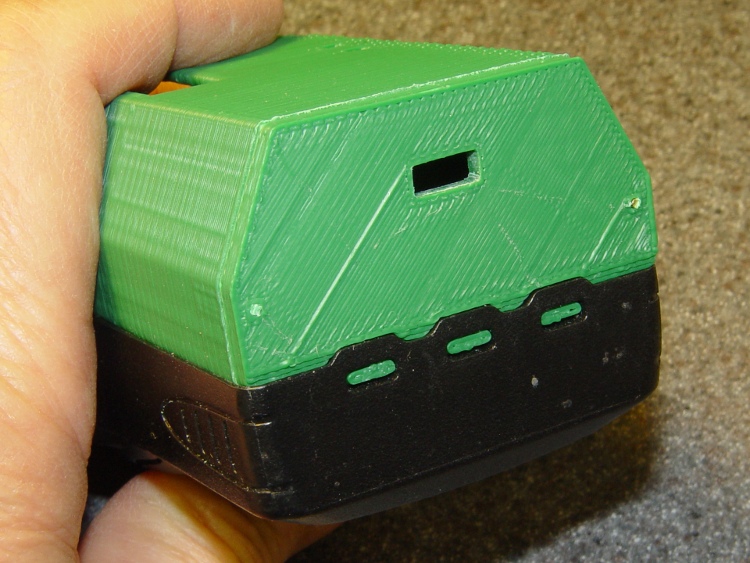
The latch is about the same as before, but the top endplate now has two cable ports and locating pins to take the force from the battery contact springs:
HT-GPS Case – latch detail
The bottom endplate has a hole for the TinyTrak3 Mode switch, plus two locating pins that hold the plate in place:
HT-GPS Case – Wouxun KG-UV3D base view
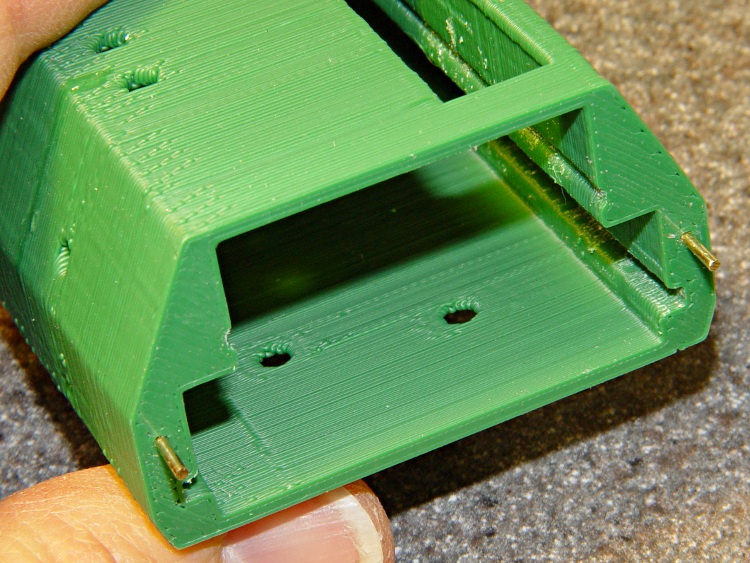
A detail shot of the two endplates shows the new holes:
HT-GPS Case – endplate detail
Snippets of brass rod became locating pins, each slipped into a hole atop a dab of epoxy to lock it in place:
HT-GPS Case – locating pin detail
The boards slide in pretty much the way you’d expect:
HT-GPS Case – Trial fit – rear view
The OpenSCAD code punches a third cable hole in the case for the HT wiring. I had high hopes that it would fit through the endplate, but …
Seen from the other end, there’s not much to see. The next case will have a slightly narrower LED opening:
HT-GPS Case – Trial fit – base view
The imperfection running down the side comes from a brief pause in the proceedings while the support plate fell out of the opening. As a consequence, I discovered that the LED window doesn’t need any support at all.
This view shows one of the battery contacts peeking through the hole for a yet-to-be-made stud:
HT-GPS Case – Wouxun KG-UV3D rear view
The solid model show some additional revisions, but it’s pretty close to the green plastic versions:
HT-GPS Case – holes and pins – solid model
The OpenSCAD source code:
// Wouxun KB-UV3D Battery Pack Case
// Ed Nisley KE4ZNU April 2012

include </home/ed/Thing-O-Matic/lib/MCAD/units.scad>
include </home/ed/Thing-O-Matic/Useful Sizes.scad>

// Layout options

Layout = "Fit";
					// Overall layout: Fit Show
					// Printing plates: Build1 .. Buildn (see bottom!)
					// Parts: TT3 Audio DSub Shell Base Top
					// Shapes: RadioBase Contact
					// Speaker-mic mount: PlugPlate

ShowGap = 20;		// spacing between parts in Show layout

//- Extrusion parameters must match reality!
//  Print with +1 shells and 3 solid layers

ThreadThick = 0.25;
ThreadWidth = 2.0 * ThreadThick;

HoleWindage = 0.2;

function IntegerMultiple(Size,Unit) = Unit * ceil(Size / Unit);

Protrusion = 0.1;			// make holes end cleanly

//----------------------
//- Dimensions

CaseOverallHeight = 31.5;				// from battery surface, must clear PCBs!
CaseOverallWidth = 56;
CaseOverallLength = 80.25;				// inside of base to end of compartment

BatteryClearance = 1.5;					// contact seal height = air gap to compartment

// Interface to radio battery contacts
//	Length = shell length
//		calculated after everything else, so as to fill the compartment

PlateWidthMin = 53.0;
PlateWidthMax = 54.5;
PlateThick = IntegerMultiple(2.0,ThreadThick);
PlateAngle = atan(PlateThick/(PlateWidthMax/2 - PlateWidthMin/2));

ContactDia = 7.0;				// use rounded contact for simplicity
ContactRecess = IntegerMultiple(0.5,ThreadThick);	// recess for contact plate
ContactGapX = 10.5;				// X space between contacts
Contact1Y = 52.5;				// offset from base to edge of contact
Contact2Y = 56.5;
ContactStudDia = Clear4_40;
ContactStudHead = Head4_40;
ContactStudHeadThick = Head4_40Thick;

// Offsets from battery surface to PCB centerlines
//	TT3 must be above HT back shell for DB9 clearance
//	These must cooperate with the numbers in the case shell module

TT3Offset = 17.5 + PlateThick;
AudioOffset = 4.0 + PlateThick;

// Plate interface to base alignment holes and notches

BaseWidthInner = PlateWidthMin;
BaseWidthOuter = CaseOverallWidth;
BaseLength = CaseOverallHeight;					// perpendicular to battery surface
BaseThick = IntegerMultiple(1.0,ThreadThick);	// minimum sheet thickness below teeth
BaseWidthTaper = 5.0;							// ramp across entire width

BaseOpeningMax = 43.0;
BaseOpeningMin = 33.0;
BaseOpeningY = 5.3;
BaseOpeningDepth = IntegerMultiple(2.25,ThreadThick);

BaseTotalThick = BaseThick + BaseOpeningDepth;
echo("Base min thick: ",BaseThick," total: " ,BaseTotalThick);

BaseTabWidth = 6.0;
BaseTabThick = 2.0;
BaseTabGap = 7.0;
BaseTabOC = BaseTabWidth + BaseTabGap;
BaseToothSection = 3*BaseTabWidth + 2*BaseTabGap;

BaseToothBase = 5.8;
BaseToothTip = 2.8;
BaseToothThick = 2.0;
BaseToothAngle = atan(BaseOpeningDepth/0.6);
BaseToothOC = BaseTabOC;

WedgeAngle = atan(BaseWidthTaper/((BaseWidthOuter - BaseWidthInner)/2));

BaseEndLip = ThreadThick;			// should be 0.25 mm or so
BaseEndWidth = (PlateWidthMin - 3*BaseToothBase - 2*BaseToothTip)/2;
BaseEndAngle = atan((BaseOpeningDepth - BaseEndLip)/BaseOpeningY);

SwitchBody = [8.6,3.7,3.3];			// mode switch

// Plate interface to HT battery latch, cables, and connectors

TopThick = IntegerMultiple(5.5,ThreadThick);	// plate thickness for stiffness behind latch bar
echo("Top plate thick: ",TopThick);

DB9Recess = TopThick - 4.0;			// recess to max TT3 PCB clearance behind DB9 plate

TabEngageLength = 1.6;				// tab engaging surface length
TabWidth = 3.0;						//  ... width
TabEngageHeight = 4.5;				//  ... above battery compartment floor
TabHeight = 7.5;					// tab ramp top above battery compartment floor
TabOC = 40.0;

LatchBarWidth = 3.4;				// sliding latch mechanism (brass L stock)
LatchBarDepth = 3.4;
LatchBarThick = 0.35;

echo(" ... minimum: ",TopThick - LatchBarDepth);

SplitOffset = TT3Offset - 3.5;

TopBevel = 1.0;						// bevel at top of battery compartment
TopBevelAngle = 45;

PinOffsetWidth = 2.5;				// choose to center in sides of case shell
PinOffsetHeight = 12.0;				// above baseplate bottom
PinDepth = 7.0;						// into case shell
PinDia = 1.2;

ShellLength = CaseOverallLength - BaseThick - TopThick;

echo("Shell length: ",ShellLength);

// Speaker-mic plug plate

PlugBaseThick = 2.5;				// recess depth
PlugFillThick = 3.0;				// outer plate thickness

//----------------------
// Useful routines

module PolyCyl(Dia,Height,ForceSides=0) {			// based on nophead's polyholes

  Sides = (ForceSides != 0) ? ForceSides : (ceil(Dia) + 2);

  FixDia = Dia / cos(180/Sides);

  cylinder(r=(FixDia + HoleWindage)/2,
           h=Height,
	   $fn=Sides);
}

module ShowPegGrid(Space = 10.0,Size = 1.0) {

  Range = floor(50 / Space);

	for (x=[-Range:Range])
	  for (y=[-Range:Range])
		translate([x*Space,y*Space,Size/2])
		  %cube(Size,center=true);

}

//-------------------
// Component parts

//-----
// TinyTrak3+ PCB and component envelope
//	Some dimensions should feed into the case shell, but don't

module TinyTrak3(Length = 1.0) {

PCBThick = 1.6;
PCBWide = 36.5;
TopHigh = 9.5;
TopWide = PCBWide - 1.5;
BotHigh = 2.5;
BotWide = 35.0;

PCBx = PCBWide/2;
PCBy = (PCBThick + HoleWindage)/2;
URx = TopWide/2;
URy = PCBy + TopHigh;
LRx = BotWide/2;
LRy = PCBy + BotHigh;

  linear_extrude(height=Length,center=false,convexity=2) {
	polygon(points=[[URx,URy],[URx,PCBy],[PCBx,PCBy],[PCBx,-PCBy],[LRx,-PCBy],[LRx,-LRy],
					[-LRx,-LRy],[-LRx,-PCBy],[-PCBx,-PCBy],[-PCBx,PCBy],[-URx,PCBy],[-URx,URy]
				   ]);
  }
}

//-----
// Interface PCB and component envelope
//	Some dimensions should feed into the case shell, but don't

module AudioInterface(Length = 1.0) {

PCBThick = 2.0;
PCBWide = 49.5;
TopHigh = 9.0 + Protrusion;
TopWide = 46.0;
BotHigh = 3.0;
BotWide = 44.0;

PCBx = PCBWide/2;
PCBy = (PCBThick + HoleWindage)/2;
URx = TopWide/2;
URy = PCBy + TopHigh;
LRx = BotWide/2;
LRy = PCBy + BotHigh;

  linear_extrude(height=Length,center=false,convexity=2) {
	polygon(points=[[URx,URy],[URx,PCBy],[PCBx,PCBy],[PCBx,-PCBy],[LRx,-PCBy],[LRx,-LRy],
					[-LRx,-LRy],[-LRx,-PCBy],[-PCBx,-PCBy],[-PCBx,PCBy],[-URx,PCBy],[-URx,URy]
				   ]);
  }
}

//-----
// DB-9 (DE-9) panel opening
// http://www.interfacebus.com/Connector_D-Sub_Mechanical_Dimensions.html
//  DB-9 shell mounts on outside surface of case
// This is for the solder terminal side

module DSubMin9(Length = 1.0) {

Holex = 0.984/2 * inch;
HoleDia = Tap4_40;

URx = 0.769/2 * inch;
URy = 0.432/2 * inch;

	linear_extrude(height=Length,center=false,convexity=3) {
	  polygon(points=[[URx,URy],[URx,-URy],[-URx,-URy],[-URx,URy]]);
	  for (x = [-1,1]) {
		translate([x*Holex,0,0])
		  rotate(45) circle(r=(HoleDia + HoleWindage)/2,$fn=4);
	  }
	}

}

//-----
// Central case shape
//	This *should* depend directly on the circuit board sizes, but doesn't
//	The "Offset" parameters attempt to bottle up all the board sizes
//	Support in LED window must be hand-fit to work correctly... and isn't needed!

module CaseShell(Length=(ShellLength),Holes="true") {

// Polygon coordinates are in XY plane

URx = 40.0/2;
URy = CaseOverallHeight;

MRx = CaseOverallWidth/2;
MRy = 15.0;

LRx = CaseOverallWidth/2;
LRy = (LRx - PlateWidthMin/2)*tan(PlateAngle);

BRx = PlateWidthMax/2;
BRy = PlateThick - 0*Protrusion;

PRx = PlateWidthMin/2;				// combined battery plate
PRy = 0;

ScrewOffset = 20.0;					// from top end of case

LEDWindow = [30.0,5.0,6];			// with case aligned vertically
LEDOffset = [15,URy,(Length + TopThick - 25.0)];

TrimPot1 = [-14,TT3Offset,(Length + TopThick - 30)];
TrimPot2 = [-14,TT3Offset,(Length + TopThick - 37.5)];

HTCableDia = 3.2;
HTCableOffset = AudioOffset + HTCableDia/2 + 1.0;

  rotate([90,0,180])
	union() {
	  difference() {

		  linear_extrude(height=Length,center=false,convexity=5)
			polygon(points=[[URx,URy],[MRx,MRy],[LRx,LRy],[BRx,BRy],[PRx,PRy],
							[-PRx,PRy],[-BRx,BRy],[-LRx,LRy],[-MRx,MRy],[-URx,URy]]);

		if (Holes) {
		  translate([0,AudioOffset,-Protrusion])
			AudioInterface(Length + 2*Protrusion);

		  translate([0,TT3Offset,-Protrusion])
			TinyTrak3(Length + 2*Protrusion);

		  for (y = [TT3Offset,AudioOffset])
			translate([-CaseOverallWidth,y,(Length - ScrewOffset)])
			  rotate([0,90,0])
				rotate(0)					// Z rotation puts point upward for printing
				PolyCyl(Tap4_40,CaseOverallWidth);

		  translate(LEDOffset)
			rotate([90,90,0])
			  translate([-LEDWindow[0]/2,-LEDWindow[1]/2,-Protrusion])
			  cube(LEDWindow,center=false);

		  for (p = [TrimPot1,TrimPot2])
			translate(p)
			  rotate([-90,90,0])				// Y rotation puts point upward for printing
				PolyCyl(3.0,URy);

		  for (x=[-1,1]) {
			translate([x*(CaseOverallWidth/2 - PinOffsetWidth),
					  PinOffsetHeight,
					  (Length - PinDepth)])
			  rotate(45)						// align hole sides with case sides
				  PolyCyl(PinDia,2*TopThick);
			translate([x*(CaseOverallWidth/2 - PinOffsetWidth),
					  PinOffsetHeight,
					  -PlateThick])
			  rotate(45)						// align hole sides with case sides
				  PolyCyl(PinDia,(PlateThick + PinDepth));
		  }

		  translate([-(ContactGapX/2 + ContactDia/2),0,(Contact1Y + ContactDia/2)])
			rotate([90,0,0])
			  Contact();
		  translate([+(ContactGapX/2 + ContactDia/2),0,(Contact2Y + ContactDia/2)])
			rotate([90,0,0])
			  Contact();

		  translate([CaseOverallWidth/2,HTCableOffset,(Length - HTCableDia/2)])
			rotate([0,90,0])
			  cube([(HTCableDia + Protrusion),HTCableDia,CaseOverallWidth],center=true);
		}
	  }

if (false)
	  if (Holes)
		translate(LEDOffset)						// support plug in LED window
		  rotate([90,90,0])
			translate([-0.95*LEDWindow[0]/2,-0.80*LEDWindow[1]/2,ThreadWidth/2])
			  cube([0.95*LEDWindow[0],0.80*LEDWindow[1],2*ThreadWidth],center=false);

	}

}

//-----
// Battery contact recess
//  This gets subtracted from the bottom plate in two places
// 	Align points to print upward

module Contact() {

if (true)
  union() {													// vertical printing with case
	translate([0,0,-(ContactRecess + Protrusion)/2])
	  PolyCyl(ContactDia,(ContactRecess + Protrusion),8);
	translate([0,0,-(PlateThick + Protrusion)])
	  rotate(60/2)
	  PolyCyl(ContactStudDia,PlateThick,6);
	translate([0,0,-(ContactRecess + ContactStudHeadThick/3)])
	  PolyCyl(ContactStudHead,ContactStudHeadThick,8);				// allow for solder blob
  }
else
    union() {												// horizontal printing alone
	translate([0,0,-(ContactRecess - Protrusion)/2])
	  PolyCyl(ContactDia,(ContactRecess + Protrusion),8);
	translate([0,0,-(PlateThick + Protrusion)])
	  PolyCyl(ContactStudDia,(PlateThick + 2*Protrusion));
	translate([0,0,-(ContactRecess + ContactStudHeadThick/3)])
	  PolyCyl(ContactStudHead,ContactStudHeadThick,8);				// allow for solder blob
  }

}

//-----
// Radio bottom locating feature
//  This polygon gets subtracted from the battery pack base

module RadioBase() {

linear_extrude(height=(BaseOpeningDepth + Protrusion),center=false,convexity=5)
  polygon(points=[
			[-BaseOpeningMax/2,-Protrusion],

			[-BaseOpeningMin/2,BaseOpeningY],
			[-(BaseToothOC/2 + BaseToothBase/2),BaseOpeningY],

			[-(BaseToothOC/2 + BaseToothTip/2),(BaseOpeningY - BaseToothThick)],
			[-(BaseToothOC/2 - BaseToothTip/2),(BaseOpeningY - BaseToothThick)],
			[-(BaseToothOC/2 - BaseToothBase/2),BaseOpeningY],

			[ (BaseToothOC/2 - BaseToothBase/2),BaseOpeningY],
			[ (BaseToothOC/2 - BaseToothTip/2),(BaseOpeningY - BaseToothThick)],
			[ (BaseToothOC/2 + BaseToothTip/2),(BaseOpeningY - BaseToothThick)],
			[ (BaseToothOC/2 + BaseToothBase/2),BaseOpeningY],
			[ BaseOpeningMin/2,BaseOpeningY],

			[ BaseOpeningMax/2,-Protrusion],

			[ (BaseTabOC + BaseTabWidth/2),-Protrusion],
			[ (BaseTabOC + BaseTabWidth/2),BaseTabThick],
			[ (BaseTabOC - BaseTabWidth/2),BaseTabThick],
			[ (BaseTabOC - BaseTabWidth/2),-Protrusion],

			[ BaseTabWidth/2,-Protrusion],
			[ BaseTabWidth/2,BaseTabThick],
			[-BaseTabWidth/2,BaseTabThick],
			[-BaseTabWidth/2,-Protrusion],

			[-(BaseTabOC + BaseTabWidth/2),-Protrusion],
			[-(BaseTabOC + BaseTabWidth/2),BaseTabThick],
			[-(BaseTabOC - BaseTabWidth/2),BaseTabThick],
			[-(BaseTabOC - BaseTabWidth/2),-Protrusion],
		  ],
		  convexity=5
  );
}

//-----
// Battery pack base

module Base() {

  difference() {

	rotate([-90,180,0])
	  CaseShell(BaseTotalThick,false);

	translate([0,0,BaseThick])
	  RadioBase();

	translate([-BaseWidthOuter,-(BaseThick + BaseEndLip)/tan(BaseEndAngle),0])
	  rotate([BaseEndAngle,0,0])
		difference() {
		  cube([2*BaseWidthOuter,3*BaseOpeningY,BaseOpeningDepth],center=false);
		  translate([(BaseWidthOuter - (BaseToothSection + 2*Protrusion)/2),0,0])
			cube([(BaseToothSection + 2*Protrusion),1.2*BaseOpeningY,BaseOpeningDepth],center=false);
		}

	translate([0,0,BaseThick])
	  rotate([(-90 + BaseToothAngle),0,0])
		translate([0,-0.5,0])
		  cube([(BaseToothSection + 2*Protrusion),1.0,10],center=true);

	for (x=[-1,1])
	  translate([x*(CaseOverallWidth/2 - PinOffsetWidth),PinOffsetHeight,-Protrusion])
		rotate(45)						// align hole side with plate side
		  PolyCyl(PinDia,2*TopThick);

	translate([(-SwitchBody[0]/2),TT3Offset,-SwitchBody[2]/2])
	  scale([1,1,2])
		cube(SwitchBody);

  }
}

//-----
// Top plate with latch
//	Split around TinyTrak3 serial connector
//	 ... which must be at the same height as in the shell!
//	The cable hole sizes & locations are entirely ad-hoc

module TopPlate() {

Cable1Dia = 5.0;
Cable2Dia = 5.0;
CableHoleLength = TopThick + 2*Protrusion;
CableHoleZ = -Protrusion;

DB9Plate = [32.0,13.5,1.25];					// plate surrounding connector body

  difference() {

	rotate([-90,180,180])
	  CaseShell(TopThick,false);

	translate([0,-TT3Offset,-Protrusion])
	  DSubMin9(TopThick + 2*Protrusion);

	translate([0,-TT3Offset,(TopThick - DB9Plate[2]/2)])
	  cube([DB9Plate[0],DB9Plate[1],(DB9Plate[2] + Protrusion)],center=true);

	translate([-CaseOverallWidth,-SplitOffset,-2*Protrusion])		// split the plate
	  cube([2*CaseOverallWidth,4*Protrusion,(TopThick + 2*Protrusion)]);

	translate([0,0,(TopThick - TopBevel)])
	  rotate([-TopBevelAngle,0,0])
		translate([-CaseOverallWidth,-TopThick,0])
		  cube([2*CaseOverallWidth,2*TopThick,2*TopThick],center=false);

	for (x=[-1,1])
	  translate([(x*TabOC/2),
				(-TabHeight/2 + Protrusion),
				(TopThick - TabEngageLength/2 + Protrusion/2)])
		rotate([90,0,0])
		  cube([TabWidth,
				(TabEngageLength + Protrusion),
				(TabHeight + Protrusion)],center=true);

	translate([-CaseOverallWidth,
			  -(TabEngageHeight + LatchBarWidth - BatteryClearance),
			  (TopThick - LatchBarDepth)])
	  cube([2*CaseOverallWidth,(LatchBarWidth + LatchBarThick),(LatchBarDepth + Protrusion)]);

	for (x=[-1,1])
	  translate([(x*CaseOverallWidth/4),
				-(TabEngageHeight + LatchBarWidth + Clear2_56/2 - BatteryClearance + Protrusion),
				0]) {
		translate([0,0,-Protrusion])
		  rotate(45)						// align sides with slot
			PolyCyl(Tap2_56,(TopThick + 2*Protrusion));
		translate([0,0,(TopThick - LatchBarDepth)])
		  rotate(60)						// align sides with slot
			PolyCyl((Head2_56 + Protrusion),TopThick,6);		// extra extra clearance
	  }

	for (x=[-1,1])
	  translate([x*(CaseOverallWidth/2 - PinOffsetWidth),-PinOffsetHeight,-Protrusion])
		rotate(45)						// align hole side with plate side
		  PolyCyl(PinDia,2*TopThick);

	for (x=[-1,1])						// coincidentally line up with latch tabs
	  translate([(x*TabOC/2),-(SplitOffset - 3.0),-Protrusion])
		scale([1,1.7,1])
		  PolyCyl(Cable1Dia,CableHoleLength,6);
  }

}

//-----
// Speaker-Mic plug mounting plate

module PlugPlate() {

JackOC = 11.20;						// 14.25 OD - (3.58 + 2.58)/2

JackScrewDia = 4.6;
JackScrewOffsetX = 1.00;
JackScrewOffsetY = 5.25;			//  mounting screw to edge of lower recess

PlugBaseWidth = 9.25;				// lower section of plate
PlugBaseLength = 22.0;
PlugBaseRadius = 1.75;

Plug3Offset = 5.25;					// edge of base recess to 3.5 mm jack

Plug2BezelDia = 7.1;				// 2.5 mm plug
Plug2BezelThick = 1.04;
Plug2ScrewDia = 6.0;
Plug3ScrewLength = 3.0;

Plug3BezelDia = 8.13;				// 3.5 mm plug
Plug3BezelThick = 1.6;
Plug3ScrewDia = 7.95;
Plug3ScrewLength = 4.0;

PlugFillOffsetX = JackScrewOffsetX - 0.5;		// base recess CL to fill CL
PlugFillOffsetY = -10.5;				//  ... to edge of fill plate
PlugFillWidth = 11.0;
PlugFillLength = 34.00;
PlugFillRadius1 = 1.5;
PlugFillRadius2 = 4.5;

PlugFillOffsetYTotal = 0;

  BaseX = PlugBaseWidth/2 - PlugBaseRadius;
  BaseY = PlugBaseLength/2 - PlugBaseRadius;

  difference() {
	union() {
	  linear_extrude(height=PlugBaseThick,center=false,convexity=3)
		hull() {
		  translate([-BaseX,-BaseY,0])
			circle(r=PlugBaseRadius,$fn=8);
		  translate([-BaseX, BaseY,0])
			circle(r=PlugBaseRadius,$fn=8);
		  translate([ BaseX, BaseY,0])
			circle(r=PlugBaseRadius,$fn=8);
		  translate([ BaseX,-BaseY,0])
			circle(r=PlugBaseRadius,$fn=8);
		}

	  translate([PlugFillOffsetX,
				(PlugFillLength/2 - PlugBaseLength/2 + PlugFillOffsetY),
				PlugBaseThick])
		linear_extrude(height=PlugFillThick,center=false,convexity=5)
		  hull() {
			translate([0,-(PlugFillLength/2 - PlugFillRadius2),0])
			  circle(r=PlugFillRadius2,$fn=10);
			translate([-(PlugFillWidth/2 - PlugFillRadius1),-PlugBaseLength/2,0])
			  circle(r=PlugFillRadius1,$fn=8);
			translate([-(PlugFillWidth/2 - PlugFillRadius1),
					  (PlugFillLength/2 - PlugFillRadius1),0])
			  circle(r=PlugFillRadius1,$fn=8);
			translate([(PlugFillWidth/2 - PlugFillRadius1),
					  (PlugFillLength/2 - PlugFillRadius1),0])
			  circle(r=PlugFillRadius1,$fn=8);
			translate([(PlugFillWidth/2 - PlugFillRadius1),-PlugBaseLength/2,0])
			  circle(r=PlugFillRadius1,$fn=8);
		  }
	}

	translate([0,-JackOC/2,-Protrusion])
	  rotate(360/16) {
		PolyCyl(Plug3BezelDia,(Plug3BezelThick + Protrusion),8);
		PolyCyl(Plug3ScrewDia,(PlugBaseThick + PlugFillThick + 2*Protrusion),8);
	  }

	translate([0,+JackOC/2,-Protrusion])
	  rotate(360/16) {
		PolyCyl(Plug2BezelDia,(Plug2BezelThick + Protrusion),8);
		PolyCyl(Plug2ScrewDia,(PlugBaseThick + PlugFillThick + 2*Protrusion),8);
	  }

	translate([JackScrewOffsetX,-(PlugBaseLength/2 + JackScrewOffsetY),0])
	  PolyCyl(JackScrewDia,(PlugBaseThick + PlugFillThick + Protrusion));
  }

}

//-------------------
// Build things...

ShowPegGrid();

if (Layout == "TT3")
  TinyTrak3();

if (Layout == "Audio")
  AudioInterface();

if (Layout == "DSub")
  DSubMin9();

if (Layout == "Shell")
  CaseShell(CaseOverallLength);

if (Layout == "Top")
  TopPlate();

if (Layout == "Base")
  Base();

if (Layout == "RadioBase")
  RadioBase();

if (Layout == "PlugPlate")
  PlugPlate();

if (Layout == "Contact")
  rotate([180,0,0])
	Contact();

if (Layout == "Show" || Layout == "Fit") {

  translate([0,-ShellLength/2,0]) {

	translate([0,(Layout == "Show")?-ShowGap:0,0])
	  rotate([90,0,0])
		color("SandyBrown") Base();

	translate([0,0,0])
	    color("Olive") render() CaseShell();

	translate([-(CaseOverallWidth/2 + 10),50,CaseOverallHeight/2])
	  rotate([0,-90,0])
		color("Brown") PlugPlate();

	translate([0,((Layout == "Show")?(ShellLength + ShowGap):ShellLength),0])
	  rotate([-90,0,0])
		color("Chocolate") TopPlate();
  }
}

if (Layout == "Build1") {

  translate([0,-CaseOverallHeight/2,ShellLength])
	rotate([-90,0,0])
		CaseShell();

}

if (Layout == "Build2") {

    translate([5 + CaseOverallHeight,0,0])
	rotate([0,0,90])
	  Base();

  translate([-(5 + CaseOverallHeight),0,0])
	rotate(90)
	  TopPlate();

}

if (Layout == "Build3") {

  translate([0,0,(PlugBaseThick + PlugFillThick)])
	rotate([180,0,0])
	  PlugPlate();

}











 The Smell of Molten Projects in the Morning