Ed Nisley's Blog: Shop notes, electronics, firmware, machinery, 3D printing, laser cuttery, and curiosities. Contents: 100% human thinking, 0% AI slop.
Alas, urethane glue didn’t hold the eye marbles in the garden dragonfly ornament for very long. Although the cured glue had a wonderfully smooth surface where it contacted the balls and it had plenty of contact area, that wasn’t enough.
This time, I used acrylic caulk that should stay gummy enough to maintain a good grip:
DIY 3D printing seems surrounded by Good Ideas that don’t happen, which led me to look up some of the early patents in the field. As nearly as I can tell, any bright idea one might have has already been patented; although you can usually get away with tinkering it up in your basement (because you’re not worth enough to interest the patent holder’s attorneys), anything beyond that will darken your skies with lawsuits.
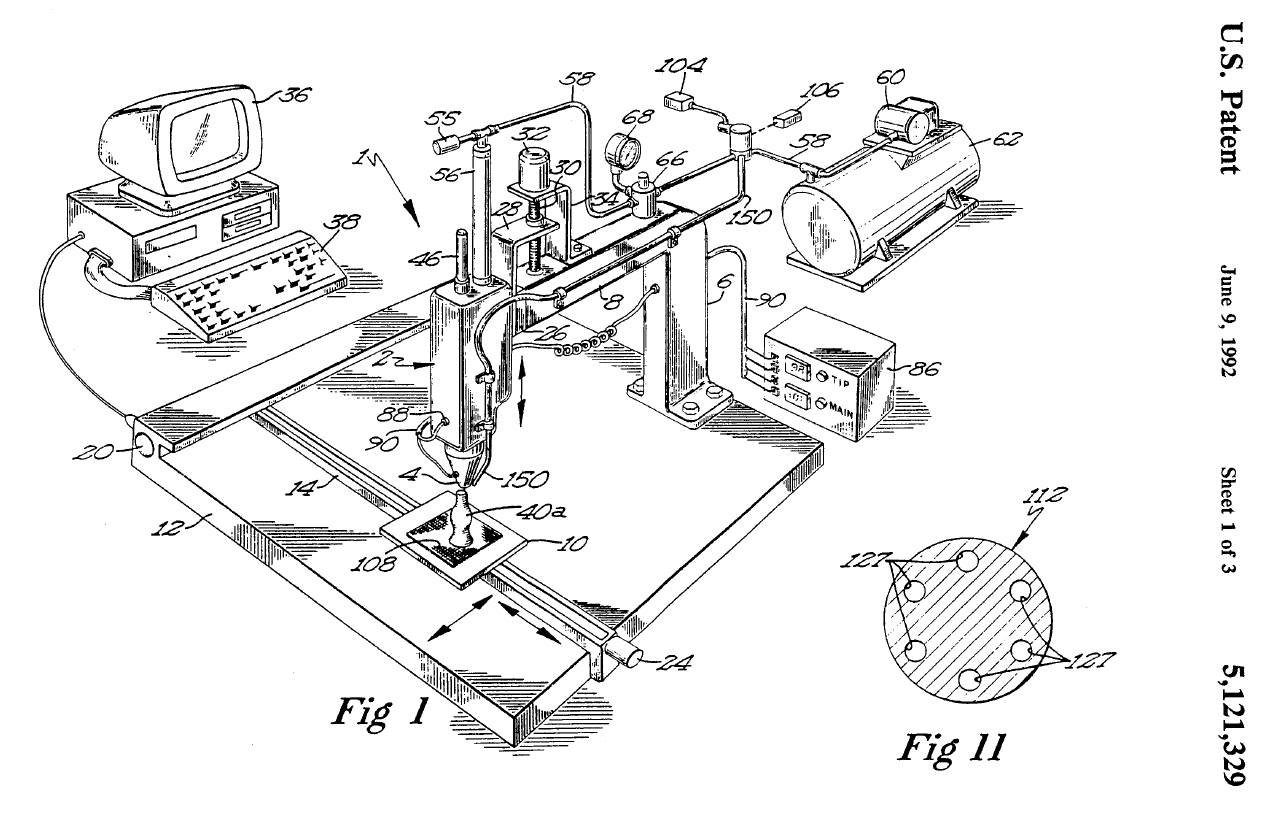
The granddaddy of all 3D extrusion machines seems to be US5121329 (Crump → Stratasys 1992-06-09): Apparatus and method for creating three-dimensional objects
Exploring the patents referencing that one as a foundation should keep you busy for a while; the PDF has clicky links.
Some fine tuning on the theme:
US6085957 (Zinniel/Batchelder → Stratasys): Volumetric feed control for flexible filament
US5303141 (Batchelder/et al → IBM): Model generation system having closed-loop extrusion nozzle positioning
Congealing 3D objects in a vat of goo probably starts with 4575330 (Hull → MVP 1986-03-11): Apparatus for production of three-dimensional objects by stereolithography
Remember: I’m not a patent attorney and my opinion is worthless…
There ought to be a survey marker pin at the front corner of the lot where it’d come in handy for locating the edge of the yet-to-be-contracted driveway paving, but if it’s there it’s been pushed below ground level. So I mooched a homebrew metal detector based on the Elenco K-26 PCB…
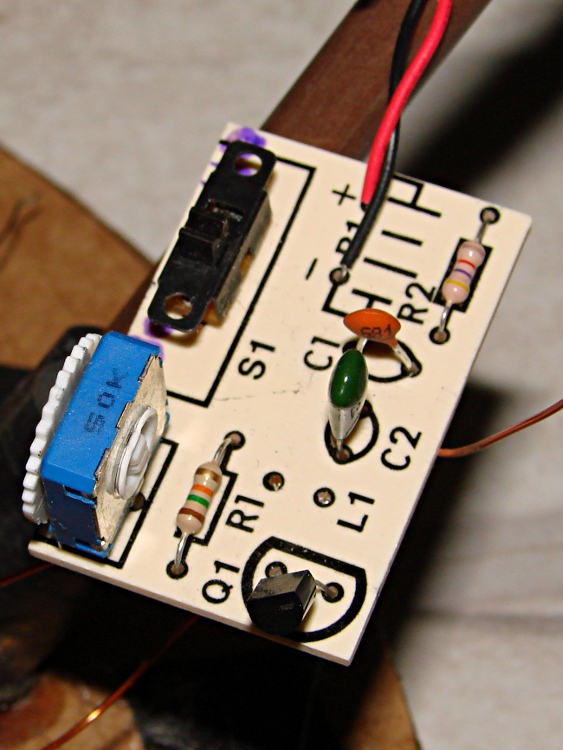
K-26 Metal Detector PCB
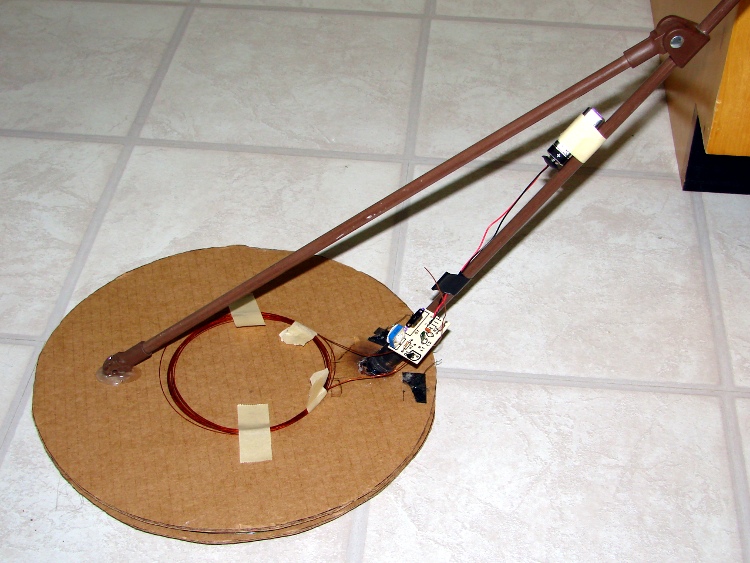
The kit included 45 feet of 22 AWG enamel wire that should have become a 5 inch diameter coil with 30 turns, but the as-built detector had a coil wrapped around a 1 foot diameter cardboard form. The coil inductance sets the oscillation frequency, which turned out to be around 300 kHz: far below the nominal 1000 kHz. So I wound 40 turns of 22 AWG magnet wire around an old CD-ROM spindle case (which is, quite coincidentally, just over 5 inches in diameter), and taped it atop the cardboard form.
The datasheet recommends a nonmetallic handle, so I swapped in a plastic umbrella support for the original metal mop (?) handle.
Rewound homebrew metal detector
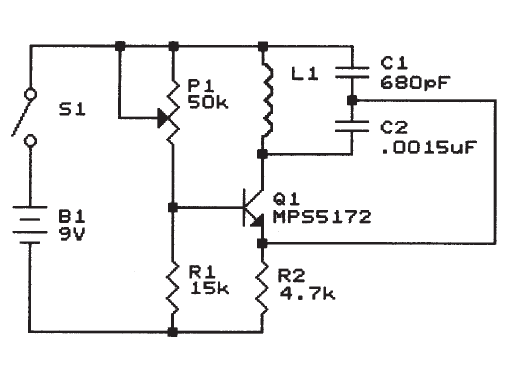
The K-26 schematic looks like a common-base Colpitts oscillator, with only the most utterly absolutely vital essential components:
K-26 Schematic
In round numbers, the oscillation frequency varies inversely with the number of turns:
F = 1/(2π√(LC)) (for a simple tank)
L = stuff × N2 (stuff = various constants & sizes)
F = stuff / N
The rewound coil oscillated at 350 kHz, so I spilled off a few turns at a time to produce these results and a tangle of wire on the floor:
L – µH
Freq – kHz
330
350
186
535
107
711
65
840
42
1140
For the record, the coil in the photo corresponds to the last line and has 12 turns.
Contrary to what the instructions imply, trimpot P1 does not adjust the oscillation frequency. It tweaks the transistor bias for best oscillation, so it’s more of an amplitude control than anything else. I adjusted P1 while watching an oscilloscope connected across the negative battery terminal and the emitter of Q1, but you could probably use a small sniffer loop to good effect.
It draws about 2 mA, so the battery should last quite a while; labeling the switch positions should help a lot.
The oscillator produces an unmodulated carrier, so I tuned a Kenwood TH-F6A HT in LSB mode for maximum squeal. Any variation in L changes the carrier frequency and thus the pitch of the demodulated audio; an earbud just barely in one ear makes this almost tolerable.
As you should expect from the picture, that metal detector lashup is mightily microphonic, to the extent that touching a blade of grass wobbles the audio pitch and bumping the cardboard plate against an object can detune the whole affair. A bit more attention to rigid coil mounting would certainly help, but this isn’t the most stable of designs to begin with and I doubt anything will help very much at all.
The coil can detect a chunk of rebar sticking out of the ground at a range of maybe half a foot, but it’s not clear how well it will cope with buried treasures (like, oh, let’s say a survey marker pin). In any event, I must mow the grass down there before going prospecting.
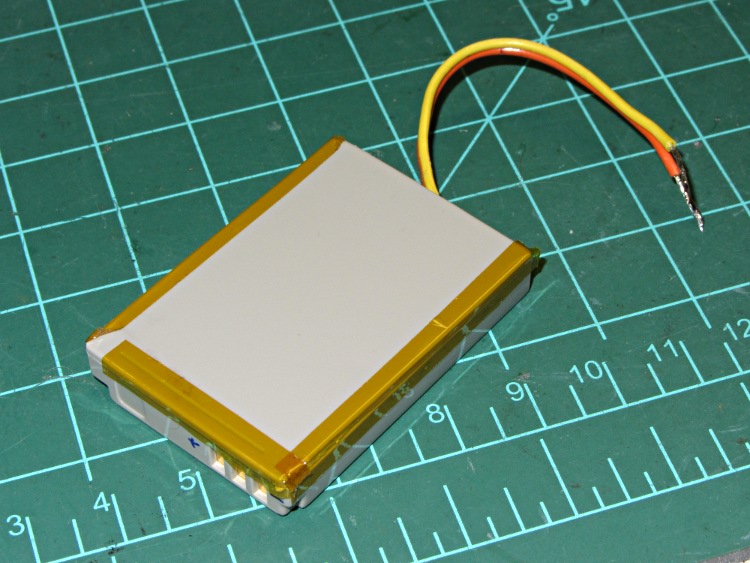
The motivation for gutting that Dell laptop battery was to find out if the cells could become a higher-capacity external battery for the Canon SX230HS camera. Those discharge curves suggest they can’t, but I also want to know what voltage levels correspond to the various battery status icons, which means I must feed an adjustable power supply into the camera… so I need a fake NB-5L battery with a cheater cord.
The first step: crack the case of the worst of the eBay junkers. I squeezed it in the bench vise to no avail, then worked a small chisel / scraper (*) into the joint. The lid was firmly bonded to the case, but it eventually came free:
NB-5L Battery – opened
The protective PCB sits at one end of the cell, with a strip of black foam insulating the components from the nickel strips:
NB-5L – protective PCB
It turns out that the cell’s metal shell is the positive contact, which I didn’t expect.
The component side of the PCB has a 10 kΩ resistor connected between the center and negative contacts. That should be a thermistor, but it’s a cheap eBay knockoff and I suppose I should be delighted that there’s not a gaping hole where that contact should be. The PCB fits against the small notch in the case and is held in place by small features on the top and bottom. The negative contact is on the far left:
NB-5L – PCB interior view
Canon sells an AC adapter for the camera that includes an empty battery with a coaxial jack that aligns with a hole in the battery compartment cover. I soldered a pair of wires to the PCB, drilled a hole in the appropriate spot, added some closed-cell foam and hot-melt glue to anchor the PCB, and made a cheater adapter. For the record, the orange wire is positive:
NB-5L – gutted case with pigtail
It turns out that the camera battery cover must be closed and latched before the camera will turn on, but the sliding latch mechanism occludes the hole. This cannot be an inadvertent design feature, but I managed to snake the wire out anyway.
Connecting that up to a bench supply (with a meter having 0.1 V resolution) produces the following results:
Voltage
Result
3.8
Full charge
3.7
2/3 charge
3.6
Blinking orange
3.5
“Charge the battery”
The camera draws about 500 mA in picture-taking mode, about 300 mA in display mode, and peaks at around 1 A while zooming.
The Genuine Canon NB-5L is good for 800 mA·h to 3.6 V, as are the two best pairs of the Dell cells. The latter remain over 3.7 V for 500 mA·h, which suggests one pair would run for about an hour before starting to blink. Maybe that’s Good Enough, but … a new prismatic battery is looking better all the time.
(*) Made by my father, many years ago, with a simple wood handle that eventually disintegrated. I squished some epoxy putty around the haft and covered it with heatshrink tubing, but (now that I have a 3D printer) I really should print up a spiffy replacement. I’ve been using it to pry objects off the printer’s build platform, so that’d be only fitting…
Now that I carry a spare tube on the bike to avoid on-the-road patching, a tangle of tubes has been accumulating in the Basement Laboratory. A protracted patching session shows why you can never have too many clamps:
Repaired bike tubes with clamps
Yes, I know they’re supposed to be ready to ride immediately after slapping the patch in place. Clamping the patch overnight won’t hurt and might actually help eliminate slow leaks, soooo… after this, they’re rolled up and ready for another season of punctures.
Repairing tubes goes much easier in the shop than by the side of the road, though. For what it’s worth, those silicone tape pads didn’t help much at all; the tube still eroded at the liner. Grumble…
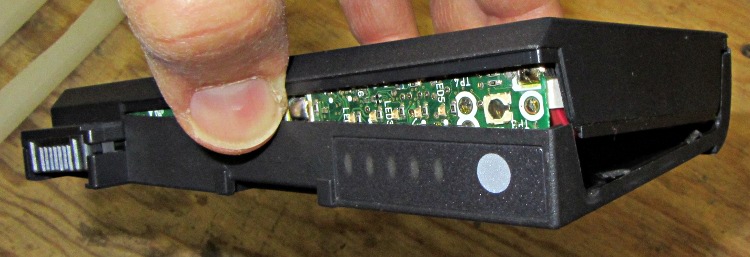
Crunching the battery case in the bench vise, plus a bit of screwdriver prying, did the trick:
Cracked-open Dell 75UYF battery
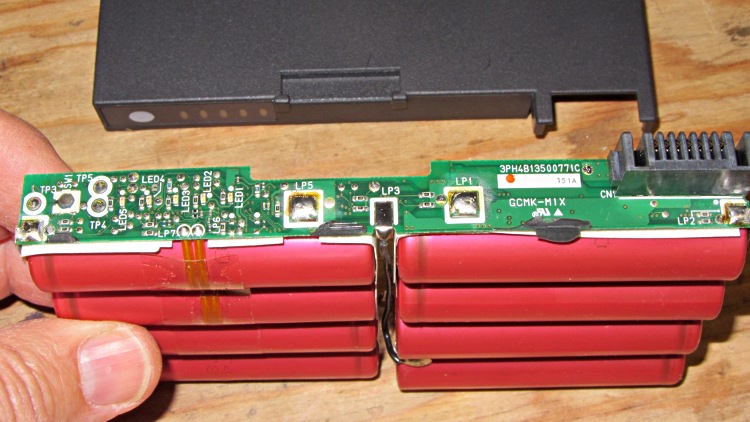
Peeling the case off revealed the eight lithium cells and the protective PCB:
Dell 75UYF battery contents
As you’d expect, each pair of cells has an individual contact to the PCB for monitoring and equalizing, which simplifies connecting the battery tester.
The case emerged from its ordeal with only superficial damage, so it’s now back in the laptop to fill up the slot. I tucked the PCB inside, although I doubt I’ll ever rebuild the battery with new cells.
Our Larval Engineer has begun writing the Arduino code (Baby’s First Real Program!) that will control ground effect lighting on her longboard, with RGB LED colors keyed to the wheel rotation speed. Her back of the envelope says the wheels spin at about 60 rev/s (= 17 ms/rev) at 30 mph, which rules out mechanical / reed switches; some experimentation with a simple mechanical switch showed why the Arduino bounce library is a Good Thing even for pushbuttons.
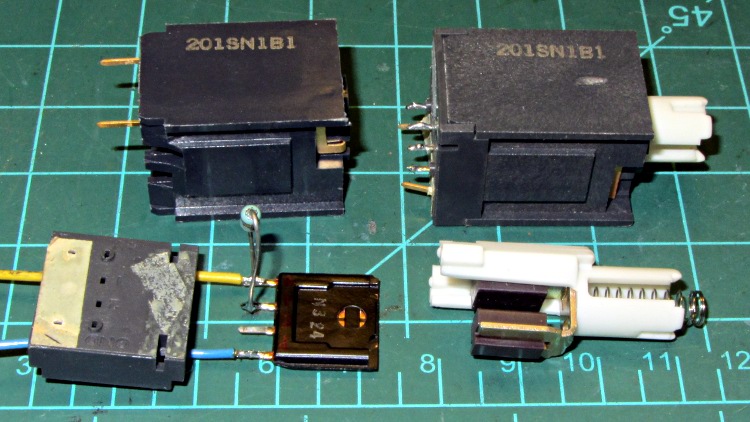
Some rummaging produced a collection of these Hall effect switches:
201SN1B1 Hall Effect Switch Components
I thought they were ordinary keyboard switches, but noooo… Honeywell 201SN1B1 switches turn out to be Mil-Spec items, with brethren serving in B-52 bombers, F-16 fighters, and even long-departed Peacekeeper ICBMs (most likely in the ground support equipment). There are no data sheets at this late date, but this compressed specs burst gives some hints:
General Characteristics Item Description: Switch body 1.060 in. l; 0.740 in. h; 0.740 in. w; hall effect solid state switching; alternate action; 5V dc; 9 ma.; operated at 0.4V dc max.; sinking 4 ma. per output; pulse output; printed circuit terminals
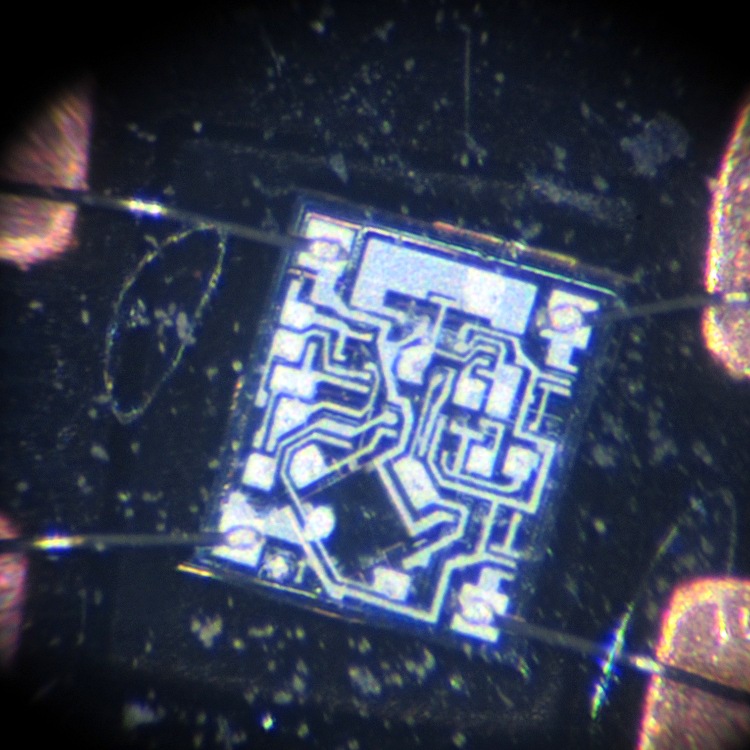
A gentle twist of a small screwdriver under the plastic latches releases the base plate and frees the Hall effect switch module, which is the square black plate above. It contains an IC (downward in the picture) with wire-bonded leads embedded in a flexible silicone seal that has pale gray smudges on its surface:
201SN1B1 IC – Overview
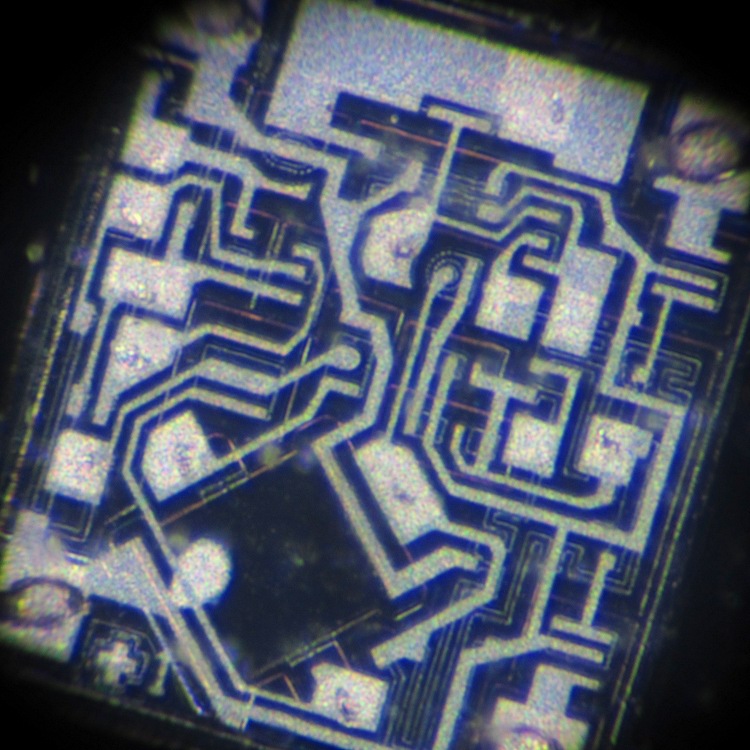
A closer look at the IC shows actual components:
201SN1B1 IC – Detail
That’s from back when you could see components on an IC…
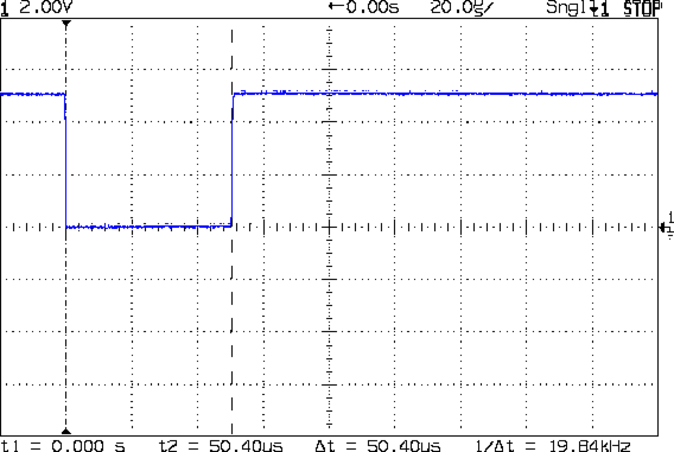
I soldered wires to the +V and Gnd pins, plus a 10 kΩ pullup resistor to one of the two output pins, applied 5 V from the bench supply, then waved a small neodymium magnet nearby:
201SN1B1 Switch Output
The two output pins appear to produce separate-but-equal 50 µs output pulses that are completely independent of the magnet’s proximity, speed, and polarity, which is a Nice Touch. The IC draws about 10 mA when inactive and 12 mA with the magnet nearby.
The form factor seems a bit awkward for a longboard wheel sensor, but it’ll get her closer to the goal. Most likely, it’ll wind up embedded in an epoxy block strapped to one of the wheel trucks.
The Arduino’s Bounce update function / method / whatever has a polled view of the input pin, which means that if you don’t call it during that 50 µs pulse you’ll completely miss that revolution. Sooo, the pulse must go into one of the Arduino’s external interrupt pins, which can catch short pulses with no trouble at all if you write a suitable interrupt handler.
Somewhere I have a handful of Hall effect motor commutation sensors, but they have an internal latch that requires alternating magnetic poles to switch the output, thus requiring two magnets halfway around the wheel circumference. Haven’t figured out how to embed the magnets in the wheels or mount the sensors, but …




 The Smell of Molten Projects in the Morning