Ed Nisley's Blog: Shop notes, electronics, firmware, machinery, 3D printing, laser cuttery, and curiosities. Contents: 100% human thinking, 0% AI slop.
You’ve seen the overview pictures of the half-scale cushwa Owlearlier, so here are some details…
The front view:
M2 – cushwa Owl – half scale
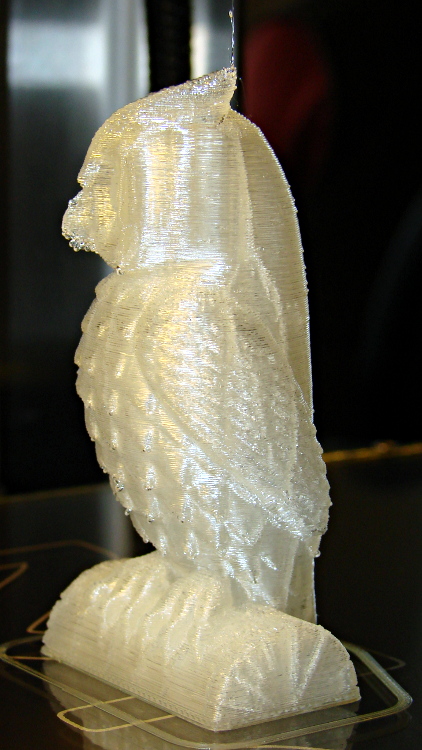
The left side view:
Owl – half size – left
The conspicuous vertical lines come from the 0.10 infill honeycomb; there are no visible retraction zippers and the surface is smooth to the touch.
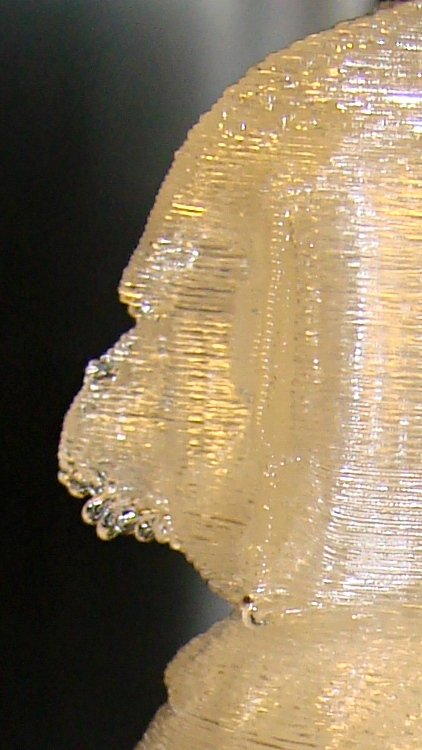
A closeup of the beak shows the crystal-clear drooping filament; a similar effect happened on the downward-pointing feather tips. Generally, this is a sign of too-hot extrusion, but at 165 °C I’m not convinced that’s applicable. It may simply be too much overhang at this scale:
M2 – cushwa Owl – beak detail
Overall, it’s pretty good. The config info doesn’t include the external perimeter speed, which I’ve been dialing back from an insanely high value. I think it was 75 for this one, which might be flinging the filament off the edge of the beak below that steep overhang.
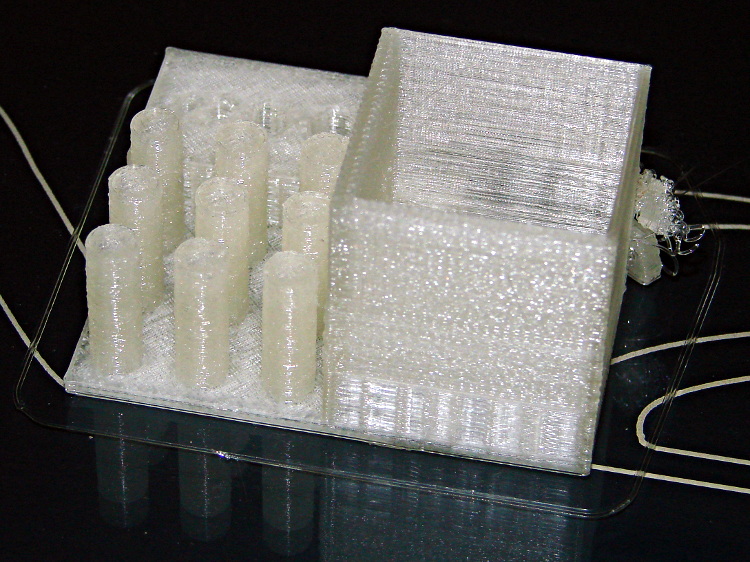
The arch foot broke loose from the platform after it grew to about 8 mm, but that seems to happen with most of the DIY printers. Apart from the tangle produced by that flaw, the rest of the object came out essentially perfect:
M2 – MAKE Magazine Torture Test – box and pillars
The surface finish is rougher than I think it should be, but the dense zigzag infill on the two thicker solid walls of the box seems to disturb their outer finish; the two thinner walls have linear fill and are fine.
Building these things seems to be the simplest and best way to figure out whether you have all the pieces flying in formation:
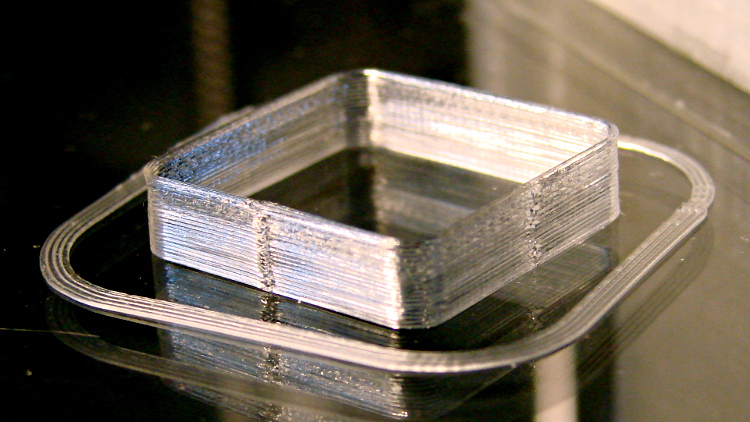
Thinwall box – first success
I took that picture after cracking them off the glass plate, then putting them back: the box really does line up with the skirt while printing. There’s another object visible in the background; that little box really was the first completely successful object.
It’s adapted from Coasterman’s classic calibration set, redone in OpenSCAD so it’s easy to modify. A pair of Minkowski sums produce two shapes that ensure the wall remains exactly one thread wide all the way around the perimeter.
When your printer can print one of these, then you can move on to more complex objects, secure in the knowledge that you’ve established:
Proper bed leveling and height setting: measure the skirt thickness
Both the layer thickness and width match your settings
Extrusion temperature: not too hot, not too cold
Printing speed / acceleration for all layers
First layer adhesion to platform
Minimum layer time to prevent melting / slumping
Filament diameter
Extrusion “packing density” multiplier: the fundamental fudge factor
Accurate steps/mm for all axes to get exact XYZ dimensions
Mechanical stability and rigidity
Basically, this object leaves no place for errors to hide. It doesn’t check infill, the various perimeter speeds, solid layers, and suchlike, but all the fundamentals must be correct or you’ll see painfully obvious flaws.
For example, there’s a bit of a zipper at the layer changes. It’s better than the Thing-O-Matic ever was, but it improved as I twiddled the Retraction settings on later objects.
No, the first few didn’t work quite that well:
M2 – Thinwall box with previous attempts
For what it’s worth, the last problem turned out to be a loose setscrew in the X axis motor pulley that produced a layer shift that closely resembled a stepper motor losing steps. All of the setscrews now sport a dab of low-strength Loctite, so that problem shouldn’t happen again.
Being that type of guy, my Start and End G-Code routines are somewhat more elaborate than usual…
The Start routine handles homing, which is more dangerous than you might think, and wiping the drool off the nozzle:
;-- Slic3r Start G-Code for M2 starts --
;  Ed Nisley KE4NZU - March 2013
M140 S[first_layer_bed_temperature]	; start bed heating
G90				; absolute coordinates
G21				; millimeters
M83				; relative extrusion distance
M84				; disable stepper current
G4 S3			; allow Z stage to freefall to the floor
G28 X0			; home X
G92 X-95		; set origin to 0 = center of plate
G1 X0 F30000    ; origin = clear clamps on Y
G28 Y0			; home Y
G92 Y-125		; set origin to 0 = center of plate
G1 Y-122 F30000    ; set up for prime near front edge
G28 Z0			; home Z
G92 Z1.0		; set origin to measured z offset
M190 S[first_layer_bed_temperature]	; wait for bed to finish heating
M109 S[first_layer_temperature]		; set extruder temperature and wait
G1 Z0.0 F2500	; plug extruder on plate
G1 E10 F300		; prime to get pressure
G1 Z5 F2500		; rise above blob
G1 Y-115 F30000	; move away
G1 Z0.0 F2500	; dab nozzle to remove outer snot
G4 P1			; pause to clear
G1 Z0.1			; clear bed for travel
;-- Slic3r Start G-Code ends --
The fundamental problem with homing is that you don’t know where the nozzle stands in relation to the build platform and the bulldog clips clamping the glass plate to the aluminum heater. If you simply home X and Y with Z unchanged, you will eventually plow the nozzle directly across a clip. Trust me on this, you do not want to do that.
So Line 7 disables the stepper motors. In an ideal world, the Z axis stage would then free-fall to the bottom of the chassis during the 4 second pause produced by the G4 S3 instruction. In the real world, that works most of the time, but the platform sometimes sticks where it is. You don’t want to home the Z axis to the top of its travel, because that will eventually crunch the nozzle into those clips, so I plan to add a bottom limit switch so I can drive the platform to a known location away from everything else.
The default M2 Start G-Code puts the XY origin at the front left side of the platform, following the RepRap convention. Maybe it’s just me, but having the origin in the middle of the platform makes more sense for my objects; most of my OpenSCAD models are more-or-less symmetric, so putting the XY origin at their center works well. Ultimately, it doesn’t matter as long as you’re consistent, but my Start G-Code doesn’t produce the same results as the Makergear setup.
Line 9 homes the X axis and Line 10 sets the coordinate to -95. The X axis home position is about 5 mm from the left edge of the glass plate, so the nozzle has about 195 mm of travel to the right edge of the 200 mm plate. The X=0 origin will be in the middle of the printable range, with -95 mm to the left limit (the home position) and +95 to the right edge; the nozzle can travel another 30 mm beyond the right edge to about +125. Line 11 puts the nozzle in the middle of its travel at X=0.
Line 12 homes the Y axis and Line 13 sets the coordinate to -125. The Y axis home position is almost exactly on the front edge of the 250 mm glass plate, so the Y=0 origin is centered on the plate. The nozzle can travel an additional 10 mm off the rear edge of the plate. Note that you must position the nozzle somewhere on the X axis that avoids the bulldog clips; any of X=±95 or X=0 will work. Line 14 puts the nozzle in the middle of the plate at Y=0; it’s already at X=0, so the plate is now centered.
Line 15 homes the Z axis. I’ve set the limit switch so that the home position leaves exactly 1.0 mm between the nozzle and the glass plate, which I find easier to measure than the Makergear suggestion of 0.1 mm. Of course, that’s because I have a Starret taper gauge in my tool cabinet. Use what you have, but use it consistently.
Line 16 sets the Z axis coordinate position to +1.0 mm, matching the measured height, so that Z=0 corresponds to the nozzle exactly kissing the glass plate. The Makergear defaults put Z=0 about 0.1 mm above the platform; I’d rather apply model- and material-dependent offsets to “natural” machine positions.
All of that ignores Z axis backlash. Some preliminary guesstimates put that around 0.1 mm, far better than my Sherline, but still large with respect to the layer thickness. I need more measurements of that, plus some measurements of the actual glass flatness. I think the glass bows upward by about 0.1 mm in the middle, but that requires better probing that will be easier under LinuxCNC control where I can do automated platform mapping.
With the nozzle parked 1.0 mm over the platform, the next two lines wait for everything to reach the proper temperature. I preheat the platform and crank up the extruder temperature before starting the program , so these steps don’t take too long.
However, the nozzle cools off as the drool contacts the much colder platform (it’s heated to 70 °C, but that’s cooler than 150-ish °C by a considerable margin) and the PID loop struggles to reheat it. I think that’s due to the default I term being only 0.1, which reduces integral windup during preheating, but also slows recovery from a sudden thermal load. It helps to preheat the nozzle about 10 °C over the desired temperature, then let it cool during this step.
M2 – Wipe blobs on glass platform
Line 19 uses Nophead’s trick (which I cannot find now) of planting the nozzle on the plate at Z=0.0 to reduce drool, although I do that after the nozzle reaches extruding temperature. The drool forms a blob on the platform as the nozzle heats, but the nozzle punches directly through it on the way to Z=0.0.
Line 20 runs 10 mm of filament into the hot end to pressurize the extruder. Some of the molten goo oozes out around the nozzle, enlarging the blob on the glass plate. The object of the game is to leave all that behind: having a generous contact patch on the glass helps.
The larger blob on the left of the picture (at Y=-125) comes from that process.
Line 21 starts the wiping dance:
Raise the nozzle above the blob to Z=5 mm
Move away from the blob by 5 mm. I’ll probably change this to move in the +X direction.
Tap the nozzle on the platform, so (almost all of) the molten PLA slides away from the orifice
Get 0.1 mm of clearance from the platform, directly over the new blob
Scoot off to print a Skirt extrusion around the object
The smaller, rather flat, blob on the right comes from the nozzle tap. A thin hair may stretch from the blob to the start of the skirt, but it doesn’t amount to much.
Sometimes, of course, the blobs don’t adhere to the glass plate and accompany the nozzle to the start of the skirt. By the conservation of perversity, that’s also when the skirt starts on the far side of the origin, so the blob smears all over the object’s first layers. The Makergear wipe process extrudes the waste filament over the side of the plate, then shears it off as the nozzle returns to the surface; I’ll try blending that in with my startup sequence at some point.
My slic3r configuration extrudes at least 15 mm of filament into the skirt, giving the extruder plenty of time to reach a steady state before starting the actual object. Generally that’s far more than enough filament, but sometimes … well, it’s a good idea to watch what’s going on.
On the other end of the printing process, the End G-Code routine handles shutdown with the object on the platform:
;-- Slic3r End G-Code for M2 starts --
;  Ed Nisley KE4NZU - March 2013
M104 S0		; drop extruder temperature
M140 S0		; drop bed temperature
M106 S0		; bed fan off
G1 Z195	F2500	; lower bed
G1 X0 Y0 F30000	; center nozzle
M84     	; disable motors
;-- Slic3r End G-Code ends --
Line 3 begins turning the heaters and bed fan off. I’ve unplugged the fan for now, so Line 5 is just for completeness.
Line 6 lowers the bed to the bottom under power, because that’s faster that a free fall and it’s guaranteed to work.
With the object safely out of the way, Line 7 centers the nozzle over the platform.
Finally, Line 8 turns off the steppers off; the platform drops another few millimeters
Then everything cools down. Because I run the platform at well above PLA’s glass transition temperature, it must cool for quite a while until the object stiffens up.
What you see here represents a stake in the ground, rather than the be-all and end-all configuration. Remember that my intent is to get the M2 working with its more-or-less stock hardware and firmware, make some straightforward improvements, then transition to LinuxCNC for better control and measurement.
While printing a variety of test objects (which I’ll describe shortly), I casually permuted the temperatures, speeds, and timings to gradually improve the results. In nearly all cases, the M2 performs much better than my old and highly modified Thing-O-Matic ever did, so the machinery lives up to its reputation.
Slic3r seems to be nearly as good at slicing as Skeinforge 50 and much faster, although it doesn’t handle very thin walls quite right and produces bizarre speed glitches on (or near?) layers with bridges. I wasn’t taking notes during any of this, which means you should regard it as hearsay evidence at best, but, on the whole, slic3r seems to work just fine for the non-pathological objects I generally build.
This is the Slic3r config.ini file, which (I think) contains all of the configuration information now distributed throughout the smaller files controlled by slic3r.ini:
# generated by Slic3r 0.9.8 on Tue Apr  9 08:43:22 2013
bed_size = 190,250
bed_temperature = 70
bottom_solid_layers = 3
bridge_fan_speed = 100
bridge_flow_ratio = 1
bridge_speed = 100
brim_width = 0
complete_objects = 0
cooling = 1
default_acceleration = 0
disable_fan_first_layers = 3
duplicate = 1
duplicate_distance = 6
duplicate_grid = 1,1
end_gcode = ;-- Slic3r End G-Code for M2 starts --\n;  Ed Nisley KE4NZU - March 2013\nM104 S0        ; drop extruder tempeature\nM140 S0        ; drop bed temperature\nM106 S0        ; bed fan off\nG1 Z195    F2500    ; lower bed\nG1 X0 Y0 F30000    ; center nozzle\nM84         ; disable motors\n;-- Slic3r End G-Code ends --
external_perimeter_speed = 75
extra_perimeters = 1
extruder_clearance_height = 20
extruder_clearance_radius = 20
extruder_offset = 0x0
extrusion_axis = E
extrusion_multiplier = 0.9
extrusion_width = 0.40
fan_always_on = 0
fan_below_layer_time = 30
filament_diameter = 1.70
fill_angle = 45
fill_density = 0.10
fill_pattern = honeycomb
first_layer_bed_temperature = 70
first_layer_extrusion_width = 0
first_layer_height = 100%
first_layer_speed = 30
first_layer_temperature = 165
g0 = 0
gap_fill_speed = 100
gcode_arcs = 0
gcode_comments = 0
gcode_flavor = reprap
infill_acceleration = 0
infill_every_layers = 1
infill_extruder = 1
infill_extrusion_width = 0
infill_speed = 200
layer_gcode =
layer_height = 0.25
max_fan_speed = 100
min_fan_speed = 50
min_print_speed = 20
min_skirt_length = 15
notes =
nozzle_diameter = 0.35
only_retract_when_crossing_perimeters =
output_filename_format = [input_filename_base].gcode
perimeter_acceleration = 0
perimeter_extruder = 1
perimeter_extrusion_width = 0
perimeter_speed = 100
perimeters = 1
post_process =
print_center = 0,0
randomize_start = 1
retract_before_travel = 1
retract_length = 1.0
retract_length_toolchange = 5
retract_lift = 0
retract_restart_extra = 0
retract_restart_extra_toolchange = 0
retract_speed = 300
rotate = 0
scale = 1
skirt_distance = 5
skirt_height = 1
skirts = 1
slowdown_below_layer_time = 10
small_perimeter_speed = 25
solid_fill_pattern = concentric
solid_infill_below_area = 70
solid_infill_every_layers = 0
solid_infill_speed = 100
start_gcode = ;-- Slic3r Start G-Code for M2 starts --\n;  Ed Nisley KE4NZU - March 2013\nM140 S[first_layer_bed_temperature]    ; start bed heating\nG90                ; absolute coordinates\nG21                ; millimeters\nM83                ; relative extrusion distance\nM84                ; disable stepper current\nG4 S3            ; allow Z stage to freefall to the floor\nG28 X0            ; home X\nG92 X-95        ; set origin to 0 = center of plate\nG1 X0 F30000    ; origin = clear clamps on Y\nG28 Y0            ; home Y\nG92 Y-125         ; set origin to 0 = center of plate\nG1 Y-122 F30000    ; set up for prime near front edge\nG28 Z0            ; home Z\nG92 Z1.0            ; set origin to measured z offset\nM190 S[first_layer_bed_temperature]    ; wait for bed to finish heating\nM109 S[first_layer_temperature]    ; set extruder temperature and wait\nG1 Z0.0 F2500    ; plug extruder on plate\nG1 E10 F300        ; prime to get pressure\nG1 Z5 F2500        ; rise above blob\nG1 Y-115 F30000    ; move away\nG1 Z0.0 F2500    ; dab nozzle to remove outer snot\nG4 P1            ; pause to clear\nG1 Z0.1            ; clear bed for travel\n;-- Slic3r Start G-Code ends --
support_material = 0
support_material_angle = 0
support_material_extruder = 1
support_material_extrusion_width = 0
support_material_pattern = rectilinear
support_material_spacing = 2.5
support_material_speed = 100
support_material_threshold = 0
temperature = 165
threads = 2
toolchange_gcode =
top_solid_infill_speed = 50
top_solid_layers = 3
travel_speed = 500
use_relative_e_distances = 0
vibration_limit = 0
z_offset = 0
Most of the changes appear in the Configuration.h file…
Start by tweaking the version info so you know what’s in the Flash ROM every time it starts up:
#define STRING_VERSION_CONFIG_H "2013-03-27" //Personal revision number for changes to THIS file.
#define STRING_CONFIG_H_AUTHOR "Ed Nisley - KE4ZNU" //Who made the changes.
I reduced the maximum temperatures to match the Makergear-defined limits, even though those are far beyond what I expect to use. I’ll probably cut them back even further, but they’ll do for now:
// When temperature exceeds max temp, your heater will be switched off.
// This feature exists to protect your hotend from overheating accidentally, but *NOT* from thermistor short/failure!
// You should use MINTEMP for thermistor short/failure protection.
// Ed Nisley KE4ZNU - 26 March 2013 - reduce to M2 limit
#define HEATER_0_MAXTEMP 230
#define HEATER_1_MAXTEMP 230
#define HEATER_2_MAXTEMP 230
#define BED_MAXTEMP 125
Long ago, I settled on a much lower extrusion temperature for ABS in the Thing-O-Matic than nearly everyone else and that’s also holding true for PLA in the M2, so I reduced the minimum allowable temperature limit from 170 °C to 120 °C. The firmware seems to use a “less-than-or-equal” test, so it prevents extrusion at exactly 120 °C. Close enough:
// M2 - reduce to allow much cooler PLA extrusion
// KE4ZNU - 24 March 2013
//#define EXTRUDE_MINTEMP 170
#define EXTRUDE_MINTEMP 120
Before I added the shim around the Z axis leadscrew bearing, the default homing speed excited a howling mechanical resonance. Increasing the homing speed moved the vibration away from the resonance, but the real cure was to reduce the motor current, which eliminated the four dead spots per full step:
// KE4ZNU - 24 March 2013 - M2 - Goose Z feedrate to avoid resonance
//#define HOMING_FEEDRATE {50*60, 50*60, 4*60, 0}  // set the homing speeds (mm/min)
#define HOMING_FEEDRATE {50*60, 50*60, 6*60, 0}  // set the homing speeds (mm/min)
Dan Newman’s comments to the post about the Z axis performance calculations suggest some rationalization should happen among all the maximum speed and acceleration settings; they appear to be quite inconsistent right now. This will take a bit of measurement, but I think substantive measurements & changes must wait until I get the LinuxCNC controller running.
The block of constants for the motor currents includes some misleading comments. I added the RAMBo design equations, which will become invalid when a board iteration changes either the supply voltage or the sense resistor value, and a bit of explanatory text.
The extruder current seemed slightly low, as it would skip steps while infilling large bottom layers. This happened before I lowered the extruder temperature, so the nominal value may be right on the edge of goodness. The new value of 1.5 A heats the motor to about 120 °C, which is higher than I’d like for something attached to a plastic mount, but I anticipate some changes there in the near future.
I increased the XY motor currents to 1.5 A in anticipation of using higher speeds, although that wasn’t based on any evidence. The motors now run at about 120 °C, which is OK because they’re attached to solid metal parts (albeit without heatsink compound).
As described earlier, reducing the Z motor current to 0.6 A from 1.1 A didn’t materially affect the maximum torque, dramatically smoothed the motion, and slightly reduced the temperature. It still runs at nearly 130 °C, despite heatsinking to the chassis, and is in line for replacement.
// Motor Current setting (Only functional when motor current pins are connected to digipot)
// Values 0-255
// RAMBO 135 = ~0.75A, 185 = ~1A
// Ed Nisley KE4ZNU - 25 March 2013 - increase XY current to 1.5 A (185 was 135)
//		decrease Z current to nominal 600 mA (75 was 135) based on 19 V / 28 ohm winding
//		value = 255 * (0.8 * Imax) / 1.66 V
// Ed Nisley KE4ZNU - 27 March 2013 - increase E current to 1.5 A (185 was 165)
//		to support 300 mm/s XY extrusion speed
#define DIGIPOT_MOTOR_CURRENT
#define X_CURRENT 185
#define Y_CURRENT 185
#define Z_CURRENT 75
#define E0_CURRENT 185 //For MakerGear M2, 165 is a good starting point
#define E1_CURRENT 125
The only change to Configuration_adv.h increases the stepper timeout to allow the build platform to reach operating temperature; the default value shut off the motors just before printing started. The value obviously depends on the start and end temperatures, so more testing is in order:
//default stepper release if idle
// Ed Nisley KE4ZNU - 25 March 2013 - make deactivate timeout exceed plate heating time
#define DEFAULT_STEPPER_DEACTIVE_TIME 400
The Z axis stage moves very smoothly along the two guide rails, so there’s little friction and no binding involved. I can’t weigh the thing without dismantling the whole printer, which isn’t going to happen right now, but some crude experiments indicate that 7 pounds = 3 kgf = 30 N isn’t too far from the truth.
The 8 mm OD leadscrew has a 4-start thread at 3.25 turn/inch = 0.311 inch/turn = 0.13 turn/mm = 7.8 mm/turn.
[Update: Thanks to Jetguy for pointing out the blindingly obvious fact that it’s really 8 mm/turn = 0.125 turn/mm and you can do the inch conversion yourself if you need it. That doesn’t materially affect the results, given that they have about one significant figure of accuracy to start with.]
The firmware uses 1/16 microstepping at 400 step/mm = 3077 3200 step/turn.
Using a pull scale to, yes, pull a string wound around the knob on the Z axis leadscrew shows about 1 pound raises the platform at a slow, constant speed. The polygonal knob is about 35 mm in diameter, so the torque works out to 11 ounce·inch = 80 mN·m. Presumably, holding the platform at a given position would require somewhat less torque, but I can’t measure that with any confidence.
The motor has very little excess torque: a gentle touch can stall the Z axis motor as it raises the stage. I guesstimate the motor produces 150 mN·m, tops, during low-speed motion at 600 mA.
Lowering the stage requires no effort at all: it falls under its own weight, prompting me to install those bumpers. The design doesn’t have much compliance, but it’s well-adjusted and works fine.
Searching with the appropriate keywords produces a 17HD-B8X300-H motor from Kysan:
12 V
400 mA
30 Ω
42 mH
2.6 kg·cm = 260 mN·m
That’s a close-enough match to suggest my measurements are in the right ballpark. The extremely high resistance and inductance indicate this is the wrong motor for a high-performance microstepping application.
The firmware has DEFAULT_MAX_ACCELERATION = 30 mm/s2 for the Z axis. It’s 9000 for X and Y, 10000 for the extruder. The extremely low Z acceleration says there’s something badly wrong with this setup.
There is also a DEFAULT_ACCELERATION = 3000 for all axes. I don’t know how that interacts with the per-axis limit, but I’m certain the Z axis doesn’t come close to that value.
I do not know how the firmware actually handles motor steps while ramping up and down, but I do intend to clamp a current probe around a motor wire and measure what goes on. Let us assume it works in the usual way all ideal components behave in physics labs.
Assuming a constant 30 mm/s2 acceleration for the first half of a 0.25 mm Z axis move, the time should be:
0.25 / 2 = (1/2) * 30 * t2 t = 90 ms
At the end of that ramp-up, the Z stage will be trundling along at:
v2 = 2 * 30 * 0.25/2 v = 2.8 mm/s
The move requires exactly 50 steps = 0.25/2 mm * 400 step/mm.
Assuming the same deceleration during the second half of the move, a 0.25 mm layer change requires about twice that long: 180 ms for 100 steps.
Along the X axis, a 0.25/2 mm move requires 5.3 ms and reaches a peak speed of 47 mm/s. The total move requires 11 ms and 22.22 steps (= 0.25 mm * 88.88 step/mm, obviously rounded to 22).
I think a difference of more than an order of magnitude matters, although some actual measurements are definitely appropriate.




 The Smell of Molten Projects in the Morning