Ed Nisley's Blog: Shop notes, electronics, firmware, machinery, 3D printing, laser cuttery, and curiosities. Contents: 100% human thinking, 0% AI slop.
Although reading PDF documents on the shining screen works fine for some topics, I’d much rather curl up with a printed version for the first read-through. Adobe Reader’s print-as-booklet option does all the heavy lifting required to print a PDF document four pages to a single Letter-size sheet of paper, after which I do a little slicing & binding to get a nice comb-bound book.
So I printed out the entire EAGLE 6 manual (found in /wherever/eagle-6.1.0/doc/), which led to the discovery that page 86 is missing (at least in the 1st edition version). That screws up the pagination from page 87 onward: odd-numbered pages move to the left side of the binding, even-numbered pages to the right, and the blank space reserved for the gutter / binding appears on the outside margins. Fortunately, it’s still readable.
To avoid that problem, do this:
Print Range → Pages → [1-85,301,86-334]
That selects the first set of contiguous pages, jams a copy of a “This page has been left free intentionally” page from the back of the manual in place of the missing page 86, and then selects the rest of the book.
Print the front sides, flip the stack over, print the back sides (with the same page range), and bind as usual.
FWIW, this is much better than having the printer mis-feed about 3/4 of the way through the back sides, which it has done in the past while printing a big book. I now run off about 20 sheets at a time, with only that many pieces of paper in the feeder, just to make sure it doesn’t ruin the entire job.
One could, I suppose, use pdftk to shuffle the PDF into a complete file which would Just Work, but that seems like more trouble than it’s worth. Ditto for expecting CadSoft to re-create the PDF.
Memo to Self: Check the last page. If the logical page doesn’t match what’s shown on the PDF page, then something’s wrong.
After a decade of stacking the plates in the dishwasher the same way every time, the flexible coating over the steel rods has worn through:
Dishwasher rack abrasion
We can’t stack them the other way, because the rotor spray rattles them unmercifully, and a fix is in order. Apparently, one can purchase touchup paint for this very purpose, but what’s the fun in that? Besides, I’d expect it to wear through even faster than the original coating, if only because adhesion is never as good as you’d expect from reading the label.
So this little dingus fits around a vertical pin and rests atop the horizontal rod, with the edge of the plate nestled into the joint between the two cylinders:
Dishwasher rack protector – solid model
Being very small, they build best in large groups:
Dishwasher rack protectors – on build platform
The horizontal half-cylinders require internal support, shown here adjacent to the protector for easy viewing:
Dishwasher rack protector – support model
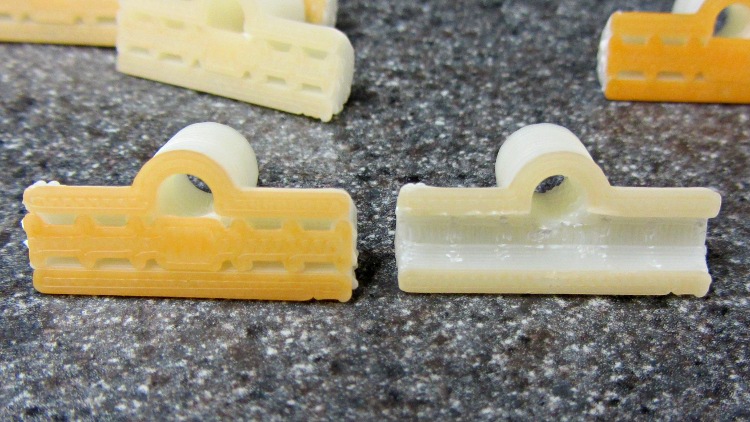
Those fins just barely clear the interior of the horizontal cylinder, so the two parts don’t bond together very well (that’s the ideal condition, of course). The flat plate glues the support fins firmly to the build platform, which is easier to see on these somewhat shorter prototypes with a layer or two of orange filament on their bottoms:
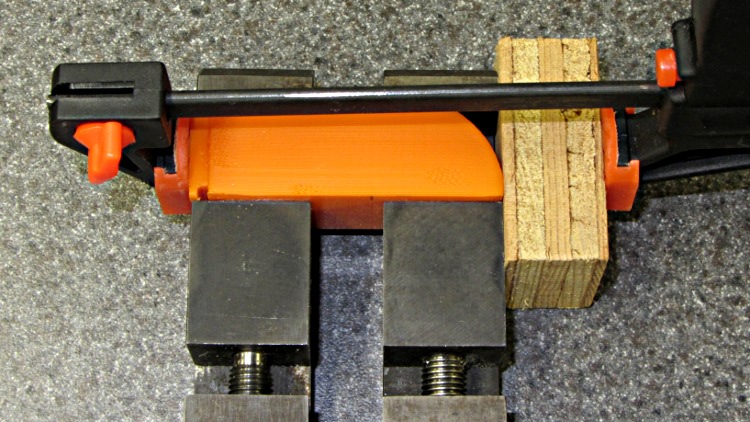
Dishwasher rack protectors – support
The support chops out neatly with a repurposed nail set punch:
Dishwasher rack protector – removing support
Actually, I stood each one vertically on an aluminum chunk, held the punch in place with finger pressure, and whacked it with a small brass hammer. The OpenSCAD code now adds a small tab each end to help align the punch for the first whack.
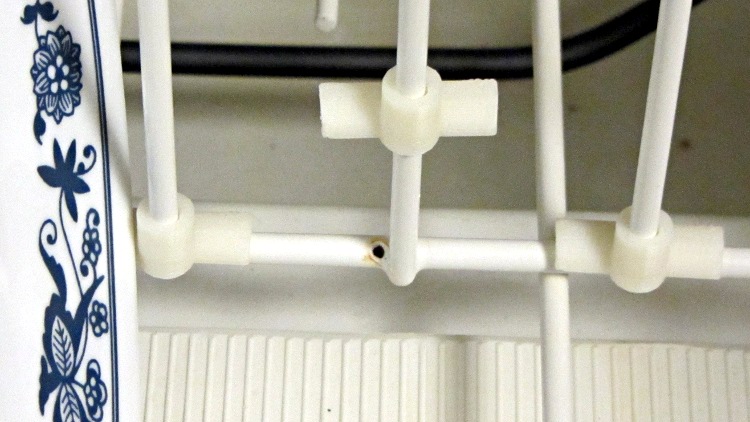
The rod (vertical) hole came out just about exactly the right size (admittedly, with a 0.4 mm HoleFinagle adjustment), but required a pass with a drill in a pin vise to clear out the Reversal Zittage. The result slides easily over undamaged pins, but some pins had rust at either the top or bottom that required a bit of cleanup. This is a trial fit:
Dishwasher rack protectors – trial fit
I put a blob of acrylic caulk on the abraded spots to (attempt to) seal them from further damage, then squished the protectors in place. The dishwasher demonstrated that it’s perfectly capable of blasting an unglued protector (without a plate) up and off the pin, ingesting it into the trash grinder, chewing it up, and spitting the pieces down the drain. Lost a couple of prototypes before I figured that out, too.
Ya learn something new every day…
The OpenSCAD source code:
// Dishwasher rack protector
// Ed Nisley KE4ZNU - Jan 2012

Layout = "Show";                    // Show Build Support

Support = true;                     // true to add support inside rod half-cylinder

include </home/ed/Thing-O-Matic/lib/visibone_colors.scad>

//-------
//- Extrusion parameters must match reality!
//  Print with +0 shells
//  Infill = 1.0, line, perpendicular to Bar axis on first bridge layer
//  Multiply = at least four copies to prevent excessive slowdown

ThreadThick = 0.25;
ThreadWidth = 2.0 * ThreadThick;

HoleFinagle = 0.4;
HoleFudge = 1.00;

function HoleAdjust(Diameter) = HoleFudge*Diameter + HoleFinagle;

Protrusion = 0.1;           // make holes end cleanly

function IntegerMultiple(Size,Unit) = Unit * ceil(Size / Unit);
function IntegerMultipleMin(Size,Unit) = Unit * floor(Size / Unit);

//-------
// Dimensions

PinDia = 4.0 + 0.5;                 // upright pin diameter + clearance
PinRadius = PinDia/2;

PinSpace = 35.0;                    // pin spacing along bar

PinOC = 3.4;                        // bar center to pin center

PinTubeLength = 15.0;               // length of upright tube along pin

BarDia = 4.7 + 0.2;                 // horizontal bar diameter + clearance
BarRadius = BarDia/2;

BarTubeLength = PinSpace - 5.0;     // length of horizontal half tube along bar

TubeWall = 4*ThreadWidth;           // wall thickness -- allow for fill motion

TubeSides = 4 * 4;                  // default side count for tubes (in quadrants)
$fn = TubeSides;

SupportClear = 0.85;                // support structure clearance fraction

//-------

module PolyCyl(Dia,Height,ForceSides=0) {           // based on nophead's polyholes
  Sides = (ForceSides != 0) ? ForceSides : (ceil(Dia) + 2);
  FixDia = Dia / cos(180/Sides);
  cylinder(r=HoleAdjust(FixDia)/2,h=Height,$fn=Sides);
}

module ShowPegGrid(Space = 10.0,Size = 1.0) {

  Range = floor(50 / Space);
  for (x=[-Range:Range])
    for (y=[-Range:Range])
      translate([x*Space,y*Space,Size/2])
        %cube(Size,center=true);
}

//--------
// Support under bar tube shells

module SupportStructure() {

  color("cyan")
  difference() {
    union() {
      for (Index=[-4:4])
        translate([Index*(BarTubeLength/8.5),0,0])
          rotate([0,90,0])
            rotate(180/TubeSides)
              cylinder(r=SupportClear*BarRadius,h=2*ThreadWidth,center=true);

      rotate([0,90,0])
        rotate(180/TubeSides)
          cylinder(r=SupportClear*BarRadius,h=10*ThreadWidth,center=true);

      translate([0,0,ThreadThick])
        cube([(BarTubeLength + 4*ThreadWidth),BarRadius,2*ThreadThick],center=true);
    }

    translate([0,0,-(BarRadius + Protrusion)/2])
      cube([(BarTubeLength + 2*Protrusion),
          BarDia,
          (BarRadius + Protrusion)],center=true);

  }

}

//-------
// Put it together

module Protector() {

  difference() {
    union() {
      translate([0,PinOC,0])
        rotate(180/TubeSides)
          cylinder(r=(PinDia + 2*TubeWall)/2,h=PinTubeLength);
      translate([-BarTubeLength/2,0,0])
        rotate([0,90,0])
          rotate(180/TubeSides)
            cylinder(r=(BarDia + 2*TubeWall)/2,h=BarTubeLength);
    }

    translate([0,PinOC,-Protrusion])
      rotate(180/TubeSides)
        PolyCyl(PinDia,(PinTubeLength + 2*Protrusion),TubeSides);

    translate([-BarTubeLength/2,0,0])
      rotate([0,90,0])
        rotate(180/TubeSides)
          translate([0,0,-Protrusion])
            cylinder(r=BarRadius,h=(BarTubeLength + 2*Protrusion));

    translate([0,0,-(BarRadius + TubeWall + Protrusion)/2])
      cube([(BarTubeLength + 2*Protrusion),
          BarTubeLength,
          (BarRadius + TubeWall + Protrusion)],center=true);
  }

}

//-------
// Build it!

ShowPegGrid();

if (Layout == "Support")
  SupportStructure();

if (Layout == "Show") {
  Protector();
  translate([0,-10,0])
    SupportStructure();
}

if (Layout == "Build")
  rotate(90) {
    if (Support)
      SupportStructure();
    Protector();
  }
If you pick up consumer-grade UPS units during closeout sales, they cost little more than replacing the batteries in older units… so we now have a new UPS replacing an old Waber box.
Just for completeness, I pulled the 25 A internal fuses:
Waber UPS battery fuses
And then measured the remaining battery capacity:
Waber UPS
The pair of sealed lead-acid batteries claim 5 Ah each, so the 6 A load far exceeds the usual C/20 SLA test current. The fact that the better one hit 1.6 Ah under that load says it’s in surprisingly good shape.
In fact, the label I put on that battery in January 2008 says it hit 1.4 Ah at 2.5 A, so it’s doing much better than you’d expect.
However, the UPS claims to support 650 VA = 450 W at 0.7 power factor. The batteries must supply the real power while the inverter drives the reactive load; giving Waber the benefit of the doubt at 90% efficiency says the batteries must provide 500 W = 21 A at 24 V under full load.
When we rearranged the kitchen after installing the laminate flooring, I conjured up a countertop to replace the ancient one over a cabinet left standing in one end of the kitchen where the new refrigerator didn’t fit. This was a temporary measure until we built an additional cabinet adjacent to the old one and laid a single countertop over the whole affair. Having several short lengths of generic gray countertop left over from the Black Bathroom, laundry, and the other side of the kitchen, I butt-glued two hunks together with a small block of wood underneath as a support.
Time passes, we never did get around to building the other cabinet, and eventually the weight of the microwave and mixer bowed the poorly supported joint until it broke free and deposited the mixer on the floor.
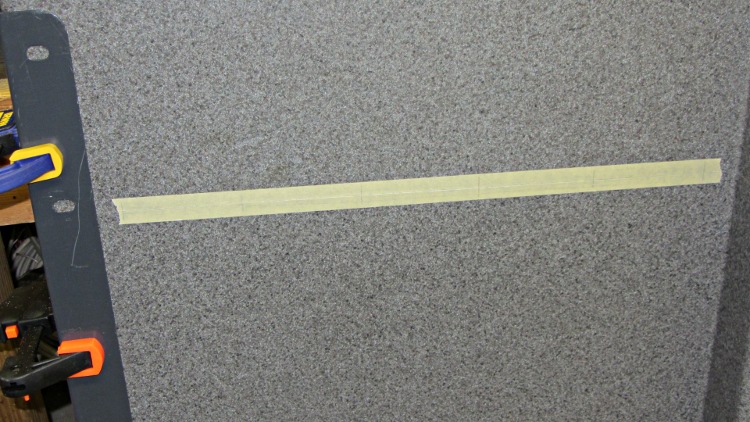
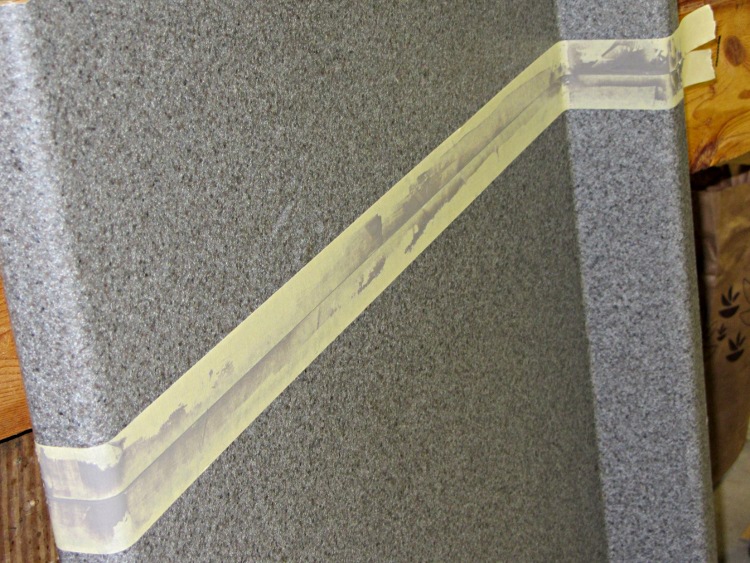
Both pieces being bowed, I screwed some angle bracket underneath to straighten them out, clamped them together, laid a piece of tape over the joint, and match-marked the dowel locations:
Countertop – match-marked joint
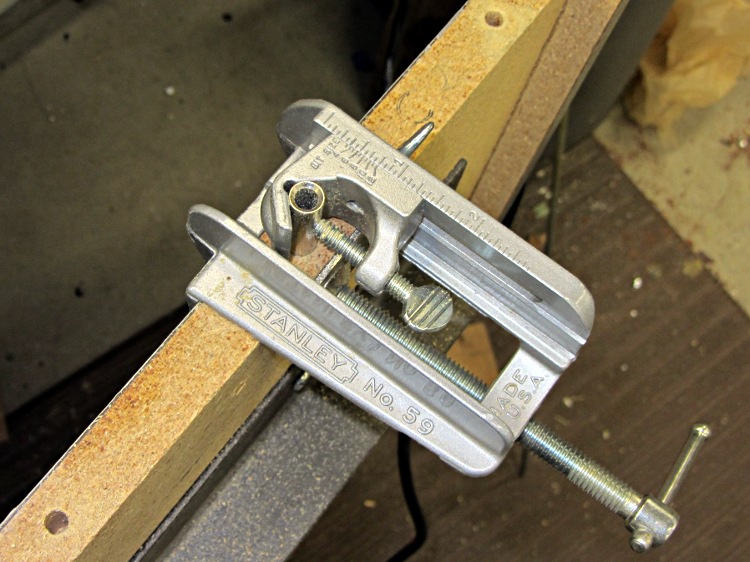
Drilled holes for 1/4 dowel pins that I sliced off a length of aluminum rod (no sissy wood pins for me!):
Countertop – dowel hole jig
Slobbered epoxy over the pins with enough into the holes for good adhesion, then buttered up the joint to fill the voids:
Countertop – underside braces and joint
Put more tape over the countertop, sliced out the gap, and buttered up the top surface to fill the joint:
Countertop – filling joint
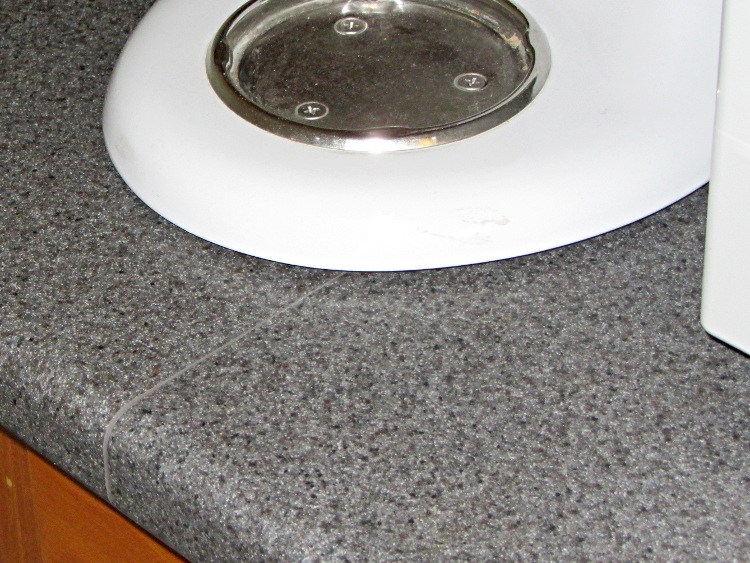
That works because JB Industro-Weld Epoxy turns out to be a nearly perfect color match:
Countertop – final joint
Those angle brackets remain in place underneath the surface in the hope they’ll prevent it from bowing again. An aluminum strip (not yet installed in these pix) fills the recess below the backsplash to level it with the underside of the countertop, providing more support over the back of the cabinet case.
The whole affair took a few days, what with curing successive epoxy applications overnight. Got to use some tools that don’t often see the light of day, too, which is always good fun.
Having not yet gotten around to building better taillights for our bikes, we picked up some Planet Bike Superflash lights on sale. I don’t like single-LED lights, because the optics produce a concentrated beam (which is how they get such high lumen ratings) that’s essentially invisible anywhere off-axis; a taillight that requires careful alignment for maximum effect is a Bad Thing. But, eh, they were on sale…
The graceful OEM seatpost mount, done in engineering plastic with smooth curves and something of a reputation for fragility, doesn’t work on a recumbent, so I build a butt-ugly mount that should last forever. It clamps firmly around a length of grippy silicone tape on the top seat frame rail:
Superflash on Tour Easy
The reviews also complain that normal road vibrations transmitted through the somewhat whippy OEM mount pop the case apart, depositing the lens and electronics on the road behind you. Hence the black tape across the case joint.
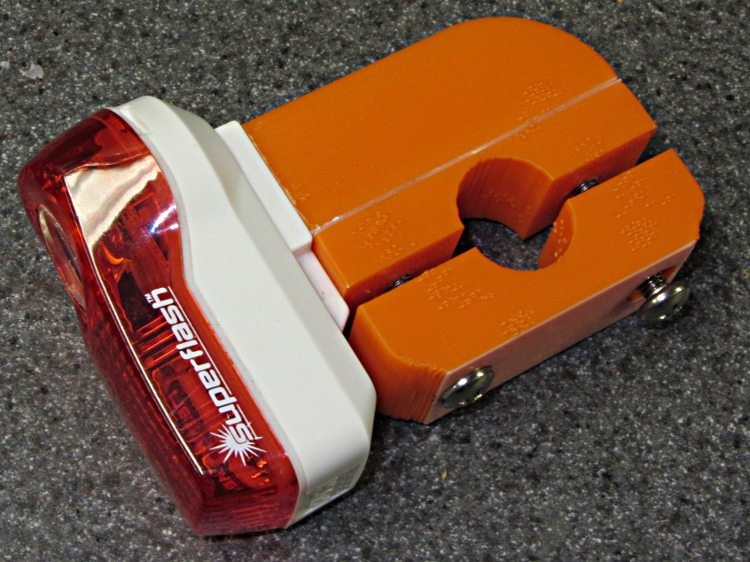
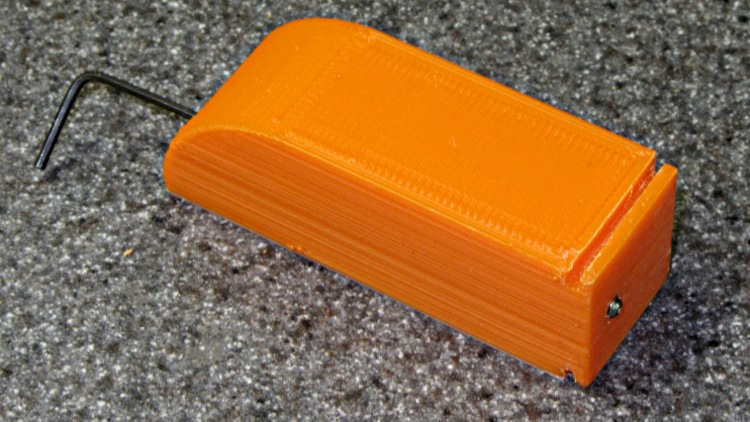
Here’s the whole affair on the bench:
Superflash on mount
The weird color line comes from white plastic left in the extruder that covers the bottom layer or two of each part. I’m not fussy about the first pass of any new gadget, because I know I’ll build at least one more to get everything right.
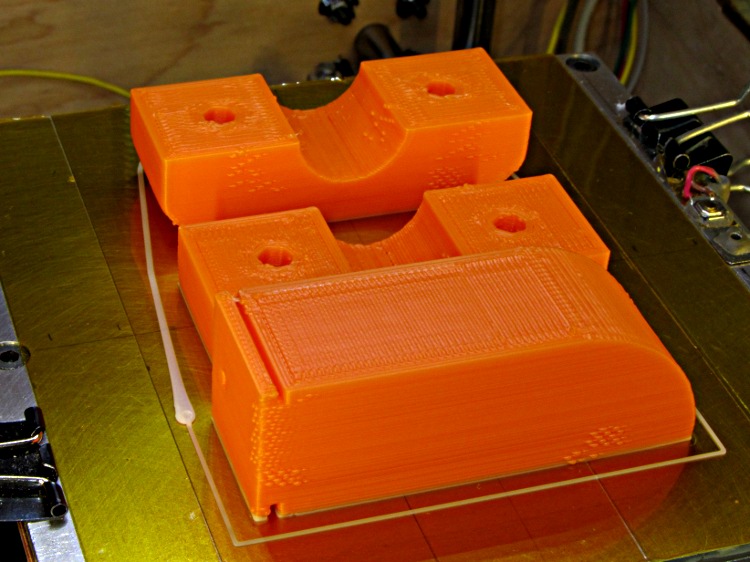
This is the first build arrangement; note the huge white teardrop blob at the start of the Skirt outline on the left. Obviously I didn’t have the initial retraction under control:
Superflash mount on build platform
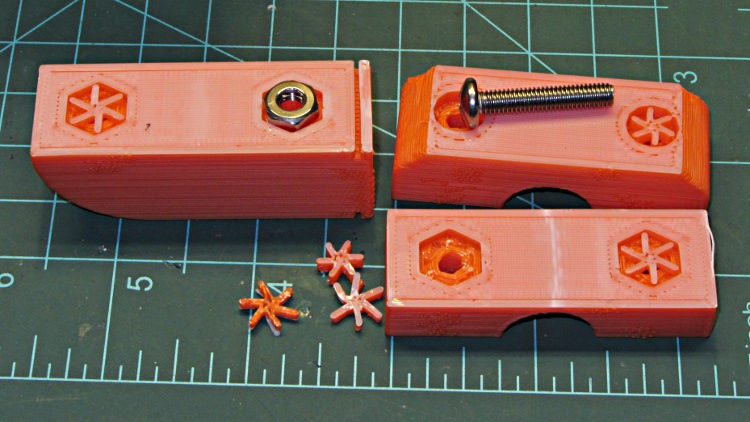
The screw recesses built over the plate and got cute little support spiders to keep their interiors from sagging:
Superflash mount – bolt support
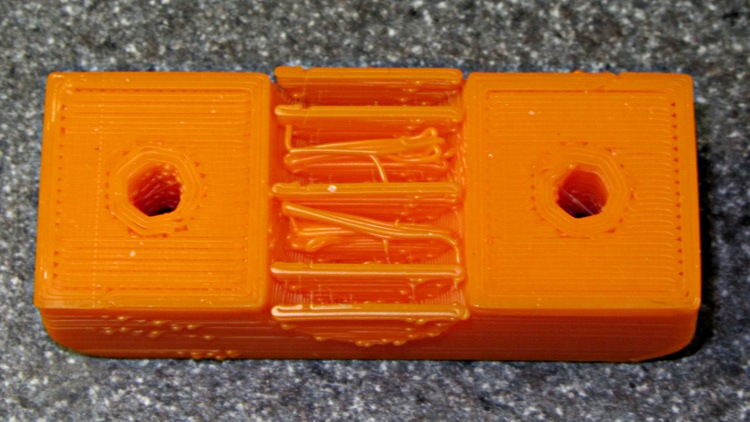
After doing it that way, I flipped the top piece over so it builds with the screw head recesses upward to get a better finish on those nice curves. That means the arch needs support, which almost worked, although some of the fins fell over:
Superflash mount – failed arch support
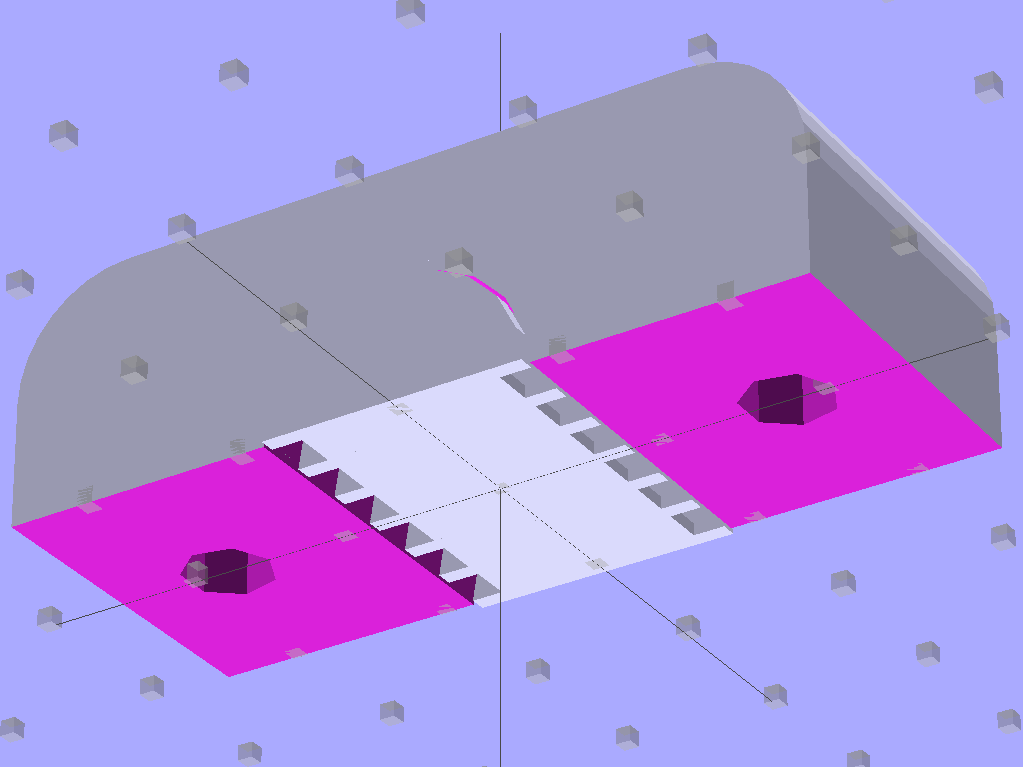
The solid model now adds a two-layer-thick flat plate joining the fins that should hold them firmly to the build plate.
Clamp Support – Solid Model
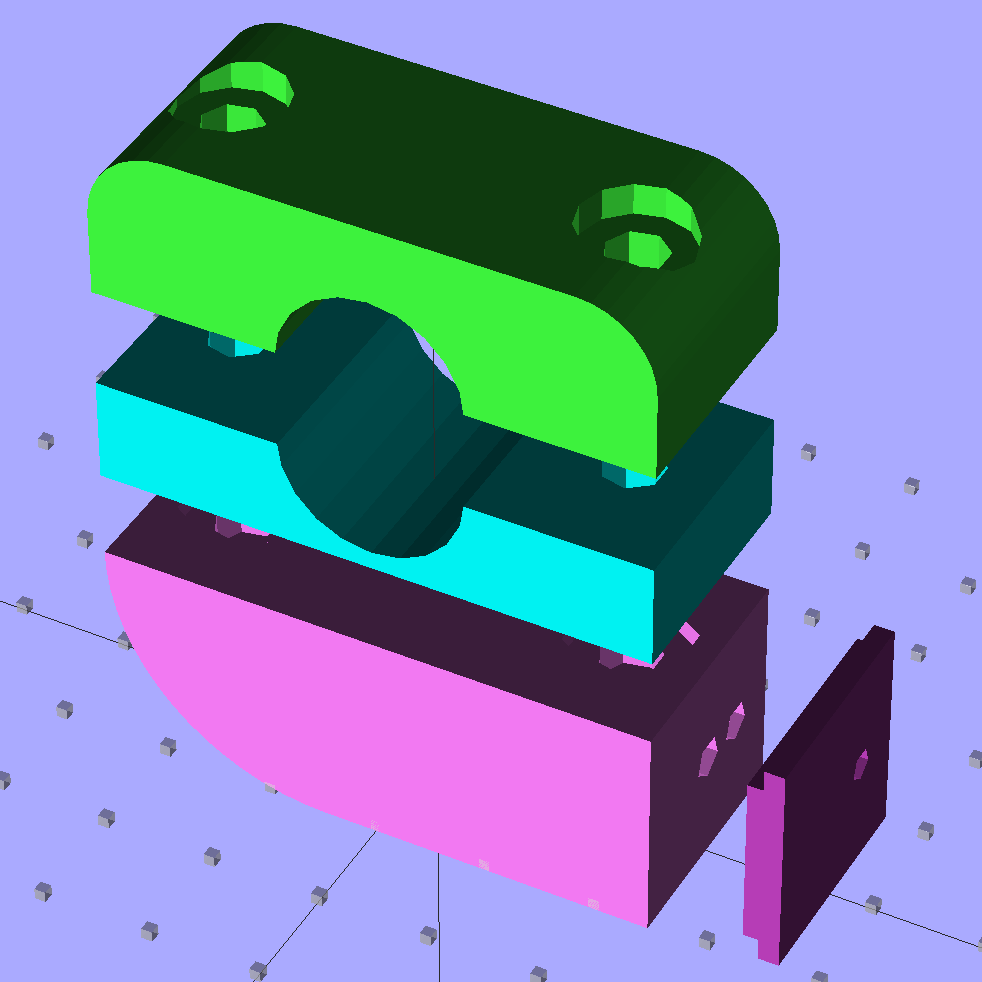
I also added an option to build the flash mounting shoe separately:
Superflash mount – solid model
That gives better control over the flange thickness, which turns out to be critical parameter requiring a bit of adjustment with a file in the first version. Of course, the shoe needs an alignment pin and another assembly step to glue it in place:
Superflash mount – gluing shoe
A 4-40 setscrew jams into the latch recess in the Superflash case, thus preventing it from walking off the shoe. You don’t need any particular pressure here, just enough protrusion to engage the case:
Superflash mount – setscrew
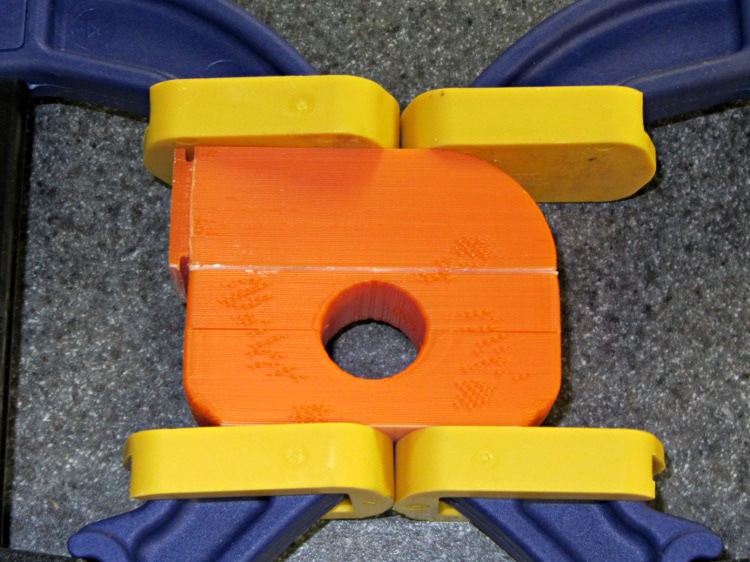
The first pass at hex nut recesses were exactly cos(30) too large, as I forgot my Useful Sizes file has the across-the-points diameter, so I added a dab of epoxy to each recess before gluing the halves together with solvent:
Superflash mount – glue clamping
And then it’s all good.
The OpenSCAD source code:
// Planet Bike Superflash mount for Tour Easy seatback
// Ed Nisley KE4ZNU - Dec 2011

Layout = "Show";            // Assembly: Show
                            // Parts: Clamp Base Shoe Mount
                            // Build Plate: Build

SeparateShoe = true;        // true = print mounting shoe separately
                            // false = join shoe to Mount block

Support = true;             // true = include support

Gap = 8;                    // between "Show" objects

include </home/ed/Thing-O-Matic/lib/MCAD/units.scad>
include </home/ed/Thing-O-Matic/Useful Sizes.scad>
include </home/ed/Thing-O-Matic/lib/visibone_colors.scad>

//-------
//- Extrusion parameters must match reality!
//  Print with +1 shells, 3 solid layers, 0.2 infill

ThreadThick = 0.25;
ThreadWidth = 2.0 * ThreadThick;

HoleFinagle = 0.1;
HoleFudge = 1.00;

function HoleAdjust(Diameter) = HoleFudge*Diameter + HoleFinagle;

Protrusion = 0.1;           // make holes end cleanly

function IntegerMultiple(Size,Unit) = Unit * ceil(Size / Unit);
function IntegerMultipleMin(Size,Unit) = Unit * floor(Size / Unit);

//-------
// Dimensions

BarDia = (5/8) * inch;              // seat back rail diameter
BarRad = BarDia/2;

TapeThick = 0.3;                    // grippy tape around bar

HoleDia = BarDia + 2*TapeThick;     // total hole dia
HoleRad = HoleDia/2;
HoleSides = 4*5;

echo("Bar hole dia: ",HoleDia);

TightSpace = 1.0;                   // space for tightening screws

PlateWidth = 20.0;                  // mounting plate across flanges
PlateLength = 20.0;                 //  ... parallel to flanges
PlateThick = IntegerMultipleMin(1.96,ThreadThick);          //  ... thickness
FlangeThick = IntegerMultiple(1.40,ThreadThick);            // lamp flange thickness
FlangeWidth = 2.0;                  //  ... width

ShoeThick = PlateThick + FlangeThick;    // dingus protruding from main block
ShoeOffset = 1.0;                   // offset due to end wall

echo("Shoe thickness: ",ShoeThick," = ",PlateThick," + ",FlangeThick);

LockOffset = -5.0;                  // offset of locking setscrew

TopRoundRad = 1.5*Head10_32/2;      // tidy rounding on top edge of clamp
echo("Top rounding radius: ",TopRoundRad);

NutDia = Nut10_32Dia*cos(30);       // adjust from across-points to across-flats dia
NutPart = IntegerMultiple(0.5*Nut10_32Thick,ThreadThick);  // part of nut in each half

BoltOffset = HoleRad + max(Head10_32,NutDia);
BoltClear = Clear10_32;
BoltHeadDia = Head10_32;
BoltHeadThick = Head10_32Thick;

MountWidth = PlateLength + ShoeOffset;         // side-to-side
MountLength = HoleDia + 3.5*max(BoltHeadDia,NutDia);

ClampHeight = TopRoundRad + HoleRad;            // includes gap/2 for simplicity
BaseHeight = NutPart + HoleRad;                 //  ... likewise
MountHeight = PlateWidth;

echo("Mount width: ",MountWidth," length: ",MountLength);
echo("Height of clamp: ",ClampHeight," base: ",BaseHeight," mount: ",MountHeight);
echo(" total: ",ClampHeight+BaseHeight+MountHeight);

AlignPegDia = 2.9;                  // shoe alignment peg
AlignPegLength = ShoeThick;

echo("Alignment peg length: ",AlignPegLength);

//-------

module PolyCyl(Dia,Height,ForceSides=0) {           // based on nophead's polyholes

  Sides = (ForceSides != 0) ? ForceSides : (ceil(Dia) + 2);

  FixDia = Dia / cos(180/Sides);

  cylinder(r=HoleAdjust(FixDia)/2,h=Height,$fn=Sides);
}

module ShowPegGrid(Space = 10.0,Size = 1.0) {

  Range = floor(50 / Space);

    for (x=[-Range:Range])
      for (y=[-Range:Range])
        translate([x*Space,y*Space,Size/2])
          %cube(Size,center=true);
}

//-------
// Upper clamp half

module Clamp() {

  difference() {
    translate([0,0,-TightSpace/2]) {
      difference() {
        translate([0,0,ClampHeight/2]) {
          intersection() {
            translate([0,0,-TopRoundRad])
              minkowski() {
                cube([(MountLength - 2*TopRoundRad),
                      (MountWidth - 2*Protrusion),
                      ClampHeight],center=true);
                rotate([90,0,0])
                  cylinder(r=TopRoundRad,h=Protrusion,$fn=4*8);

              }
            cube([MountLength,MountWidth,ClampHeight],center=true);
          }
        }
        translate([0,(MountWidth/2 + Protrusion)])
          rotate([90,0,0])
            PolyCyl(HoleDia,(MountWidth + 2*Protrusion),HoleSides);
        for (Index=[-1,1])
          translate([(Index*BoltOffset),0,0]) {
            translate([0,0,-Protrusion])
              PolyCyl(BoltClear,(ClampHeight + Protrusion));
            translate([0,0,(ClampHeight - BoltHeadThick)])
              PolyCyl(BoltHeadDia,(BoltHeadThick + Protrusion));
          }
      }

    }
    translate([0,0,-TightSpace/2])
      cube([(MountLength + 2*Protrusion),
           (MountWidth + 2*Protrusion),
           TightSpace],center=true);
  }

    if (Support)                    // choose support to suit printing orientation
      union() {
        translate([0,0,1.5*ThreadThick])
          cube([0.75*HoleDia,(MountWidth + 2*ThreadWidth),3*ThreadThick],center=true);
        intersection() {
          for (Index=[-3:3])
            translate([0,Index*(MountWidth/6),-TightSpace/2])
              rotate([90,0,0])
                cylinder(r=(HoleRad - 0.25*ThreadThick),
                        h=2*ThreadWidth,center=true,$fn=HoleSides);
          translate([-HoleRad,-MountWidth,0])
            cube([HoleDia,2*MountWidth,HoleRad]);
        }
      }
}

//-------
// Lower clamp half = base

module Base() {

  difference() {
    translate([0,0,-TightSpace/2])
      difference() {
        translate([0,0,BaseHeight/2])
          cube([MountLength,MountWidth,BaseHeight],center=true);
        translate([0,(MountWidth/2 + Protrusion)])
          rotate([90,0,0])
            PolyCyl(HoleDia,(MountWidth + 2*Protrusion),HoleSides);
        for (Index=[-1,1])
          translate([(Index*BoltOffset),0,0]) {
            translate([0,0,-Protrusion])
              PolyCyl(BoltClear,(BaseHeight + Protrusion));
            translate([0,0,(BaseHeight - NutPart)])
              rotate(30)
                PolyCyl(NutDia,(NutPart + Protrusion),6);
//              cylinder(r=NutDia/2,h=(NutPart + Protrusion),$fn=6);
          }
      }
    translate([0,0,-TightSpace/2])
      cube([(MountLength + 2*Protrusion),
           (MountWidth + 2*Protrusion),
           TightSpace],center=true);

  }

  if (Support)
    for (Index=[-1,1])                  // support inside nut openings
      translate([(Index*BoltOffset),
                0,
                (BaseHeight - (NutPart - ThreadThick) - TightSpace/2)]) {
        translate([0,0,0])
          for (Seg=[0:5]) {
            rotate(30 + 360*Seg/6)
              cube([NutDia/2,2*ThreadWidth,NutPart - ThreadThick],center=false);
          }
      }

}

//-------
// Superflash mounting shoe
// Offset by -ShoeOffset/2 in Y to align on Mount (half of total offset on each side)

module Shoe() {

    difference() {
      translate([-ShoeThick/2,-ShoeOffset/2,PlateWidth/2])
        if (SeparateShoe)
          cube([ShoeThick,PlateLength,PlateWidth],center=true);
        else
          cube([(ShoeThick + Protrusion),PlateLength,PlateWidth],center=true);

      translate([-(FlangeThick - Protrusion),
                -(PlateLength/2 + ShoeOffset/2 + Protrusion),
                (MountHeight - FlangeWidth)])
        cube([FlangeThick,(PlateLength + 2*Protrusion),(FlangeWidth + Protrusion)]);

      translate([-(FlangeThick - Protrusion),
                -(PlateLength/2 + ShoeOffset/2 + Protrusion),
                -Protrusion])
        cube([FlangeThick,(PlateLength + 2*Protrusion),(FlangeWidth + Protrusion)]);

      translate([-(ShoeThick + Protrusion),LockOffset,MountHeight/2])
        rotate([0,90,0])
          rotate(0)                 // align to match Mount hole orientation
            PolyCyl(Tap4_40,(ShoeThick + 2*Protrusion));

      if (SeparateShoe)
        translate([-(ShoeThick - AlignPegLength/2),0,MountHeight/2])
          rotate([0,90,0])
            PolyCyl(AlignPegDia,AlignPegLength);
    }
}

//-------
// Bottom block for Superflash mount

module Mount() {

  translate([0,0,MountHeight/2])
    union() {
      difference() {
        union() {
          translate([-MountLength/4,0,0])
            cube([MountLength/2,MountWidth,MountHeight],center=true);
          translate([((MountLength/2 - MountHeight)/2 + Protrusion),0,0])
            cube([(MountLength/2 - MountHeight + 2*Protrusion),
                 MountWidth,
                 MountHeight],center=true);
          translate([(MountLength/2 - MountHeight),0,0])
            intersection() {
              translate([MountLength/4,0,0])
                cube([MountLength/2,MountWidth,MountHeight],center=true);
              translate([0,0,MountHeight/2])
                rotate([90,0,0])
                  cylinder(r=MountHeight,h=MountWidth,center=true,$fn=4*16);
            }
        }

        translate([-(MountLength/2 + Protrusion),LockOffset,0])
          rotate([0,90,0])
            rotate(0)       // align through hole sides with point upward
              PolyCyl(Clear4_40,(MountLength + 2*Protrusion));

        for (Index=[-1,1])
          translate([(Index*BoltOffset),0,0]) {
            translate([0,0,BaseHeight/2])
              PolyCyl(BoltClear,(BaseHeight/2 + Protrusion));
            translate([0,0,(BaseHeight - NutPart)])
              rotate(30)
                PolyCyl(NutDia,(NutPart + Protrusion),6);
          }

        if (SeparateShoe)
          translate([-(MountLength/2 + AlignPegLength/2),0,0])
            rotate([0,90,0])
              PolyCyl(AlignPegDia,AlignPegLength);
      }

      if (Support)
        for (Index=[-1,1])            // support inside nut openings
          translate([(Index*BoltOffset),0,(MountHeight/2 - (NutPart - ThreadThick))]) {
            translate([0,0,0])
              for (Seg=[0:5]) {
                rotate(30 + 360*Seg/6)
                  cube([NutDia/2,
                      2*ThreadWidth,
                      (NutPart - ThreadThick)],center=false);
              }
          }

      if (!SeparateShoe)
        translate([-MountLength/2,0,-MountHeight/2])
          Shoe();
    }
}

//-------

ShowPegGrid();

if (Layout == "Clamp")
  Clamp();

if (Layout == "Base")
  Base();

if (Layout == "Shoe")
  Shoe();

if (Layout == "Mount")
  Mount();

if (Layout == "Show") {
  translate([0,0,(BaseHeight + MountHeight + Gap)]) {
    translate([0,0,TightSpace/2 + Gap])
      color(MFG) Clamp();
    translate([0,0,-TightSpace/2])
      rotate([180,0,0])
        color(DHC) Base();
  }
  translate([0,0,0])
    color(LDM) render(convexity=3) Mount();

  if (SeparateShoe)
    translate([-(MountLength/2 + Gap),0,0])
      color(DDM) Shoe();
}

if (Layout == "Build") {
  translate([-15,30,(BaseHeight - TightSpace/2)]) rotate([180,0,0])
    Base();
  translate([-15,00,0]) rotate([0,0,0])
    Clamp();
  if (SeparateShoe)
    translate([20,30,ShoeThick]) rotate([0,-90,180])
      Shoe();
  if (SeparateShoe)
    translate([-15,-30,MountHeight]) rotate([180,0,180])
      Mount();
  else
    translate([-15,-40,MountWidth/2]) rotate([90,0,180])
      Mount();

}
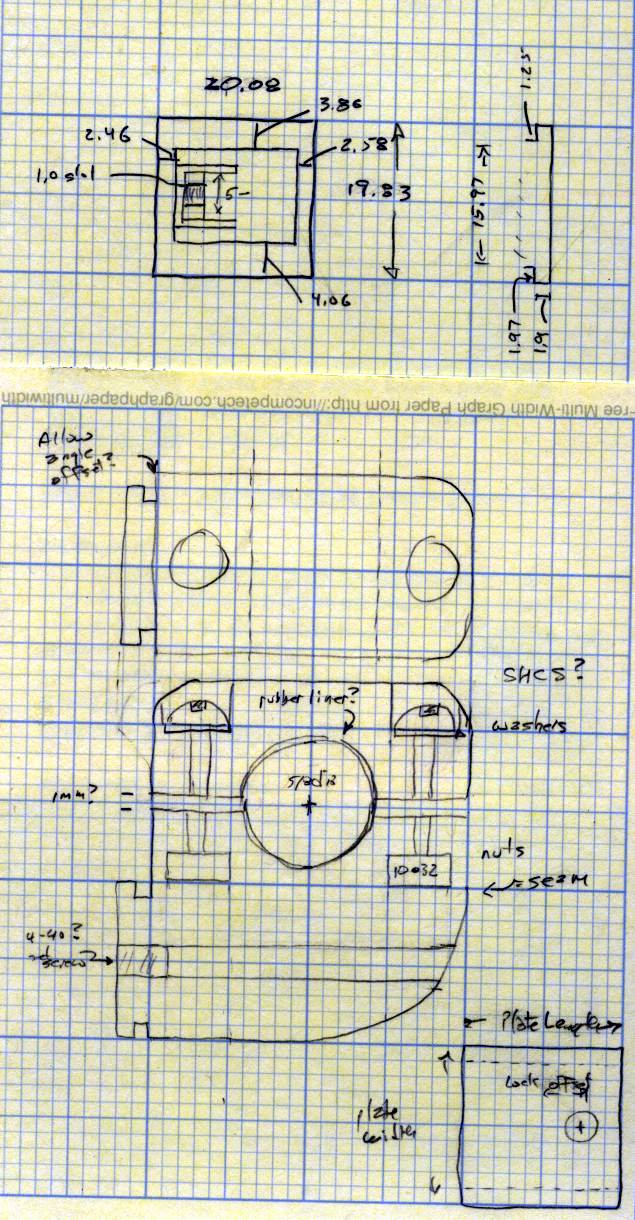
The original doodles, done on a retina-burning yellow scratchpad:
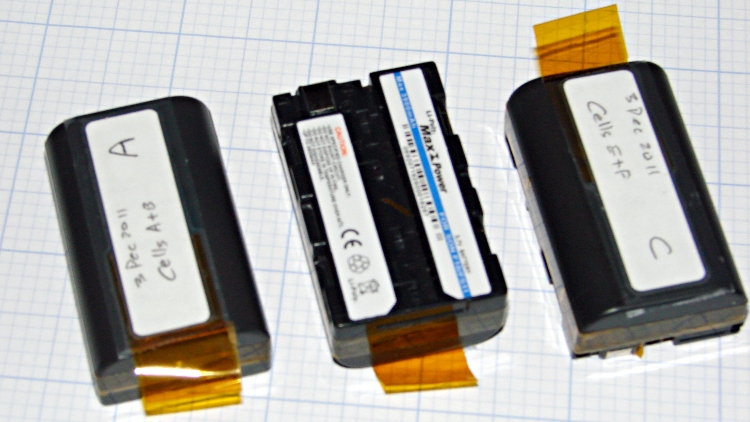
The batteries I rebuilt for our much-beloved Sony DSC-F505V camera back in early 2010 have faded away with constant use. Having already sawed the cases open, rebuilding three of them didn’t pose much of a challenge; this time I added a short tab of Kapton tape to help extract them from the camera socket.
Rebuilt NP-FS11 batteries
Three batteries seems to be about the minimax for ordinary use:
One in the camera
One in the carrying case
One in the charger
You (well, we) can’t keep track of more than three: it always seems one battery gets overused and another gets lost in the dark. We’ll see how three works in practice; there’s a set of six more raw cells lying in wait.
The new batteries produced these results on their first two charge-discharge cycles:
Sony NP-FS11 2011 Packs – First Charges
One battery didn’t come up to speed on the first charge, but after that they’re all pretty close.
These were cheap-after-rebate phones with 2/3 AA NiCd cells that lasted nigh onto five years. We rarely talk on the phone and even more rarely use these, so they’re on the dreaded continuous trickle charge and low usage cycle that kills rechargeable batteries. Of course, they’ve been sitting there for five years…
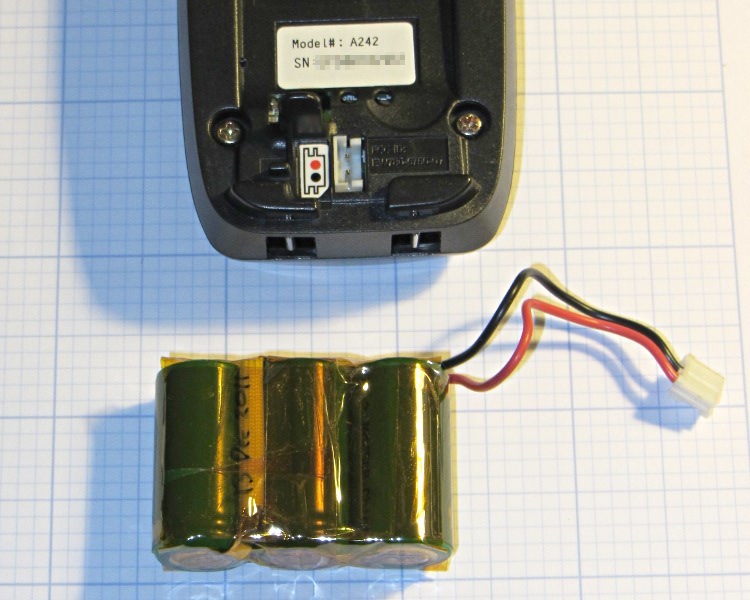
The rebuild was no big deal, although I had to replace the original 360 mAh NiCd cells with 650 mAh NiMH cells (with tabs) because that’s what’s available nowadays. The trickle rate will be even lower relative to the capacity, of course, which may or may not be a Bad Thing.
The packs contained a simple fuse consisting of a thinned section of the usual nickel strap connecting two cells, covered with a fiberglass sleeve under the shrink overwrap. For lack of anything smarter, I harvested the fuse and soldered it in the new pack. although the risk of a catastrophic short seems fairly low:
NiCd pack with thin-wire fuse
The final result looks about as you’d expect, complete with obligatory Kapton tape wrap:
Ativa phone – rebuilt battery
The old pack is kaput and new pack delivers pretty nearly its rated capacity at an arbitrary 550 mA discharge (which is, admittedly, a bit stiff for the old pack):
Ativa phone battery tests
That takes care of one phone… the other one’s probably in the same condition, so I have enough cells to rebuild it, too.