The Smell of Molten Projects in the Morning

Ed Nisley's Blog: Shop notes, electronics, firmware, machinery, 3D printing, laser cuttery, and curiosities. Contents: 100% human thinking, 0% AI slop.

Category: Electronics Workbench

Electrical & Electronic gadgets

  • Nissan Fog Lamp: Desk Stand

    Nissan Fog Lamp: Desk Stand

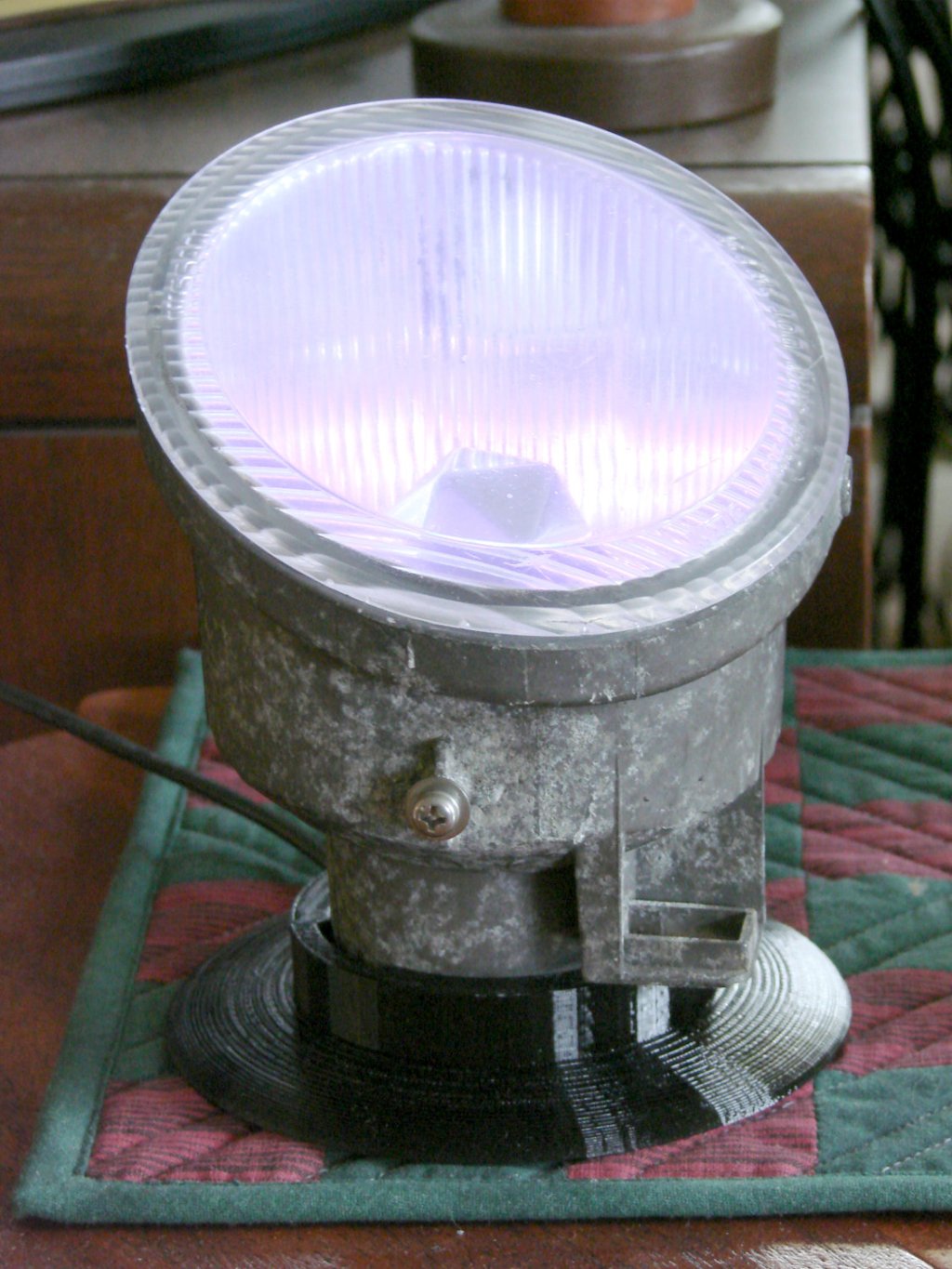
    The Nissan fog lamp looks pretty good pointing at the ceiling:

    Nissan Fog Lamp - table mount
    Nissan Fog Lamp – table mount

    I briefly considered sandblasting the shell to knock back the corrosion, but came to my senses: this is art!

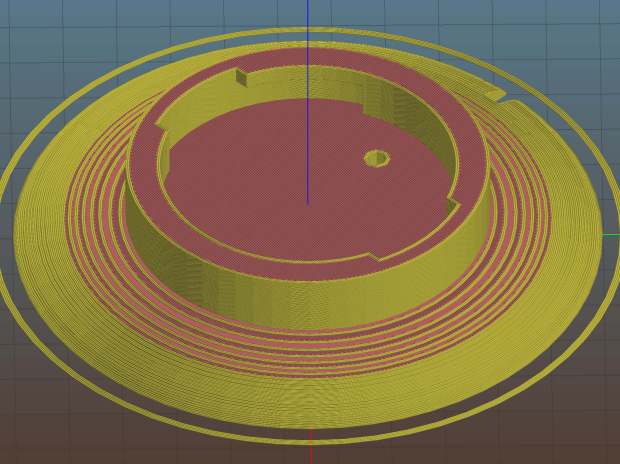
    The shell has a bayonet mount intended for the cable connector, but a bout of solid modeling produced a matching twist-lock desk stand:

    Nissan Fog Light Base - Slic3r preview
    Nissan Fog Light Base – Slic3r preview

    The locking dogs overhang little enough, relative to their diameter, to let the thing build without internal supports. Took about three hours without any intervention at all.

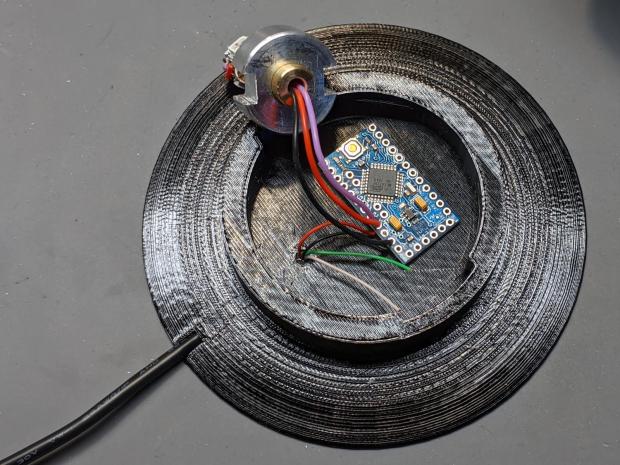
    The little hole matches up with the slot on the bottom holding a USB cable bringing power from a wall charger:

    Nissan Fog Lamp - table mount interior
    Nissan Fog Lamp – table mount interior

    It’s a knockoff Arduino Pro Mini without the USB interface found on a Nano, so the USB data wires don’t connect to anything.

    The base might look better under a layer of (black?) epoxy, although I’m definitely a fan of those brutalist 3D printed striations.

    The OpenSCAD source code as a GitHub Gist:

    // Nissan Fog Light Base
    // Ed Nisley KE4ZNU 2020-04-20
    /* [Hidden] */
    ThreadThick = 0.25;
    ThreadWidth = 0.40;
    HoleWindage = 0.2;
    function IntegerMultiple(Size,Unit) = Unit * ceil(Size / Unit);
    Protrusion = 0.1; // make holes end cleanly
    //———————-
    // Dimensions
    ID = 0;
    OD = 1;
    LENGTH = 2;
    /* [Fog Light] */
    ShellBase = [49.0,55.0,10.0];
    Dog = [55.0,60.0,7.0];
    DogWidth = 21.0;
    DogAngle = atan(DogWidth / ShellBase[ID]);
    echo(str("Dog angle: ",DogAngle));
    ReflectorOD = 90.0;
    LensOD = 110.0;
    LensAngle = -90; // peak relative to dogs
    WallThick = 4.0;
    BaseThick = 2*WallThick;
    CableOD = 3.5;
    $fn = 3*4*5;
    //——————-
    // Useful shapes
    module Dogs(h=Dog[LENGTH]) {
    translate([0,0,h/2])
    intersection() {
    cube([Dog[OD],DogWidth,h],center=true);
    cylinder(d=Dog[OD],h=h,center=true);
    }
    }
    //——————-
    // Build it
    difference() {
    union() {
    cylinder(d=(Dog[OD] + 2*WallThick),h=(BaseThick + ShellBase[LENGTH]));
    intersection() {
    resize([0,0,2*BaseThick])
    sphere(d=LensOD);
    translate([0,0,BaseThick/2])
    cube([2*LensOD,2*ReflectorOD,BaseThick],center=true);
    }
    }
    translate([0,0,BaseThick])
    cylinder(d=ShellBase[OD],h=ShellBase[LENGTH] + Protrusion);
    translate([0,0,BaseThick]) {
    Dogs();
    rotate(1.5*DogAngle)
    Dogs();
    rotate(2*DogAngle)
    Dogs(2*ShellBase[LENGTH]);
    }
    rotate(LensAngle)
    translate([0.75*ShellBase[ID]/2,0,-Protrusion]) {
    cylinder(d=CableOD,h=2*BaseThick,$fn=8);
    translate([LensOD/2,0,CableOD/2])
    cube([LensOD,CableOD,CableOD + Protrusion],center=true);
    }
    translate([31,0,ThreadThick-Protrusion])
    cube([23.0,55.0,2*ThreadThick],center=true);
    }
    linear_extrude(height=2*ThreadWidth + Protrusion) {
    translate([32,0,-Protrusion])
    rotate(-90) mirror([1,0,0])
    text(text="Ed Nisley",size=6,font="Arial:style:Bold",halign="center");
    translate([23,0,-Protrusion])
    rotate(-90) mirror([1,0,0])
    text(text="softsolder.com",size=5,font="Arial:style:Bold",halign="center");
    }

  • Nissan Fog Lamp: RGB LED “Bulb”

    Nissan Fog Lamp: RGB LED “Bulb”

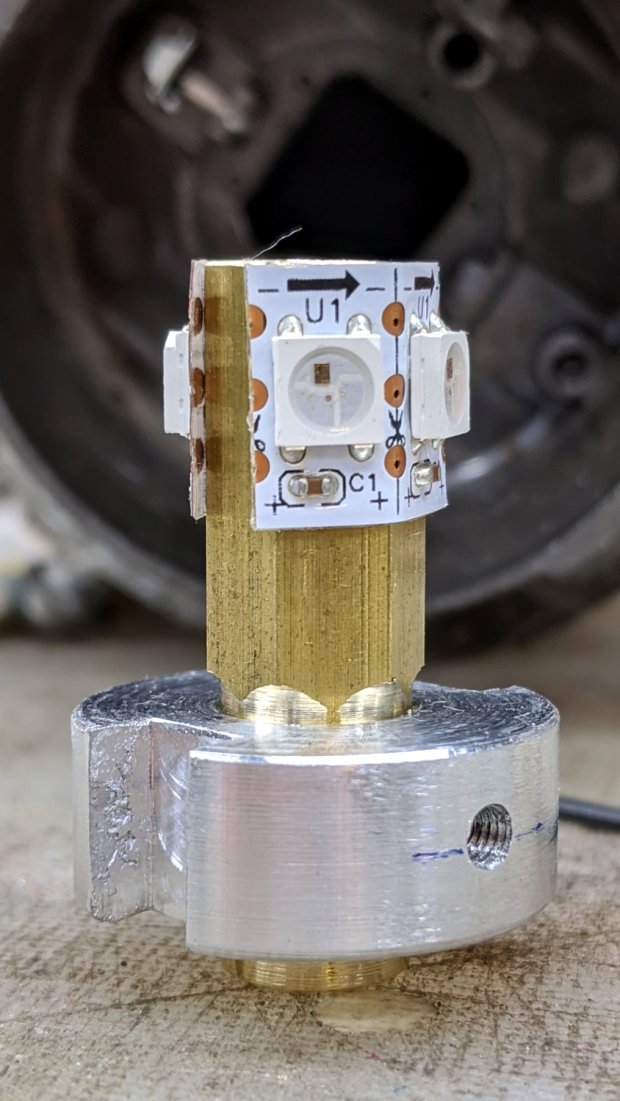
    After cleaning the fog lamp lens enough to be encouraging, I made an LED “bulb” from four WS2812 RGB pixels:

    Nissan Fog Lamp - LED bulb standup
    Nissan Fog Lamp – LED bulb standup

    The small threaded hole has an M3 setscrew to let the brass post slide up & down to adjust the LED position inside the fog lamp’s reflector.

    Despite my poor experience with the PCB-based WS2812 LEDs, the strip-mounted ones have been ticking along in the hard drive platter lamp basically forever, at least after I tamped down the heat problem.

    The brass hex rod has plenty of thermal conductivity, particularly clamped into an aluminum disk connected more-or-less well to the fog lamp’s base.

    Nissan Fog Lamp - RGB LED lamp
    Nissan Fog Lamp – RGB LED lamp

    The two short wires linking the two LED strips (the purple wire is data into the first LED) hold them in place around the hex, despite their desire to straighten out, pull free of their adhesive, and fall off.

    The general idea was to put the LEDs at about the same level as the halogen bulb filament, thereby spreading enough light to fill the reflector housing:

    Nissan Fog Lamp - LED vs halogen
    Nissan Fog Lamp – LED vs halogen

    I drilled a hole through the hex as a cable “conduit”, turned the end into a nice rod, then machined a stub of aluminum to fit:

    Nissan Fog Lamp - parting off LED base
    Nissan Fog Lamp – parting off LED base

    A pair of slots milled along the sides of the aluminum disk fit the housing’s locating features:

    Nissan Fog Lamp - LED bulb trial fit
    Nissan Fog Lamp – LED bulb trial fit

    Nissan used an elaborate spring latch to clamp the halogen bulb’s sheet-metal base in place, but its 50 mil wire didn’t have nearly enough give for my chunky aluminum disk. My version of a spring latch came from a length of 24 mil music wire, which definitely beats the epoxy I was planning to use.

    Heat transfer seems to be a non-issue, as the LEDs get barely warm to the touch. Until they drop dead, I’ll assume it’s all good in there.

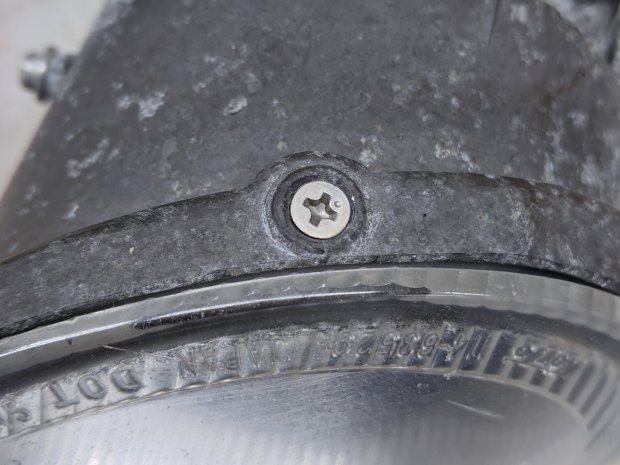
    Two screws hold the lens in place, but the collision seems to have stripped their grip on the plastic and they didn’t un-screw:

    Nissan Fog Lamp - lens retaining screw
    Nissan Fog Lamp – lens retaining screw

    Jamming a utility knife blade under the screw head and prying upward while turning the screwdriver persuaded them out of their sockets, after which the lens popped out of its form-fitted silicone gasket with surprisingly little effort:

    Nissan Fog Lamp - reflector stains
    Nissan Fog Lamp – reflector stains

    The lamp spent a week or so beside the road, out in the weather, and shipped a few drops of rainwater through the rectangular hole under the spring latch anchor. Some delicate cotton-swab action removed most of the grime without too much damage, but the reflective film on those corrugations won’t ever be the same again.

    Now it’s just a simple matter of software …

  • Tour Easy: Baofeng Radio PTT Cable Glitch

    Tour Easy: Baofeng Radio PTT Cable Glitch

    The signal from the Baofeng UV-5R HT tucked behind the seat of my Tour Easy became exceedingly choppy on recent rides. Here’s an earlier version to give you an idea of the situation:

    Radio in seat wedge pack in bottle holder
    Radio in seat wedge pack in bottle holder

    Of course, it worked perfectly in the garage and only failed while on a ride. The clue turned out to be having it fail more on rough roads and crappy scab patches (courtesy of NSYDOT) than on relatively smooth asphalt.

    That led me to wiggle of All The Cables while crouched beside the bike in the garage, listening to another HT, and watching the transmit LED. After about five minutes of this, I found wiggling the 3.5 mm connector between the cable from the PTT button on the handlebar and the radio blinked the transmit LED: ah-HA!

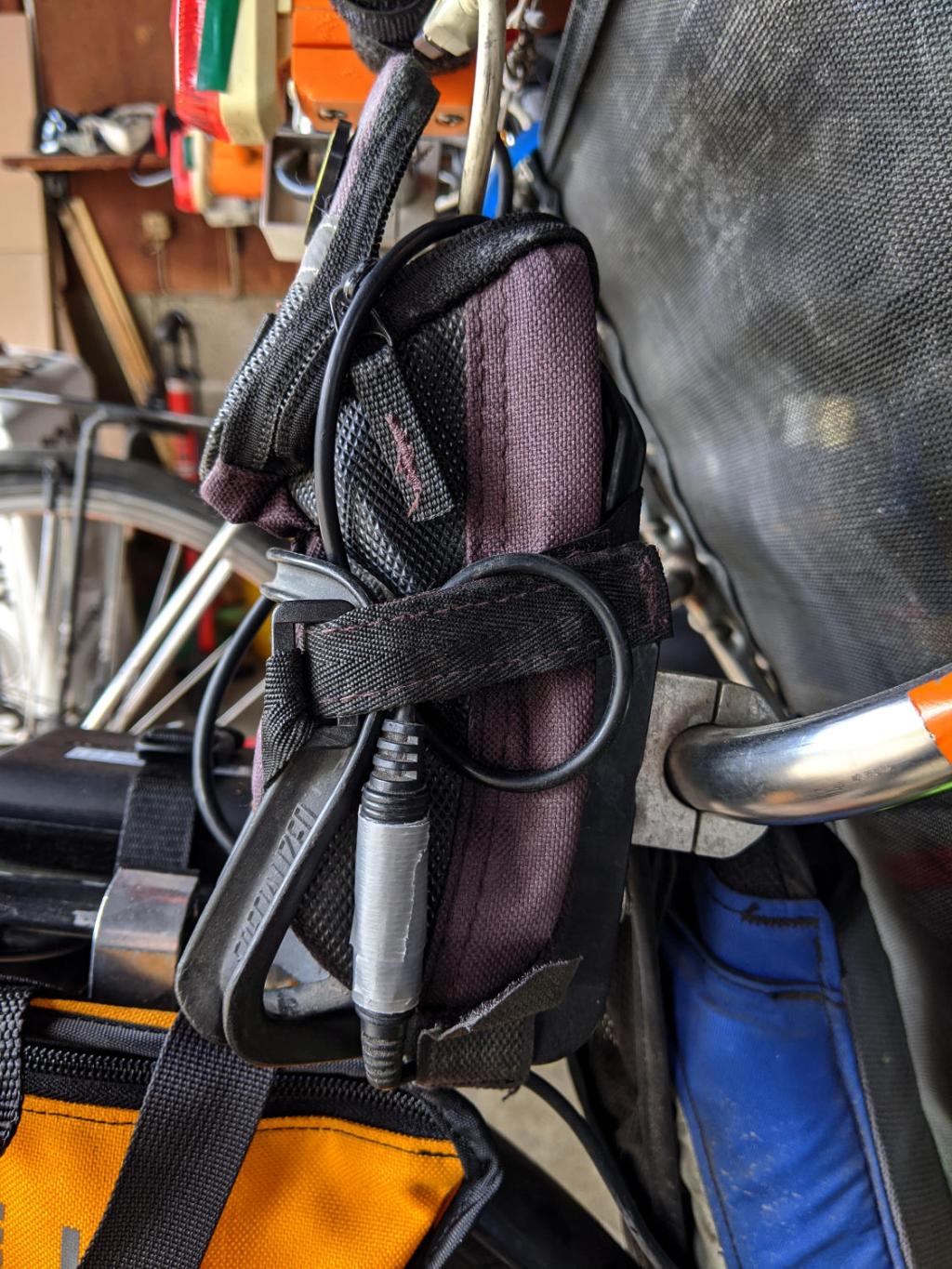
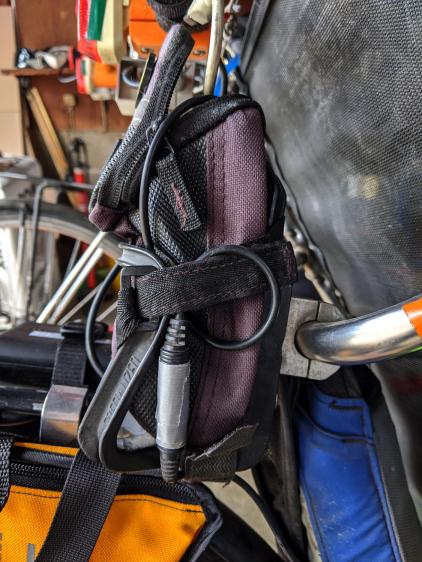
    The connector had worked itself loose from the straps holding the radio pack in place, pulled some slack in the cable, and was bouncing around in mid-air. A wrap of duct tape now holds the connector halves together, the upper loop passes around the Velco-ish strap, and the lower loop (from the PTT button) goes through the bottom of the repurposed bottle holder:

    Tour Easy - Baofeng PTT cable connection
    Tour Easy – Baofeng PTT cable connection

    No trouble on the next two rides, so we’ll call it fixed.

    Protip: it’s always the connector.

  • Tek Circuit Computer: Formula Layout

    Tek Circuit Computer: Formula Layout

    Although Inkscape can lay out simple text in many intricate ways, there seems no way to typeset mathematical equations, even the simple ones involved in the Tektronix Circuit Computer.

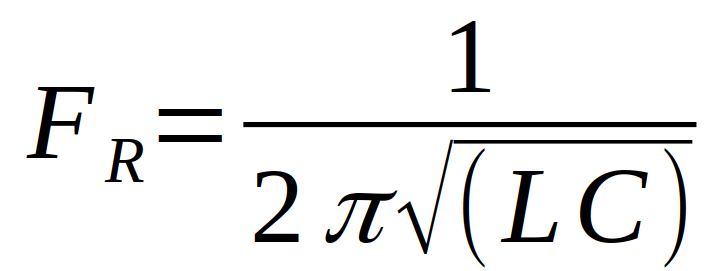
    So I entered the equations in LibreOffice’s math editor, zoomed in on each equation to the maximum 600%, whacked the little-used PrntScr key, cropped out everything except the equation, and saved it as a PNG file:

    Tek CC - Bottom Deck Back - FR formula
    Tek CC – Bottom Deck Back – FR formula

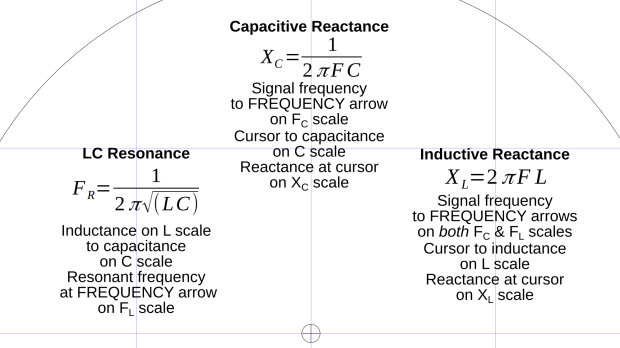
    Import the PNG files into Inkscape, fiddle with the line spacing to get enough room, and jockey everything into position:

    Tek CC - Bottom Deck Back - formula detail
    Tek CC – Bottom Deck Back – formula detail

    Bit of a kludge, but it looks Good Enough™.

  • Homage Tektronix Circuit Computer: Minimally Viable Product, Pickett Variation

    Homage Tektronix Circuit Computer: Minimally Viable Product, Pickett Variation

    This one came out just about perfect:

    Tek Circuit Computer - MVP - Pickett Edition - front
    Tek Circuit Computer – MVP – Pickett Edition – front

    The yellow decks may not be authentic, but they definitely look nice; think of it as an homage to Pickett’s Eye-Saver Yellow slipsticks.

    The rear has my how-to-operate hints:

    Tek Circuit Computer - MVP - Pickett Edition - back
    Tek Circuit Computer – MVP – Pickett Edition – back

    Laser-printing on “inkjet” paper worked fine, although this isn’t fancy Gloss-coated Brochure paper, and the text looks like it should.

    The cursor sports a two-pass hairline scribed at 330 g and filled with Lacquer-Stick paint:

    Tek CC - Milled PETG cursor - Lacquer-Stik hairline
    Tek CC – Milled PETG cursor – Lacquer-Stik hairline

    This time, I had the clear film on top!

    Although the picture doesn’t do it justice, the scales are in blue ink, which looks better against the yellow background. I suppose I could do custom colors:

    Pilot V5RT cartridge - ink levels
    Pilot V5RT cartridge – ink levels

    The line width has decreased as the ink level drops: 0.3 mm on yellow card stock and 0.2 mm on glossy white brochure paper. I don’t know if they’re supposed to work like that, but, for this application, narrower lines are definitely better.

  • Batmax NP-BX1 Batteries

    Batmax NP-BX1 Batteries

    Having recently lost one of the year-old DOT-01 batteries, a quartet of Batmax NP-BX1 batteries for the Sony HDR-AS30V helmet camera just arrived:

    Batmax DOT-01 Wasabi NP-BX1 - 2020-04
    Batmax DOT-01 Wasabi NP-BX1 – 2020-04

    The orange curve is the last surviving (“least dead”) Wasabi battery from the 2017-08 batch and the dark green curve just above it is another DOT-01 from 2019-02. The problem is not so much their reduced capacity, but their grossly reduced voltage-under-load that triggers a premature camera shutdown.

    The Batmax batteries measure better than the craptastic Wasabi batteries, worse than the STK batteries, and should survive the next year of riding. As before, I have zero belief that Amazon would send me a “genuine” Sony NP-BX1 battery, even at six times the nominal price, nor that it would perform six times better.

    Batmax is one of many randomly named Amazon Marketplace sellers offering seemingly identical NP-BX1 batteries: Newmowa, Miady, Powerextra, Pickle Power, LP, Enegon, and so forth. Mysteriously, it’s always cheaper to get a handful of batteries and a charger, rather than just the batteries, so I now have a two-socket USB charger:

    Batmax NP-BX1 - USB dual charger
    Batmax NP-BX1 – USB dual charger

    Despite the “5 V 2 A – 10 W” and “4.2 V 0.6 A – 5 W” label on the back, charging a pair of batteries after a ride started at 700 mA from a USB 3.0 port. The charger makes no claims about USB 3 compliance, so I’d expect it to top out around 1 A from a generously specified port.

  • Natural Enemies

    Natural Enemies

    I couldn’t resist setting this up for my next Digital Machinist column on logarithmic scales:

    Homage Tektronix Circuit Computer with HP 50g calculator
    Homage Tektronix Circuit Computer with HP 50g calculator

    The caption will read “Photo 1: A replica Tektronix Circuit Computer shown with its natural enemy, an HP 50g Graphing Calculator.”

    It’s my desk calculator. In the Basement Laboratory, I use the HP 48 calculator app, with a couple of $10 Sharp calculators in harm’s way.