Ed Nisley's Blog: Shop notes, electronics, firmware, machinery, 3D printing, laser cuttery, and curiosities. Contents: 100% human thinking, 0% AI slop.
The circuit board is 30-mil, double-sided, half-ounce (I think) copper on glass-fiber stock, direct-etched by rubbing ferric chloride solution onto it with a sponge.
The top copper image (on the left) is reversed so it comes out correctly when you’re doing toner-transfer etching.
I didn’t bother with a silkscreen, because I don’t have a soldermask and there’s no room for text around the parts anyway.
The four vias at the corners mark the edge of the board. Trim it with tinsnips (or a shear if you have one), then introduce it to Mr Belt Sander until the edges pass directly through the middle of those via holes. Round the corners a bit so they fit into the case recess atop the mounting shoulder.
Put Z-wires in the small round vias (the ones that don’t have any other traces) to connect the top and bottom ground planes.
Put Z-wires in the other round vias to connect a top-side signal to the corresponding bottom-side trace.
There are three jumper wires across the bottom; with only two layers I don’t get all bothered about embedding the last few. Those vias are square.
I don’t have any way to do plated-through holes, so solder the wires to both sides of any vias with traces on both planes. I admit I missed two of them on the TT3 ribbon cable.
The big empty space around the positive power terminal prevents the ring-lug connector from shorting to the ground plane. Now that I think of it, there’s no need for an empty space on the bottom copper, but it doesn’t do any harm.
This board drives the helmet mic & earbud, combines the TinyTrak3+ AFSK audio with the mic audio, and interfaces with the radio’s mic & speaker jacks.
GPS + Audio circuit board
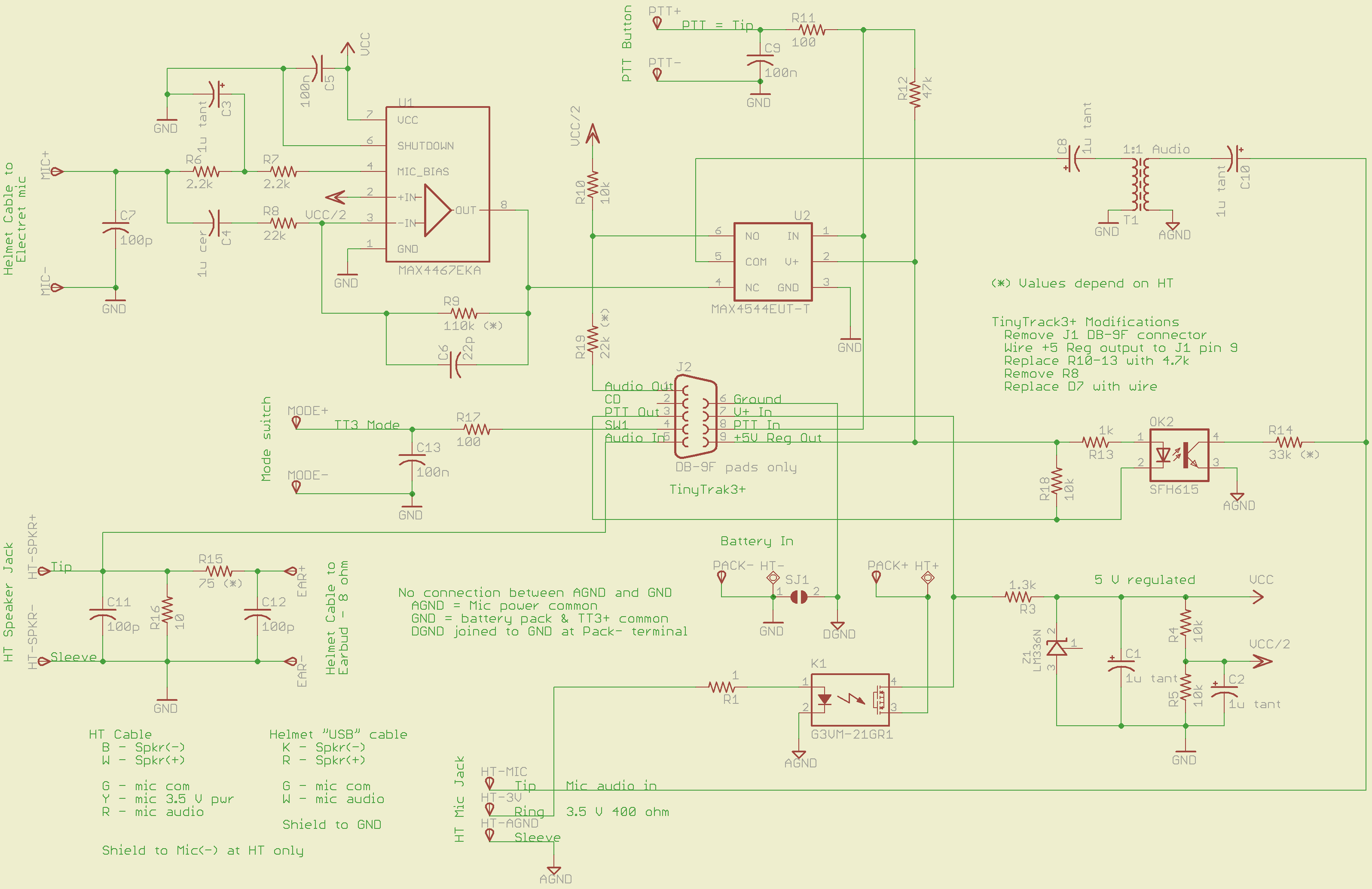
The schematic (click for more dots):
GPS + Voice HT Interface schematic
The ICOM IC-Z1A provides a 3.5 V power supply (on the ring terminal of the mic jack) that normally drives an electret mic. I use it to turn on a MOSFET relay that powers all the circuitry directly from the external battery pack. The relay has about 1 Ω of resistance, so there’s not much voltage drop. Note that the radio’s power does not go through the relay: it connects directly to the external battery.
An earlier version used an optocoupler to drive a 2N2907 PNP transistor for power switching. That worked fine and might actually be better; I think the MOSFET relay needs slightly more drive current than the HT’s 3.5 V supply can provide. More on that later if the problems continue.
The TinyTrak3 includes a 5 V regulator that I wired through the normally unused pin 9 of the DB-9 connector (no connector, just a ribbon cable). It powers the PTT button, analog switch, and the PTT optocoupler.
The MAX4467 handles the electret mic, with power from a separate 5 V shunt regulator built around an LM336. That keeps much of the TT3’s digital noise out of the audio. You can use a MAX4468 if the voltage gain required for your electret mic capsule is greater than Av=5; the ’67 is unity-gain stable.
A MAX4544 analog switch (basically, a low-power MOSFET relay) selects either voice or AFSK data. I originally tried adding the two with an op-amp, but there’s just too much noise from the TT3. The external PTT selects audio data; the rest of the time the radio gets the TT3.
The HT’s mic input is galvanically isolated from the rest of the circuit board. That eliminates ground loops, circulating RF, and all manner of hassle. Bulky, awkward, expensive, and highly worthwhile.
An optocoupler isolates the TT3 PTT-out signal from the HT’s audio input, while switching the 33 kΩ resistor that activates the HT PTT. R18 bypasses any leakage current from the TT3’s driver transistor around the coupler’s LED; the PTT current to the HT is so small that the leakage on a hot day can tease it.
A small 1:1 audio transformer couples the voice + data into the HT’s mic input jack. The 1 μF caps are certainly overkill, but they’re small and work well.
The HT’s external speaker goes into a simple L attenuator that reduces the volume. The HT expects an 8 Ω speaker, but most of the earbuds these days are 30 Ω and way loud; the volume control doesn’t have much resolution when there’s only two or three clicks between inaudible and ouch.
All the external inputs have a 100 pF bypass cap and a 100 Ω series resistor to cut down on RF and tamp down static discharges. Might be overkill, but the previous units withstood years of abuse with that sort of circuitry and I’ll stand by it.
Required tweakage for your HT’s preferences:
R9: MAX4467 gain gets the electret capsule output up to whatever your HT expects.
R15/R16: Earbud attenuator cuts the HT’s speaker output down to something reasonable for your ear
R14: PTT resistor must suit your radio
R19: TT3 output may be too hot for your HT audio, even with R6 on the TT3 turned way down.
All the wires go to top-layer solder pads, rather than physical connectors. I didn’t have any “front panel” space for connectors, anyway, so that’s as good as it gets.
I’ll eventually gather all the files into one lump and put ’em up here.
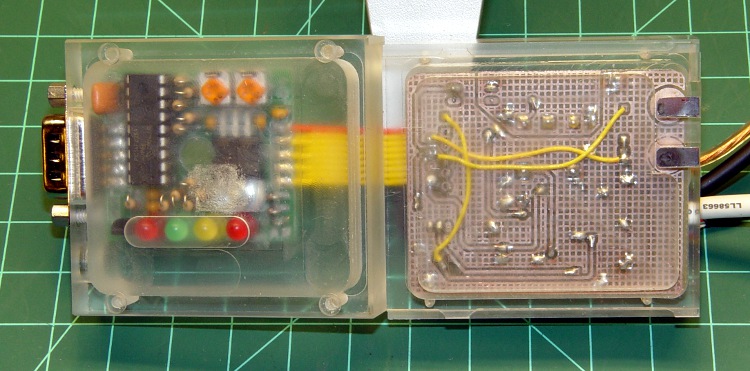
The boards fit in the two halves of the enclosure, which is held together by four 7/8-inch 2-56 machine screws. The blind holes in the lower (right) half are tapped for the screws. The clearance holes in the upper (left) half are a bit too close to the interior; if the setup isn’t perfect, they break through.
The right half slides into the HT’s battery pack grooves. The two tin plates match up with the HT’s power input contact springs.
Interface – top and bottom surfaces
The oval mark around the four LEDs is actually a 1 mm deep recess in the cover; the LEDs are the tallest things on the board and I sort of ran out of room. The GPS connector is essentially flush against the back of the HT, so the board can’t get any lower. Even though the case halves are milled from a hulking 3/4-inch plastic plate, the top surface is only 1 mm thick above the LEDs, so the board can’t get any higher.
The interior view:
Interface box – interior
The DB-9 serial connector mounting screws hold the TinyTrak3 board in place. The GPS receiver and PC serial port (used for configuration) plug into that connector.
The four external cables connected to the circuit board:
power from external battery pack
helmet mic + earbud
PTT switch
HT speaker + mic + mic power
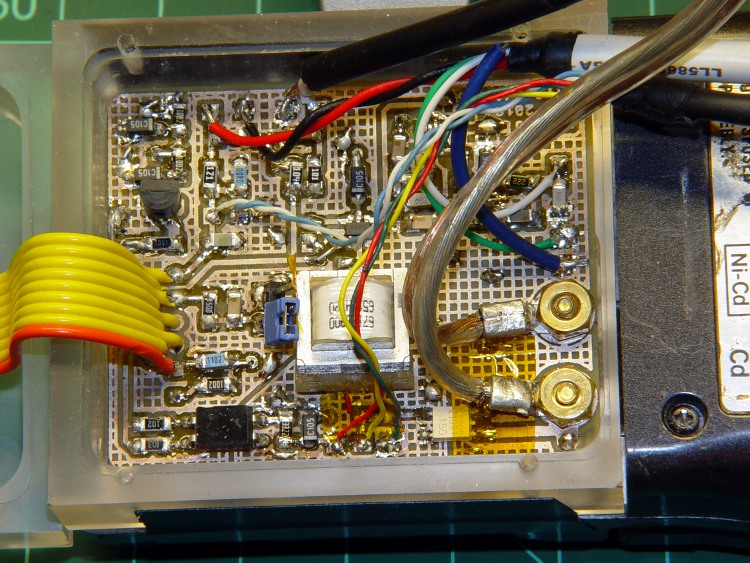
A closeup of the audio PCB in its natural habitat:
GPS + Audio circuit board
The two nuts on the right fit on 4-40 brass screws that I converted into studs under those tin battery pack strips, about which more later. The nuts hold the circuit board in place atop a shoulder around the interior of the compartment.
The OEM battery packs have nice tabs that engage the HT’s clever pushbutton latching mechanism. I spent a lot of time staring at them: they’re easy to do in an injection mold and impossible to machine at my skill level. So I punted: two strips of tape hold the enclosure in place on the HT. Works fine.
You’ve seen bits & pieces of this in the previous weeks and months: now it’s up and running!
Admittedly, this is brassboard hardware; I must now build three final versions for our bikes incorporating all the tweaks & adjustments. But it’s time to write this stuff down so I can find it again … and perhaps you can use some chunks, too.
I don’t have an instruction manual to go along with this, nor is there a parts kit available. You’ll certainly want to modify everything for your own purposes; the circuit board and case certainly won’t fit whatever HT you’re using!
Over the next several days, I’ll be describing & documenting the tricky parts… in no particular order, because I’m not going to sort my notes & photos ahead of time.
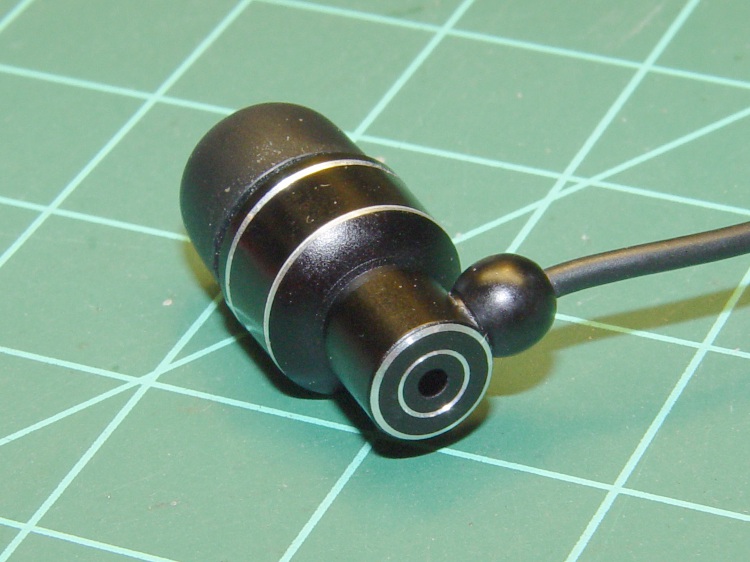
I favor a small cylindrical earbud with a good seal inside my ear for use with the amateur radio on my bike. These things come with back vents that allegedly improve their bass response; that’s not a concern for communications-grade audio and, worse, the vent produces a tremendous amount of wind noise.
Earbud with back vent
The solution is straightforward: put some tape over the vent!
Kapton tape over vent
I used Kapton tape, because I have it, but in point of fact the snippet of duct tape I applied on the first ride (having forgotten to do it on the bench) worked just fine. A drop of epoxy would be fine, too, if you were a bit careful about not letting it ooze down inside the case while it cured.
Despite the fancy appearance, this is a random pick from the assortment of earbuds I’ve bought at $10 or less over the last few years. According to my golden-eared assistant, the audio quality varies dramatically among the assortment, but they all work reasonably well between 300-3000 Hz. I suspect the insanely cheap ones on eBay are essentially the same things, although IMO they’re intended to collect large quantities of high positive ratings: caveat emptor.
Speaking of caveats, insert the usual safety caveats here.
Note that we’re using one earbud for tactical comm, not boppin’ to the music, and the audio level is low enough we (well, I) can’t hear diddly at speeds over 15 mph. Your jurisdiction may prohibit “headphones” or “earphones” or some such, so behave accordingly.
All the officers I’ve met think the radios are a great idea, if that means anything.
This is my latest attempt to come up with a robust electret mic capsule mount for our bike helmets.
The general idea is to put the capsule in a small brass tube (from my box o’ random cutoffs) soldered to the end of a copper-wire boom lashed to the helmet. The tube provides alignment and physical protection, the boom doesn’t pose a poking hazard, and some decent electrical tape secures the mic cable to the boom.
The mic capsule has back vents that allegedly provide ambient noise reduction, so the brass tube must be open on both ends. This does not implement the “waterproof” part of the spec; I still haven’t figured that out yet.
I annealed a length of 12 AWG copper wire to make it easy to bend around the helmet’s contours; two passes with a propane torch to red heat does the deed. It will work-harden quickly and maintain its shape after that.
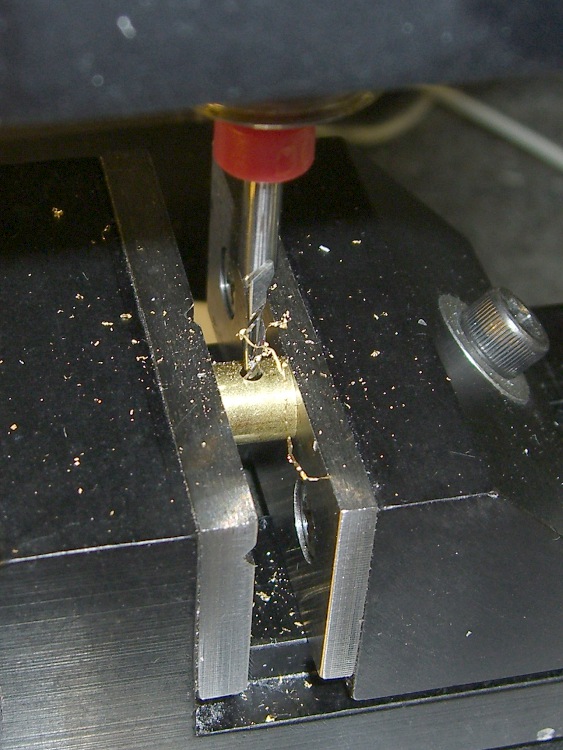
AWG 12 wire is 0.080 inches in diameter, close enough to 2 mm that I poked a hole in the brass tubing with a 2 mm end mill. Filed the end of the wire flat, stuffed it in the hole, fluxed the joint, applied the big soldering gun to the wire, flowed some silver solder, and it’s all good. Fairly obviously, this meets my “the bigger the blob, the better the job” soldering criterion…
Mic rear
The capsule has two layers of Kapton tape wrapped around it to snug up the fit, although I doubt that insulating it from the brass tube makes any difference.
Mic front
The windscreen is a ball snipped from an open-cell acoustic foam sound deadening panel that has contributed myriad mic windscreens over the years. The mic fits into a slit cut with an X-acto knife; no finesse required. The nylon cable tie will disintegrate from sun exposure at about the same time the foam rots away, which takes about two years.
Mic foam windscreen ball
Despite what you might think, the helmet attachment is dramatically less butt-ugly than in years gone by…
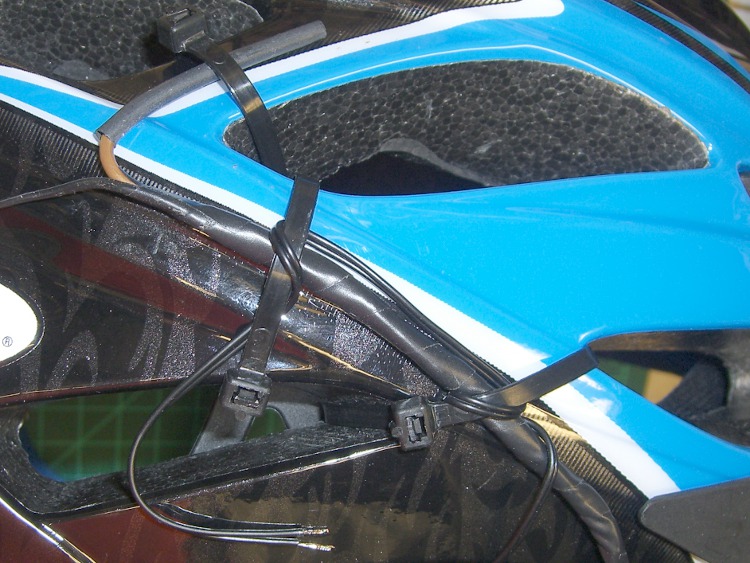
Boom-to-helmet detail
The trick is lashing the bent portion of the boom to the helmet, which prevents the entire boom from rotating around its long axis. That keeps the mic aimed directly at your mouth, regardless of how you bend the boom.
The earbud wire loops around the mic boom a few times, with the first loop over the boom to take advantage of its rounded surface. With any luck, that will delay the inevitable fatigue failure. Mary favors old-style cylindrical earbuds, rather than newer flat or round ones.
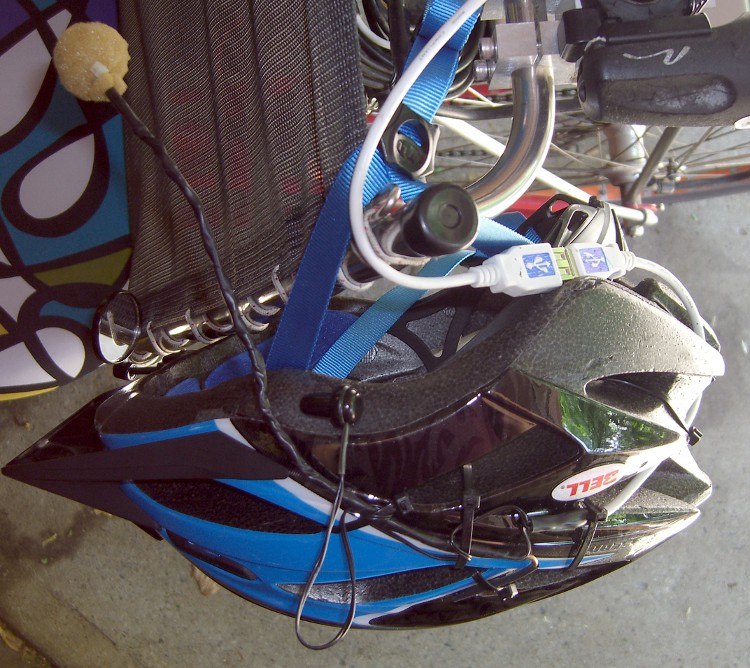
The USB cable (this is not, repeat not a USB headset) gets lashed to various parts of the helmet foam and routed out to the middle of the back, with the male connector a few inches below the helmet. That puts the cable over the back of the Tour Easy’s seat frame, leaving the bulk of the cable hanging behind the seat. The cable length from the female connector to the radio interface is a delicate trade off between being
Long enough to let you stand up and
Short enough to stay out of the rear wheel.
This vertiginous shot looks down at the helmet hanging on the seat of Mary’s bike. Yup, that’s her bright new homebrew seat cover to the upper left…
I’m in the process of reworking the interface box between the amateur radio HTs on our bikes and our helmet-mounted earbud & mic lashup. Mary needed a new helmet before I got the new interface ready, soooo there’s an adapter cable in the middle.
This time around, the helmet cable uses a male USB-A connector, rather than a female 6-pin Mini-DIN PS/2 keyboard connector. Either one is cheap & readily available as assembled cables, which gets me out of soldering teeny little connector pins. These days, though, USB cables are more common.
The motivation for a non-latching, low-extraction-force connector at the helmet is that when (not if) you drop the bike, the helmet doesn’t tie your head to the bike and snap your spine. Falls on a recumbent are much less exciting than on an upright bike, but you still want the bike to go that-a-way while you go this-a-way. Been there, done that.
The old helmet cable connector: female 6-pin mini-DIN. The wire color code is not standardized. Viewed from rear of female connector or the front of the male connector, with the key slot up:
 ear com - Gn   5  |_|  6  K - ear hot
 mic com - Or   3  key  4  Y - mic hot
        gnd - Bn  1   2  R - gnd
The new helmet cable connector: male USB-A. Mercifully, they standardized the wire colors. Looking at the front of the male USB-A connector with the tab down and the contacts up, the pins are 4 3 2 1:
1 – R – ear hot
2 – W – mic hot
3 – G – mic com
4 – K – ear com
The female USB-A connector is exactly the same.
That arrangement should produce the proper twisted pairs in a USB 2.0 cable, but all the USB cables I’ve seen so far lay all four wires in a common twist inside the shield. Maybe it’s the cheap junk I buy, huh?
It’s worthwhile to scribble some color in the background of the trident USB symbol so it’s easier to mate the connectors.
Easy-align USB connectors
Memo to Self: verify the connections & proper operation before shrinking the tubing!







 The Smell of Molten Projects in the Morning