The Smell of Molten Projects in the Morning

Ed Nisley's Blog: Shop notes, electronics, firmware, machinery, 3D printing, laser cuttery, and curiosities. Contents: 100% human thinking, 0% AI slop.

Category: Electronics Workbench

Electrical & Electronic gadgets

  • Resistance Soldering Gizmo: Overview

    My resistance soldering gizmo is sufficiently handy that I keep promising to write it up here, but sufficiently weird that I keep not doing it. Here’s a first pass at rectifying that omission…
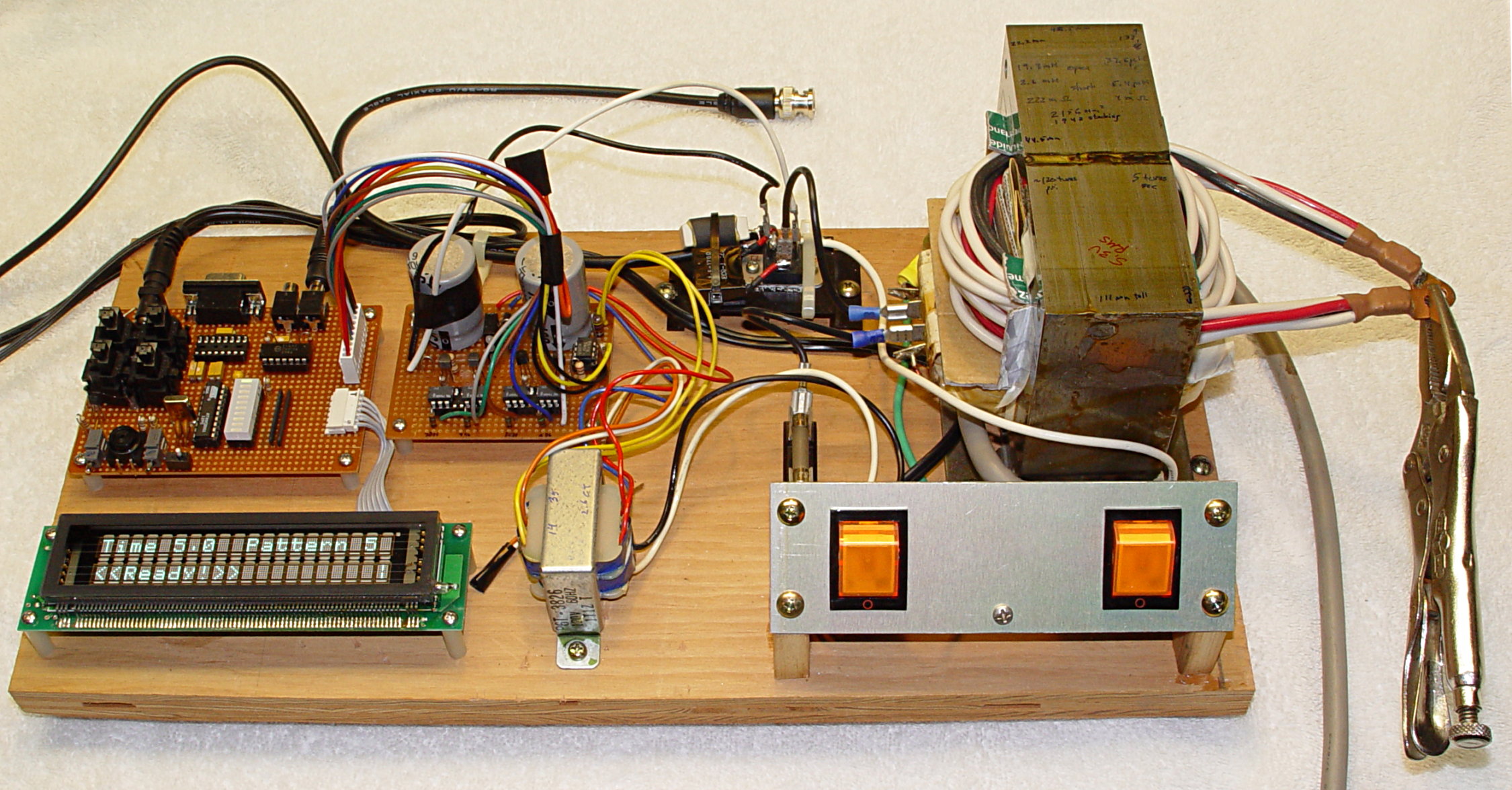
    Resistance Soldering Breadboard Overview
    Resistance Soldering Breadboard Overview

    Back in 2007/8 I built a resistance soldering gizmo and wrote it up for my Circuit Cellar column (Feb / Apr / June 2008, issues 211, 213, 215). Those articles go into excruciating detail about transformer action, flux density, triac triggering with inductive loads, and how all the firmware works. If you want the gory details, go there to get the issues or there to get a CD.

    What you’ll see here over the next few days is a quick overview of how I built the thing, along with some suggestions & color commentary.

    The general idea is that you can get nearly all the spendy bits by harvesting parts from a kilowatt-class microwave oven. I used an ancient Sears ‘waver and I suspect older boxes will be better donors: more iron in the transformer, more robust semiconductors, bigger clearances. Use what you’ve got or can find along the side of the road.

    That gives you the right half of the board in the picture. The transformer gets rewound for low voltage and very high current, the triac controls line current through the primary as usual, and the fuse does what it’s supposed to do.

    Oh, yeah, the Vise Grip is providing a dead short to test the maximum current. It’s fine doing that; just makes the transformer buzz a bit. Remember, you don’t leave it on for hours at a time.

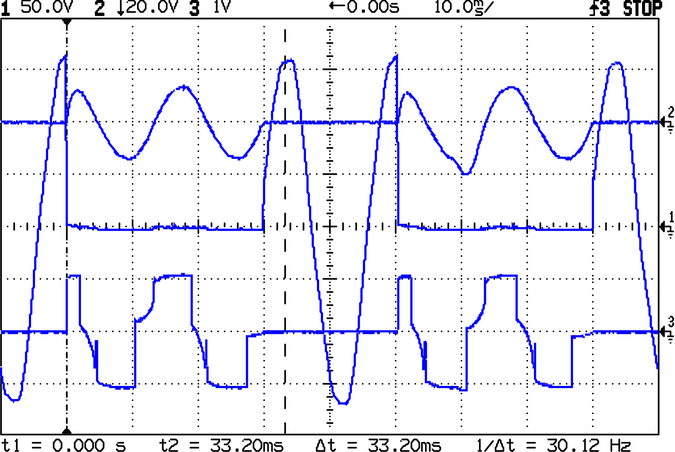
    I wanted to show how triacs behave when they’re controlling highly inductive loads, which the (unloaded) transformer certainly is. So I built a controller around an Atmel AT89C2051 (the good bits of an 8051 stuffed in a 20-pin DIP) that gave complete source/sink control over the gate current in 1/8-cycle increments during six complete cycles. The left side of the picture therefore has some custom circuitry to make all that happen.

    Like, for example, 2/3 duty cycle with maximum-voltage switching:
    Triac drive - 2/3 duty cycle - max V trigger
    Triac drive – 2/3 duty cycle – max V trigger

    For a resistance soldering setup, you don’t want any of that. All you need is to turn the triac on and hold it on for a specific duration. Duty cycle control would be nice, but probably doesn’t make much difference. I’ll describe what I have, provide the source code, and you can hack it to make it do what you want…

    Then I’ll show some electrodes and point to some projects I’ve soldered with the thing. It works fine and maybe you can get something useful out of it.
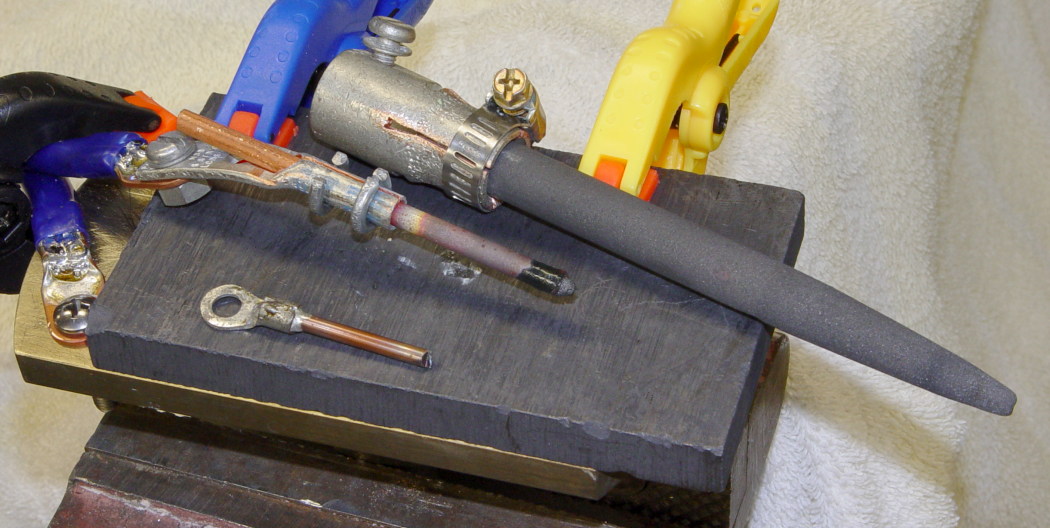
    Electrodes
    Electrodes

    Onward…

  • Arduino Mega 1280: PWM-to-Timer Assignment

    The Arduino Mega has five hardware Timers, each with up to three PWM outputs. Most of the outputs go to headers, but the correspondence between Timer hardware and Arduino PWM number is not obvious.

    Herewith…

    PWM Hardware
    13 OC1C
    12 OC1B
    11 OC1A
    10 OC2A
    9 OC2B
    8 OC4C
    7 OC4B
    6 OC4A
    5 OC3A
    4 OC0B
    3 OC3C
    2 OC3B

    Although the Mega schematic shows PWM0 and PWM1, they don’t really exist; they’re actually the serial I/O bits for the FT232 USB converter.

    PWM4 uses Timer 0: OC0B. Don’t mess with Timer 0’s prescaler to get higher speeds; it’ll wreck the millis() function and the firmware’s timekeeping in general.

    Timer 5 doesn’t come to a header. If you desperately need three more PWM outputs (that aren’t supported by the Arduino runtime), you could affix three fine wires to pins 38, 39, and 40 of that TQFP. Good luck with that…

    Some notes about fiddling with the Arduino PWM setup: changing the frequency and going much faster. The new Timers have different numbers, but the same considerations apply. As before, Thou Shalt Not Mess with Timer 0!

    Consult the Fine Manual for the ATmega1280 chip to get all the details.

  • CPU Heatsink Fuzz Redux

    A friend donated an old Aptiva with an AMD K6 CPU to my collection. It’s too slow & power-hungry to be useful, so I harvested some useful bits and passed the corpse along to the recyclers.

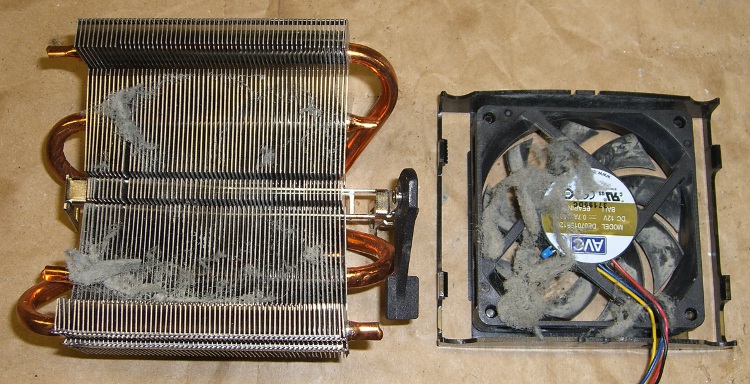
    As fate would have it, I have an upcoming project that needs a cooler, so I popped the fan off the top (it’s rotated a quarter-turn: those tabs lock over the edges of the heatsink) to see what’s inside…

    Fuzz in AMD K6 CPU Cooler
    Fuzz in AMD K6 CPU Cooler

    That accumulation was pretty much invisible from the outside, with most of the fuzz clotted around the periphery of the fan duct. The fan blows downward into the heatsink, which acted (as usual) as a good dust filter.

    A bit of vacuum cleaner work and it’ll be just fine.

    Memo to Self:

    1. The bottom of the heatsink is a 42×78 mm copper block with the heat pipes soldered into notches. Clearance from the block to the step below the widest part of the fins is 18 mm and the fins are 25 mm above the block surface.
    2. Fan = 12 @ 70 mA. Reasonably quiet.
    3. The small blue heat sensor (at about 8 o’clock in the picture) is upstream of the heatsink and, thus, measures ambient air . It’s essentially open-circuit at room temperature, but a diode test shows 1.4 V in either direction. That suggests it’s not a thermistor or thermocouple, but the CPU is old enough that it’s likely not a fancy IC, either. A puzzlement.
  • Arduino Connector & Hole Coordinates: Mega 1280 board

    The Arduino Mega uses the ATMega 1280 chip to get more memory and far more analog & digital & PWM I/O pins, but remains more-or-less header-pin-compatible with the older Duemilanove and Diecimila boards (notes on the header coordinates for those boards is there).

    Arduino Mega - ATmega1280 chip
    Arduino Mega – ATmega1280 chip

    Herewith, some useful coordinates for the Mega board in (X,Y) format using the default 0.001 grid: 1 unit = 0.001 inch (a.k.a 1 mil). Values are taken directly from the Eagle PCB layout.

    The board outline is bounded by (2100,4000) on the upper right, with (0,0) at the lower left by the power jack. It’s not rectangular, but a conversation with Mr Belt Sander could remove the tab sticking out to the right beyond JP1/JP2 if that were really important.

    The header names are not the same as on the old boards. Bolded values seem unusual.

    • PWMH 1×8 @ (1300,2000) ← X is not 1290 as before!
    • PWML 1×8 @ (2150,2000)
    • COMMUNICATION 1×8 @ (3050,2000)
    • JP1 2×8 @ (3750,1550)
    • JP2 2×8 @ (3750,750)
    • POWER 1×6 @ (1550,100)
    • ADCL 1×8 @ (2350,100)
    • ADCH 1×8 @ (3250,100)
    • ICSP 2×3 @ (2555,1100) ← +5 X offset
    • Reset switch @ (2920,1100) ← -30 X offset

    The PWMH header is 10 mils to the right of its position on the older boards, but still not on the same grid used by the other headers: it’s now offset by a nice, even 50 mils. This probably doesn’t matter for most headers, given the sloppy fit. If you have a finicky board setup, you’re in trouble.

    Here’s what the PWMH and PWML headers look like, measured against a Duemilanove board on the top. The offset is not due to perspective!

    Arduino Mega PWMH header offset
    Arduino Mega PWMH header offset

    The Mega board has four 0.125-inch diameter mounting holes (they use 125.984, which is a hard-metric 3.2 mm). The first one is at the same position as on the Duemilanove board.

    • (600,2000)
    • (600,100)
    • (3550,2000)
    • (3800,100)

    Three fiducials:

    • 1 @ (780,2000)
    • 2 @ (2319,1603) ← deliberately offset from the grid?
    • 3 @ (3800,100)

    Memo to Self: As always, verify these numbers before you start drilling!

  • Mobile Amateur Radio Power: Check the Fuseholders

    The Yaesu FT-857 I have in the car has been not turning on lately, which I feared had something to do with being cooked inside a closed van for a week on the top level of a Camden parking garage during the hottest part of the summer.

    But, no, as it turned out, that had nothing to do with it: when I got the radio on the workbench, it powered up just fine. Back in the car, it’s dead.

    Which implies a power problem. The radio power comes from 10-AWG zip cord, through a pair of 40 A fuses, directly from the battery. The zip cord terminates in Anderson Powerpoles (of course) under the driver seat, mated to the end of the cable that came with the radio. That cable uses craptastic Molex connectors (equally of course) that are instantly suspect when any problems arise, plus a pair of smaller in-line 3AG glass fuses.

    Voltage at the Molex connectors: anything from 4.8 V to 11.9 V, depending on imponderable factors. Voltage at the Powerpoles: ditto. So maybe it’s not the Molex connectors, after all.

    The 40 A fuses are the kind the high-power automotive sound system folks use, complete with gratuitous goldish-plated everything. These I got surplus at a minute fraction of sticker price and mounted on the air filter housing, thusly:

    Engine compartment fuses for radio power
    Engine compartment fuses for radio power

    I plugged a 12 V bulb in place of the radio, then went a-measuring. Voltage downstream of the hot fuse: 0 V. Tah-dah, it’s a bad fuse!

    Nope, the fuse element is intact.

    The zip cord terminates in ferrules penetrated by 1/8-inch setscrews. Applying a wrench, I find that the setscrews are somewhat loose, although nothing catastrophic. Tighten all four screws and the radio turns on just fine.

    Case closed!

    Until the next day, when the radio doesn’t turn on. Reinstall the lamp, re-measure, once again find 0 V downstream of the hot fuse.

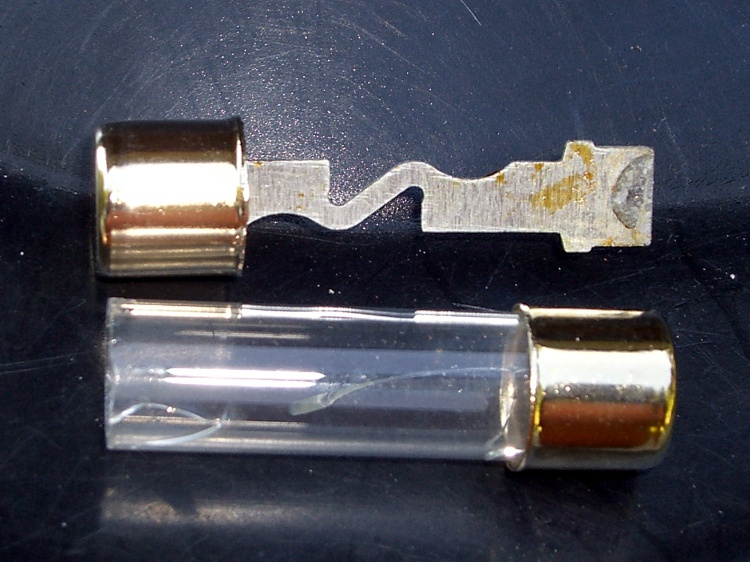
    Pull the fuse out again and it comes apart in my hand.

    Defective 40A fuse
    Defective 40A fuse

    Huh. That would explain everything.

    I suspect the fuse was marginally defective from the factory and finally failed after that prolonged heat wave. Living in the engine compartment isn’t easy under the best of circumstances, so I’ll give this one a pass.

    Being that sort of bear, I plucked a spare fuse from the ziplock baggie of fuses & bulbs that’s tucked into the van’s jack compartment, popped it in place, and the radio works fine again.

    Problem solved, for sure!

    Side note: those fuseholder screws go through the air filter housing, into nuts with Loctite, and I ruined the threads to absolutely prevent the nuts from coming off. You really don’t want a nut loose inside the engine air intake, downstream of the air filter and upstream of the throttle…

  • Yaesu FT-857 Front Panel: Up-Armored Plug

    The  remote cable for the Yaesu FT-857 I have in the car terminates in an 8-pin modular plug. The connector body has a cutout for the round rubber (?) insulation around the cable; it’s not set up for a standard flat 8-wire network cable. However, the cable makes a right-angle bend immediately outside the Front Panel to fit inside the confines of the remote mounting case, which pulled the insulation out of the connector.

    Connector with displaced insulation
    Connector with displaced insulation

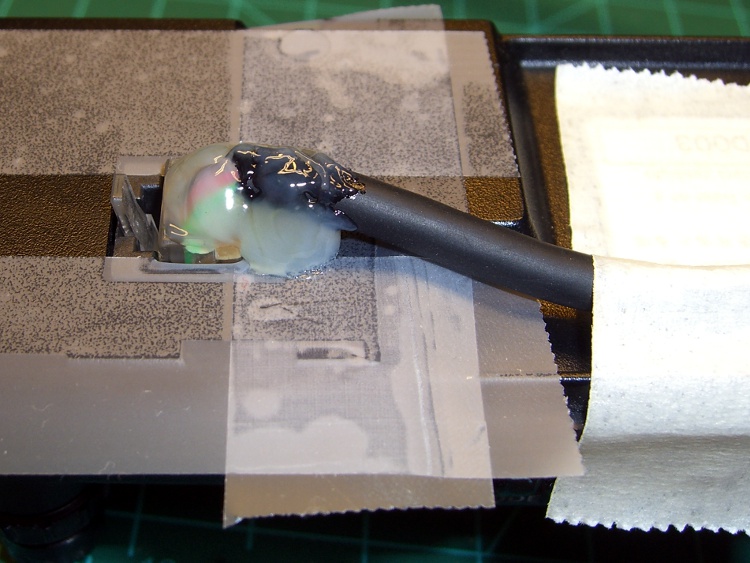
    The electrical connections are fine, but that can’t last. I finally got around to armoring that bend to (I hope!) prevent any problems. Contrary to what you might expect from my proclivity to blob epoxy on everything, I blobbed on hot-melt glue to hold the wires in place, as well as turn a bit of the cable into a rigid body. Even in a hot car, this ought to work fine…

    Connector with hot-melt glue
    Connector with hot-melt glue

    I put some ordinary adhesive tape on the back of the Panel, butted up against the connector body, to keep the glue out of the socket and off the (back of the) Front Panel. That prevents the connector from becoming one with the Panel.

    Pause while the glue solidifies, release the latch and pry the connector+glue off the tape with a small screwdriver, trim the excess glue, then peel the tape off the Panel. The connector snaps into place just like it should and the wires no longer have any freedom of motion.

    Here’s what the modified connector looks like in all its glory. The cable really does bend downward slightly beyond a right angle in order to fit into a recess in the Front Panel.

    Finished connector kludge
    Finished connector kludge

    This isn’t suitable for a connector getting a lot of the old in-out in-out, but the Front Panel remains in place for months at a time and this should delay the inevitable failure.

  • HT GPS + Audio: Revised Schematic

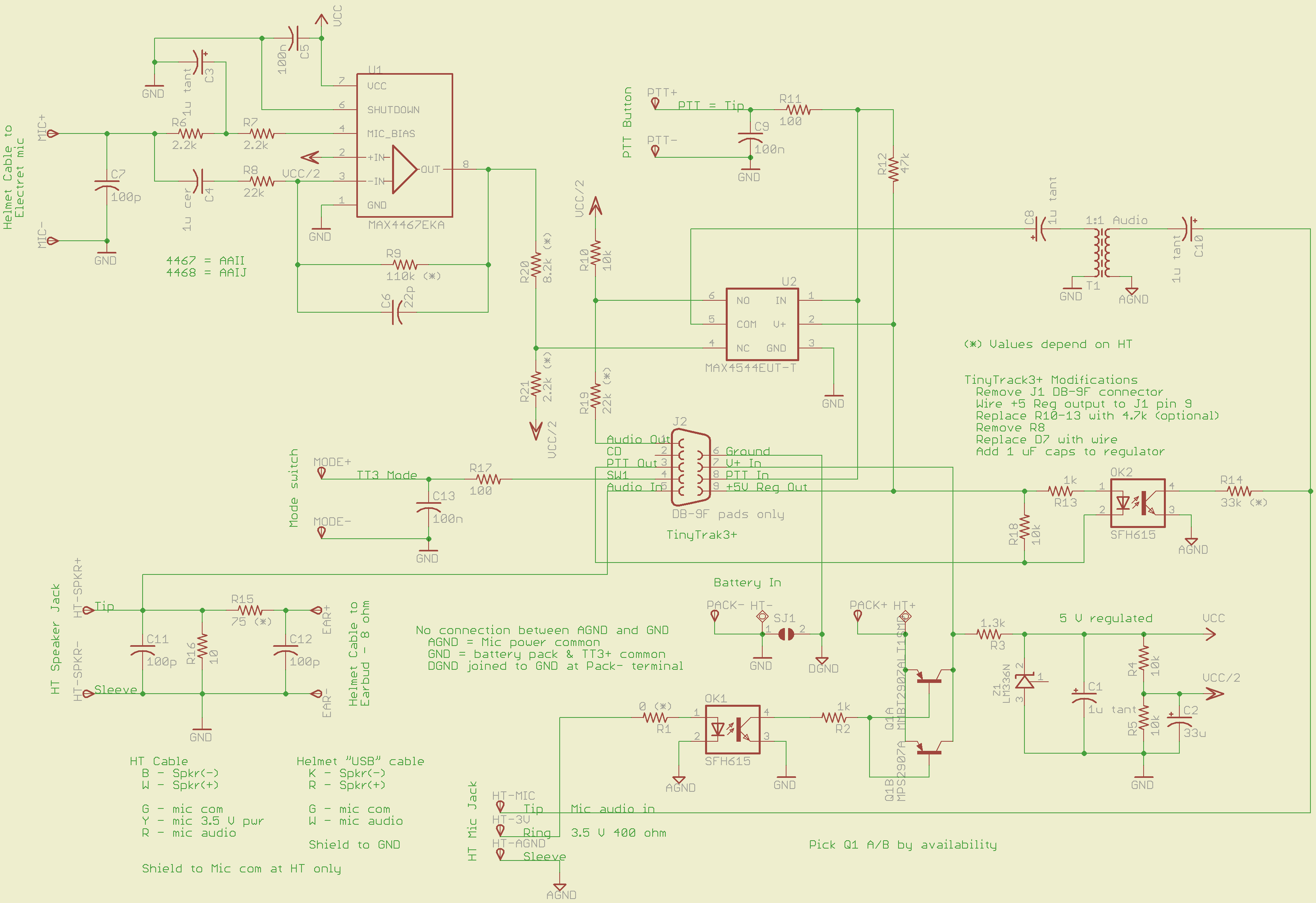
    This is a tweak to the previous design, based on some road testing.

    An attenuator on the output of the MAX4467 voice amp allows gains below unity. Right now, the MAX4467 has Av=5 and the attenuator cuts it back by about 1/5, so the overall gain is about unity. I have a bunch of surplus electret mic capsules and some have come through really hot; this allows backing the gain way down with the mic amp set to Av=1.

    That requires stiffening the Vcc/2 supply by swapping in a 33 µF cap for the original 1 µF unit. If you don’t do that, the amp turns into a oscillator: the attenuator jerks the Vcc/2 supply around, which feeds back to the non-inverting input of the MAX4467. In principle, the gain should be less than unity, but I wouldn’t bet on it.

    The MOSFET relay sometimes didn’t quite turn on from the piddly 4 mA available through the ICOM IC-Z1A’s mic power supply; it was vaguely temperature dependent. I returned to an ordinary optocoupler with a CTR of about 100% driving a 2N2907 PNP transistor, as in the first-pass design that you never saw.

    The two 2N2907 devices allow either a through-hole TO-92 or SMD SOT-3 package, depending on what you have and the power dissipation you need. In my situation, the SMD version suffices, with less than 100 mV of VCE saturation.

    Let me know if you need the Eagle PCB files or PCB layouts.

    Clicky for a bigger image…

    GPS + Voice HT Interface schematic - revised 15 July 2010
    GPS + Voice HT Interface schematic – revised 15 July 2010

    [Update: I’m not convinced the Vcc/2 supply is stiff enough. I ripped out the attenuator and cut the amp gain to 1.0. If I get some really hot capsules, I’ll think it over a bit more.]