The Smell of Molten Projects in the Morning

Ed Nisley's Blog: Shop notes, electronics, firmware, machinery, 3D printing, laser cuttery, and curiosities. Contents: 100% human thinking, 0% AI slop.

Category: Electronics Workbench

Electrical & Electronic gadgets

  • Aluminum-Housed Resistor Hole Locations and Derating

    The battle plan is to mount some resistors on those heatsinks to warm up the disinsector.

    These seem to be the right hammer for the job:

    Aluminum housed resistors
    Aluminum housed resistors

    The big one is rated 50 W @ 25 °C ambient. Use two, derated by 50%, times three air-cooled heatsinks for 150 W of low-temperature heating. The little one is 25 W @ 25 °C.

    The derating curve is linear from 100% @ 25 °C down to 10% @ 250 °C, when mounted to a square foot of flat aluminum plate: -0.40% / °C.

    Assuming a max heater ambient of  150 °F = 65 °C, you can use 84% of full power. Derating by 50% isn’t all that unreasonable.

    The relevant hole locations:

    • 50 W: X=1.562 inch / 39.67 mm Y=0.844 inch / 21.44 mm
    • 25 W: X=0.719 inch / 18.26 mm Y=0.781 inch / 19.84 mm
    • 10 W: X=0.562 inch / 14.27 mm Y=0.625 inch / 15.88 mm

    Divide those by 2.0 for from-the-center offsets, which may be more useful for manual CNC operations: zero at the resistor mounting center, then back-and-forth from there.

    The mounting hole size for 25 & 50 W resistors: 0.125 inch / 3.18 mm diameter, just exactly what you want for a 4-40 mounting screw. Tap drill #43, clearance drill #32 (close fit) or #30 (loose fit).

    The mounting hole size for 10 W resistors: 0.094 inch / 2.39 mm to fit a 2-56 screw. Tap drill #50 (better: #49 for 50% threads), clearance drill #43 (close) or #41 (loose).

    The Vishay-Dale data sheet is there

  • Heatsink Thermal Coefficient

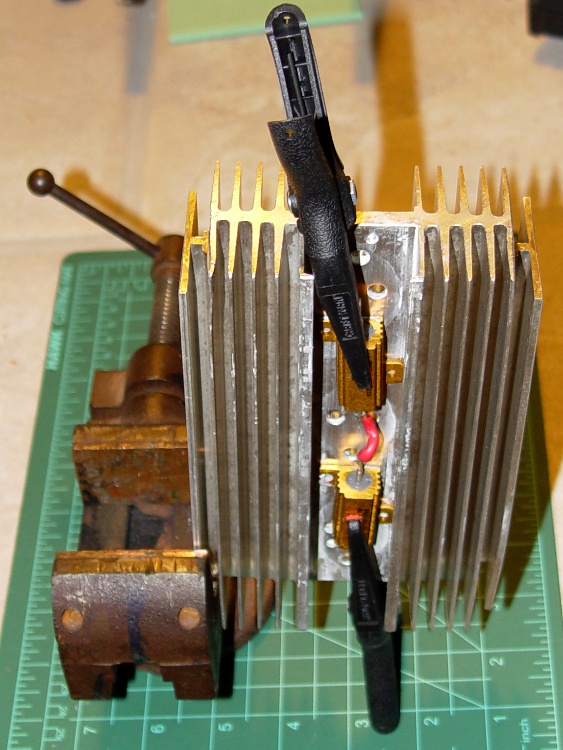
    To get an idea of how those recycled heatsinks performed, I soldered a pair of 8 Ω 25 W power resistors in series, clamped them to the first heatsink out of the dishwasher, fired up a bench power supply, and took some quick data.

    Ambient is about 63 °F with more-or-less still air. Temperature measured with an IR non-contact thermometer aimed at a strip of masking tape on the edge of the heatsink. The resistors (and the center of the heatsink) are somewhat hotter than that, as you’d expect. The numbers include the resistor case-to-heatsink thermal coefficient, too.

    Held edgewise in a vise with the fins horizontal (like this: ===, the second-worst possible orientation), a few inches above the bench, the temperature stabilizes in about an hour:

    • 16 W -> 101 °F: 2.4 °F/W
    • 32 W -> 132 °F: 2.2 °F/W
    • 64 W -> 188 °F: 2.0 °F/W

    The alert reader will note that 64 W is somewhat excessive, given that the resistors are 25 W each. The temptation to run the supply at constant currents of 1.0, 1.4, and 2.0 amps was just impossible to resist, OK?

    Heatsink - vertical
    Heatsink – vertical

    Held edgewise with the fins vertical (like this: |||), also with a few inches of clearance to the bench, the temperature stabilized in a matter of 10-20 minutes. I didn’t bother with the lower power tests:

    • 64 W -> 166 °F: 1.6 °F/W

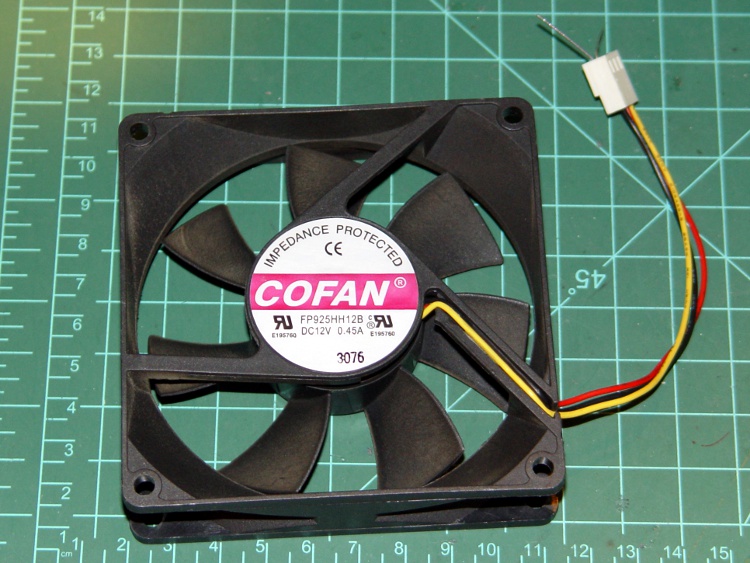
    Putting a bare CPU case fan 2 inches from one side of the heatsink, aimed directly at the middle, with no attention whatsoever to ducting or air flow rates, produced a stable temperature in a few minutes:

    • 64 W -> 85 °F: 0.3 °F/W

    That’s under 0.2 °C/W with airflow on only one side. Zowie!

    While I must run these tests again with the resistors & fans I intend to use (and better control over the air flow), things are looking good.

  • Heatsink Recycling

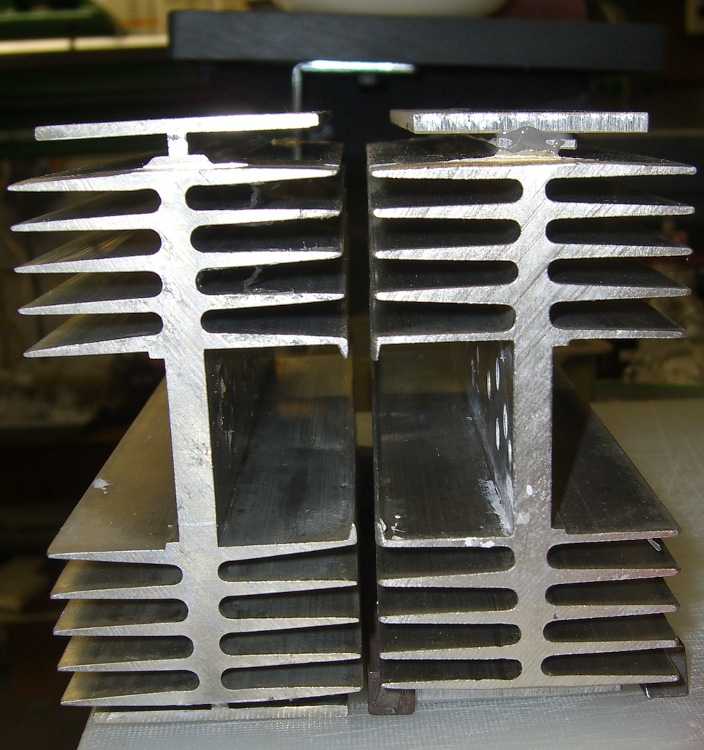
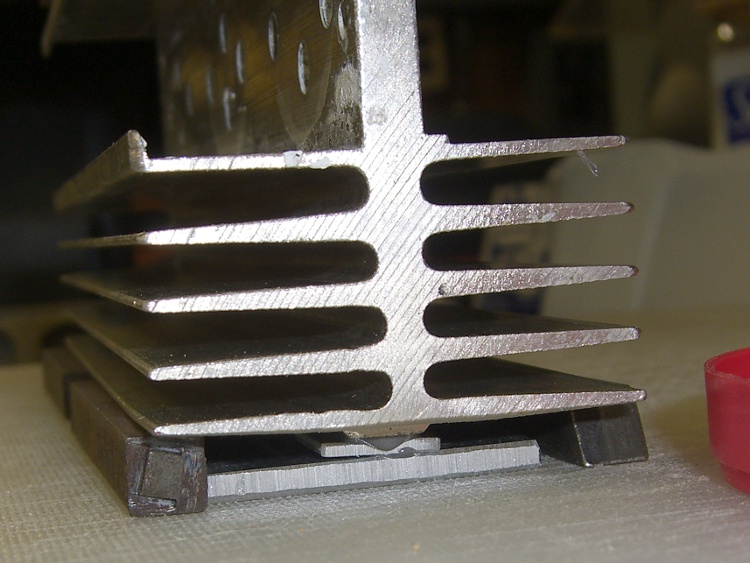
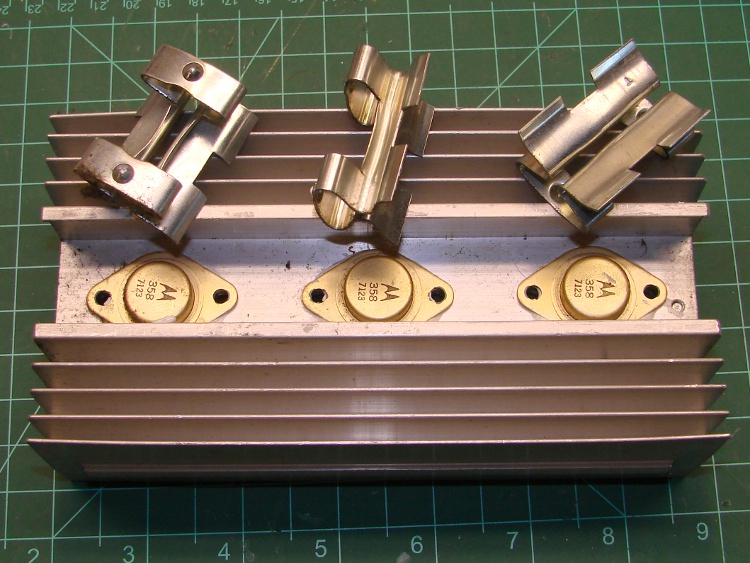
    Some diligent rummaging turned up a trio of heatsinks that I think will work nicely for the Hot Box Disinsector. As nearly as I can tell from the date codes, they started life at IBM in the early 70s and are built to take a direct hit; the bent fins show they’ve taken a few shots along the way. Those clips applied direct clamping pressure to the transistor cases: much better than screws that can will eventually deform the aluminum and stop forcing the case against the heatsink.

    Heatsink with TO-3 transistors
    Heatsink with TO-3 transistors

    To judge from the crud built up on the fins and the fact that some of the transistors are now completely open, these puppies were run hard and put up wet.

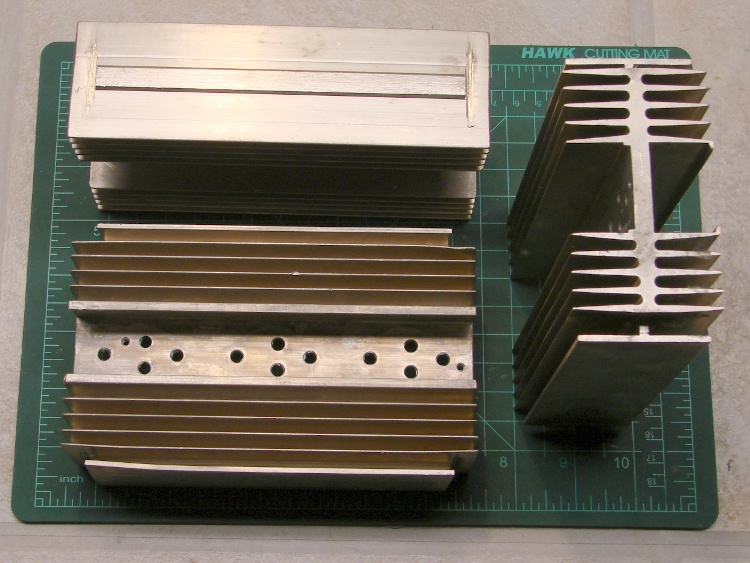
    I wiped off the heatsink grease, cleaned off the bigger chunks of crud, and popped them in the dishwasher for a good scrubbing.

    Heatsinks ready for reuse
    Heatsinks ready for reuse

    Lovely! The web across the middle is 1/4-inch thick; they don’t make ’em like that any more. The rear heatsink lost its mounting flanges along the way; I have no idea if I sawed those off or somebody else got there first.

    I’ll probably plug the holes, just because it’s a nice idea; the sinks are certainly overqualified for their next job as they stand. TO-3 transistors have power ratings over 100 W: these are at least 300 W heatsinks, albeit with an unknown operating temperature. Egad & similar remarks.

    In round numbers, I need maybe 150 W of heat at 140 °F ambient. Each heatsink will dissipate 50 W, which is certainly well under its original rating. Figuring 0.5 °C/W sink-to-ambient (call it 1 °F/W) with decent air flow, dissipating 50 W will raise the heatsinks to 190 °F.

    That’s higher than I want, so more doodling & measurements are in order.

  • Peltier Cooler Test

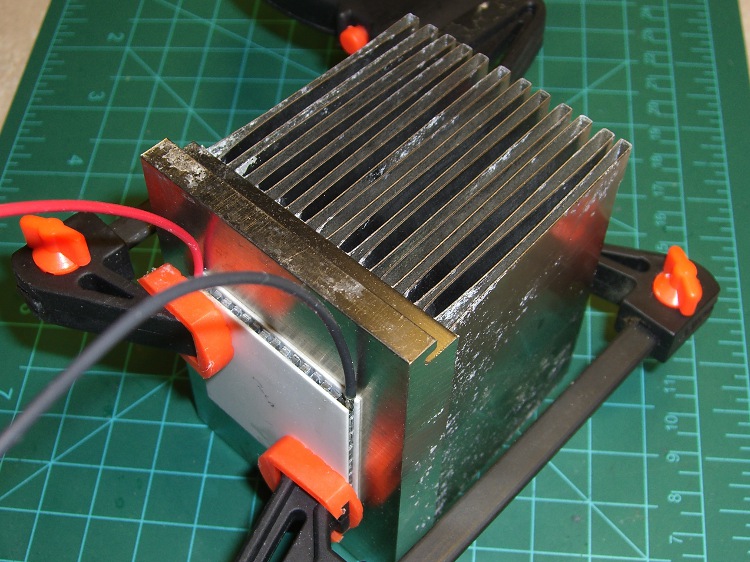
    This Peltier cooler just emerged from a pile o’ stuff on the Electronics Workbench, so I combined it with a scrap CPU heatsink (using plain old water as “thermal grease”) and fired it up to get some quick numbers for future reference.

    Peltier cooler test lashup
    Peltier cooler test lashup

    It draws 3 A (the bench supply’s current limit) at 5 V. The cold side got down to 19 °F with the hot side at 75 °F: ΔT = 56 °F.

    That’s with zero thermal load, other than whatever arrives from plain old air and those two plastic clamps. It looks like a nice one, so it’s maybe 10% efficient and could pump a watt, barely enough to cool a simple circuit.

    Freezes a drop of water just fine, though.

    The I-V curve is nearly bar-straight over the first five volts: call it 620 mΩ. The thing would draw 7.5 A at 12 V, call it 90 W, and could pump maybe a whopping 9 W from the cold side.

    Actually getting good numbers would require some serious work that I’m not up for. In particular, everything has a serious temperature coefficient, so nothing would be the way it looks. I have doubts about the efficiency guesstimate; I’d like to actually measure that sometime.

    But it confirms my opinion of Peltier coolers between hundred-watt CPUs and water-cooled heatsinks: pure delusion.

  • Needle-nose Tweezers: Matching the Jaws

    While excavating the top of my workbench and putting things away, I managed to drop my favorite needle-nose tweezers… which, of course, landed point-down on the concrete floor:

    Mismatched tweezer jaw
    Mismatched tweezer jaw

    Well, that gave me an excuse to match up the jaws. If you take a close look at most of your tweezers, they’ll have jaws that don’t quite come together evenly, so you’re trying to grab things with a single point instead of between two flat surfaces.

    A brief session with coarse and medium diamond files produced this pleasing result (with a mm scale for size):

    Matching tweezer jaws
    Matching tweezer jaws

    Much better!

    Another trick that works well: grab a piece of fine sandpaper in the tweezers, scrub sideways, and repeat for the other jaw. That’ll flatten out the jaws, make them reasonably parallel, and put the scratches in the direction that helps the most when you’re pulling something. Works best if the jaws are already pretty well aligned.

  • DSC-F717 Memory Stick Errors: Socket Cable Reinsertion

    While I was fiddling with the camera to get that first spectrograph, it began coughing up an assortment of Memory Stick errors, including the dreaded C:13:01 error. Having had this happen several years ago, I knew it came from the ribbon cable contacts in the Memory Stick socket and the only way to fix it involves taking the camera apart.

    At the time, I used the guide at http://hbar.servebeer.com/text/f707/, which is now a dead link; you can use archive.org to retrieve it. There’s an exact copy at http://batteringram.org/misc/f707repair/ and a bit of rummaging suggests the same person is running the new site.

    Anyhow, here’s my version of the teardown and fix. This is a bit more aggressive than what you’ll read above, in that I disconnect all the cables to get straightforward access to the guts of the camera, but I think it makes everything easier. In any event, re-plugging the cables in those connectors will probably be a Good Thing.

    Remove the battery, Memory Stick, and all the straps and doodads. This fix will reset the camera to its factory defaults; you must eventually reset everything, so review your settings.

    If your filing system depends on the camera’s numbering system: heads up! This will reset the image sequence numbers; the next picture will be DSC00001.JPG.

    Remove the four Philips-00 screws that hold the rear case in place. Note that they are not identical…

    Two on the left.

    DSC-F717 case screws - left side
    DSC-F717 case screws – left side

    The rear screw on the right side.

    DSC-F717 case screws - right side
    DSC-F717 case screws – right side

    The screw on the right side of the bottom passes through the front part of the case.

    DSC-F717 case screws - bottom
    DSC-F717 case screws – bottom

    Ease the whole rear half of the case, display and all, away from the front half, until you can disconnect the three-wire cable from the power jack. A needle-nose pliers may be helpful, but be gentle!

    DSC-F717 internal power cable
    DSC-F717 internal power cable

    Now things get nasty.

    The flat paddle in the lower right plugs into a socket on the display board in the rear case: pry it out if it hasn’t popped out of its own accord.

    Disconnect the ribbon cable on the left side by prying the gray latch away from the cable; the ribbon will pop out with no effort.

    Put the rear part of the case somewhere out of the way.

    DSC-F717 main board cables
    DSC-F717 main board cables

    Peel the static shield off the main circuit board. The black strip is a surprisingly strong adhesive tape that’s stuck to the ribbon cables along the top edge of the board. Peel gently!

    DSC-F717 static shield
    DSC-F717 static shield

    Pull the three cables out of the sockets along the top of the board. The blue cable seems to be much more fragile than the others, but they all come out by just pulling directly upward: parallel to the board.

    Unscrew the two P-00 screws holding the main board in place: upper left and center of the board.

    DSC-F717 main board cables - top
    DSC-F717 main board cables – top

    Flip the camera over and ease the main board away from the case to expose the white connector on the bottom. This is stuck firmly in place, so try to not brutalize anything around the connector when it pops out.

    DSC-F717 main board cables - bottom
    DSC-F717 main board cables – bottom

    That leaves only the ribbon cable on the right of this picture (left of the camera) connecting the optical section to the main board. Push the two ends of the gray latch bar parallel to the cable (it is not the same as the connector on the other side of the board shown above) away from the connector until the bar releases the cable and it pops out.

    Put the main board somewhere safe.

    DSC-F717 main board cables - rear
    DSC-F717 main board cables – rear

    Now you can actually see the Memory Stick socket behind all the ribbon cables!

    DSC-F717 Memory Stick socket - exposed
    DSC-F717 Memory Stick socket – exposed

    Remove the two P-00 mounting screws, one to the upper right and the other to the lower right in the steel retaining bar.

    Remove the socket from the camera. Whew!

    DSC-F717 Memory Stick socket - retaining screws
    DSC-F717 Memory Stick socket – retaining screws

    Here is the offending cable entry into the Memory Stick socket. Pull the mumble cable out.

    DSC-F717 Memory Stick socket - cable entry
    DSC-F717 Memory Stick socket – cable entry

    The socket pins evidently move just a little bit, every time you put in a  Memory Stick, eroding teeny divots in the cable contact pads. I generally use the USB connection, so the socket doesn’t see a lot of motion. Your mileage may vary.

    DSC-F717 Memory Stick cable indentations
    DSC-F717 Memory Stick cable indentations

    I cleaned off the ribbon cable pads with Caig DeoxIT, although I’m not convinced that really does anything in this situation.

    This guy dismantled the socket to clean the internal contacts, which would probably make sense while you’ve got the hood up. I didn’t do that this time, though.

    Then you reassemble everything in reverse order, after which the camera Just Works. Probably for another few years.

    The puzzling part of this failure: the camera has literally hundreds of ribbon cable contacts, but only the Memory Stick cable goes bad. If any other cable failed, the camera would go Toes Up, right? Next time around I may try soldering thin copper pads on the cable or applying a thin backing layer to improve the resilience, but that sounds pretty risky even to me.

    If you haven’t done so already, put a write-protected image of your biz card / contact info on every Memory Stick you use with your cameras to make it easy for an honest person who finds your camera to get in touch with you. The dishonest ones won’t change their behavior one way or the other.

    Take a picture of your card now: the camera will set up the folders and name it DSC00001.JPG. If you’ve already got such a file, take a picture anyway, delete it, then copy your existing file to the camera as DSC00001.JPG. In either case, write-protect the file.

    Memo to Self: next time, take the socket apart and cast some epoxy around the contacts to prevent further motion.

  • Bed Bugs: Hot Box Disinsector

    Now, having seen what we’ve been living through, you might ask yourself

    Wouldn’t It Be Nice If there was some way to be absolutely sure that mumble does not happen to me?

    There isn’t, but you can stack the odds in your favor by disinsecting everything that enters your house. In particular, when you return from a trip, you must treat your luggage with the same casual regard as you apply to any lump of highly radioactive waste.

    Because all bed bug stages die when exposed to temperatures over 45°C (113°F, which I round to 120°F), the simplest way to ensure that you’re not bringing any passengers home is to heat your luggage / packages / clothing / whatever to an internal temperature around 120°F, then let it soak for maybe an hour to ensure all the occupants get the message.

    What you need is a box that gets hot on the inside, but not hot enough to set your luggage on fire. As with all things sold for bed bug problems, the commercial solution seems grossly overpriced for what looks like an uninsulated ripstop nylon bag containing a rack, a heater, and a fan.

    It should come as no surprise that I built something that’s bigger, uglier, and harder to use… but it produces data and you can do science. And, with liberal use of my parts heap, the overall price is maybe 10 dB down from the commercial version…

    Hot box exterior
    Hot box exterior

    I figured that this widget is going to be a major part of our lives from now on, so a foldable / storable heater wasn’t particularly useful. In point of fact, we’ve been using it heavily and I don’t expect that to stop any time soon.

    It’s a rigid box made of Dow Tuff-R rigid polyisocyanurate foam insulating board, held together with 4-inch wide aluminum HVAC tape. The rim around the top is sealed with opposing strips of felt weatherstripping, held on with double-stick tape.

    Inside, I used lengths of wire shelving to support the thing-to-be-baked. After we’ve used it a bit more, I’ll conjure up permanent supports for the second level shelving (stacked on the right of the exterior picture); right now, they’re supported on wood blocks as needed.

    Hot box interior
    Hot box interior
    Hot Box - Dimension sketch
    Hot Box – Dimension sketch

    The interior dimensions work out to 34x22x24 inches: it’s made from a single 4×8 foot sheet of insulating board. Here’s my working sketch showing how the parts lay out and fit together. (clicky the pic for more dots).

    The only waste is the 1-inch strip along the right edge; the slab I bought came with a molding imperfection, so discarding that edge was OK.

    I cut the sheet into four 2×4 foot strips, cut a 13-inch strip off each plank, then trimmed the 1 inch waste. That seemed less prone to catastrophic blundering than (trying to) make a pair of 8-foot cuts and whack each resulting strip in quarters. An ordinary razor utility knife worked fine, although I found that making two passes along each cut produced cleaner results than trying to do it all in one.

    I assembled it with the heavy / shiny aluminum foil side inward, although I doubt it makes any difference. Cover all the edges with tape, tape all the joints both inside and outside, and it becomes a nice rigid box when you’re done. Pay attention to getting the sides at right angles; I used a framing square.

    The board allegedly has an insulating mojo of:

    R = 6.5 ft2 • h • °F/Btu

    Figuring a surface area of 32 ft2 and a temperature differential of 120 – 60 = 60°F, the box should require 295 BTU/hr = 87 W to maintain that temperature.

    Which, as it turns out, is pretty close to how it worked out:

    Hot Box - Temp vs Time - First light
    Hot Box – Temp vs Time – First light

    The lower curve shows a 60 W bulb with a 10 W 120 VAC fan heats the interior to a bit over 100°F in 100 minutes, where it looks to be stabilizing. That was the first test and showed that I was on the right track.

    The second test, with a pair of 60 W bulbs and the fan produced the two upper curves: one for air, the other inside some cloth jammed inside a plastic bucket to simulate a (tiny) suitcase. The combined 130 W heats the box over 150°F in two hours, with the somewhat insulated bucket trailing neatly behind as you’d expect.

    Without opening the box, I connected the bulbs and fan to a Variac plugged into my Kill-A-Watt meter and dialed it for 100 W total dissipation. The temperature fell to slightly over 130°F in 80 minutes and looks like it would stabilize near there.

    Ambient temperature was 67°F, so

    R = 32 ft2 • 67°F / (341 BTU/hr) = 6.3

    Close enough, I’d say. Given those few data points, it looks like the temperature sensitivity around 130°F is 0.7°F / W. [Update: typo in the equation. Doesn’t change the answer much at all.]

    I swapped in a 100 W bulb, removed the Variac, and heated the cushions from my office chair.

    Hot Box - Chair cushions
    Hot Box – Chair cushions

    One thermocouple is hanging in mid-air, the other is wedged inside one of the cushions. After nearly 5 hours the cushion is up to killing temperature and I turned the heater off. The air temperature drops rapidly, but the cushion stays over 120°F for another two hours.

    The light bulb is just a proof of concept, because it’s entirely too hot: if the fan fails, your luggage ignites. I plan to build a rather subdued heater with a surface temperature around 140°F and a controller that monitors several sensors to ensure the contents reach killing temperatures and stay there long enough.

    But that’s a project for another day…

    [Update: If you’re arriving from a link, start at the overview to get The Whole Story.]