Ed Nisley's Blog: Shop notes, electronics, firmware, machinery, 3D printing, laser cuttery, and curiosities. Contents: 100% human thinking, 0% AI slop.
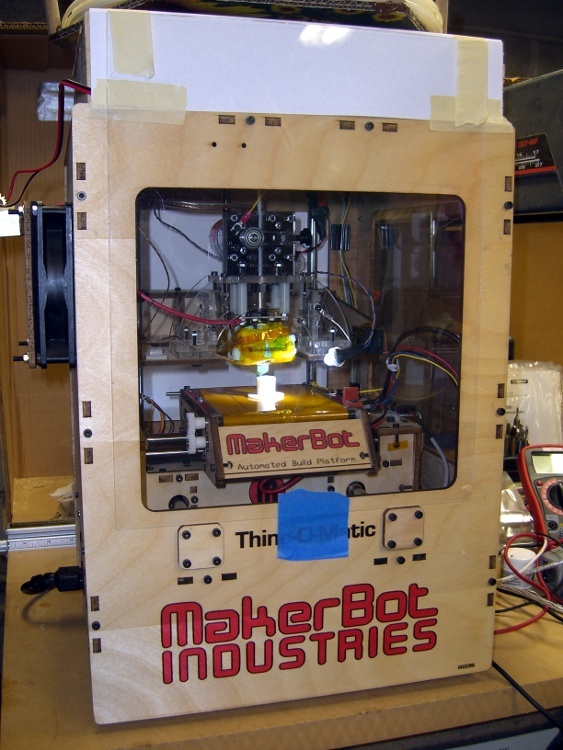
The inside of a Thing-O-Matic gets pretty dark, particularly with the Lazy Susan spool parked on top, so I added a spot light to the Z stage.
The alternative seems to be LED strip lighting all over the inside, but my Parts Heap doesn’t have any of those yet and it did have a 10 mm white LED. The thing runs at 100 mA, so a 15 Ω 1/2 W resistor (to a +5V tap), a few snippets of heat-shrink tubing, and a blob of hot-melt glue did the trick.
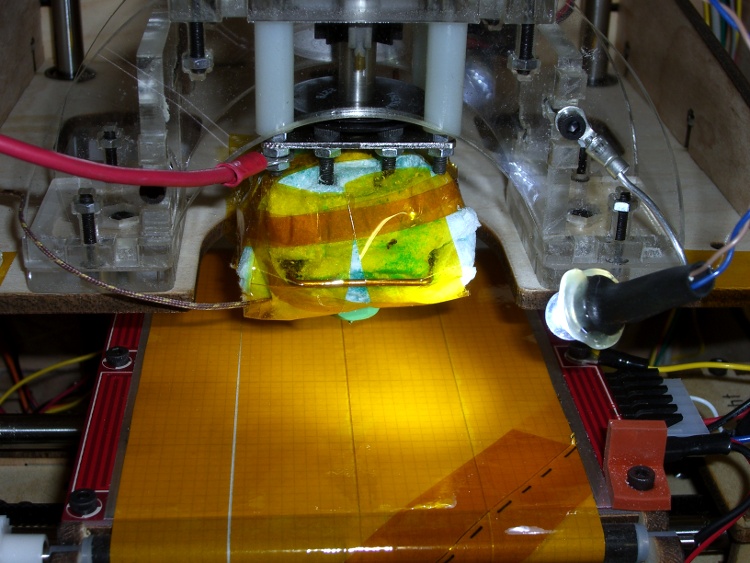
Some sculpture armature wire that’s been kicking around for years holds the LED (wrap it around, add hot-melt glue) and doesn’t mind the occasional bump. I crimped the wire in a solderless connector and grabbed it in one of the Extruder Frame screws. It’s allegedly fatigue-proof, but it looks a lot like aluminum.
A bit more detail, with a Kapton-and-graph-paper belt (about which, more later) on the ABP:
The MK5 Extruder’s DC motor seems prone to a shorted-winding failure that reduces the DC resistance of (at least) one pole to (at best) a few ohms. The A3949 H-bridge driver has an upper limit of 2.8 A, but the failed winding jams too much current through the chip and eventually (instantly?) kills it stone cold dead.
Discussions on the Makerbot Wiki tended to favor fuses. My buddy Eks suggested putting an incandescent lamp in series with the motor leads, as described there, and that’s what I’ve done. That discussion is also informative.
It’s worth noting that the A3949 datasheet has this to say about overloads:
Output current rating may be limited by duty cycle,
ambient temperature, and heat sinking. Under any
set of conditions, DO NOT exceed the specified
IOUT or TJ.
So all this may be irrelevant: any transient overload could kill the driver chip stone cold dead, regardless of how clever you (think you) are.
Anyhow.
Yesterday I came across my Big Box of Fuses and said the obvious thing:
Note: that’s not the same as the Famous Last Words “Hold my beer. Watch this!”
I clipped the oscilloscope across a 1 Ω power resistor, set a 3 A bench power supply to 12.0 V, and connected a Device Under Test between the +12 V lead and the resistor:
The #89 bulb from my TOM
A Littelfuse 3AG 1 A fast-blow fuse (actually, two of ’em)
A dead short
I used a 1 A fuse because that’s what I have. I strongly suspect a 1/2 A fuse would behave about the same way.
The oscilloscope trace starts at 0 V, jumps when the DUT contacts the resistor, and then settles at the final current. The 1 Ω resistor makes the vertical scale read directly in amps. Pay attention to the horizontal scale.
First, the lamp:
Type 89 Lamp
The peak current hits 4.5 A before the bulb lights up and limits the current to about 600 mA in the steady state. The supply’s current limiter doesn’t seem to come into play: the bulb wrestles the current under 3 A before the supply notices what’s going on. Indeed, it’s under 3 A in 2 ms and below 1 A in 20 ms.
Next, the fuse:
Littelfuse 3AG 1A Fast – 50 ms
The peak current starts off-scale high, well in excess of 7A, drops to the power supply’s 3 A limit, then falls to zero when the fuse blows 76 ms later.
Finally, the dead short:
Bare 1 ohm resistor
I changed the vertical scale to capture the initial peak, which tops out just under 10 A, obviously not limited by the power supply. The supply eventually clamps the current to 3 A and, because there’s no fuse, the current just sits there.
So…
The lamp does a much better job of protecting the H-bridge chip than the fuse:
The peak current is lower
It cuts off sooner
And the sustained current falls well within the chip’s limit
The TOM does not have a current-limited +12 V supply, which means a nominally “protective” fuse will conduct whatever current the failing motor’s winding will permit until it eventually blows. The time-to-blow depends on the fault current: if the winding fails at, say, 6 Ω the fuse will last much longer while it passes 2 A than with the 3 A you see here.
Here’s an example of how that works. The first time I tapped the fuse to the resistor, I flinched and it fell off:
Littelfuse 3AG 1A Fast – 20 ms
That’s indistinguishable from a blown fuse, but the same fuse subsequently produced this result (another fuse died to produce the first fuse picture):
Littelfuse 3AG 1A Fast – 100 ms
Moral of the story: a 1 A fuse can pass 3 A for 80 ms and live to tell the tale!
Of course, I knew how this would work out: Eks didn’t accumulate 100+ patents during his career by not knowing what he was doing…
The stock MK5 Extruder head assembly instructions suggest wrapping the thermocouple with Kapton tape before capturing it under the washer against the Thermal Core. Alas, as I’ve found, that doesn’t work well: the tape isn’t proof against mechanical forces applied to small objects and the thermocouple bead can punch through the tape to contact the Core.
This isn’t a problem until one of the heating resistors blows out and shorts the +12 V supply to the Thermal Core. The only ground path is through the thermocouple, which leads to the MAX6675 thermocouple interface chip, which generally results in a dead Extruder Controller. The third picture in that thread is chilling, isn’t it?
I cast my thermocouple into a brick of JB Industro Weld epoxy for both mechanical and electrical protection. The epoxy is rated for 500 °F (call it 260 °C), which is barely adequate for the job, but JB Weld is cheap & readily available. Note that this isn’t your really cheap garden-variety clear epoxy, which falls apart at much lower temperatures. That discussion suggests a higher-temperature epoxy from Omega, but I haven’t gone that route yet.
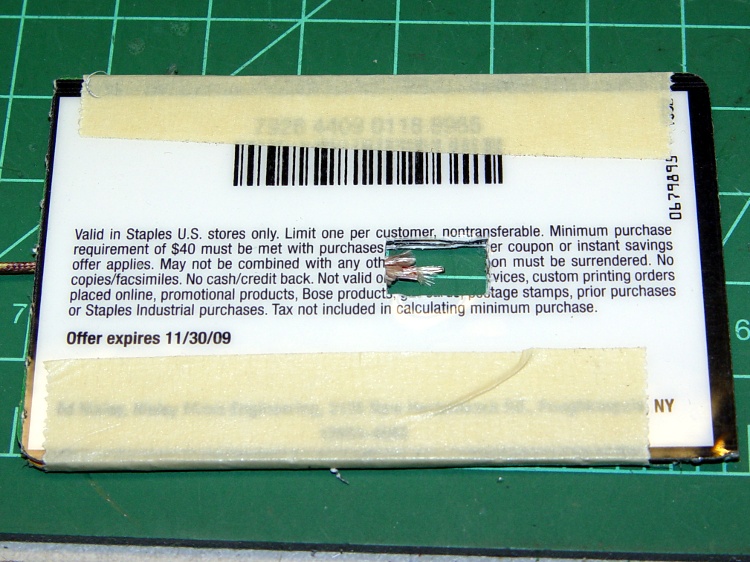
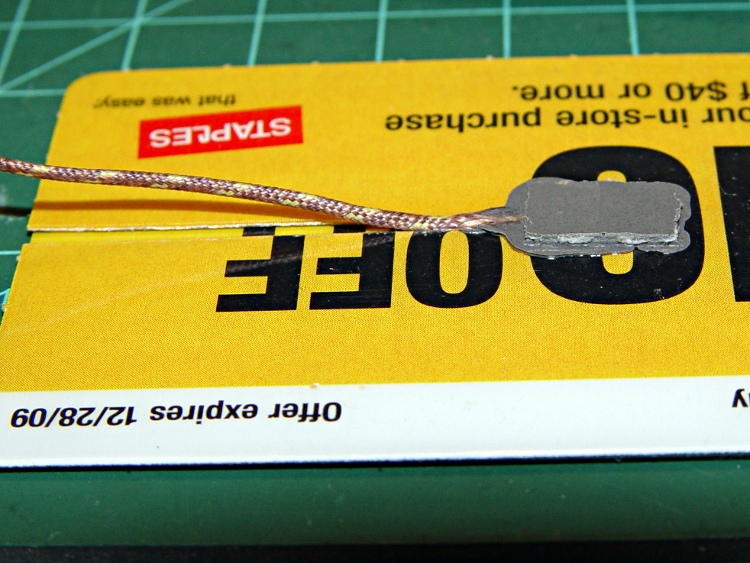
Anyhow, I converted three credit-card-thickness sale coupons from Staples into a brick-shaped mold around the thermocouple. The middle card has a slot for the thermocouple wire, which means the bead is positioned in free space in the middle of the opening.
Thermocouple positioned in mold
A close-up of the thermocouple bead:
Thermocouple positioned in mold – detail
I taped that assembly to another coupon, filled the mold with JB Weld, made sure everything was saturated, and gave it a day to cure. This view shows the brick after peeling off the top coupon, so you can see the cable slot:
Removing thermocouple from mold
A bit of filing and general cleanup made it presentable:
Finished thermocouple brick
A wrap of Kapton around the brick gives the Thermal Core washer something to grab onto:
Thermocouple in place – ceramic insulation jacket
The brick could be much smaller without any penalty. There’s no issue with excessive thermal mass here, however, because the Core itself has a 10-minute time constant, so the thermocouple has plenty of time to tag along.
The red wire in the upper-left corner connects the plate above the Thermal Core directly to the static drain ground point that leads to the ATX power supply case. In the event of a resistor failure that shorts the +12 V supply to the Thermal Core, the power supply should shut down. Whether that will actually happen, I cannot tell, but now a failed resistor won’t destroy the thermistor or the Extruder Controller.
The ceramic wool insulation (from a lifetime supply of furnace chamber lining; it’s rated for direct oil burner flame impingement) may seem excessive, but I wanted measurements from a well-insulated Thermal Core at reduced power: 40 W seems to do the trick.
However, the insulation on the bottom of the Core around the Nozzle tended to catch on the ABP’s silicone wiper. The next iteration used just the original MBI ceramic cloth insulation on the bottom, protected by Kapton tape, with ceramic wool around the rest of the Core. Much better!
After we rearranged the living room, we had a few floor lights in different locations that called for more X10 Appliance Controllers. I’m not a big fan of automated housing, because X10 communication is unreliable with a bullet, but it’s convenient to turn off all the lamps from the bedroom.
Anyhow, the old RCA HC25 X10 Appliance Modules I pulled out of the Big Box o’ X10 Stuff suffered from the usual conflict between compact fluorescent lamps and the “local control” misfeature that’s supposed to let you turn the appliance on by simply flipping the switch. The problem is that a CFL ballast draws a nonlinear trickle of current that the module misinterprets as a switch flip, thus occasionally turning the lamp on shortly after you turn it off.
This has been true since the first compact fluorescent bulbs appeared. The circuitry inside X10 modules hasn’t changed much, at least up until I bought the last round of switches quite some time ago. That’s either a Bad Thing (still a problem) or a Good Thing (everybody knows about it).
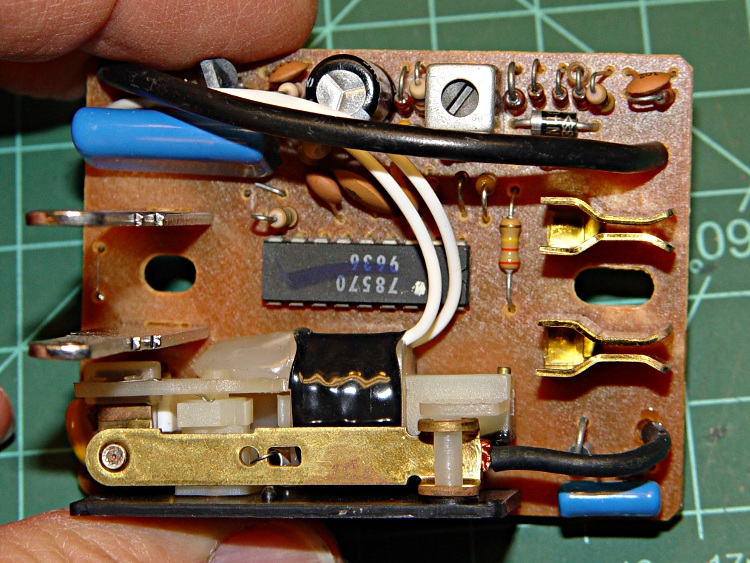
The solution (everybody knows about it, just use the obvious keywords) is to cut a jumper on the module’s circuit board that’s obviously placed there for this very reason. In this view, it’s just below the lower-right corner of the fat blue capacitor. If you need confirmation, it’s connected to pin 7 of the only IC on the board.
Snip the wire, move the cut end a little bit, and button the module up again.
Local control jumper cut
Oh, yeah. No user serviceable parts inside is a challenge around here…
I wondered if the Thing-O-Matic would benefit from having its two high-current heaters on a separate +12 V supply than the DC Extruder, after finding that the heaters dragged the +12 V output down by nearly half a volt.
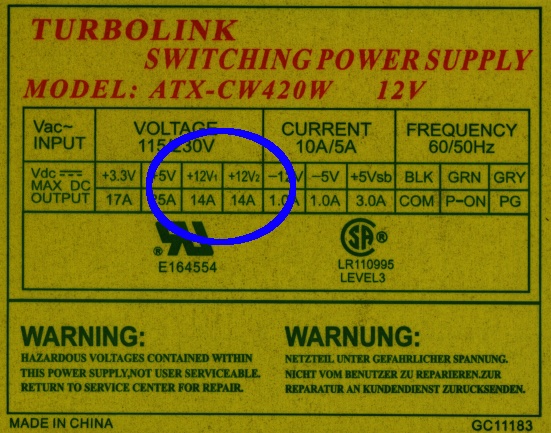
A bit of rummaging turned up a suitable ATX supply with a data plate that might justifiably lead one to believe that the supply provides separate +12 V outputs:
Turbolink ATX-CW420W power supply data plate
There’s no indication which of the four connectors might use +12V1 and +12V2, but, being that sort of guy, I applied an ohmmeter to the various yellow wires and found they were all exactly 0.0 Ω apart.
Huh.
So I opened the Warranty Void If Seal Removed top cover and found this situation:
All the yellow wires terminate in the same solder blob below the PCB
Two incoming wires got neatly spliced together in mid-air, despite having free holes in the PCB
This may not come as much of a shock: they lie…
Perhaps if you spend more money on your supply, it’ll actually live up to the data plate specs. Then, again, perhaps you’ll just be spending more money.
And, if you swap in a fancy supply for the MBI-stock one, it might not make much difference at all. I suspect the various power levels and current capacities have pretty much the same degree of integrity…
The Thing-O-Matic Motherboard rides atop an Arduino Mega (with the auto-reset option disabled), drawing most of its power from the hulking ATX connector at one end. The Mega draws power from the ATX +12 V supply and produces +5 V through its on-board regulator.
As I noted there, that regulator runs surprisingly hot when fed from +12 V, even without any additional current flowing to the Mega’s pins. The solution here required another search through the parts heap, which eventually disgorged a small heatsink that was, I think, intended for a 16-pin DIP, although I obviously added the hole for some other, long-forgotten purpose.
Motherboard regulator heatsink
A bit of fin-bending to clear the (unused) power entry jack, a dab of JB Kwik epoxy, and a clamp to keep it in place while the epoxy cures:
Clamping the Motherboard regulator heatsink
You won’t have such a heatsink, but any similarly shaped chunk of metal, even without fins, should suffice. Nothing critical about it, as long as it clears the Motherboard that will be plugged atop the Mega; you’re just increasing the surface area for heat dissipation.
The Motherboard and Mega sit in the large opening across the Thing-O-Matic’s baseplate from the ATX supply’s fan intake, where they get plenty of cooling air. Do a before-and-after test with a fingertip on the regulator to feel the improvement for yourself.
This is, admittedly, just a feel-good tweak, but a cool regulator is a happy regulator. Spread the joy…
During the conversation following my original post on the MakerBot support forum, CodeRage suggested using cartridge heaters. I asked Eks about that and he said something along the lines of “Damn straight! We used ’em all over the place! Just do it!”
CodeRage plans to retrofit his MK5 head with a pair of 230 V 150 W heaters running at 120 V to get a total of 75 W. I have qualms about running line voltage around the extruder head, but it’s certainly a better solution than toasting power resistors.
The trouble with 1/2-inch models is that they don’t fit conveniently on the Thermal Core. I’d make an adapter block with a hole for the heater and two holes for the existing cap screws, but the screws don’t quite pass around a half-inch cartridge heater.
He suggested 1/8-inch heaters from Sun Electric Heater Company, which look like just the ticket except that they’re nigh onto 40 bucks a pop. Ouch.
High Temp Industries[Edit: new link 2013-12-27] has 1/4-inch heaters for under $20 that will fit in the space available. If I understand the configuration options, you can even get 12 V 30 W heaters (the same power as the existing resistors) with a 1000 °F (call it 500 °C) temperature rating.
So I think what’s needed is to get some of those heaters, machine blocks to hold them on each side of the Core, and see how that works. The heaters will fit between the resistor screw holes and the Core is just about exactly 1 inch long. What’s not to like?
This might work… except for the fact that HTI has a $150 minimum order, which is somewhat off-putting even for me. Anybody up for a group buy of ten cartridge heaters?
Note that if you swap in some cartridge heaters, you really should do the separate +12 V supply Extruder Controller hack described there.
[Update: Zach @ MBI has ordered a stack of cartridge heaters for their internal testing (he promises to send me some), plans a retrofit kit, and may become a retail source for the heaters. He reports the lead time to get heaters in bulk is something over two weeks, which is a lot longer than I expected.
In light of that, I will hold the “group order” until I have a better handle on what’s needed to retrofit cartridge heaters into the existing MK5 head, how they’ll actually work, and what PID loop retuning may be required. Once I know more about all that, we can proceed.
Having MBI handle the ordering & shipping makes sense to me!]






 The Smell of Molten Projects in the Morning