The Smell of Molten Projects in the Morning

Ed Nisley's Blog: Shop notes, electronics, firmware, machinery, 3D printing, laser cuttery, and curiosities. Contents: 100% human thinking, 0% AI slop.

Category: Electronics Workbench

Electrical & Electronic gadgets

  • Cordless Screwdriver Switch Re-Repair

    The switch on that screwdriver failed again, this time by having the internal switch mounting bosses disintegrate:

    Cordless screwdriver - broken switch mounts
    Cordless screwdriver – broken switch mounts

    Not being one to worry about outside appearances, I simply drilled out the bosses to fit a pair of 4-40 screws, put the nuts inside, and it was all good:

    Cordless screwdriver - switch with screws
    Cordless screwdriver – switch with screws

    Except that the switch now required an unseemly amount of force to operate in the forward direction. The switch is the cheapest possible collection of bent metal strips and injection molded plastic bits you can imagine, but with some bending and re-staking and general futzing around, it works fine again.

    This still makes no economic sense…

  • Stepper Motor Oscillocope Synchronization: Arduino to the Rescue!

    In order to get good scope pictures of the winding current in a stepper motor, the scope must sync to the step pulses. However, it must also sync to the groups of 32 step pulses that make up a single set of four full steps, because the winding current repeats for each of those groups. Triggering once per revolution and delaying for a fixed amount will get you where you need to be.

    The sync wheel provides a once-per-revolution pulse, but there’s some jitter in the edge for all the usual reasons and you’d be better off with a sync based on the stepper driver’s step input. The general idea is to find the leading edge of the optical pulse, find the next step pulse, then produce output pulses based on the step signal. Assuming a regular step pulse stream (from a pulse generator, for example), the output will be both locked to the wheel rotation and to the step pulses.

    Normally this calls for a tedious wiring session involving logic gates and counters, but an Arduino has all the requisite machinery built in. The trick is to generate the pulses using the ATmega’s hardware, rather than program instructions, thus eliminating the usual jitter caused by instruction execution time.

    I set up Timer 1 in Mode 4 (CTC with OCR1A controlling the matches) to count step pulse inputs on its T1 external clock input pin and produce a once-per-revolution output pulse on the OC1A pin. Because the output changes on the rising edge of the input clock, its rising and falling edges will provide rock-solid stable scope synchronization.

    The big picture goes a little something like this:

    • Tell the counter to set the output on match, load the duration of the output pulse
    • Wait for the once-per-revolution signal, then enable the external clock input
    • Wait for the comparison to happen and reset the match flag
    • Set a one-pulse delay and tell set the counter to clear the output on match
    • Wait for the compare, clear the flag, turn off the counter
    • Wait until the once-per-rev signal goes low
    • And then do it all over again

    Which produces this:

    Sync Wheel
    Sync Wheel

    Top trace = optical signal from interrupter, middle = 1/rev sync from Arduino OC1A pin, bottom = step pulses. The motor is turning 3.5 rev/s = 210 rev/min. The top half of the screen is at 2 ms/div, the bottom half at 200 μs/div.

    You could synchronize the counter to the 1/rev input exactly once, then produce the output pulse just by counting stepper pulses. It’d also be nice to have a pulse that repeats for each group of 32 microsteps within each set of four full steps, perhaps settable to a particular microstep within the group. All that’s in the nature of fine tuning.

    Of course, devoting an Arduino to this project would be absurd, but for a one-off effort it makes a lot of sense.

    The Arduino source code:

    // Stepper motor driver synchronization
    // Ed Nisley KE4ZNU June 2011
    
    //-- Pin definitions, all of which depend on internal hardware: do *not* change
    
    #define PIN_REV	2					// INT0 = positive 1/rev pulse from optical switch
    #define PIN_STEP 5					// T1 = positive 1/step pulse from stepper driver
    #define PIN_TRIGGER 9				// OC1A = positive trigger pulse to scope
    
    #define SYNC_OFFSET	15				// steps from 1/rev puse to start of first 4-full-step group
    
    #define PIN_TRACE_A    10
    #define PIN_TRACE_B    11
    #define PIN_TRACE_C    12
    
    #define PIN_LED		13
    
    //---------------------
    // Useful routines
    
    //--- Input & output pins
    
    void TogglePin(char bitpin) {
    	digitalWrite(bitpin,!digitalRead(bitpin));    // toggle the bit based on previous output
    }
    
    //----------------
    // Initializations
    
    void setup() {
    
      pinMode(PIN_REV,INPUT);		// INT0 1/rev pulse from wheel
    
      pinMode(PIN_STEP,INPUT);		// T1 step pulse from stepper driver
    
      pinMode(PIN_LED,OUTPUT);
      digitalWrite(PIN_LED,LOW);
    
      pinMode(PIN_TRACE_A,OUTPUT);
      pinMode(PIN_TRACE_B,OUTPUT);
      pinMode(PIN_TRACE_C,OUTPUT);
    
    //--- Prepare Timer1 to count external stepper drive pulses
    
      TCCR1B = B00001000;				// Timer1: Mode 4 = CTC, TOP = OCR1A, clock stopped
    
      pinMode(PIN_TRIGGER,OUTPUT);		// OC1A to scope trigger
    
    }
    
    //----------------
    // The main event
    
    void loop() {
    
    //-- Wait for rising edge of 1/rev pulse from optical switch
    
      TCCR1A = B11000000;						// COM1A set on compare
      TCNT1 = 0;								// ensure we start from zero
      OCR1A = SYNC_OFFSET;						// set step counter
    
      while(!digitalRead(PIN_REV)) {			// stall until 1/rev input rises
    	TogglePin(PIN_TRACE_A);
      }
    
    //-- Got it, fire up the timer to count stepper driver pulses
    
      TCCR1B |= B00000111;						// enable clock from T1 pin, rising edge
    
      digitalWrite(PIN_LED,HIGH);				// show we got here
      digitalWrite(PIN_TRACE_A,LOW);
    
      while(!(TIFR1 & _BV(OCF1A))) {			// wait for compare
    	digitalWrite(PIN_TRACE_B,digitalRead(PIN_STEP));
    	continue;
      }
      TIFR1 |= _BV(OCF1A);						// clear match flag
    
    //-- Scope sync pulse now active
    
      digitalWrite(PIN_LED,LOW);				// show we got here
      digitalWrite(PIN_TRACE_B,LOW);
    
    //-- Wait for another step pulse to clear scope sync
    
      TCCR1A = B10000000;						// COM1A clear on compare
      OCR1A = 1;								// wait for another pulse
    
      while(!(TIFR1 & _BV(OCF1A))) {			// wait for compare
    	digitalWrite(PIN_TRACE_B,digitalRead(PIN_STEP));
    	continue;
      }
      TIFR1 |= _BV(OCF1A);						// clear match flag
      digitalWrite(PIN_TRACE_B,LOW);
    
    //-- Shut down counter and wait for end of 1/rev pulse
    
      TCCR1B &= ~B00000111;						// turn off timer clock
    
      while(digitalRead(PIN_REV)) {				// stall until 1/rev pulse goes low again
    	TogglePin(PIN_TRACE_C);
      }
      digitalWrite(PIN_TRACE_B,LOW);
    
    }
    
  • OPB815 Optical Switch: Always Measure Your Components

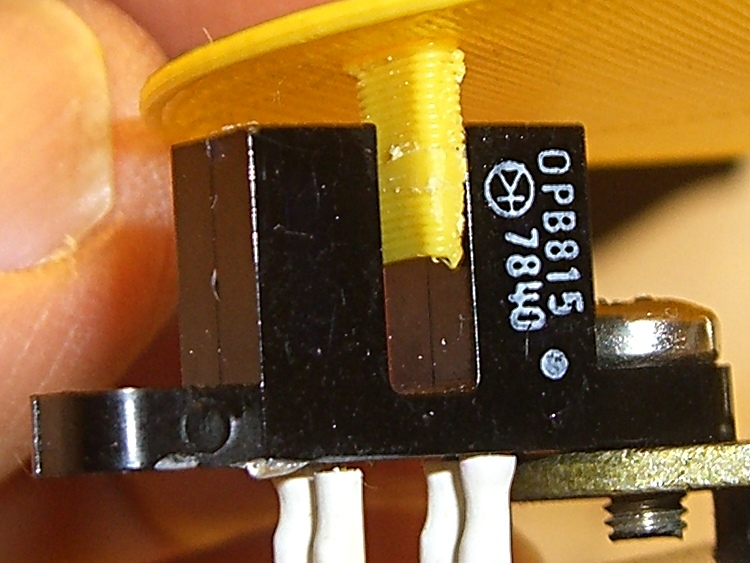
    Given this ID printed on the side of an old OPB815 optical interrupter switch:

    OPB815 Optical Interrupter Switch - detail
    OPB815 Optical Interrupter Switch – detail

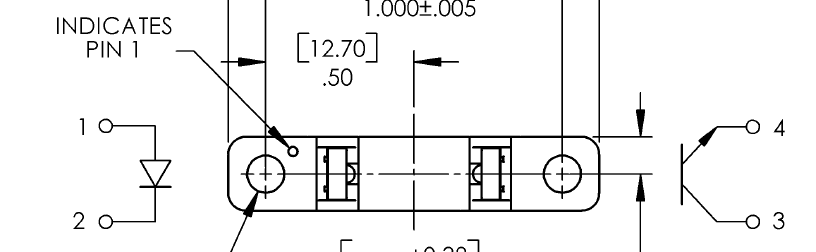
    And this pinout diagram from a randomly chosen datasheet for that part number:

    OPB815 Datasheet Pinout Diagram
    OPB815 Datasheet Pinout Diagram

    One might reasonably be led to believe that the white dot on the part marks the LED anode. That’s what I thought, too, but the innards are actually rotated 180° from the picture: the dot marks the transistor collector.

    Took me a while to figure that out; I eventually tore one apart and used my pocket camera to look for the blue-white glare of the IR emitter.

    After the dust settled, I rummaged around in the impacted shitpile holding my paper documents and found the original 1982 datasheet, with my very own scrawled notes:

    Original OPB815 Datasheet Pinout Diagram
    Original OPB815 Datasheet Pinout Diagram

    Back in the day, the dot on pin 1 marked the transistor collector…

    Memo to Self: No, scanning all that old paper wouldn’t help.

  • Why Manual CNC Is A Bad Idea

    Crushed tool length probe switch
    Crushed tool length probe switch

    Most of my machining involves one-off setups and simple cuts, so I usually type G-Code directly into EMC2’s Axis interface: CNC hits precise locations and makes smoother cuts than I ever could. Most of the time, that works really well.

    Occasionally, though, I think one thing and type something else.

    Just a typo, happens all the time…

    Better, of course, to write a little program and debug it, but then a simple task starts to look a lot like work.

    Fortunately, I have a bunch of those switches on hand.

  • Thing-O-Matic: Thermal Runaway!

    Well, it finally happened: the Extruder Controller jammed the extruder heater full on and the Thermal Core temperature went on an uncontrolled rise.

    This changes the thermal runaway scenario from “It can’t happen here” to “Once is happenstance“.

    I’d been tweaking an OpenSCAD model, slicing it, not liking the results shown in Skeinlayer, re-tweaking, re-slicing, and iterating around that loop for quite some time. When I figured I was close to having a good model & G-Code, I turned on the heaters to get the printer ready; heating from a cold start requires about 12 minutes due to the double aluminum build plates and hulking cartridge heater adapters.

    I made several (well, many) more iterations through OpenSCAD and slicing, flipped to the Control Panel, and discovered the Thermal Core temperature was passing through 285 °C on the way up. Now, the temperature doesn’t rise abruptly, but it was already far higher than the original 210 °C setpoint; you cannot set an Extruder temperature over 260 °C (!) without passing through a confirmation dialog.

    Oddly, the setpoint temperatures for both the Extruder and HBP showed 9 °C. The build platform was cooling off, as you would expect for a setpoint far below the actual temperature, but the Thermal Core heater was jammed on.

    An LED indicator on the Z stage shows when the EC switches the cartridge heater on. That LED was lit, so I knew the EC had gone nuts: the heater was on, even though the Thermal Core temperature was far above the setpoint.

    I passed up an opportunity for Science by punching the Emergency Shutdown button on the Thermal Lockout: the Thing-O-Matic went dark. Turned it back on, reconnected RepG, and ran a few yards of smoking hot filament out of the nozzle. Yes, the Thermal Core really was that hot… I ran the filament drive at 25 rev/min for 10 seconds and it sprayed filament like crazy.

    The Thermal Lockout had not tripped, very much as expected. Back when I was figuring out where to mount the thermal switches, those measurements suggested that the Thermal Core would probably exceed 325 °C before the 100 °C NC switch at the top of the Thermal Rise opened. The Core hadn’t gotten close to that temperature, but it was on the way!

    The 40 °C NO switch glued to the base of the filament drive had long since closed and lit the yellow LED, but even I agree that’s an absurdly low temperature for such a warning. I have no idea what the actual temperatures were, but I’m thinking of putting a pair of thermocouples in the obvious spots.

    I’ve devoted considerable time and energy to eliminating erratic operation and glitchy behavior, to the extent that the printer has behaved flawlessly up to this point. Obviously, something glitched the Extruder Controller, which is basically an Arduino-class microcontroller monitoring two temperature sensors and driving two MOSFETs, while chatting with the Arduino Mega that lives under the Motherboard.

    A power glitch will hard-reset the Mega (because I connected +Power Good to -Reset), but the (2.7, anyway) MB firmware has the disturbing property of not resetting the EC when it restarts. You can confirm this by turning the heaters on using the Control Panel, closing it, then blipping the Motherboard Reset button: the heaters remain on. I’ll connect +Power Good to the EC’s -Reset the next time I open the box.

    The Thing-O-Matic worked fine (again) after the shutdown, but, as far as I’m concerned, all the effort I put into the Thermal Lockout on the Extruder Heaters has been justified. If the EC ran away once, it will run away again.

    I don’t have an MBI MK6+ Thermal Core or their Safety Cutout Switch circuit, but a look at the schematic suggests a heads-up if you use that hardware. The Safety Cutout Switch has (IMO, anyway) several design flaws:

    • The relay is not energized during normal operation. If it fails to energize when the thermal switch activates, the heater remains active.
    • By design, the 12 V relay sees only 9 V when the thermal switch operates. The usual wiring resistance and MOSFET resistances, in combination with a sagging power supply,  can reduce the available voltage below the relay’s 8.4 V must-operate voltage: it may not cut off the heater.
    • The relay cannot operate when the ground connection in the Alarm cable isn’t connected, as is the case in a Cupcake without a matching E-Stop jack. In any printer, a disconnected Alarm cable or a broken ground wire will silently prevent the relay from operating.

    I’m willing to be proven wrong on any of those points, but as nearly as I can tell, the cartridge heater in a MK6+ can operate with a completely non-functional “Safety Cutout” and you’ll never know there’s a problem. When installed exactly as directed and with the entire printer working properly, it’ll probably work… but if everything worked properly, you wouldn’t need it.

    [Update: MBI recently issued a slipstream update that put the Safety Circuit at Rev B. The relay now attaches to the Extruder Controller MOSFET, thus eliminating the requirement for the Alarm cable’s ground.  However, the relay now sees the heater’s high-current voltage drop on both terminals. Measure the actual voltage at the Safety Circuit’s input terminals with both heaters running. If that voltage is less than 11.2 V, the relay must operate below its must-operate voltage in order to cut off the Extruder heater.]

    The rant at the bottom of that post gave some features that I considered vital when I was designing the Thermal Lockout for my printer. I thought it went without saying that a safety circuit should fail safe: if the safety circuit does not operate, the protected equipment must not operate. As long as the Thermal Switch functions correctly, my Thermal Lockout will fail safe: an inoperative relay, a broken wire, a disconnected switch, or a weak power supply will prevent the printer from starting.

    My circuit is not completely fail-safe, of course, but the most common problems cause a hard shutdown.

    It really does matter…

    I’m now thinking that a thermal switch on the heated build platform is a Good Thing. I suspect the solder will melt and the connector will fall off before melting the acrylic in an ABP or charring the plywood in an HBP, but it’d be interesting to test that assumption, wouldn’t it?
  • Thing-O-Matic: Reset on Power (Not So) Good

    Having added a dummy load to pull a minimum current from both the +5 V and +12 V supplies, it seemed reasonable to connect the ATX +Power Good signal to the Arduino’s -Reset input. That ensures a power glitch will force a hard reset, rather than produce random crashes / instability / weirdness, and make the problem obvious.

    Of course, that presumes the power supply notices the glitch and drops the +Power Good line. That’s probably an incorrect assumption, but the only way to test it requires hitting the power supply with a crowbar and I’m just not going to go there.

    Anyhow.

    This also ensures the Arduino gets a hard reset when I turn the power off by triggering the manual shutdown button on the thermal lockout control box. The Arduino draws power through the USB cable from the PC (at least on the Foxconn box I’m using) and sometimes starts up crazy; that will no longer happen.

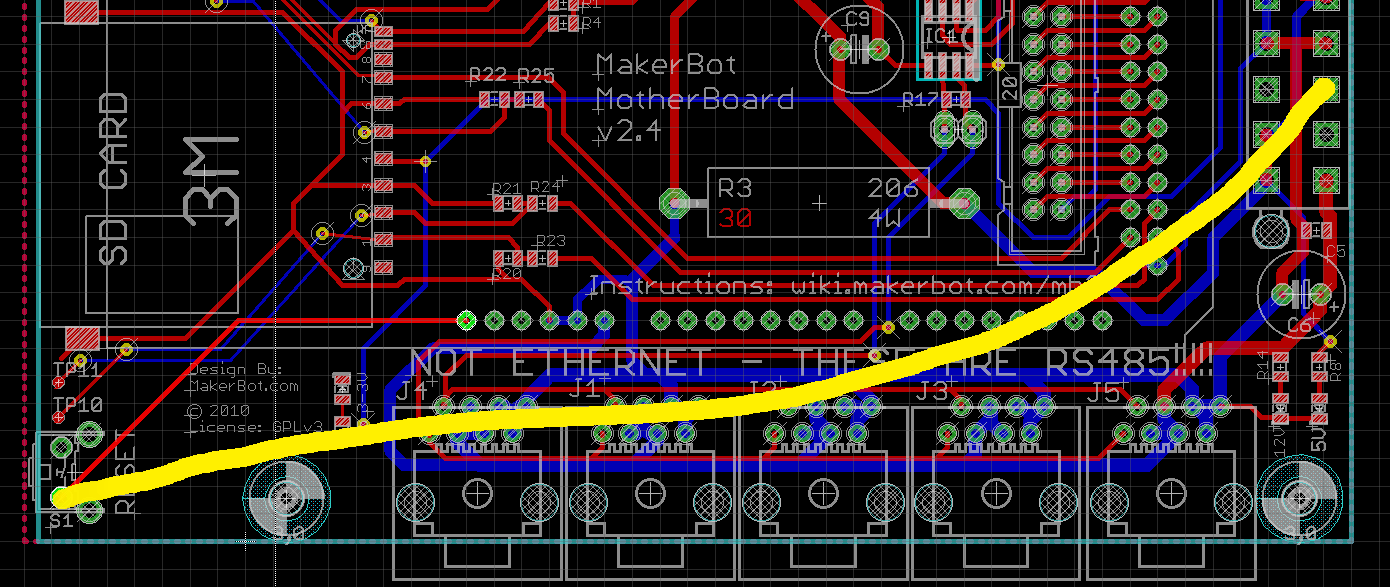
    The +Power Good signal arrives through the Gray wire on ATX pin 8 (it also drives an LED on the lockout box) and the -Reset signal is the outside pin on the Motherboard’s manual reset pushbutton. The new connection looks like this:

    Power Good to Reset - MB Schematic
    Power Good to Reset – MB Schematic

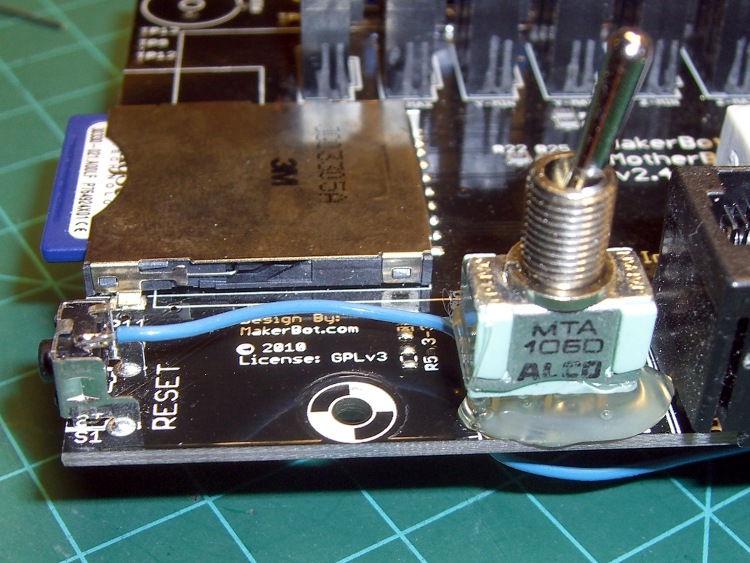
    Being no fool somewhat cautious, however, I added a switch that can disconnect the two lines; if it turns out the +Power Good signal has any glitches, I can use the original mode while scratching my head.

    A giant blob of hot melt glue holds the switch in position:

    Power Good Enable Switch to MB Reset Button
    Power Good Enable Switch to MB Reset Button

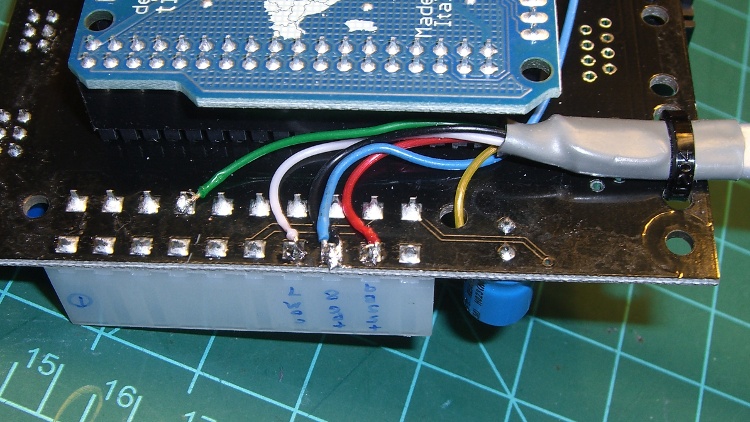
    A wire burrows through one of the unused RS-485 connector mounting holes under the switch on its way to the ATX connector. It’s the Blue wire below the board in the previous picture, enters from the top right here, and terminates on the third pad over with the Black wire that joins the cable on the way to the Lockout box

    ATX Power Good connection
    ATX Power Good connection

    Now I’ll see whether the Thing-O-Matic begins resetting at random moments. After doing all the various mods & improvements you’ve seen over the past few months the printer has been quite reliable, so I have some hope that this change will produce … no change.

    As a quick test, I let the printer sit all day with the Thermal Core and HBP temperatures cycling around 50 °C and all four steppers enabled. Any reset would disable the steppers and make itself obvious, but after two days it’s all good.

    One good sign: the LED ring around the extruder head just barely changes brightness as the heaters cycle.

    Oh, and the steppers don’t overheat, either. This thing is starting to behave like a real 3D printer should!

    If it does start resetting, however, I’ll add a latch inside the Thermal Lockout box that captures short +Power Good glitches and lights Yet Another LED.

  • Thing-O-Matic: Minimum Power Supply Load

    Dummy load in place
    Dummy load in place

    The ATX power supplies commonly used in PCs generally require a minimum load of about an amp on the +5 V and +12 V lines to ensure good voltage regulation, but the Thing-O-Matic Motherboard has only a 30 Ω power resistor that draws 170 mA. They’re also designed for relatively constant-current loads, which the Thing-O-Matic is not, by any stretch of the imagination, so it’s no wonder the voltages jump all over the place.

    I think, but cannot prove, that many of the random problems plaguing long-duration prints arise from power glitches. That load resistor on the +5 V line was, at best, a stop-gap measure, and this is what I had in mind from the start. There are additional constant loads here and there throughout the Thing-O-Matic, but it really does not apply a known minimum load to the power supply.

    I got a stock of 6 Ω resistors for that heater project and used a trio here: one draws 800 mA from +5 V (about an amp, including the MB load) and the other two in series draw 1 A from +12 V. The little fan runs from +12 V, although I may connect it to +5 V to make it quieter; the 16 W total power dissipation is too high for convection cooling.

    Power resistors on heat spreader
    Power resistors on heat spreader

    Note that these are 50 W resistors dissipating 6 W apiece while running at room temperature. Yes, they look like extruder heater resistors, but this is an application they’re designed for.

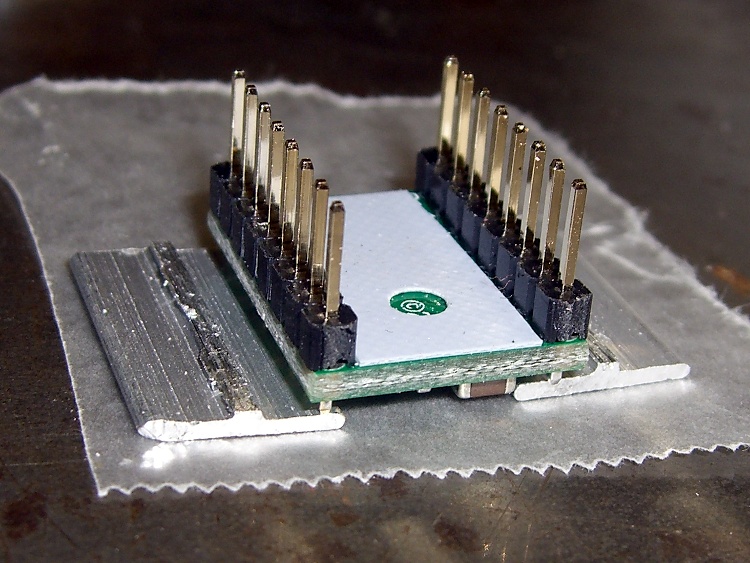
    A bit of machining mated a junked CPU cooler to a half-inch slab of aluminum that serves as a heat spreader. The cooler had many tabs and protuberances on its bottom surface that I simply sliced off with an abrasive wheel. Two pieces of brass shim stock filled in a mysterious recess along the right edge in this picture. The cooler’s spring clamp engages a pair of wire tabs screwed to the spreader and the force smushes a layer of thermal compound into the air gaps.

    CPU heatsink on aluminum spreader
    CPU heatsink on aluminum spreader

    The holes atop the cooler didn’t match up with any fans in my collection, but that’s why I have a Thing-O-Matic. I had to rotate the fan case to get the holes to fit, which was trivially easy in OpenSCAD.

    Fan Adapter Plate Model
    Fan Adapter Plate Model

    And then it built about like you’d expect:

    Fan adapter plate
    Fan adapter plate

    Yes, it really needs a finger guard, but that’s in the nature of fine tuning…

    Assembled dummy load
    Assembled dummy load

    The OpenSCAD source code, with a rather fat ThreadWidth setting. IIRC, this was fallout from a random walk through the Skeinforge parameter space.

    // Fan adapter plate for CPU cooler
    //  Used for Thing-O-Matic minimum current loads
    // Ed Nisley - KE4ZNU - Mar 2011
    
    // Build with...
    //	extrusion parameters matching the values below
    //	+2 extra shells
    //	3 solid surfaces at top + bottom
    
    include </home/ed/Thing-O-Matic/lib/MCAD/units.scad>
    
    // Extrusion parameters for successful building
    
    ThreadWidth = 1.0;					// should match extrusion width
    ThreadZ = 0.33;						// should match extrusion thickness
    
    HoleWindage = ThreadWidth;			// enlarge hole dia by extrusion width
    
    // Plate dimensions
    
    PlateX = 70.0;
    PlateY = 66.0;
    PlateZ = 5.0;
    
    FrameHoleSpace = 50.0;				// mounting holes in frame
    FrameHoleXOffset = 10.0;			//  ... offset from front left
    FrameHoleYOffset = 10.0;			//  ... which are *not* symmetrical!
    FrameHoleDia = 3.0 + HoleWindage;	// from frame holes
    FrameHoleRadius = FrameHoleDia/2;
    
    FanHoleSpace = 40.0;				// fan hole separation in X & Y
    FanHoleDia = FanHoleSpace * sqrt(2);	// diameter of hole circle
    FanHoleRadius = FanHoleDia / 2;
    
    FanAngle = acos(FrameHoleSpace / FanHoleDia) - 45;
    
    FanDuctDia = 48.0;
    FanDuctRadius = FanDuctDia/2;
    
    FanCenterX = PlateX/2;
    FanCenterY = PlateY/2;
    
    FanScrewDia = 4.0 + HoleWindage;	// from fan frame holes
    FanScrewRadius = FanScrewDia/2;
    
    // Convenience settings
    
    BuildOffsetX = 3.0 + PlateX/2;		// build X spacing between top & bottom plates
    BuildOffsetY = 3.0 + PlateY/2;		//	... Y
    
    Protrusion = 0.1;					// extend holes beyond surfaces for visibility
    HoleZ = PlateZ + 2*Protrusion;
    
    //-- Build it!
    
      difference() {
    	cube([PlateX,PlateY,PlateZ],center=true);
    
    	translate([(FrameHoleXOffset - FanCenterX),(FrameHoleYOffset + FrameHoleSpace - FanCenterY),0])
    	  cylinder(r=FrameHoleRadius,h=HoleZ,center=true,$fn=6);
    	translate([(FrameHoleXOffset + FrameHoleSpace - FanCenterX),(FrameHoleYOffset - FanCenterY),0])
    	  cylinder(r=FrameHoleRadius,h=HoleZ,center=true,$fn=6);
    
    	cylinder(r=FanDuctRadius,h=HoleZ,center=true,$fn=48);
    
    	rotate(a=[0,0,FanAngle]) {
    	  for(x=[-FanHoleSpace/2,FanHoleSpace/2]) {
    		for(y=[-FanHoleSpace/2,FanHoleSpace/2]) {
    		  translate([x,y,0])
    			cylinder(r=FanScrewRadius,h=HoleZ,center=true,$fn=6);
    		}
    	  }
    	}
      }
    

    The original as-it-was-being-machined heat spreader dimensions:

    Dummy load - As-built spreader dimensions
    Dummy load – As-built spreader dimensions