Ed Nisley's Blog: Shop notes, electronics, firmware, machinery, 3D printing, laser cuttery, and curiosities. Contents: 100% human thinking, 0% AI slop.
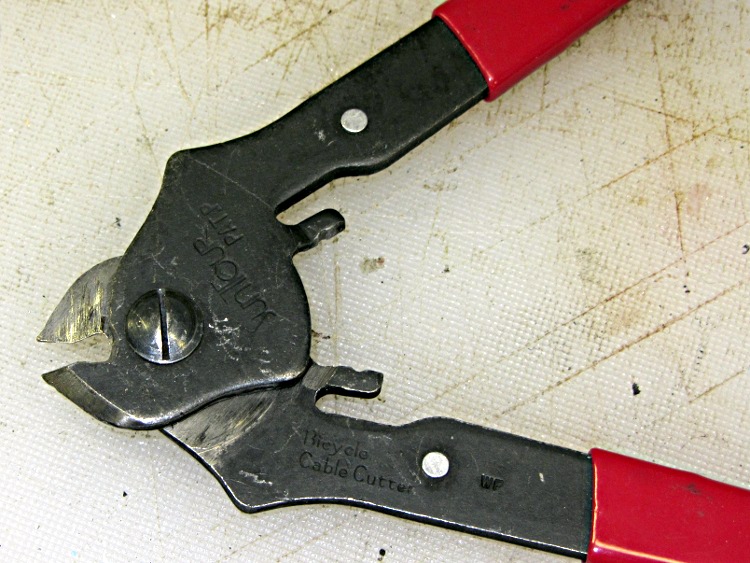
It should go without saying, but you do not cut music wire with diagonal cutters intended for electrical wire or the low-carbon steel shears built into wire strippers. I use a bicycle cable cutter that easily slices through the hard wire used in brake cables and their housing:
Every now and again I touch up the jaws with a diamond file to get rid of small dings; despite being hardened, those fine points seem particularly prone to burrs.
When you see an ordinary wire cutter with matching half-moons in each blade, you know what happened…
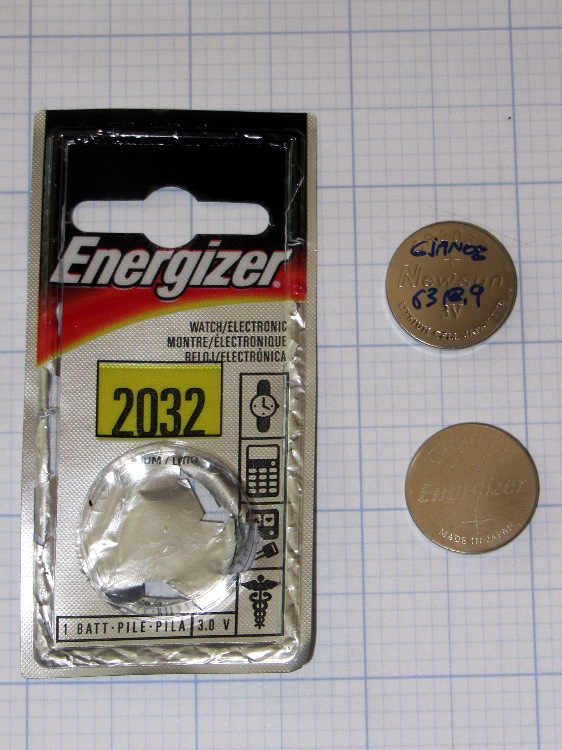
The display on Mary’s Cateye Astrale cyclocomputer (remember cyclocomputers?) faded to gray, which meant a new CR2032 lithium cell was in order. I grabbed one from the heap, popped out the old cell, inserted the new cell, and … the display stayed blank.
Quick like a bunny, I reinserted the old cell to save the odometer (15524 miles) and wheel circumference (1475 mm) data; the display returned to dim gray.
The “new” cell, which came from an unopened pack, read 0.45 V with no load…
The cell didn’t have a date code, but the package sports a cryptic MU that might encode the date of manufacture or the date of packaging or the copyright date or something; the various search results aren’t forthcoming and the Energizer site gives no explanation.
I’m pretty sure I haven’t owned that package for more than a few years and it’s been in a shirtsleeve environment (plus the occasional hot van) ever since.
Another Energizer cell from a more recent lot, bearing CA on the package and YA on the cell, worked fine.
Being that sort of bear, I wrote the date and mileage on the previous cell (a Newsun, whoever they are, with a 3Y code), because the last time around the odometer value didn’t survive the cell change. The current total works out to 277 miles/month = 3300 miles/year, including winter downtime, which is fine with us; we mostly ride the bikes around town on errands and take the occasional tour.
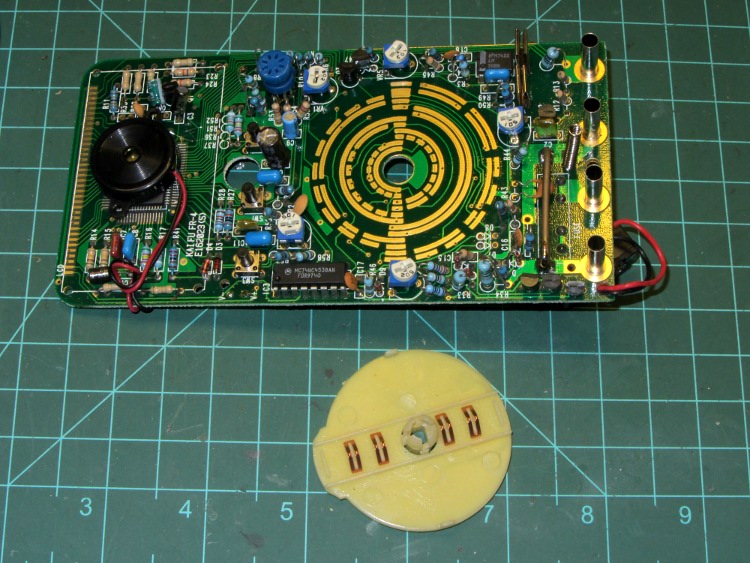
One of my multimeters began reporting bogus values that improved by working the range switch back-and-forth, which suggested the switch contacts need cleaning. Taking the meter apart was easy, right up to the point where I removed the range switch from the PCB by compressing the four locking tabs on the central shaft:
Multimeter range selector switch
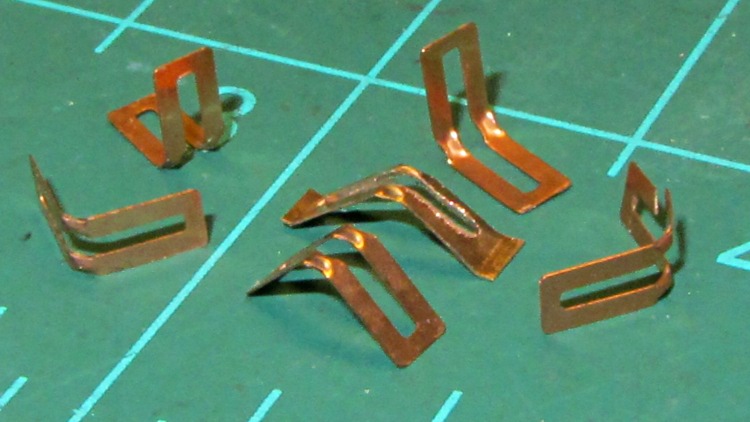
Just before taking that picture, the switch launched half a dozen spring contacts across the bench, my shirt, and the floor… I recovered four for the picture and later found a fifth smashed on the floor, but the last contact remains AWOL.
The contact in the middle, the oddly shaped one with small tabs on the ends, is a prototype replacement conjured from 6 mil phosphor bronze stock:
Multimeter range switch contacts
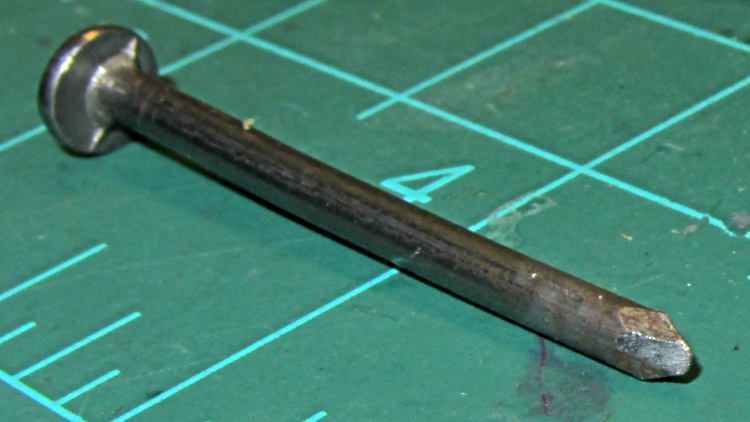
The little domes ensure a good sliding surface, but require two bends in the middle of the contact and some way to shape the metal into a dome. After a few experiments, I filed the end of a nail into a rounded chisel that worked pretty well:
DMM switch contact punch
The original contacts came from 3.5 mil stock and have considerably more flex; 6 mil stock is what I have.
I think I should make half a dozen contact springs to replace the entire set, a task requiring more time than I have right now. For the record, the overall process goes like this:
lay out overall shape, slightly longer than needed
cut center opening with abrasive wheel
cut out contact
punch contact domes (from back = dimples)
bend to shape
trim ends to length (not done in picture)
dress raw edges (not done in picture)
Given the number of parts and the fiddly accuracy required to make the slot, this might be a good job for the Sherline, although clamping each little proto-spring down while getting the abrasive wheel in there seems daunting.
Perhaps cutting the slots and punching the dimples would work better before cutting out the contacts, with a sheet clamped on four sides? The center will be floppy, what with all the slots, but grinding slots on the middle contacts first might be helpful. Would adhesive under the sheet to hold down the middle gunk up the abrasive wheel?
A Black & DeckerPocket Power emerged from the heap and refused to take a charge, which obviously calls for a teardown. The case has three screws, one lurking behind the label:
Pocket Power – case screws
The sticker over on the right says it’s five years old, which explains the whole problem right there; you can evidently buy new-old-stock units from the usual low-dollar sources that will arrive with a similarly dead battery.
Peeling off the rubber bumpers and prying the case open reveals the innards:
Pocket Power – internal layout
The battery pack looks to be an octet of ordinary NiMH cells; the label on the other side of the shrink wrap reports 9.6 V @ 1200 mA·h, which is about what you’d expect, with a date in mid-2007 that matches the sticker on the case.
The upper left corner of the main label has some interesting information:
Pocket Power – label specs
The tiny wall wart that came with the unit produces 12 VDC at 300 mA, which doesn’t match the INPUT spec at all. Perhaps the maximum current from the internal pack made its way to the label by mistake?
The label also shows the reason I got this thing: it can produce just enough 120 VAC power to run an arbitrary wall wart charger for a gadget that doesn’t charge from a 12 VDC source. Upconverting 9.6 VDC to 120 VAC, then downconverting it to, say, 14.4 VDC makes no sense whatsoever, unless that’s the only way to charge that particular gadget. Which has, I’m sorry to say, been the case every now and again.
I think the Model name has a typo: everything else suggests this is a CP120B. So it goes.
Unsoldering the leads and perpetrating the obvious tests produces these curves:
B&D Pocket Power
The black curve is the initial “won’t accept a charge” state with the wall wart and internal circuitry; the pack obviously has two weak cells. The curves in the lower left correspond to individual cells and series pairs that I discharged to 0.9 V/cell after the top curve ended.
The tiny stroke between the sets, way over on the Y axis, is cell pair BC (my arbitrary labels) that probably accounts for the sudden drop in the black curve. However, the orange curve also came from pair BC after charging for about 18 hours at 120 mA, so they’re not completely dead. Their capacity has dropped to about 700 mA·h, though, which isn’t good.
Soldering the pack back together and charging for another 18 hours at 120 mA produced the green curve at the top, which shows the same sudden dropoff at about 700 mA·h.
So I’ll put it back together again and let it charge for a while, but new cells will definitely brighten its disposition.
After un-bending the top of a pole lamp that suffered an untimely collision with the floor, I discovered that the entire stock of three-way bulbs in the heap had at least one burned-out filament each; I’d acquired them when Mom moved out of the Ancestral House, so they dated back a long time. So I figured I’d insert a decently sized single-filament bulb and be done with it.
Three-way lamp sockets have an additional tab contact between the usual central contact and the outer shell:
Interior of 3 way lamp socket
The shell forms the common contact for the filaments and the switch counts in binary: off / off, off / on, on / off, on / on. In principle, the tab sits low enough to not contact the shell of an ordinary bulb.
I was doing this in the Basement Laboratory Workshop Wing, with the lamp plugged into the outlet strip along the front edge of the bench; that way, I simply poked the power strip button to remove line voltage from the lamp while swapping bulbs. So I:
turned the power strip off
unscrewed the last dead three-way bulb
threw it away
screwed in an ordinary bulb
turned the strip on
At which point all the fluorescent overhead lights in the Laboratory went dim, the shop resounded with a deep resonant groan, and the acrid smell of electrical death filled the air. Elapsed time less than a second, tops.
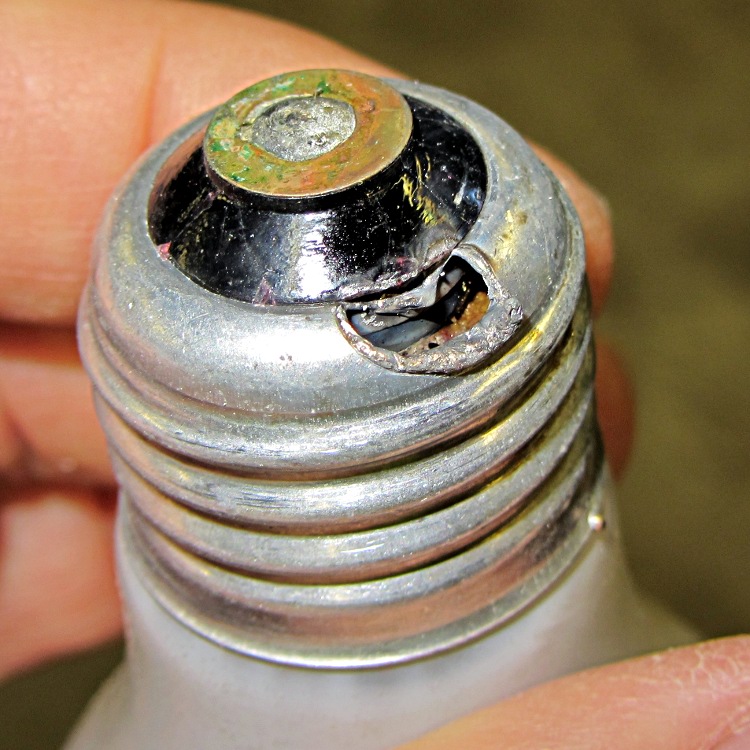
Come to find out that the socket’s contact tab stuck up a little bit further than it should, producing a dead short across the line:
Melted bulb base
Of interest: the branch circuit breaker didn’t trip, the GFI on the circuit didn’t trip, and the pop-out breaker in the power strip didn’t trip.
Huh.
I harvested the pole sections, the base counterweight, and the line cord. The rest of the corpse joined the bulbs in the trash…
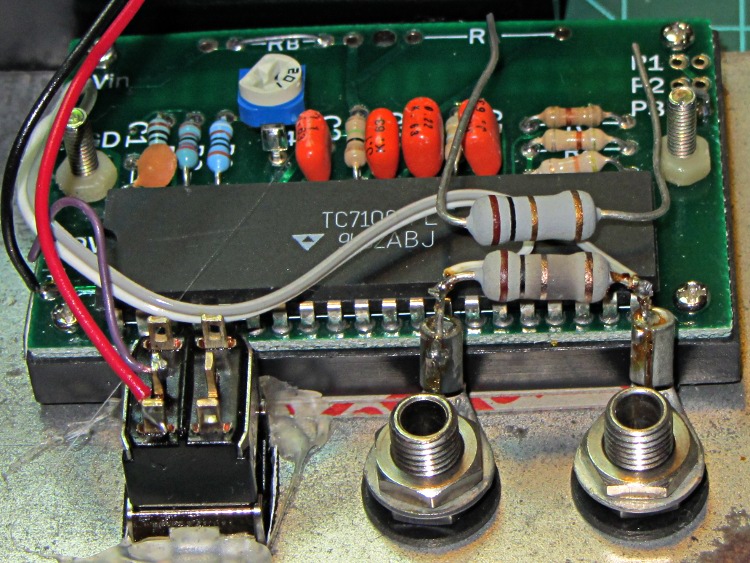
The bench supplies I use have current limiting, but the 10 mA meter resolution leaves a lot to be desired, so I conjured up a simpleminded 200 mA meter from a panel-mount meter and a 1 Ω sense resistor. That means it’s good for only 200 mA, so I insert it in series with the supply only when it’s needed. Lately it’s been reading more than a little bit high and I took it apart to find this obvious evidence of abuse:
Homebrew millammeter with burned sense resistor
The loose resistor sitting atop the chip shows what the burned resistor soldered in the circuit should look like.
The power supply has a 3 A current limit. No surprise: 9 W is more than the unfortunate 5 W resistor can handle.
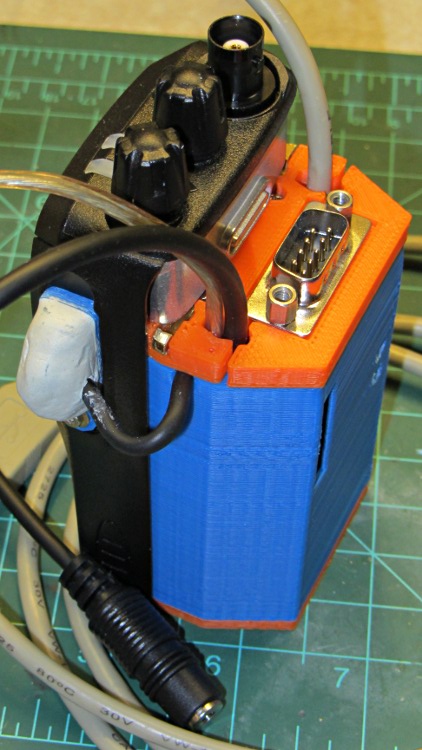
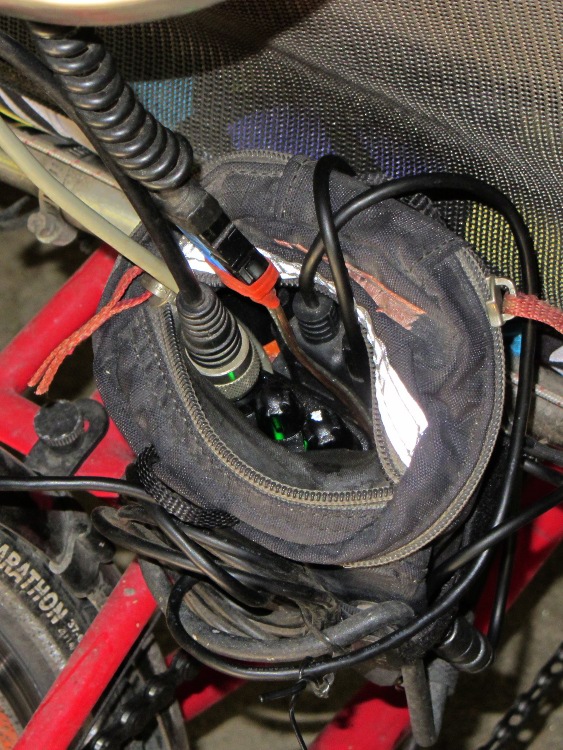
Both of the GPS+voice interfaces for the Wouxun KG-UV3D radios have been working fine for a while, so I should show the whole installation in all its gory detail.
If you haven’t been following the story, the Big Idea boils down to an amateur radio HT wearing a backpack that replaces its battery, combines the audio output of a Byonics TinyTrak3+ GPS encoder with our voice audio for transmission, and routes received audio to an earbud. Setting the radios to the APRS standard frequency (144.39 MHz) routes our GPS position points to the global packet databaseand, with 100 Hz tone squelch, we can use the radios as tactical intercoms without listening to all much of the data traffic.
The local APRS network wizards approved our use of voice on the data channel, seeing as how we’re transmitting brief voice messages using low power through bad antennas from generally terrible locations. This wouldn’t work well in a dense urban environment with more APRS traffic; you’d need one of the newfangled radios that can switch frequencies for packet and voice transmissions.
So, with that in mind, making it work required a lot of parts…
The flat 5 A·h Li-ion battery pack on the rack provides power for the radio; it’s intended for a DVD player and has a 9 V output that’s a trifle hot for the Wouxun radios. Some Genuine Velcro self-adhesive strips hold the packs to the racks and have survived surprisingly well.
Just out of the picture to the left of the battery pack sits a Byonics GPS2 receiver puck atop a fender washer glued to the rack, with a black serial cable passing across the rack and down to the radio bag.
A dual-band mobile antenna screws into the homebrew mount attached to the upper seat rail with another circumferential clamp. It’s on the left side of the rail, just barely out of the way of our helmets, and, yes, the radiating section of the antenna sits too close to our heads. The overly long coax cable has its excess coiled and strapped to the front of the rack; I pretend that’s an inductor to choke RF off the shield braid. The cable terminates in a PL-259 UHF plug, with an adapter to the radio’s reverse-polarity SMA socket.
The push-to-talk button on the left handgrip isn’t quite visible in the picture. That cable runs down the handlebar, along the upper frame tube, under the seat, and emerges just in front of the radio bag, where it terminates in a 3.5 mm audio plug.
The white USB cable from the helmet carries the boom mic and earbud audio over the top of the seat, knots around the top frame bar, and continues down to the radio. USB cables aren’t intended for this service and fail every few years, but they’re cheap and work well enough. The USB connector separates easily, which prevents us from being firmly secured to a dropped bike during a crash. I’d like much more supple cables, a trait that’s simply not in the USB cable repertoire. This is not a digital USB connection: I’m just using a cheap & readily available cable.
I long ago lost track of the number of Quality Shop Time hours devoted to all this, which may be the whole point…
In other news, the 3D-printed fairing mounts, blinky light mounts, and helmet mirror mounts continue to work fine; I’m absurdly proud of the mirrors. Mary likes her colorful homebrew seat cover that replaced a worn-out black OEM cover for a minute fraction of the price.