The Smell of Molten Projects in the Morning

Ed Nisley's Blog: Shop notes, electronics, firmware, machinery, 3D printing, laser cuttery, and curiosities. Contents: 100% human thinking, 0% AI slop.

Category: Amateur Radio

Using and building radio gadgetry

  • Mobile Amateur Radio Power: Check the Fuseholders

    The Yaesu FT-857 I have in the car has been not turning on lately, which I feared had something to do with being cooked inside a closed van for a week on the top level of a Camden parking garage during the hottest part of the summer.

    But, no, as it turned out, that had nothing to do with it: when I got the radio on the workbench, it powered up just fine. Back in the car, it’s dead.

    Which implies a power problem. The radio power comes from 10-AWG zip cord, through a pair of 40 A fuses, directly from the battery. The zip cord terminates in Anderson Powerpoles (of course) under the driver seat, mated to the end of the cable that came with the radio. That cable uses craptastic Molex connectors (equally of course) that are instantly suspect when any problems arise, plus a pair of smaller in-line 3AG glass fuses.

    Voltage at the Molex connectors: anything from 4.8 V to 11.9 V, depending on imponderable factors. Voltage at the Powerpoles: ditto. So maybe it’s not the Molex connectors, after all.

    The 40 A fuses are the kind the high-power automotive sound system folks use, complete with gratuitous goldish-plated everything. These I got surplus at a minute fraction of sticker price and mounted on the air filter housing, thusly:

    Engine compartment fuses for radio power
    Engine compartment fuses for radio power

    I plugged a 12 V bulb in place of the radio, then went a-measuring. Voltage downstream of the hot fuse: 0 V. Tah-dah, it’s a bad fuse!

    Nope, the fuse element is intact.

    The zip cord terminates in ferrules penetrated by 1/8-inch setscrews. Applying a wrench, I find that the setscrews are somewhat loose, although nothing catastrophic. Tighten all four screws and the radio turns on just fine.

    Case closed!

    Until the next day, when the radio doesn’t turn on. Reinstall the lamp, re-measure, once again find 0 V downstream of the hot fuse.

    Pull the fuse out again and it comes apart in my hand.
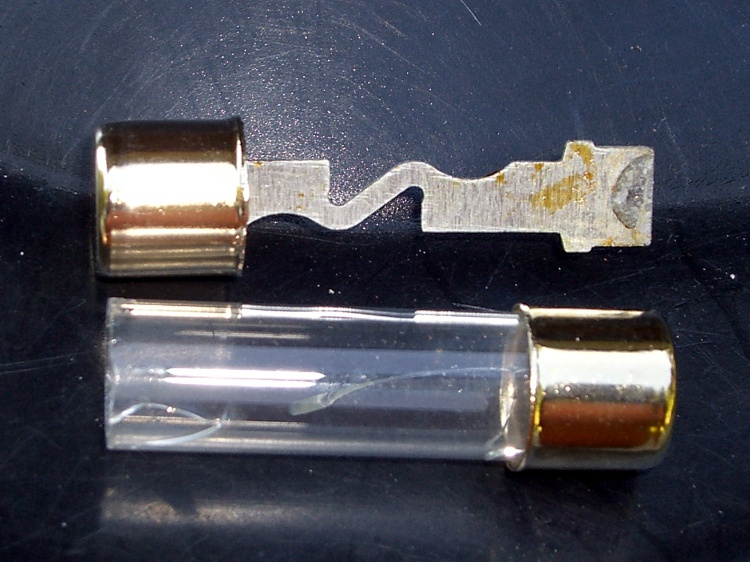
    Defective 40A fuse
    Defective 40A fuse

    Huh. That would explain everything.

    I suspect the fuse was marginally defective from the factory and finally failed after that prolonged heat wave. Living in the engine compartment isn’t easy under the best of circumstances, so I’ll give this one a pass.

    Being that sort of bear, I plucked a spare fuse from the ziplock baggie of fuses & bulbs that’s tucked into the van’s jack compartment, popped it in place, and the radio works fine again.

    Problem solved, for sure!

    Side note: those fuseholder screws go through the air filter housing, into nuts with Loctite, and I ruined the threads to absolutely prevent the nuts from coming off. You really don’t want a nut loose inside the engine air intake, downstream of the air filter and upstream of the throttle…

  • Stopping Bike Helmet Strap Creepage

    My bike helmet sports a mirror, microphone boom, and earbud, so I generally hang it from the top of the seat on my Tour Easy. There’s a convenient peg seemingly made for capturing the triangle of strap that normally goes over my ear and, up to the point where I set up this helmet, everything was good.

    Helmet hanging on Tour Easy seat
    Helmet hanging on Tour Easy seat

    After about a week, I noticed that the buckle was grossly off-center under my chin: the straps had shifted to one side.

    Come to find out that the front strap on this helmet passes through an opening across the central member, below the plastic covering. Judging from the teardown of an older helmet, Bell used double-stick tape to hold the strap in place. Applying a constant force in one direction (I’m a creature of habit, the helmet always hangs from its right-side triangle) gently pulls the strap through the passage.

    Front strap passing through helmet
    Front strap passing through helmet

    So I cut two slabs of closed-cell foam and jammed them into the opening atop the strap, one from each side, with a screwdriver. That forced the strap against the adhesive and mechanically wedged it in place.

    Problem solved!

  • APRS SmartBeaconing Parameters for Bicycling

    Setting relatively prime beacon times for the GPS-to-APRS trackers on our three bikes worked quite well, but I wondered how much better SmartBeaconing would be. The trick is getting the numbers right for typical bicycling speeds.

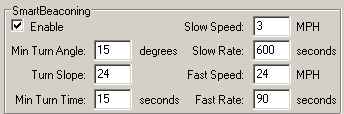
    Here’s some settings (from the TinyTrack3+ config program display) that seem to work reasonably well…

    SmartBeaconing Parameters
    SmartBeaconing Parameters

    The general idea is to beacon every 10 minutes at rest and about three / mile in motion.

    The only time I hit 3 MPH is up a really nasty hill, the likes of which I avoid with all due diligence. On the other end, 24 MPH is pretty much as fast as I can go for any length of time; faster, certainly, on downhills, but those are rare & precious commodities on most rides around here. The Slow and Fast parameters control both ends of that range. The beacon rate increases linearly below the Fast speed: 180 seconds at 12 MPH, which is roughly what I used for the constant-time setting.

    Note that the Rate parameters are actually periods. Rate is thing/time, period is time/thing. The period varies as 1/speed, while the rate varies directly with speed. See the SmartBeaconing writeup or the TinyTrak3+ doc for the algorithm.

    The Turn Slope parameter is the most confusing. It has units of degrees/MPH degree·MPH and serves to modify the Min Turn Angle so that you must turn more sharply at lower speeds to generate a beacon. This works better for vehicles with a wider dynamic range: our bikes tend to stay within 5-20 mph and a factor-of-four doesn’t affect the basic angle very much at all.

    My track through a residential area shows pretty good “Corner Pegging” for those settings and, in any event, it’s much better than the simple every-three-minutes beaconing I’d been using before. On the other hand, this is in a low-RF-traffic area with a digipeater about a mile away across the Northway, so very few packets get clobbered.

    APRS Track with SmartBeaconing
    APRS Track with SmartBeaconing

    Perhaps setting Turn Slope to 240 degrees/MPH degree·MPH with a Fast Speed of 24 MPH and a Turn Angle of 10 degrees would be slightly better. At top speed the minimum turn angle would be 10 + 240/24 = 20 degrees and nose-pickin’ speed relaxes the angle to 10 + 240/6 = 50 degrees. On the other hand, that track looks pretty good as-is!

    One problem with three bikes in close proximity (the track above is just me) is that we’ll all be turning at about the same time and, thus, sending beacons almost simultaneously. This will take a while to sort out, given that many beacons never make it to a receiver…

    [Update: A correction shows why the units aren’t what I expected.]

  • APRS Beaconing: On Being Relatively Prime

    I ran into an amusing situation on a recent family bike ride with our GPS-to-APRS trackers running: my ladies were transmitting a few seconds apart. As a result, I had to listen to a pair of very short data bursts in quick succession throughout the whole ride.

    Under normal circumstances that doesn’t happen, because I set the TinyTrak3+ trackers to delay during and wait a second after a voice PTT that collides with an automatic beacon. Somehow they never managed to delay an APRS beacon to knock the synchronization off kilter.

    So I tweaked the automatic transmission intervals to make us relatively prime: 179, 181, and 191 seconds. That’s close enough to the original 180 seconds as to make no difference, while now ensuring that we won’t collide with each other for very long even if we should get aligned.

    An alternative is SmartBeaconing, which I’ll turn on in a while after I collect a bit more data.

    A useful table of primes is there.

    If you have some spare CPU and power, you can join the Great Internet Mersenne Prime Search and help find new primes, albeit ones much larger than I need…

  • Yaesu FT-857 Front Panel: Up-Armored Plug

    The  remote cable for the Yaesu FT-857 I have in the car terminates in an 8-pin modular plug. The connector body has a cutout for the round rubber (?) insulation around the cable; it’s not set up for a standard flat 8-wire network cable. However, the cable makes a right-angle bend immediately outside the Front Panel to fit inside the confines of the remote mounting case, which pulled the insulation out of the connector.

    Connector with displaced insulation
    Connector with displaced insulation

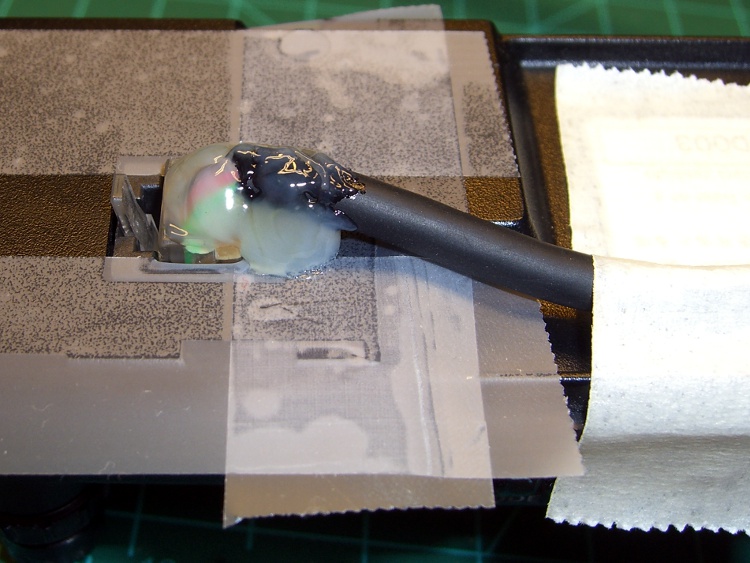
    The electrical connections are fine, but that can’t last. I finally got around to armoring that bend to (I hope!) prevent any problems. Contrary to what you might expect from my proclivity to blob epoxy on everything, I blobbed on hot-melt glue to hold the wires in place, as well as turn a bit of the cable into a rigid body. Even in a hot car, this ought to work fine…

    Connector with hot-melt glue
    Connector with hot-melt glue

    I put some ordinary adhesive tape on the back of the Panel, butted up against the connector body, to keep the glue out of the socket and off the (back of the) Front Panel. That prevents the connector from becoming one with the Panel.

    Pause while the glue solidifies, release the latch and pry the connector+glue off the tape with a small screwdriver, trim the excess glue, then peel the tape off the Panel. The connector snaps into place just like it should and the wires no longer have any freedom of motion.

    Here’s what the modified connector looks like in all its glory. The cable really does bend downward slightly beyond a right angle in order to fit into a recess in the Front Panel.

    Finished connector kludge
    Finished connector kludge

    This isn’t suitable for a connector getting a lot of the old in-out in-out, but the Front Panel remains in place for months at a time and this should delay the inevitable failure.

  • GPS Position Jitter: Into the Drink!

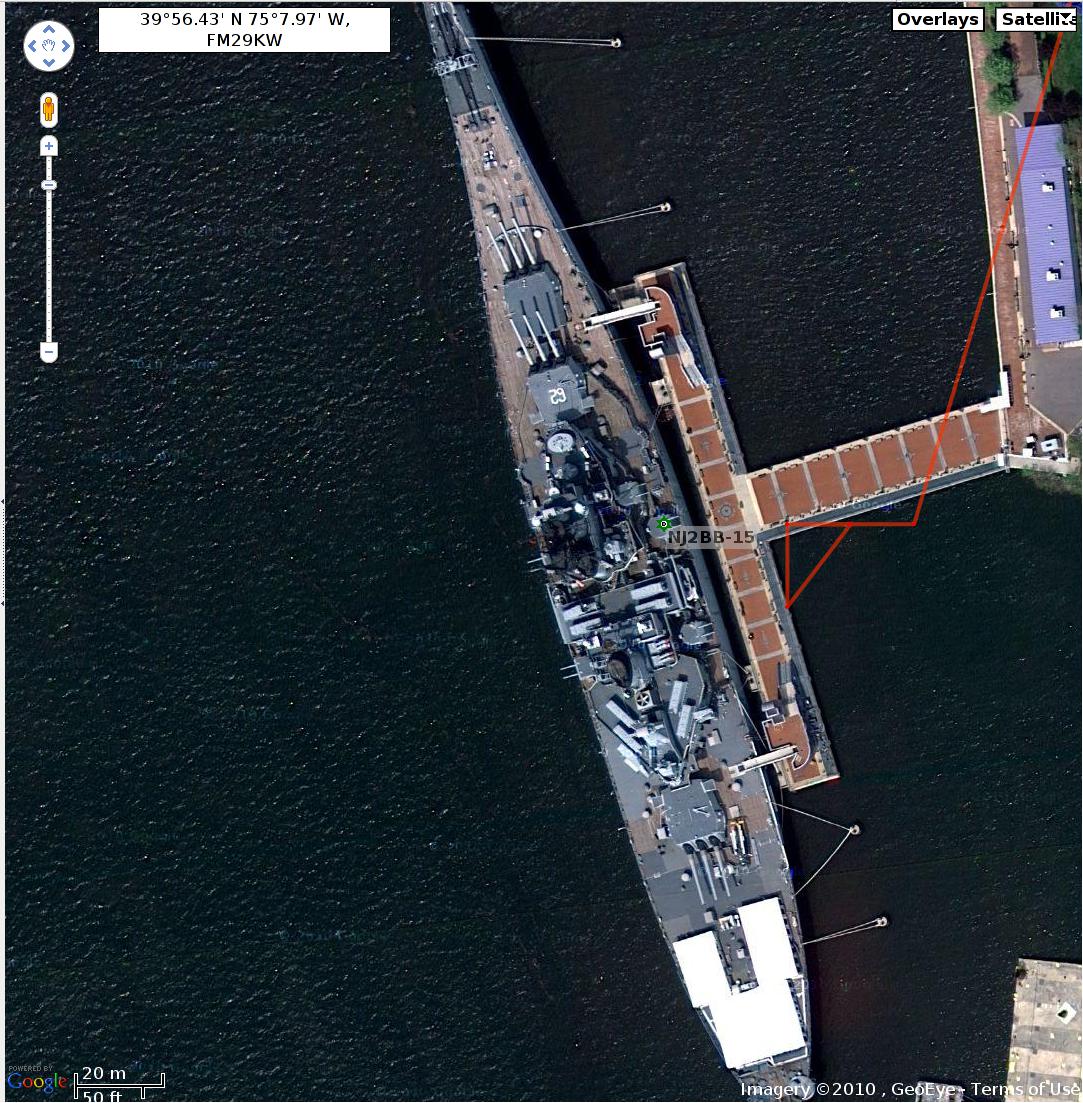
    We spent the night aboard BB62 in Camden NJ, with our bikes lashed to a post on the dock. Follow the light-color brick track from the upper-left GPS point across the dock to the black dot marking a memorial stone: we tied up just to the left of that spot.


    Position Jitter - ZNU at NJ2BB-15
    Position Jitter – ZNU at NJ2BB-15


    NJ2BB-15 is the APRS digipeater aboard BB62 with an antenna high in the superstructure. While I didn’t have any trouble with RF reception, packet collisions pose a problem in a dense urban environment. For what it’s worth, essentially everything in the superstructure is an antenna; the NJ2BB ham shack is a wonder to behold.


    BB62 starboard side
    BB62 starboard side


    The point-to-point jitter is about 20 meters (18.52, says the GPS info dump), so you’re looking at the un-augmented GPS accuracy of a long-term stationary object. I’m sure there’s a slight registration mismatch between the satellite imagery coordinates and the GPS coordinates, enough to put the upper-left point across the dock.

    If you get the chance, take the tour. The guides are retired Navy, some served aboard BB62, and they take their storytelling duties very seriously. The bunk space, even with air conditioning, is claustrophobic at best; a tip of the bike helmet to you folks who live in these machines!

    [Update: Our daughter discovered three itchy bites in a line across her tummy the morning after spending a night in the bunks. That means BB62 has bedbugs, which you do not want to bring home in your luggage. As a result, I cannot recommend an overnight on BB62, alas. We wish she’d mentioned that before we got home…]

    [Further update: when I reported this to the folks at BB62, they had an exterminator check out the berthing spaces and conclude they have no bedbugs on board. That’s encouraging, but I still heartily recommend that you follow the same decontamination procedures that you should use after all trips.]

    It turned out one rider in our group was an active-duty Rear Admiral who, evidently, could (or should) have supervised the signal gun firing after Colors and Taps. She was traveling incognito, though, and didn’t stand on ceremony.

  • APRS Coverage in Eastern PA

    PHG Plot - Sojourn - KE4ZNU-9
    PHG Plot – Sojourn – KE4ZNU-9

    I was running my GPS-to-APRS tracker while on a bicycling vacation along rail-trail paths around southeast PA. I expected good coverage in urban areas and not much in the woods, which is pretty much how it worked out.

    Here’s a plot of my track (from aprs.fi), with superimposed half-size PHG (Power-Height-Gain) “circles” for the digipeaters that caught my signal. Clicky for many more dots.

    The first part of the ride, from BB62 in Camden NJ to Pottstown PA, had good coverage.

    A bus jaunt from Pottstown to White Haven, just north of I80 along the Lehigh River gorge, accounts for the abrupt jump. I dropped off the face of the earth at White Haven, riding south along the Lehigh River to Jim Thorpe, then along some undeveloped trails to resurface just north of Allentown.

    Strangely, there are no points east from Allentown to the Delaware, then south along the river & canal to Trenton. We stayed overnight on Bull’s Head Island where, as nearly as I could tell, there were no other APRS signals at all.

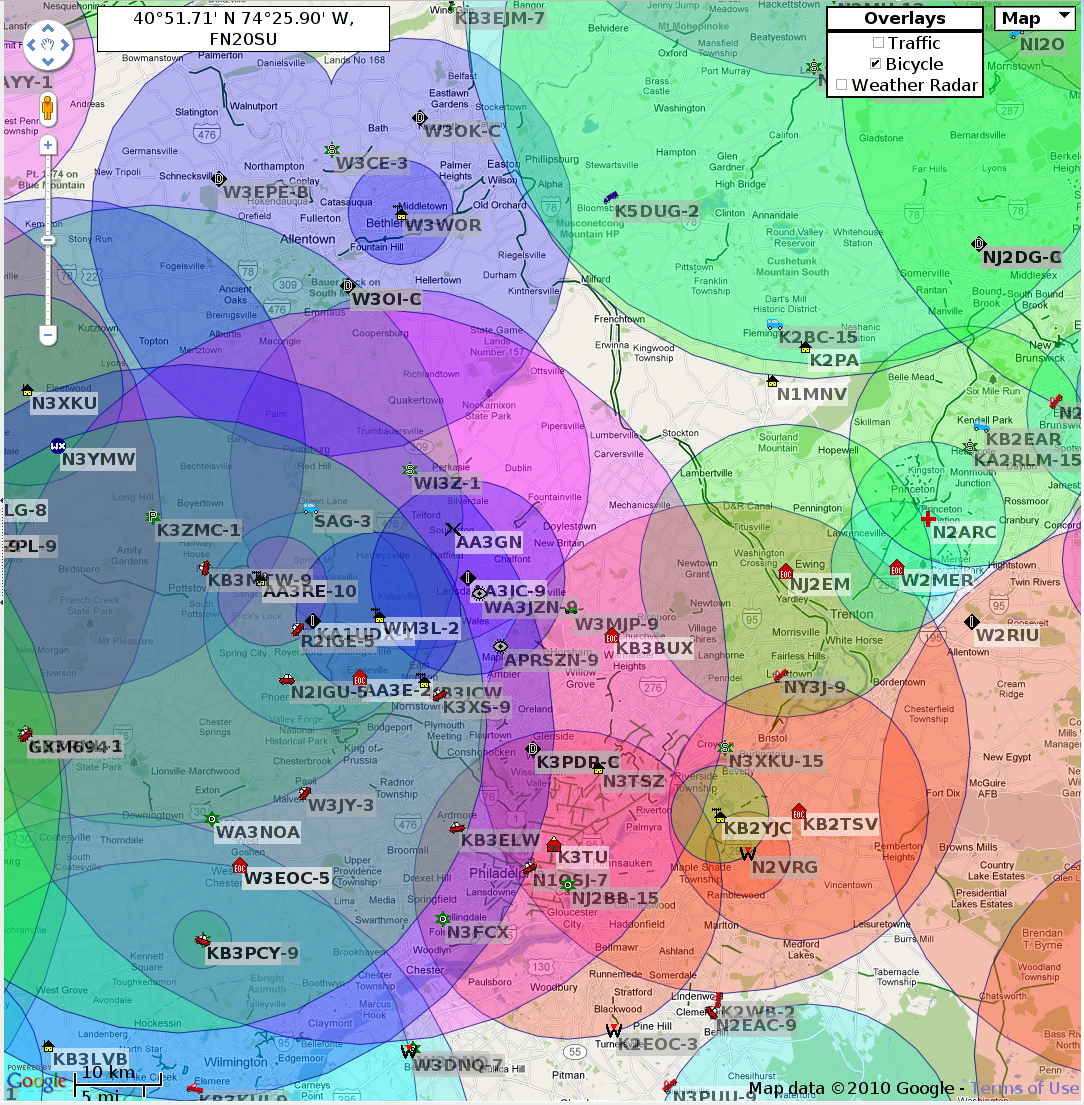
    A plot of all the APRS activity (and, thus, all the active digis) for a different 24 hours shows the gaps in coverage match up fairly well with where I wasn’t heard. These are also half-size circles, but don’t take topography into account. Notice that the trails along the Delaware run right through the no-coverage zone!

    PHG Allentown to Camden - 24 hours
    PHG Allentown to Camden – 24 hours

    I’m not sure why the digis caught me going into Allentown and not going out, but the vagaries of RF propagation remain inscrutable. Even if the digipeater could receive a clear signal, a collision between two transmitters can kill both packets stone cold dead. In addition, I’m using 100 Hz tone squelch and some receivers may not decode packets with tones.

    Another possibility is a path (WIDE1-1, WIDE2-2) that allows only two hops to an Internet gateway. In those remote regions, it may well be that I should have had a path allowing three or four hops. However, I wasn’t hauling along all the programming gear to tweak the TinyTrak3+ on my bike. If I lived around there, I’d have a better appreciation of what’s needed to get out of the valleys.

    In any event, it was an interesting exercise…