Ed Nisley's Blog: Shop notes, electronics, firmware, machinery, 3D printing, laser cuttery, and curiosities. Contents: 100% human thinking, 0% AI slop.
After grounding the obvious metal bits around the desk as shown thereand taking some pains to zap the light switch on the wall (rather than the grounded objects) before sitting down and routing the USB cable away from everything else, the mysterious USB disconnects seem to have Gone Away.
The USB hubs were reporting exactly what happened:
hub 3-0:1.0: port 1 disabled by hub (EMI?), re-enabling...
Which wasn’t much help in the beginning, because I couldn’t correlate a static zap with the disconnect. Quite often, it’d be something innocent like plugging a camera into its USB/charging cradle with no obvious discharge.
The onset of 0 °F weather and the ensuing 0% relative humidity, plus my donning a synthetic fleece jacket while venturing into the rather too-chilly basement laboratory, brought the problem to the fore. An inch-long arc to a light switch gets your attention pretty quick!
Hint: when you know you’re charged, pull a pen from your pocket, get a good grip on the metal pocket clip, and use that to draw the spark from the light switch. The larger surface area contacting your fingers reduces the current density to the mild tingle level, rather than leaving a charred pit on the end of your finger.
In round numbers, the dielectric breakdown voltage of air is 1 kV / mm. That inch-long arc required upwards of 20 kV: not bad for an acrylic jacket!
When we go riding in the winter, we dress in layers of acrylic this and synthetic that, to the extent that simply moving generates a nasty charge. Hence the punchline: nobody moves, nobody gets hurt.
The number of daily visitors here rounds off to very nearly zero, so this spike from my Cabin Fever trip report stands out like a sore thumb:
Cabin Fever Trip Report Hits
The numbers are 118, 36, 10, 5, 4, 3. If you’re a geek, you’ll think of an exponential decay and it turns out that’s just about true: the time constant is 2.8 days and the equation pretty much works for the first four days, after which we’re into the Long Tail.
Most of the hits came directly from the EMC mailing list, with a substantial minority from Webbish sources like Gmail and various archives. There’s no way to tell how many people who subscribe to the list didn’t click on the link, although this provides a quick-and-dirty estimate of the folks interested in such things.
The counterweight gantry, laser aligner, and Y-axis bellows posts were also popular, at least to very small groups of people in the grand scheme of things. But if everybody showed up in the basement shop, I’d definitely have to move some stuff to make room!
I just tried compiling a program (for an Arduino) and make grumped about a date in the future:
make: Warning: File `Makefile' has modification time 1.4e+02 s in the future
<<< usual compile output snipped >>>
make: warning:  Clock skew detected.  Your build may be incomplete.
Turns out that the timestamps really were screwy:
[ed@shiitake Solar Data Logger]$ date
Sun Jan 25 10:57:44 EST 2009
[ed@shiitake Solar Data Logger]$ ll
total 28
drwxr-xr-x 2 ed ed 4096 2009-01-25 10:59 applet
-rw-r--r-- 1 ed ed 1920 2009-01-25 10:35 Logger.pde
-rwxr-xr-x 1 ed ed 7719 2009-01-25 10:59 Makefile
-rwxr-xr-x 1 ed ed 7689 2009-01-25 10:53 Makefile~
-rw-r--r-- 1 ed ed 1880 2009-01-25 10:08 Solar Data Logger.pde~
Well, now, how can that be?
The offending files are stored on a file server, not on the machine in front of my Comfy Char. The current dates for the two machines weren’t quite the same: the server was running just slightly in the future.
I used an ordinary Kubuntu desktop install on our “file server”, which is basically a Dell Inspiron 531s running headless in the basement. All this is behind a firewall router, so I do not have an Internet-facing machine running X, OK?
Kubuntu has an option that updates the clock automagically, but only once per boot.
Right now, that box claims an uptime of just over 22 days. It’s run for months at a time without any intervention, which just one of the things I like about Linux:
I think you can see the problem: after three weeks the PC’s internal clock had drifted more than two minutes fast.
I used the Big Hammer technique to whack the server’s clock upside the head:
sudo ntpdate pool.ntp.org
[sudo] password for ed: youwish
25 Jan 11:01:22 ntpdate[23062]: step time server 66.7.96.2 offset -151.277185 sec
That’s 7 seconds per day or 151 seconds out of 2 megaseconds: 77 parts per million. It’s in a basement at 55 F right now, so there may well be a temperature effect going on.
You can set up ntp (www.ntp.org or, better, from a package in your distro) to run continuously in the background and keep the clock in time by slewing it ever so slightly as needed to make the average come out right. I just added an entry to /etc/crontab like this:
That way the clock gets whacked into line once a day when nobody’s looking.
If you’re running a real server with heavy activity, ntp is the right hammer for the job because you don’t want ntpdate to give you mysterious gaps of a few seconds or, worse, duplicate timestamps. Leap year is bad enough.
Memo to Self: set up ntp on the server and then aim all the desktops at it.
I used to do that when I was running a GPS-disciplined oscillator to produce a nearly Stratum 1 clock on my server, but then power got too expensive for that frippery.
The next step in the process for this board: toner transfer masking.
What you see here follows the basic process given by the folks at Pulsar, so go there for the instructions & supplies. The overall flow is:
Print the PCB trace pattern on the special paper
Align to the circuit board
Tape in place
Fuse toner to PCB
Apply green sealant film
Etch
Repeat for the other side
Some tricks:
An Eagle CAM file (found there in Useful Stuff) creates Postscript files for the top & bottom copper (and the silkscreen, although I don’t use that).
I load those PS files in The GIMP at 600 dpi with mild antialiasing, crop (autoshrink!), combine into a single image, then print on a single sheet of paper using an HP Laserjet 1200 (obsolete, but pretty nearly any laser printer should work).
Turn off all the toner saving features; you want a really dark image with plenty of toner!
I run a sheet of paper through to find out exactly where the images will wind up, then tape the transfer paper atop the images (shiny side up!) using laser address labels (because they can take the heat) on the first-to-enter end of the transfer paper.
Vital step: run that whole assembly through the printer to print a blank page. This cooks the moisture out of the transfer paper and pre-shrinks it for the next step. This might not matter for very small circuit boards, but if you’re doing anything over an inch or so, it makes a big difference.
Run it through the printer again to print the trace patterns. They should wind up exactly in the middle of the transfer papers, although you’ll be surprised at how far off they can be from the patterns on the sheet underneath. Lasers have great dot resolution, but are not particularly accurate at locating the paper relative to the printing drum. That doesn’t matter for ordinary documents, but be sure you leave more margin on the transfer paper around your patterns than you think necessary.
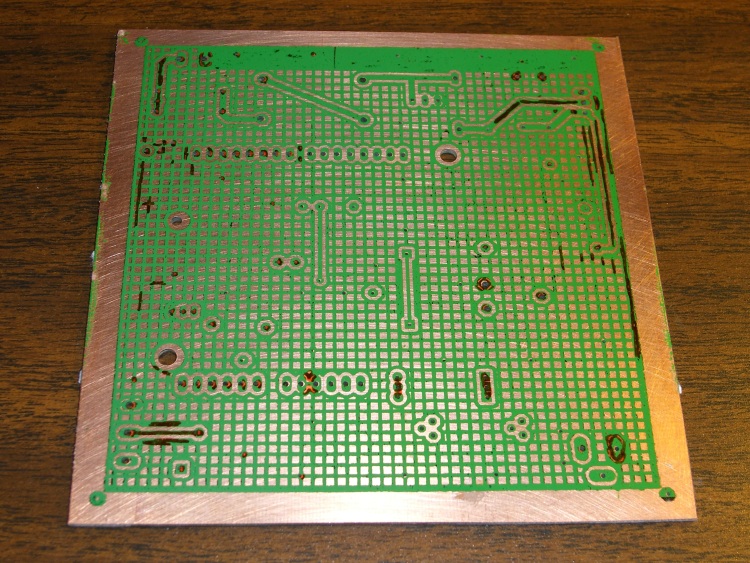
PCB Masked – Rear
Use the printer’s manual-feed feature to queue up all three prints at once. My printer is in the basement laboratory and my comfy chair is upstairs, so that saves several trips up & down the stairs. Not that I can’t use the exercise, mind you, but it’s the principle of the thing.
Cut the transfer paper off the backing sheet. Don’t bother trying to un-stick the labels; they’re fused solid. Stick another label on the back side of the transfer paper along shortest side.
Alignment trick: now lay the paper pattern-side-up on a light table (I use an old fluorescent fixture with a frosted-glass lens), lay the board atop it, and adjust for best hole alignment over the whole board. The trace patterns on the paper form very nice bright spots that shine up through the holes in the circuit board. You can do it with the board on the bottom, but this way works better.
You’ll be dismayed at how far off some of the holes are, but you should get within perhaps 10 mils all across the board. Squish the board down on the sticky side of the label and fold the label over the top of the board. That anchors the paper to the board and, because the label is fairly wide, keeps the paper from twisting relative to the board.
Flip it over, verify that the holes still line up by looking through the paper, then apply labels to the sides to hold the transfer paper flat and in alignment. I’ve tried it without the side attachments and the result is, ahem, not quite as good. You can see the label residue on the front side in the photo above; obvously, you’ll be cleaning the gunk off before doing that side.
I’ve tried the clothes-iron technique with little success, so I have one of the heated roller fusers. Works pretty well, although it requires some fiddling to get the proper combination of heat and spacing.
Add water, let the paper soften, peel it off.
Run it through the fuser again with the green sealer film. I get better results with a layer of ordinary paper atop the green film, perhaps because that prevents the film from touching anything inside the fuser. Without the paper, the film sometimes transfers lengthwise scratches to the toner.
Peel off the film and touch up any imperfections with an Ultra-Fine-Point Sharpie; I use orange to make the corrections easy to see against the green background. Those are the highly visible ugly marks on the bottom mask.
Having masked one side, etch it. Then you mask the other side and etch that. Don’t try to get clever and do both sides at once; it doesn’t work. Ask me how I know.
Next step: etching. More on that later…
Suggestions: after you etch the first side, leave the mask in place to protect the copper. When you run the board through the fuser, add a sheet of paper on the masked side to keep the film and toner from coming off on the rollers.
Memo to self: always pre-shrink the transfer paper.
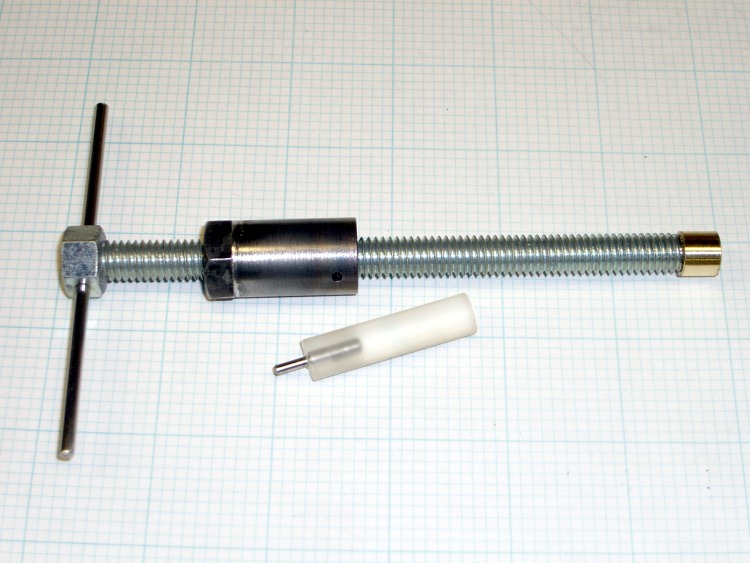
After a while you realize that whacking the drawbolt to extract a tapered tool or collet can’t possibly be a Good Thing for the spindle bearings, particularly on the 10k rpm head. So you need one of these, a low-effort / low-skill version of the beauty described in Sherline’s Tip 15.
It’s basically a length of all-thread rod with a nut epoxied on the top, a nut soldered to a sleeve that locks to the spindle, and a brass tip epoxied on the bottom to push the taper out.
Drill a suitable hole in the nut for a steel rod, add heatshrink tubing on both sides so it doesn’t fall out. If you’re clever, you’ll make the rod short enough that it fits in your tool tray along with all the other itsy-bitsy tools and parts.
Bore out a steel cylinder to clear the top of the Sherline spindle and drill a small hole to exactly match the hole in the side of the spindle. Turn down the end of another nut to fit inside the cylinder and silver-solder them together. Maybe epoxy would work here, too.
Find or make a steel locking pin that fits the small holes, make a cute handle for it, press in place. Take some care that the handle radius clears the headstock pulley. It’s a very good idea to have a much better fitting pin than I started with; a too-small pin will goober the top edge of the spindle hole. Ask me how I know…
Turn the end of the all-thread down to a little post, drill a slightly larger hole in the brass tip which you turned to fit down the spindle bore, goosh together with epoxy. Hint: spin the cylinder on the all-thread before epoxying the tip in place.
To use:
Remove drawbolt
Spin cylinder up the all-thread a bit
Insert extractor in the spindle
Line up small holes, insert locking pin
Insert tommy bar in spindle
Turn the extractor handle & hold the tommy bar: don’t torque the locking pin!
Cup your hand under the cutter to catch it before it hits the part / table
… profit!
This goes a lot faster than it sounds and feels much nicer than beating the crap out of my precious Sherline head.
The far end of the Sherline Y-axis leadscrew isn’t supported, which really doesn’t matter much because the motors can’t drive the screws all that fast. But, if you’re like me, you think about dropping something heavy on the screw and maybe bending it just enough so it doesn’t work.
What to do?
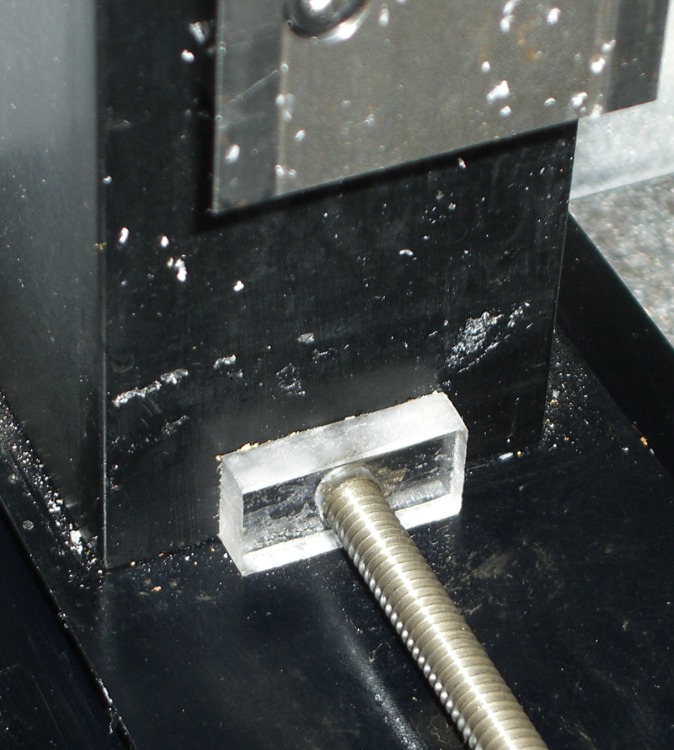
Sherline Y-axis leadscrew bushing
The next time you replace the bellows covering the leadscrew, add a scrap of plastic with a suitable hole bored in it. Measure your leadscrew (metric & inch diameters differ!), poke a hole with enough clearance to make you happy, then cover one side of the block with double-stick tape.
Run the Y axis to about 30 mm from the far end, unbolt the motor mount, slide the table forward, put the bushing on the screw, slide the table back, affix the bushing to the column, screw the motor mount in place, and you’re done.
If you’re really fussy, make sure the bottom of the plastic block bears on the frame, but that’s in the nature of fine tuning.
This will cost you a bit of precious Y-axis travel, but the bellows need about that much space to fold up and you’re not losing much more than you already have.
The end of the X-axis leadscrew isn’t supported, either, but you can’t drop anything on it.
Sherline hot-rodders with super-fast high-torque nitro-breathing motors run the risk of bending the leadscrew by having it whip around, but that’s a whole ‘nother subject.
I use Cadsoft’s Eagle for schematics & circuit board layouts, then build the boards in my basement laboratory using Pulsar’s laser toner transfer and ferric-chloride etching. My Sherline CNC milling machine pokes the holes in the board, which means they actually wind up in the right places. I don’t mill the outline into any fancy shapes, generally using a tin snip and maybe a little filing; glass-fiber dust is a nuisance.
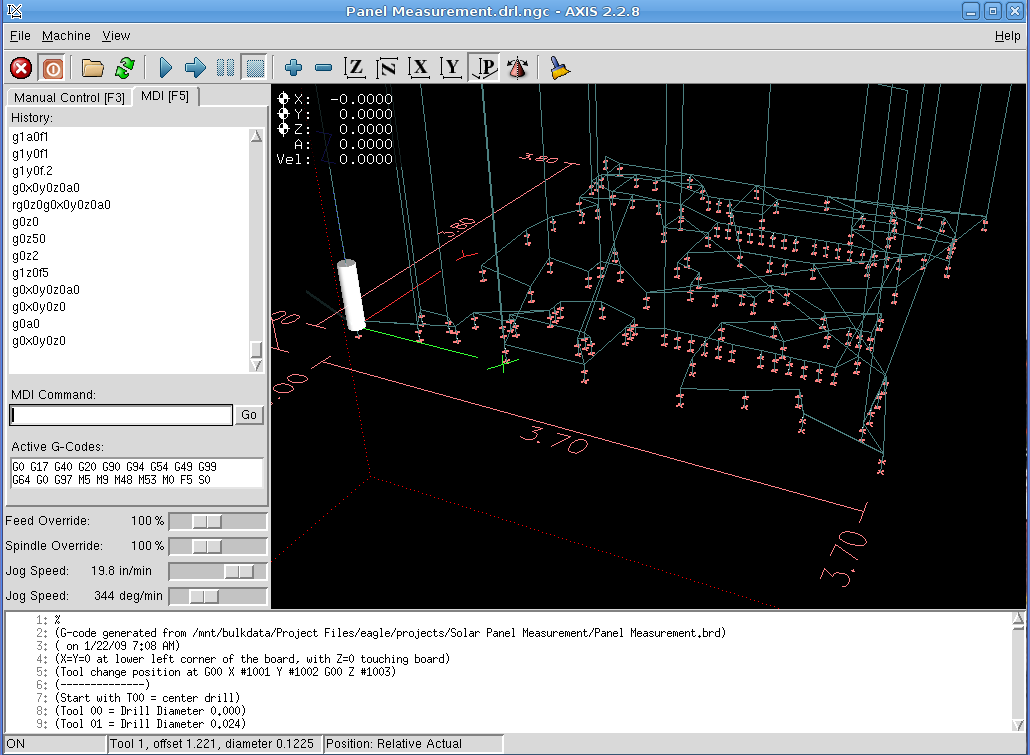
AXIS hole-drilling screenshot
My Eagle ulp routine (in the Useful Stuff page) extracts the holes from the circuit board layout, sorts by drill size, then visits each hole in nearest-neighbor order. It starts by touching each hole with a center drill, which probably isn’t necessary, but it makes me feel good and provides a last-minute check that everything is lined up properly.
Figuring the tool path is obviously the traveling-salesman problem in disguise, but a strict nearest-neighbor order is close enough for boards of this size. You could probably optimize it by brute-force exhaustion and that would be appropriate for production use, but I rarely make more than one version of each board.
Eagle’s standard part libraries use a weird set of hole diameters, which my routine rounds off to the nearest mil. I don’t have a vast array of drills, so I don’t pay much attention to the differences between, say, 0.024, 0.025, and 0.027 inch drills. Tool changes are strictly manual and I don’t have to change the drill if I don’t want to!
Got a bunch of teeny carbide drills as resharps from DrillBitCity a long time ago.
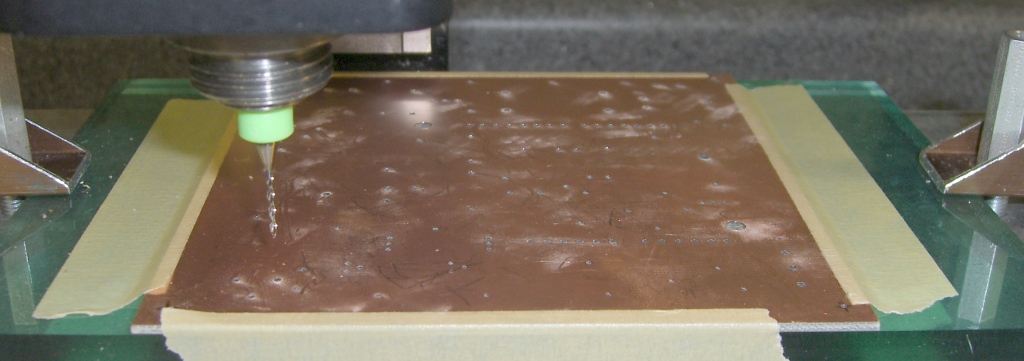
I double-stick-tape the board (center and corners) to a flycut sacrificial plate, which makes it flat enough for these purposes.The pic below shows a 60-mil board held down with masking tape; it’s the same layout as in the screen shot above.
Tool changes use a 2-inch block (plus a sheet of paper) as a height reference. You can tweak the ulp file for your setup.
My board layouts have a giant via at each corner, with the lower-left corner at (0,0). Drilling doesn’t require any fussy alignment, because I etch the board after drilling: the holes serve as bright lights to line up the pads & vias. I’ll have more to say about this elsewhere.
Speeds and feeds are on the sissy side; I crank the 10k rpm head up to a dangerous chattering whine and feed the drills at 5 inches/min (call it 125 mm/min). Both of those are far too slow, but work OK.
Run a shop vac to suck up the dust as you drill! I doubt that a typical shopvac filter removes the fines, but it’s better than letting all the dust settle on the mill and in my lungs.
Circuit board drilling
The clamps are these, mounted on studs screwed into the tooling plate.
Incidentally, the Sherline mill’s throat depth and Y-axis travel limits the board to about 4 inches along the Y axis; yes, with the spacer block installed. That’s just about exactly the maximum size the low-end version of Eagle can produce, so it’s a nice match.
There are other ways of doing PCBs. I haven’t tried trace-isolation milling, but PCB-Gcode looks like the ticket if you want to generate a breathtaking amount of glass-fiber dust. My quick check shows that it inserts semicolon-delimited comments into the tool-change commands, which EMC 2.2.8 promptly chokes upon, but that’s probably a quick configuration tweak and will change with EMC 2.3 anyway.
If you’ve got the scratch, there are commercial solutions: Chris Daniel (who was also at the Cabin Fever EMC booth) uses a T-Tech gantry router at work.
Memo to Self: Expect a call from a patent lawyer either telling me that I’m infringing somebody’s Nearest Neighbor Algorithm claims or asking me for my design notebooks to establish me as the Prior Artist.


 The Smell of Molten Projects in the Morning