Ed Nisley's Blog: Shop notes, electronics, firmware, machinery, 3D printing, laser cuttery, and curiosities. Contents: 100% human thinking, 0% AI slop.
Digital camera, at least the ones I have, include a “multi-burst” (Sony DSC-H5 and DSC-F717) or “multi-continuous” (Casio EX-Z850) shutter mode that takes a bunch of pictures in quick succession, then combines them into a single JPG image file.
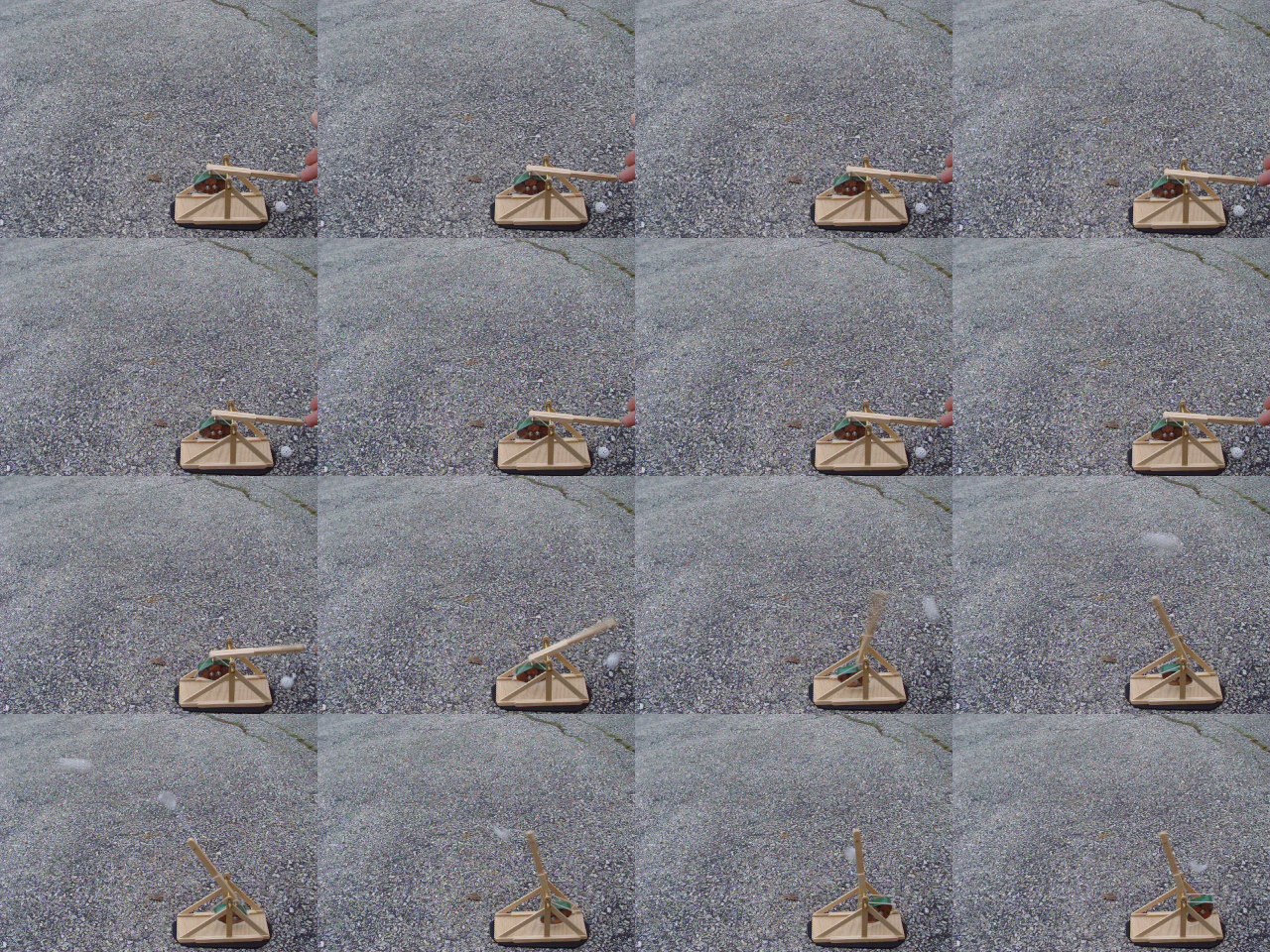
The Sony cameras create a 4×4 array. This image of a small trebuchet comes from the F717 and is 1280×960, so each sub-image is 320×240. The time between images is 1/30 second and the shutter speed is 1/125 second.
Extracting the sub-images is trivially easy with the ImageMagickconvert function:
convert -crop 320x240 dsc02594.jpg shot-%02d.jpg
Sub-image shot-11.jpg from the sequence
You must specify the size of the sub-images to extract, which you can determine by RTFM or simple division, and convert extracts all the tiles into files named, in this case, shot-00.jpg through shot-15.jpg. The files appear in left-to-right, top-to-bottom order, which is most likely the sensible way for cameras to store them.
The C printf-style format string %02d forces two-digit sequence numbers. You can omit that and the sequence will start with shot-0.jpg, but you must then contend with the usual hassles of shot-1.jpg and shot-10.jpg.
Can you tell the designers were computer geeks?
With 16 separate images in hand, you can have your way with them, using all your usual image-manipulation tools.
ImageMagick can convert the images into an animated GIF:
convert -delay 50 shot-*jpg shot-ani.gif
Animated GIF from separate images
That’s nigh onto 7 MB of image, which seems excessive for what it is, but there you have it. Obviously, you can de-res the images to fit the space available.
The -delay 50 option should set the frame delay to 50 ticks at the default 100 ticks per second, but some display software ignores the frame rate within the file. Assuming, that is, that the usual spam filters don’t swat animated GIFs right out of the bitstream.
You can also convert the images into a movie, as I discussed in more detail there. The ffmpeg program does a fine job of it:
ffmpeg -r 3 -i shot-%02d.jpg shot.mp4
Actually, convert can do that all by itself if you install mpeg2encode.
One cannot upload movies to one’s free WordPress blog without buying a space expansion, so you’ll have to take my word that it works.
The Sony cameras provide control over the interval between the images, allowing 1/30, 1/15, and 1/7.5 second intervals, but the Casio evidently just does the best it can. If you know the interval, you can determine interesting things like velocity and acceleration, so that’s something to look for when you’re buying a camera.
Perhaps you can calibrate your camera using a pendulum?
A friend gave me an old Aptiva, upon which I was going to install Puppy Linux.
But, first I let it start up Win ME just for old time’s sake. What the heck, it’s a classic.
The first thing up is a prompt asking permission to install Compuserve, which I really don’t need. As is usually the case with shovelware, that program doesn’t show up in the Start Menu, so I did some rummaging around.
Firing up msconfig and looking at the auto-started stuff revealed, among the usual stuff, this interesting file:
c:\windows\nav.exe .vbs
That pretty much pushes the Compuserve popup to the back of the queue.
Note the long string of blanks in the middle. That, in combination with Windows Explorer’s default “Hide known file extensions” setting, is an old trick, but, then, this is an old box.
Sooo, at one time there was a virus on that box masquerading as good ol’ Norton AntiVirus. The offending file seems to be missing now, so something killed it without removing its auto-start setting.
Either my friend removed NAV, too, or the virus shot it in the head. There’s all manner of NAV config files and clutter lying around, but no executables.
In goes the Puppy CD, reboot, and I install its slightly backlevel ClamAV package. No problem with that; it’ll use the most recent virus signatures and, heck, any problems on this box are half a decade old.
After mulling over the Windows ME partition for a while, ClamAV reported:
/mnt/sda1/Program Files/Netscape/Users/Default/Mail/Trash: W95.Matrix.SCR FOUND
/mnt/sda1/Program Files/Netscape/Users/Default/Mail/Inbox: W32.Magistr.B FOUND
/mnt/sda1/_RESTORE/ARCHIVE/FS346.CAB: Worm.Kido-18 FOUND
----------- SCAN SUMMARY -----------
Known viruses: 513471
Engine version: 0.91.2
Scanned directories: 1821
Scanned files: 44557
Infected files: 3
Data scanned: 10721.32 MB
Time: 73200.595 sec (1220 m 0 s)
Feeding the obvious keywords into Google produces the comforting result that these are all old news:
However, Kido is a Conficker / Downadup variant, which is disturbing. The hit is almost certainly a false positive, as it’s in a CAB file, we don’t run any Windows machines, and they’re behind a hardware firewall that’s in full effect.
Handing the offending file to VirusTotal shows that ClamAV is the outlier and all the others are perfectly happy: Current status: finished Result: 1/39 (2.57%)
An RC snubber is just a resistor and capacitor in series that damps out the oscillations occurring when a switched inductive circuit turns off.
How this is supposed to work is that the snubber capacitance forms a resonant tank circuit with the inductance, the resistor absorbs the tank’s energy, and the oscillations damp out quickly.
In practice, snubber circuits tend to be ill-designed, simply because it seems there’s no good way to measure the actual inductance and stray capacitance at the switch. Folks tend to apply a 100-ohm resistor and a 100 nF capacitor and hope for the best. Sometimes that works. Most of the time it’s suboptimal.
You can do better than that.
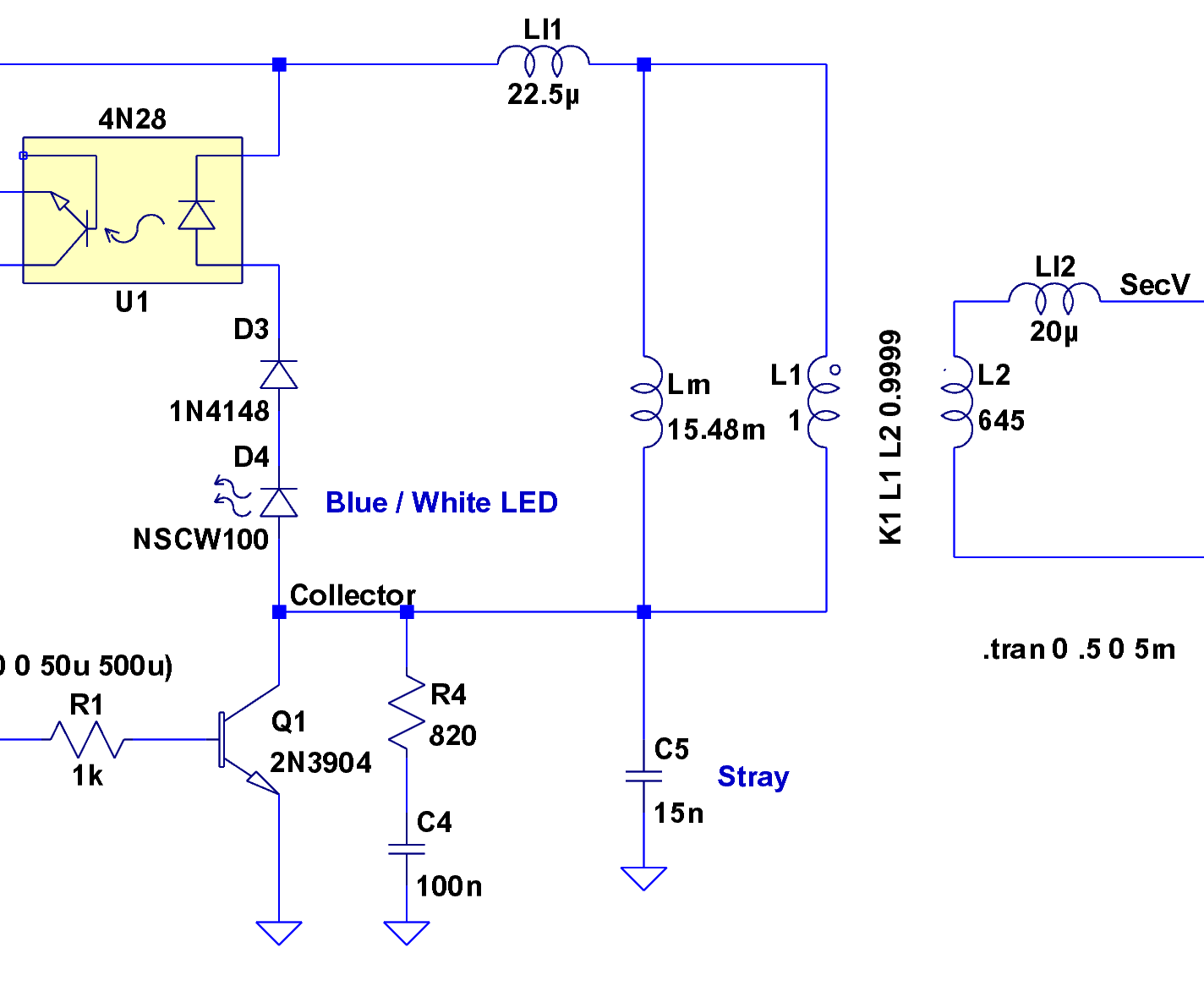
Forward converter switch, transformer, and snubber
Here’s the key chunk of simple-minded forward converter I’m doing for a Circuit Cellar column. It’s an LTSpice IV model, not an actual schematic, but the hardware is pretty close to what you see here. The “Stray” capacitance at C5 represents a measured value, not an actual component. The transformer parameters come from my measurements there.
A microcontroller drives the transistor switch, which draws current through the transformer primary and transfers power to the secondary winding; the turns ratio is 1:25, so a 6 V input becomes a 150 V output. When the microcontroller shuts off the switch, the collector voltage pops up to about 11 V, at which point the stack of diodes turns on and the inductor begins to discharge. The diode forward-bias characteristics keep a more-or-less constant voltage until the current becomes essentially zero, so the collector voltage declines only slightly as the current drops.
When the current drops enough that the diodes don’t conduct very much, the collector node is in a peculiar condition: there’s no place for the remaining energy to go!
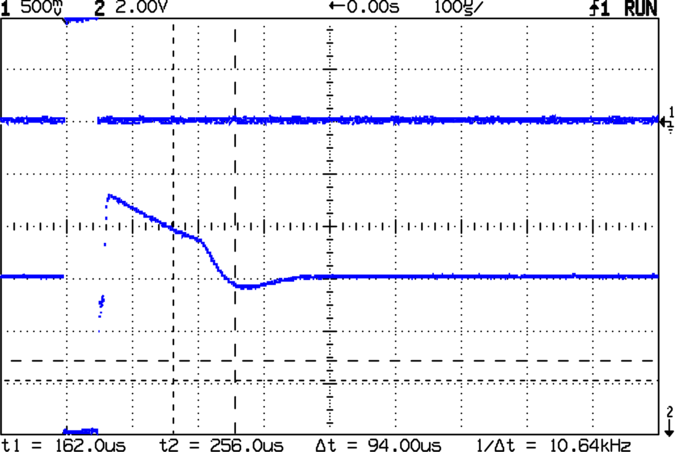
Undamped collector ringing
This scope shot shows the result. The drive pulse (top trace) pulls the collector voltage (bottom trace) to zero, it snaps up to 11.5 V, and then declines to about 10 V before the diodes switch off. At that point the collector voltage rings like a bell: 8 V peak-to-peak at 10 kHz. That’s a very low frequency because the primary reflects the fairly substantial stray capacitance in the zillion-turn secondary winding.
In order to form a resonant circuit, you need some idea of the existing inductance and capacitance. You can’t just clip a meter in there to measure them, because their values depend on the frequency, layout, and actual hardware.
One good experimental technique is pretty well summarized in Maxim’s AN-3835, which deals with Cold-Cathode Fluorescent Lamp drivers. Pay no attention to the CCFL stuff, as snubber fundamentals are the same wherever you go.
Basically, you add a test capacitance across the transistor (from collector to ground, similar to C5 in the schematic) and measure the new ringing frequency. Fiddle with the test capacitance until the frequency is half of what it started at. Use reasonably short lead lengths, particularly for applications that don’t involve actual transformers or inductors; surface-mount capacitors are your friends.
What you’re doing is fiddling with this equation:
F = 1 / (2 π sqrt (L C))
Because of the square root around LC, when you increase the capacitance by a factor of 4, the frequency decreases by a factor of 2. So the test capacitance required to cut the frequency in half is three times the original stray capacitance. Got that?
Knowing the original stray capacitance, which is 1/3 the test capacitor value, and the original ringing frequency, you can figure out the actual inductance:
L = 1 / ((2 π F)^2 C)
Now the magic happens…
You know the inductance and capacitance of the tank circuit and its resonant frequency. At that frequency, the inductive and capacitive reactances are equal:
XL = 2 π F L
XC = 1 / (2 π F C)
In fact, they’re also equal to what’s called the characteristic impedance of the circuit:
Z = sqrt(L / C)
The resonant frequency is about 10 kHz and an additional 60-some-odd nF dropped the frequency to about 5 kHz. Fairly obviously, your stock of caps will affect the precision of the results. Let’s suppose the stray capacitance, shown as C5, is about
C5 = 60 / 3 = 20 nF.
The inductor is then:
L = 13 mH
The characteristic impedance works out to:
Z = 800 ohms
Take those numbers with a grain of salt, but twiddling the scope cursors will get you pretty close in your own circuit.
In order to swamp any variations in the stray capacitance (during the production run or whatever), pick the snubber capacitance to be at least four times the stray capacitance, rounded up to the next standard value. In this case, that works out to the traditional 100 nF, but that need not be the case.
Snubbed ringing
You want to kill the ringing stone cold dead, so pick the snubber resistance equal to the characteristic impedance. That makes it a tank circuit with:
Q = R sqrt(C / L) = 1
Which is a pretty low Q, all things considered.
The scope shot shows the result with an 820 Ω resistor and a 100 nF capacitor: wham, no ringing!
Notice that the collector voltage is slightly lower immediately after the transistor switches off, as compared to the undamped case, because there’s now some juice going into the RC snubber. The overall converter efficiency will drop and you can trade off Q for efficiency for resistor dissipation in the usual manner.
Pretty slick, huh?
Update: you might want to put the snubber directly across the winding in higher-powered systems, to keep the snubber current out of the power supply. In this case it doesn’t matter all that much.
The used Optiplex GX270 that will eventually become my mother’s “new” PC has been booting absolutely reliably in the basement, so whatever was troubling it a few months ago seems to have Gotten Better By Itself. I don’t have to like that, but so far, so good.
This morning I ssh-ed into it, as I do every few days, then fired up krdc on my desktop, which immediately complained that there wasn’t anything there to connect with. Uh-oh…
But the ssh worked, so at least there’s a Linux system at the end of that network cable.
A changing cast of PCs has gone through the basement lab in that time and I’ve been swapping the desktop monitor among them. Most recently, a friend gave me an ancient Aptiva that might turn into a dedicated controller and I’d left the monitor connected to it.
After I figured out that the monitor wasn’t hitched to the Optiplex, traced the cable, and fixed that oversight, I was confronted with a command-line prompt. A bit of rummaging in /var/log/Xorg.0.log turned up some useful information:
(II) intel(0): Output VGA disconnected
(EE) intel(0): No valid modes.
... <snippage> ...
(EE) Screen(s) found, but none have a usable configuration.
Fatal server error:
no screens found
In the Bad Old Days, you told X exactly what output to produce by providing modelines that specified the exact video timings. That was fraught with peril, as you could do the Digibomber thing to a fussy fixed-frequency monitor by specifying timings beyond its abilities.
Nowadays, the X server feels around, detects the video card, asks it what it can produce, detects the monitor, asks it what it can display, figures out the best match from the ensuing matrix of possibilities, and shazam slaps up a GUI. Might not be exactly what you want, but more likely than not it’ll be pretty close and you can apply some tweakage to get it right.
If there’s no monitor connected, then the X server doesn’t know quite what to do. I’m sure it’s possible to specify a default fallback configuration, but maybe it’s better to just ensure the monitor is always connected. Those cute little screws on the connector might be a clue, eh?
The command line continues to work, of course, so you can figure this stuff out either locally or through ssh. Alas, it’s really hard to reconnect a monitor cable through ssh.
Although you can change the Arduino runtime’s default PWM clock prescaler, as seen there, the default Phase-correct PWM might not produce the right type of output for the rest of your project’s circuitry.
I needed a fixed-width pulse to drive current into a transformer primary winding, with a variable duty cycle (hence, period) to set the power supply’s output voltage. The simplest solution is Fast PWM mode: the output goes high when the timer resets to zero, goes low when the timer reaches the value setting the pulse width, and remains low until the timer reaches the value determining the PWM period.
The best fit for those requirements is Fast PWM Mode 14, which stores the PWM period in ICRx and the PWM pulse width in OCRxA. See page 133 of the Fine Manual for details on the WGMx3:0 Waveform Generation Mode bits.
I needed a 50 μs pulse width, which sets the upper limit on the timer clock period. Given the Diecimila’s 16 MHz clock, the timer prescaler can produce these ticks:
1/1 = 62.5 ns
1/8 = 500 ns
1/64 = 4 μs
1/256 = 16 μs
1/1024 = 64 μs
So anything smaller than 1/1024 would work. For example, three ticks at 1/256 works out to 48 μs, which is close enough for my purposes. A 1/8 prescaler produces an exact match at 100 ticks and gives a nice half-microsecond resolution for pulse width adjustments.
The overall PWM period can vary from 200 μs to 10 ms, which sets the lower limit on the tick rate. The timer is 16 bits wide: 65535 counts must take more than 10 ms. The 1/1 prescaler is too fast at 4 ms, but the 1/8 prescaler runs for 32 ms.
So I selected the 1/8 prescaler. The table on page 134 gives the CSx2:0 Clock-Select mode bits.
Define the relevant values at the top of the program (uh, sketch)
The microsecondsToClockCycles() conversion comes from the Arduino headers; just use it in your code and it works. It’ll give you the right answer for 8 MHz units, too, but you must manually adjust the timer prescaler setting; that could be automated with some extra effort.
Then, in the setup() routine, bash the timer into its new mode
analogWrite(PIN_BOOSTER,1);	// let Arduino setup do its thing
TCCR1B = 0x00;			// stop Timer1 clock for register updates

TCCR1A = 0x82;			// Clear OC1A on match, Fast PWM Mode: lower WGM1x = 14
ICR1 = BOOST_PERIOD_DEFAULT;	// drive PWM period
OCR1A = BOOST_ON_DEFAULT;	// ON duration = drive pulse width
TCNT1 = BOOST_ON_DEFAULT - 1;	// force immediate OCR1A compare on next tick
TCCR1B = 0x18 | TCCR1B_CS20;	// upper WGM1x = 14, Clock Sel = prescaler, start running
The Arduino analogWrite() function does all the heavy lifting to set the PWM machinery for normal use, followed by the tweakage for my purposes. All this happens so fast that the first normal PWM pulse would still be in progress, but turning the PWM timer clock off is a nice gesture anyway. Forcing a compare on the first timer tick means the first pulse may be a runt, but that’s OK: the rest will be just fine.
What you don’t want is a booster transistor drive output stuck-at-HIGH for very long, as that will saturate the transformer core and put a dead short across the power supply: not a good state to be in. Fortunately, the ATmega168 wakes up with all its pins set as inputs until the firmware reconfigures them, so the booster transistor stays off.
The PWM machinery is now producing an output set to the default values. In the loop() routine, you can adjust the timer period as needed
noInterrupts();			// no distractions for a moment
TCCR1B &= 0xf8;			// stop the timer - OC1A = booster may be active now

TCNT1 = BOOST_ON_DEFAULT - 1;	// force immediate OCR1A compare on next tick
ICR1 = BasePeriod;		// set new PWM period

TCCR1B |= TCCR1B_CS20;		// start the timer with proper prescaler value
interrupts();			// allow distractions again
The ATmega168 hardware automagically handles the process of updating a 16-bit register from two 8-bit halves (see page 111 in the Manual), but you must ensure nobody else messes with the step-by-step process. I don’t know if the compiler turns off interrupts around the loads & stores, but this makes sure it works.
Once again, setting the TCNTx register to force a compare on the next timer tick will cause a runt output pulse, but that’s better than a stuck-HIGH output lasting an entire PWM period. You can get fancier, but in my application this was just fine.
You can update the PWM pulse width, too, using much the same hocus-pocus.
And that’s all there is to it!
Memo to Self: always let the Arduino runtime do its standard setup!
The simple technique of reading a quadrature knob I described there works fine, except for the knob I picked for a recent project. That’s what I get for using surplus knobs, right?
I picked this knob because it has a momentary push-on switch that I’ll be using for power; the gizmo should operate only when the knob is pressed. The rotary encoder part of the knob has 30 detents, but successive “clicks” correspond to rising and falling clock edges: the encoder has only 15 pulses in a full turn.
So, while advancing the knob counter on, say, the falling edges of the A input worked, it meant that the count advanced only one step for every other click: half the clicks did nothing at all. Disconcerting, indeed, when you’re controlling a voltage in teeny little steps.
Worse, the encoder contacts are painfully glitchy; the A input (and the B, for that matter) occasionally generated several pulses that turned into multiple counts for a single click.
Fortunately, the fix for both those problems is a simple matter of software…
The Arduino interrupt setup function can take advantage of the ATmega168’s ability to generate an interrupt on a pin change, at least for the two external interrupts that the Arduino runtime code supports. So it’s an easy matter to get control on both rising & falling edges of the A input, then make something happen on every click of the knob as you’d expect.
The hardware is straightforward: connect the knob’s A output to INT0, the B output to D7, and the common contact to circuit ground. Although you can use the internal pullups, they’re pretty high-value, so I added a 4.7 kΩ resistor to Vcc on each input. The code defining that setup:
#define PIN_KNOB_A	2			// LSB - digital input for knob clock (must be 2 or 3!))
#define IRQ_KNOB_A	(PIN_KNOB_A - 2)	//  set IRQ from pin
#define PIN_KNOB_B	7			// MSB - digital input for knob quadrature
Because we’ll get an interrupt for each click in either direction, we can’t simply look at the B input to tell which way the knob is turning. The classy way to do this is to remember where we were, then look at the new inputs and figure out where we are. This buys two things:
Action on each edge of the A input, thus each detent
Automatic deglitching of crappy input transitions
So we need a state machine. Two states corresponding to the value of the A input will suffice:
enum KNOB_STATES {KNOB_CLICK_0,KNOB_CLICK_1};
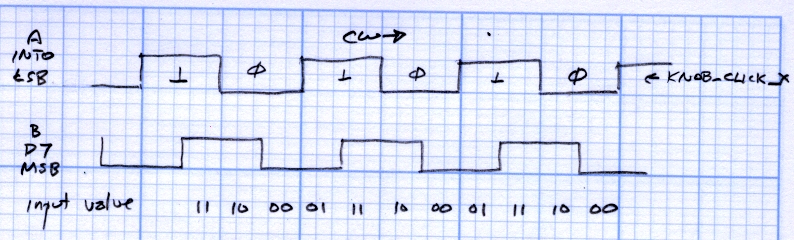
A sketch (from one of these scratch pads) shows the states in relation to the knob inputs. Think of the knob as being between the detents for each state; the “click” happens when the state changes.
Knob encoder states and inputs
In order to mechanize that, put it in table format. The knob state on the left shows where the knob was and the inputs along the top determine what we do.
Knob state table
So, for example, if the knob was resting with input A = 0 (state KNOB_CLICK_0), then one detent clockwise means the inputs are 01. The second entry in the top row has a right-pointing arrow (→) showing that the knob turned clockwise and the next state is KNOB_CLICK_1. In that condition, the code can increment the knob’s position variable.
The entries marked with X show glitches: an interrupt happened, but the inputs didn’t change out of that state. It could be due to noise or a glitchy transition, but we don’t care: if the inputs don’t change, the state doesn’t change, and the code won’t produce an output. Eventually the glitch will either vanish or turn into a stable input in one direction or the other, at which time it’s appropriate to generate an output.
An easy way to handle all the logic in the state table, at least for small values of state table, is to combine the state and input bits into a single value for a switch statement. With only eight possible combinations, here’s what it the interrupt handler looks like:
void KnobHandler(void)
{
byte Inputs;
	Inputs = digitalRead(PIN_KNOB_B) << 1 | digitalRead(PIN_KNOB_A);	// align raw inputs
	Inputs ^= 0x02;								// fix direction

	switch (KnobState << 2 | Inputs)
	{
	case 0x00 : // 0 00 - glitch
		break;
	case 0x01 : // 0 01 - UP to 1
		KnobCounter++;
		KnobState = KNOB_CLICK_1;
		break;
	case 0x03 :	// 0 11 - DOWN to 1
		KnobCounter--;
		KnobState = KNOB_CLICK_1;
		break;
	case 0x02 : // 0 10 - glitch
		break;
	case 0x04 : // 1 00 - DOWN to 0
		KnobCounter--;
		KnobState = KNOB_CLICK_0;
		break;
	case 0x05 : // 1 01 - glitch
		break;
	case 0x07 : // 1 11 - glitch
		break;
	case 0x06 :	// 1 10 - UP to 0
		KnobCounter++;
		KnobState = KNOB_CLICK_0;
		break;
	default :	// something is broken!
		KnobCounter = 0;
		KnobState = KNOB_CLICK_0;
	}
}
Reading the knob counter in the main loop is the same as before:
noInterrupts();
KnobCountIs = KnobCounter;	// fetch the knob value
KnobCounter = 0;		//  and indicate that we have it
interrupts();
Problem: increment or decrement a variable by a fixed percentage, without using floating-point arithmetic routines. This is the sort of problem that crops up in microcontroller projects, because there’s just not enough storage for the floating-point library stuff and your program at the same time.
Suppose you want to increment the variable BaseNum by 10%. Using floating point, that’s just
BaseNum = 1.1 * BaseNum;
In fixed point, it would look like
BaseNum = (BaseNum * 11) / 10;
Similarly, to increment by 5%, you’d use
BaseNum = (BaseNum * 105) / 100;
The general idea is that you scale the operation to eliminate the fractional part, then chop off the scaling to get the final answer. The parentheses are vital: the multiplication must precede the division.
The integer division operator truncates any fractional part, it does not round. This becomes a nasty gotcha if you’re expecting the final value to change.
For example, incrementing 15 by 10% would look like
15 -> 165 -> 16
But incrementing 15 by 5% goes like
15 -> 1575 -> 15
For obvious reasons, you should make sure the multiplication can’t overflow. If you’re incrementing by 5% (multiplying by 105), then an int BaseNum can’t exceed 312, which might come as a surprise. Casting the operands to long int would be prudent for many problems:
BaseNum = ((long int)BaseNum * 105) / 100;
Suppose you want to increment BaseNum several times in succession, with that number stored in Ticks. With floating point, you could use the pow() function
BaseNum = BaseNum * pow(1.1,Ticks);
In fixed point, the same thing seems like it ought to work
Unfortunately, that idea runs out of gas pretty quickly: pow(11,9) falls just outside the range of a long int, so even if BaseNum is, say, 2, you’re screwed. It’s even worse for smaller percentages, as pow(105,5) is about 13e9.
One solution, which works well for reasonable values of Ticks, is to iterate the process
That won’t overflow in the middle. However, if the division truncates away the increment you were expecting, then the loop just whirs for a while and accomplishes exactly nothing.
That could come as a surprise if you were expecting, say, five 5% increments to add up to a 28% boost: pow(1.05,5) = 1.276, right?
Bottom line: when you use fixed-point arithmetic, always check the low end of the range for underflow and the high end for overflow.
Hint: store the numerator and demoninator of the fixed-point percentage fraction in variables. You can’t decrement by the same percentage by just swapping the numerator and denominator, but it might be close enough for human-in-the-loop knob twiddling adjustments.
Memo to Self: always check for underflow and overflow!




 The Smell of Molten Projects in the Morning