The Smell of Molten Projects in the Morning

Ed Nisley's Blog: Shop notes, electronics, firmware, machinery, 3D printing, laser cuttery, and curiosities. Contents: 100% human thinking, 0% AI slop.

Author: Ed

  • Programming Algorithm for 27HC641 EPROMs

    General idea: replacing a failing Mostek MK36000-series masked ROM in a Tektronix 492 Spectrum Analyzer memory board with an equally obsolete 27HC641 EPROM, using the bits found there.

    The various datasheets give contradictory advice concerning device programming:

    EPROM Burn - Microchip algorithm
    EPROM Burn – Microchip algorithm

    Assuming you have appropriate power supplies, then the waveform on VCE looks like this. The upper trace is the -OE signal for the data latch supplying the byte-to-be-burned, the lower trace is VCE on EPROM pin 21. Set VCC = 6 V on pin 24 while all this is going on. The currents range into the hundreds of mA; this is not a low-power device!

    The squirts on the -OE latch signal before each programming cycle are eight quick writes to those antique DL-1414 displays that share the data bus with the EPROM. They show the current address and data byte during programming, plus other status & error messages.

    The Microchip and GI datasheets both claim that the EPROM cells erase to all 1 bits, like every other EPROM I’ve ever used. The Philips datasheet says:

    … after each erasure, all bits of the 27HC641 are in an undefined state. […] which is neither a logical “1” or a logical “0”
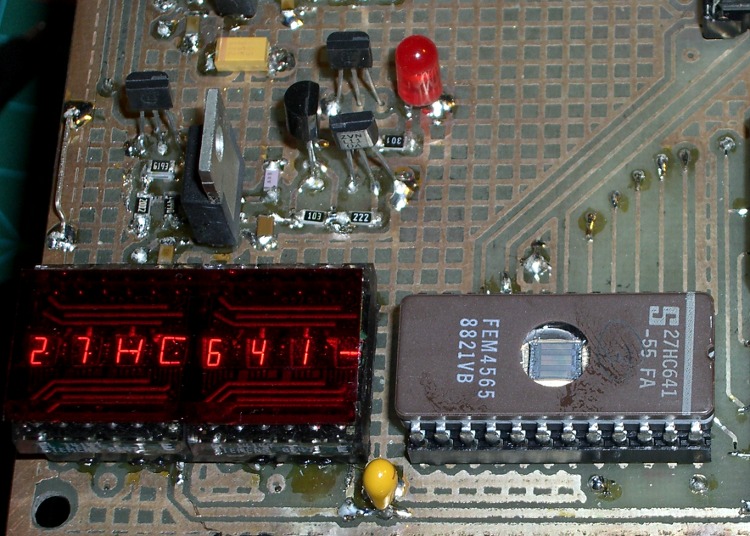
    27HC641 EPROM in programming socket
    27HC641 EPROM in programming socket

    The chip markings suggest they were made by Signetics, which got Borged by Philips some years ago. Lo and behold, the chip erases to a bizarre pattern that may be “undefined” but is perfectly consistent from erasure to erasure.

    Therefore, you cannot blank-check a 27HC641 EPROM before programming it!

    The Philips / Signetics datasheet doesn’t have a programming algorithm and the GI datasheet says you’re supposed to hold VCE at +12.5 V except when you’re asserting the programming data. So I used the Microchip algorithm on a Signetics chip and it seems to program properly.

    The only quirk is that the Arduino Diecimila doesn’t have enough storage to hold the entire EPROM at once, so I verified each data byte as I wrote it, rather than doing the whole chip after the entire programming loop. The top picture shows a single 1 ms programming pulse followed by the 3-ms overburn pulse; the byte read back from the EPROM must agree with the source byte after each pulse. When it’s all done, I manually dump the entire EPROM as an Intel HEX file and verify that against the original HEX file: if it matches, the burn is good.

    The byte-burning function goes a little something like this:

    int BurnByte(word Address, byte Data) {
    
    unsigned Iteration;
    byte Success;
    
     SetVcc(VH);                              // bump VCC to programming level
     SetVce(VIH);                             // disable EPROM outputs
     Outbound.Address = Address;              // set up address and data values
     Outbound.DataOut = Data;
    Success = 0;
    for (Iteration = 1; Iteration <= MAX_PROG_PULSES; ++Iteration) {
    
    RunShiftRegister();
    digitalWrite(PIN_DISABLE_DO,LOW);       // present data to EPROM
    
    SetVce(VH);                             // bump VCE to programming level
    delayMicroseconds(1000);                // burn data for a millisecond
    SetVce(VIH);                            // return VCE to normal logic level
    
    digitalWrite(PIN_DISABLE_DO,HIGH);      // turn off data latch buffer
    SetVce(VIL);                            // activate EPROM outputs
    CaptureDataIn();                        // grab EPROM output
    SetVce(VIH);                            // disable EPROM outputs
    
    RunShiftRegister();                     // fetch data
    
    if (Data == Inbound.DataIn) {           // did it stick?
    Success = 1;
    break;
    }
    }
    
    MaxBurns = max(MaxBurns,Iteration);
    
    if (Success) {                           // if it worked, overburn the data
    
    digitalWrite(PIN_DISABLE_DO,LOW);       // present data to EPROM (again!)
    SetVce(VH);                             // bump VCE to programming level
    delay(3 * Iteration);                   // overburn data
    
    SetVce(VIH);                            // return VCE to normal logic level
    digitalWrite(PIN_DISABLE_DO,HIGH);      // turn off latch buffers
    
    SetVce(VIL);                            // activate EPROM outputs
    CaptureDataIn();                        // grab EPROM output
    SetVce(VIH);                            // disable EPROM outputs
    
    RunShiftRegister();                     // fetch data
    
    Success = (Data == Inbound.DataIn);     // did overburn stick?
    }
    
    return !Success;                         // return zero for success
    }
    

    NOTE: the MK36000 and 27HC641 have slightly different address bit assignments.

    The MK36000 address bits look like this:

    • pin 18 = A11
    • pin 19 = A10
    • pin 21 = A12

    The 27HC641 address bits look like this:

    • pin 18 = A12
    • pin 19 = A11
    • pin 21 = A10

    Now, if you’re building a programmer, just wire up the 27HC641 socket as if it were a MK36000 and everything will be fine. The byte locations within the chip won’t match those in the original MK36000, but it doesn’t matter because you store bytes at and the Tek CPU fetches bytes from the same addresses.

    However, if you’re using a commercial EPROM programmer, it will write the bytes at the locations defined by the 27HC641 address bit assignments (because that’s all it knows), which will not work when plugged into the Tek board. Choose one of the following options:

    • build an interposer board to permute the address bits
    • cut-and-rewire the Tek board (ugh!)
    • write a program to permute the bytes in the HEX file

    Think about it very carefully before you build or program anything, OK? The checksum will most likely come out right even with permuted bits, but the CPU will crash hard as it fetches the wrong instructions.

    Memo to Self: always RTFM, but don’t believe everything you read.

  • Harvestman Not-a-Spider

    Saw several of these critters on our tent while we were packing up in the morning; I’m in favor of anything that eats small insects, so Harvestmen get a pass. I don’t know if those frogs eat ’em, but that’s something they can work out without my attention.

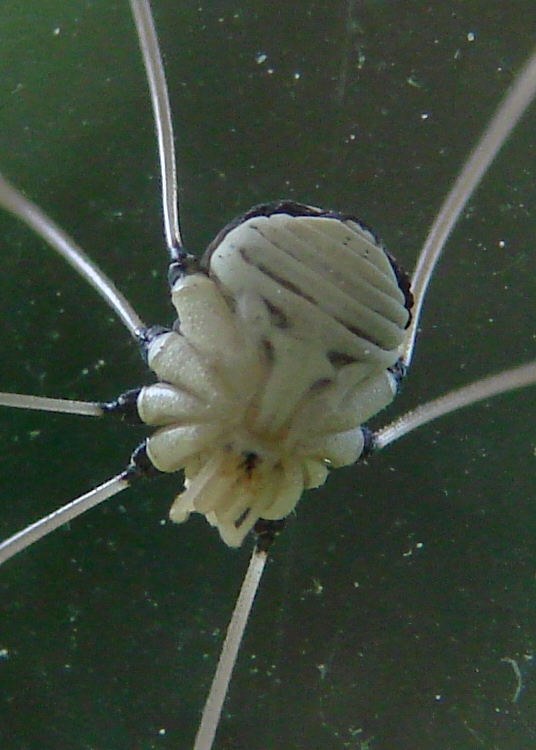
    Then I found another Harvestman on a window when we got home. Not having seen the underside of one in quite a while, I was struck by the “alien face” pattern. I suppose the reddish dot under the alien’s nose is the Harvestman’s mouth, just like it looks.

    Eeeek!

    They’re actually pleasant to have around and tickle mightily when they crawl up your arm. We gently deport them from the house and generally manage to deposit them undamaged on a plant, where we presume they’ll be much happier.

  • Giant Swallowtail Butterfly

    Mary planted some Butterfly Bushes in front of the living room window and shazam we have butterflies. Highly recommended!

    This unusual butterfly came by yesterday. The invaluable Butterflies Through Binoculars identifies it as a Giant Swallowtail Butterfly and says:

    • Similar species: None
    • Range: North to around Philadelphia
    • Comments: Formerly found further north. A colony existed in the 1950s in Dutchess Co., NY.

    So either this chap’s range is expanding northward or that colony never quite died out.

  • Photography: Timing is Everything

    Over the Top
    Over the Top

    So we did the HersheyPark thing on the way back from our bicycling vacation and our young lady rode seven of their eleven roller coasters. Not being all that strong of stomach, I wimped out after two and contented myself with taking pictures.

    I had decided to not lug a Big Camera and the tele-adapter along, seeing as how we’d be camping for four nights. That turned out to be a wise decision: it rained every night and everything we carried was damp. So I took pix with my Casio Z-850 pocket camera, which had been sealed in a ziplock bag most of the time, and that had to be good enough.

    The Fahrenheit coaster is, they tell me, 121 feet tall and I was standing outside the fence about 100 feet from the base of the drop; the slant range was maybe 150 feet. I had plenty of time to set up and practice the shot, as the line was half an hour long. I filled the equivalent of two rolls of film with pix of people I don’t know while exploring a nine-dimensional parameter space & scrutinizing the results; pixels are cheap.

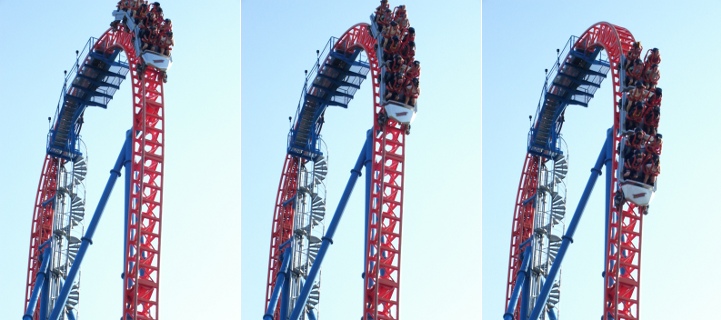
    Most digital cameras, this one included, have a long delay between pushing the button and getting results. However, it has several “continuous shutter” modes and I picked the “high-speed” version that records three images in quick succession. There’s no indication of how much time passes between exposures, which probably depends more on the SD Card’s speed than anything else. The timestamp resolution is 1 second, which isn’t much help.

    Anyhow, poking the shutter button when the train came over the top consistently produced one good picture as it descended.

    Continuous Shutter Images
    Continuous Shutter Images

    I fought all the other automation to a standstill:

    • Infinity focus
    • Shutter speed 1/1000 sec
    • Aperture f/5.1

    The camera picked ISO 200, probably as a result of the “high speed” continuous shutter setting, and warned me that it wasn’t happy about doing that. This being a bright, sunlit day, the nominal exposure for that ISO speed would be 1/200 @ f/16. Two stops faster shutter and three stops bigger aperture should work out OK, as the subjects were on the down-sun side of the coaster. The camera has just two apertures (big and little) that, of course, vary with the zoom setting, so I didn’t have much leeway. I figured I could fix any minor exposure issues in the cough darkroom.

    The tele end of the zoom range is equivalent to a 114 mm lens with 35 mm film, which is better than the beer-can-sized zoom on the SLR I used to lug around back in the day.

    In round numbers:

    • the car is 30 feet long and the original image is two cars tall, call it 60 feet
    • the image is 2816 pixels tall
    • (60 * 12) / 2800 = maybe 1/4″ per pixel

    Cropping the interesting part from the frame, goosing the gamma a smidge, and applying a touch of Unsharp Mask says that’s about right: you can see the expressions on their grainy little faces. National Geographic quality, it ain’t, but it’s OK for a pocket camera and pix of relatives.

    Memo to Self: Would forcing the ISO down to 100 reduce the graininess a bit?

  • Kensington Expert Mouse Trackball: Scroll Ring Troubles

    Trackball Scroll Ring
    Trackball Scroll Ring

    The oddly named Kensington “Expert Mouse” (it’s a trackball) sits to the left of my keyboard, where it serves as my main pointer controller; I’m right-handed, but have used a left-hand mouse / trackball for years.

    [Edit: a comment from the future compares it with a different trackball that may work on the right.

    Also, search for Kensington scroll to find other posts. There may be no good fix for scroll ring problems.]

    Recently the scroll ring has become balky, stuttering upward & downward rather than actually scrolling. It’s an optical device, so I suspected it had ingested a wad of fuzz that blocked the beam path.

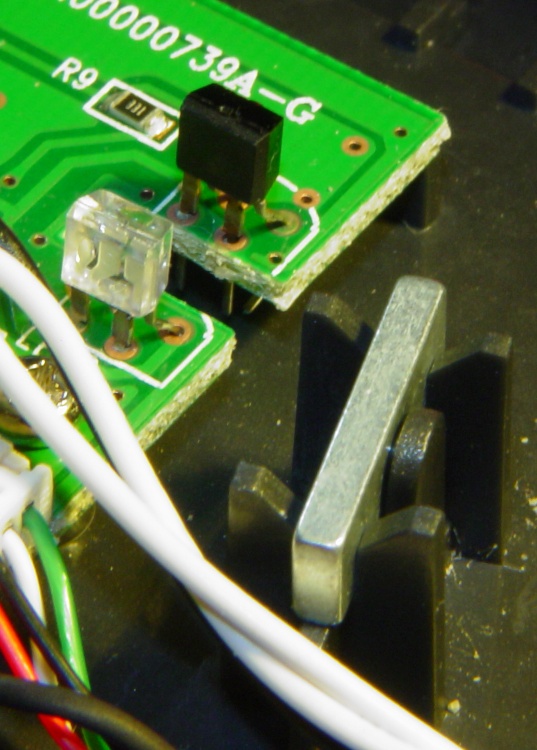
    The top photo shows the infra-red emitter adjacent to the scroll ring’s slotted rim. The silver bar to the right of the emitter is the magnet that provides those soft detents. There’s no obvious fuzz.

    Disassembly is straightforward.

    • Tip the ball out into your hand and put it where it can’t possibly roll off the desk.
    • Peel the four rubber feet off the bottom, remove four screws, and the top half of the body pops off.
    • Remove three screws from each of the two button cap assemblies and pry the button caps off the case bottom.
    • Remove two screws from the ball socket, pull it off, and clean any fuzz from the openings.

    Surprisingly, I didn’t find much crud at all.

    Scroll Ring Emitter and Detector
    Scroll Ring Emitter and Detector

    This photo shows the IR emitter and detector, peering at each other across the electrical isolation gap in the circuit board. Nothing obviously wrong here, either…

    They both seem to be dual elements, which makes sense for a quadrature position encoder. Unfortunately, replacing them seems to be really difficult; they don’t look like stock items.

    So I put it back together, plugged the USB cable in, restarted the X server (this being Xubuntu 8.10), and it pretty much works again.

    Kensington replaced a previous Expert Mouse under warranty when one of the three minuscule red bearing balls that support the trackball went walkaround, but that gadget had been getting erratic, too.

    I’m not sure what’s going on, but I have a bad feeling about this.

    [Update: More troubles lead to some interesting pix and an insight. Maybe even a fix!]

    Further Update: Ten years in the future, a real fix appears!

  • Hobo Data Logger: AA Battery Pack Hack

    Hobo Battery Mod - Outside View
    Hobo Battery Mod – Outside View

    We have a bunch of Hobo Data Loggers recording various & sundry temperatures, humidities, and light levels around the house; as the saying goes, “If you observe something long enough, it turns into science.”

    Normally the things run on single CR2032 lithium cells, which last for a good long time. However, Something Happened to the one that’s collecting groundwater temperatures at the water inlet pipe from the town supply: it started eating lithium cells like potato chips.

    Hobo Battery Mod - Inside View
    Hobo Battery Mod – Inside View

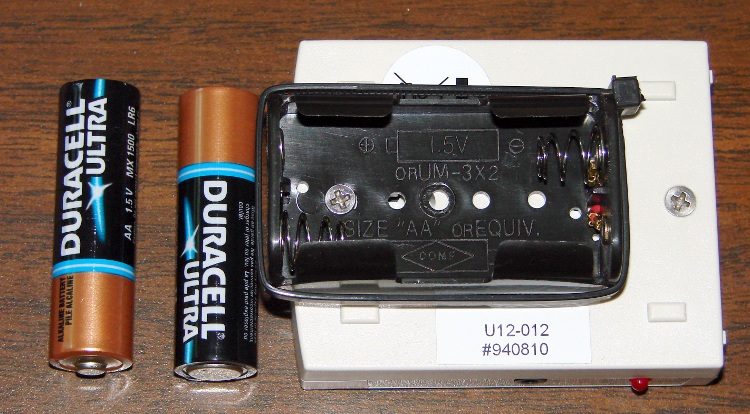
    It was still producing good data, so I was loathe to toss it out. Instead, I figured all it needed was more battery, as a high current for a lithium cell doesn’t amount to much for an AA cell. A pair of alkaline AA cells produces just about exactly 3 V and the data logger can’t tell the difference.

    So I opened the logger one last time, soldered the wires from a dual AA cell holder to the appropriate points on the circuit board, affixed the holder to the back with one of the case screws, and it’s been working fine ever since.

    However, this seems like one more application where whatever plastic they thought would last doesn’t: the AA holders routinely split at the ends. Maybe the joint should be thicker, maybe it’s the wrong plastic for the job, but without the cable tie acting as a belly band one end of the holder splits off in a year or so. Bah!

    Update: Maybe I got a batch of bad CR2032 cells, as the logger’s current seems to be just about right. Read the comments and then check the followup there.

  • Tour Easy Zzipper Fairing Wrappers: “Bubble Wrap”

    Tour Easy Zzipper Fairing Wrappers
    Tour Easy Zzipper Fairing Wrappers

    We spent four days biking along the Pine Creek Valley rail trail with a Rails-to-Trails Conservancy group ride on our Tour Easy recumbent bikes. Because a crushed-stone path creates a lot of noise that the fairings direct right into our ears and because we weren’t going very fast, we left the fairings at home. As a result, the bikes were wonderfully quiet.

    Some years ago, Mary sewed up “bubble wraps” to store our fairings on those rare occasions when they’re not on the bikes. She had some red flannel left over from another project and a hank of cheery Christmas-themed edging, so they turned out to be rather conspicuous.

    The trick is to get the size right when the fairing is rolled up. With the fairing in its natural bubble shape, the wrap is rather limp, so you need pockets on both ends to hold the wrap in place. The toes are, she admits, an affectation, but didn’t take much figuring to get right. The width is just slightly more than the fairing’s flat width; you find that by rolling it up and measuring the roll.

    She actually made a paper template first to sort out all the curves, then transferred that to the flannel for final cutting.

    Tuck in the fairing’s head & toes, roll it up toes first, tie the (attached) strap in a neat bow, and it’s done!

    We have three fairings and they roll up together, each in its own wrap, into one tidy, albeit rather heavy, package.