The Smell of Molten Projects in the Morning

Ed Nisley's Blog: Shop notes, electronics, firmware, machinery, 3D printing, laser cuttery, and curiosities. Contents: 100% human thinking, 0% AI slop.

Author: Ed

  • Clothes Rack Dowel Splicing

    Clothes Rack Dowel Glue
    Clothes Rack Dowel Glue

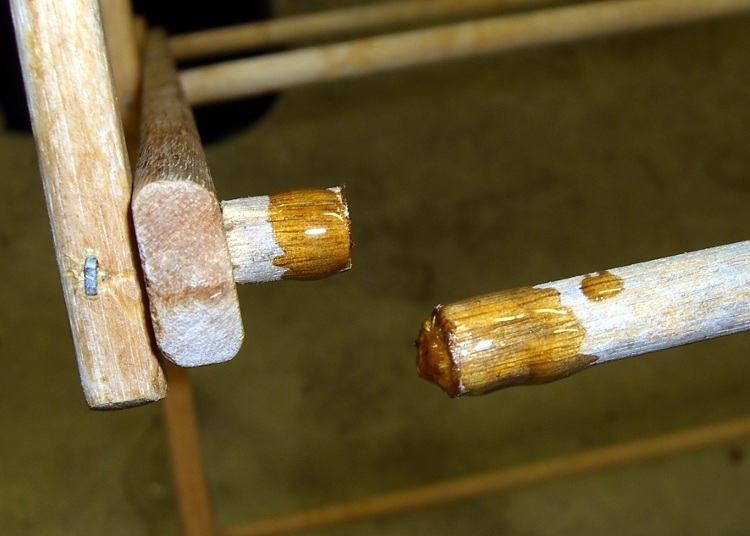
    Mary picked up a rather well-used wooden-dowel clothes drying rack at a tag sale for essentially nothing; one of the dowels was missing. That’s easy enough to fix, as I have a stash of dowels from what seems to be another rack of the same type on my wood stockpile…

    Of course, those dowels are just an inch or two shorter than needed.

    So…

    • Turn down the ends of two dowels to 0.29″ x 3/4″ to fit the holes in the support struts
    • Sand a small taper on the ends
    • Pull the staples, insert the longer dowel and mash the staple back in place
    • Eyeball the length of the other dowel, hacksaw to fit, install similarly
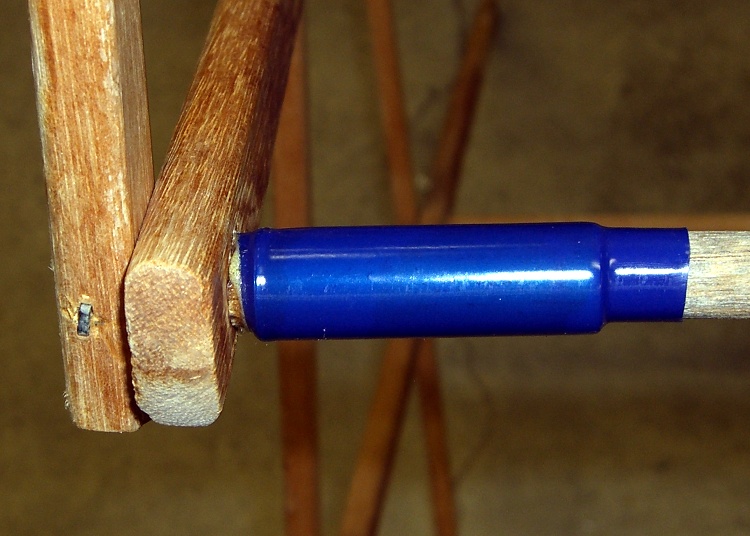
    • Find a length of brass tubing that slips over the dowels
    • Cut some heat stink shrink tubing to fit
    Spliced dowels
    Spliced dowels

    I used urethane adhesive, because it expands as it cures and will fill the gaps inside the brass tubing. The heat stink tubing is just for nice… although it does make for a rather stunning contrast to the aged wood dowels, I’ll agree.

    And it’s all good!

    (Use it up, wear it out, repair it, wear it out again, then save the pieces because they’ll come in handy for something else.)

  • Arduino: Dividing an External Frequency

    A friend asked for a Totally Featureless Clock (it’s a long story) and in order to build that, I must concoct a WWVB simulator. Not needing really precise atomic time, I can use ordinary bench-grade crystals and suchlike; microsecond-level jitter isn’t a big problem.

    Anyhow, I must divide down an external 60 kHz signal to produce a 10-Hz interrupt to drive the modulator. The 60 kHz comes from a 12 MHz crystal, through a divide-by-200 counter, and feeds the ATmega T1 input (aka Arduino pin 5, normally the PWM5 output).

    The key is setting up Timer1 to divide T1 inputs by 6000 (count 0 through 5999), then have it produce an interrupt when the maximum count occurs. You’ll want to read Chapter 15 of The Fine Manual to learn how the hardware works.

    I used CTC Mode 12, so that the counts occur on the falling edge of the signal on T1 with the maximum value stored in ICR1. That causes the Input Capture Interrupt to occur when ICR1 == TCNT1.

    Review the avr-lib interrupt doc to get the proper interrupt vector names. You want the ICF interrupt, enabled with ICIE1.

    Note that Table 15-4 is misleading. The TOV1 Flag may be set when TCNT == MAX, but unless ICR1 == MAX it’ll never get there. You (well, I) can spend a distressing amount of time figuring out why TOV1 doesn’t happen.

    With that in mind, Timer1 setup is straightforward:

    TCCR1B = 0;                // stop Timer 1 by shutting off the clock
    TCNT1 = 0;                 // force count to start from scratch
    TCCR1A = 0;                // no compare outputs to OC1A OC1B, WGM1 1:0 = 00
    TCCR1C = 0;                // no forced compares
    ICR1 = 5999;               // count 0 through 5999 = divide by 6000
    TIMSK1 = 1 << ICIE1; // allow interrupt on capture event (TCNT == ICF)
    TCCR1B = B00011110;        // start Timer 1: CTC mode = 12, TOP=ICR1, ext clock on T1, falling edge
    

    The interrupt handler can do whatever you want. This one just flips an output bit (ultimately connected to the modulator) to show it’s arrived:

    ISR(TIMER1_CAPT_vect) {
       PINB |= _BV(1);
    }
    

    That weird-looking line takes advantage of an Arduino hardware feature: if you write a 1 to a bit in the PIN register, the corresponding PORT value toggles. It’s documented in The Fine Manual on page 74, section 13.2.2 and mentioned there.

    Then the rest of the simulator is just a simple matter of software…

  • Arduino vs. ATMega168 Chip Pinouts

    The Arduino pin names are silkscreened right on the board, but sometimes you must know the corresponding ATMega168 pin name. I printed out The Fine Manual and penciled in the Arduino names, but that’s getting smudgy.

    Herewith, the ATmega168 pinout with neatly printed Arduino pin names.

    Arduino vs ATMega168 chip pinouts
    Arduino vs ATMega168 chip pinouts

    [Update:Turns out there’s an Official Version.]

    Sometimes, you also must know the relation between hardware Timers and PWM output pins:

    OC0A PWM6 PWM3 OC2B
    OC0B PWM5 PWM5 OC0B
    OC1A PWM9 PWM6 OC0A
    OC1B PWM10 PWM9 OC1A
    OC2A PWM11 PWM10 OC1B
    OC2B PWM3 PWM11 OC2A
  • Arduino: Be Careful With the Preprocessor

    This trips me up every damn time…

    Although the Arduino language looks like C and parses like C and runs like C, it’s not really C. It’s a specialized language gnawed on by a vast conversion monster and eventually shat out as executable ATmega-style instructions.

    Here’s a (rather contrived) trivial working program…

    #define PIN_ARDUINOLED    13     // standard LED
    
    typedef struct {
     int initial;
     int on;
     int off;
     int reps;
    } timeout_ ;
    
    timeout_ Trial = {2000,100,1000,5};
    
    void setup() {
     pinMode(PIN_ARDUINOLED,OUTPUT);
    }
    
    void loop() {
    
    int counter;
    
     digitalWrite(PIN_ARDUINOLED,LOW);
     delay(Trial.initial);
    
     for (counter = 0; counter < Trial.reps; ++counter) {
     digitalWrite(PIN_ARDUINOLED,HIGH);
     delay(Trial.on);
     digitalWrite(PIN_ARDUINOLED,LOW);
     delay(Trial.off);
     }
    
    }

    That compiles and runs just like you’d expect: a long delay, followed by five blinks, repeating endlessly.

    Now, use some preprocessor conditionals to gut-and-replace the code, with a bit of garish colorization to make things more obvious. This is Bad Programming Practice, but work with me…

    #define PIN_ARDUINOLED    13        // standard LED
    
    #if 0
    typedef struct {
     int initial;
     int on;
     int off;
     int reps;
    } timeout_ ;
    #endif
    
    #if 0
    timeout_ Trial = {2000,100,1000,5};
    #else
    int LoopCount = 50;
    #endif
    
    void setup() {
     pinMode(PIN_ARDUINOLED,OUTPUT);
    }
    
    void loop() {
    
    int counter;
    
    #if 0
     digitalWrite(PIN_ARDUINOLED,LOW);
     delay(Trial.initial);
    
     for (counter = 0; counter < Trial.reps; ++counter) {
     digitalWrite(PIN_ARDUINOLED,HIGH);
     delay(Trial.on);
     digitalWrite(PIN_ARDUINOLED,LOW);
     delay(Trial.off);
     }
    #else
     digitalWrite(PIN_ARDUINOLED,LOW);
     for (counter = 0; counter < LoopCount; ++counter) {
     digitalWrite(PIN_ARDUINOLED,HIGH);
     delay(250);
     digitalWrite(PIN_ARDUINOLED,LOW);
     delay(500);
     }
    
    #endif
    
    }

    The error message lump resulting from compiling that looks like:

    In function ‘void setup()’:
    error: ‘OUTPUT’ was not declared in this scope In function ‘void loop()’:
     In function ‘int main()’:

    Really?

    Delete the lines already removed by the preprocessor, the lines that shouldn’t be there when the code reaches the compiler, and you have:

    #define PIN_ARDUINOLED        13              // standard LED
    
    int LoopCount = 50;
    
    void setup() {
     pinMode(PIN_ARDUINOLED,OUTPUT);
    }
    
    void loop() {
    
    int counter;
    
     digitalWrite(PIN_ARDUINOLED,LOW);
     for (counter = 0; counter < LoopCount; ++counter) {
     digitalWrite(PIN_ARDUINOLED,HIGH);
     delay(250);
     digitalWrite(PIN_ARDUINOLED,LOW);
     delay(500);
     }
    
    }

    Which compiles and runs like a champ, of course. It blinks merrily away, more off than on, forever. The LoopCount variable doesn’t do much for us, but it’s the thought that counts.

    Put the original lines back, comment out the new stuff, and you get:

    #define PIN_ARDUINOLED        13              // standard LED
    
    typedef struct {
     int initial;
     int on;
     int off;
     int reps;
    } timeout_ ;
    
    timeout_ Trial = {2000,100,1000,5};
    
    #if 0
    int LoopCount = 50;
    #endif
    
    void setup() {
     pinMode(PIN_ARDUINOLED,OUTPUT);
    }
    
    void loop() {
    
    int counter;
    
     digitalWrite(PIN_ARDUINOLED,LOW);
     delay(Trial.initial);
    
     for (counter = 0; counter < Trial.reps; ++counter) {
     digitalWrite(PIN_ARDUINOLED,HIGH);
     delay(Trial.on);
     digitalWrite(PIN_ARDUINOLED,LOW);
     delay(Trial.off);
     }
    
    #if 0
     digitalWrite(PIN_ARDUINOLED,LOW);
     for (counter = 0; counter < LoopCount; ++counter) {
     digitalWrite(PIN_ARDUINOLED,HIGH);
     delay(250);
     digitalWrite(PIN_ARDUINOLED,LOW);
     delay(500);
     }
    
    #endif
    
    }

    And that compiles and runs perfectly, just like you’d expect. Uh-huh. Right.

    Basically, there’s a complex interaction between ordinary C preprocessor directives, ordinary C language elements, and the inscrutable innards of the Arduino IDE & compiler chain.

    As nearly as I can tell, you can wrap #if whatever around simple declarations and most executable code with impunity, but putting anything more elaborate than that, like a simple typedef struct, inside the conditionals causes bizarre problems.

    In fact, just typedef can cause problems, particularly if you attempt to use the ensuing tag in a function declaration. Don’t even think about anything along these lines:

    typedef struct {whatever} taggit_;
    ... snippage ...
    void SomeFunction(taggit_ *pThing) {
    ... snippage ...
    }

    However, this seems to work fine:

    struct taggit_ {whatever};
    ... snippage ...
    void SomeFunction(struct taggit_ *pThing) {
    ... snippage ...
    }

    Trying to make sense of this will drive you mad (well, it drives me mad), but when you get bizarre error messages that can’t be explained by the usual operator screwups, well, most likely you’re being too clever with the preprocessor.

    Or you’ve (also) made a trivial typo that cannot be discovered by inspection.

    It seems the right (only?) way to handle typedef definitions is to put ’em in a separate header file, as described there, then add the header file to your sketch in a separate tab. That seems to insert the definitions in the proper order within the *.cpp file that actually goes into the compiler.

    However, some limited fiddling reveals that I don’t understand the nuances or I’m screwing it up. Probably both.

    Memo to Self: define the structs & variables without typedefs, then prepare for some protracted tweakage…
  • Death of the Bake-A-Round

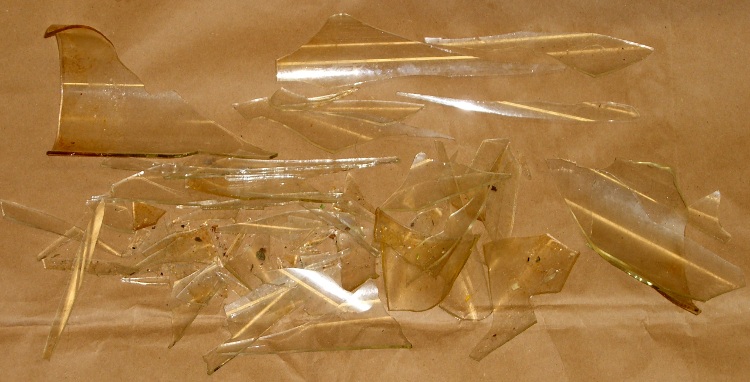
    After nigh onto a year of twice-weekly baking, I finally managed to destroy our Pyrex Bake-A-Round tube, in exactly the manner I expected. Despite liberal buttering-up before inserting the dough, sometimes the bread sticks to the tube and requires a bit of probing with a long knife along the sides to release it. Given that the tube just came out of the oven, I’m holding it one-handed with a pad… it fell over onto the wood cutting-board counter.

    The loaf inside is remarkably akin to a two-pound dead-blow hammer and, as you’d expect, the tube shattered like, uh, glass. Fortunately, I was belly-up to the counter and facing into a corner, so the fragments remained mostly in place.

    Shattered Bake-A-Round tube
    Shattered Bake-A-Round tube

    What surprised me, though, was that (at least for this 30-year-old B-A-R tube) the glass wasn’t tempered. The fragments are long, thin, razor-sharp daggers.

    Glass fragments
    Glass fragments

    Now we must get used to eating rectangular bread slices again…

    In other good news, there weren’t many minuscule glass fragments on the loaf. I was surprised at how closely baked flax-seed meal resembles either chitin or glass, but a thorough scan with my headband magnifier and a bit of deft brushing cleared the loaf for consumption.

    After some of the stuff I’ve eaten over the years, an errant glass chip or two isn’t going to do me a bit of harm. The ladies figured if I was willing to eat it, they couldn’t back down, so it’s all good.

    (Top pic with flash, bottom without: it’s hard to take a picture of glass!)

  • Seiko Epson RTC-65271 Real Time Clock Datasheet

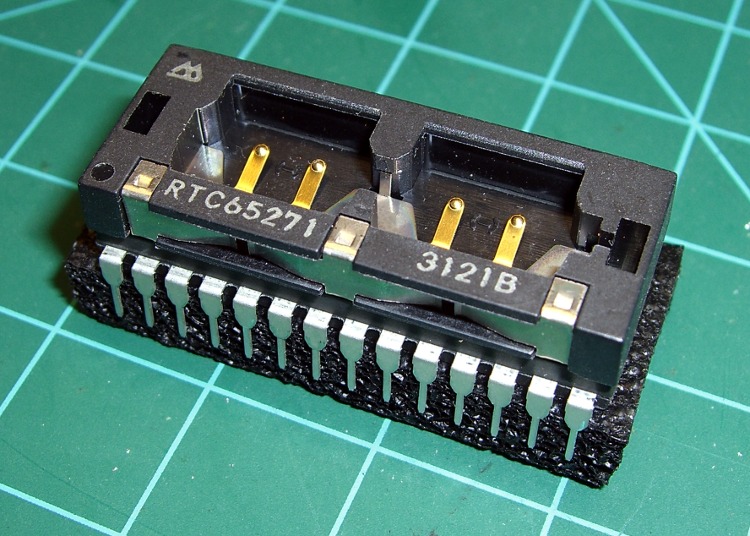
    RTC-65271 Module
    RTC-65271 Module

    I have a stash of RTC65271 real-time clock modules and might use one in an upcoming project. They’re obsolete by nigh onto two decades, but it’s a one-off project and I know I’ve been saving these things for some good reason.

    Alas, the datasheet doesn’t seem to appear anywhere else on the web; you can find an overview & general description, but not how the thing actually works.

    However, if you happen to have a chip and need the datasheet, this is indeed your lucky day: a scanned RTC65271 Datasheet.

    The datasheet alleges it’s “functionally compatible with MC146818A and DS1287“, and those datasheets may be more readable, if not exactly applicable. It seems to be (similar to) the clock chip used in the original PC/AT, if you recall those relics, and might actually use standard hardware & software protocols.

    Dealing with this thing may be more trouble than it’s worth in this day of bus-less microcontrollers with Serial Peripheral Interface widgetry. A back-of-the-envelope count says it’d require three ‘595 output chips and a ‘166 input chip to fit on an SPI bus. Yuch…

    Hey, if you want one, drop me a note. I have far more than a lifetime supply at my current rate of consumption.

  • Digital Photography: Sometimes Underexposure Is Your Friend

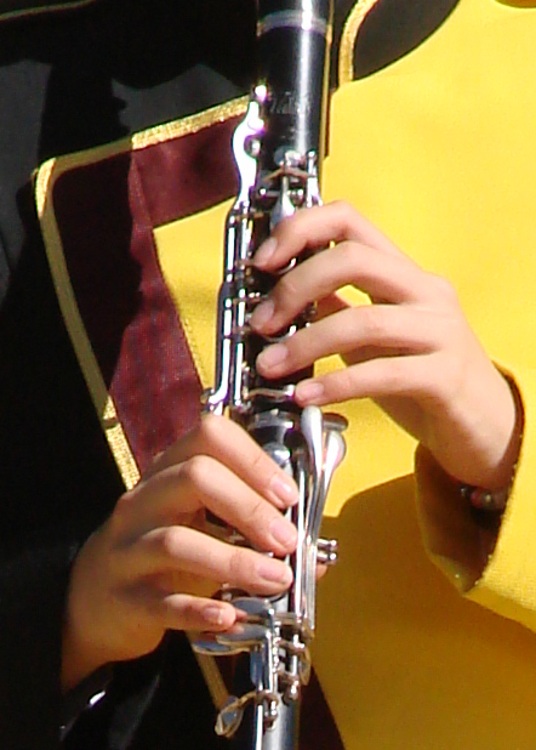
    Took some pix of the high school marching band yesterday and the whole lot came out one stop underexposed… exactly as I intended.

    Their uniforms are dead black wool with a yellow left-shoulder flap. The camera looks at all that black, desperately attempts to make it neutral gray, and blows out all the highlights. Given that the only highlights are the face and hands, the absolutely critical part of the image looks awful.

    Auto Exposure
    Auto Exposure

    The first picture (a small crop from a much bigger image) shows what the auto-exposure algorithm comes up with:

    Exposure Bias : 0
    Exposure Mode : Auto
    Exposure Program : Auto
    Exposure Time : 1/1000 s
    FNumber : F4
    Flash : No, auto
    Focal Length : 60.1 mm
    ISO Speed Ratings : 125
    Light Source : Daylight
    Metering Mode : Center weighted average

    Notice the burned-out highlights: the left hand is flat, the clarinet keys reflect retina-burn white, and the yellow shoulder is monochrome.

    Under those circumstances, the only thing to do is override the camera’s opinion and force some underexposure. You can either meter each shot manually or just tell it to knock the auto-exposure back a bit. I generally choose the latter, if only because the camera comes up with a reasonable approximation of a good exposure faster than I can. If I don’t lay the center-weighted spot on the black side of a uniform, that is.

    Minus 1 stop
    Minus 1 stop

    So the second picture (another small crop) is “underexposed” by a stop:

    Exposure Bias : -1
    Exposure Mode : Manual
    Exposure Program : Auto
    Exposure Time : 1/1250 s
    FNumber : F5.6
    Flash : No, auto
    Focal Length : 60.1 mm
    ISO Speed Ratings : 125
    Light Source : Daylight
    Metering Mode : Center weighted average

    Much better.

    We can quibble about the color quality, but at least the highlights aren’t blown out and there’s some texture to the uniform. The black part of the uniform is a dead loss, but that’s pretty much the way it’s got to be: the camera simply doesn’t have enough dynamic range to handle a dead-black uniform and glare-white reflections.

    One of the band members has absolutely gorgeous deep-dark-brown skin that I have yet to get right. Either the highlights burn out or her skin blends into the shadows. Twiddling the gamma doesn’t help much.

    More on the details of why you want underexposure, even in what look like evenly illuminated scenes is there.

    Sometimes, though, you just gotta fix it in the mix, as described there.

    Memo to Self: Set the color balance to “daylight”, too, because bright primary colors against black can be confusing.