The Smell of Molten Projects in the Morning

Ed Nisley's Blog: Shop notes, electronics, firmware, machinery, 3D printing, laser cuttery, and curiosities. Contents: 100% human thinking, 0% AI slop.

Author: Ed

  • Character-string Histogram

    I’m in the midst of counting glitches on a WWVB receiver, a glitch being any pulse with a duration that isn’t close to 200, 500, or 800 ms. It’s useful to know the pulse width distribution, which is what a histogram does for a living.

    Rather than a graphic histogram, though, I’ve been using a character array (a string!) with one character for each possible pulse duration, measured in units of 20 ms. The value of each character indicates the number of pulses having that duration during the previous minute.

    The counting sequence goes like this:

    • No counts: . (a period)
    • 1 to 9 counts: 1 .. 9
    • 10 to 35 counts: A .. Z
    • 36 to 61 counts: a .. z
    • More than 61 counts: !

    So a minute with no glitches (and a valid WWVB time code frame) looks like this:

    .........4S9............462............322.........
    

    The three clusters show the three valid pulse widths. The pulse widths from the receiver have an inherent jitter, plus the usual ±1 jitter you get for free when you digitize something, plus (this being RF from half a continent away) whatever the Lords of Cosmic Jest do to the signal. So each width usually occupies two or three cells.

    • The 200 ms binary zero pulses form the cluster on the left: that “S” is equivalent to 10 + 18 = 28 counts. Add in the 4 and 9 on either side and you get 41 binary zero pulses.
    • The middle cluster has the 500 ms binary 1 pulses: 4 + 6 + 2 = 12.
    • Each WWVB time code frame has exactly seven 800 ms frame markers, which form the cluster on the right end: 3+2+2 = 7.

    Add them up: 41 + 12 + 7 = 60. That’s exactly the right number of pulses in a minute. What a pleasant surprise!

    A minute with three out-of-spec glitches looks like this:

    1...1....6NC2............82.......1.....51.........
    

    And a minute with very high noise that pretty much obliterates the WWVB signal:

    f!!jHC6AB746312.2121..2.1..........................
    

    Here’s how all that works…

    The histogram counters form a character array that’s also a string. There are 50 20-ms Jiffies in each second (given by the obvious constant), so the histogram has 52 entries: 50 valid counts (0-49), 1 for “more than that”, and 1 for the null byte at the end of the string.

    char    Durations[JIFFIES_PER_SECOND + 2];
    

    Initialize each counter (character) with the starting value and jam a binary zero at the end:

    memset(Durations,'.',sizeof(Durations)-1);
    Durations[sizeof(Durations) - 1] = 0;
    

    And then tick the appropriate counter as each pulse arrives:

    Index = min(PWM_Width,sizeof(Durations)-2);
    
    switch (Durations[Index]) {
     case '.' :
     Durations[Index] = '1';
     break;
     case '9' :
     Durations[Index] = 'A';
     break;
     case 'Z' :
     Durations[Index] = 'a';
     break;
     case 'z' :
     Durations[Index] = '!';
     break;
     case '!' :
     break;
     default :
     Durations[Index]++;
    }
    

    The switch statement maneuvers the counting sequence through the digits, uppercase and lowercase alphabet, then enforces a stall at the maximum count value of “!”. You can’t just increment each element without some checking, because you do not want unprintable control characters in the string.

    Then you print the histogram as you would any ordinary string. If you’re using an Arduino, as I am, this will suffice:

    Serial.println(Durations);
    

    All this depends on the ASCII character set’s numerical sequence. Ponder the charts there and all should become clear.

    Here are the histograms from an hour of WWVB reception during the late afternoon of New Year’s Day: watch the noise floor rise up and eat the WWVB signal…

    
    .........7OD............36............133..........
     .........BID1...........37.............6.1.........
     .1.......9O91..........262.............43..........
     ........27V2............272............421.........
     .........4Y41...........46............124.........2
     .........AP71...........2811..........123.........2
     .........AN9............731...........1.6..........
     12.111..28IB11.........1623.......2..1.42.....2....
     1412...125Q911..........461.....1......41..........
     1........8Q81..........137...1.........15..........
     .12....119N912.........116..........1.132..........
     1521..1.17O931...1......27...........1..5..........
     .12....12BKB2...........332....1......132.......2..
     25211.1.3AHB5......1...1143........1...14.........3
     45412...4BDA4..12.......25111..1.....1..22.........
     6A44322.26CI53.2.1...1..343...1.......1.11.........
     5D75531113FG511...12..212313.1........1.2..1.......
     1432.1.119GB41..........262.1...11.....14..........
     .5211..115MB4...........441............14.2........
     .4.1....25JB6...........442.........1..231.........
     6B443...27I772..........2322.....1.....1221......2.
     4555411.27HA321........3232......1....114..........
     3232.1.129GI1...1.......4321...1.1.1...111.........
     ...1..1.19O8..1....11...262............24..........
     11......2AN62...........622...........124..........
     111.....2BJ551..1......1522........3..141........21
     1421....29N611.......1.136............1231........2
     1.12.....AIB3........1..38...1........312..........
     7F42..1.28FE341.1.1.....351........1...12...1.....2
     .23......8GG2....11....2423............33..........
     112..13.1AK931.....2....142....2.11.1..3.1........2
     423111..44JD4.2..1.....1433........11111...........
     1413..1.3CL812..11......242..1....11...21.........2
     474112.34AI84.2...3.1...16.2.....1...1.11..........
     8LHC734657D857411..11...131......1..1.1...........2
     JuSFDCCDDCD662412...1..............................
     VmG376788AC8671.21.1..3.......1....................
     IlCB4576CFE532131.11.1..1.1........................
     KxN798EB98A7422...2.1...1..........................
     AYL96853CF7742121311.13..21....1...................
     8TDEB6649A7952..32.41..124.....1.....1............2
     DeO78638C9GA6142.15111..........1........2.....2...
     AcPC83426BD4823.122..11132.1.......................
     7SF31121AHFB73..2.111...321..1.1...................
     7F3221414GG5411.111121.133...1.1.1.................
     6RD9669647F7361.31.2..1212...1.....................
     6L71.2444ALB21...221.212321..2...1...1.............
     4LHFD7638C9B12.31341.22113...2..........1..........
     264321112EFA5.112.22.2.14111..1.....1...1.........2
     235511445BEC3.12..1131.131..1.1........11..........
     7UC741635AAC442.1..112.1..11311.......1.1.........2
     EVLCAB3598E752252133.111.1.1..........1...........2
     JnTE9913A59A452331.13..1222.............1..........
     f!!jHC6AB746312.2121..2.1..........................
     !!!iMB772.4532..1.1.1.1..1.........................
    
  • Sears Craftsman Radial Saw Elevation Knob Handle

    Broken Knob
    Broken Knob

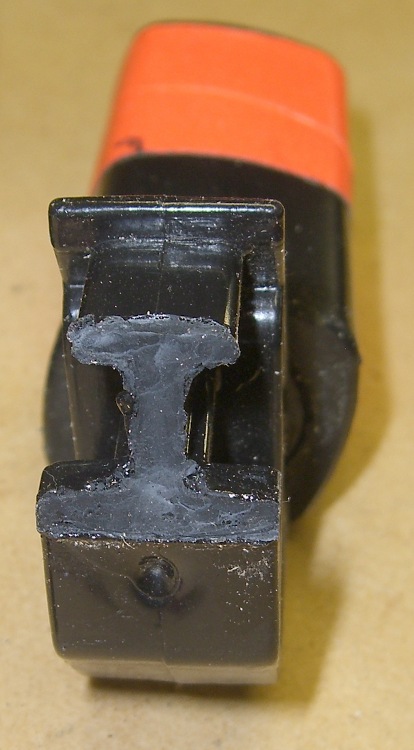
    Mary’s folks visited us for Christmas and her father brought along a shelf that needed cutting; their apartment doesn’t have room for his shop equipment, alas. I cleared the crap off the radial saw, grabbed the elevation knob to crank the blade up to get it set for ripping, and … the handle broke off.

    That’s not the first time this has happened, so I wasn’t entirely surprised. The knob is large enough that I could complete the mission just by grabbing the rim, but it was a near thing.

    The handle is made of some wonderful engineering plastic that doesn’t solvent-bond well with anything in my armory, although Plastruct had enough bite to make me think it would work. That repair actually lasted several years of admittedly low-duty-cycle use, but obviously this couldn’t continue.

    Stress raiser
    Stress raiser

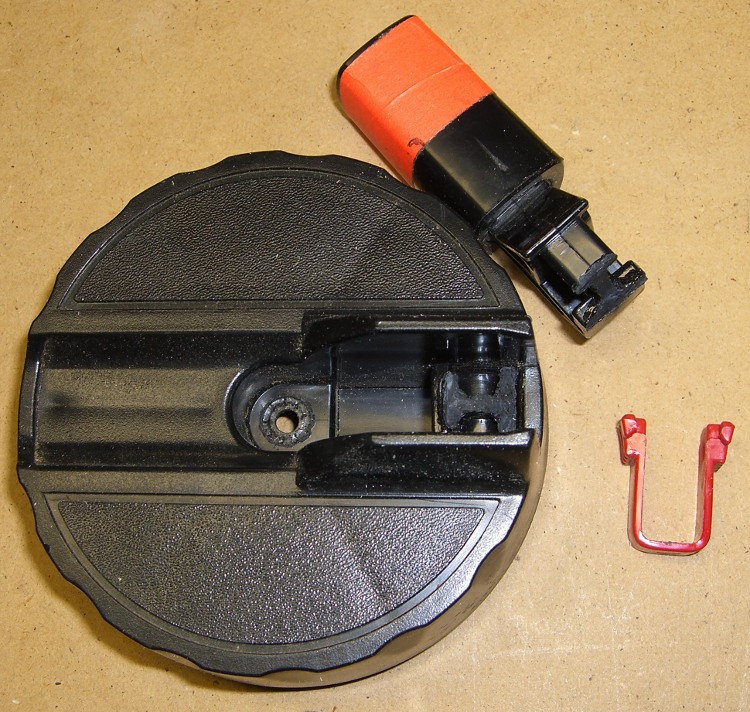
    The problem seems to be built into the handle design. This pic shows that the fracture spans a high-stress part of the handle: between the inside right-angle corner (upper left) that rests on the outside of the knob, across the handle’s web, to the corner of the recess in the flange at the bottom of the picture.

    The red hoodickie is the latch that secures the handle in its deployed position, wherein it sticks out at exactly crotch height for average human males. That accounts for the fluorescent red tape around the handle.

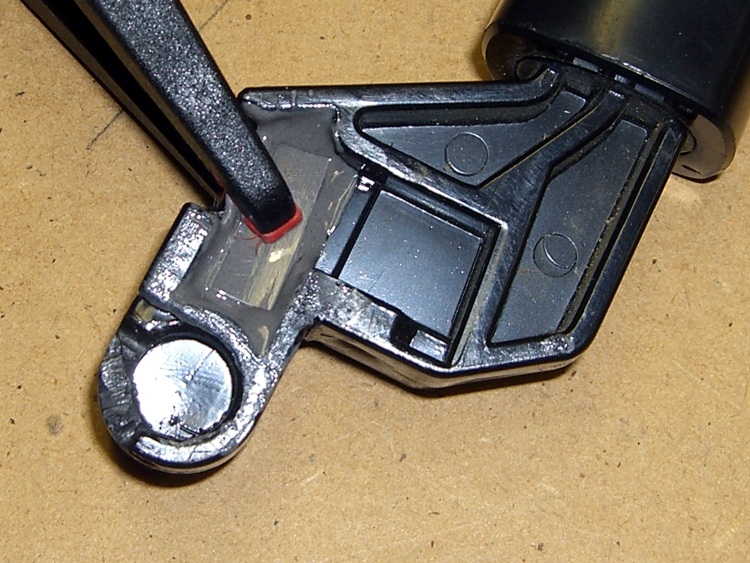
    Broken surface
    Broken surface

    You can see how the latch recess triggered the crack: that notch where the latch wraps around must be the highest-stress part of the handle. I suspect the original design didn’t have the latch (or had something different) and the fat web near the round feature on the left extended all the way to the angled flange on the right.

    That would work!

    I epoxied a pair of rectangular brass tubes across the fracture inside the web, where they fit neatly below the latch. I roughed up the web with an awl to give the epoxy more surface to grab.

    Incidentally, this is one of those cases where you might think a cyanoacrylate adhesive would work. It won’t: too much shock, too much pressure. I used it to hold the parts together while the epoxy cured, but that’s about as far as I’d trust it.

    I’d like to add something to the notch, but I’m not convinced a right-angle brass flange and some epoxy will have enough grip to make any difference. It would certainly require changing the latch, perhaps by thinning the left side, which would make that weaker. On the other paw, I can probably eke out a miserable existence without the latch.

    Brass internal reinforcement
    Brass internal reinforcement

    The picture shows the clamping in operation. A snippet of polypropylene (from some random consumer packaging) under the tip of the clamp prevents it from becoming one with the project; the clamp tip is slippery plastic, but you never know.

    Perhaps this fix will last for a few more years…

    Y’know, I’m beginning to believe that finite-element analysis will be the death of us all. Obviously this handle was modeled to a fare-thee-well, with only enough material to meet the expected stresses in the expected directions. Unfortunately, the real world doesn’t cooperate: the forces are always larger, the conditions always worse, and the materials always weaker than the design anticipated. A “safety factor” of three or four or maybe even ten just isn’t enough!

  • Arduino Serial Optical Isolator

    Optical Isolator - oops
    Optical Isolator – oops

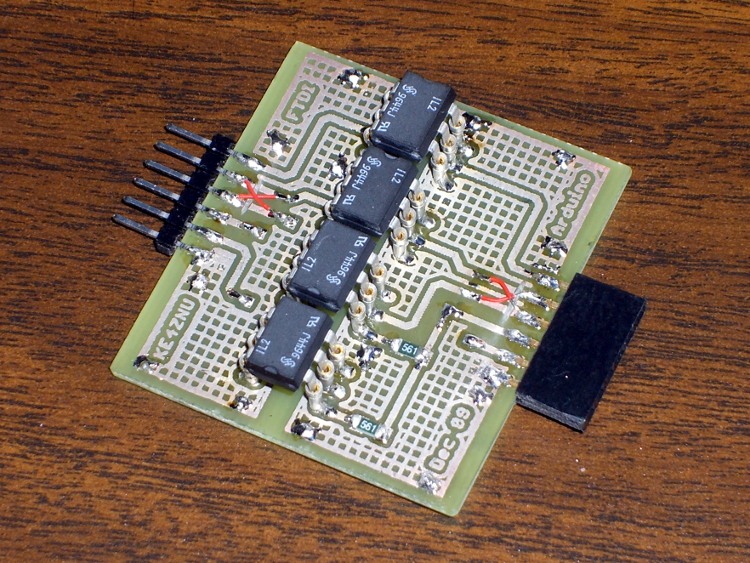
    It turns out that attaching some, but not all, of the PCs around here to the Arduino Pro board controlling the Totally Featureless Clock cause the WWVB receiver to drown in a sea of noise. In fact, just touching the USB cable’s shield to the FTDI Basic USB-to-serial adapter would bring the noise.

    So this is a quick-and-dirty circuit to see if optical isolation will reduce the problem enough to be bearable.

    The schematic is pretty simple: two bits in, two bits out.

    Optical Isolate Schematic
    Optical Isolate Schematic

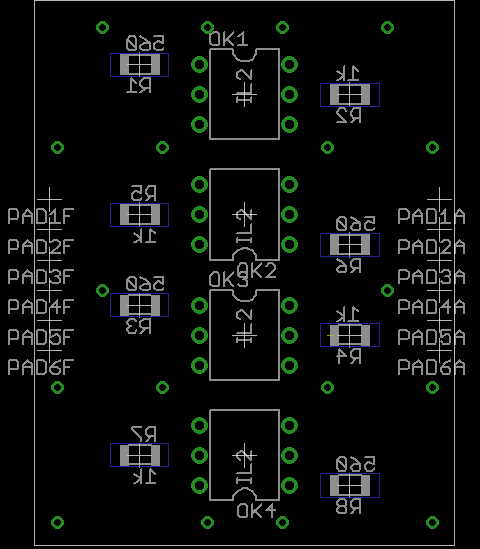
    The layout puts the DIP isolators on the top and the SMD resistors on the bottom. I used fancy screw-machine IC socket pins, just because I had some, but you could solder the isolators directly to the board. The FTDI Basic connects through header pins and the Arduino connects through female header sockets, both soldered sideways to the top of the board. I’ll eventually reinforce them with some epoxy, never fear.

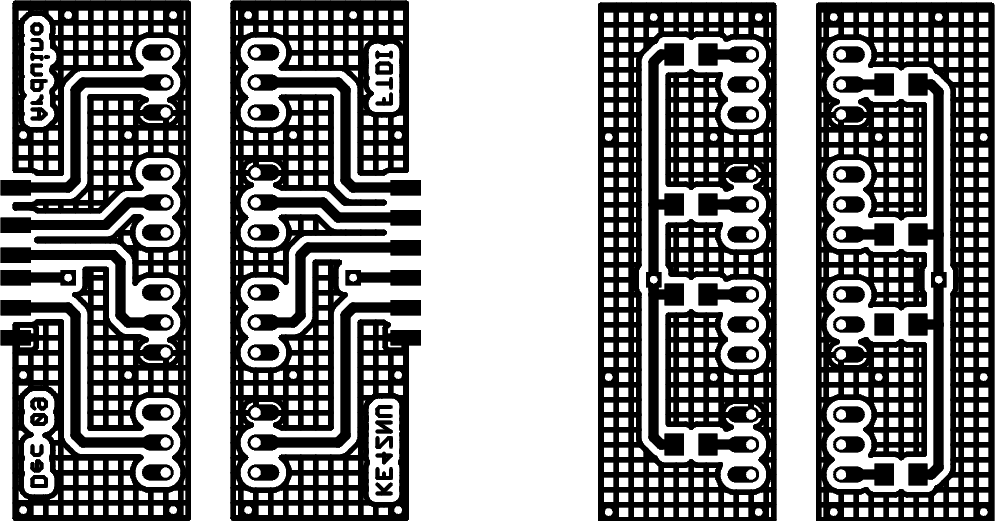
    Double-size PCB layout:

    PCB Layout
    PCB Layout

    Actual-size copper images. Remember that the top copper is flipped left-to-right here so it comes out properly after toner-transfer imaging.

    Copper
    Copper

    And the placement info showing where the parts wind up. This is sort of the silkscreen for the top and bottom, both together: the backwards stuff goes on the bottom side.

    Top and Bottom Silkscreen
    Top and Bottom Silkscreen

    The alert reader will note that the photo doesn’t match the rest of the images. Nay, verily, eagle-eyed readers will have picked out a few resistors on the top and two embarrassing little red-wire Xes at the connectors. Somehow, I managed to swap the RxD and TxD pins, even with an FTDI board on the desk next to me. I hate it when that happens… so I fixed the schematic & layout for the next time around.

    The resistors push a lot of current through the LEDs and phototransistors, which is what you need to get decent 19200 b/s serial data pulses. Here’s what the data stream out of the TxD isolator looks like:

    Optoisolator - TXD
    Optoisolator – TXD

    I have the Eagle files and the CNC drill file for my Sherline mill if you must have them, but you can go from those images above directly to the hardware. It’s an evening’s work, more or less.

    You might want to kludge a jumper into the Reset line so it’s impossible to accidentally reset the Arduino. Sometimes you don’t want a reset, like after a few days of data collection…

    Now, does it actually do what I expected? The early reports are good, but I’m at the mercy of the atmosphere and must collect a few days (actually, nights) worth of data to find just how far down the noise went.

  • Corelle Sliver

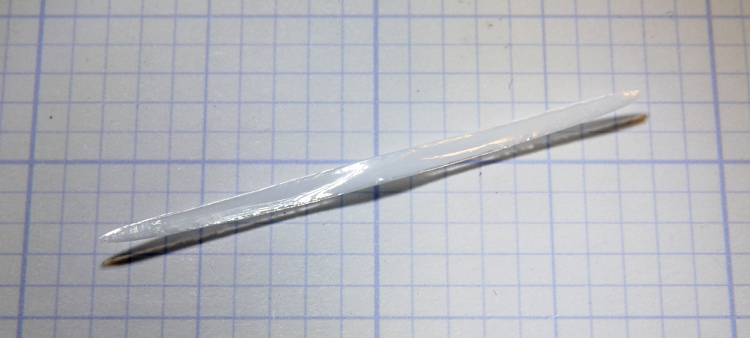
    Mary found a sliver chipped from the outside edge of a Corelle dinner plate, which provides an opportunity to see something that’s normally invisible: the ceramic layer inside its glass coating.

    Overall, the sliver is nearly two inches long and about the same width as the plate is thick.

    Corelle sliver
    Corelle sliver

    Peering through the microscope at the left end, the glass layer is most obvious along the top edge. You can barely see it along the bottom, where the chip thins to a razor edge.

    Corelle sliver - detail
    Corelle sliver – detail

    On the right end the upper and lower glass layers are a bit more obvious, at least with the light arriving nearly horizontally and after some aggressive exposure hackage,

    Corelle sliver - side light
    Corelle sliver – side light

    The ceramic has a slightly higher coefficient of thermal expansion than the glass, so it puts the glass under a tremendous amount of compressive stress as the newly manufactured plate cools. Glass is really strong in compression (and terribly weak in tension), so the plate becomes remarkably hard to break. More details there and there.

    The plate rims do tend to chip, however, if you own them as long as we have. These are the long-discontinued Old Town Blue pattern: over three decades old by now.

    Oddly, they’re still under warranty: back in the day, Corning sold its then-new Corelle with a Lifetime Warranty. Nowadays, you get three years for the mid-grade line, five years for thicker plates, and a mere one year for stoneware (whatever that is). I suppose enough people actually took them up on the warranty to make it economically impractical.

    I ran a fine diamond file over the chipped edge and it’s OK. Eventually, we’ll break down and get new plates, but there’s no sense rushing a decision like that…

  • WWVB Time Code Format Diagram

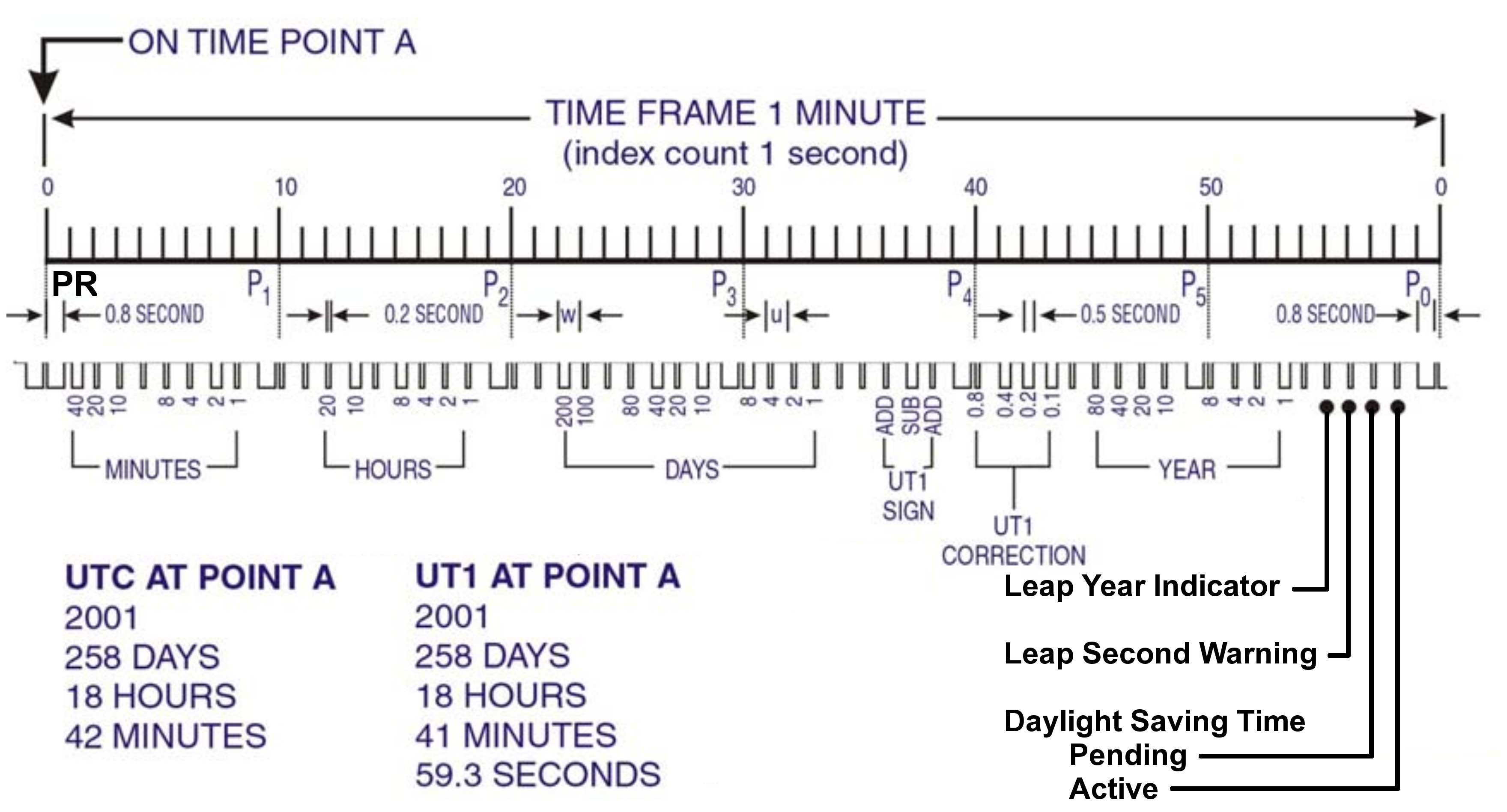
    This is by-and-large the same diagram of the WWVB Time Code Format that you’ll find there, but with:

    • the PR frame reference pulse identified
    • the last four bits clearly labeled
    • some verbiage chopped out
    WWVB Time Code Format - with PR marker
    WWVB Time Code Format – with PR marker

    Memo to Self: Remember that…

    • The time code applies to the minute that’s currently happening, so …
    • The PR pulse happens before the rest of the time code arrives
    • You must know the end-of-month date to apply the leap second bit, but EOM isn’t part of the data stream
  • Rudy Sunglasses: Back From the Dead

    Clear lens installed
    Clear lens installed

    As expected, the uni-lens on Mary’s Rudy Project sunglasses cracked right up the middle as that stress crack above the nosepiece opened up. The sunglasses came with interchangeable lenses, so I swapped in the clear lens.

    Having used urethane adhesive to mechanically lock the defunct gray lens in place, the broken bits were pretty firmly bonded. I applied a brass hammer and small drift punch to the remaining tabs, pried the debris out of the temples, cleaned the adhesive from the recesses, and snapped the new lens in place. Surprisingly, it popped in and locked securely.

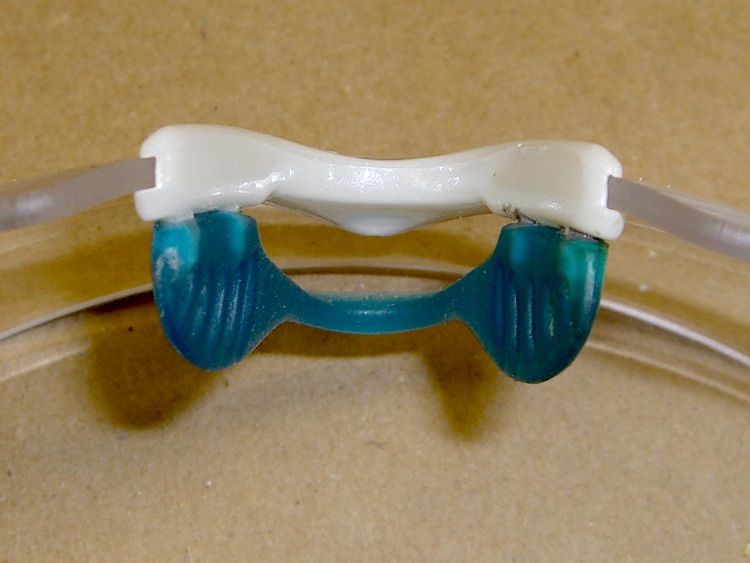
    The nosepiece has never worked satisfactorily: there’s nothing locking the flexible blue-silicone pad to the straight-sided posts that are supposed to hold it. As a result, it tends to pop off at the most inopportune moments.

    Rudy nosepiece
    Rudy nosepiece

    I dotted the posts on one side with cyanoacrylate and the other pair with epoxy to see if either will bond well enough to make a difference. If those fail, I’ll try urethane, although I’m not sure what will happen as the urethane expands in the sockets.

    Anyhow, she now has glasses suitable for biking on cloudy and rainy days… which is much better than a sharp stick (or a bug) in the eye, as we see it.

  • Extracting Text from PDF Documents

    Mary had to extract an extensive table from a PDF (think financial statements) and found that a simple cut-and-paste failed with mysterious symptoms. I’ve had that happen, too, as PDF documents sometimes have a complete disconnect between the rendered page and the original text; sometimes you can’t even select the text block you want without copying huge chunks of the surrounding document or pasting meaningless junk.

    Easy solution: feed the PDF into pdftotext and extract the table from the ensuing flat text file.

    It’s a command-line thing:

    
    pdftotext -layout whatever.pdf


    That produces whatever.txt with the ASCII characters bearing more-or-less the same spatial arrangement as the original PDF, minus all the font and graphic frippery. It tends to insert a ton of blanks in an attempt to make the formatting come out right, which may not be quite what you want.

    Omitting the -layout option gives you something vaguely resembling the PDF, although precisely arranged tables tend to fare poorly.

    If you have a bazillion-page PDF document and need the text from just a page or two, feed it into the pdftk brush chipper, extract the appropriate pages, and then run those files through pdftotext. You can probably get similar results using just pdftk, but pdftotext seems to work better on the files I’ve had to deal with.

    This is a GNU/Linux thing; the programs are likely part of your favorite distribution; follow the links if not. If you’re still using Windows, maybe they’ll work for you, but maybe it’d be easier to just go buy something similar.