The Smell of Molten Projects in the Morning

Ed Nisley's Blog: Shop notes, electronics, firmware, machinery, 3D printing, laser cuttery, and curiosities. Contents: 100% human thinking, 0% AI slop.

Author: Ed

  • Arch Linux: Kensington Expert Mouse FDI File

    The FDI file is similar to the one I used for Xubuntu, with the exact match changed to a partial match. For some reason, the exact match seemed to not work.

    Because the XFCE4 Mouse configuration utility sets handedness on a per-mouse basis, you need not swap buttons 1+3 here. I did, anyway, and the mouse automagically came up left-handed.

    I swapped 2+8, the top two buttons, putting the browser “back one page” button at the upper left and the “open in new tab” button at the upper right.

    The contents of /etc/hal/fdi/policy/10-expertmouse.fdi:

    <?xml version="1.0" encoding="ISO-8859-1"?>
    <deviceinfo version="0.2">
     <device>
     <match key="input.product" contains="Kensington Expert Mouse">
     <append key="input.x11_options.ButtonMapping" type="string">3 8 1 4 5 6 7 2</append>
     </match>
     </device>
    </deviceinfo>
    

    And, for whatever reason, the scroll ring now works perfectly without the least hint of stuttering or jamming.

  • Arch Linux: X11 and XFCE4 Setup

    The Arch Linux Installation Guide gets X11 up and running in fairly short order, leaving you with a bare xterm session. That handled a single screen, so I copied the /etc/X11/xorg.conf file I’d hand-carved for Xubuntu, restarted X, and by gosh-and-golly, it worked perfectly!

    The right-hand screen is still in landscape mode while physically rotated to portrait, but that’s fixable with xrandr.

    For future reference…

    Section "ServerLayout"
        Identifier     "RotatedPortrait"
        Screen      0  "Landscape" 0 0
        Screen      1  "Portrait" RightOf "Landscape"
    EndSection
    
    Section "Module"
        Load           "dbe"
        Load           "extmod"
    #   Load           "type1"
    #   Load           "freetype"
        Load           "glx"
    EndSection
    
    Section "ServerFlags"
        Option         "Xinerama" "0"
    EndSection
    
    Section "Monitor"
        # HorizSync source: edid, VertRefresh source: edid
        Identifier     "Dell2001FP"
        VendorName     "Dell"
        ModelName      "DELL 2001FP"
        HorizSync       31.0 - 80.0
        VertRefresh     56.0 - 76.0
        Option         "DPMS"
    EndSection
    
    Section "Monitor"
        # HorizSync source: edid, VertRefresh source: edid
        Identifier     "Dell2005FP"
        VendorName     "Dell"
        ModelName      "DELL 2005FPW"
        HorizSync       30.0 - 83.0
        VertRefresh     56.0 - 75.0
        Option         "DPMS"
    EndSection
    
    Section "Device"
        Identifier     "GF9400_0"
        Driver         "nvidia"
        VendorName     "NVIDIA Corporation"
        BoardName      "GeForce 9400 GT"
        BusID          "PCI:1:0:0"
        Screen          0
    EndSection
    
    Section "Device"
        Identifier     "GF9400_1"
        Driver         "nvidia"
        VendorName     "NVIDIA Corporation"
        BoardName      "GeForce 9400 GT"
        BusID          "PCI:1:0:0"
        Screen          1
    EndSection
    
    Section "Screen"
        Identifier     "Landscape"
        Device         "GF9400_0"
        Monitor        "Dell2001FP"
        DefaultDepth    24
        Option         "TwinView" "0"
        Option         "metamodes" "DFP-0: 1600x1200 +0+0"
        Option         "NoLogo" "Off"
        SubSection     "Display"
            Depth       24
        EndSubSection
    EndSection
    
    Section "Screen"
        Identifier     "Portrait"
        Device         "GF9400_1"
        Monitor        "Dell2005FP"
        DefaultDepth    24
        Option         "TwinView" "0"
        Option         "metamodes" "DFP-1: 1680x1050 +0+0"
        Option         "NoLogo" "Off"
        Option         "RandRRotation" "On"
    #    Option         "Rotate" "CCW"
        SubSection     "Display"
            Depth       24
        EndSubSection
    EndSection
    

    With that in hand, the Install Guide gets you through setting up XFCE4 with no problems at all; consult the XFCE guide for more details.. It handles both screens, lets you install panels on both with no complaint, and generally Just Works.

    Useful widgets:

    • clipman
    • cpugraph
    • datetime
    • netload
    • screenshooter
    • time-out (wish it knew about screensaver timeouts)

    Add xscreensaver which politely blanks both screens. Timeout in 5 minutes, lock after 1 more, then power saving stages in at 7/8/9 minutes.

  • Monthly Aphorism: On Choosing Jobs

    • This project is doomed, but you can have fun for the next two years.

    That’s how a friend of mine introduced the IBM Digital Video Disk project. She was absolutely right on both counts; before the project went down the toilet, I wrote the killer hard-real-time track-following code that:

    1. Laid a one-micron laser beam dead-nuts on a one-micron data track while the one-foot-diameter floppy disk rotated at 3600 rpm with a few hundred microns of eccentricity.
    2. Acquired and mapped the aforementioned spiral track’s eccentricity from a cold start, so Step 1 would actually work.

    Everything I’ve written after that has been pretty straightforward.

    The project was a Skunk Works deal, running well outside the mainline IBM planning hierarchy, and had plenty of capital & expense budget to go around. Unfortunately, the technical foundation was a bit, mmm, flaky; one of the marketeers insisted that some combination of primary light colors would project black on a screen.

    It eventually imploded, of course, pretty much on the timeline she expected. For some reason splitting the assets off into an independent company and moving the neutron-star remnant to California made sense to the higher-ups. They offered a few key guys good jobs in sunny CA (the rest of us got token offers that didn’t get any takers), the core group lasted another few years, and then the thing went into a black hole.

    Would it surprise you to know the spinoff was called “Disc-O-Vision”? Bear in mind this was before the whole disco music era, but, still … and it’s entirely unrelated to the MCA laser disk of the same name, independently developed somewhat later.

    Word had it that the single most valuable asset was a patent on slapping digital data on a disk: that patent yielded a quarter-cent royalty on every pressed CD ever made. I have no way to know whether that story is true, but you can do the math.

  • Arch Linux: Initial Setup

    Herewith, some general notes on getting Arch Linux installed & tweaked on my rather bizarre set of desktop hardware. The bottom line is that it pretty much works, with very few quirks, right out of the carton. Search for previous posts detailing most of the things discussed here.

    Hard drive partitioning on /dev/sda:

    1. Dell Utility
    2. Windows XP
    3. Dell Restore
    4. Logical -> Extended
    5. Swap
    6. Xubuntu 9.10 (recently installed desktop)
    7. Xubuntu 8.10 (last year’s desktop)
    8. Arch Linux installation (replacing Ubuntu 9.10 trial install)

    The trick is to have enough partitions lying around that you can do a complete installation without clobbering your previous version. Then, when you’re happy the new one works, just change the Grub boot default and you’re off & running.

    Follow the Installation & User Guides, which walk you through most of the choices and situations.

    I did not allow it to install Grub, as I already had it set up and didn’t mind some manual tweakage.

    After the installation, I added this stanza to the existing Xubuntu 9.10 grub.cfg file to boot the new Arch installation; the old menu.lst file has vanished with the new Grub. On a 1600×200 LCD, I need VGA=792 in what used to be the kernel line to get readable characters.

    menuentry "Arch Linux on /dev/sda8" {
    	insmod ext2
    	set root=(hd0,8)
    	search --no-floppy --fs-uuid --set 108a6b1b-1628-47dd-ab84-7a13be82590b
    	linux /boot/vmlinuz26 root=/dev/sda8 ro vga=792
    	initrd /boot/kernel26.img
    }
    

    The Arch installation completes with a reboot to a naked root command prompt. Everything beyond that happens only at your command.

    Add your personal user, add the wheel group to your ID, then uncomment that line to enable super powers when you edit /etc/sudoers.

    I had to do pacman -Syy before any installs worked. I found no advantage to powerpill rather than pacman.

    Various programs:

    • rpcbind & nfs-common
    • alsa-utils
    • cups

    The modified entries in /etc/rc.conf, which is where much of the system configuration & daemon startup occurs:

    LOCALE="en_US.UTF-8"
    HARDWARECLOCK="localtime"
    TIMEZONE="America/New_York"
    KEYMAP="us"
    CONSOLEFONT="Lat2-Terminus16.psfu.gz"
    ...
    eth0="eth0 192.168.1.3 netmask 255.255.255.0 broadcast 192.168.1.255"
    INTERFACES=(eth0)
    ...
    gateway="default gw 192.168.1.1"
    ROUTES=(gateway)
    ...
    DAEMONS=(syslog-ng hal network rpcbind netfs nfs-common cups crond)
    

    The Terminus font looks better than whatever the default is, but maybe that’s just me.

    The eth0 line is all it takes to set up a static IP address. Zowie!

    The gateway line aims all Internet traffic at my firewall router.

    The DAEMONS line starts up a variety of services. I have these:

    • hal – required for XFCE and others
    • rpcbind – for nfs network file shares
    • netfs – similarly
    • nfs-common – nfs client
    • cups – network printing

    I added my usual nfs mounts to /etc/fstab, got the service startup order correct in rc.conf, and it’s all good.

  • Improved Sherline Way Bellows

    What with all the milling going on lately, I decided to replace the crusty bellows on the Sherline mill. The previous design worked reasonably well, but I’ve had a few tweaks in mind for a while.

    Herewith, a PDF file with some Sherline Bellows – Improved:

    • Color coded lines so you know which way to fold them!
    • Unlined side up for a neat look
    • Fits on Letter and A4 sheets
    • Taping cuts and hints

    The PDF page size is about 8×10 inches; call it 204×280 mm. Print it without scaling and it should just barely squeak onto the sheet. If you don’t have a full-bleed printer, the tips of the sides may get cropped off, but you can extrapolate easily enough.

    Some assembly required:

    • Cut it out
    • Fold the central valleys (red) first, flatten it out again
    • Fold the central ridges (blue) next
    • Pleat the whole thing into a half-inch tall stack
    • Squash it into a neat package to harden the folds
    • Fold the tips along one side
    • Fold the tips along the other side
    • Squash the folds again
    • Make the saddle cuts & fold the tabs
    • Apply double-stick tape as noted (some on back)
    • Install on your cleaned-up mill
    • Admire!

    The tip folding is the trickiest part. Basically, flip the first tip from a ridge to a valley, then chase the little transition folds into place. Repeat for each tip along that side, then do the other side.

    It gets easier after you fumble around for a while.

    My nimble-fingered daughter has offered to fold ’em for you. Stick a few bucks in an envelope and mail it to me; we’ll mail back two folded sets (two each, front and rear bellows) for your amusement. Kid’s gotta earn her college money somehow…

    Address? Go to the QRZ.com database and search for my amateur radio callsign: KE4ZNU. Cut, paste, that was easy.

    For the do-it-yourselfers, start with the PDF file in the link above. That’s the easiest way to get the correct scaling. The tabs on the ends should be 4.0 inches across on the printed page.

    Rear Bellows
    Rear Bellows
    Front Bellows
    Front Bellows

    Here are some 300 dpi PNG files, but you’re on your own for scaling.

    If you want the original Inkscape SVG files, drop me a note.

  • Sink Drain Pop-Up Lever: The Rot

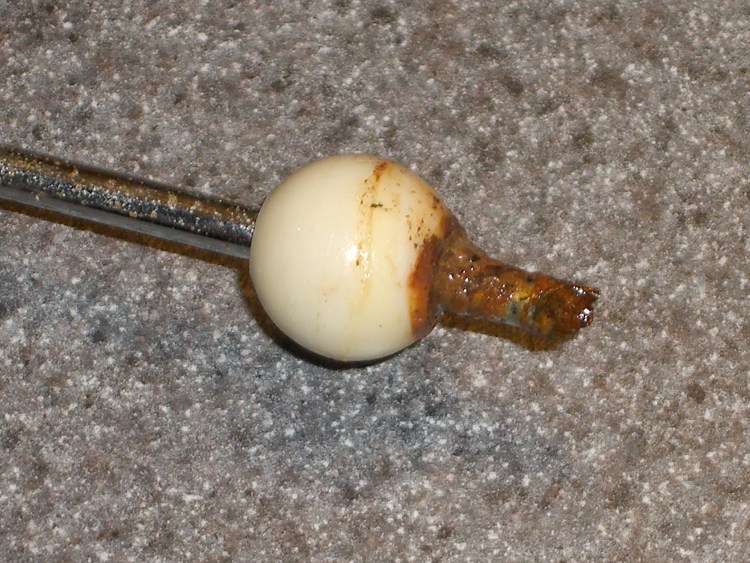
    Rusted Drain Rod
    Rusted Drain Rod

    The drain in our black bathroom(*) stopped working: the pop-up drain seal didn’t pop up.

    I finally wedged myself under the sink, with my feet in the shower stall, and removed the operating rod. Turns out that we replaced the countertop and sink (nine years ago; nothing lasts) and the drain used plastic pipe.

    Except, of course, for the operating rod that sticks out into the drain. That’s chrome-plated steel, evidently with a few plating imperfections, and the end had simply rotted away. I suppose there’s a small chunk of steel decomposing in the trap.

    How much would it have cost to use stainless steel in this corrosion-prone application? Or good old brass (“contains an ingredient known to the State of California to cause cancer or birth defects”)?

    After a brief moment of consideration, with my feet still in the shower, I pushed the rod through the bearing ball so the other end stuck out by about the right amount and replaced it in the drain.

    Swapped Rod
    Swapped Rod

    Yeah, there’s an icky rusted end hanging out there in mid-air, but the next person under that sink will understand exactly what’s going on…

    (*) It’s the size of a large closet with wraparound black ceramic tile, a white tile shower stall, and a wall-sized mirror over the sink. We painted the walls and ceiling white, installed an ersatz gray granite counter top (it’s laminate, not anything spendy) with a shiny white sink, and it’s all good. The original half-century-old grout is in fine shape: some things really do last!

  • Tire Liners

    After putting Mary’s newly covered seat on her Tour Easy, I replaced the tire liner in the front wheel; the previous tube had gone flat, as mentioned there, due to erosion from the end of the liner.

    Here’s what the taped liner looked like: smashed as flat as you’d expect from 100 psi applied evenly over the surface. The tube had a rectangular imprint on it, with what looked like minute abrasions, around the outline of the tape. Nothing major, but it shouldn’t ought to look that way.

    Taped tire liner
    Taped tire liner

    I rolled that liner up, popped it in the Bike Tire Stuff drawer and replaced it with a Slime liner. This picture shows the ends of the two liners: the brown one (bottom) is about 90 mils thick in the center, the Slime liner (top, fluorescent green) is 60-ish.

    Tire liner comparison
    Tire liner comparison

    As nearly as I can tell, I’ve never had an abrasion flat with a Slime liner, while various other brands have caused troubles.

    I broke the edges of the Slime liner with a bit of sandpaper, just to see what that’ll do. Most likely, bad things, seeing as how I’ve never done that before…