The Smell of Molten Projects in the Morning

Ed Nisley's Blog: Shop notes, electronics, firmware, machinery, 3D printing, laser cuttery, and curiosities. Contents: 100% human thinking, 0% AI slop.

Author: Ed

  • Ceramic Resonator Frequency Compensation

    Although this isn’t a real long-term experiment, here’s a week of continuous WWVB clock operation, sitting by the window in our living room, with the circuit board open to ambient conditions.

    The firmware checks the local oscillator drift against the WWVB time signal if more than 3 hours (10800 seconds) has elapsed since the last synch, so you’re not seeing every WWVB synch event.

    Drift: TS   5281890 UTC 10015.113059 Elapsed 15900 Offset 0 Corr +0 ICR1 39841
    Drift: TS   5283109 UTC 10016.074959 Elapsed 55680 Offset 2 Corr +1 ICR1 39842
    Drift: TS   5283486 UTC 10016.140659 Elapsed 15600 Offset -1 Corr -2 ICR1 39840
    Drift: TS   5284662 UTC 10017.094259 Elapsed 15720 Offset 0 Corr +0 ICR1 39841
    Drift: TS   5285324 UTC 10017.204459 Elapsed 31680 Offset 1 Corr +1 ICR1 39842
    Drift: TS   5285606 UTC 10018.012659 Elapsed 16920 Offset 0 Corr +0 ICR1 39842
    Drift: TS   5286030 UTC 10018.083059 Elapsed 16860 Offset 0 Corr +0 ICR1 39842
    Drift: TS   5286490 UTC 10018.161059 Elapsed 14220 Offset 0 Corr +0 ICR1 39842
    Drift: TS   5287312 UTC 10019.055259 Elapsed 49320 Offset 0 Corr +0 ICR1 39842
    Drift: TS   5288722 UTC 10020.052259 Elapsed 55980 Offset 0 Corr +0 ICR1 39842
    Drift: TS   5290304 UTC 10021.074459 Elapsed 75480 Offset 0 Corr +0 ICR1 39842
    Drift: TS   5291588 UTC 10022.050859 Elapsed 77040 Offset 1 Corr +0 ICR1 39842
    

    The frequency offset is on the order of 1 in 75000 seconds: 13 parts per million or about 0.0013%.

    The last line shows that the clock went 21.4 hours between synchs while drifting less than two seconds. If the clock didn’t synch for an entire week, it’d be within 15 seconds of the correct time. That’s not wonderful for a clock, but it’s good enough for this application: the display shows just hours and minutes.

    Not bad for a cheap ceramic resonator on an Arduino Pro…
  • WWVB: 7 dB More Modulation!

    I read a whole stack of NIST doc on the WWVB transmitter & time code format last year, figuring out how to build a WWVB simulator and then the Totally Featureless Clock. The Circuit Cellar article on the simulator just appeared in print and a reader gave me a heads-up: the transmitter power now drops 17 dB during the low-power part of the PWM pulse.

    The relevant doc is there.

    How could I miss it? Well, all the doc is quite old and the change happened in 2006…

    Fairly obviously, the C-Max WWVB receiver I’m using doesn’t have the mojo to track the signal during the day, no matter how fancy the modulation. Those pulses, the low-power part of the signal, just aren’t present amid all the other noise!

    Also of interest: the WWVB transmitter has been running at half-power during the daylight hours since September 2009 while they do antenna maintenance. That’s supposed to be finished right about now, so the signal should be 3 dB better. I’ve got a nearly continuous record of the last month or so, which means a comparison will be in order after a few weeks.

    Search for WWVB to find the other posts I’ve done on this topic…

  • Recipe Inflation: Hershey’s Cocoa

    My mother’s pantry disgorged a can of Hershey’s Cocoa dating back to the mid-90s (if I’m interpreting the 94P date code correctly). Their Favorite Hot Cocoa recipe is straightforward:

    SINGLE SERVING: Combine 1 heaping teaspoon HERSHEY’S Cocoa, 2 heaping teaspoons sugar, and dash salt in mug, add 2 teaspoons milk and stir until smooth. Heat 1 cup milk: fill mug. Stir and serve.

    Browsing in the grocery store revealed that the current recipe has considerably more stiffness: two tablespoons of both cocoa and sugar.

    One tablespoon = 3 teaspoons. How they interpret “heaping” I don’t know, but it’s under a factor of two. Maybe cups are bigger these days, but surely not by a factor of four or five.

    Zowie!

    The Official Recipe from the Hershey’s website lists 2-3 teaspoons of cocoa and 2 tablespoons of sugar. I love this suggestion:

    VARIATIONS
    Rich and Adult: Increase cocoa to 2 tablespoons …

    Adult cocoa. Who’d’a thunk it?

  • Ubuntu 9.10 Partition Backup: ext4 vs partimage vs dd

    Ubuntu 9.10 uses ext4 filesystems by default and it’s usually a Good Thing to not mess with defaults early in the installation.

    That precept worked up to the point where I wanted to make a full-partition backup before doing something potentially catastrophic… at which point I discovered that the current version of System Rescue CD has a version of partimage that doesn’t know about ext4 filesystems. While FSArchiver looks promising, all I really wanted was a quick-and-simple backup and (possibly) restoration.

    So. Once again, dd to the rescue.

    This being a fresh installation, there’s not much other data to contend with. In fact, the installation uses under 3 GB, but it’s in a 32 GB partition. Wouldn’t It Would Be Nice If we could back up just the 10% of useful data and skip the rest?

    Reboot to System Rescue CD (hereinafter, SRC) and, while that’s happening, plug in a spare hard drive using a USB-to-SATA converter. That will be the “backup drive”.

    Mount the backup drive (which appeared as /dev/sdf1 and will be different for you) at /mnt/backup, which is conveniently provided by SRC:

    mount /dev/sdf1 /mnt/backup
    

    Mount the partition to be backed up (which is /dev/sda8 and will be different for you) at /mnt/custom, another existing mount point.

    mount /dev/sda8 /mnt/custom
    

    Zero out all the unused space by creating one honkin’ big file, then erase it leaving all those highly compressible zeros behind:

    dd bs=1M if=/dev/zero of=/mnt/custom/zero.bin
    sync
    rm /mnt/custom/zero.bin
    

    Unmount the partition, make the backup, and save the MBR while you’re at it:

    umount /mnt/custom
    dd bs=1M if=/dev/sda1 | gzip -c -3 > /mnt/backup/boxname-sda8-ext4-32GB.bin.gz
    dd bs=512 count=1 if=/dev/sda of=/mnt/backup/boxname-mbr.bin
    

    The bs=1M option sets a decent blocksize for the read operations, which gets dd trundling along at a pretty good clip by reducing the per-read overhead.

    The -c option tells gzip to pipe the output to stdout and not mess with the input file. The -3 says to not waste a lot of time trying to compress the data; much of the partition consists of raw binary executables, so there’s no point. The whole process will be limited by disk I/O speed, most likely.

    As it happened, the partition squeezed down into about 1.8 GB worth of gzipped backup file.

    Unmount the backup drive, reboot, and do risky things…

    As it turned out, I actually had to restore the partition.

    Once again, boot into SRC with the backup drive plugged in, mount the backup drive. Restoration is straightforward:

    gunzip -c /mnt/backup/boxname-sda8-ext4-32GB.bin.gz | dd bs=1M of=/dev/sda8
    

    Warning: if you bungle the target of that dd, you are so screwed.

    You’re both saving and restoring from a specific partition (/dev/sda8, in my case) within the drive, not the whole drive (which would be /dev/sda). Pay attention to what’s on the screen, check twice, and have a full-drive backup lurking in your fireproof safe…

  • Ubuntu Karmic 9.10 vs Separate X Sessions: Whack-a-mole!

    I’m in the process of figuring out which Ubuntu 9.10 desktop will work with my collection of hardware. That I got all this working successfully with Xubuntu 8.10 is most likely a testament to raw determination rather than good sense, but that’s water over the dam.

    The hardware:

    • Kensington Expert Mouse trackball (must use left-hand buttons)
    • Logitech Cordless Optical Trackman (must use right-hand buttons)
    • Wacom Graphire3 6×8 tablet (must swap side buttons)
    • Dell 2001FP 1600×1200 landscape display (left side)
    • Dell 2005FP 1680×1050 portrait display (right side)
    • nVidia GeForce 9400 GT dual-DVI card (using nVidia driver)
    • Dell Dimension 9150 deskside PC
    • Intel HDA Stac92 on-board sound (system sounds)
    • Ensoniq AudioPCI plug-in sound (unused right now)
    • Logitech USB audio headset (phone calls)

    General requirements:

    • Monitors must use separate X sessions, not Xinerama or TwinView
    • 2005FP must be rotated 1/4 turn CCW into portrait mode
    • *buntu preferred, due to large user base

    After some trial installations and moderate fiddling, some of which served as blog fodder:

    • Kubuntu doesn’t work, as KDE 4.x can’t handle separate X sessions
    • Xubuntu is OK, but tends to not have nearly the support of Ubuntu
    • Ubuntu comes heartbreakingly close to working

    Problems:

    • Rotating that monitor is a real problem
    • I don’t need RandR, but static rotation in xorg.conf causes other problems
    • The tablet wants to cover both screens, but that’s fixable
    • Trackball handedness requires careful FDI tweakage
    • Previous xorg.conf setup is not useful in the new world of FDI files
    • Most configuration documentation isn’t useful in that new world, either

    Installations on other household PCs  have gone reasonably well. Installation on my desktop box is in a spare partition, so I can return to What Worked without too much trouble.

    With all that in hand, here we go …

  • Monthly Aphorism: On Buying Test Equipment

    • When you’re buying test equipment, buy all the options.

    Mad Phil taught me, long ago, to buy everything available in one package, rather than try to figure out what you’ll eventually need and go through the justification process for each piece you forgot.

    That applied in a corporate setting, but it’s worth pondering even for your own gear: you’re likely to own it longer than the company producing it will offer parts.

    Or, these days, it’s more likely you’ll outlive the company…

  • WWVB Antenna: Oops!

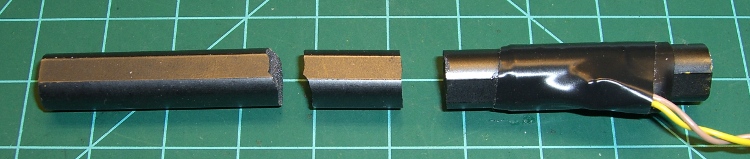
    Ferrite inductor cores are notoriously fragile: they do not withstand much abuse at all. Given the amount of fiddling I’ve been doing with the Totally Featureless Clock, it was inevitable that I’d manage to drop the antenna…

    Broken ferrite bar antenna
    Broken ferrite bar antenna

    Gluing it back together with cyanoacrylate demonstrated that some things just never work the same. The antenna depends on a continuous flux path through the winding and even the minute gap introduced by the adhesive is enough to ruin the antenna.

    What they say about hearts and wheels is also true of ferrite bar antennas:

    “Once you bend it, you can’t mend it…”