Ed Nisley's Blog: Shop notes, electronics, firmware, machinery, 3D printing, laser cuttery, and curiosities. Contents: 100% human thinking, 0% AI slop.
With the jack in hand, I idly poked a coaxial plug into it and realized that the amount the plug stuck out was just about exactly equal to the thickness of the black plastic cap on its tip. Some rummaging turned up one of the six plugs with a missing tip, at which point both the problem and its solution were obvious.
Broken vs original coaxial power tips
A bit of tedious work with a tiny screwdriver and a needle convinced the socket to disgorge the plastic ring from its bowels …
Broken tip extracted from jack
Now, I suppose I could have figured this out without taking the case apart, but actually fixing the problem would still require surgery, soooo there’s no wasted effort. That’s my story and I’m sticking with it.
If you think you could extract that ring from the outside, there’s a joke about that.
I put the case back together with a few dabs of silicone snot adhesive (despite what I know about letting acetic acid loose near electronics) to anchor the circuit board, applied a belly band of tastefully color-coordinated (i.e. silver) duct tape, and it’s all good.
Actually, the pack was stone cold dead until I plugged it into the charger to reset its battery protection circuitry. Evidently, disconnecting and reconnecting the battery tripped the protection logic. I’ve seen that in other Li-Ion packs, so it wasn’t quite so scary as it was the first time around.
As for the coaxial power tip: a dab of solvent glue, an overnight clamping session, and I think it’ll work fine forever more.
I should machine up some stabilizing collars around the sockets to match that obvious shoulder on the plug, shouldn’t I?
The power lead into the Li-Ion pack I’m using for the bike radio became badly intermittent on a recent ride. When I got back I swapped in a different pack and the problem Went Away, but I noticed that the coaxial power plug didn’t seem to seat all the way into the jack on the failed pack. I’d noticed that before, although I attributed it to getting two different sets of the packs; it didn’t seem to make any difference.
Given that I was going to have to either repair or replace the jack, dismantling the offending pack was next on the list. Some preliminary poking showed that there were no screws concealed under the label, so the two halves of the pack were either snapped or bonded together.
The case didn’t respond to the usual wedging and prying by revealing an opening, which suggested that it was bonded. That meant I must saw the thing apart.
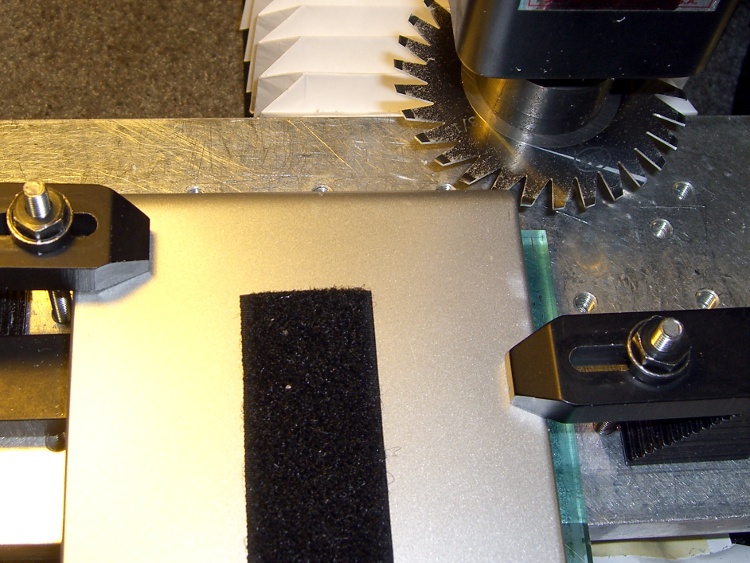
I set up a 31-mil slitting saw on the Sherline and clamped the pack atop a random plastic slab atop the tooling plate. The Sherline’s limited throat depth meant I had to cut the far side of the pack. I aligned the saw to the Z-axis level of the joint along the middle of the pack by eyeballometric guesstimation.
Slitting saw setup
Key point:
You absolutely do not want to saw into a lithium-ion cell, not even a little bit.
Therefore:
The pack must be aligned parallel to the cutter’s travel
The cuts must proceed in tiny increments, and
You must verify that each cut doesn’t reveal any surprises.
In this setup, the pack aligns against a clamp on the left side and to a parallel block (removed while cutting) along the rear edge of the tooling plate. I could then unclamp the pack, rotate it to put the next edge in place, and use the same XYZ origin with the edge parallel to X.
Here’s the view from the back of the table.
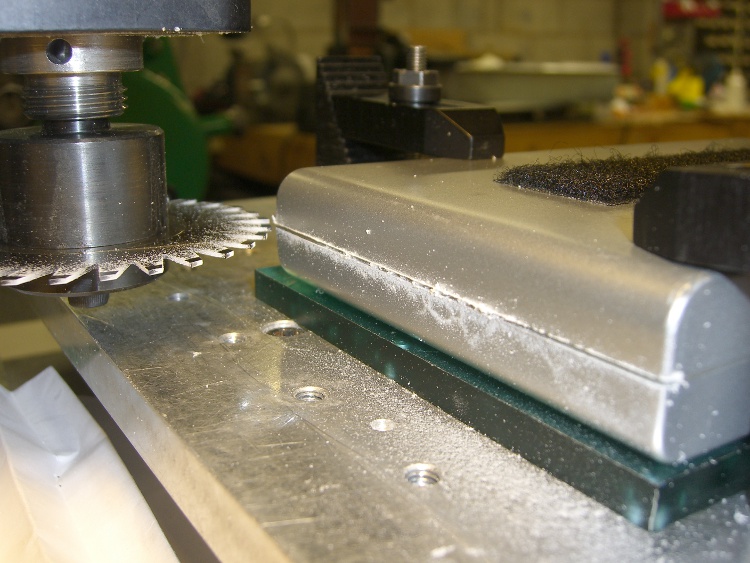
Sawing the case
I ran the spindle at 5 k RPM and cut about 15 inch/secminute. I’m sure the pros do it faster, but that was enough to warm up the blade and that’s fast enough for me. [Update: typo on the units. Thanks!]
Cuts were 0.020 inch per pass, which is about 0.5 mm. I expected the case to be some hard-metric dimension and wasn’t disappointed.
After the cuts reached 0.060 inch, I manage to pry the remaining plastic in the joint apart and split the halves apart along the connectors and LEDs at the front where I couldn’t do any sawing.
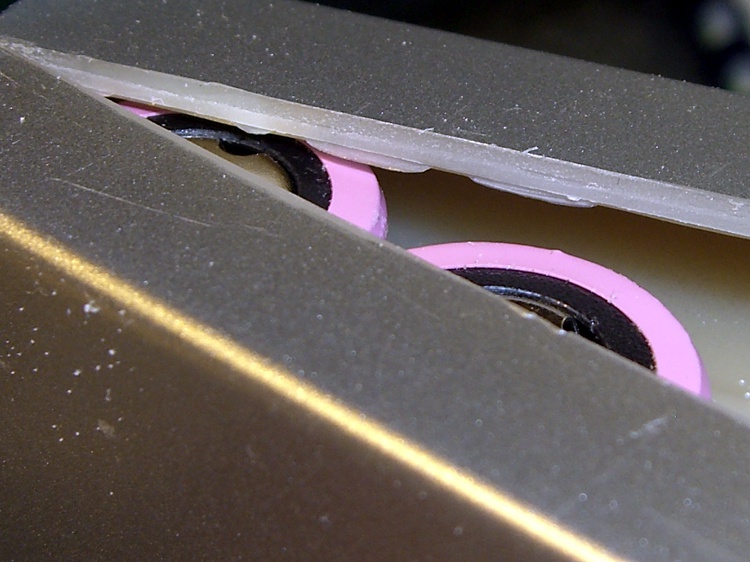
Here’s a close look at the cut, just above the battery terminals. The case turned out to be 2 mm thick, about 0.080 inch, so I was just about all the way through. The cut was perfectly aligned with the case and cracked open neatly along the entire length.
Tight tolerance on the cut depth
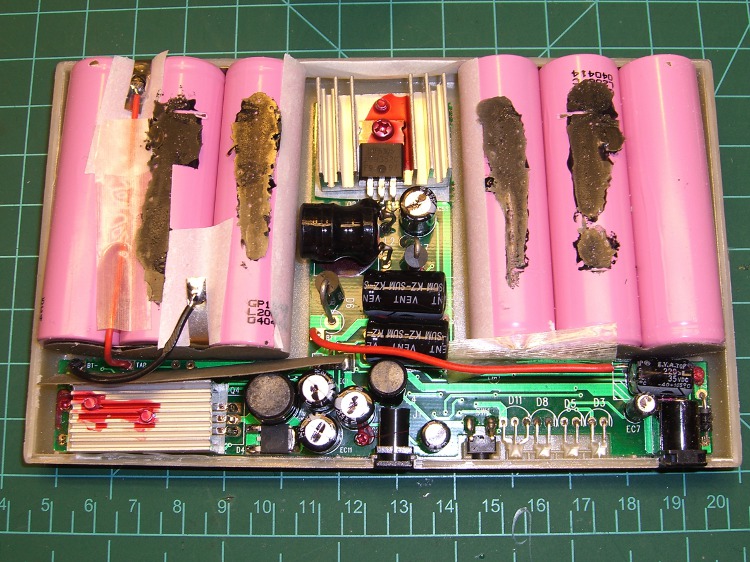
An interior view, showing that the cells adhered to the left half of the case and the electronics to the right: of course. I pried the cells loose from the left side, which provided enough access to unsolder the things, as the terminals were against the case. Notice that there’s absolutely nothing between the inside of the case and the outside of the cell, so cutting just slightly too deep would be a Bad Thing™.
First look inside the case
After a bit of work, here’s the entire layout…
Battery pack internal layout
Much to my surprise, the battery consists of two series-connected sets of three cells: 2 x 3.7 V = 7.4 V. I expected three series sets for about 3 x 3.7 = 11.1 V, with a linear regulator down to the 9.0 V output.
As it turns out, they used two switching regulators: the one between the two triplets controls the charging voltage and the one to the lower-left boosts the battery to the pack’s 9.0 V output. I had hoped for a resistor divider that I could tweak to get 9.6 V out, but it certainly wasn’t obvious.
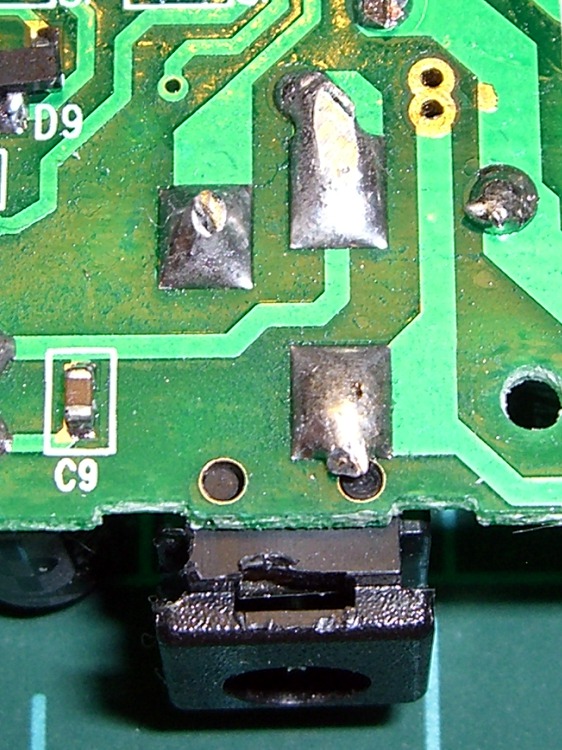
I unsoldered the cells, dismounted the circuit board, and puzzled over it for a bit, after which the problem was obvious.
The story continues tomorrow, with a dramatic denouement…
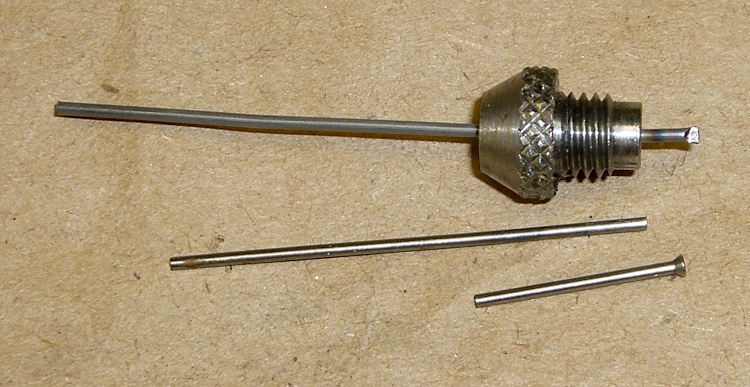
I have a quartet of nice pin punches with hardened pins in various diameters. I managed to drop the smallest punch, didn’t get my foot under it in time, it struck sparks from the concrete floor when it hit, and the pin snapped.
Not being able to replicate the pin’s neat mushroom head, I contented myself by chopping off a length of music wire and grinding the ends flat. Annealed one end over the kitchen stove, whacked it with another punch to get a flat, and it’s all good.
Replacement pin for punch
The music wire isn’t quite perfectly straight, but you don’t beat on things with a 40-mil punch, anyway.
The current FiOS triple-play deal is $90/month for two years, plus the usual unknowable taxes & fees.
The flyer touts numerous advantages, including this bit of seemingly significant numerology (emphasis theirs):
50X MORE BANDWIDTH THAN CABLE
America’s top-rated broadband. With FiOS Internet, you get an average download bandwidth capacity per household that’s 50 times that of cable.^
They used a caret because disclaiming earlier claims had burned through *, †, and ††.
Anyhow, the ^ leads you to this baffling explanation:
Based on FiOS GPON download access network bandwidth capacity of 2,400 Mbps and 32 households & cable capacity of 160 Mbps and a typical node size of 125 households for DOCSIS with 4 bonded channels.
Now, if that doesn’t make you all giddy with desire and admiration, I don’t know what will.
The numbers don’t quite work out, but that’s in the nature of advertising. The upstream bandwidth oversubscription seems to be:
FiOS: (15 * 32) / 2400 = 0.2
Cable: (15 * 125) / 160 = 11.7
Ratio: 58.6. If you assume the cable cap is 12 Mb/s, the ratio is 46.8. Evidently, Verizon puts the cable cap at exactly 12.8.
A bit of rummaging shows that FiOS generally uses BPON, with a downstream limit of 622 Mb/s downstram, which would give a non-bragworthy ratio of 1.25. Whether we have GPON running past the house is unknowable.
They’ve eliminated all the kickbacks and incentives, so $90/month now seems to be the standard FiOS triple-play price. If we actually wanted TV, it would be attractive.
As you might expect, there’s another bold claim sporting a double caret (^^) further down the page.
My PC makes a seasonal migration: to the basement during the summer, to the living room in the winter. Those moves provide an opportunity to vacuum the fuzz out of the fan grilles and heatsinks.
You’d think that, given the trouble caused by blocked air inlets, manufacturers would make it easy to get access to the grilles and trivially easy to remove the fuzz. Not so, alas.
This time, I decided to see what the intake side of the main heatsink looked like. Two screws secure the shell to the circuit board and provide clamping pressure on the CPU heat spreader. The heatsink is a massive affair with liquid-filled heat pipes; I’ve never taken it out before because removing the screws exposes the CPU heat spreader, where you do not want to get fuzz.
Heatsink fuzz
Oops!
A bit of work with the vacuum and a brush greatly improved the situation. I think I kept the fuzz out of the heatsink-to-CPU joint, but there’s really no way to know because, as nearly as I can tell, Dell didn’t include any of the CPU temperature readouts on this system board.
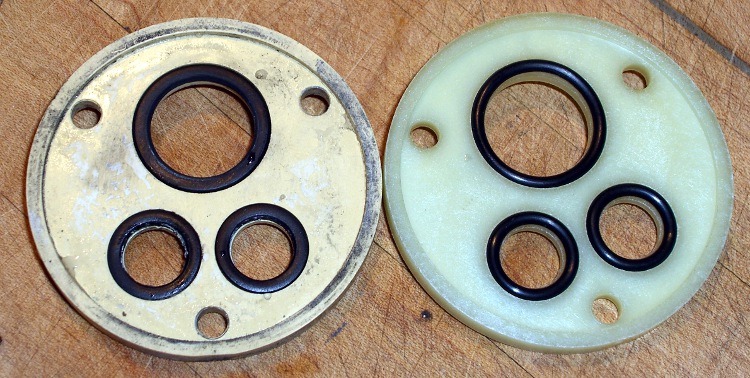
Half a year after replacing the O-rings on the kitchen faucet, it’s dribbling again. This time, the symptom looked like a leak from the top of the faucet, which implied the three O-rings on the Spacer plate rather than big O-rings that seal the spout.
You can see the O-rings look different on the old and new spacers …
Old and New Faucet Spacers
Indeed, the old O-rings are flattened out. It’s most visible over on the right edge of the lower ring; the top ring is new.
Flattened O-ring
Replacing them is no big deal; follow the directions in the earlier post to get everything apart. But: only half a year?
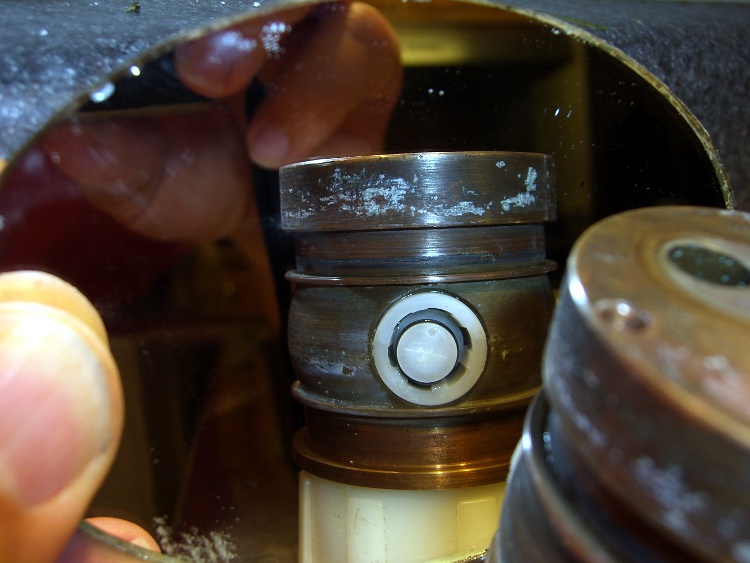
Here’s a view of the diverter on the back of the column.
Diverter viewed in mirror
Notice that the larger O-rings that seal the spout to the column had glued themselves to the column and left shreds when I removed them. A narrow strip of Scotch-Brite scouring pad, applied shoe-shine style, cleaned the O-ring debris off the column and made it nice & shiny. I suppose as long as they slip freely on the spout, then it’s all good, but there are new ones in place now.
I used a bit more silicone grease on the O-rings this time; we’ll see if that makes it better or worse.





 The Smell of Molten Projects in the Morning