Ed Nisley's Blog: Shop notes, electronics, firmware, machinery, 3D printing, laser cuttery, and curiosities. Contents: 100% human thinking, 0% AI slop.
The continuous ink system I have on the Epson R380 occasionally stops the yellow ink flow. I think it’s related to back pressure: the lines drain down quickly after the printer stops and the yellow line is on top.
The label on the front of the continuous ink supply reservoir minces no words:
Do not raise the external ink reservoir higher because of curiosity or insufficient ink-supply …
Well, maybe a little bit won’t hurt?
As it turns out, the original ink tanks inside the printer are pretty high up, with the bottom of the print heads maybe 60 mm off the table. That chunk of foam packing material is 40 mm tall: the bottom of the ink supply remains well below the heads.
The ink supply tubes drain back a few cm when the printer has been idle, which means the elevated reservoir isn’t applying positive pressure to the heads. And, after a few weeks of this treatment, the yellow ink flow hasn’t stopped!
I’ll call it a win.
Here’s the overall view, with a few ink splotches visible from previous blunders. If the table wasn’t a raw slab of half-inch plywood bolted to a surplus printer (?) stand in the basement, I’d care a lot more…
Elevated continuous ink reservoir
The amount of ink in the waste ink tank beside the printer is breathtaking: about 50% more than noted there.
The scrap pile disgorged a chunk of aluminum plate exactly the correct size for a heat spreader that will mate eight power FETS to that heatsink. The catch: a 1-1/4-inch deep hole tapped 1/4-20 for about 3/4 inch at almost the right spot along one end. Rather than sawing off Yet Another Chunk from the original plate, I figured it’d be more useful to just plug the hole.
Note that this is somewhat different than the situation described there, where I screwed up by putting a hole in the wrong place. Here, I’m just being a cheapskate by making a piece of junk good enough to use in a project, rather than having it kick around in the scrap pile for another decade.
Anyway.
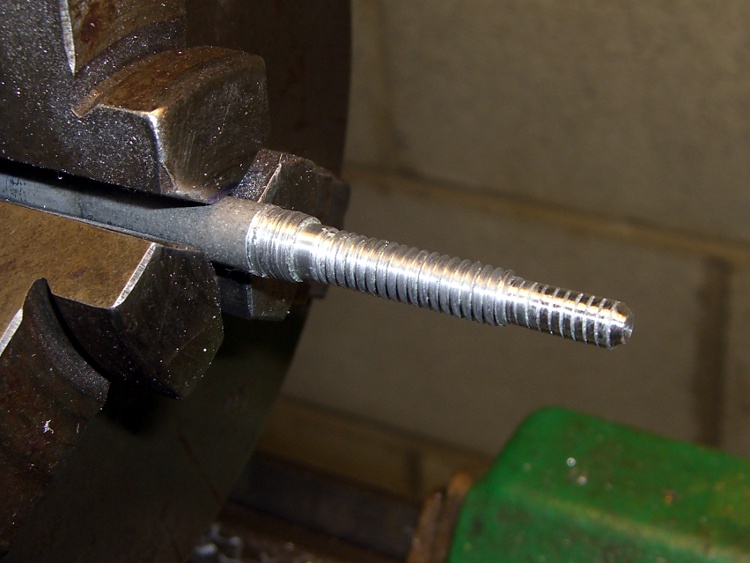
I turned a 3/8-inch diameter aluminum rod down to 1/4 inch for the threaded part and a bit under 0.200 inch to fit into the partially threaded end.
A real machinist would single-point the thread, but I just screwed a die over it. The narrow end is slightly larger than the minor thread diameter, which helped get things started. Then a trial fit, saw off the excess on the skinny end, and apply a touch of the file to shape the end to mate with the hole’s drill-point bottom:
Threaded hole plugPlug epoxied in place
I buttered up the plug with a generous helping of JB Weld epoxy and screwed it in. Toward the end of that process, the air trapped in the end became exceedingly compressed, to the extent I had to stop after each quarter-turn to let it ooze outward; eventually the hole gave off a great pffft as the remaining air pooted out. Unscrewed slightly to suck some epoxy back in, screwed it tight, and let it cure overnight.
Squared-up block with plugged hole
Sawed off the plug, filed the rubble more-or-less smooth, then squared it in the Sherline mill. The heatsink prefers to sit on a nice, smooth metal surface, so I flycut the other side of the block to get rid of a few dings and the entire anodized layer while I was at it.
The epoxy ring doesn’t have a uniform width, because you’re looking at a cross section of the thread. The skinny part is the crest of the plug thread, the wide part is along one flank. Barely a Class 1A fit, methinks.
New hole
Locate the midpoint of the block’s end, center-drill, then poke a new #29 hole 20 mm deep (I really do prefer metric!) for an 8-32 screw. The plug didn’t move at all during this process, pretty much as you’d expect. The chips came out of this hole in little crumbles, rather than the long stringy swarf from the solid aluminum on the other end.
Using a simple peck drill canned cycle is just downright wonderful:
G83 Z-20 R1 Q3 F100
The rule of thumb is 3000 RPM with a feed 100 times the drill diameter. In this case, the drill is about 3 mm and calls for 300 mm/min, but the Sherline is happier with slower feeds. Maybe if I was doing production work, I’d push it harder.
A real machinist would have a milling machine with a servo-driven spindle for rigid tapping, but I just screwed an ordinary hand tap into the holes.
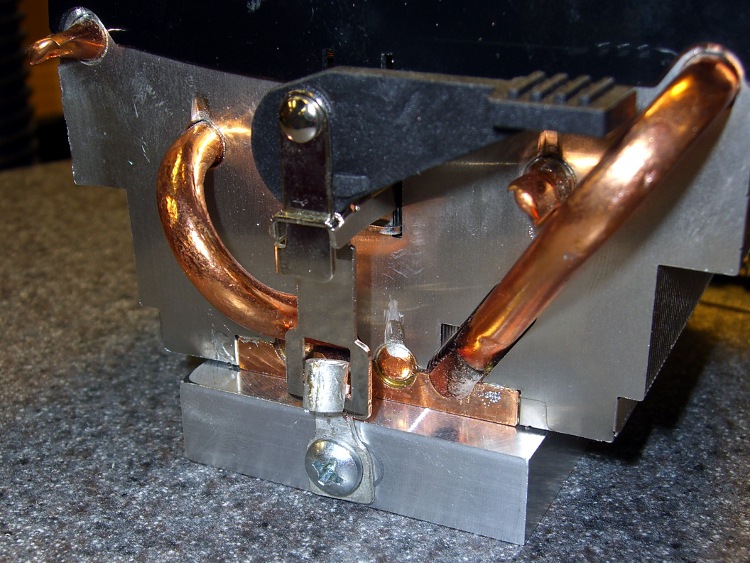
A bit of futzing converted a pair of solderless connectors into clips that capture the hooks on the ends of the heatsink’s springy wiffletree to secure the spreader to the heatsink. You can see the flycut surface peeking out from below the end of the heatsink. I should hit it with some fine abrasive to polish it out, but I think heatsink compound alone will do the trick.
Heat spreader on heatsink
The next step: drilling-and-tapping eight more blind holes along the sides for the FETs. It’d be really neat to have a servo spindle…
While walking home with the bike, I noticed that the odometer wasn’t matching up with reality. This generally means the front-wheel magnet sensor got whacked out of line and, given that I’d just laid the bike down on that side, that’s what I expected to fix.
As it turned out, the failure meant it was time for the more-or-less annual contact cleaning. The three tiny contact balls on the bottom of the Cateye Astrale tend to collect enough dirt over the course of a few thousand miles to become intermittent. The balls lead to the wheel and pedal sensors, with a single common wire.
Cateye Astrale contacts
You can see that they’re not shiny little factory-fresh bumps. Here’s a detail of the upper-right one on the base to the right. Even through the horrors of a tight crop from a hand-held shot, you can see the problem.
Cateye Astrale – contact detail
No big deal, just wipe ’em off and apply a bit of DeoxIT to make ’em happy again for another year.
You know those slide-out ads, the ones that emerge from the lower-right corner of your screen, demanding your attention? The ones that aren’t pop-ups, so pop-up blockers don’t work on them?
Just had this one appear.
Focus Your Attention Online
Words fail me.
BTW, if you figure out how to block those mumble things, let me know!
So I bought an octet of Sanyo Eneloop NiMH cells from the usual Amazon source and ran a few charge / discharge tests, with the hope of powering my Sony DSC-H5 for more than a few dozen minutes at a time. It’s Marching Band season!
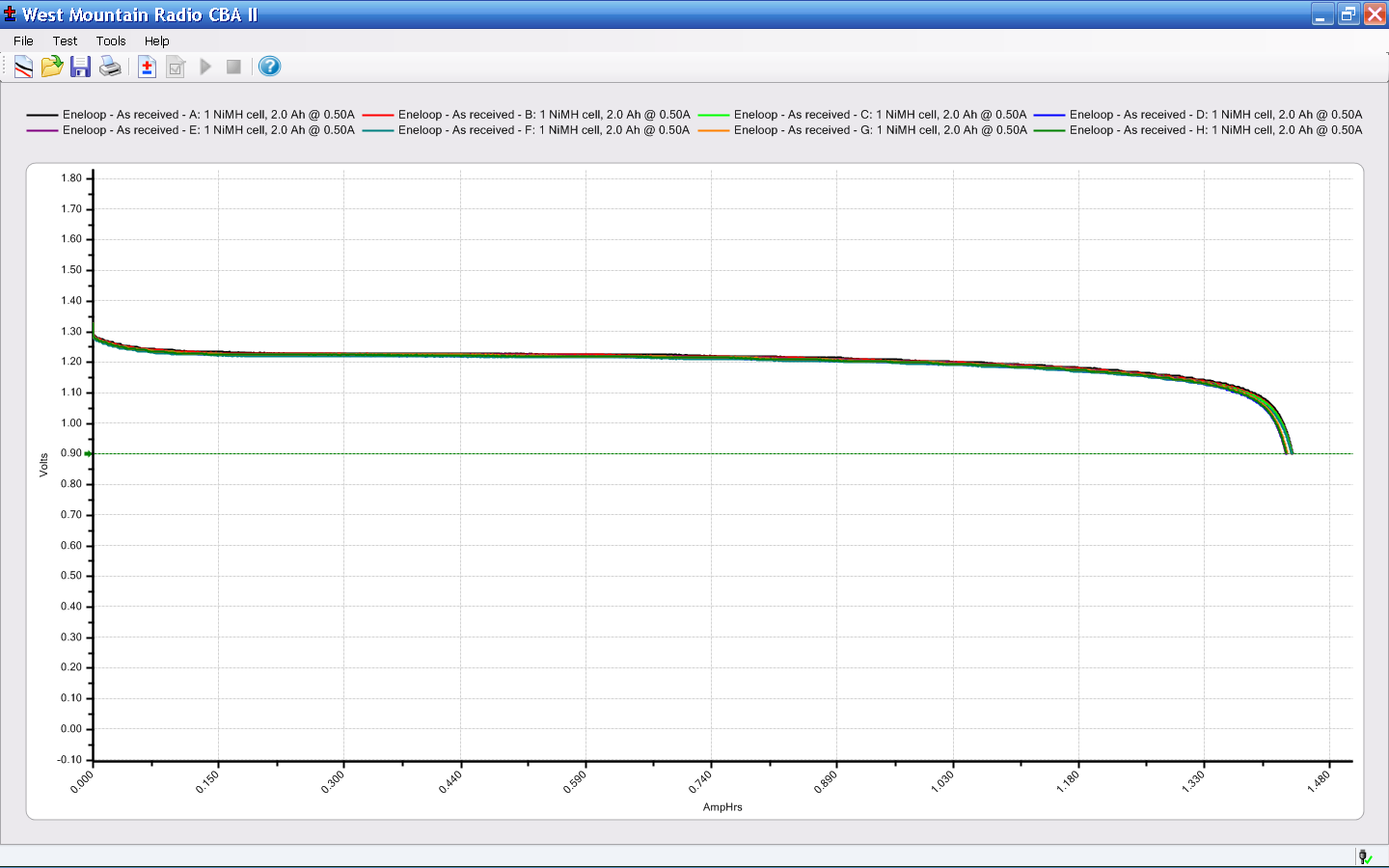
The cells bear a laser-etched 09-10-IF date code that I assume means October 2009, because they arrived in early September 2010. Rumor has it that Eneloop cells come off the manufacturing line factory-charged to 75% of their nominal 2.0 Ah; all eight arrived with the same charge: 1.43 Ah. Given the vagaries of measuring battery capacity, that’s 95% of what they started with, nearly a year ago.
The eight 500 mA constant current discharge curves are essentially identical:
Eneloop – As received
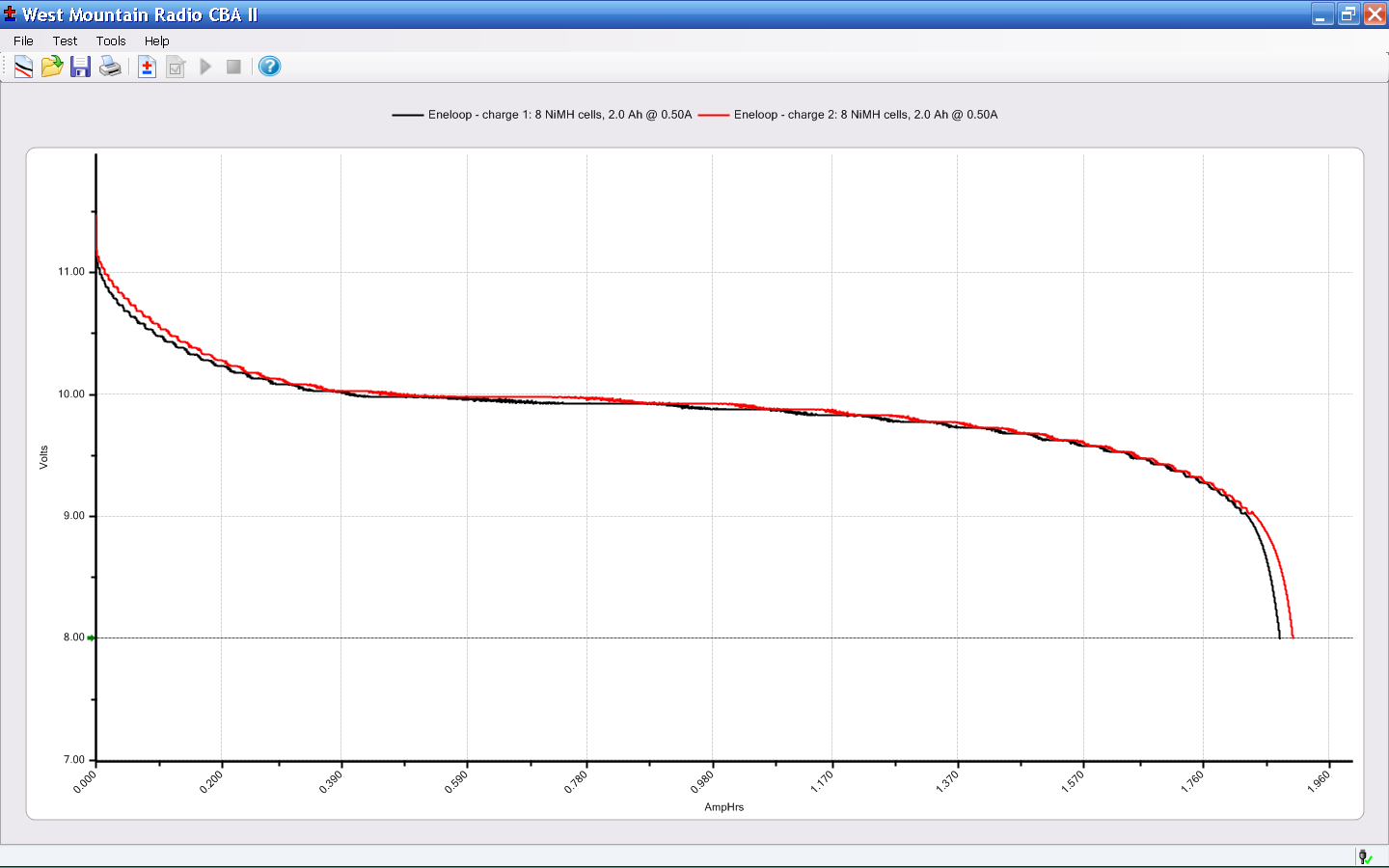
The first charge after that test was individual cells in a 400 mA charger, the second as a complete 8-cell pack with a 900 mA charger. Those two discharge curves for the pack, again at 500 mA, also overlay nicely:
Eneloop – 8-cell pack
The pack voltage remains above 9.6 V for about 1.5 Ah, far better than the tired assortment of cells in my collection (albeit those were measured at 1 A, not 500 mA).
These should get me through an entire day of Marching Band travel, setup, practice, and competition!
On my way back from a ride around the block the back tire went pfft thump thump thump. I’m 1.5 miles from home: fix or walk?
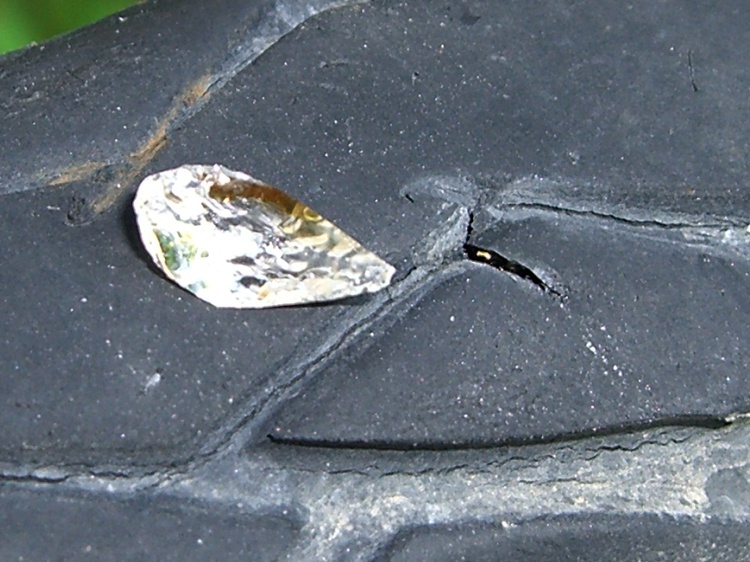
The first step: always examine the tire to find the puncture, before you move too far. Finding something sticking out of the tire means you’re well on your way to fixing the flat. Lose the entry point and you’re left to blow up the tire and listen for escaping wind. So I picked up the butt end of the bike, spun the wheel, and this little gem heaved into view…
That area of the road has seen several collisions in recent months that left the shoulder littered with broken automotive glass. The shard in my tire glistened like a diamond, because one side was flat and mirrored; perhaps it’s from a headlamp reflector or side mirror. The pointy end went into the tire, of course…
Glass fragment and puncture
Well, a single-point failure like that is easy to fix, so:
remember that the hole is a few inches spinward of the label
shift to small chainring / small sprocket
get the tool bag out
lay the bike down (it’s a recumbent, this is no big deal)
release the rear brake
release the skewer and whack the hub out of the dropouts
apply tire irons to get the tire off
pop the tube out and examine the innards
No pix of any of that, but suffice it to say I was astonished to discover that the glass penetrated the Marathon tire’s Kevlar belt just barely far enough to poke the Slime tire liner, but not enough to leave more than a hint of a mark on the tube. Definitely not a puncture and certainly nothing that would account for a sudden flat.
That glass shard is not why the tire went flat! Tire liners FTW!
Examining the rest of the tube revealed this situation a few inches anti-spinward of the glass fragment.
Failed tube rubber
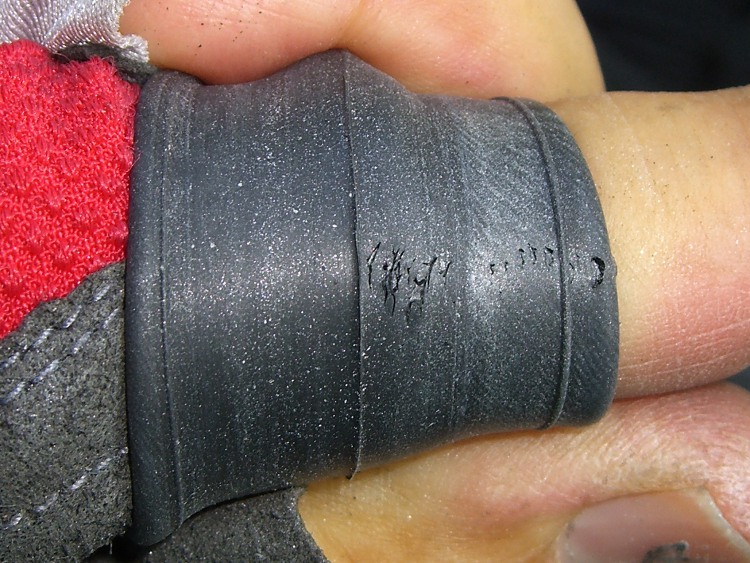
There’s a row of holes across the tube, with no corresponding tire or liner damage at all. As nearly as I can tell, the tube rubber simply pulled apart across that line, all at once, and the air went pfft just like you’d expect.
That’s not survivable, but I don’t carry a spare tube (well, two spare tubes: 700x35C rear and 20×1.25 front) on rides around the block. Long bike tours? Yup, spare tires & tubes because I’m that type of guy.
Anyway, I’ve got the tube in hand, so what’s to lose? Scuff it up with the sandpaper and yipes…
Tube after scuffing
What’s not obvious in the picture is that all those little spots around the big holes are pinholes. The whole area of the tube must have gotten just barely enough rubber to cover the mold.
I know as well as you do this isn’t going to have a happy outcome, but I slobber on the cement, let it dry, squash on a big patch, install the tube & tire, fire a 16-gram CO2 cartridge into it, and … it doesn’t seal.
The tube is several-many years old, probably from whoever was supplying Nashbar at the time, and it served well, so it gets a pass. I’d rather tubes fail in the garage than on the road and sometimes they do, but that’s not the usual outcome.
My ladies were out gardening at the time and a long wheelbase ‘bent isn’t the sort of thing you can stuff into a friend’s car. Not to mention that my ladies had the magic phone.
So I walked home.
Sometimes a man’s gotta do what a man’s gotta do.
Memo to Self: Schwalbe tube at 8910. Reversed(*) the Marathon’s direction.
(*)They’re directional, but when they get about halfway worn I don’t see that it makes much difference. The rear tire on my bikes wears asymmetrically: probably too many tools in the left underseat bag.
When I replaced the kitchen counter & installed a new sink, I added a soap dispenser, mostly because the stainless steel sink had three holes that needed filling. After nigh onto a decade, the dispenser pump is now getting sticky: difficult to push down and reluctant to pop up.
Soap dispenser pump
The problem seemed to be that the O-ring wasn’t sliding nicely along the internal bore.
The catch is that both ends have ball check valves, so you can’t just squirt lube into the bore. I tried prying the thing apart, but the snap-together cap has a really aggressive closure.
So I shoved the exit valve ball (on the left of the picture) out of the way with a pin punch, wedged it into the end of the spring, and squirted the least amount of silicone lube I could manage into the pump. A bit of fiddling un-wedged the ball and got it back in position.
The pump works fine now, but I have my doubts as to how long the lube will last with continuous exposure to soap and constant sliding.
The thing probably needs a new O-ring and I’m certain of two facts:









 The Smell of Molten Projects in the Morning