Ed Nisley's Blog: Shop notes, electronics, firmware, machinery, 3D printing, laser cuttery, and curiosities. Contents: 100% human thinking, 0% AI slop.
Another one of those LED ring lights wound up in the Thing-O-Matic, affixed to the underside of the Z stage with double-sticky foam tape. You can see the whole ring reflected in that picture, but the front third of the ring obscured what the nozzle was doing.
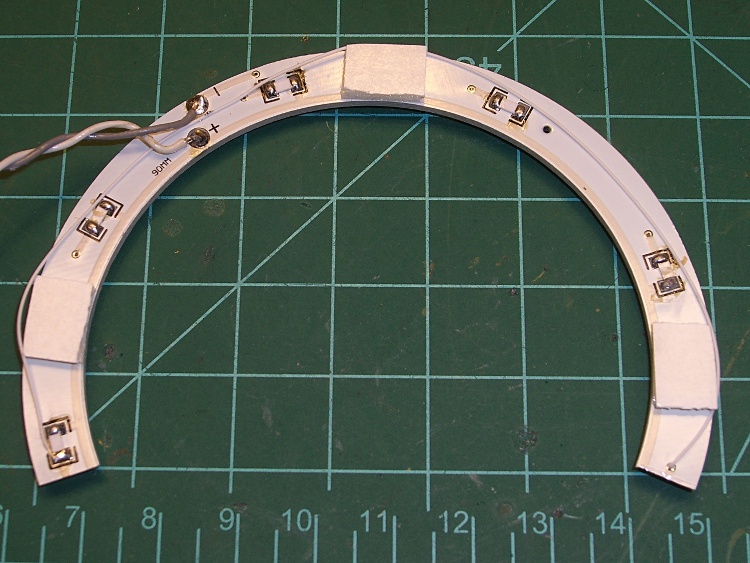
So I sawed out one of the three-LED strings to open a gap:
LED ring light with gap
Unfortunately, the designers arranged things so that the ballast resistor for each string sits directly above the last LED of the adjacent string. The white wire you can barely see connects the ballast resistor that drove the now-missing string on the left to the via feeding the first string on the right.
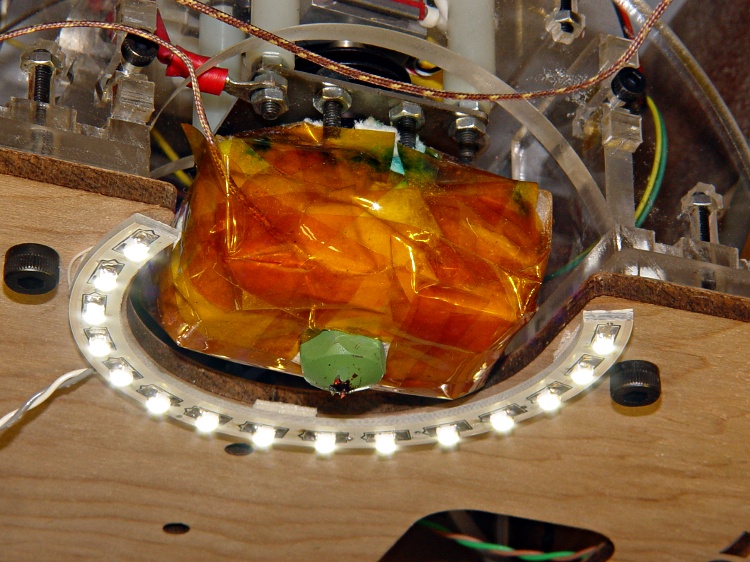
It now fits around the extruder with the gap exactly matching the opening in front of the Thermal Core.
LED ring light installed
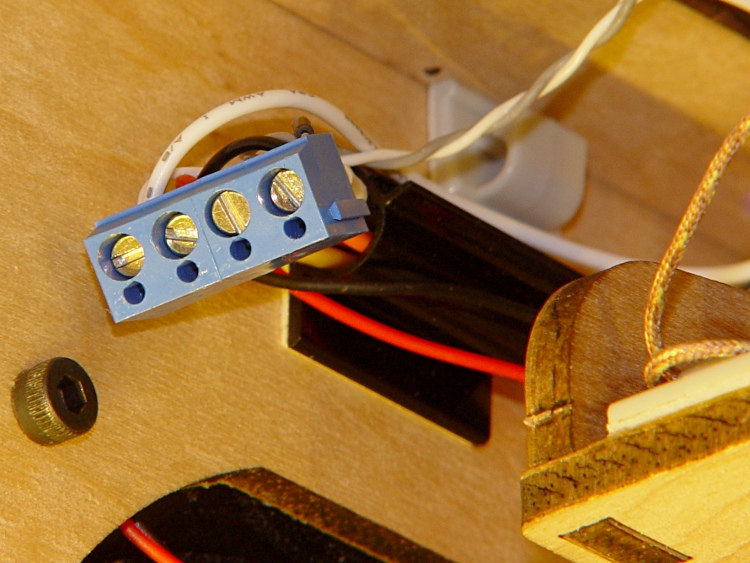
Power comes from a screw terminal connector I hacked into the 4-pin block that used to be part of the 20+4-pin ATX power block at the Motherboard. There’s a length of overly stout 4-wire cable leading to a kludged not-a-connector made of square pins and heatshrink tubing jammed into the block.
TOM auxiliary power connector
It provides +12, +5, +3.3 V, and ground for the fan and LED lighting.
Most of the light in that last picture comes from LED strips on either side of the front opening. My Shop Assistant won a meter of warm-white LEDs at the 3rd Ward Make-a-Thon [Update: dead link. Try their pix from the event.] and graciously allowed me to chop off two 6-LED strips for a good cause.
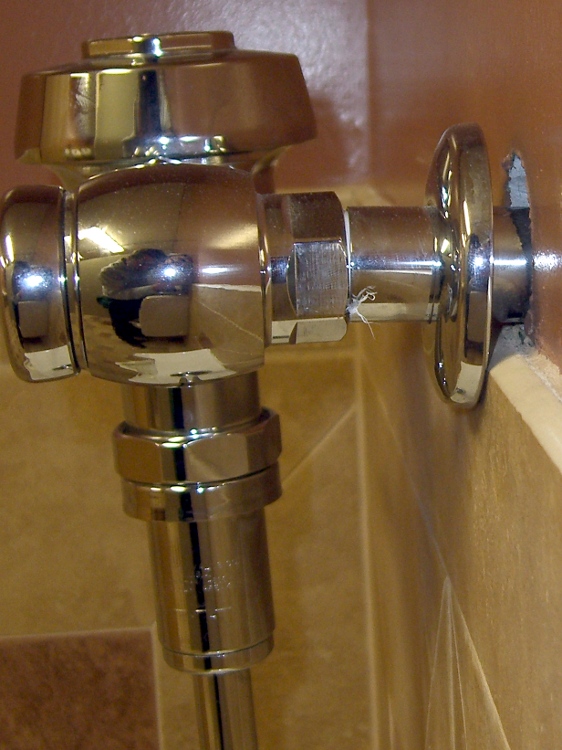
This from a restroom near the new high school auditorium, rebuilt at vast expense over the course of several years. You’d think for all the big bucks, somebody would remember that trim plates require a flat surface.
It’s not like I’ve never forgotten a detail in any of my designs. In this case, though, several different people surely noticed this situation and none of them were sufficiently empowered to fix the problem.
I’ve got a ten cent bet with myself that this will never get repaired. I’ll likely never know, though, as my Shop Assistant graduates this year.
So I’d installed an activated charcoal air filter to cut down the hot-ABS stink and it’s been doing fine. Of late, however, I’ve noticed more smell, so I figured it was time to replace the filter…
After building a bunch of stuff (about which more later), the Skirt extrusions showed a consistent tilt of about 0.1 mm downward to the right and the Skirt along the that side was consistently around 0.42 mm thick. So I cranked the right side down by 0.10 mm (just over 1/6 turn) and changed the G92 setting to Z1.50 to move the plate up by 0.05 mm.
Three test extrusions in quick succession gave these results (in multiples of 0.01 mm). I used the plates in reverse numerical sequence due to an accident of history:
The three Skirt extrusions around those polyhole test plates had thicknesses that looked like this (in the usual units of 0.01 mm):
28
33
24
38
29
34
Average: 0.31 mm
34
35
30
41
34
37
Average: 0.35 mm
36
37
32
40
35
38
Average: 0.36 mm
In round numbers the extrusions all fall within ±0.05 mm of their average (for a loose definition of average, of course) and the test pieces built just fine. The layer thickness is slightly over the desired 0.33 mm, but sheesh the Z-min switch gets it close enough.
[Update: following tweaked to match reality. The motor steps are 0.005 mm, but the conclusion remains.]
However, the Z axis motor drives a four-start leadscrew that moves the Z stage and the thingomatic.xml file specifies 200 step/mm = 0.005 mm/step. As a result, the Z axis positions occur in discrete steps (no surprise there) and the first extrusion happened ten-ish motor steps higher than the other two: 0.31 mm vs 0.35-ish.
Other folks use layer thicknesses below 0.30 mm and I think they’ll start to see the effect of Z axis resolution and consistency on build quality. Putting the height adjustment on the build platform means you can set the initial nozzle height above the platform very precisely (no steps on the screw-and-spring adjusters), but the height will continue to vary due to all the usual effects. The Z-min switch can adjust the Z stage height only in integral motor steps that may not be precise enough.
That means the actual extrusion thickness will vary by ±0.005 mm depending on where the Z-min switch trips with respect to the motor steps. Because the nozzle-to-plate distance varies smoothly with temperature / time / sag / whatever, you’ll see steps of that size no matter how much you twiddle the initial platform height.
For example, if you adjust the build plate height (using the platform screws) to set the nozzle at 0.00 mm for a commanded Z=0.000, the next possible Z stage positions are 0.005 mm above and below that level: the Z-min switch cannot adjust the platform with better resolution. The possible ±0.005 mm variation represents ±2% of a 0.25 mm layer thickness (it’s 1.5% of the 0.33 mm I use).
Using a 1/16 microstepping driver (and a better Z-axis motor!) would cut the nominal resolution to 0.0025 mm, but I think there’s no way to improve the actual resolution and precision given the present mechanical design. In short: you can make the steps smaller, but that doesn’t mean the Z stage will actually pay attention.
There’s also backlash: the Z-min switch sets the height as the stage moves down and the nozzle moves down to the first layer, but the second layer thickness depends on the stage moving up by a precise distance. I now think some of the surface finish problem with the three-layer polyholes test pieces came from the second layer being a bit thinner than it should be: the Z stage didn’t really move up by the full 0.33 mm due to backlash and there’s more plastic than room to put it.
A backlash compensation setting lies buried somewhere in RepG/SF, but I don’t have any measurements to justify anything other than zero. I think the entire Z stage assembly lacks the rigidity for motion on this scale, anyway, and the XY stages flop around more than that, too.
Building a machine tool with positioning accuracy / repeatability / stability below 0.1 mm is an exceedingly non-trivial project; getting that much resolution is no big deal. The Thing-O-Matic works just fine, but smaller nozzles and thinner layers require more attention to the mechanical design. Achieving tighter tolerances with plywood and acrylic probably isn’t feasible, but anything else will drive the cost up far too much.
It’s an interesting set of tradeoffs…
FWIW, I picked 0.33 mm to get a (nearly) integral number of layers per millimeter of object height; I tend to build things using hard-metric sizes and that seemed reasonable. It’s now obvious that the actual heights will be in multiples of 0.005 mm, which doesn’t really matter at all in absolute terms. I should probably use 0.30 mm to make the answers come out easy.
Nophead’s polyholes test piece (search for it here to find other attempts) seems to be a particularly difficult-to-print object: it’s 1 mm thick and has narrow openings between the holes.
Here are three variations, printed in quick succession, on three different plates, at 0.33 mm layer thickness, 2.0 w/t = 0.66 mm width, and speed variations to maintain those numbers:
25 mm/s, 50 mm/s, 1.65 rev/min
50 mm/s, 80 mm/s, 3.3 rev/min
75 mm/s, 100 mm/s, 5.0 rev/min
Polyholes at 25 50 75 mm per secPolyholes – large hole detail
Those are as-printed, with no cleanup other than breaking off the final filament leading to the extruder.
I’ve turned off Comb, because the extruder really isn’t dribbling very much and high-speed travel stretches what’s left into very fine hairs. Comb tends to run the nozzle along the path of the infill threads, which can be jarring at 80 mm/s.
A higher-resolution slice (clicky for more dots) down the right side shows the largest filled area; I stretched the contrast and added a little unsharp mask to highlight the threads. The 25 mm/s version has much straighter fill lines, with the other two exhibiting side-to-side jitter; the platform seems unstable at those speeds.
The upper hole is nominally 9.5 mm and measures 9.1 mm on the 25 mm/s plate and 9.2 mm on the other two. This is with my HoleWindage tweak set to zero, so the larger holes now print 3% smaller than nominal. That’s a considerable improvement over my previous attempts, with the new Z-min height measurement making all the difference.
Polyholes – small hole detail
This slice down the left side shows that the small holes come out rather ugly, but they’re actually pretty close to the right size amid all the chaff: around 0.3 mm too small. Of course, that’s a huge percentage of the nominal 1 to 4 mm size, but so it goes.
The fill around the small holes looks much worse on the higher-speed plates.
The longer threads parallel to the X axis have an odd stippled pattern that might be coming from the extruder stepper motor. Given that it’s driving an 8:51 gear reduction, I find that hard to believe, too. It’s only present on the fill threads, so most likely it’s something weird.
One of Skeinforge’s myriad settings very predictably chops off the initial or final (or both?) section of the inner extrusion of some circles. It’s probably not Clip, because that’s set to 0.34 × width = 0.24 mm and the gaps can be just shy of 1 mm long. Ditto for early Reversal, which has threshold of 3 mm that’s much smaller than the distance to the next perimeter thread. More tinkering seems inevitable.
So a super stock TOM can print upwards of 50 mm/s on non-critical parts, but something around 30 mm/s would work better should you care about surface finish. I think the results will be much better on thicker parts that can absorb some of the excess plastic around the holes; this is likely a lower limit on print quality.
After building a few large objects (about which more later) and verifying that the Z-minimum switch remains stable and delivers useful results, I cobbled up a test script that simplifies measuring the build platform tilt and extrusion thickness for a given switch height value.
The pattern looks about like this, although the G-Code script below connects the top of the X so it hangs together better.
Test X extrusion pattern
The extrusion uses my defaults for the first layer: 0.33 mm layer thickness, 2.0 w/t, 10 mm/s, 0.66 rev/min. Those are 20% of the normal extrusion speeds: 50 mm/s and 3.3 rev/min.
I built all the objects without adjusting the plate tilt to determine if all three plates produced the same result: they do! The results showed a consistent tilt, with the rear left corner high by 0.10 mm and the front right corner low by 0.10 mm. Those are all rubbery numbers, with accuracy based on measuring a filament, but they’re reasonably consistent.
The Z-min switch set the middle of the platform to about 0.35 mm, making the corners around 0.25 mm and 0.45 mm. That led to slightly too much plastic (plate too high) and slightly too little (plate too low), respectively, but the objects printed quite well.
Running the G-Code below under those conditions produced these numbers:
30
29
32
30
34
33
30
32
41
28
36
The numbers come from two measurements on each side of the outer square at about the 1/4 and 3/4 points, plus four measurements near the middle of the X. I didn’t average multiple measurements, some are definitely off due to error, and your mileage will vary.
Those thicknesses aren’t quite the same as I’d been seeing around printed objects, but if you squint you can see the tilt. There’s one missing number; that part of the X broke off and vanished somewhere between the Basement Laboratory and my upstairs desk.
I tightened the rear left bolt 1/6 turn (about 0.08 mm) to lower that corner and raise the opposite one, then stuck a sheet of 8-mil (0.008 inch = 0.021 mm) shimstock under the upper plate to see how the switch handled an abrupt change in plate height:
Built plate on 8 mil shimstock sheet
Another text X extrusion produced these thicknesses:
25
26
28
27
34
30
29
31
30
38
28
36
It’s obviously tilted even worse than before, which means the shimstock has the odd nick, bend, or bit of grit. What’s important, however, is that the extrusion thickness remains pretty close to normal, despite having the build surface 0.22 mm higher than usual. Without the Z-min switch on the plate, the extrusion thickness would suddenly decrease by 0.21 mm… and that’s enough to wreck a print!
Removing the shimstock and running another test extrusion produced about what I expected:
35
32
36
24
35
33
30
36
35
38
29
35
Overall, the thickness now lies within 0.05 mm of the 0.33 mm average. My measurement accuracy simply isn’t good enough to get any better than that.
The evidence so far suggests the platform tilt remains reasonably constant, even as the overall height varies, so I think a Z-minimum switch on the build platform should compensate for the changes that affect first layer extrusion thickness.
What that means: slice an STL into G-Code and fire the Thing-O-Matic!
This Level Test.gcode file, which is basically my start.gcode and end.gcode laminated around the snippet that draws the boxed-X pattern, lives in ~/ReplicatorG/scripts/calibration and thus appears on RepG’s pulldown menu:
(---- start.gcode begins ----)
(MakerBot Thing-O-Matic with aluminum HBP and Z-min platform switch)
(Tweaked for TOM 286 - Ruttmeister MK5 stepper extruder mod)
(Ed Nisley - KE4ZNU - May 2011)
(- set initial conditions -)
G21		(set units to mm)
G90		(set positioning to absolute)
(- begin heating -)
M104 S210 T0	(extruder head)
M109 S120 T0	(HBP)
(- coarse home axes -)
G162 Z F1000	(home Z to get nozzle out of danger zone)
G161 Y F4000	(retract Y to get X out of front opening)
G161 X F4000	(now safe to home X)
G92 X-53.0 Y-59.0 Z117.0	(set XYZ coordinate zeros)
(- fine home axes)
G0 X-51 Y-57 Z115 F400	(back off switches)
G161 Y F200
G161 X F200
G162 Z F200
G92 X-53.0 Y-59.0 Z117.0	(re-set XYZ coordinate zeros)
(- manual nozzle wipe)
G0 X0 Y0 Z10	    (pause at center to build confidence)
G4 P500
G0 X40 Y-57.0 Z10	(move to front, avoid wiper blade)
G0 X56            (to wipe station)
G0 Z6.0           (down to wipe level)
M6 T0			        (wait for temperature settling)
G1 Y-40	F1000		  (slowly wipe nozzle)
(- home Z downward to platform switch)
G0 X55.9 Y8 Z3	      (get over build platform switch)
G161 Z0 F50	          (home downward very slowly)
(-----------------------------------------------)
(- Set the Z height based on the switch height  )
G92 X55.7 Y8 Z1.45
(-----------------------------------------------)
G0 Z6.0			          (back off switch to wipe level)
(- start extruder and re-wipe)
G0 X56 Y-40     (set up for wipe from rear)
G1 Y-57.0 F1000 (wipe to front)
M108 R2.0	      (set stepper extruder speed)
M101		        (Extruder on, forward)
G4 P4000  	    (take up slack, get pressure)
M103		        (Extruder off)
G4 P4000  	    (Wait for filament to stop oozing)
G1 Y-40	F1000		(slowly wipe nozzle again)
G0 X0           (get away from wiper blade)
(- manual splodge)
G0 X0 Y-58		  (to front center)
G0 Z0.5 		    (just over surface)
M108 R2.0	      (set stepper extruder speed)
M101            (start extruder)
G4 P2000        (build up a turd)
(---- start.gcode ends ----)
(--------------------------)
(- print thread around platform)
( Speed as in Raft plugin for first layer)
( Print continuously to make it hang together while measuring)
M108 R0.66				(set stepper extruder speed)
G1 X-45 Y-45 Z0.33 F600	(to front left corner)
G1 Y45
G1 X45
G1 Y-45
G1 X-45					(return to front left)
G1 X40 Y40				(diagonal to rear right)
G1 X-40					(to rear left)
G1 X45 Y-45				(diagonal to front right)
(--------------------------)
(---- end.gcode starts ----)
(Tweaked for TOM 286)
(Ed Nisley - KE4ZNU - May 2011)
(- inhale filament blob)
M102		(Extruder on, reverse)
(- turn off heaters)
M104 S0 T0 	(extruder head)
M109 S0 T0 	(ABP)
(- move to eject position)
G162 Z F1500	(home Z to get nozzle away from object)
M103		(Extruder off)
G0 X0		(center X axis)
G0 Y40	(move Y stage forward)
(---- end.gcode ends ----)


 The Smell of Molten Projects in the Morning