The Smell of Molten Projects in the Morning

Ed Nisley's Blog: Shop notes, electronics, firmware, machinery, 3D printing, laser cuttery, and curiosities. Contents: 100% human thinking, 0% AI slop.

Author: Ed

  • Mind the Overhang!

    Crane treads overhanging flatbed
    Crane treads overhanging flatbed

    Spotted this one in a rest stop along I-84. I suppose it’s perfectly safe, but those anchoring hooks really don’t inspire much confidence, even if the only way you could jounce that crane sideways would involve flipping the flatbed. Right?

    Yes, it was hanging over the other side just as far.

    Come to think of it, the tractor that towed this assembly wasn’t present. Perhaps someone discovered / was informed it really isn’t a Good Idea / legal to haul an excavator at 65 mph in this configuration?

    At least the driver didn’t do that

  • Drilling a Drainage Hole in a Plant Pot

    We divided an ancient Snake (a.k.a. Mother-In-Law’s Tongue) Plant and discovered the pot had no drainage hole, which is not to be tolerated.

    It turns out that an ordinary carbide glass drill works just fine on glazed clay pots. Use a low RPM and very slow feed, flood the scene with water, and drill from the other side after the point breaks through.

    Glass drill for plant pot hole
    Glass drill for plant pot hole

    The glaze inside the pot already had a flaw that let the water into the clay, from whence it seeped out through the unglazed lower rim. I suppose saturating the clay can’t possibly be good, but I’ve done this to many glazed pots over the years and none of them have ever complained, so it’s all good.

  • Thing-O-Matic: Webcam Pole Mount

    Webcam pole - in action
    Webcam pole – in action

    Some upcoming presentations on 3D printing need a way to show what’s going on inside the box. I’ve had various webcams affixed to various parts of the Thing-O-Matic, but nothing worked quite right: the camera was either in the wrong spot, at the wrong angle, or just flat-out in the way.

    The helmet mirror project produced a trio of three-draw telescoping shafts that looked promising, so I drilled suitable holes in two chunks of scrap make-from plastic and produced a pole mount for a Logitech camera without doing a bit of machining. The camera wants to clamp onto a notebook and works fine atop a block of acrylic, with the cable secured to the base of the pole to prevent the whole thing from falling over at the slightest tug.

    I briefly considered printing a nice clip to hold the cable to the pole, then came to my senses and used a cable tie. After all, that’s what they’re for, right?

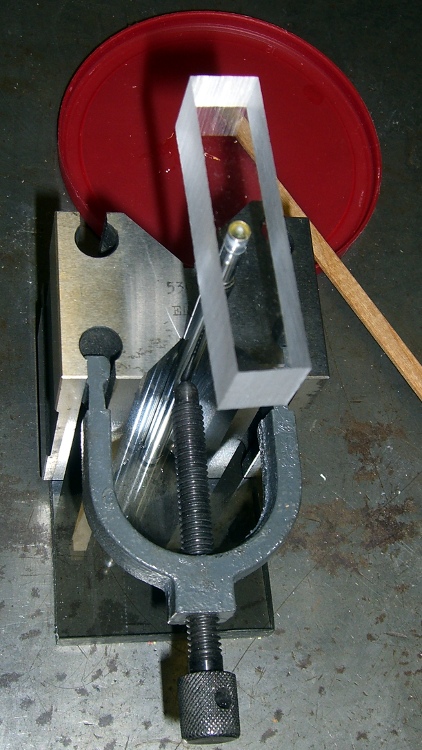
    A dot of clear epoxy in each hole prevents the blocks from rotating on the shafts; they’re sufficiently un-round to give it a decent grip. I clamped the pole in a V-block to keep it perpendicular to the base while the epoxy cured:

    Webcam pole - clamping
    Webcam pole – clamping

    The white LEDs under the Z-stage produce far too much glare and reflect in the Kapton tape; a switch to knock ’em off for video viewing seems in order.

    (If anybody else is keeping track, this is Post 1000. Although we humans love numbers with plenty of zeroes, Post 10000 will pose a challenge…)

  • Thing-O-Matic: Uncommanded Z Motion After Homing

    After printing the Barbie Pistol, I discovered that moving the Z stage to anything less than the absolute maximum was a Bad Idea, so I changed end.gcode to simply home the Z axis to the top. That worked fine in RepG 24, but after printing a few things with RepG 25, I discovered that the Z axis now has uncommanded motion after that homing step: a G0 F4000 X0 causes the Z stage to drop by anywhere from a few millimeters to half the total travel.

    Of course, the uncommanded Z motion depends on something imponderable, but it’s consistent for any given setup. This chunk of G-Code causes about 10 mm of downward Z motion:

    G21        (set units to mm)
    G90        (set positioning to absolute)
    (- coarse home axes -)
    G162 Z F1000    (home Z to get nozzle out of danger zone)
    G161 Y F4000    (retract Y to get X out of front opening)
    G161 X F4000    (now safe to home X)
    M132 X Y Z A B    (fetch home offsets from EEPROM)
    G0 F4000 X0 Y0 Z30        (pause at center to build confidence)
    (- draw square)
    G0 F4000 X-45 Y-45 Z10    (to front left corner)
    G1 Y45 F4000
    G1 X45
    G1 Y-45
    G1 X-45                    (return to front left)
    (- move to eject position)
    G162 Z F1500    (home Z to get nozzle away from object)
    (G0 F4000 Z113) (this would work fine)
    G0 F4000 X0        (center X axis)
    G0 F4000 Y40    (move Y stage forward)

    There’s a RepG ticket for that.

    As nearly as I can tell, homing an axis trashes its coordinate value, so the only thing you can do next is set the axis coordinate value with G92 or M132. Given that those values are now stored in EEPROM, maybe it’s be a good idea to simply use them, without requiring another command after each homing command?

    You’d want home offset values for both the maximum and minimum limits, to accommodate printers with limits on both ends of the axis, rather than the single offset now stored. The two homing commands (G161 and G162) could pick the appropriate offset, if a valid one was stored, and leave the coordinate unchanged (but not trashed!) otherwise.

    There’s a RepG ticket for that.

  • Peacock in Deployed Mode

    I tagged along on a Master Gardener trip to Weathersfield and found this fellow confined to a cage:

    Peacock - stowed view
    Peacock – stowed view

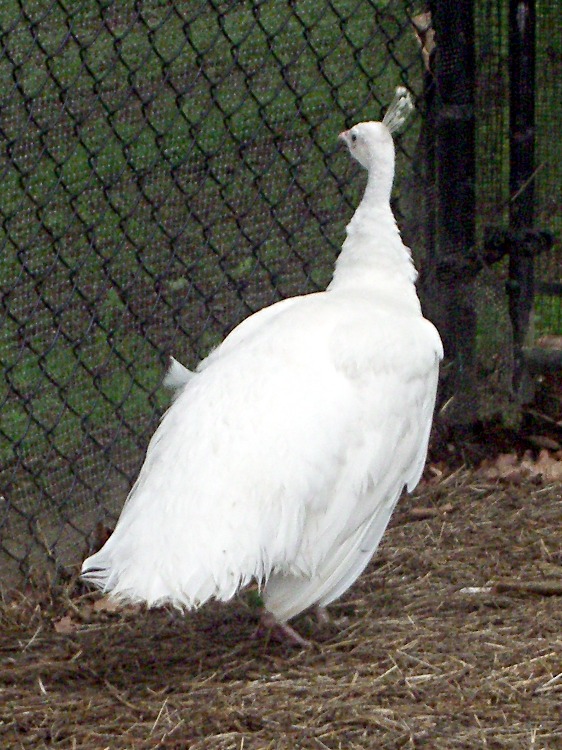
    His companion was a pure white (leucistic, not albino) female:

    Leucistic Peahen
    Leucistic Peahen

    Shortly thereafter, he deployed for action. Part of the dance involves rattling all those quills:

    Peacock - side view
    Peacock – side view

    I had no idea peacocks have wooly white underwear!

    Peacock - stern view
    Peacock – stern view

    The female remained utterly uninterested throughout the entire show; evidently, one can get used to anything if it happens often enough.

    Raj, our correspondent from India, surely has these things like we have turkeys: enough to be a nuisance.

  • Thing-O-Matic: Broken G91 Relative Motion

    It would be handy, while doing the fast / coarse home stuff, to switch to G91 relative positioning mode and back off the switches by 2 mm by using a simple G0 X2 Y2 Z-2 that doesn’t depend on knowing the exact coordinates of the endpoint, but it seems relative positioning doesn’t work for any but the most trivial cases.

    After some fiddling, this short routine produces a very fast, very long, fully coordinated XY move to some position in the +X +Y direction at the G1 X2 F100 command after the G91 command sets relative motions; it should move 2 mm away from the X switch. When the machine arrives at the new (unexpected) position, it then does the expected slow 2 mm Y and Z moves:

    G21 (set units to mm)
    G90 (set positioning to absolute)
    (- coarse home axes)
    G162 Z F1000 (home Z to get nozzle out of danger zone)
    G161 Y F4000 (retract Y to get X out of front opening)
    G161 X F4000 (now safe to home X)
    (- back off switches)
    G91
    G1 X2 F100
    G1 Y2 F100
    G1 Z-2 F100
    G90

    I gave up and used an absolute move with hardcoded XYZ coordinates that should be pretty close to the stored values.

    There’s a RepG ticket for that.

    Obviously, I’m going where no other Thing-O-Matic operator has gone before. I do that a lot, don’t I?

  • Thing-O-Matic: Revised Homing

    After adding F feed speed parameters to all the G0 commands in my start.gcode (to work around that bug), I decided to use the new-with-firmware-2.8 feature that stores the home offsets in the Thing-O-Matic’s EEPROM. That turned out to be, one might say, a thinly documented feature, so this may be a useful summary…

    The Official Way to set the EEPROM, which you can find in ReplicatorG/scripts/calibration/Thing-O-Matic calibration.gcode, goes a little something like this:

    • Manually position the nozzle dead center on the build plate, just touching the surface
    • Use G92 to set all axes to 0.0
    • Home the axes to the switches
    • Use M131 X Y Z A B to store the current values in EEPROM

    Having already found good values for those offsets as part of the aluminum build plate adventure, I jammed them into EEPROM using RepG’s Machine→Motherboard Onboard Preferences. The values I’m using are:

    • X = -53.0
    • Y = -59.0
    • Z = 116.0

    For some unknown reason that has nothing to do with floating point representation (I mean sheesh even the 32-bit version of IEEE 754 floating point has at least 10 decimal digits of precsion), RepG modifies only the negative values sufficiently to be bothersome:

    • X = -52.964
    • Y = -58.976

    Having stored the offsets, I wondered how to fetch them. That is also, of course, completely undocumented, but I eventually traced down the answer in (deep breath)

    skein_engines/skeinforge-35/skeinforge_application/prefs/SF35-Thingomatic-HBP-Stepstruder/alterations/start.gcode

    That’s not true for all the start.gcode files you might find, though, and there are many such in far more obvious places.

    So, OK, I fetch the EEPROM coordinates using M132 after doing both the coarse home (they’ll be pretty close) and the fine home (they’ll be dead on, modulo the changes), then wipe the nozzle and poke the Z-minimum height switch (which is why I really really care about random changes in the stored values) to find the actual height above the aluminum build surface.

    At exactly this position it would be nice to set only the Z height to the actual switch thickness, but G92 sets all un-mentioned axes to zero, so you can’t set just one axis. I have no idea how M131 and M132 behaves in that regard; none of this stuff is documented anywhere that I can find and this stopped being funny a while ago.

    So, knowing the XYZ coordinates of the switch, I reset the XYZAB axes using G92.

    The current working start.gcode that I devoutly hope will continue to work for a while:

    (---- start.gcode begins ----)
    (MakerBot Thing-O-Matic with aluminum HBP and Z-min platform switch)
    (Tweaked for TOM 286 - Ruttmeister MK5 stepper extruder mod)
    (Ed Nisley - KE4ZNU - July 2011)
    (Hack to work around bad G0 speed)
    (- set initial conditions)
    G21		(set units to mm)
    G90		(set positioning to absolute)
    (- begin heating)
    M104 S210 T0	(extruder head)
    M109 S110 T0	(HBP)
    (- coarse home axes)
    G162 Z F1000	(home Z to get nozzle out of danger zone)
    G161 Y F4000	(retract Y to get X out of front opening)
    G161 X F4000	(now safe to home X)
    M132 X Y Z A B	(fetch home offsets from EEPROM)
    (- fine home axes)
    G0 X-51 Y-55 Z114 F400	(back off switches)
    G161 Y F200
    G161 X F200
    G162 Z F200
    M132 X Y Z A B	(fetch home offsets from EEPROM)
    (- manual nozzle wipe)
    G0 F6000 X0 Y0 Z10	(pause at center to build confidence)
    G4 P500
    G0 X40 Y-57.0 Z10	(move to front, avoid wiper blade)
    G0 X56				(to wipe station)
    G0 Z6.0				(down to wipe level)
    M6 T0				(wait for temperature settling)
    G1 Y-45	F1000		(slowly wipe nozzle)
    (-----------------------------------------------)
    (- Make sure the XY position matches the G92    )
    (- home Z downward to platform switch)
    G0 F6000 X56.4 Y7.6 Z3		(get over build platform switch)
    G161 Z0 F50					(home downward very slowly)
    G92 X56.4 Y7.6 Z1.60		(set Z height)
    G0 F6000 Z6.0				(back off switch to wipe level)
    (-----------------------------------------------)
    (- start extruder and re-wipe)
    G0 X56 Y-45     (set up for wipe from rear)
    G1 Y-57.0 F1000 (wipe to front)
    M108 R2.0		(set stepper extruder speed)
    M101			(Extruder on, forward)
    G4 P4000  	    (take up slack, get pressure)
    M103			(Extruder off)
    G4 P4000  	    (Wait for filament to stop oozing)
    G1 Y-45	F1000	(slowly wipe nozzle again)
    G0 F6000 X0		(get away from wiper blade)
    (- build some pressure)
    M108 R2.0		(set stepper extruder speed)
    M101			(start extruder)
    G4 P100			(run for a bit)
    (---- start.gcode ends ----)


    For what it’s worth, I put that file in the sf_40_alterations directory, blew away the previous versions in all the profiles, and replaced them with symlinks to that single file. When the next change comes along, I can modify one file and all the profiles will pick up the change at once.