Ed Nisley's Blog: Shop notes, electronics, firmware, machinery, 3D printing, laser cuttery, and curiosities. Contents: 100% human thinking, 0% AI slop.
While I was puttering around outside (an admittedly rare occurrence), a deep thuttering over the northern horizon eventually resolved into a formation of four helicopters. Hard to tell at this range, but they looked like Black Hawks southbound for the Stewart Air National Guard field.
Our Larval Engineer reports that the college ROTC contingent includes some pilots-in-training who regularly land Black Hawks on the campus outfields.
Well, truth be known, it took a bit of tweaking to get to this point, but this was the first dependable & repeatable measurement:
BUZ71A-overview
Rescaling the graph to show just the interesting part down near the origin:
BUZ71A-detail
The VGS output steps from 4.0 to 10.0 V by 0.25 V, which is too fine until I get the Gnuplot script sorted out. The ID output runs from 0.0 A to 2.0 A in steps of 50 mA, which makes for smooth curves. These are all at 30 °C.
The drain resistance flattens out nicely for VGS beyond 7 V, which is well over the BUZ71A max threshold of 4.0 V. That means you really need more than the usual 5 V supply to control the thing; I’ll eventually try some “logic level” MOSFETs. Part of the trick will be to find a logic-level MOSFET with a relatively high drain resistance suitable for current sensing.
The board looks like this, with the foam shako for the thermal block and some MOSFET victims off to the side:
MOSFET RDS Tester – overview
The key part of the schematic:
Schematic – MOSFET path
Two Arduino PWM outputs set the gate voltage and maximum drain current. The three jumpers near the middle allow various feedback paths, although the only one that really makes sense is closing the current loop. The trimpot is unused and the analog output directly sets the drain current limit at 0.5 A/V: 4 V → 2 A. The PWM outputs must run at 32 kHz, not the Arduino-standard 500-ish Hz.
The MAX4544 SPDT analog multiplexers switch between ground and the PWM voltages. That’s a simple way to turn the outputs off and on without waiting for the PWM values to ramp up and down. The LEDs on those control signals provide an indication that the firmware hasn’t fallen off the rails.
Three Arduino analog inputs report the drain voltage, actual drain current, and temperature input. The LM324 op amps run from ±12 V, so a pair of BAT54S dual diodes clamp the analog inputs at one Schottky diode drop below ground and above 5 V. That should be close enough to prevent any damage without rounding off the values near the extremes, given the fairly high op-amp output resistors; the analog inputs present a reasonably high impedance and it seems to not matter much.
The measuring sequence amounts to a pair of nested loops:
Step the gate voltage
Step the drain current limit
The inner loop ends when the current limit, the actual current, or the drain voltage exceeds the corresponding maximum value. The outer loop ends when the gate voltage exceeds its limit.
A 100 ms delay after changing any analog output allows time for the voltages to settle before taking the next set of inputs.
void loop() {

    digitalWrite(PIN_HEARTBEAT,HIGH);           // show that we've arrived

//--- Stabilize temperature

    Temperature = ReadTemperature();
    SetPeltier(Temperature,TSetpoint);

    if (abs(Temperature - TSetpoint) > T_ACCEPT) {

      Serial.print("# Exceed T limit: ");
      Serial.print(Temperature,1);
      Serial.print(" C ");

      while (abs(Temperature - TSetpoint) > T_DEADBAND) {
        Temperature = ReadTemperature();
        SetPeltier(Temperature,TSetpoint);
        TogglePin(PIN_HEARTBEAT);
        delay(SETTLING_TIME);
        Serial.print('.');
      }
      Serial.print(" Now at: ");
      Serial.print(Temperature,1);
      Serial.println(" C");
    }

//--- Record current data point

    IDrainSense = GetIDrain();
    VDrainSense = GetVDrain();

    Serial.print(VGateSet,3);
    Serial.print('\t');
    Serial.print(VDrainSense,3);
    Serial.print('\t');
    Serial.print(IDrainSense,3);
    Serial.print('\t');
    Serial.print((IDrainSense == 0.0) ? 0.0 : (VDrainSense / IDrainSense),3);
    Serial.print('\t');
    Serial.print(Temperature,1);
    Serial.print('\t');
    Serial.print(millis() - StartTime);
    Serial.println();

//--- Step to next point

    if ((IDrainLimit > MAX_DRAIN_CURRENT) ||        // beyond last current increment
        (IDrainSense > MAX_DRAIN_CURRENT) ||        // power supply current limit
        (VDrainSense > MAX_DRAIN_VOLTAGE)) {        // beyond linear voltage measurement
      IDrainLimit = 0.0;
      VGateSet += VGATE_STEP;
      if (VGateSet <= MAX_GATE_VOLTAGE) {
        PrintHeader();
      }
    }
    else {
      IDrainLimit += IDRAIN_STEP;
    }

    SetIDrain(IDrainLimit);
    SetVGate(VGateSet);

    TogglePin(PIN_HEARTBEAT);
    delay(SETTLING_TIME);                           // wait for settling

    if (VGateSet > MAX_GATE_VOLTAGE) {
      Serial.print("# Done! Elapsed: ");
      Serial.print((millis() - StartTime)/1000);
      Serial.println(" sec");

      SetIDrain(0.0);
      SetVGate(0.0);
      digitalWrite(PIN_DISABLE_IDRAIN,HIGH);
      digitalWrite(PIN_DISABLE_VGATE,HIGH);
      digitalWrite(PIN_ENABLE_HEAT,LOW);
      analogWrite(PIN_SET_IPELTIER,0);

      while (true) {
        TogglePin(PIN_HEARTBEAT);
        delay(25);
      }
    }

}
Everything is a compile-time option, which is certainly user-hostile. On the other paw, that allows me to get on with writing column instead of putzing around with the user interface… [grin]
The MOSFET tester I’m building controls the MOSFET’s gate voltage and drain current, while measuring the drain voltage. That, however, puts the drain terminal at a relatively high-impedance node between two current sources: the limiter and the MOSFET-under-test. When they’re both set to nearly the same value, the drain terminal picks up a generous helping of 32 kHz noise from the 3 A PWM Peltier module current. When either current source is set much larger than the other, the higher one serves as a relatively low impedance path that reduces the pickup.
I thought about grounding the thermal block, but that means adding an insulating washer under every MOSFET-under-test, which means an even greater thermal control problem. So the easiest solution is to just turn off the PWM during measurements:
Peltier Noise – VDS – PWM Shutdown
The lower trace (at 5 V/div, not 500 mV as shown) is a digital output marking the duration of the three analog reads: temperature, drain voltage, and drain current. The upper trace shows the absolute worst case for the noise, which looks rather awful.
The Peltier PWM comes from Arduino digital output 10, which is lashed to hardware Timer 1. Turning off the PWM requires setting the corresponding clock prescaler to “no input”, then setting it back to select the appropriate clock input after the measurement.
Just on general principles, I average three successive analog inputs, so the Arduino source code for the analog reads looks like this:
#define TCCRxB                  0x01        // set prescaler to 1:1 for 32 kHz PWM
#define NUM_T_SAMPLES    3

float ReadAI(byte PinNum) {
word RawAverage;

    digitalWrite(PIN_SYNC,HIGH);                // scope sync
    TCCR1B = 0x00;                              // turn off Peltier module PWM

    RawAverage = analogRead(PinNum);            // prime the averaging pump

    for (int i=2; i <= NUM_T_SAMPLES; i++) {
        RawAverage += (word)analogRead(PinNum);
    }

    TCCR1B = TCCRxB;                            // restart Peltier PWM
    digitalWrite(PIN_SYNC,LOW);

    RawAverage /= NUM_T_SAMPLES;

    return (float)RawAverage;
}
That’s a 33 uF 300 V electrolytic that started life as a surface-mount kludge, simply soldered to the Peltier supply’s screw terminal pins on the bottom of the board.
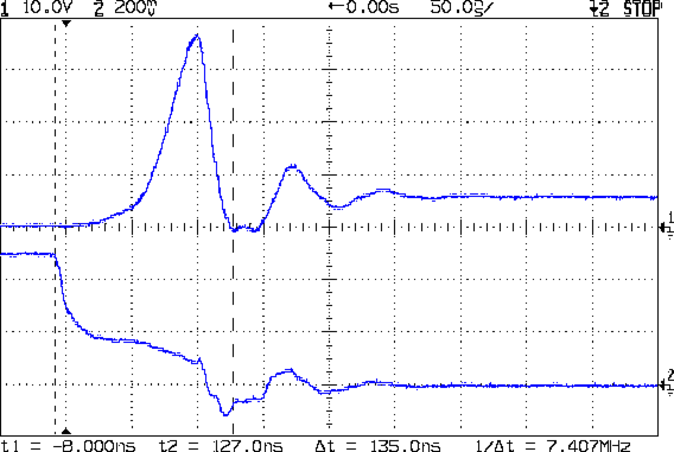
With the cap in place, the supply drops to 4 V at turn-on and bumps to 6 V at turn-off, with the transients much better-behaved now.
Those spikes at the turn-off transient are also somewhat better, even if the MOSFET drain rings for another cycle before dying out. The peak is down to 35 V, which I think comes from the other end of the circuit being more reluctant to instantly jump 70 V, and the width has decreased, too:
Peltier Drain Ringing – 30 uF Supply
The ringing jumped to 15 MHz, rather than 5 MHz, which means it’s over faster even if there’s another cycle. If it were any worse, I’d be forced to re-figure the snubber RC numbers…
The Miller capacitance effect still shows up clearly on the gate drive in the lower trace. There’s a reason why you really need higher-performance drivers for faster circuits!
Although the economic argument for producing custom cookie cutters may not be persuasive, the fact that you (well, I) can produce custom widgets certainly is. Most of the things I build and repair don’t require great mechanical strength or finicky dimensional precision, so a DIY 3D printer is exactly the right hammer for the job.
The Peltier assembly looked like this while I was epoxying everything together with JB Weld:
Peltier module – epoxy curing
The aluminum-case resistor held the heatsink at 105 °F to encourage the epoxy to cure in a finite amount of time.
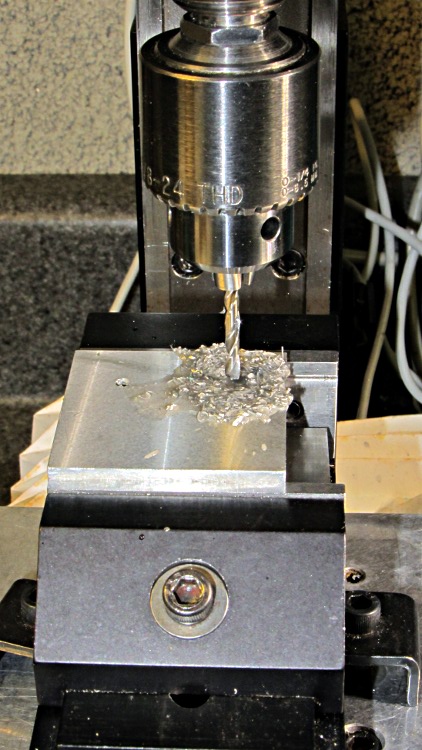
The 40 mm square block is a squared-up piece of 1/2 inch aluminum plate (manual CNC on the Sherline, nothing fancy) with a pair of 6-32 tapped holes for the screws that will hold TO-220 transistors or the yet-to-be-built TO-92 adapter. The CPU heatsink got a pair of symmetric holes for the posts holding it to the acrylic base, but other than that it’s perfectly stock.
MOSFET thermal block – drilling
Then epoxy the thermistor brick to the middle of the block between the two screws, stick on some obligatory Kapton tape to prevent embarrassing short circuits, and add a foam collar around the Peltier module to insulate the block from the heatsink:
MOSFET thermal block
A square foam shako covers everything, held down with a random chunk o’ weighty stuff, to insulate the whole affair from the world at large.





 The Smell of Molten Projects in the Morning