Ed Nisley's Blog: Shop notes, electronics, firmware, machinery, 3D printing, laser cuttery, and curiosities. Contents: 100% human thinking, 0% AI slop.
The third hand grabbers I have all put bare alligator clip ferrules in the adjustable sockets with a thumbscrew to secure them. Over time, that thumbscrew crunches the ferrule and makes the clip hard to adjust. This has become enough of an annoyance that I rummaged around in the brass tubing cutoffs to find some that fit into the ferrules:
Alligator clip with brass tube insert
Given the sorry state of the ferrules, they required quite a bit of squeezing and shaping until that tube fit inside, but after that they rounded up nicely.
I suppose I should solder the tubes in place, but …
This Watts 9D-M3 Backflow Preventer Valve feeds water into our furnace, provides an overpressure relief, and prevents heating loop water from re-entering the potable water supply.
Watts 9D-M3 Backflow Preventer Valve
The vertical pipe leads downward near the floor, underneath which sits the small plastic bucket I provided to catch the occasional drip. Recently we had an all-hands scramble to soak up a pool of water spreading across the floor from the overflowing bucket, across the aisle, and below the shafts-and-rods-and-tubes-and-pipes storage rack. Evidently the occasional drip became a steady drip while we weren’t watching; not a catastrophic flood, but far more water than we want on the floor.
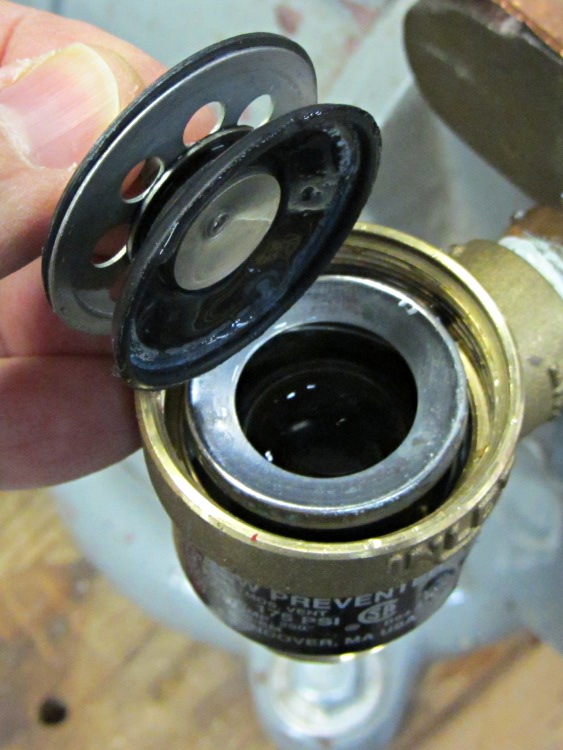
This is the inlet valve, which is basically a flapper. You can’t see the fine cracks around the central mount, but they’re all over the inner half of the ring.
Watts 9D-M3 – Inlet valve
And this is the outlet valve, which has pretty much disintegrated. Note the outer rim peeled back under my thumb:
Watts 9D-M3 – Outlet valve
A complete new valve is $40, in stock and ready for pickup at Lowe’s, but all I really needed was the failed rubber flapper valves, which they don’t carry. A few minutes of searching reveals the Watts 0886011 Repair Kit, which has all of the interior parts.
Pop Quiz: How much does the repair kit cost?
Answer: Starts at $38 plus shipping and goes up from there. Cheap aftermarket kits run $20 and up, but they’re all out of stock.
Now that, party people, is the sort of thing that ticks me right off.
Perhaps the local HVAC / plumbing supply stores have such kits in stock? To quote: “They may exist, but we don’t have them.”
I don’t see any way to homebrew new flapper valves, so it’s off to Lowe’s we go…
It would seem to me that these things shouldn’t fail after a mere decade of service. I thought that about the CdS flame sensor that crapped out in the middle of a sub-zero January cold snap while I was at Cabin Fever some years ago, too.
These are the bare cells, without the protection circuit in series, so the voltage is a bit higher than the camera will see. One is completely dead and two of them appear to have about 1 A·h of capacity, but the discharge voltage evidently drops below what the camera considers acceptable.
They’d work fine driving a less fussy load, though…
It seems that a much older version of Eagle allowed device names along the lines of ELECTRET MIC that contained blanks and worked perfectly at the time. Since then, the rules changed to prohibit blanks, but the EAGLE 5.x series evidently allowed those names to exist as long as they weren’t used in the schematic or touched in the library editor. In 6.x, however, you can’t even load the library without triggering an error message.
Because 6.x won’t load the library, you can’t use the library editor to remove the blank.
Because the most recent version of 5.x kvetches about the blank, you can’t use the library editor to remove the blank.
Having only two offending device names, I figured I could use a hex editor to jam a hyphen in place of the blanks and be done with it. Come to find out that EAGLE (wisely) wraps a checksum around the binary library file to detect such changes and prevent the files from loading. I think that’s an excellent idea, even if it was inconvenient in this situation.
Fortunately, 6.x both complains about the problem and offers up a “text editor” window with the complete XML source code for the library that it converted from the 5.x binary format.
So:
Copy-and-paste the text into an editor that supports highlighted XML editing
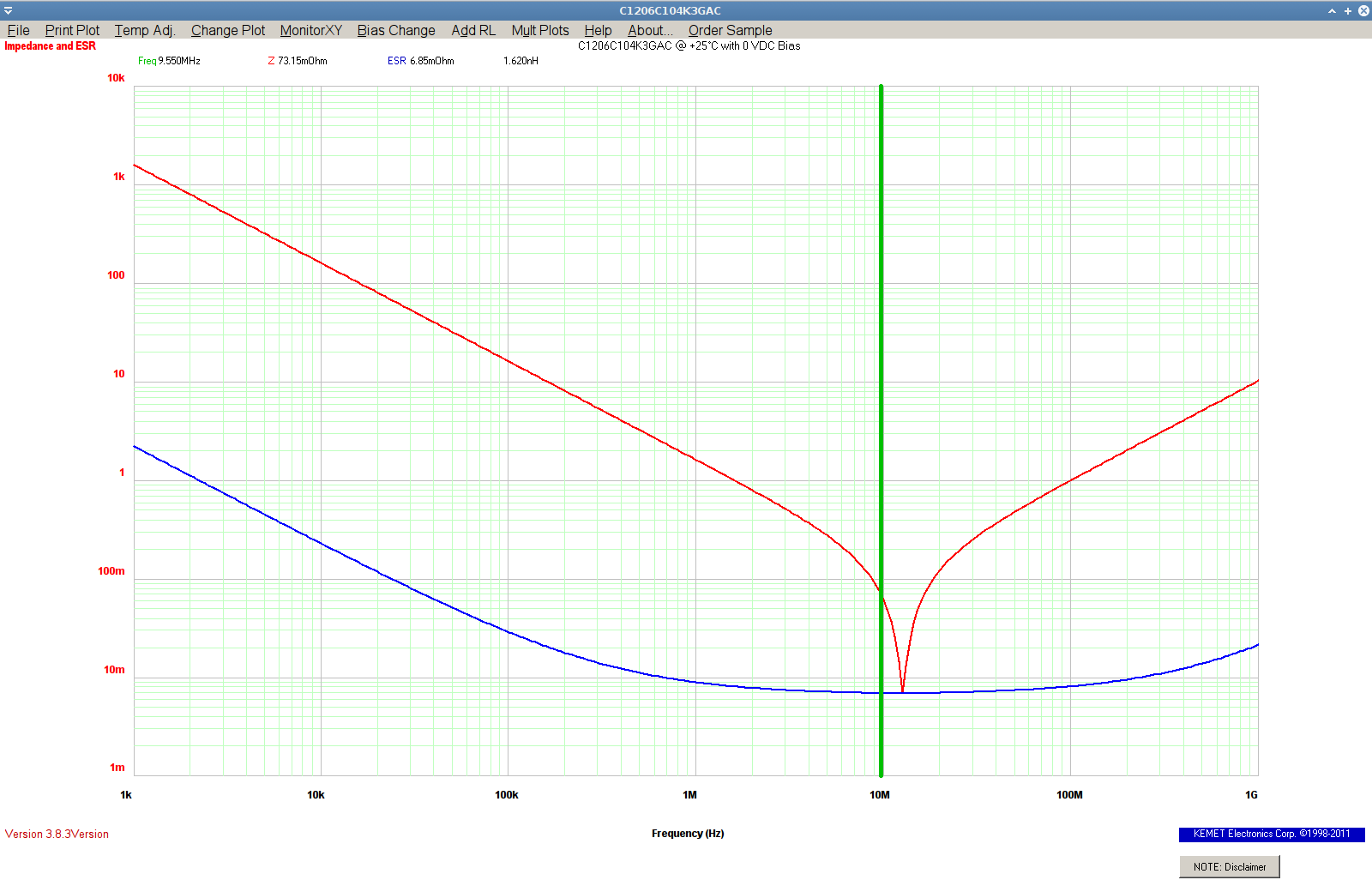
A Circuit Cellar reader recommended the KEMET Spice calculator that lets you explore the Z / ESR / capacitance / inductance of their various capacitors:
My assumption that the basement document safe had an effective door seal turned out to be wrong, so I replaced the bagged desiccant with a tray of granules, sealed the door with masking tape, and tried again:
Basement Safe Humidity – 2012-01-12
The jagged black curve shows the Basement Laboratory temperature trending toward the usual mid-50s winter level. The dead-flat horizontal blue line at 15% RH shows the tray of desiccant can keep up with whatever air leakage might occur around the tape and through the floor bolts.
I cannot find the table (that I once had and know exists somewhere) which lists various desiccants and their terminal humidity levels in a sealed container. I’m pretty sure the low humidity means it’s one of the clay-based desiccants, not silica gel.
Faced with the need to measure heatsink temperature in an Arduino project and being unwilling to putz around with a MAX6675 thermocouple amp, I found a bag of thermistors in the heap. Unlike most surplus, the bag pedigreed them as Semitec 103CT-4, which led to some relevant parameters:
T0 = 25 °C
R0 = 10 kΩ
B = 3270 K
The equation for a thermistor’s resistance at a given temperature (in K, not °C) is:
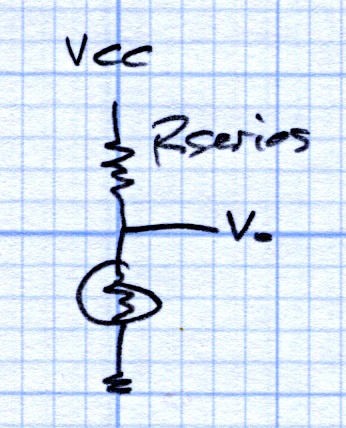
Setting Rseries = 10 KΩ and applying a bit of spreadsheet-fu produces this:
Thermistor Linearization – Rseries – Graph
Getting within +2 °C /-1 °C over -20 °C to 60 °C isn’t all that bad, but … I wondered whether there might be an easy way to get better linearization. The heatsink temperature will range from about -10 °C to 60 °C (yes, there will be a Peltier cooler involved), so the range is a bit broader than usual.
A bit of diligent rummaging turned up that description, which led to US Patent 3,316,765 from back in 1967, which teaches the concept of two different thermistors, one for low temperatures and one for high temperatures, with some resistive blending:
Patent 3316765 Fig 3
The patent includes the claim of many different thermistors, each with a series resistor, to cover a much broader temperature range.
Given a bag of identical thermistors, I wondered what might be possible. A bit more spreadsheet-fu produced this:
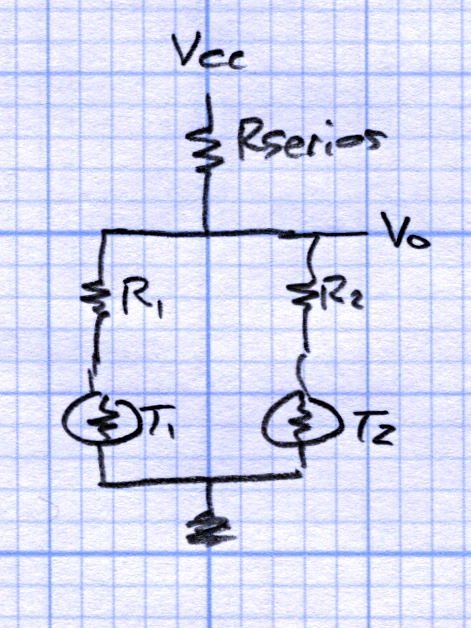
Which corresponds to this sketch, with Rseries = 6.2 kΩ, R1 = 27 kΩ, and R2 = 0.0:
Thermistor Linearization – Dual Thermistors
All in all, a nicely centered ±1 °C error from -15 °C to +60 °C can’t be beat. The output voltage even spans 0.13 to 0.71 of Vcc, about 9 of the available 10 ADC bits.
Those two resistors came from hand-tweaking with standard values, so it’s not like there’s a genetic algorithm involved. The value of Rseries wants to be a bit below the parallel combination of the two branches near 30 °C and R1 seems happiest around the 0 °C thermistor resistance. I vaguely thought about using a multivariable solver, but what’s the point?
The result seems good enough that I didn’t try three thermistors. T2, the one with R2=0, already handles the high temperature range and the low end is fine, so it seems there’s not much to be gained. If you had a stash of different thermistors and knew their characteristics, then the results would be different.
Admittedly, one could program the actual logarithmic equation to unbend a single thermistor’s voltage into temperature, but I must kludge up a thermistor mount anyway, so why not entomb two thermistors and an SMD resistor, then use a linear fit? It’s not like fancy math will give the whole lashup any greater accuracy.
The spreadsheet may be of interest. It started out as an OpenOffice spreadsheet, but WordPress doesn’t permit *.ods files, soooo it’s in MS Excel format.







 The Smell of Molten Projects in the Morning