The Smell of Molten Projects in the Morning

Ed Nisley's Blog: Shop notes, electronics, firmware, machinery, 3D printing, laser cuttery, and curiosities. Contents: 100% human thinking, 0% AI slop.

Author: Ed

  • Peltier PWM Temperature Control: Noise Blanking

    The MOSFET tester I’m building controls the MOSFET’s gate voltage and drain current, while measuring the drain voltage. That, however, puts the drain terminal at a relatively high-impedance node between two current sources: the limiter and the MOSFET-under-test. When they’re both set to nearly the same value, the drain terminal picks up a generous helping of 32 kHz noise from the 3 A PWM Peltier module current. When either current source is set much larger than the other, the higher one serves as a relatively low impedance path that reduces the pickup.

    I thought about grounding the thermal block, but that means adding an insulating washer under every MOSFET-under-test, which means an even greater thermal control problem. So the easiest solution is to just turn off the PWM during measurements:

    Peltier Noise - VDS - PWM Shutdown
    Peltier Noise – VDS – PWM Shutdown

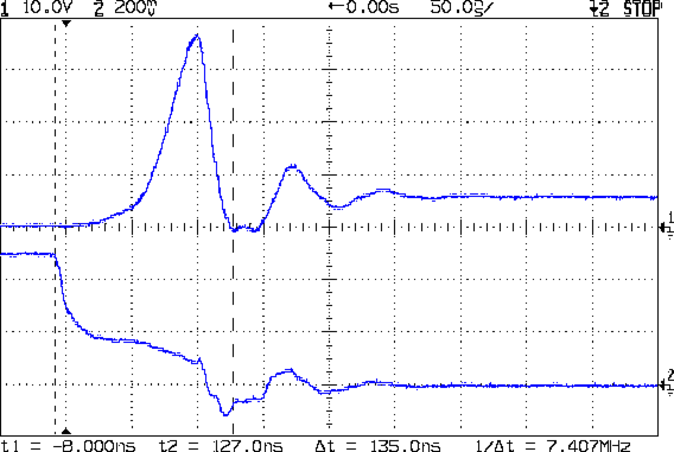
    The lower trace (at 5 V/div, not 500 mV as shown) is a digital output marking the duration of the three analog reads: temperature, drain voltage, and drain current. The upper trace shows the absolute worst case for the noise, which looks rather awful.

    The Peltier PWM comes from Arduino digital output 10, which is lashed to hardware Timer 1. Turning off the PWM requires setting the corresponding clock prescaler to “no input”, then setting it back to select the appropriate clock input after the measurement.

    Just on general principles, I average three successive analog inputs, so the Arduino source code for the analog reads looks like this:

    #define TCCRxB                  0x01        // set prescaler to 1:1 for 32 kHz PWM
    #define NUM_T_SAMPLES    3
    
    float ReadAI(byte PinNum) {
    word RawAverage;
    
        digitalWrite(PIN_SYNC,HIGH);                // scope sync
        TCCR1B = 0x00;                              // turn off Peltier module PWM
    
        RawAverage = analogRead(PinNum);            // prime the averaging pump
    
        for (int i=2; i <= NUM_T_SAMPLES; i++) {
            RawAverage += (word)analogRead(PinNum);
        }
    
        TCCR1B = TCCRxB;                            // restart Peltier PWM
        digitalWrite(PIN_SYNC,LOW);
    
        RawAverage /= NUM_T_SAMPLES;
    
        return (float)RawAverage;
    }
    
  • Peltier PWM Temperature Control: Power Supply Improvement

    Adding a touch of bulk local capacitance dramatically improved the Peltier power supply’s transient performance when the MOSFET turns on:

    Peltier Supply - 30 uF
    Peltier Supply – 30 uF

    That’s a 33 uF 300 V electrolytic that started life as a surface-mount kludge, simply soldered to the Peltier supply’s screw terminal pins on the bottom of the board.

    With the cap in place, the supply drops to 4 V at turn-on and bumps to 6 V at turn-off, with the transients much better-behaved now.

    Those spikes at the turn-off transient are also somewhat better, even if the MOSFET drain rings for another cycle before dying out. The peak is down to 35 V, which I think comes from the other end of the circuit being more reluctant to instantly jump 70 V, and the width has decreased, too:

    Peltier Drain Ringing - 30 uF Supply
    Peltier Drain Ringing – 30 uF Supply

    The ringing jumped to 15 MHz, rather than 5 MHz, which means it’s over faster even if there’s another cycle. If it were any worse, I’d be forced to re-figure the snubber RC numbers…

    The Miller capacitance effect still shows up clearly on the gate drive in the lower trace. There’s a reason why you really need higher-performance drivers for faster circuits!

  • Dr. Who Cookie Cutters: First Light!

    Dr. Who and Tux Cookies
    Dr. Who and Tux Cookies

    The chefs produced fine cookies from those fine Thing-O-Matic objects.

    Although the economic argument for producing custom cookie cutters may not be persuasive, the fact that you (well, I) can produce custom widgets certainly is. Most of the things I build and repair don’t require great mechanical strength or finicky dimensional precision, so a DIY 3D printer is exactly the right hammer for the job.

    Now, if only I had a laser cutter

  • Not a Hand Hole

    Abraham Lincoln once observed that calling a tail a leg doesn’t make it a leg, which seems to apply perfectly to this situation:

    Not a Hand Hole
    Not a Hand Hole

    Surely, the real reason boils down to:

    • A warehouse full of boxes with pre-cut hand holes
    • A stack of returns due to guys poking their hands too far into the boxes
    • A desire to disallow said returns

    I bet they pick up the box that way, too.

  • Peltier PWM Temperature Control: MOSFET Thermal Block

    The Peltier assembly looked like this while I was epoxying everything together with JB Weld:

    Peltier module - epoxy curing
    Peltier module – epoxy curing

    The aluminum-case resistor held the heatsink at 105 °F to encourage the epoxy to cure in a finite amount of time.

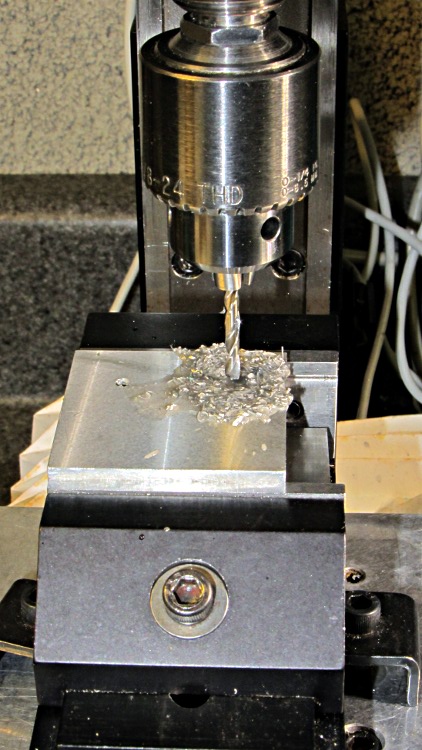
    The 40 mm square block is a squared-up piece of 1/2 inch aluminum plate (manual CNC on the Sherline, nothing fancy) with a pair of 6-32 tapped holes for the screws that will hold TO-220 transistors or the yet-to-be-built TO-92 adapter. The CPU heatsink got a pair of symmetric holes for the posts holding it to the acrylic base, but other than that it’s perfectly stock.

    MOSFET thermal block - drilling
    MOSFET thermal block – drilling

    Then epoxy the thermistor brick to the middle of the block between the two screws, stick on some obligatory Kapton tape to prevent embarrassing short circuits, and add a foam collar around the Peltier module to insulate the block from the heatsink:

    MOSFET thermal block
    MOSFET thermal block

    A square foam shako covers everything, held down with a random chunk o’ weighty stuff, to insulate the whole affair from the world at large.

  • Peltier PWM Temperature Control: Thermistor Brick

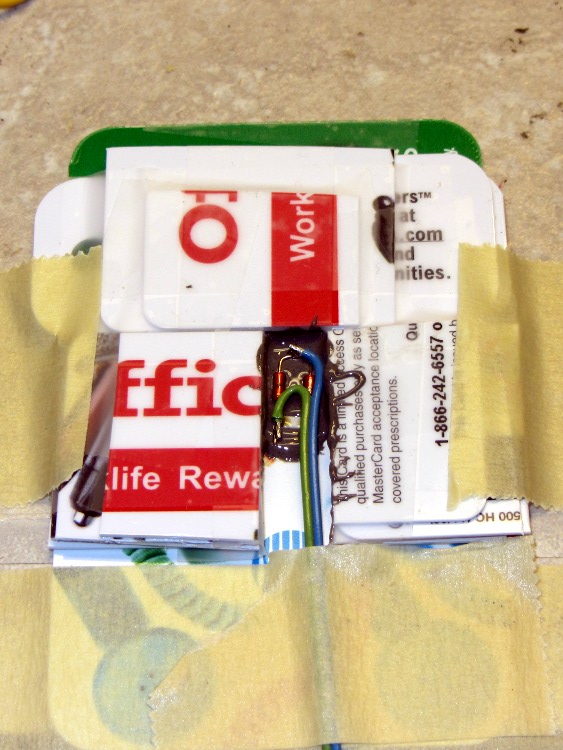
    Having figured out the dual-thermistor circuit, I made a small mold from cut-up credit card-ish things, laid down a layer of JB Weld epoxy, and positioned the thermistor assembly just above it:

    Thermistor brick - mold layout
    Thermistor brick – mold layout

    A generous dollop of epoxy filled in the rest of the mold and it cured overnight:

    Thermistor brick - curing
    Thermistor brick – curing

    Extract the final result, file off the rough edges, and then epoxy it to the thermal block:

    MOSFET thermal block
    MOSFET thermal block

    And then it’s all good!

    The thermal resistance from aluminum-to-thermistor seems to be no big deal compared with the thermal inertia of the block and Peltier module.

  • Bash File Name Chopping for Gnuplot

    Just so I can remember it for next time, this plot:

    PI-Loop-ErrDrive
    PI-Loop-ErrDrive

    Came from a dataset with a zillion lines like this:

    #Set	Temp	TZone	TErr	Int	PDrive	sPWM	Time
    30.0	15.7	3	-14.30	0.000	-1.000	-255	0
    30.0	15.7	3	-14.30	0.000	-1.000	-255	142
    30.0	15.7	3	-14.30	0.000	-1.000	-255	245
    30.0	15.7	3	-14.30	0.000	-1.000	-255	348
    

    Using this Bash script to allow many different file names:

    #!/bin/sh
    export GDFONTPATH="/usr/share/fonts/truetype/"
    base=${1%%.*}
    echo Base name: ${base}
    ofile=${base}.png
    echo Output file: ${ofile}
    gnuplot << EOF
    #set term x11
    set term png font "arialbd.ttf" 18 size 950,600
    set output "${ofile}"
    set title "Peltier Test - Loop Tuning"
    set key noautotitles
    unset mouse
    set bmargin 4
    set grid xtics ytics
    set xlabel "Time - sec"
    #set format x "%4.0f"
    #set xrange [5000:7500]
    #set xtics 0,5
    set mxtics 2
    set ytics nomirror autofreq
    set ylabel "Various"
    set format y "%5.1f"
    set yrange [-2:2]
    #set mytics 2
    #set y2label "PWM"
    #set format y2 "%3.0f"
    #set y2range [0:255]
    #set y2tics 32
    #set rmargin 9
    set datafile separator "\t"
    #set label 1 "HP + LP" at 0.25,-14 font "arialbd,14"
    plot	\
        "$1" using (\$8/1000):4 with lines lt 3 title "Error" ,\
        "$1" using (\$8/1000):6 with lines lt 4 title "Drive"
    #    "$1" using 4 with lines lt 3 title "Error" ,\
    #    "$1" using 6 with lines lt 4 title "Drive"
    #    "$1" using (\$8/1000):1 with lines lt 3 title "Setpoint" ,\
    #    "$1" using (\$8/1000):2 with lines lt 4 title "Temp C"
    EOF
    

    There’s quite some other cruft in there, but the first part I must remember is right up at the top, where the magic incantation

    base=${1%%.*}

    chops off the file extension. Of course, that doesn’t work worth beans when the file name has several periods scattered through it.

    The other part is at the bottom, where various alternate lines for the plot command must live after the last valid parameter line: the octothorpe comment header doesn’t work inside a command!