Ed Nisley's Blog: Shop notes, electronics, firmware, machinery, 3D printing, laser cuttery, and curiosities. Contents: 100% human thinking, 0% AI slop.
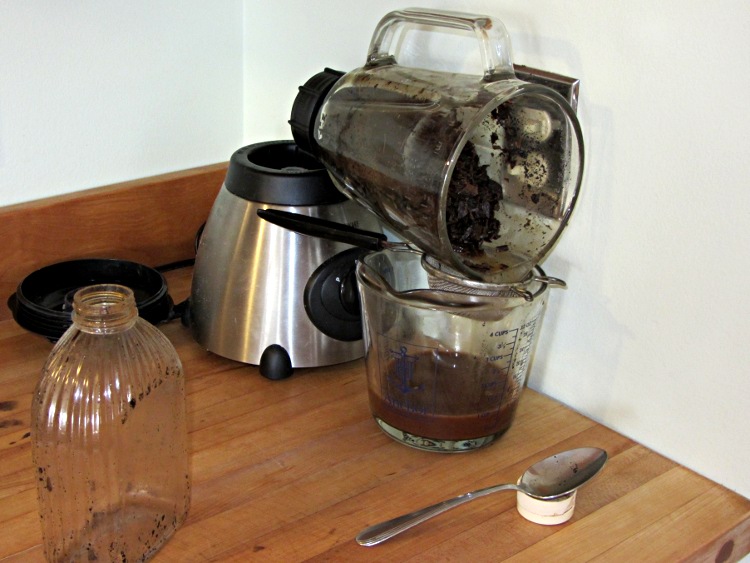
After decanting the homebrew vanilla extract from those bottles, I added enough vodka to cover the spent beans, ran them through the blender, and drained the liquid:
Draining the vanilla dregs
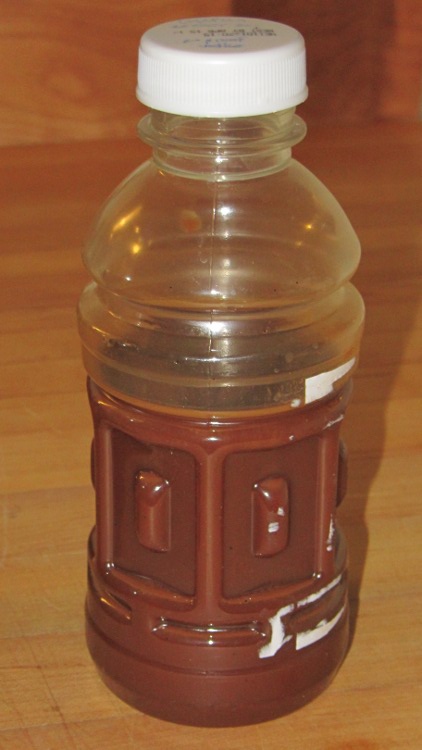
It’s rather muddy and probably not worth keeping, but we’ll see what settles out:
DIY Vanilla dregs
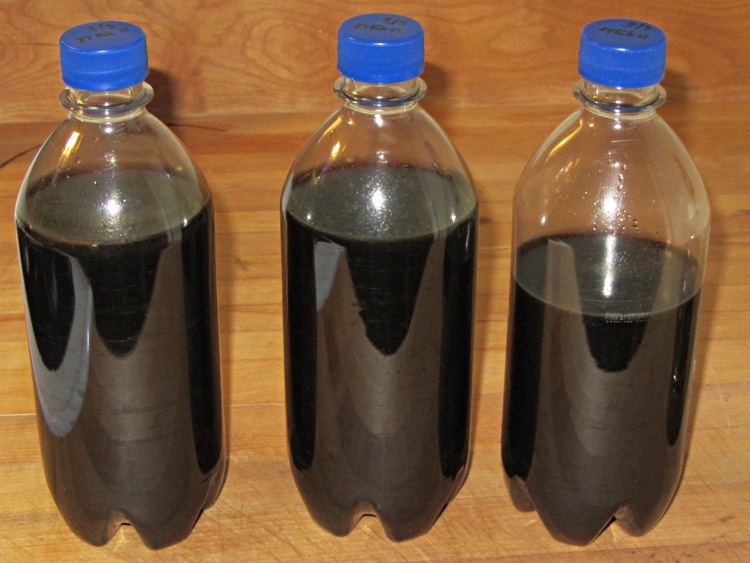
The Good Stuff looked like this before it went into a dark corner of the Basement Laboratory Storage Warehouse:
DIY Vanilla Extract – Batch 2 Done
It turns out you (well, I) cannot run vanilla extract through an ordinary coffee filter: it just doesn’t drain well at all. Cheesecloth didn’t seem worth the effort, so I combined all the clear liquid in a single jar, let it settle for a few days, then decanted it back into those three bottles again. The bottom of the rightmost bottle has a layer of what Breyers calls “real vanilla bean specks” in their ice cream.
In round numbers, $20 for half a pound of beans and $16 for a 1.75 l bottle of 80 proof vodka adds up to $36 for maybe 1.4 l of DIY vanilla extract = $26/l. Commercial vanilla extract runs about $72/l, so that’d be $100 in those bottles.
One could drive the DIY price down by processing more beans at a time, but this should keep us in vanilla for quite a while; that cup of hot cocoa in the afternoon smells really good now!
Although I don’t often block-quote other sources, for this I’ll make an exception:
The Cassini Plasma Spectrometer (CAPS, off since June 2011) was powered back on on March 16 based on the unanimous agreement of the review board at the CAPS turn-on review held on March 8. All went as planned for both the instrument and the spacecraft during the turn-on. The high rail to chassis short internal to the instrument that was part of what prompted it to be turned off last June was not present, and no changes were seen in the bus voltages or currents when the turn-on occurred. On Tuesday, March 20, the high rail to chassis short in the CAPS instrument returned, generating the same condition that existed at the time the instrument was turned off. However, based on the tin whisker model developed by the NESC team, this condition is believed to be understood and is not expected to cause any problems for either the instrument or the spacecraft. The CAPS instrument has been left powered on and is sequenced to operate as originally planned for the 75 kilometer Enceladus flyby coming up on March 27.
Having seen a forest of tin whiskers myself, that’s a pretty scary diagnosis. One assumes NASA takes extensive precautions, based on their experience, but … 15 years in hard vacuum and free fall will do odd things to spacecraft.
Remember those Toyota unintended acceleration problems? Guess what caused some of them: yup. Read their report to find out what makes metal whiskers so hard to detect. Hint: combine a minimum threshold voltage with a very low current capacity.
You could subscribe to the Cassini Significant Events newsletter.
The MOSFET tester spits out datasets using this tedious Arduino code:
void PrintHeader(void) {
  Serial.println();                         // Gnuplot group break
  Serial.println("#-----------------------------");
  Serial.print("# VGate: ");
  Serial.print(VGateSet,3);
  Serial.println();
  Serial.print("# TSetpoint: ");
  Serial.print(TSetpoint,1);
  Serial.println(" C");
  Serial.println("# VGS \tVDS \tID  \tRDS \tC   \tTime");
}

void PrintTempHeader() {
  Serial.println();                                    // Gnuplot index break
  Serial.println();
  Serial.print("#T=");                                //  ... index name
  Serial.println(TSetpoint,1);
  Serial.println("#=============================");
  Serial.print("# Setting temperature to: ");        // human-readable annotation
  Serial.print(TSetpoint,1);
  Serial.println(" C ...");
}

... later, deep inside the main loop ...

    Serial.print(VGateSet,3);
    Serial.print('\t');
    Serial.print(VDrainSense,3);
    Serial.print('\t');
    Serial.print(IDrainSense,3);
    Serial.print('\t');
    Serial.print((IDrainSense == 0.0) ? 0.0 : (VDrainSense / IDrainSense),3);
    Serial.print('\t');
    Serial.print(Temperature,1);
    Serial.print('\t');
    Serial.print(millis() - StartTime);
    Serial.println();
All that produces a text file formatted to work with Gnuplot, including a blank line between successive gate voltage groups to produce separate plot traces:
#T=0.0
#=============================
# Setting temperature to: 0.0 C ...

#-----------------------------
# VGate: 4.250
# TSetpoint: 0.0 C
# VGS 	VDS 	ID  	RDS 	C   	Time
4.250	1.200	0.000	0.000	1.0	1757
4.250	1.665	0.044	37.851	1.0	1861

#-----------------------------
# VGate: 4.500
# TSetpoint: 0.0 C
# VGS 	VDS 	ID  	RDS 	C   	Time
4.500	0.003	0.000	0.000	1.0	2038
4.500	0.016	0.044	0.370	1.0	2143
... snippage ...
4.500	0.212	1.953	0.108	0.9	6105
4.500	0.216	2.001	0.108	0.9	6210
Which produces a plot like this:
IRFZ44
It’d be handy to automatically generate labels for the gate voltages, but I haven’t been able to figure out how to read values from the dataset and plunk them into the label strings. You can, however, select blocks of gate voltage and superblocks of temperature with a bit of effort.
The Bash script that feeds Gnuplot looks something like this:
#!/bin/sh
#-- set plot limits
tx=3
vgs_min="4.0"
vds_max="0.2"
rds_max=100
rds_tics=$((${rds_max} / 4))
id_max="2.0"
#-- overhead
export GDFONTPATH="/usr/share/fonts/truetype/"
base="${1%.*}"
echo Base name: ${base}
ofile=${base}.png
echo Output file: ${ofile}
#-- do it
gnuplot << EOF
#set term x11
set term png font "arialbd.ttf" 18 size 950,600
set output "${ofile}"
set title "${base}"
set key noautotitles
unset mouse
set bmargin 4
set grid xtics ytics
set xlabel "Drain-Source Voltage - VDS - V"
set format x "%4.2f"
set xrange [0:${vds_max}]
#set xtics 0,5
set mxtics 2
set ytics nomirror autofreq
set ylabel "Drain Current - ID - A"
set format y "%4.1f"
set yrange [0:${id_max}]
#set mytics 2
set y2label "Drain Resistance - RDS - mohm"
set y2tics nomirror autofreq ${rds_tics}
set format y2 "%3.0f"
set y2range [0:${rds_max}]
#set y2tics 32
#set rmargin 9
set datafile separator "\t"
#set label 1 "Temp index = ${tx}" at 0.81,0.55 font "arialbd,18"
set label 2 "VGS >= ${vgs_min} V" at 0.11,0.55 font "arialbd,18"
plot    \
"$1" using 2:((\$1 >= ${vgs_min})?\$3:NaN)            index $tx:$tx           with lines lt 3 lw 2 title "ID" ,\
""   using 2:((\$1 >= ${vgs_min})?(\$4*1000):NaN)    index $tx:$tx axes x1y2 with lines lt 4 lw 2 title "RDS"
EOF
The variables up near the top control the plot limits; it’d be nice to have a complex Bash script that prompted for values, had useful defaults, and fed all that into Gnuplot. Given what I’m doing, it’s easier to just keep the Bash script open in the portrait monitor, watch the results on the landscape monitor, and twiddle until it looks right.
This script produces a plot for a single temperature range based on the superblock index tx; you can select a single block using index name (along the lines of “T=0.0”), but you can’t select multiple such blocks in a single plot statement.
Selecting gate voltages requires testing the first column for a match with the trinary operator and assigning the data value for lines that don’t match to the not-a-number value NaN to prevent it from appearing in the plot:
((\$1 >= ${vgs_min})?\$3:NaN)
All in all, the whole apparat makes for a fairly brittle set of code, but the plots come out ready for printing and that makes up for a lot.
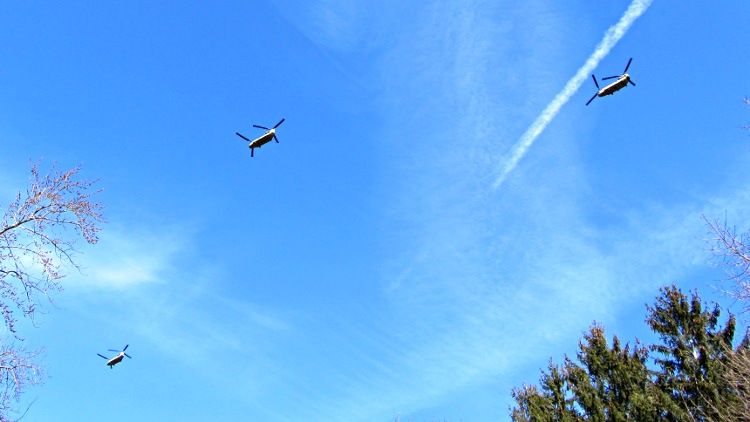
Those northbound CH-47 Chinooks looked to be barely over treetop level, but the rotors are 60 feet in diameter and they were much higher than they seemed. Shook the house and brought all hands outside to watch the show.
I remember getting a tour inside one, a long time ago, at a military air show.
A week or so ago, the scroll ring on the Kensington Expert Mouse trackball at my left hand failed completely. Unlike the previousrepair attempts, tweaking the IR emitter-detector pair positions did nothing. Tried it on three different PCs and five different operating systems with the same result: the ring stayed dead.
Fortunately, this one was a warranty replacement for the dead Unit 1 I bought some years back and was still within its 5 year warranty, so when I contacted Kensington tech support with the story they immediately shipped a replacement. It just arrived and works fine.
The scroll ring detents seem much smoother on this one, so I haven’t taken it apart to remove the magnetic latch and don’t know if they’re using a different quadrature sensor. One can but hope.
Kensington Expert Mouse – ball bearing
For what it’s worth, an absolutely brand new ball barely moves on those three jeweled bearings (one marked with the yellow oval in the picture). Just rub the ball on one side of your nose to add some skin oil: shazam it spins like glass on ice.
They don’t mention that trick anywhere in the meager instructions…
Update: Eight years in the future, a real fix appears!
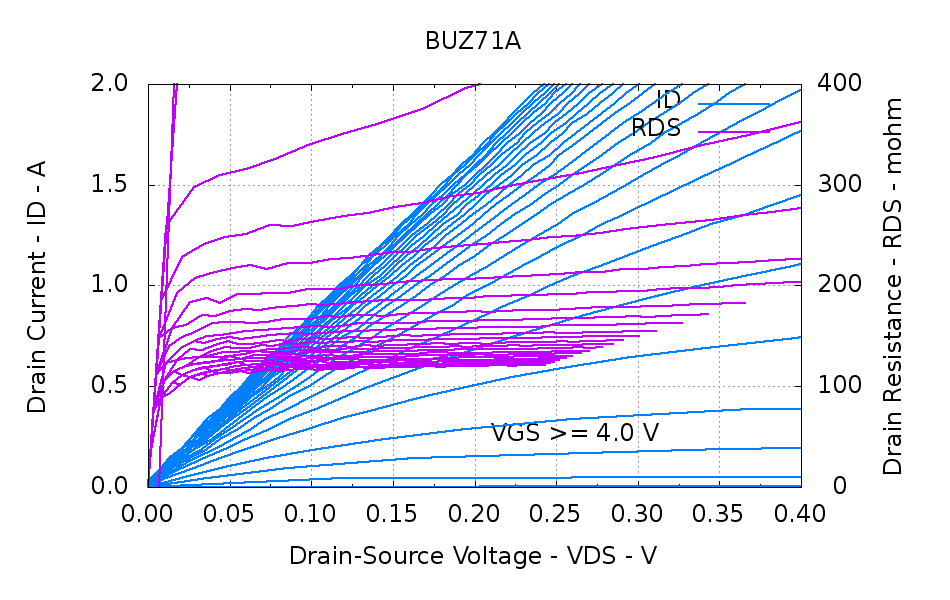
The 120 m 50 V BUZ71A that served as the crash test dummy while I got the thing working:
BUZ71A-overview
A detail of the interesting area near the origin:
BUZ71A-detail
The datasheet drain resistance values are the maximum values, so they’ll generally be higher than what I measure.
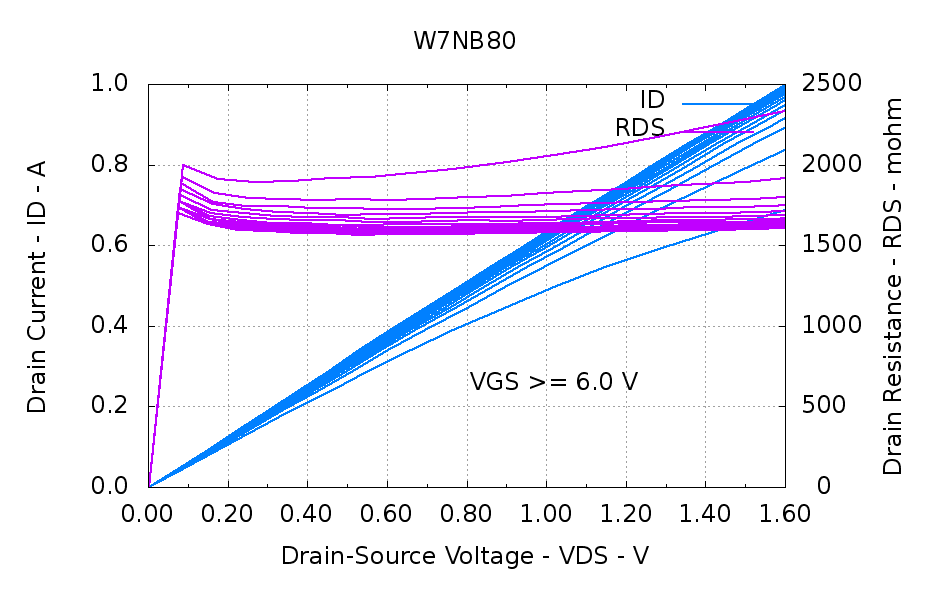
A plastic-encapsulated W7NB80 with a 1.9 (!) drain resistance, due to its 800 V (!) rating:
W7NB80-overview
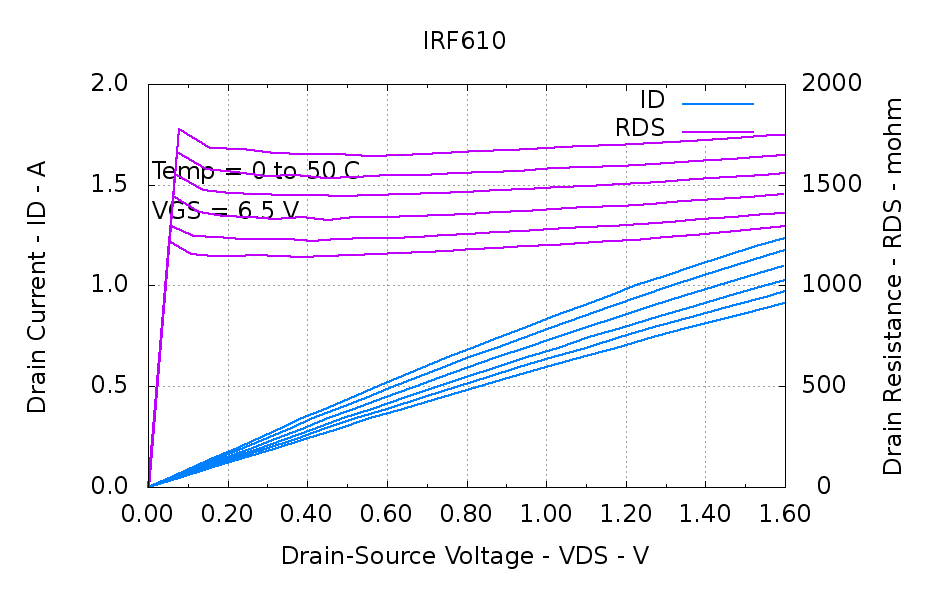
Hold the gate voltage constant at 10.0 V and step the temperature from 0 °C to 50 °C:
W7NB80-Temp
I haven’t figured out how to get the actual temperatures from the Gnuplot input dataset to the graph without knowing them in advance. The “index” is simply the 0-origin block number, which conveniently (and coincidentally) lines up with the 0 °C to 50 °C temperature range.
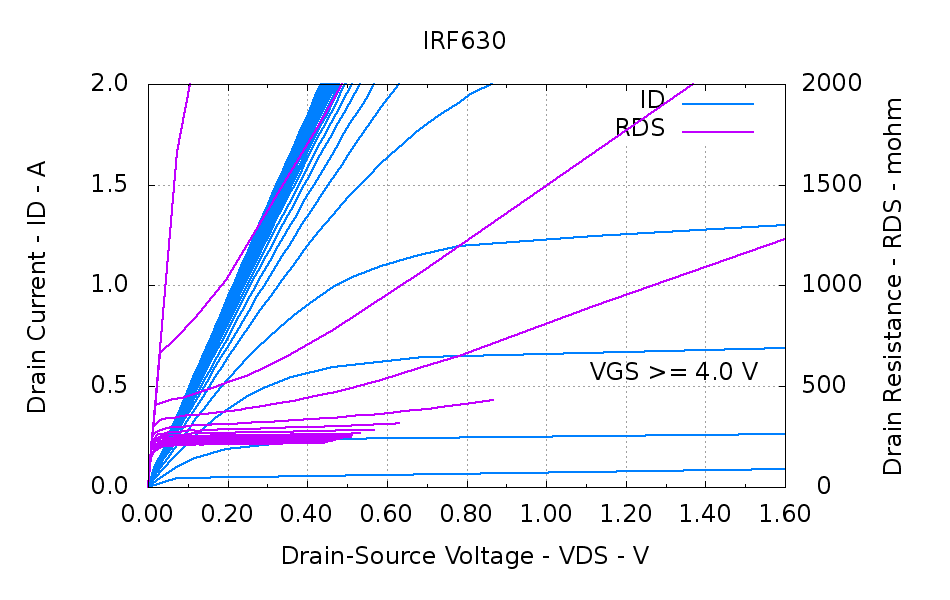
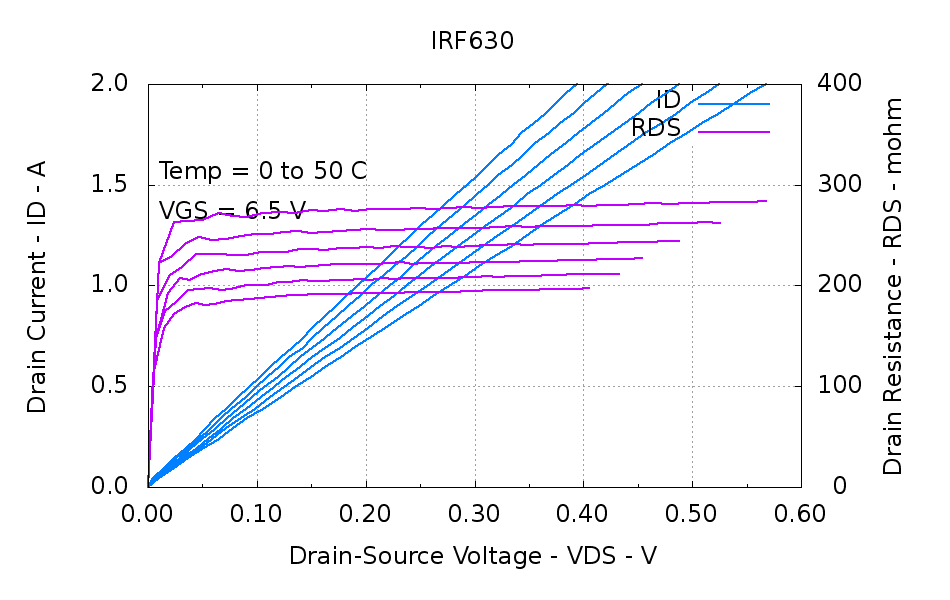
An overview of a 400 m 200 V IRF630:
IRF630-overview
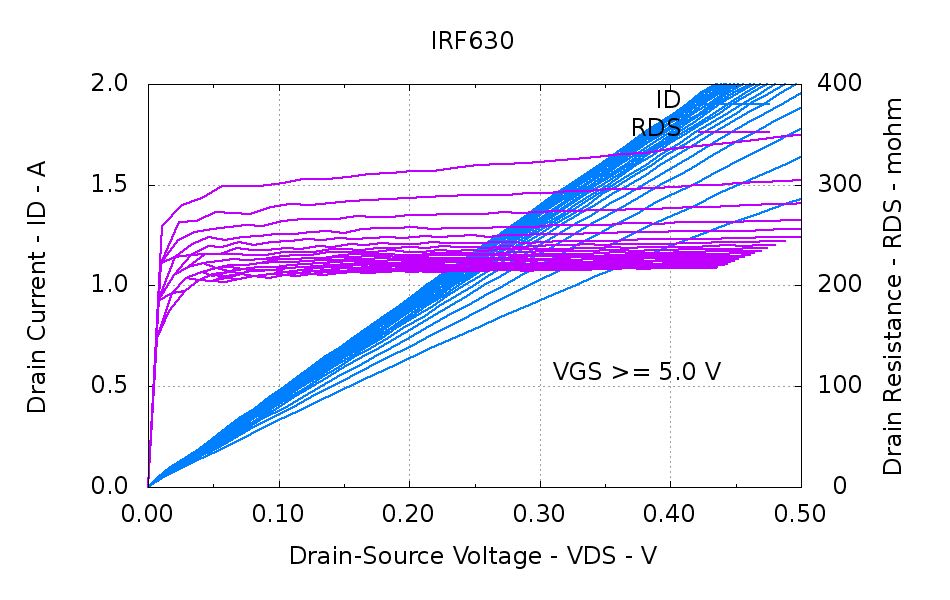
The juicy part:
IRF630-detail
And the variations with temperature:
IRF630-Temp
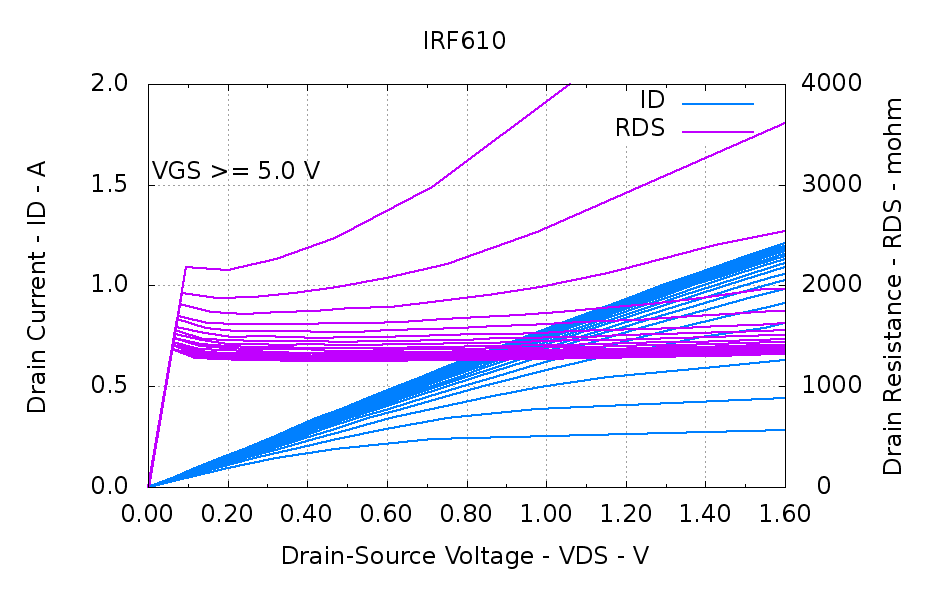
A 1.5 200 V IRF610, another high-resistance transistor:
IRF610-overview
The temperature variations:
IRF610-Temp
The winning entry for high resistance, though, is the 500 Ω (!!!) BSS127 that emerged from a paper on current sensing using mirror FETs for temperature compensation. It has a 600 V rating, but I have no idea why such a high drain resistance makes any sense in a SOT-23 package. They’re obsolescent and I won’t buy any just to have ’em around.
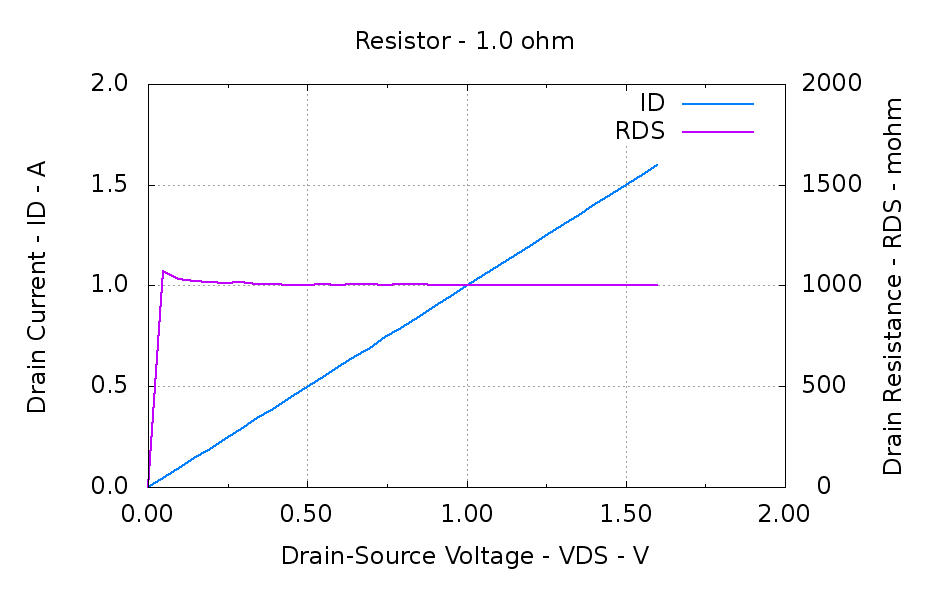
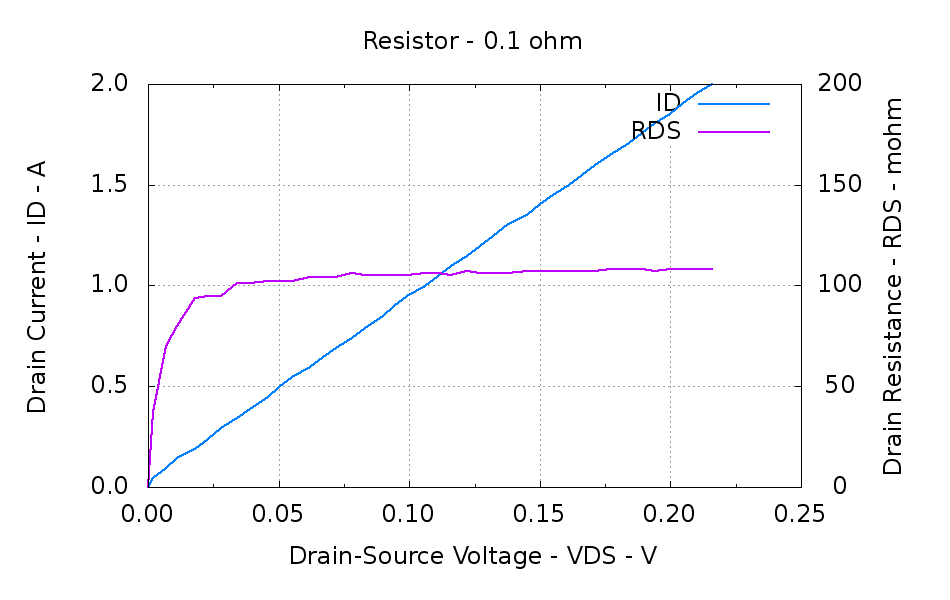
Just for completeness, a 1 1% resistor:
Resistor – 1.0 ohm
And a 100 m 1% resistor:
Resistor – 0.1 ohm
It turns out that the wire leads I soldered on contributed 6 m to the total, so the tester actually reports the truth! I checked that by passing 1.000 A through the resistor, which put 100 mV at the base of the resistor pins, then measuring 106 mV at the end of the wire leads. One can quibble about voltmeter accuracy, but it’s pretty close and much better than the ohmmeter accuracy at that resistance.
The firmware forces 0.0 for drain current identically equal to 0.0 (it’s a floating point number cast from a 10-bit unsigned integer) to avoid numeric explosions. The next few points away from the origin show the effect of small errors on small measurements; the voltage resolution is 15 mV and the current resolution is 2.5 mA; you can actually see the steps near the origin.
All in all, a fun project…
Need the datasheets? Ask your favorite search engine for, say, IRF610 datasheet. That should do the trick.
New this year at the Trinity College Firefighting Home Robot Contest will be a Checkout Table, where teams can verify that their robot meets some initial specifications (Section 2.5 of The Rules). The overall size should be the easiest spec to check; I just glued up a pair of suitable Bounding Boxes:
Trinity Robot Contest – bounding boxes
Robowaiter robots must fit in the smaller cube, which is 30 cm on a side. Firefighting robots must fit in the larger box, with wheeled / treaded robots inside the 31 x 31 x 27 cm outline and walkers within the larger 46 x 31 x 27 volume.
Next step: fluorescent orange paint over a white shot coat to kill the lettering.





 The Smell of Molten Projects in the Morning