The Smell of Molten Projects in the Morning

Ed Nisley's Blog: Shop notes, electronics, firmware, machinery, 3D printing, laser cuttery, and curiosities. Contents: 100% human thinking, 0% AI slop.

Author: Ed

  • Automated Cookie Cutters: OpenSCAD surface() Function

    While pondering the notion of making cookie cutters, it occurred to me that the process could be automated: a grayscale height map image of the cookie should be enough to define the geometry. The existing height map solutions (like William Adams’s fine work) seem entirely too heavyweight, what with custom Windows or Java programs and suchlike. Some doodling indicates that a simpler solution may suffice for my simple needs, although the devil always hides in the details.

    The overall problem with a cookie press involves producing a non-rectangular solid with a bumpy upper surface corresponding to the grayscale values of an image: dark pixels = low points of the surface, light pixels = peaks. The image size controls the XY extent of the solid and the pixel values control the Z, with some known value (likely either black or white) acting as a mask around the perimeter. Given such a solid, you can then wrap a cutter blade and handle around the outline, much as I did for the Tux cutter.

    OpenSCAD has a lightly documented surface() function that reads an ASCII text file consisting of an array of numeric values. Each array element defines a 1 × 1 unit square of the resulting 3D object; the example in the doc shows a 10 x 10 array producing a 10 x 10 unit object. Each numeric value sets the height of the surface at the center of the square.

    This array, slightly modified from the one in the doc, shows how that works:

    9 9 8 7 6 5 5 5 5 1
    9 9 7 6 6 4 3 2 1 0
    8 7 6 6 4 3 2 1 0 0
    7 6 6 4 3 2 1 0 0 0
    6 6 4 3 2 1 1 0 0 0
    6 6 3 2 1 1 1 0 0 0
    6 6 2 1 1 1 9 9 9 0
    6 6 1 0 0 0 9 8 9 0
    3 1 0 0 0 0 9 9 9 0
    9 8 7 6 5 4 3 2 1 0
    

    Feeding that into this OpenSCAD program:

    module ShowPegGrid(Space = 10.0,Size = 1.0) {
    
      Range = floor(50 / Space);
    
    	for (x=[-Range:Range])
    	  for (y=[-Range:Range])
    		translate([x*Space,y*Space,Size/2])
    		  %cube(Size,center=true);
    
    }
    
    ShowPegGrid();
    surface("/tmp/test.dat",center=true,convexity=10);
    

    Produces this object, surrounded by a few non-printing 1 unit alignment cubes on the Z=0 plane for scale:

    Example Object
    Example Object

    Some things to note:

    • The text array looks like it builds downward from the upper left, but the solid model builds from the origin toward the +X and +Y directions, with the first line of the array appearing along Y=0. This reverses the object along the Y axis: the first line of the array is the front side of the object.
    • The “center=true” option centers the object in XY around the Z axis, with a 1 unit thick slab below the entire array; the top surface of that slab (at Z=0) represents the level corresponding to 0 elements in the array.
    • Each array element becomes a square one unit on a side; the RepRap software chain regards units as millimeters
    • The center point of each element’s square is at the nominal height
    • The Z coordinate of the edges of those squares linearly interpolate between adjacent centers
    • Vertical edges become slanted triangular facets

    Remember that STL files contain a triangular tessellation (or whatever you call it in 3D) of the object surface, which means rectangles aren’t natural. The edge interpolation make the whole thing work, because an array of pure square pillars probably won’t be a 2-manifold object: some pillars would share only a common vertical edge. The interpolation does, however, produce a bazillion facets atop the object.

    So the problem reduces to generating such an array from a grayscale image, for which some ImageMagick and Bash-fu should suffice, and then manipulating it into a model that will produce a cookie press and cutter. More on that tomorrow…

    [Update: image file, height map file, solid modeling, printing]
  • Xubuntu 12.04: Forcing Monitor DPI Settings

    For whatever reason, X no longer automagically determines the dots/inch value for the right-hand portrait monitor and, for lack of anything better, defaults to 75 DPI. That scales everything down by 25% 33%, makes the menu fonts eye-crackingly small, and squinches the monospaced terminal font. The fix requires jamming the proper value directly into /etc/X11/xorg.conf along with all the other stuff:

    Section "Monitor"
        # HorizSync source: edid, VertRefresh source: edid
        Identifier     "Dell2005FP"
        VendorName     "Dell"
        ModelName      "DELL 2005FPW"
        HorizSync       30.0 - 83.0
        VertRefresh     56.0 - 75.0
        Option         "DPMS"
        Option         "DPI" "98x98"
    EndSection
    

    One could calculate the actual value, but that matches what X determines for the left-hand landscape monitor.

    And then it Just Works…

  • Battery Terminal Corrosion: Endpoint

    So the outdoor thermometer hanging over my desk became very, very faint, which suggested it was time for a new alkaline cell. The last time that happened, the insides were pretty bad, so I expected the worst, but, surprisingly, neither the cell nor the negative contact spring were corroded. So I popped in a new cell, buttoned it up, and … it didn’t work. At all. As in: blank display.

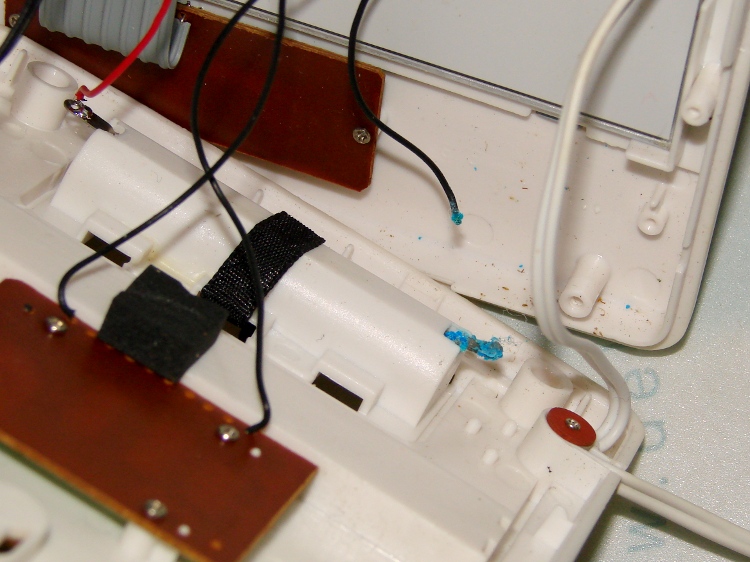
    Taking the back off revealed the simple cause:

    Outdoor thermometer - corroded battery lead
    Outdoor thermometer – corroded battery lead

    Evidently, the negative terminal wire had corroded completely through and popped off when I replaced the cell. There’s plenty of green-blue corrosion on the terminal inside the case, where it can’t be seen from outside; three years ago I cleaned up both the outside and inside, so this is new news.

    The negative wire was discolored all the way from end to end and couldn’t be soldered. I think the corrosion products are just slightly hygroscopic and wick their way along the copper strands inside the insulation: the solder pad on the circuit board was also discolored.

    I removed the terminal, neutralized the alkaline corrosion, ran it through an Evapo-Rust bath, scrubbed it clean, installed it, replaced both the positive and negative wires, resoldered everything, and it works perfectly again.

    This can’t go on, can it?


  • Hudson River at Poughkeepsie

    During that ride for apples, we stopped for lunch in the middle of the Walkway where the scenery is a lot better and the traffic much more pleasant than elsewhere along our route:

    Poughkeepsie Bridge
    Poughkeepsie Bridge

    For reasons that have nothing to do with engineering judgement, the west (right) end of the Mid-Hudson Bridge terminates at a cliff with the road in a monster cut turning abruptly to the right and ramping up to the toll plaza. It’s still a pretty span…

  • Whirlpool Refrigerator: Replacement Freezer Shelf Bracket

    Somehow, one of the brackets that supports the small shelf inside the freezer of our Whirlpool refrigerator went missing over the many intervening years and repairs; we never used that shelf and stashed it in a closet almost immediately after getting the refrigerator, so not having the bracket didn’t matter. We recently set up a chest freezer in the basement for all the garden veggies that used to fill all the space available and decided to (re-)install the shelf, which meant we needed a bracket.

    It’s impossible to figure out exactly which “shelf stud” in that list would solve the problem, but one of the upper-left pair in that set seems to be about right. On the other paw, I don’t need all the other brackets and doodads and screws, sooo… I can probably make one.

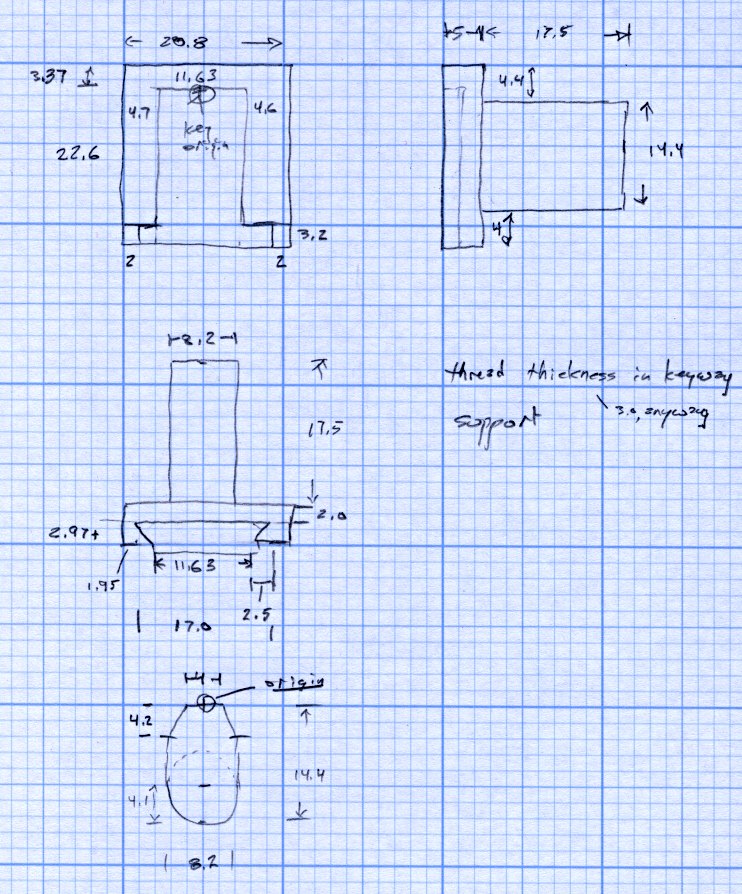
    Start with a few measurements, then doodle up the general idea:

    Refrigerator Bracket - dimension doodle
    Refrigerator Bracket – dimension doodlet’s time to conjure up a solid model:

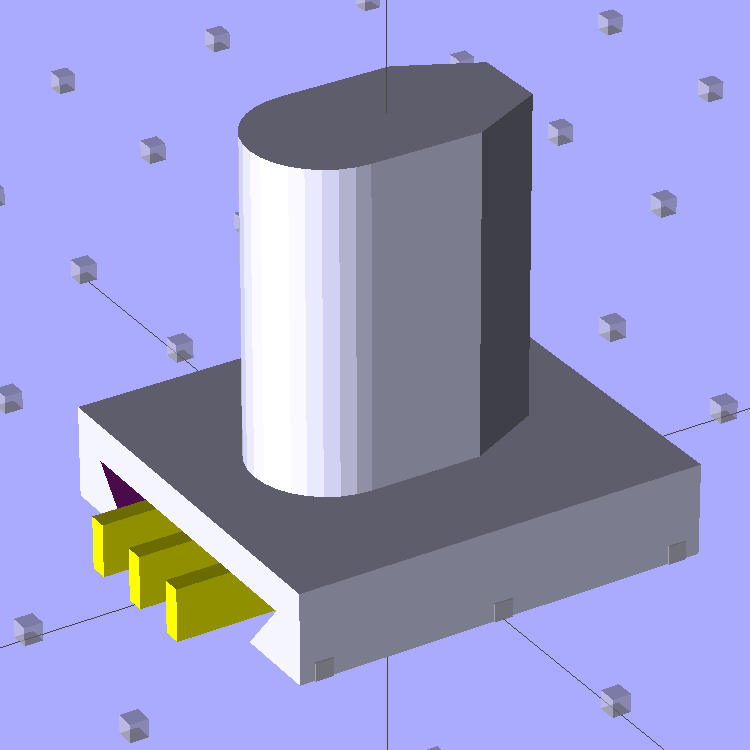
    A bit of OpenSCAD solid modeling:

    Refrigerator Bracket Pin - solid model
    Refrigerator Bracket Pin – solid model

    The yellow bars support the ceiling of that big dovetail, which would otherwise sag badly. The OEM bracket has nicely rounded corners on the base and a bit of an overall radius at the end of the post; this was pretty close and easier to do.

    Now it’s time to Fire the Thing-O-Matic…

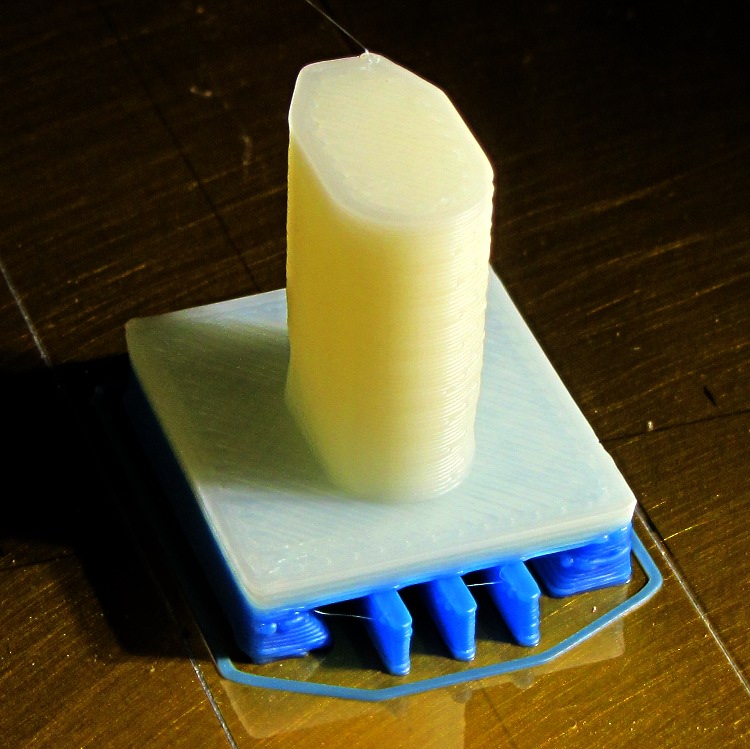
    I switched from blue to white filament during the print, because I figured I’d print another one after I got the sizes right, so it emerged with an attractive blue base:

    Bracket on build platform
    Bracket on build platform

    A better view of the support structure:

    Bracket - dovetail support structure
    Bracket – dovetail support structure

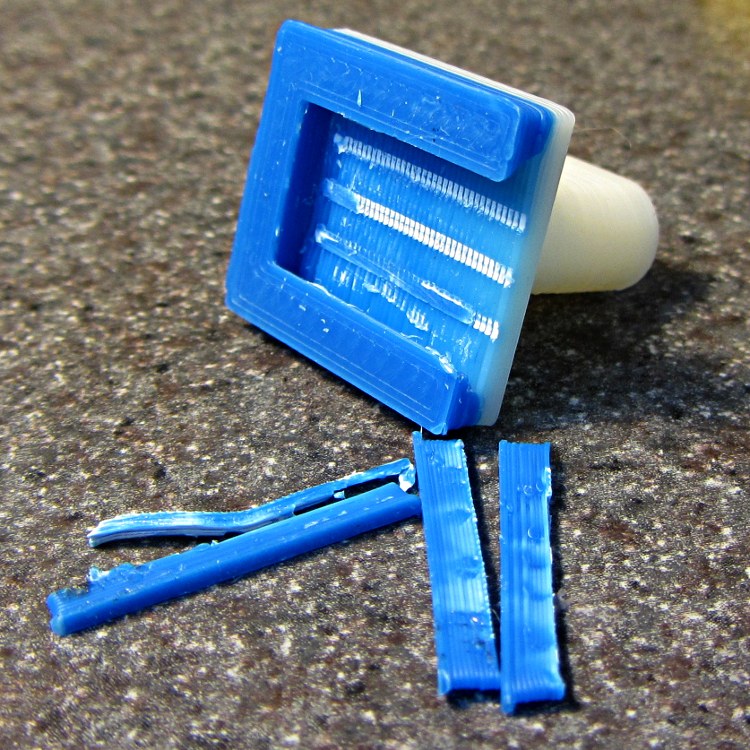
    Two of the bars snapped off cleanly, but the third required a bit of scraping:

    Bracket - support scars
    Bracket – support scars

    Somewhat to my surprise, Prototype 001 slipped snugly over the matching dovetail on the freezer wall, with about the same firm fit as the OEM brackets:

    Refrigerator bracket - installed
    Refrigerator bracket – installed

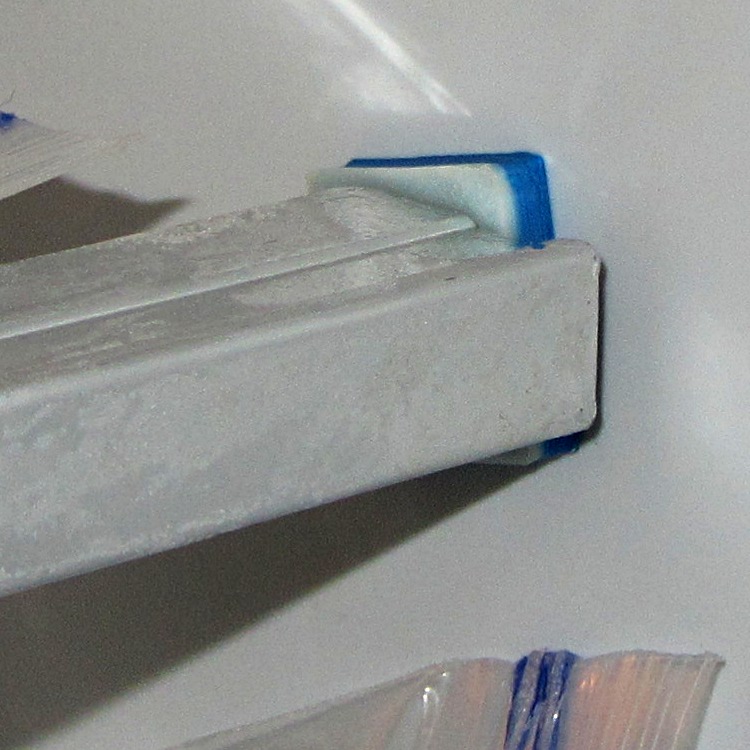
    And it works perfectly, apart from that attractive blue base that I suppose we’ll get used to after a while:

    Refrigerator bracket - in use
    Refrigerator bracket – in use

    I have no idea whether ABS is freezer-rated. It seems strong enough and hasn’t broken yet, so we’ll declare victory and keep the source code on tap.

    The whole project represents about an hour of hammering out OpenSCAD code for the solid model and another hour of printing, which means I’d be better off to just buy the parts kit and throw away the unused bits. Right?

    I loves me my Thing-O-Matic…

    The OpenSCAD source code:

    // Shelf support bracket
    // for Whirlpool freezer
    // Ed Nisley KE4ZNU Octoboer 2012
    
    //include </mnt/bulkdata/Project Files/Thing-O-Matic/MCAD/units.scad>
    //include </mnt/bulkdata/Project Files/Thing-O-Matic/Useful Sizes.scad>
    
    // Layout options
    
    Layout = "Build";
     // Overall layout: Show Build
     // Printing plates: Build
     // Parts: Post Base Keystone Support
    
    ShowGap = 10; // spacing between parts in Show layout
    
    //- Extrusion parameters must match reality!
    // Print with +1 shells and 3 solid layers
    
    ThreadThick = 0.25;
    ThreadWidth = 2.0 * ThreadThick;
    
    HoleWindage = 0.2;
    
    function IntegerMultiple(Size,Unit) = Unit * ceil(Size / Unit);
    
    Protrusion = 0.1; // make holes end cleanly
    
    //----------------------
    // Dimensions
    
    PostLength = 17.5;
    PostWidth = 8.2;
    PostHeight = 14.4;
    PostOffset = 4.4;
    
    PostTopWidth = 4.0;
    PostTopHeight = 4.2;
    
    BaseLength = 22.6;
    BaseWidth = 20.8;
    BaseThick = 5.0;
    
    KeystoneOffset = 3.4;
    KeyThick = IntegerMultiple(3.0,ThreadThick);
    KeyBase = 2.5;
    SlotOpening = 11.63;
    //----------------------
    // Useful routines
    
    module PolyCyl(Dia,Height,ForceSides=0) { // based on nophead's polyholes
    
    Sides = (ForceSides != 0) ? ForceSides : (ceil(Dia) + 2);
    
    FixDia = Dia / cos(180/Sides);
    
    cylinder(r=(FixDia + HoleWindage)/2,
     h=Height,
     $fn=Sides);
    }
    
    module ShowPegGrid(Space = 10.0,Size = 1.0) {
    
     Range = floor(50 / Space);
    
     for (x=[-Range:Range])
     for (y=[-Range:Range])
     translate([x*Space,y*Space,Size/2])
     %cube(Size,center=true);
    
    }
    
    //-------------------
    // Component parts
    
    //--- Post
    
    module Post(h=PostLength) {
    
    PostTopAngle = atan((PostWidth - PostTopWidth)/(2*PostTopHeight));
    PostBottomRadius = PostWidth/2;
    
    PostPolyTop = [PostTopWidth/2,0];
    PostPolyBottom = [PostWidth/2,-PostTopHeight];
    
    hull() {
     linear_extrude(height=h) {
     polygon(points=[
     [-PostPolyTop[0],PostPolyTop[1]],
     PostPolyTop,
     PostPolyBottom,
     [-PostPolyBottom[0],PostPolyBottom[1]]
     ]);
     translate([0,-PostHeight + PostBottomRadius])
     circle(r=PostBottomRadius,$fn=4*8);
     }
     }
    }
    
    //--- Base block
    
    module Base() {
    
     linear_extrude(height=BaseThick)
     square([BaseWidth,BaseLength],center=true);
    
    }
    
    //-- Keystone slot
    
    module Keystone() {
    
    Tx = SlotOpening/2 + KeyBase;
    
     rotate([90,0,0])
     linear_extrude(height=BaseLength)
     polygon(points=[
     [-Tx,KeyThick],
     [ Tx,KeyThick],
     [ SlotOpening/2,0],
     [ SlotOpening/2,-Protrusion],
     [-SlotOpening/2,-Protrusion],
     [-SlotOpening/2,0]
     ]);
    }
    
    //--- Support structure
    
    module Support() {
    
    SupportLength = BaseLength - 2*ThreadWidth;
    SupportWidth = 2*ThreadWidth;
    SupportHeight = KeyThick - Protrusion;
    
    SupportPeriod = 7.0*ThreadWidth;
    
    SupportBeams = 3; // must be odd -- choose to fit
    SIndex = floor((SupportBeams - 1)/2);
    
    for (i=[-SIndex:SIndex])
     translate([(i*SupportPeriod - SupportWidth/2),-(SupportLength + ThreadWidth),0])
     color("Yellow") cube([SupportWidth,SupportLength,SupportHeight]);
    }
    
    //--- The whole thing!
    
    module Bracket(ShowSupp) {
    
     union() {
     difference() {
     Base();
     translate([0,(BaseLength/2 - KeystoneOffset),0])
     Keystone();
     }
     translate([0,(BaseLength/2 - PostOffset),BaseThick - Protrusion])
     Post(h=(PostLength + Protrusion));
     }
    
     if (ShowSupp)
     translate([0,(BaseLength/2 - KeystoneOffset),0])
     Support();
    
    }
    
    //----------------------
    // Build it!
    
    ShowPegGrid();
    
    if (Layout == "Show")
     Bracket(false);
    
    if (Layout == "Build")
     Bracket(true);
    
    if (Layout == "Post")
     Post();
    
    if (Layout == "Base")
     Base();
    
    if (Layout == "Keystone")
     Keystone();
    
    if (Layout == "Support") {
     Support();
    % Keystone();
    }
    
  • Arduino Digital Output Drive vs. Direct-connected LEDs

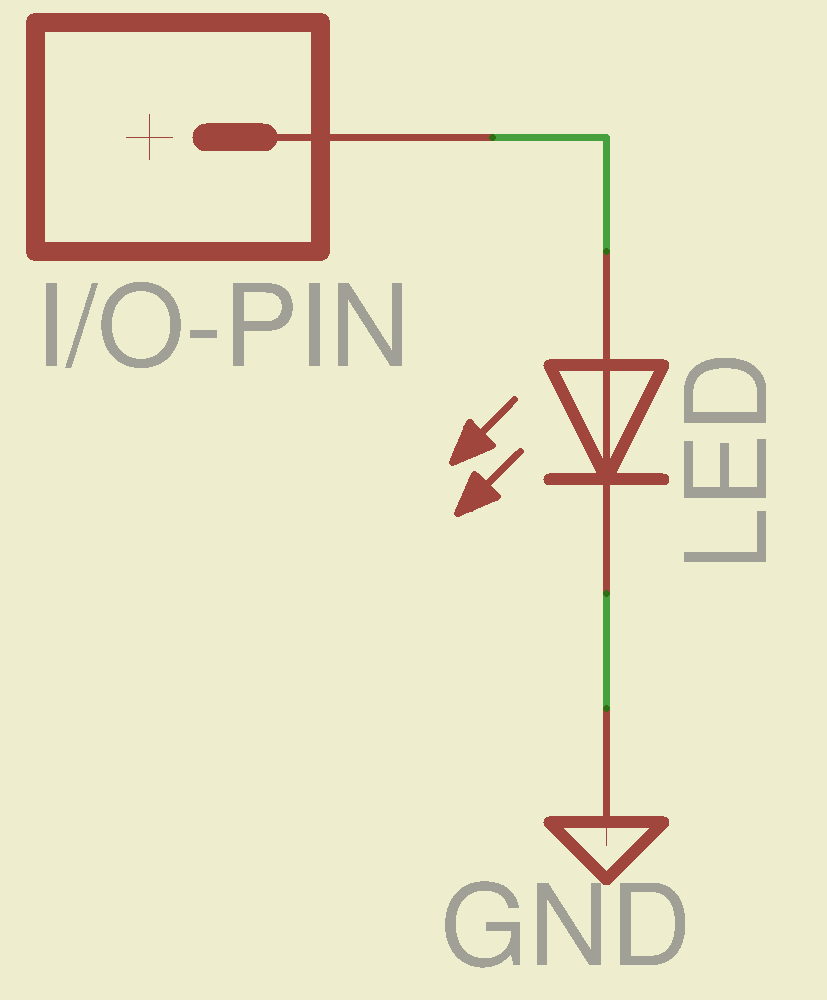
    What happens when you jam an LED into an Arduino digital output and turn it on?

    Direct LED drive - no ballast resistor
    Direct LED drive – no ballast resistor

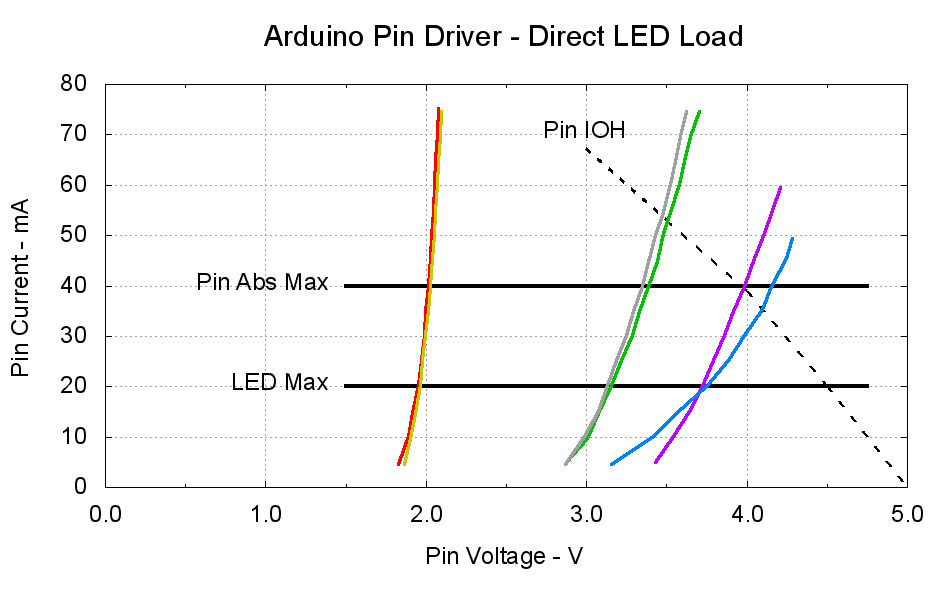
    This plot gives the load-line solution for that situation:

    Arduino Pin Driver - Direct LED Load
    Arduino Pin Driver – Direct LED Load

    The dotted curve comes from Figure 29-22 of the ATmega168 datatsheet and shows the typical source current vs. voltage for a digital output pin on your favorite Arduino.

    The cheerful colored curves show the current vs. voltage characteristics of some random LEDs, with data from the same curve tracer setup as those.

    Given a particular LED directly connected between an Arduino output pin and circuit common (without the formality of a current-limiting ballast resistor), the intersection of the dotted output pin curve with the colored LED curve gives you the current & voltage at the pin. For example, the violet LED would operate at 4 V and 40 mA.

    Some gotchas:

    • Typical 5 mm LEDs, of the sort one might use for this experiment, have a maximum DC current limit of 20 mA
    • Arduino output pins have an absolute maximum current limit of 40 mA

    So all of the direct solutions drive too much current through the LED. Although the blue and violet LEDs don’t quite exceed the output pin limit, the others certainly do. Those old standby red & amber LEDs would have absurdly high intercepts, well beyond the limit of sanity, in the region where the data you see here breaks down, where the pin driver gives up and goes poof, not that that ever stopped anybody from trying.

    You’ve probably seen somebody do it. Next time, aim ’em here in a non-confrontational manner… [grin]

    My Arduino Survival Guide presentation has other info that may help that poor sweating Arduino survive. You don’t get my performance-art patter, but the pictures and captions should carry the tale…

    As part of conjuring up this plot, I discovered that, for whatever reason, Gnuplot’s TrueType font rendering (via gdlib) no longer works in Xubuntu 12.04: the font name has no effect whatsoever, but the point size does.

    The Gnuplot source code:

    #!/bin/sh
    #-- overhead
    export GDFONTPATH="/usr/share/fonts/truetype/msttcorefonts"
    Pinfile="ATmega Pin Driver Data - Source.csv"
    LEDfile="LED Data.csv"
    base="Arduino Pin Driver - Direct LED Load"
    Outfile="${base}.png"
    echo Output file: ${Outfile}
    fontname="Arial"
    echo Font: ${fontname}
    #-- do it
    gnuplot << EOF
    #set term x11
    set term png font "${fontname},18" size 950,600
    set output "${Outfile}"
    set title "${base}" font "${fontname},22"
    set key noautotitles
    unset mouse
    set bmargin 4
    set grid xtics ytics
    set xlabel "Pin Voltage - V"
    set format x "%4.1f"
    set xrange [0:${vds_max}]
    #set xtics 0,5
    set mxtics 2
    #set ytics nomirror autofreq
    set ylabel "Pin Current - mA"
    #set format y "%4.1f"
    set yrange [0:80]
    #set mytics 2
    #set y2label "Drain Resistance - RDS - mohm"
    #set y2tics nomirror autofreq ${rds_tics}
    #set format y2 "%3.0f"
    #set y2range [0:${rds_max}]
    #set y2tics 32
    #set rmargin 9
    set datafile separator "\t"
    set label "Pin IOH" at 3.0,70 center font "${fontname},18"
    set label "Pin Abs Max" at 1.4,40 right font "${fontname},18"
    set arrow from 1.5,40 to 4.75,40 lw 4 nohead
    set label "LED Max" at 1.4,20 right font "${fontname},18"
    set arrow from 1.5,20 to 4.75,20 lw 4 nohead
    plot \
    "${Pinfile}" using 1:3 with lines lt 0 lw 3 lc -1 ,\
    "${LEDfile}" using (\$5/1000):((\$1>0)?\$2/1000:NaN) index 0:0 with lines lw 3 lc 1 ,\
    "${LEDfile}" using (\$5/1000):((\$1>0)?\$2/1000:NaN) index 1:1 with lines lw 3 lc 2 ,\
    "${LEDfile}" using (\$5/1000):((\$1>0)?\$2/1000:NaN) index 2:2 with lines lw 3 lc 0 ,\
    "${LEDfile}" using (\$5/1000):((\$1>0)?\$2/1000:NaN) index 3:3 with lines lw 3 lc 4 ,\
    "${LEDfile}" using (\$5/1000):((\$1>0)?\$2/1000:NaN) index 4:4 with lines lw 3 lc 3 ,\
    "${LEDfile}" using (\$5/1000):((\$1>0)?\$2/1000:NaN) index 5:5 with lines lw 3 lc 7
    EOF
    

    A few early risers got to see a completely broken listing, with all the quotes and brackets and suchlike reduced to the usual HTML escaped gibberish…

  • Monthly Subconscious: Rubbery Worm

    I would Just Say No:

    Smoke rubbery worm & twitch
    Smoke rubbery worm & twitch

    In text:

    smoke rubbery worm & twitch