The Smell of Molten Projects in the Morning

Ed Nisley's Blog: Shop notes, electronics, firmware, machinery, 3D printing, laser cuttery, and curiosities. Contents: 100% human thinking, 0% AI slop.

Author: Ed

  • Propane Tank QD Adapter Tool

    Although it’s common practice to exchange your empty 20 pound propane tank for a full one, I vastly prefer to keep my own tanks: I know where they’ve been, how they’ve been used, and can be reasonably sure they don’t have hidden damage. Two of my tanks have old-style threaded connections, but the barby has a quick-disconnect fitting on the regulator and I’ve been using an adapter on those tanks.

    The adapter comes with a plastic tool that you use to install it in the tank valve. In principle, you insert the tool into the adapter, thread the adapter into the valve, then tighten with a wrench until the neck of the plastic tool snaps, at which point you eject the stub and the adapter becomes permanently installed. I don’t like permanent, so I carefully tightened the adapter to the point where the O-ring seals properly and the tool didn’t quite break. I’ve always wanted a backup tool, just in case the original broke, and now I have one:
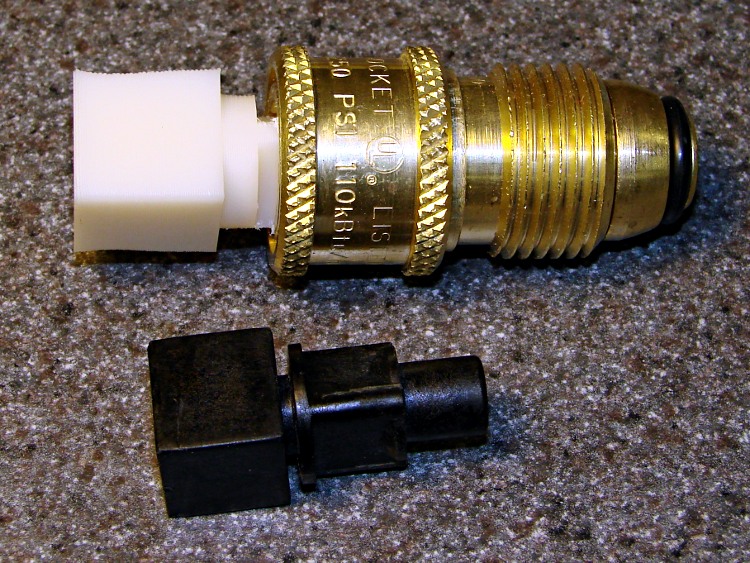
    Propane QD Adapter Tool - in adapter
    Propane QD Adapter Tool – in adapter

    It fit into both the adapter body and the 5/8 inch wrench (the OEM tool is 9/16 inch) without any fuss at all:

    Propane QD Adapters - OEM and printed
    Propane QD Adapters – OEM and printed

    The solid model has a few improvements over the as-printed tool above:

    • Shorter wrench flats
    • More durable protrusions to engage the locking balls
    Propane QD Adapter Tool
    Propane QD Adapter Tool

    It took about an hour to design and another 45 minutes to print, so it’s obviously not cost-effective. I’ll likely never print another, but maybe you will.

    The OpenSCAD source code:

    // Propane tank QD connector adapter tool
    // Ed Nisley KE4ZNU November 2012
    
    include </mnt/bulkdata/Project Files/Thing-O-Matic/MCAD/units.scad>
    include </mnt/bulkdata/Project Files/Thing-O-Matic/Useful Sizes.scad>
    
    //- Extrusion parameters must match reality!
    //  Print with +1 shells and 3 solid layers
    
    ThreadThick = 0.25;
    ThreadWidth = 2.0 * ThreadThick;
    
    HoleWindage = 0.2;
    
    function IntegerMultiple(Size,Unit) = Unit * ceil(Size / Unit);
    
    Protrusion = 0.1;			// make holes end cleanly
    
    //----------------------
    // Dimensions
    
    WrenchSize = (5/8) * inch;		// across the flats
    WrenchThick = 10;
    
    NoseDia = 8.6;
    NoseLength = 9.0;
    
    LockDia = 12.5;
    LockRingLength = 1.0;
    LockTaperLength = 1.5;
    
    TriDia = 15.1;
    TriWide = 12.2;										// from OD across center to triangle side
    TriOffset = TriWide - TriDia/2;		// from center to triangle side
    TriLength = 9.8;
    
    NeckDia = TriDia;
    NeckLength = 4.0;
    
    //----------------------
    // Useful routines
    
    module PolyCyl(Dia,Height,ForceSides=0) {			// based on nophead's polyholes
    
    Sides = (ForceSides != 0) ? ForceSides : (ceil(Dia) + 2);
    
    FixDia = Dia / cos(180/Sides);
    
    cylinder(r=(FixDia + HoleWindage)/2,
    h=Height,
    	   $fn=Sides);
    }
    
    module ShowPegGrid(Space = 10.0,Size = 1.0) {
    
    Range = floor(50 / Space);
    
    	for (x=[-Range:Range])
    	  for (y=[-Range:Range])
    		translate([x*Space,y*Space,Size/2])
    		  %cube(Size,center=true);
    
    }
    
    //-------------------
    // Build it...
    
    $fn = 4*6;
    
    ShowPegGrid();
    
    union() {
    
    	translate([0,0,(WrenchThick + NeckLength + TriLength - LockTaperLength - LockRingLength + Protrusion)])
    		cylinder(r1=NoseDia/2,r2=LockDia/2,h=LockTaperLength);
    
    		translate([0,0,(WrenchThick + NeckLength + TriLength - LockRingLength)])
    		cylinder(r=LockDia/2,h=LockRingLength);
    
    	difference() {
    		union() {
    
    			translate([0,0,WrenchThick/2])
    				cube([WrenchSize,WrenchSize,WrenchThick],center=true);
    
    			cylinder(r=TriDia/2,h=(WrenchThick + NeckLength +TriLength));
    
    			cylinder(r=NoseDia/2,h=(WrenchThick + NeckLength + TriLength + NoseLength));
    		}
    
    		for (a=[-1:1]) {
    			rotate(a*120)
    				translate([(TriOffset + WrenchSize/2),0,(WrenchThick + NeckLength + TriLength/2 + Protrusion/2)])
    					cube([WrenchSize,WrenchSize,(TriLength + Protrusion)],center=true);
    		}
    	}
    }
    
  • Waterproof RGB LED Strip

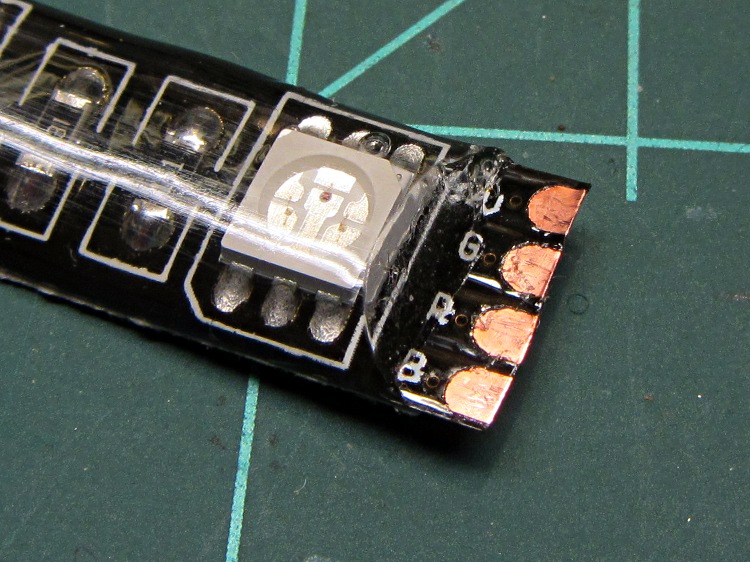
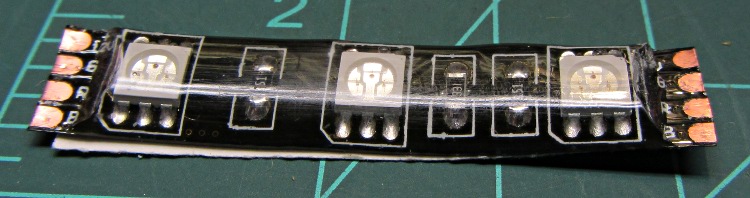
    Another package from halfway around the planet brought 5 meters of waterproof RGB LED strip, which may be useful for projects like longboard lighting. Not having worked with a waterproof strip before, I snipped off a segment:

    Waterproof RGB LED Strip - one segment
    Waterproof RGB LED Strip – one segment

    The waterproof coating seems to be a soft silicone or acrylic pour with roughly the consistency of Gummy Bear tummy, so cutting it off requires a delicate touch to avoid slicing the flex circuit board:

    Waterproof RGB LED Strip - peeled top
    Waterproof RGB LED Strip – peeled top

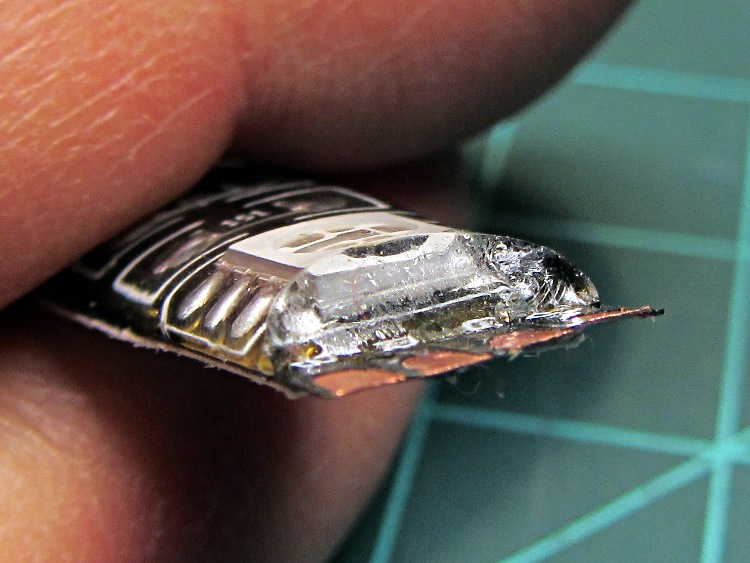
    It doesn’t actually bond to the circuit board, though, and if you get a sharp blade underneath, can be peeled away. I suspect this means water will eventually make its way into the circuitry and you shouldn’t expect to submerge the strip in a fish tank. I scraped the contacts clean, which probably isn’t the right way to do it:

    Waterproof RGB LED Strip - end view
    Waterproof RGB LED Strip – end view

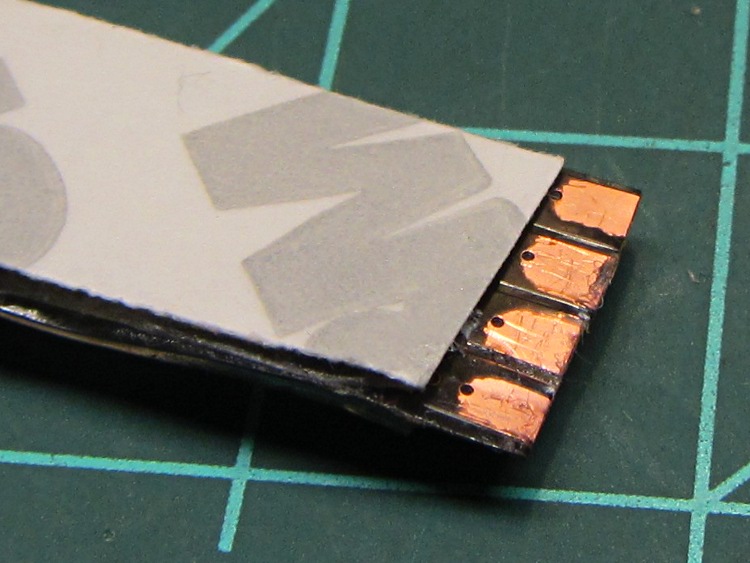
    The underside makes no pretension of being waterproof and you can peel / roll / rub the adhesive off the contacts:

    Waterproof RGB LED Strip - peeled bottom
    Waterproof RGB LED Strip – peeled bottom

    Does anyone else doubt the authenticity of that 3M logo? The production values look rather low, but maybe it’s just me.

    The trouble with soldering contacts to the bottom is the ensuing lump that prevents good adhesive bonding. The trouble with soldering contacts on the top is the surgery required to remove the coating. You can get punch-through contacts with snake-bite fangs, but even the vendors admit to about a 20% failure rate, which implies it’s pretty much a crapshoot.

  • AH49E Hall Effect Sensor Connections

    AH49E Hall effect sensor - breadboard
    AH49E Hall effect sensor – breadboard

    Two lots of linear Hall Effect sensors arrived from halfway around the planet, labeled AH49E and OH49E, and roughly corresponding to the original Honeywell SS49E. The Honeywell datasheet has a non-obvious pinout diagram (that one is better), so I poked one of them into a breadboard and tried it out.

    Fortunately, I got it on the first try. Facing the tapered side, with the leads downward, pin 1 is on your left:

    1. Power – typically +5 V
    2. Ground
    3. Output – 0 gauss = 2.5 V

    The chip [may | may not], depending on which datasheet you use and which part you have, include an internal 65 μA load on the current source, so you [may not | may] need an external load resistor.

    Without a load resistor, this one worked fine. Old-school ferrite and ceramic magnets push it about 1 V off-center, neodymium magnets saturate the output.

    That Honeywell / Micro Switch handbook should dispel many misconceptions about proper use, calibration, polarity, and suchlike.

    Memo to Self: verify the output voltage for both units with typical load resistors.

  • Braided Wind Chime

    Fish Wind Chime
    Fish Wind Chime

    A few days of high & gusty winds braided the cords of the aluminum fish school wind chime hanging over the end of the patio:

    It’s obviously an old, much-repaired relic.

    My Shop Assistant added those blue fins many years ago, quite some time after she and a friend lost one of the fish while using them as digging implements. An unmarked replacement fish, crudely bandsawed from black-coated aluminum, began swimming in stealth mode amid the school.

    Sometimes it’s not the object, it’s the memories…

  • Kindle Fire NTP: Timing Channel Attack

    I’ve completely offloaded remembering my appointments to the Kindle Fire, which now lives in the right thigh pocket of my cargo pants (it’s a sartorial thing). While waiting for a meeting (which it had correctly reminded me of) to start, I did my usual “What do we find in the way of open WiFi networks?” scan, found one, and connected to it. Unfortunately, it was one of those open WiFi networks that subsequently requires a password, but … then I noticed something odd with the time displayed at the top of the screen.

    A bit of tapping produced the Date & Time settings screen:

    Kindle Fire - 0503 1 Jan 1970
    Kindle Fire – 0503 1 Jan 1970

    Evidently, that not-exactly-open WiFi network also features a defunct time server that’s happy to clobber any device asking for a time update. As you might expect, snapping back forty years does horrible things to many Kindle fire apps. The crash handler can only suggest re-downloading the app from the online store, which turns out to not be necessary after a complete shutdown / reboot.

    Ah, if I knew then what I know now… I’d certainly get into much more trouble. Not surprisingly, there’s a book about that; maybe it’s better not to know how things will work out.

    Memo to Self: watch the time!

  • Electrical Grounding: Not Like This

     Corroded Grounding Strap - Walkway Over the Hudson
    Corroded Grounding Strap – Walkway Over the Hudson

    Spotted this through the railing on the north side of the Walkway Over the Hudson:

    I’m not sure what it’s bonding to the bridge structure, but the corrosion where the braid touches the I-beam suggests an electrical potential drives the reaction. There’s stout bonding braid connecting all the railing sections together, but this braid wanders off below the decking and seems too casual / flimsy for lightning protection.

    The rivets date back to the late 1800s. I suspect that bolt won’t last nearly as long…

  • APRS Electronics Case: Battery Contacts, Again

    Although the contacts passing power to the Wouxun HT worked well, they were obviously (in retrospect, as always) in the wrong place. Recently I rode the bike over a major bump and heard the radio reboot (it gives off two low-speed Morse “M” characters), which suggests at least one of the screw heads just barely touches the radio’s spring contacts.

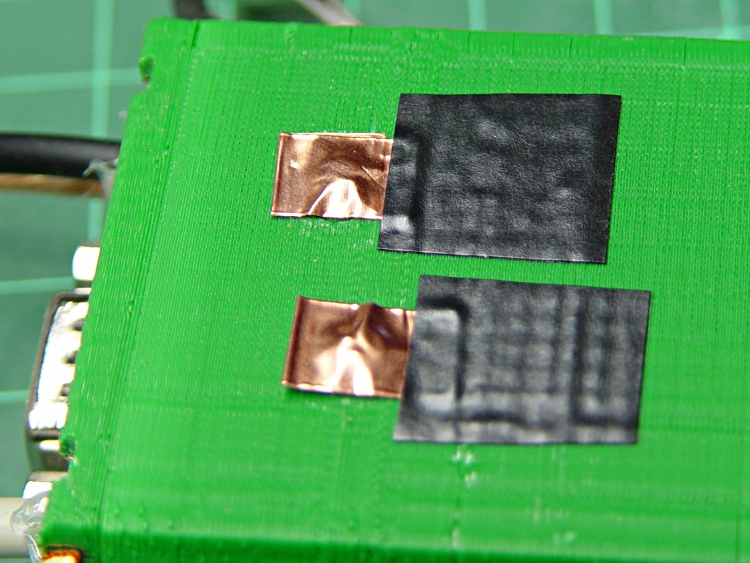
    Two folded-under strips of copper tape may work around that problem until I build a whole ‘nother interface:

    Copper foil on power contacts
    Copper foil on power contacts

    The black tape adds emphasis to the lightly sticky end of the copper tape. The folded-under ends lie to the left in the picture, so there’s a continuous copper sheet connecting the radio battery contacts to the screw heads on the green case. It’s not a huge cross-sectional area, but … it’s better than no area at all.

    The last time I tried this fix, I used woven copper mesh tape. This time, the solid copper tape was on top of the TLB (Tape Lookaside Buffer) holding the specialty tapes. Either should work fine.