The Smell of Molten Projects in the Morning

Ed Nisley's Blog: Shop notes, electronics, firmware, machinery, 3D printing, laser cuttery, and curiosities. Contents: 100% human thinking, 0% AI slop.

Author: Ed

  • Sanitizing A PC: Another Item For The Checklist

    Just got another off-lease Dell, fired it up for the first time, and the BIOS presented this splash screen:

    Optiplex 780 BIOS A06 Splash
    Optiplex 780 BIOS A06 Splash

    Updating the BIOS from A06 to A13 restored the default Dell logo, but I really miss having a Genuine Lockheed Martin PC.

    The Windows 7 Professional installed on the disk started up in “first time” mode, so they did scrub the drive. It does have RAID enabled, though, which may confuse the Linux installation I have yet to do.

    I wish I could put my logo on the BIOS splash screen…

  • Driveway Drain Pipe Grate vs. Chipmunks

    Known to be true: chipmunks love drain pipes!

    Chipmunk peering from drainpipe
    Chipmunk peering from drainpipe

    Obviously, an open pipe attracts rodents.

    That didn’t matter with a three-foot pipe attached directly to the downspouts, but, as part of the driveway project, I routed the house storm drains and wall footing drain pipes about 20 feet down from the new retaining wall, with the two joining into a single outlet. There’s a cleanout plug on the storm drain line, but the footing drain consists of about 50 feet of corrugated and perforated tubing that would be just about the finest possible chipmunk habitat.

    In principle, one would simply glue a grate into the final fitting and be done with it, but leaves from the gutter will pack behind the grate, so it must be removable. Leaving the grate loose means it’ll pop out at the slightest provocation and, most likely, roll another hundred feet down the driveway into the street.

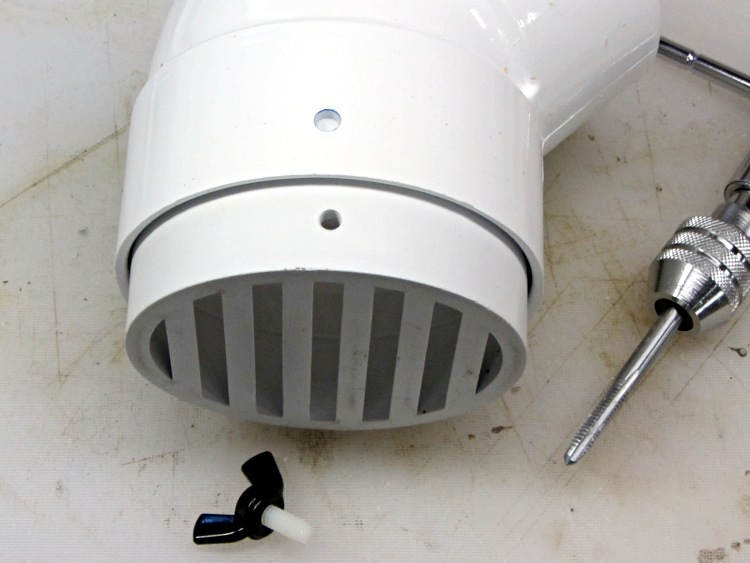
    Rather than coping with that, I drilled a clearance hole in the elbow and tapped a matching hole in the grate:

    Drain pipe grate - hole tapping
    Drain pipe grate – hole tapping

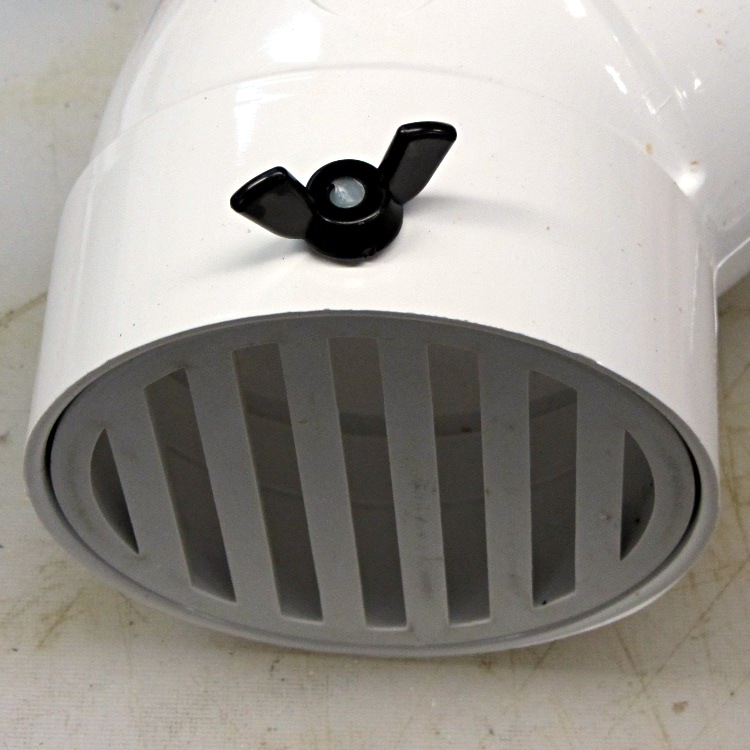
    I have a few white nylon 1/4-20 cutoffs from the bike fairing clamps, so I wrecked the threads on one and jammed it into a black nylon thumbscrew:

    Drain pipe grate - thumbscrew
    Drain pipe grate – thumbscrew

    Now, of course, the critters can still climb down the drainpipes from the gutters and set up housekeeping in the plumbing, but I’m not putting grates where I must climb onto the roof to clear them. A chipmunk dropped from two stories will scamper away; I’d never walk again.

    We shall see how this works out…

  • Better GIMPS Startup

    No, not GIMP, but GIMPS: the Great Internet Mersenne Prime Search.

    I’d been starting mprime from rc.local, but this time I used crontab, as suggested in that thread, to reduce the program’s privileges.

    Start the crontab editor:

    crontab -e

    Then add this line:

    @reboot ( /opt/Primenet/mprime & )

    It starts every time the box boots and run until you hit shutdown, which is exactly the way things should work.

    Power dissipation looks like this:

    • Idle: 40 W
    • mprime running: 88 W

    They estimate an additional 40 W, which comes out slightly low for this box. Their system info dump looks like this:

    CPU Information:
    Intel(R) Core(TM)2 Duo CPU     E8400  @ 3.00GHz
    CPU speed: 2992.40 MHz, 2 cores
    CPU features: Prefetch, SSE, SSE2, SSE4
    L1 cache size: 32 KB
    L2 cache size: 6 MB
    
  • SANE: Network Access to a USB Scanner in Xubuntu 12.04

    The missing link turns out to be assigning a device node with the proper owner, group, and permissions to let saned share the scanner over the network. IIRC, this worked right out of the box in previous versions of Xubuntu, but now requires manual tweakage.

    That post gives the steps for my old SCSI scanner. It turns out that the udev rule is not optional for USB scanners… at least not in 12.04, anyway.

    In order to build the udev rule, you start with lsusb:

    Bus 001 Device 001: ID 1d6b:0002 Linux Foundation 2.0 root hub
    Bus 002 Device 001: ID 1d6b:0002 Linux Foundation 2.0 root hub
    Bus 003 Device 001: ID 1d6b:0001 Linux Foundation 1.1 root hub
    Bus 004 Device 001: ID 1d6b:0001 Linux Foundation 1.1 root hub
    Bus 005 Device 001: ID 1d6b:0001 Linux Foundation 1.1 root hub
    Bus 006 Device 001: ID 1d6b:0001 Linux Foundation 1.1 root hub
    Bus 007 Device 001: ID 1d6b:0001 Linux Foundation 1.1 root hub
    Bus 008 Device 001: ID 1d6b:0001 Linux Foundation 1.1 root hub
    Bus 002 Device 002: ID 0424:2504 Standard Microsystems Corp. USB 2.0 Hub
    Bus 002 Device 005: ID 0d8c:000c C-Media Electronics, Inc. Audio Adapter
    Bus 002 Device 006: ID 046d:c52f Logitech, Inc. Wireless Mouse M305
    Bus 008 Device 006: ID 04a9:220e Canon, Inc. CanoScan N1240U/LiDE 30
    Bus 008 Device 003: ID 413c:1003 Dell Computer Corp. Keyboard Hub
    Bus 008 Device 004: ID 413c:2010 Dell Computer Corp. Keyboard
    

    That gives you the bus and device numbers, which means the corresponding device is, at least right now:

    /dev/bus/usb/008/006

    The udevinfo command I used a while ago has Gone Away, replaced by udevadm with even more syntactic sugar:

    udevadm info --query=all --attribute-walk --name=/dev/bus/usb/008/006

    Which produces a ton of information, starting with:

      looking at device '/devices/pci0000:00/0000:00:1d.2/usb8/8-1':
        KERNEL=="8-1"
        SUBSYSTEM=="usb"
        DRIVER=="usb"
        ATTR{configuration}==""
        ATTR{bNumInterfaces}==" 1"
        ATTR{bConfigurationValue}=="1"
        ATTR{bmAttributes}=="a0"
        ATTR{bMaxPower}=="500mA"
        ATTR{urbnum}=="18658"
        ATTR{idVendor}=="04a9"
        ATTR{idProduct}=="220e"
        ATTR{bcdDevice}=="0100"
        ATTR{bDeviceClass}=="ff"
        ATTR{bDeviceSubClass}=="00"
        ATTR{bDeviceProtocol}=="ff"
        ATTR{bNumConfigurations}=="1"
        ATTR{bMaxPacketSize0}=="8"
        ATTR{speed}=="12"
        ATTR{busnum}=="8"
        ATTR{devnum}=="6"
        ATTR{devpath}=="1"
        ATTR{version}==" 1.10"
        ATTR{maxchild}=="0"
        ATTR{quirks}=="0x0"
        ATTR{avoid_reset_quirk}=="0"
        ATTR{authorized}=="1"
        ATTR{manufacturer}=="Canon"
        ATTR{product}=="CanoScan"
    

    Extracting the two highlighted values lets you create a udev rule. If your udev-fu is strong, you can pluck them directly from the lsusb output.

    I created a new file:
    /etc/udev/rules.d/60-scanner.rules

    Which contains this rule:

    # Canon LiDE 30 scanner
    ATTRS{idVendor}=="04a9",ATTRS{idProduct}=="220e",SYMLINK+="scanner",MODE="0660",OWNER="root",GROUP="saned"
    

    Based on the advice there, I added the port number to the /etc/xinetd.d/saned stanza, but I’m not sure it’s needed:

    service sane-port
                {
                  port = 6566
                  socket_type = stream
                  server = /usr/sbin/saned
                  protocol = tcp
                  user = saned
                  group = scanner
                  wait = no
                  disable = no
                }
    

    After doing all the rest of the saned and xinetd setup, unplug and replug the scanner, which should produce these devices:

    ll /dev/bus/usb/008/006 /dev/scan*
    crw-rw----+ 1 root saned 189, 901 Jan  5 21:30 /dev/bus/usb/008/006
    lrwxrwxrwx  1 root root        15 Jan  5 21:14 /dev/scanner -> bus/usb/008/006
    

    And then it should Just Work…

  • Hall Effect Sensors From eBay: Supply Current

    As a follow-up to those surprising (in an un-surprising way) magnetic field measurements, I measured each sensor’s current from a +5 V supply with no magnetic field applied:

    Seq 49E 231NB AH49E
    1 7.12 4.08
    2 6.98 4.11
    3 6.85 4.18
    4 6.93 4.04
    5 6.81 3.95
    6 7.00 4.02
    7 7.02 4.05
    8 7.00 4.00
    9 3.65
    10 4.15
    11 3.97
    12 4.05

    The sequence numbers do not match those in the field measurements, because the sensors spent the night in their respective bags and I didn’t want to re-measure everything from scratch. I may wind up doing it with a DC field, but not right now.

    The first column averages 7.0 mA, the second 4.0 mA. It turns out that the Honeywell specs distinguish between SS49 and SS49E sensors, with the “E” suffix denoting the “economy” line:

    • SS49: 4 mA typical, no max given
    • SS49E: 6 mA typical, 10 mA maximum

    The sensors in the first column have supply currents that are close enough for SS49E sensors, albeit with out-of-spec 1.8 mV/G sensitivity.

    However, I’d say the sensors in the second column should be marked 49 rather than 49E and, if that’s true, then the plot thickens. In-spec SS49 sensors have 0.60 to 1.25 mV/G sensitivity, which neatly brackets the average 0.875 mV/G I measured: it’s faintly possible those have incorrect markings, rather than being manufacturing rejects.

    But I wouldn’t bet on that

    I should pick up some genuine sensors from a reputable supplier and measure those, just for completeness.

  • Hall Effect Sensors From eBay: Variations On a Specification

    It seems that the “49E” Hall effect sensor I used to measure the field in the ferrite toroid was running at 1.9 mV/G, rather than the 1.0 to 1.75 range suggested by the perhaps-not-quite-applicable specs. Here’s a table of all the sensors in my collection, which came in two bags from the usual eBay vendors:

    Seq 49E 231NB AH49E
    1 41.1 18.5
    2 42.9 20.0
    3 39.5 19.9
    4 40.6 18.8
    5 43.3 18.9
    6 42.6 23.0
    7 40.7 20.0
    8 44.0 19.3
    9 18.9
    10 19.5
    11 20.0
    12 19.8

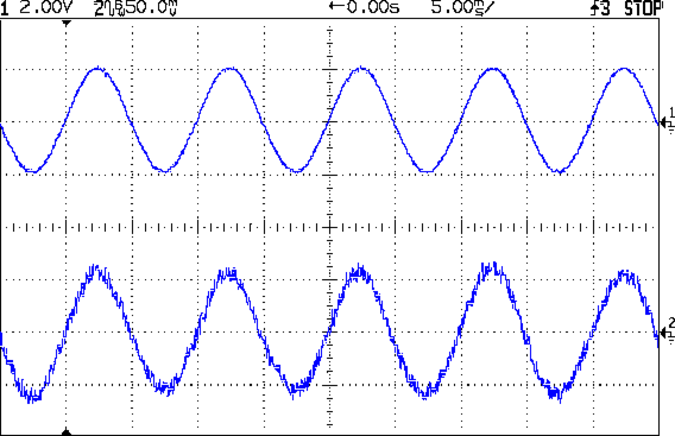
    That’s the RMS value in mV of the sine wave resulting from a 200 mA peak current in the 25 turn winding, measured on the scope with low pass filtering and 8 trace averaging. An unfiltered and unaveraged trace looks like this, which explains why I’m knocking back the noise:

    Hall Current Sense - 25T FT50-61 - raw
    Hall Current Sense – 25T FT50-61 – raw

    Even with that noise reduction, the variation between successive readings is about 5%, so trust only the first digit and half of the second; the fractional digit is worthless. Averaging the columns gives 42 and 20 mV RMS, which correspond to 59 and 28 mV peak. I estimated 60 mV peak from the filtered-but-not-averaged scope trace in the earlier calculations, which falls in the same ballpark. If you were doing this for real, you’d use a DC current and a static field, plus a simple RC filter to improve the noise rejection, but this was a quick-and-dirty measurement.

    The peak magnetic flux should be about 31 to 33 G; I’ve been using 32 G based on the nominal permeability and measured air gap. Assuming that’s the case, then the sensors in the first column run at 1.8 mV/G (1.75 + 3% or 1.7 + 6%) and those in the second column at 0.875 mv/G (1.0 – 9%).

    Here’s what I think: these are manufacturing rejects, sold cheap to extract money from suckers. Those in the first column came from the “too high” scrap heap, the second column’s contestants were in the “too low” pile. Note the tight clustering: they’re not random, they’ve been carefully selected! A quick-and-dirty histogram tells the tale:

    49E Hall Effect Sensor Histogram - 200 mA 32 G
    49E Hall Effect Sensor Histogram – 200 mA 32 G

    The nominal range, taken from the SS49E datasheet, runs neatly across the gap in the middle, with one sensor falling just barely inside. The SS49 range neatly brackets the data on the left, but that’s not what those parts are supposed to be.

    Now, I’ve often referred to eBay as my parts locker (at least for stuff I don’t have in the Basement Laboratory Warehouse Wing), but I know what to expect and am not in the least surprised at these numbers. If you or anyone you know buys parts from eBay in the expectation that they’re getting Good Stuff Cheap, then you should rethink that expectation.

    I’d say that, to a very good first approximation, anything bought directly from halfway around the planet via eBay (or any source like it) will be, at best, counterfeit. For my purposes, I can measure and use most of it (assuming it actually works and ignoring minor issues like, oh, reliability and stability). In an actual product application, eBay is not the way to get your parts.

    No surprise, right?

    I wonder what the supply current might be? They’re supposed to run around 6 mA, max 10 mA…

  • Hall Effect Current Sensor: Magnetic Flux Calibration

    With a wound ferrite toroid in hand, the next step involves measuring the magnetic field in the gap from a known winding current. I don’t have a calibrated magnetic sensor, so all this involves considerable guesswork and estimation.

    A ULN3751Z power op amp converts an input signal voltage into winding current:

    Ferrite Toroid Winding Test Driver
    Ferrite Toroid Winding Test Driver

    The 10 Ω sense resistor (5% tolerance, measured at 9.97 Ω on a typical 5% meter) sets the conversion at 100 mA/V, which should be good enough for a first pass. The ULN3751Z has 40 to 60 mA quiescent current and would cook at 1.2 W from ±12 V supplies, so I used ±5 V for this test. That’s not enough for a wide output range, but it’s OK now.

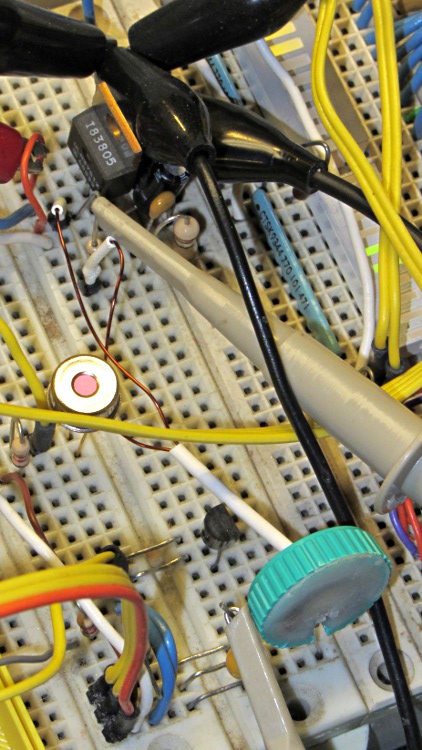
    Given that I already have a breadboard with a Hall effect sensor on it, I hairballed the winding driver in an empty spot:

    Ferrite toroid winding test driver - breadboard
    Ferrite toroid winding test driver – breadboard

    The green ring in the foreground surrounds the toroid, with the slot around the Hall effect sensor sticking up from the breadboard. The toroid cross-section is about the same size as the sensor and the field in the gap seems sufficiently uniform to make positioning completely non-critical. I should conjure up a mount of some sort, just to keep the toroid from flopping around, but that’s definitely in the nature of fine tuning.

    Driving a 200 mA peak current into the winding produces a rather noisy result from the Hall sensor:

    Hall Current Sense - 25T FT50-61 - raw
    Hall Current Sense – 25T FT50-61 – raw

    Applying the oscilloscope’s low pass filter cleans it up a bit:

    Hall Current Sense - 25T FT50-61 - LP
    Hall Current Sense – 25T FT50-61 – LP

    The peak current is 200 mA, so the MMF = 200 mA x 25 turn = 5 A·t.

    Assuming μ = 125 and a 0.172 cm gap, then the magnetic flux works out to:

    (0.4 π · 125 · 5) / (3.02 + 125 · 0.172) = 7.21 · 5 = 32 G

    The Hall effect sensor specs are, at best, hazy, but something like 1.0 to 1.7 mV/G appears on most of the datasheets, with a nominal 1.4 mV/G. The measured peak voltage from the Hall sensor is maybe 60 mV, which suggests a nominal B = 43 G with a range from 60 down to 35 G.

    Ferrite toroid datasheets give permeability to three or four significant figures, but also admit that the actual value can differ by ±25% from the nominal. However, the air gap dominates the equation, so B varies from 30.8 to 32.8 G over that range of μ.

    Assuming that B = 32 G, then the sensor is running just shy of 1.9 mV/G. Perhaps it didn’t quite pass final inspection; it’s not like I’m buying from an authorized distributor or anything.

    Anyhow, the results seems close enough to suggest the ferrite toroid and the Hall effect sensor actually do pretty much what they’re supposed to do. I’d have no qualms about calibrating the sensor output from a known current and running with that number…