Ed Nisley's Blog: Shop notes, electronics, firmware, machinery, 3D printing, laser cuttery, and curiosities. Contents: 100% human thinking, 0% AI slop.
Combining all the records so far into one giant lump:
Well Pit Air Temperature – 2014-10 to 2015-04
Yes, the air temperature really did hover around freezing for two weeks in mid-February. If it didn’t require hoisting a four-inch concrete slab with a rusted lift ring, I’d affix a logger to the copper water pipe running across the pit for some direct samples of the actual water temperature.
It hasn’t ever frozen in the last half-century or so; I’m not going to start worrying now…
The objective being to wrap a nose around the cutter blade to allow some control over the cut depth, I lengthened the cylinder around the cutter body and modeled a discrete glue-on cap:
Roland knife stabilizer and nose – show
Which, with an additional 80 g of ballast, worked fine in the double-thick vinyl:
Roland knife stabilizer – nut weight
The pen-lift spring can just barely manage to heave that load off the vinyl, but it’s obviously running at the limit of its ability and this can’t possibly be a Good Thing for the mechanism in the long run.
After a bit more fiddling around, I noticed that the stabilizer wasn’t sitting flat on the pen holder and that there really wasn’t any good reason to have a separate cap, so I did one more revision:
Roland knife stabilizer with nose – side view
The cutaway view shows the knife model now has tapered transition from the body to the grossly enlarged blade, so the model will build without supports inside the cylinder.
A little cutout on one wall lets the plate sit flat on the pen holder and a barely visible recess in the cylinder gives the carousel pen-capping actuator a bit more clearance:
Roland knife stabilizer with nose – Slic3r preview
It works about as well as the version shown above, minus the tedious gluing, so I’ll call it a success… even though it’s obviously not going to get much use. I don’t see any way to apply enough downforce to make the cutter work; the mechanical changes just aren’t worthwhile.
The OpenSCAD source code, which includes some tweaks and outright kludges since the first version, builds adapters for Sakura pens (which work just fine) as well as this knife stabilizer:
// HP 7475A plotter pen adapters
// Ed Nisley KE4ZNU April 2015

Layout = "BuildStabilizer";
							// ShowBody BuildBody BodyPoly
							// ShowPen ShowPenAdapter BuildPenAdapter Plug Pen PenPoly
							// ShowKnife BuildKnife KnifeAdapter Knife
							// ShowStabilizer Stabilizer BuildStabilizer

//- Extrusion parameters must match reality!

ThreadThick = 0.25;
ThreadWidth = 0.40;

HoleWindage = 0.2;

Protrusion = 0.1;			// make holes end cleanly

inch = 25.4;

function IntegerMultiple(Size,Unit) = Unit * ceil(Size / Unit);

//----------------------
// Dimensions
// Z=0 at pen tip!

NumSides = 8*4;						// number of sides on each "cylinder"

RADIUS = 0;							// subscript for radius values
HEIGHT = 1;							//   ... height above Z=0

//-- Original HP plotter pen, which now serves as a body for the actual pen

BodyOutline = [						// X values = (measured diameter)/2, Y as distance from tip
	[0.0,0.0],						//  0 fiber pen tip
//	[2.0/2,1.4],					//  1 ... taper (not buildable)
	[1.0/2,0.005],					//  1 ... faked point to remove taper
	[2.0/2,0.0],[2.0/2,2.7],		//  2 ... cylinder
	[3.7/2,2.7],[3.7/2,4.45],		//  4 tip surround
	[4.8/2,5.2],					//  6 chamfer
	[6.5/2,11.4],					//  7 rubber seal face
	[8.9/2,11.4],					//  8 cap seat
	[11.2/2,15.9],					//  9 taper to body
	[11.5/2,28.0],					// 10 lower body
	[13.2/2,28.0],[16.6/2,28.5],	// 11 lower flange = 0.5
	[16.6/2,29.5],[13.2/2,30.0],	// 13 flange rim = 1.0
	[11.5/2,30.0],					// 15 upper flange = 0.5
	[11.5/2,43.25],					// 16 upper body
	[0.0,43.25]						// 17 lid over reservoir
	];

TrimHeight = BodyOutline[9][HEIGHT];		// cut off at top of lower taper
SplitHeight = (BodyOutline[11][HEIGHT] + BodyOutline[14][HEIGHT])/2;	// middle of flange

FlangeOD = 2*BodyOutline[13][RADIUS];
FlangeTop = BodyOutline[15][HEIGHT];

BodyOD = 2*BodyOutline[16][RADIUS];
BodyOAL = BodyOutline[17][HEIGHT];

echo(str("Trim: ",TrimHeight));
echo(str("Split: ",SplitHeight));

BuildSpace = FlangeOD;

//-- Sakura Micron fiber-point pen

ExpRP = 0.15;						// expand critical sections (by radius)

//-- pen locates in holder against end of outer body

PenOutline = [
	[0,0],							//  0 fiber pen tip
	[0.6/2,0.0],[0.6/2,0.9],		//  1  ... cylinder
	[1.5/2,0.9],[1.5/2,5.3],		//  3 tip surround
	[4.7/2,5.8],					//  5 chamfer
	[4.9/2,12.3],					//  6 nose
//	[8.0/2,12.3],[8.0/2,13.1],		//  7 latch ring
//	[8.05/2,13.1],[8.25/2,30.5],	//  9 actual inner body
	[8.4/2 + ExpRP,12.3],[8.4/2 + ExpRP,30.5],	//  7 inner body - clear latch ring
	[9.5/2 + ExpRP,30.5],			//  9 outer body - location surface!
	[9.8/2 + ExpRP,50.0],			// 10 outer body - length > Body
	[7.5/2,50.0],					// 11 arbitrary length
	[7.5/2,49.0],					// 12 end of reservoir
	[0,49.0]						// 13 fake reservoir
	];

PenNose = PenOutline[6];
PenLatch = PenOutline[7];

PenOAL = PenOutline[11][HEIGHT];

//-- Plug for end of cut-off pen body
//   you need two plugs...

PlugOutline = [
	[0,0],							// 0 center of lid
	[9.5/2,0.0],[9.5/2,1.0],		// 1 lid rim <= body OD
	[7.9/2,1.0],					// 3 against end of pen
	[7.6/2,6.0],					// 4 taper inside pen body
	[5.3/2,6.0],					// 5 against ink reservoir
	[4.0/2,1.0],					// 6 taper to lid
	[0.0,1.0]						// 7 flat end of taper
	];

PlugOAL = PlugOutline[5][HEIGHT];

//   cap locates against end of inner body at latch ring
//-- cap origin is below surface to let pen tip be at Z=0

CapGap = 1.0;						// gap to adapter body when attached
CapGripHeight = 2.0;				// thickness of cap grip flange
CapTipClearance = 1.0;				// clearance under fiber tip

CapOffset = -(CapGripHeight + CapTipClearance);	// align inside at pen tip Z=0

CapOutline = [
	[0,CapOffset],									// 0 base
	[FlangeOD/2,CapOffset],							// 1 finger grip flange
	[FlangeOD/2,CapOffset + CapGripHeight],			// 2  ... top
	[BodyOD/2,CapOffset + CapGripHeight],			// 3 shaft
	[BodyOD/2,TrimHeight - CapGap],					// 4  ... top with clearance
	[PenLatch[RADIUS],TrimHeight - CapGap],			// 5 around pen latch ring
	[PenLatch[RADIUS],PenNose[HEIGHT]],				// 6  ... location surface!
	[PenNose[RADIUS] + ExpRP,PenNose[HEIGHT]],		// 7 snug around  nose
	[PenNose[RADIUS] + ExpRP,-CapTipClearance],		// 8 clearance around tip
	[0,-CapTipClearance],							// 9  ... bottom
	];

//-- Roland drag knife bearing assembly

ExpRK = 0.30;						// expand critical sections (by radius)
AdjLen = 2.0;						// allowance for adjustment travel

//- Knife tweaked for pen adapter
/*
KnifeOutline = [
	[0,0],							//  0 blade point (actually 0.25 mm offset)
	[1.0/2,0.0],					//  1  ... blunt end
	[1.0/2,4.0],					//  2  ... cylinder
	[2.0/2,4.0],					//  3 blade shank
	[2.0/2,5.9],					//  4  .. at bearing
	[6.0/2,5.9],					//  5 holder - shell

	[7.3/2 + ExpRK,8.3],			//  6 holder - taper to body
	[7.3/2 + ExpRK,21.0 - AdjLen],	//  7 holder body

	[8.8/2 + ExpRK,22.0 - AdjLen],	//  8 holder - threads bottom
	[8.8/2 + ExpRK,25.0],[9.0/2 + ExpRK,26.0],		//  9 clear threads to reduce friction
	[9.0/2 + ExpRK,32.0],[8.8/2 + ExpRK,33.0],		// 11  ... end clearance
	[8.8/2 + ExpRK,42.5 - AdjLen],	// 13 holder - threads top = locknut bottom
	[12.5/2,42.5 - AdjLen],			// 14 knurled locknut - adjustment travel
	[12.5/2,45.8],					// 15 knurled locknut - top
	[11.0/2,45.8],					// 16 holder - adjusting knurl
	[11.0/2,52.0],					// 17 holder - top surface
	[3.0/2,52.0],[3.0/2,57.2],		// 18 spring post
	[0.0,57.2]						// 19 end of post
	];
*/

//- Knife tweaked for stabilizer

KnifeOutline = [
	[0,0],							//  0 blade point (actually 0.25 mm offset)
	[3.0/2,0.0],					//  1  ... blunt end
	[3.0/2,4.0],					//  2  ... cylinder
	[3.0/2,4.0],					//  3 blade shank
	[6.0/2,5.9],					//  4  .. at bearing (taper to support nose)
	[6.0/2,5.9],					//  5 holder - shell

	[7.3/2 + ExpRK,8.3],			//  6 holder - taper to clear threads
	[7.3/2 + ExpRK,21.0 - AdjLen],	//  7  ..

	[8.8/2 + ExpRK,22.0 - AdjLen],	//  8 holder - threads bottom
	[8.8/2 + ExpRK,25.0],[9.0/2 + ExpRK,26.0],		//  9 clear threads to reduce friction
	[9.0/2 + ExpRK,32.0],[8.8/2 + ExpRK,33.0],		// 11  ... end clearance

	[8.8/2 + ExpRK,42.5 - AdjLen],	// 13 holder - threads top = locknut bottom
	[12.5/2,42.5 - AdjLen],			// 14 knurled locknut - adjustment travel
	[12.5/2,45.8],					// 15 knurled locknut - top
	[11.0/2,45.8],					// 16 holder - adjusting knurl
	[11.0/2,52.0],					// 17 holder - top surface
	[3.0/2,52.0],[3.0/2,57.2],		// 18 spring post
	[0.0,57.2]						// 19 end of post
	];

ThreadStart = KnifeOutline[8][HEIGHT];
ThreadOD = 2*KnifeOutline[11][RADIUS];

//-- Plotter pen holder stabilizer

HolderPlateThick = 3.0;				// thickness of plate atop holder
RimHeight = 5.0;					// rim around sides of holder
RimThick = 2.0;						// wall thickness

HolderOrigin = [17.0,12.2,0.0];		// center of pen tip relative to polygon coordinates

HolderHeight = 30.0;				// top of holder to platen in pen-down position
HolderTopThick = 1.7;				// top of holder to top of pen flange

HolderNoseLength = 4.0;				// length of nose taper
HolderKnifeOffset = -3.0;			// additional downward adjustment range

LockScrewInset = 3.0;				// from right edge of holder plate
LockScrewOD = 2.0;					// tap for 2.5 mm screw

UncapperHeight = -17.0;				// uncapping actuator arm from top of pen holder
UncapperOD = 11.0;					//  ... max OD that clears uncapper

// Beware: update hardcoded subscripts in Stabilizer() when adding / deleting point entries

HolderPlate = [
	[8.6,18.2],[8.6,23.9],			// 0 lower left corner of pen recess
	[13.9,23.9],[13.9,30.0],		// 2
//	[15.5,30.0],[15.5,25.0],		// 4 omit middle of support beam
//	[20.4,25.0],[20.4,30.0],		// 6
	[22.7,30.0],[22.7,27.5],		// 4
	[35.8,27.5],[35.8,20.7],		// 6 spring box corner
	[43.0,20.7],					// 8
	[31.5,0.0],						// 9
//	[24.5,0.0],[24.5,8.0],			// 10 omit pocket above pen clamp
//	[22.5,10.0],[22.5,16.5],		// 12
//	[20.5,18.2]						// 14
	[13.6,0.0],						// 10
	[8.6,5.0]						// 11
	];

BeamWidth = HolderPlate[4][0] - HolderPlate[2][0];		// rear support beam

TabWidth = HolderPlate[1][1] - HolderPlate[0][1];		// tab extending left beyond pen recess
TabClear = 3.0;											// maximum rim height over tab

HolderCylinderOutline = [
	[0,0],											//  0 center of nose
	[6.0/2,0.0],									//  1 flat nose surface OD
	[BodyOD/2,HolderNoseLength],			//  2 taper to cylinder OD
	[BodyOD/2,HolderHeight],				//  3 cylinder to top of holder plate
	[0,HolderHeight]								//  4 flat top
	];

//----------------------
// Useful routines

module PolyCyl(Dia,Height,ForceSides=0) {			// based on nophead's polyholes

  Sides = (ForceSides != 0) ? ForceSides : (ceil(Dia) + 2);

  FixDia = Dia / cos(180/Sides);

  cylinder(r=(FixDia + HoleWindage)/2,
           h=Height,
	   $fn=Sides);
}

//- Locating pin hole with glue recess
//  Default length is two pin diameters on each side of the split

PinOD = 1.75;
PinOC = BodyOD / 2;

module LocatingPin(Dia=PinOD,Len=0.0) {

	PinLen = (Len != 0.0) ? Len : (4*Dia);

	translate([0,0,-ThreadThick])
		PolyCyl((Dia + 2*ThreadWidth),2*ThreadThick,4);

	translate([0,0,-2*ThreadThick])
		PolyCyl((Dia + 1*ThreadWidth),4*ThreadThick,4);

	translate([0,0,-(Len/2 + ThreadThick)])
		PolyCyl(Dia,(Len + 2*ThreadThick),4);

}

module LocatingPins(Length) {
	for (i=[-1,1])
	translate([0,i*PinOC/2,0])
		rotate(180/4)
		LocatingPin(Len=Length);
}

//----------------------
// Basic shapes

//-- HP plotter pen body

module ShowPolygon(pts) {
	polygon(pts);
}

module Body() {
	render(convexity=3)
		rotate_extrude($fn=NumSides)
			polygon(points=BodyOutline);
}

//-- Sakura drawing pen body

module Pen() {
	rotate_extrude($fn=NumSides)
		polygon(points=PenOutline);
}

//-- Plug for top of Sakura pen

module Plug() {
	render(convexity = 2)
		rotate_extrude($fn=NumSides)
			polygon(points=PlugOutline);
}

//-- Cap for tip of Sakura pen

module Cap() {
	render(convexity = 2)
		rotate_extrude($fn=NumSides)
			polygon(points=CapOutline);
}

//-- Sakura pen adapter

module PenAdapter() {

	render(convexity=3)
		difference() {
			Body();
			Pen();
			translate([0,0,TrimHeight/2])
				cube([2*FlangeOD,2*FlangeOD,TrimHeight],center=true);
		}
}

//-- Roland knife body

module Knife() {
	render(convexity=3)
		rotate_extrude($fn=NumSides)
			polygon(points=KnifeOutline);
}

//-- Roland knife adapter

module KnifeAdapter(TrimZ = false) {

Trans = TrimZ ? - TrimHeight : 0;

	render(convexity=5)
		translate([0,0,Trans])
			difference() {
				Body();
				Knife();
				translate([0,0,TrimHeight/2])
					cube([2*FlangeOD,2*FlangeOD,TrimHeight],center=true);
			}
}

//-- nose cap for stabilizer cylinder

module StabilizerNose() {
	render(convexity = 2)
		rotate_extrude($fn=NumSides)
			polygon(points=StabilizerNoseOutline);
}

//-- Roland knife stabilizer atop pen holder
//   the trim blocks have offsets with magic numbers from the HolderPlate outline &c

module Stabilizer(SeeKnife = false) {

Cutout = (Layout == "ShowStabilizer") ? 0 : 1;

	difference() {
		union() {
			translate(-HolderOrigin)													// put center of pen at origin
			translate([0,0,-RimHeight])													// put top of holder at Z=0
				difference() {
						render(convexity=4)
						linear_extrude(height=(HolderPlateThick + RimHeight))			// overall flange around edges
							offset(r=RimThick)
									polygon(points=HolderPlate);

						render(convexity=4)
						translate([0,0,-Protrusion])									// recess for pen holder plate
							linear_extrude(height=(RimHeight + Protrusion))
								polygon(points=HolderPlate);

						translate([HolderPlate[7][0] - Protrusion,HolderPlate[7][1] - Protrusion,-Protrusion])	// trim spring box from top plate
							cube([30,20,(RimHeight + HolderPlateThick + 2*Protrusion)]);

						translate([27.0,HolderPlate[6][1] - Protrusion,-Protrusion])	// trim pivot plate clearance
							cube([30,20,(RimHeight + HolderPlateThick + 2*Protrusion)]);

						translate([HolderPlate[2][0],20,-Protrusion])					// trim left support beam
							cube([BeamWidth,20,(RimHeight + Protrusion)]);

						translate([0,HolderPlate[0][1],-(TabClear + Protrusion)])		// trim tab behind pen recess
							cube([(HolderPlate[0][0] + Protrusion),TabWidth,RimHeight + Protrusion]);

						translate([HolderPlate[9][0] - LockScrewInset,RimThick,RimHeight - HolderTopThick - LockScrewOD/2])												// lock screw on front edge
							rotate([90,0,0])
								rotate(180/4)
									PolyCyl(LockScrewOD,3*RimThick);					// punch out hold-down screw hole
				}

			difference() {
				translate([0,0,-HolderHeight])											// cylinder and nose
					rotate_extrude($fn=NumSides)
						polygon(points=HolderCylinderOutline);
				translate([-HolderOrigin[0],-(BodyOD + Cutout*UncapperOD/2),(UncapperHeight - HolderHeight)])	// uncapper clearance
					cube([2*HolderOrigin[0],BodyOD,HolderHeight]);
			}
		}

		translate([0,0,-HolderHeight + HolderKnifeOffset])
			if (SeeKnife)
#				Knife();
			else
				Knife();

	}
}

//----------------------
// Build it

if (Layout == "Pen")
	Pen();

if (Layout == "Knife")
	Knife();

if (Layout == "Stabilizer")
	Stabilizer();

if (Layout == "ShowBody")
	Body();

if (Layout == "BodyPoly") {
	ShowPolygon(BodyOutline);
	Body();
}

if (Layout == "PenPoly") {
	ShowPolygon(PenOutline);
	Pen();
}

if (Layout == "BuildBody") {
	Spacing = 0.75*BuildSpace;
	difference() {
		union() {
			translate([Spacing,0,-SplitHeight])
				Body();
			rotate([180,0,0])
				translate([-Spacing,0,-SplitHeight])
					Body();
		}
		translate([0,0,-BodyOAL])
			cube(2*BodyOAL,center=true);
		for (i = [-1,1])
			translate([i*Spacing,0,0])
				LocatingPins(5.0);
	}
}

if (Layout == "Plug")
	Plug();

if (Layout == "KnifeAdapter")
	KnifeAdapter();

if (Layout == "ShowPen") {
	color("AntiqueWhite") {
		Pen();
		translate([-1.5*BodyOD,0,0])
			Pen();
	}
	color("Magenta",0.35) {
		translate([0,0,PlugOAL + PenOAL + 3.0])
			rotate([180,0,0])
				Plug();
		PenAdapter();
		Cap();
	}
	color("Magenta") {
		translate([1.5*BodyOD,0,PlugOAL + PenOAL + 3.0])
			rotate([180,0,0])
				Plug();
		translate([1.5*BodyOD,0,0]) {
			PenAdapter();
			Cap();
		}
	}
}

if (Layout == "ShowPenAdapter") {
	color("AntiqueWhite") {
		translate([0.00*BodyOD,0,0])
			Pen();
		translate([-2.75*BodyOD,0,0])
			Pen();
	}

	translate([-1.50*BodyOD,0,0])
		color("SandyBrown")
			Body();

	translate([0.00*BodyOD,0,0])
		color("SandyBrown",0.35)
			PenAdapter();

	translate([3.00*BodyOD,0,0])
		color("SandyBrown")
			PenAdapter();

	translate([1.50*BodyOD,0,0])
		difference() {
			color("SandyBrown")
				PenAdapter();
			translate([-BodyOD,-2*BodyOD,0])
				cube([2*BodyOD,2*BodyOD,PenOAL]);
		}

}

if (Layout == "ShowKnife") {

	color("Goldenrod") {
		Knife();
		translate([-1.5*BodyOD,0,0])
			Knife();
	}
	color("Magenta",0.35)
		KnifeAdapter();
	color("Magenta") {
		translate([1.5*BodyOD,0,0])
			KnifeAdapter();
	}

}

if (Layout == "BuildPenAdapter") {

	if (false) {
		for (j = [-1,1])
			translate([j*BuildSpace/2,-0.7*BuildSpace,0])
			Plug();

		translate([0,0,-CapOffset])
			Cap();
	}
	else {
		Plug();
	}

	difference() {
		union() {
			translate([1.20*BuildSpace,0,-SplitHeight])
				PenAdapter();
			rotate([180,0,0])
				translate([-1.20*BuildSpace,0,-SplitHeight])
					PenAdapter();
		}
		translate([0,0,-BodyOAL])
			cube(2*BodyOAL,center=true);
	}

}

if (Layout == "BuildKnife") {

	difference() {
		union() {
			translate([0.7*BuildSpace,0,-SplitHeight])
				KnifeAdapter(false);
			rotate([180,0,0])
				translate([-0.7*BuildSpace,0,-SplitHeight])
					KnifeAdapter(false);
		}
		translate([0,0,-BodyOAL])
			cube(2*BodyOAL,center=true);
	}

}

if (Layout == "BuildStabilizer") {

	translate([0,0,HolderPlateThick])
		rotate([0,180,0])
			Stabilizer(false);
}

if (Layout == "ShowStabilizer") {

	translate([BuildSpace/2,0,HolderHeight])
			Stabilizer(true);
	translate([-BuildSpace/2,0,HolderKnifeOffset])
		Knife();
}
Well, with a bit of ballast, that little unsupported blade actually did cut some vinyl:
HP 7475A knife stabilizer – big nut weight
That ugly nut adds 125 g to the pen holder’s 19±10 g (that’s the spec) down force and grossly overloads the pen-lift spring at the solenoid, but it did provide enough force to carve that little strip from the vinyl sheet. Vertical compliance comes from the pen holder’s travel, so the weight exerts a constant force at the knife tip.
I’m using the front-panel controls to drive the pen around at whatever speed the FAST button provides, which limits the results to straight lines.
The vinyl, leftover from a discarded window decoration, is 0.15 mm = 6 mil thick and definitely not intended for use with a cutter; vinyl cutter sheets and rolls seem to run around 0.07 mm = 3 mil.
Obviously, this doesn’t have much potential, but it actually worked better than I expected. The unguarded blade bites into the substrate (which I did expect), so the next step is to wrap a nose around the blade for controlled depth-of-cut.
Somewhat encouraged by the results of the height-map cap atop the plotter’s pen holder, I figured a unified knife adapter and stabilizer cap would work even better. That requires enough accuracy to build a real solid model, rather than just sketch a height map…
Print out the the grid-overlaid image of the pen holder, then doodle coordinates & measurements all over the poor thing:
HP 7475A Pen Holder – gridded doodle
Now I can toss that piece of paper…
That, plus a bit of digital caliper work, produces a flurry of dimensions & an array of vertices:
//-- Plotter pen holder stabilizer

HolderPlateThick = 3.0;				// thickness of plate atop holder
RimHeight = 5.0;					// rim around sides of holder
RimThick = 2.0;

HolderOrigin = [17.0,12.2,0.0];		// center of pen relative to polygon coordinates

HolderZOffset = 30.0;				// top of holder in pen-down position
HolderTopThick = 1.7;				// top of holder to top of pen flange
HolderCylinderLength = 17.0;		// length of pen support structure

HolderKnifeOffset = -2.0;			// additional downward adjustment range (not below top surface)

LockScrewInset = 3.0;				// from right edge of holder plate
LockScrewOD = 2.0;					// tap for 2.5 mm screw

// Beware: update hardcoded subscripts in Stabilizer() when adding / deleting point entries

HolderPlate = [
	[8.6,18.2],[8.6,23.9],			// 0 lower left corner of pen recess
	[13.9,23.9],[13.9,30.0],		// 2
//	[15.5,30.0],[15.5,25.0],		// 4 omit middle of support beam
//	[20.4,25.0],[20.4,30.0],		// 6
	[22.7,30.0],[22.7,27.5],		// 4
	[35.8,27.5],[35.8,20.7],		// 6 spring box corner
	[43.0,20.7],					// 8
	[31.5,0.0],						// 9
//	[24.5,0.0],[24.5,8.0],			// 10 omit pocket above pen clamp
//	[22.5,10.0],[22.5,16.5],		// 12
//	[20.5,18.2]						// 14
	[13.6,0.0],						// 10
	[8.6,5.0]						// 11
	];

BeamWidth = HolderPlate[4][0] - HolderPlate[2][0];
The general idea is to extrude the overall shape of the stabilizer cap, carve out chunks to fit it onto the pen holder, then add a cylinder around the knife bearing:
HP7475A – Roland knife stabilizer – bottom – thrown together view
The OpenSCAD source code contains a bunch of magic numbers and indexes that pull values from the vertex array:
module Stabilizer(SeeKnife = false) {

  difference() {
    union() {
      translate(-HolderOrigin)                                            // put center of pen at origin
        difference() {
            render(convexity=4)
            linear_extrude(height=(HolderPlateThick + RimHeight))         // overall flange around edges
              offset(r=RimThick)
                  polygon(points=HolderPlate);

            render(convexity=4)
            translate([0,0,-Protrusion])                                  // recess for pen holder plate
              linear_extrude(height=(RimHeight + Protrusion))
                polygon(points=HolderPlate);

            translate([HolderPlate[7][0] - Protrusion,HolderPlate[7][1] - Protrusion,-Protrusion])  // trim spring box from top plate
              cube([30,20,(RimHeight + HolderPlateThick + 2*Protrusion)]);

            translate([27.0,HolderPlate[6][1] - Protrusion,-Protrusion])  // trim pivot plate clearance
              cube([30,20,(RimHeight + HolderPlateThick + 2*Protrusion)]);

            translate([HolderPlate[2][0],20,-Protrusion])                 // trim left support beam
              cube([BeamWidth,20,(RimHeight + Protrusion)]);

            translate([HolderPlate[9][0] - LockScrewInset,RimThick,RimHeight - HolderTopThick - LockScrewOD/2])                        // lock screw on front edge
              rotate([90,0,0])
                rotate(180/4)
                  PolyCyl(LockScrewOD,3*RimThick);                        // hold-down screw hole
        }

      translate([0,0,(RimHeight - HolderCylinderLength + Protrusion)])
        cylinder(d=BodyOD,h=HolderCylinderLength + Protrusion,$fn=NumSides);  // surround knife threads
    }

    translate([0,0,-HolderZOffset + HolderKnifeOffset])
      if (SeeKnife)
#        Knife();
      else
        Knife();
  }
}
A bottom view shows all the cutouts:
HP7475A – Roland knife stabilizer – build layout
The little hole in the front fits a screw that will pass under the top plate of the pen holder and prevent the cutting forces from pushing it off.
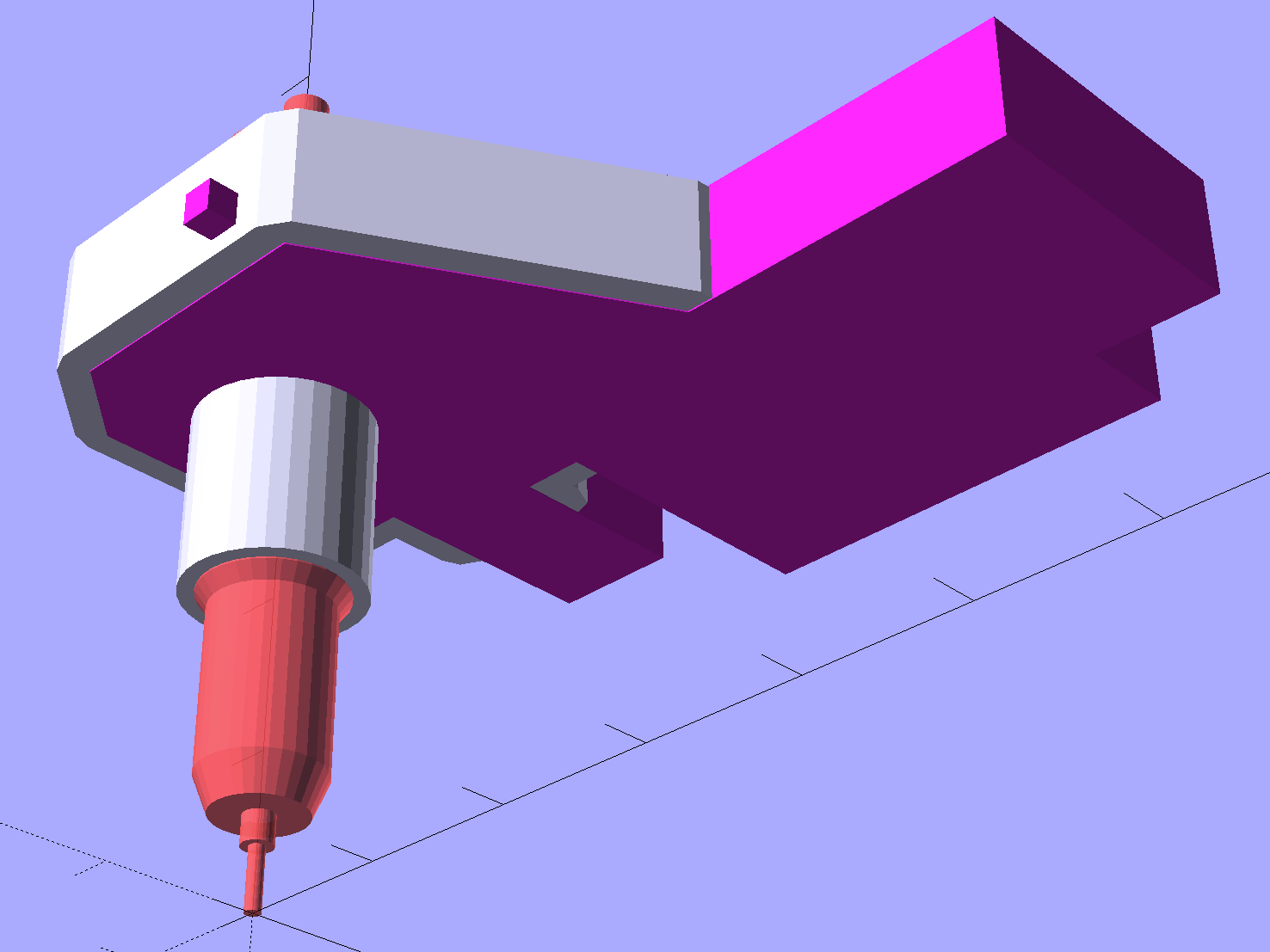
As with the Sakura pen adapter, the knife point sits at (0,0,0) with the stabilizer cap positioned at the (estimated) top of the pen holder:
Roland knife stabilizer – show layout
After a few print-and-try iterations to align all the fiddly cutouts:
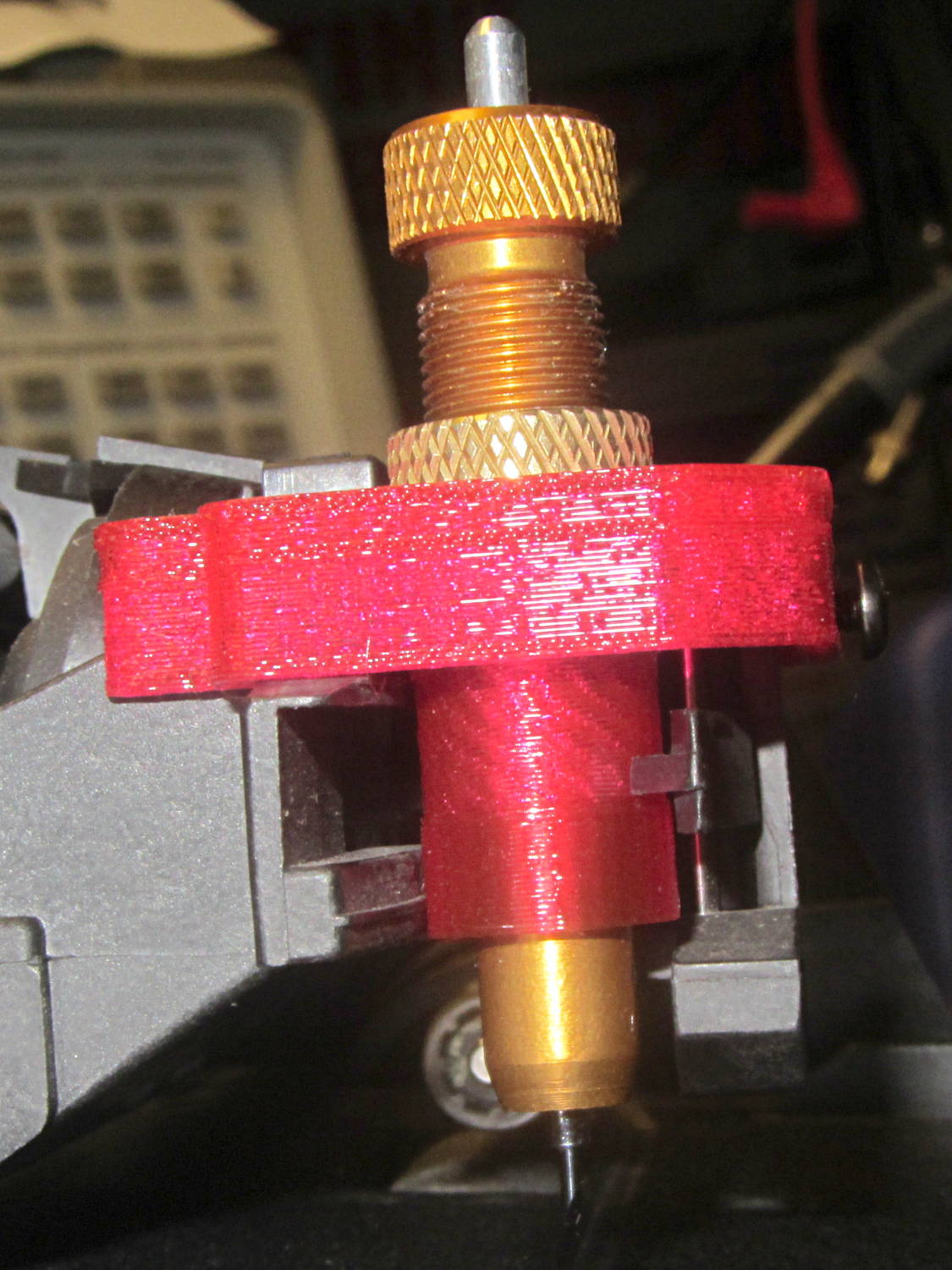
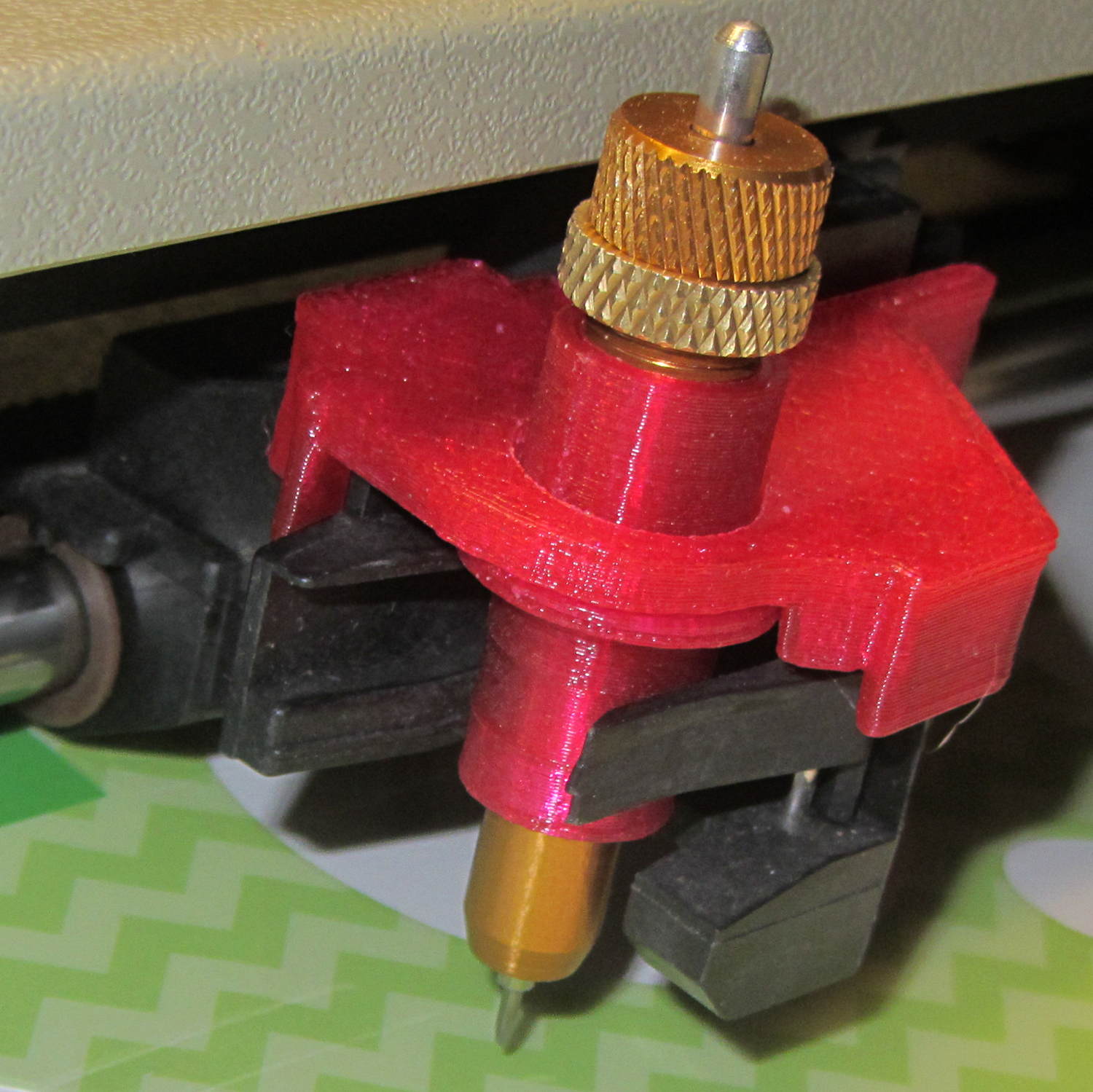
HP 7475A – Roland knife stabilizer – installed
The slope-topped block protruding toward you from the bottom right actuates the carousel’s pen capping mechanism; it doesn’t quite touch the side of an HP pen and is well clear of the knife holder.
Because there’s still no depth control surrounding the knife blade, this won’t work well at all, but it should suffice for better measurements.
The “pen holder” in an HP 7475A plotter carries the pen across the width of the paper:
HP 7475A – Pen Holder – overview
Given that it was designed to carry pens, not knives, I wasn’t surprised that the spring-loaded finger clamping the knife adapter didn’t apply enough force to hold the adapter in place against the cutting forces. I figured a quick test of a gizmo to stabilize the adapter would be in order, even though I knew:
The pen holder doesn’t apply enough downward force
The knife adapter doesn’t have a depth-of-cut shroud around the blade
In order to build the gizmo, I need the carrier’s dimensions…
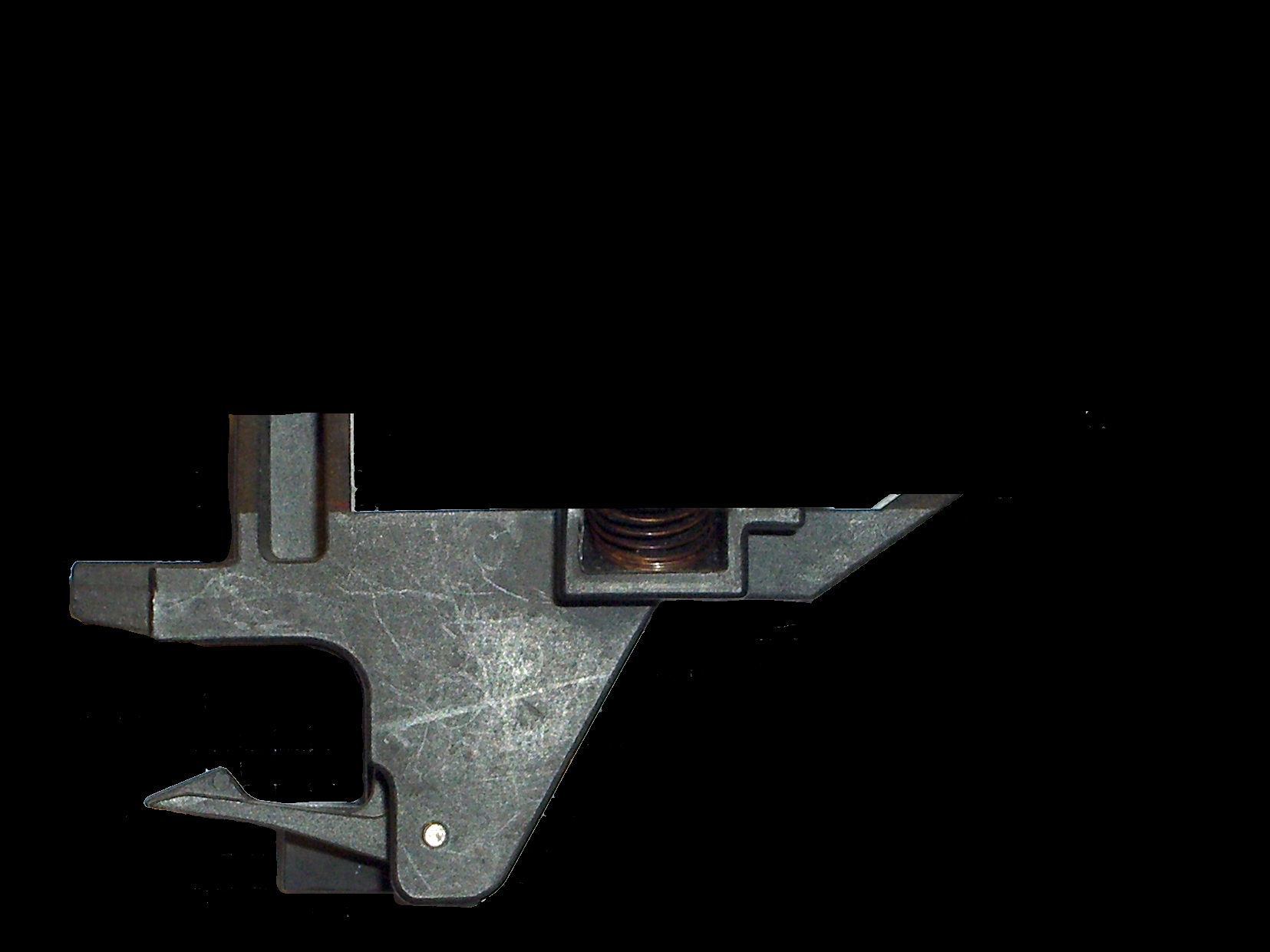
An overhead photo of the pen holder shows the layout in the XY plane:
HP7475A – pen holder – top view
I shouldn’t have used graph paper as a background, because the next step was to remove the background and isolate the carrier:
HP7475A – pen holder – top view – isolated
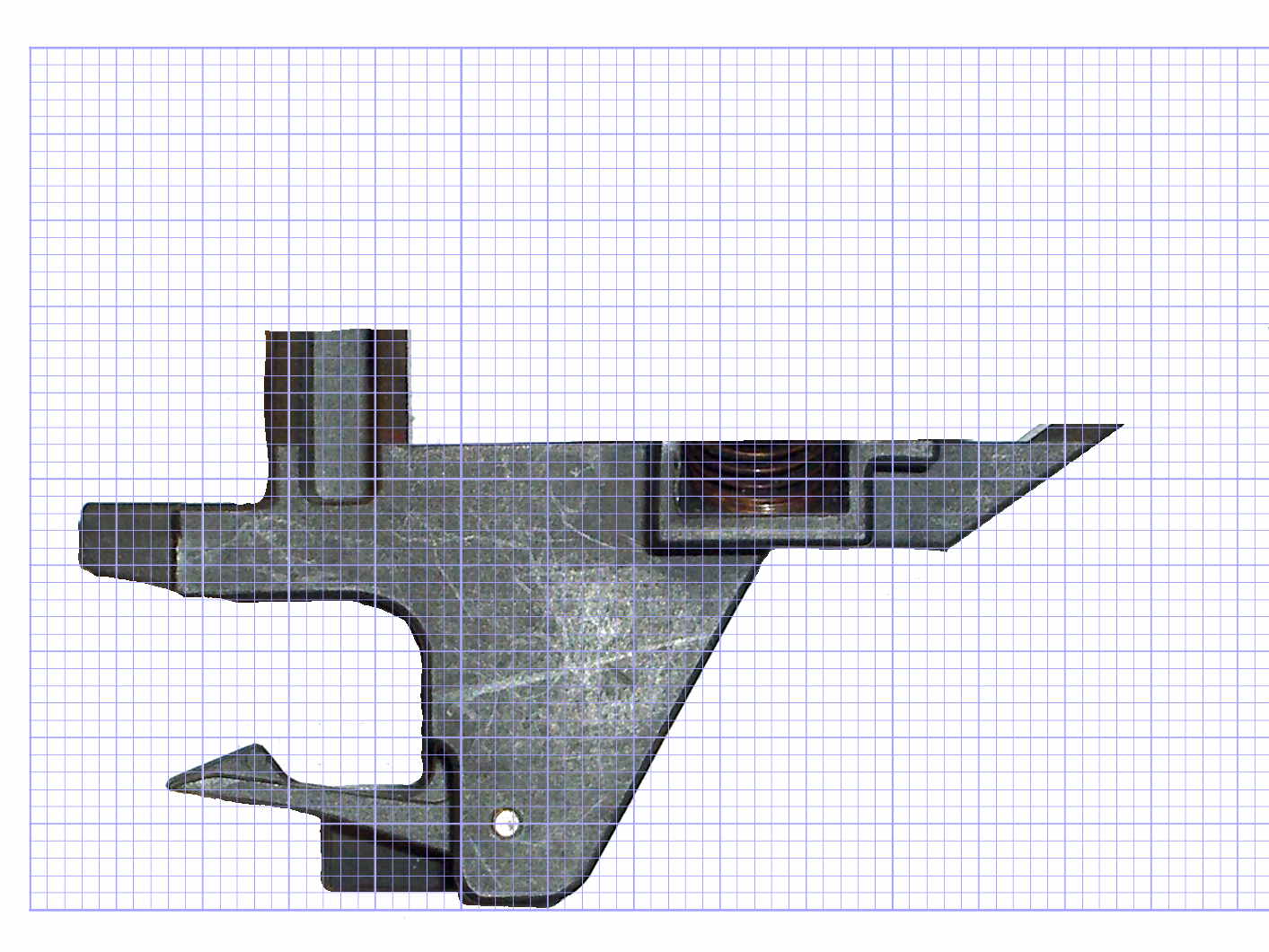
The carrier measures 26.8 mm front-to-back, so scaling a grid to match that dimension provides a coordinate system overlay:
HP7475A – pen holder – top view – 1 mm grid
The (0,0) origin sits at the lower left, so you can read off all the relevant coordinates as needed.
However, rather than go full-frontal digital, I resized the isolated image to 20 pixel/mm, turned it into a height map, and treated it like a chocolate mold or cookie cutter with gray values scaled to the desired height:
Black = background to be removed
Dark gray = 2.5 mm thick
Medium gray = 3.5 mm
Light gray = 7 mm
White = 10 mm
Drawing the walls with a 40 pixel diameter pen makes them 2 mm wide at 20 pixel/mm:
HP7475A – knife stabilizer
It’s painfully obvious why I don’t do much freehand drawing, although the knife adapter hole is supposed to be oval.
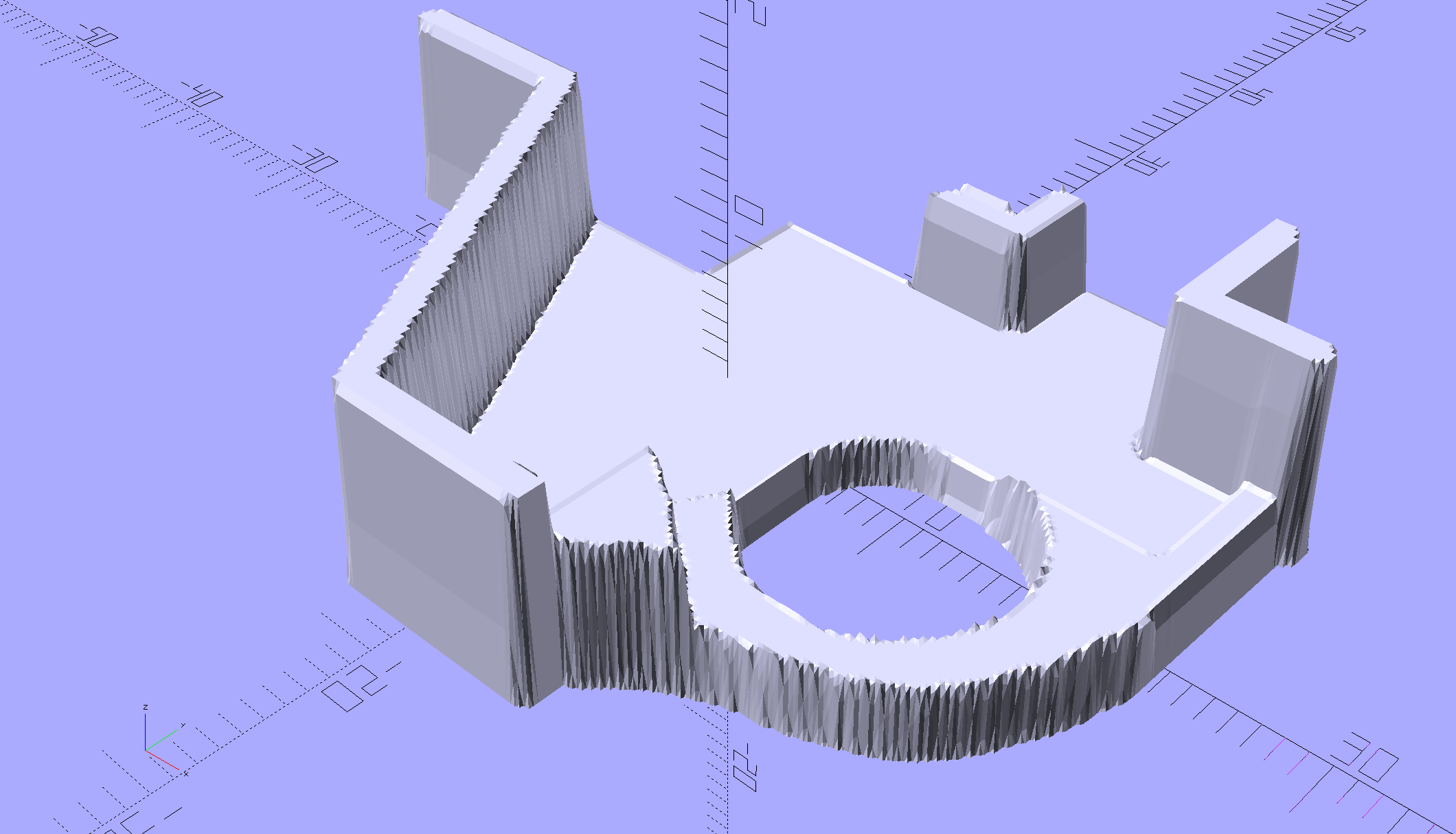
As with cookie cutters and chocolate molds, there’s no need for that much resolution, so I rescaled it to 4 pixel/mm, saved that tiny image as a PNG file, and handed it to OpenSCAD’s surface() function to get a solid model. This being a one-off, I typed this OpenSCAD source code directly into the OpenSCAD editor on the fly, then remembered to save it (!) before shutting down:
The mirror() transformation inverts the model top-to-bottom along the Z axis, compensating for the flip from drawing the height map as though the walls rise upward from the pen carrier, after which the flip() transformation puts the flat side down to make it buildable.
The height map image conversion produces a bazillion irrelevant faces, but it’s quick and easy:
HP7475A – Roland knife stabilizer – height map model
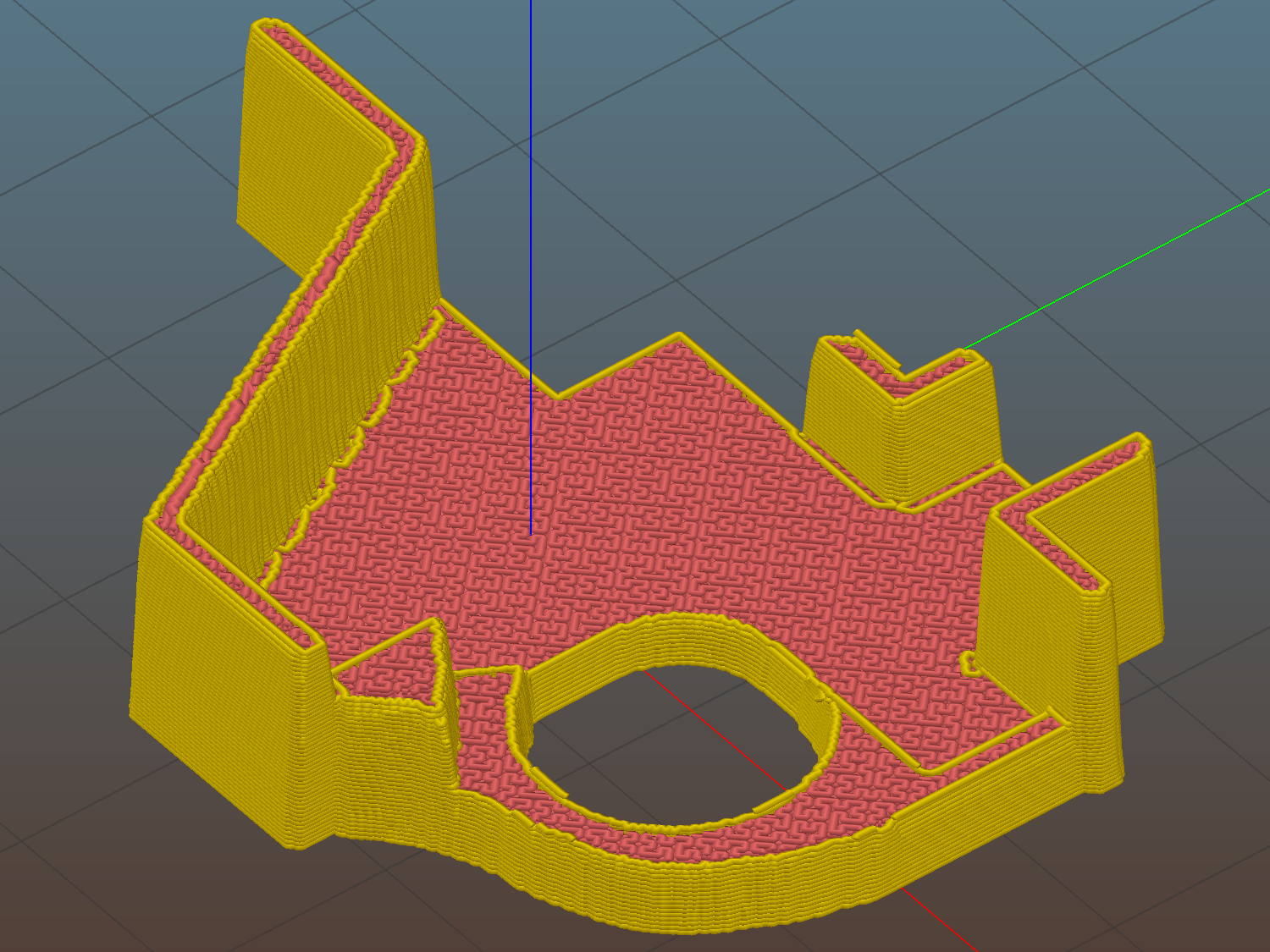
I’ve been using Slic3r’s Hilbert Curve pattern for top & bottom infill to get a nice textured result:
Roland knife stabilizer – height map – Slic3r preview
Which printed just about like you’d expect:
HP 7475A – Roland knife adapter and stabilizer – height map – bottom view
I reamed out the hole with a step drill (the HP pens are close enough to 7/16 as to make no difference here) to get the knife adapter to fit, but the walls and suchlike came out close enough.
Then it just snapped into place:
HP 7475A – Roland knife adapter and stabilizer – height map
Actually, no, it didn’t just snap into place: some (dis)assembly was required.
First, remove the brass knife bearing from the adapter, push the knife adapter shell into the pen holder, slide the stabilizer cap down over the adapter, press it firmly around the pen holder, reinstall the brass knife bearing, then it’s ready.
The cuts in the green vinyl just to the left of the knife blade (in a window decoration sheet I spotted in a trash can) show that the blade can cut, albeit with some finger pressure, but the fancy red stabilizer didn’t stay stuck on the pen carrier nearly as well as I expected. A screw attachment will help with that, which calls for going all digital on those coordinates.
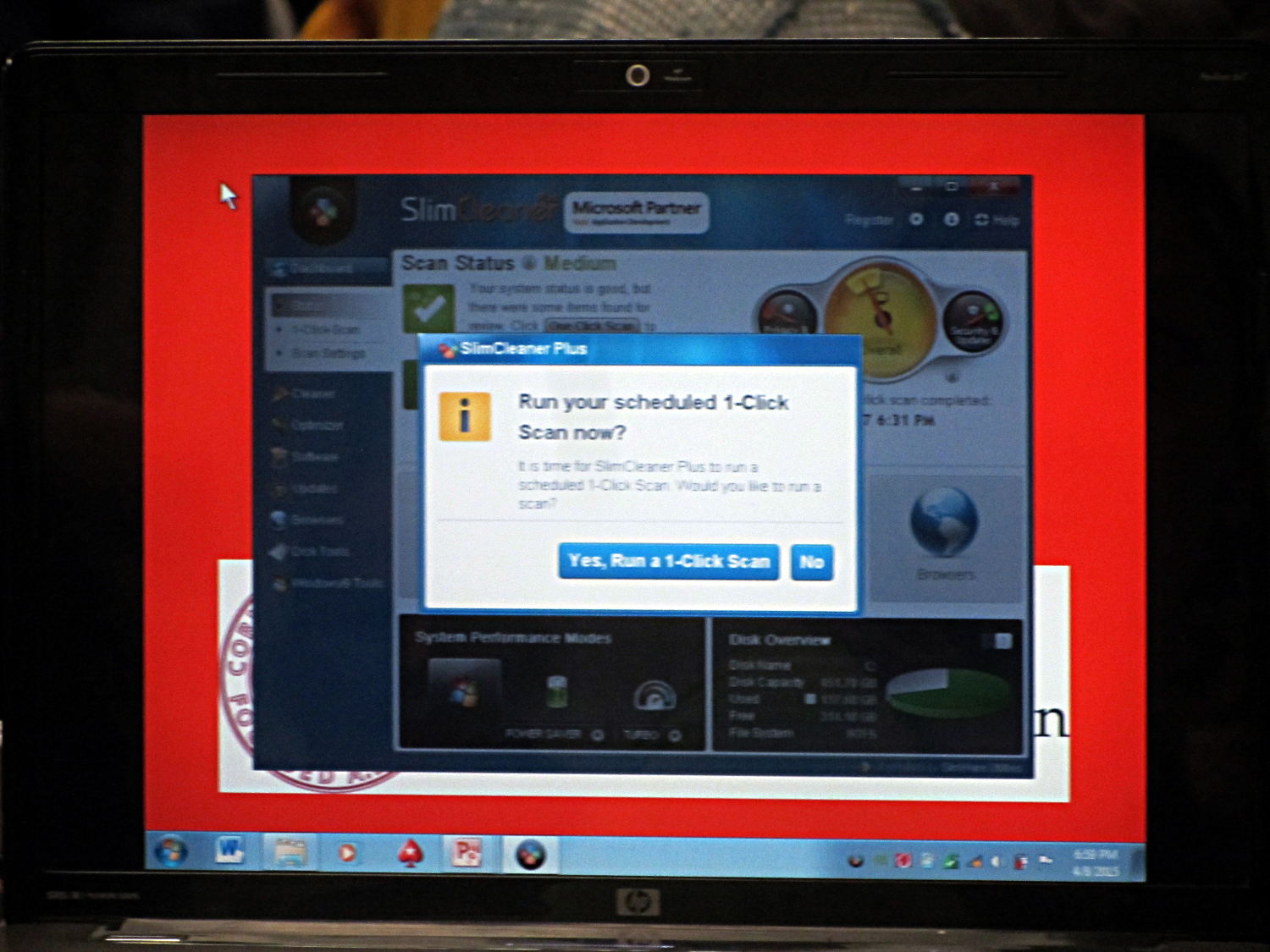
Caught this one moments before the presentation started:
Slimcleaner – pop-up presentation overlay
The “1-Click Scan” (doesn’t Amazon have a patent / trademark on 1-Click?) will occupy a large pop-up screen overlay featuring a host of dashboard-style data that nobody really cares about, triggered by a smaller modal dialog box that’s impossible to work around.
Yes, that appeared on the screen projector, too. I don’t know if “Presentation Mode” should inhibit these things, but, somehow, I doubt it.
Pardon the blurred focus… the laptop sat halfway across the room.









 The Smell of Molten Projects in the Morning