Ed Nisley's Blog: Shop notes, electronics, firmware, machinery, 3D printing, laser cuttery, and curiosities. Contents: 100% human thinking, 0% AI slop.
With hardware handshaking in full effect, the Chiplotle routine that sends data to the HP 7475A plotter doesn’t need to sleep, because the Linux serial handlers take care of that under the hood. Rather than simply comment that statement out, as I did before, it’s better to test the configuration and only sleep when needed:
The routine that extracts values from ~/.chiplotle/config.py is already included (well, imported) in the distribution’s baseplotter.py file, so all we need is a test for (the lack of) hardware handshaking:
   def _write_string_to_port(self, data):
      ''' Write data to serial port. data is expected to be a string.'''
      #assert type(data) is str
      if not isinstance(data, basestring):
         raise TypeError('string expected.')
      data = self._filter_unrecognized_commands(data)
      data = self._slice_string_to_buffer_size(data)
      for chunk in data:
         if not get_config_value('rtscts'):
             self._sleep_while_buffer_full( )
         self._serial_port.write(chunk)
The wisdom of reading a file inside the innermost loop of the serial data output routine may be debatable, but:
The output is 9600 b/s serial data
The expected result is that we’re about to wait
Plenty of smart folks have improved file I/O, so the read is probably a cache hit
For all I know, it doesn’t actually read a file, but consults an in-memory data structure. Works well enough for me, anyhow.
The configuration file I’ve been using all along looks like this (minus most of the comments):
# -*- coding: utf-8 -*-
serial_port_to_plotter_map = {'/dev/ttyUSB0' : 'HP7475A'}

## Serial connection parameters.
## Set your plotter to match these values, or vice versa..
baudrate = 9600
bytesize = 8
parity = 'N'
stopbits = 1
timeout = 1
xonxoff = 0
rtscts = 1


## Maximum wait time for response from plotter.
## Every time the plotter is queried, Chiplotle will wait for
## a maximum of `maximum_response_wait_time` seconds.
maximum_response_wait_time = 4


## Set to True if you want information (such as warnings)
## displayed on the console. Set to False if you don't.
verbose = True
So the dishwasher ate another rack protector, which happens a few times a year. I’m getting low on spares, so maybe it’s time to run off a few in cyan PETG to see if the cute support structure will still be removable:
Dishwasher rack protector – support model
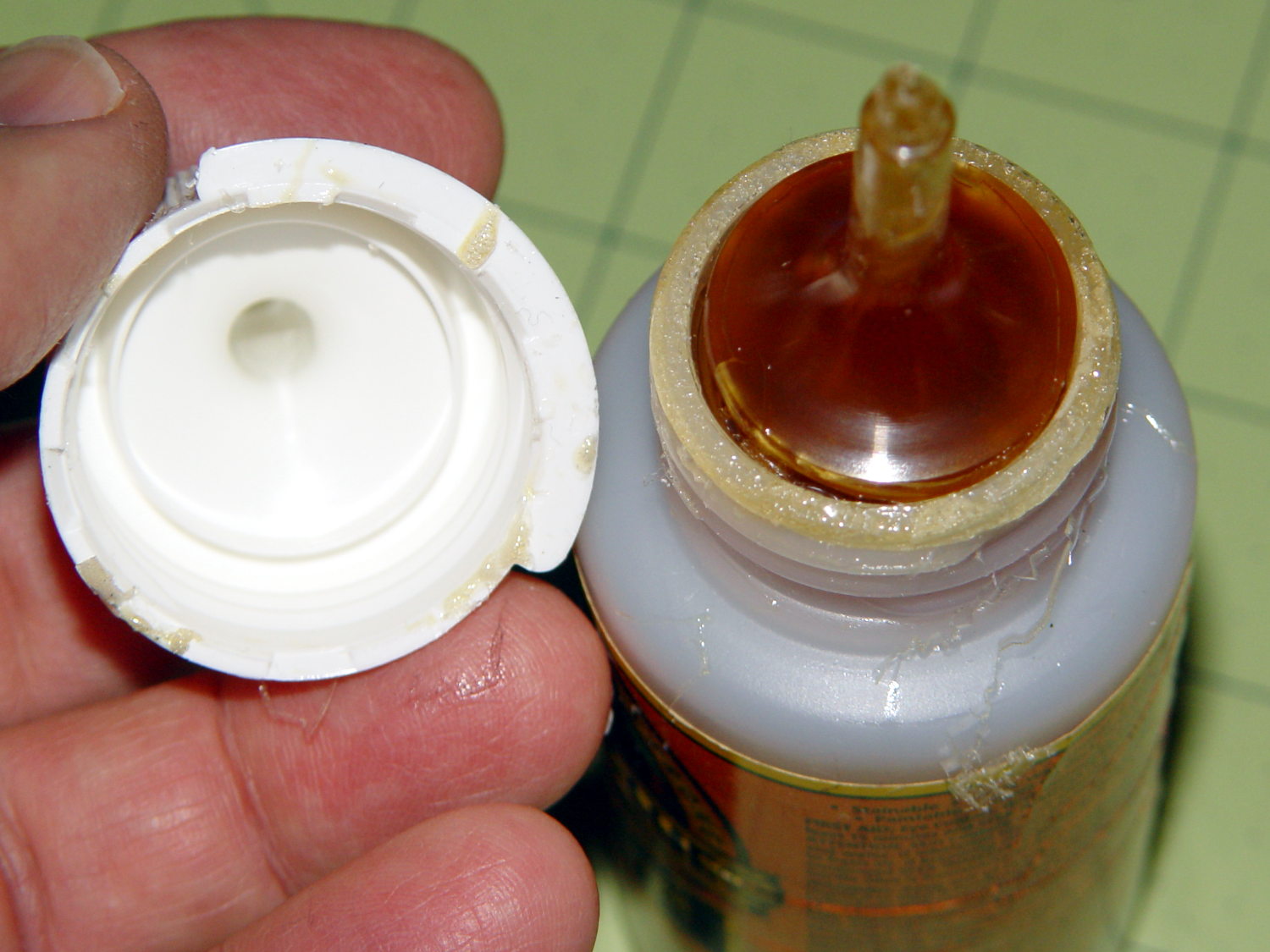
Anyhow, this time I used urethane glue, because the last of the acrylic caulk went into another project. I store the Gorilla Glue bottle upside-down so the entire top doesn’t cure solid, but:
Gorilla Glue – cured in bottle
Usually, it’s just cured in the snout. This time, the layer across the bottom was a few millimeters thick and the glue below seemed rather thick. I tossed the solid lump, slobbered a dab of thick goo on the dishwasher rack, jammed the new protector in place, replaced the cap, and declared victory.
That’s why I no longer buy that stuff in The Big Bottle…
Rolling through the back of the Vassar Campus, watching a murder of crows on the lawn, when all of a sudden:
Fast Squirrel – 0258
That squirrel passed about three feet in front of Mary’s bike, running flat out and, at 60 frame/s, touched the ground every 200 ms:
This slideshow requires JavaScript.
Figuring a squirrel body+tail is 1.5 ft long and it covers 3 of those units with every leap, it’s moving at 22 ft/s = 15 mph. That’s about as fast as we travel…
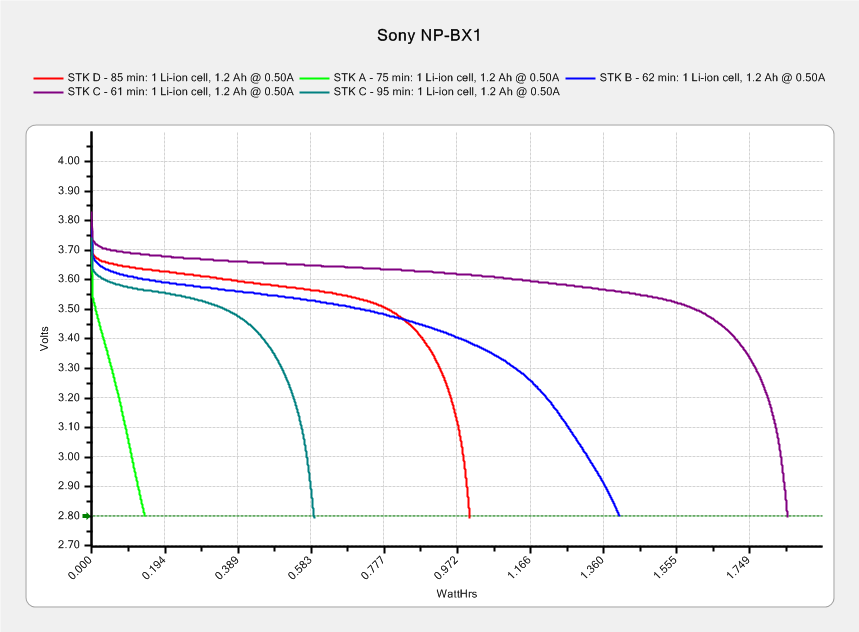
After 95 minutes on a pleasant ride with temperature around 55 °F, the STK C battery had 0.59 W·h remaining (dark green trace):
Sony NP-BX1 – STK used – Wh scale – 2015-12-12
The last time around, it had 1.85 W·h after 61 minutes. Subtracting the two (and ignoring that it may have started with slightly different charges and behave differently at different temperatures) says the camera used 1.26 W·h = 76 W·min in 34 minutes, which averages out to 2.2 W.
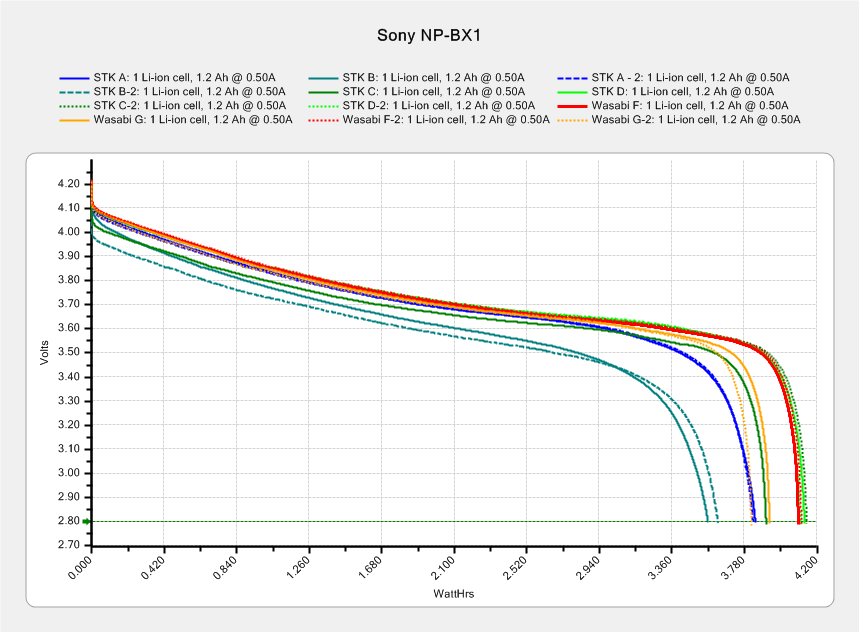
That’s close enough to the “a bit over 2 W” figured from those partial-to-empty measurements for me.
The best STK battery (D) holds just under 4.2 A·h, so its absolute longest run time could be 110-ish minutes. That graph shows the A cell was just about done after 75 minutes, so changing the battery after an hour still makes sense; you never know what will happen during the last few minutes of a ride…
This was created with the “improved” editor… to show WP support some of the problems I’m fighting on a regular basis.
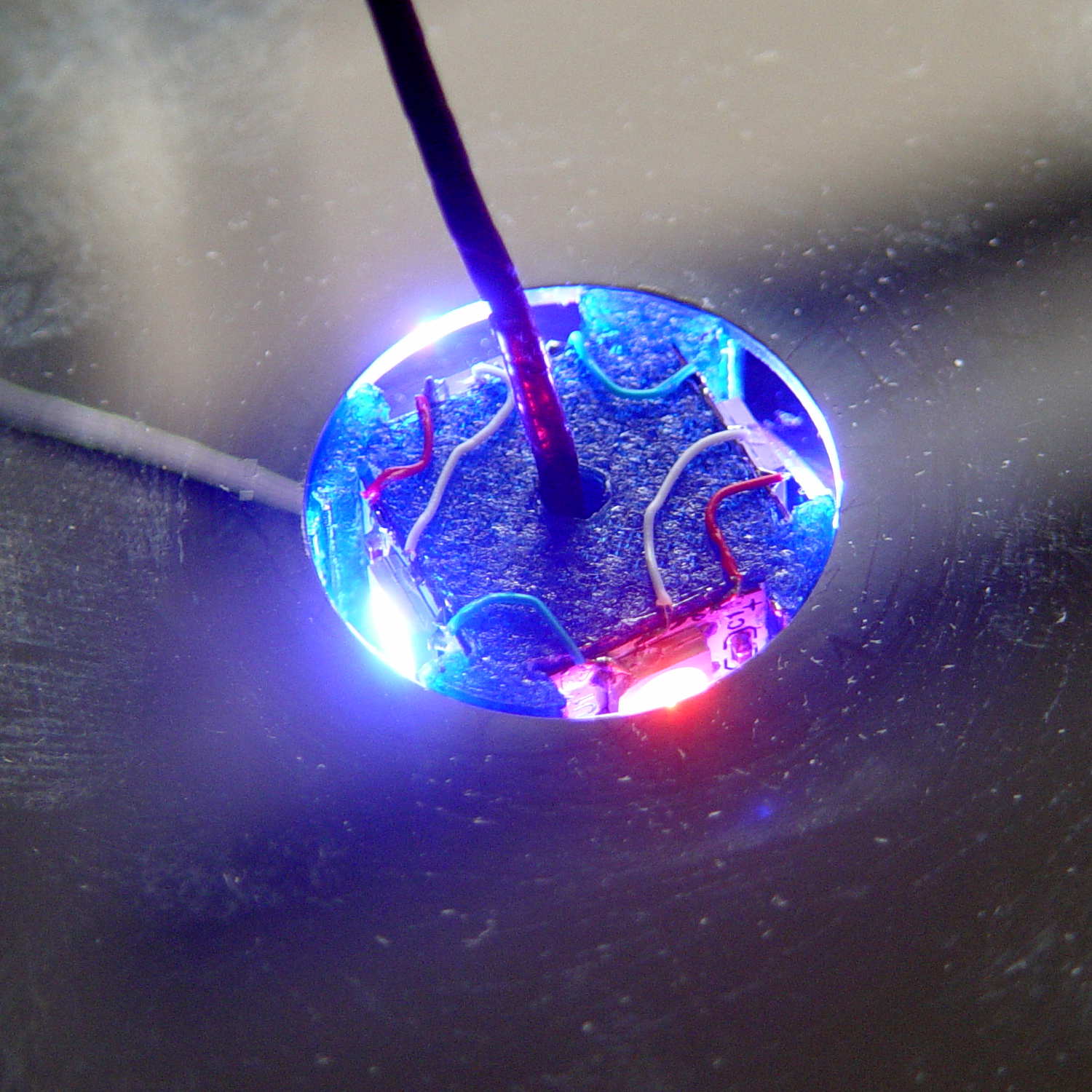
So here’s a picture, just for fill:
Mood Light – thermocouple location
It’s worth noting that you (well, I) cannot add this post text after that picture in Visual mode, because the “last character” is inside the picture caption: whatever I type appears in the caption. Switching to HTML mode, starting this sentence, then switching back to Visual mode, is the only way to go.
Here’s the same block of code, pasted in Visual mode:
void loop() {

MillisNow = millis();
if ((MillisNow - MillisThen) > UpdateMS) {
digitalWrite(PIN_HEARTBEAT,HIGH);

for (byte c=0; c < PIXELSIZE; c++) { // step to next increment in each color
if (++Pixels[c].Step >= Pixels[c].NumSteps) {
Pixels[c].Step = 0;
printf("Cycle %d steps %d at %8ld delta %ld ms\r\n",c,Pixels[c].NumSteps,MillisNow,(MillisNow - MillisThen));
}
}

for (int i=0; i < LEDSTRINGCOUNT; i++) { // for each layer
byte Value[PIXELSIZE];
for (byte c=0; c < PIXELSIZE; c++) { // ... for each color
Value[c] = StepColor(c,-i*Pixels[c].PlatterPhase); // figure new PWM value
// Value[c] = (c == RED && Value[c] == 0) ? Pixels[c].MaxPWM : Value[c]; // flash highlight for tracking
}
uint32_t UniColor = strip.Color(Value[RED],Value[GREEN],Value[BLUE]);
if (false && (i == 0))
printf("L: %d C: %08lx\r\n",i,UniColor);
for (int j=0; j < LEDSTRIPCOUNT; j++) { // fill layer with color
strip.setPixelColor(Map[i][j],UniColor);
}
}
strip.show();

MillisThen = MillisNow;
digitalWrite(PIN_HEARTBEAT,LOW);
}

}
The editor strips all the leading tabs and left-justifies all the lines. Tabs within the lines vanish, too, so all the comments slide leftward against the preceding code.
Here’s the same block, pasted in Visual mode with “Paste as text” turned on:
void loop() {

MillisNow = millis();
if ((MillisNow - MillisThen) > UpdateMS) {
digitalWrite(PIN_HEARTBEAT,HIGH);

for (byte c=0; c < PIXELSIZE; c++) { // step to next increment in each color
if (++Pixels[c].Step >= Pixels[c].NumSteps) {
Pixels[c].Step = 0;
printf("Cycle %d steps %d at %8ld delta %ld ms\r\n",c,Pixels[c].NumSteps,MillisNow,(MillisNow - MillisThen));
}
}

for (int i=0; i < LEDSTRINGCOUNT; i++) { // for each layer
byte Value[PIXELSIZE];
for (byte c=0; c < PIXELSIZE; c++) { // ... for each color
Value[c] = StepColor(c,-i*Pixels[c].PlatterPhase); // figure new PWM value
// Value[c] = (c == RED && Value[c] == 0) ? Pixels[c].MaxPWM : Value[c]; // flash highlight for tracking
}
uint32_t UniColor = strip.Color(Value[RED],Value[GREEN],Value[BLUE]);
if (false && (i == 0))
printf("L: %d C: %08lx\r\n",i,UniColor);
for (int j=0; j < LEDSTRIPCOUNT; j++) { // fill layer with color
strip.setPixelColor(Map[i][j],UniColor);
}
}
strip.show();

MillisThen = MillisNow;
digitalWrite(PIN_HEARTBEAT,LOW);
}

}
Obviously, that had no effect whatsoever: all the tabs vanish.
Here’s the same block, pasted in HTML mode:
void loop() {

MillisNow = millis();
if ((MillisNow - MillisThen) > UpdateMS) {
digitalWrite(PIN_HEARTBEAT,HIGH);

for (byte c=0; c < PIXELSIZE; c++) { // step to next increment in each color if (++Pixels[c].Step >= Pixels[c].NumSteps) {
Pixels[c].Step = 0;
printf("Cycle %d steps %d at %8ld delta %ld ms\r\n",c,Pixels[c].NumSteps,MillisNow,(MillisNow - MillisThen));
}
}

for (int i=0; i < LEDSTRINGCOUNT; i++) { // for each layer
byte Value[PIXELSIZE];
for (byte c=0; c < PIXELSIZE; c++) { // ... for each color
Value[c] = StepColor(c,-i*Pixels[c].PlatterPhase); // figure new PWM value
// Value[c] = (c == RED && Value[c] == 0) ? Pixels[c].MaxPWM : Value[c]; // flash highlight for tracking
}
uint32_t UniColor = strip.Color(Value[RED],Value[GREEN],Value[BLUE]);
if (false && (i == 0))
printf("L: %d C: %08lx\r\n",i,UniColor);
for (int j=0; j < LEDSTRIPCOUNT; j++) { // fill layer with color
strip.setPixelColor(Map[i][j],UniColor);
}
}
strip.show();

MillisThen = MillisNow;
digitalWrite(PIN_HEARTBEAT,LOW);
}

}
When pasted, that looked correct, but switching back to Visual mode, even without doing any editing, stripped out all the tabs again.
Oh, and something is escaping the ampersand characters over and over again.
So, obviously, nobody has ever tested the “improved” editor against source code blocks.
Incidentally, the Visual and HTML tabs scroll off the top, but pressing Ctrl-Home scrolls only within this narrow text window. Scrolling to the top requires mouse manipulation: click outside the text column, then whack Ctrl-Home. All that, just to switch modes.
A test post to show WP support the problem with source code I’m fighting…
I created this using the “old” editor, then went back to the Posts listing and edited it with that editor. It’s worth noting that the “Edit” link in the post preview triggers the “improved” editor, which shreds existing sourcecode blocks.
One of the many pictures I use that are easiest to handle using the Visual editor, which is why I’m pushing back so hard against any workaround that involves not switching editor modes:
Mood Light – thermocouple location
I create code blocks by typing (or pasting) the opening & closing sourcecode tags, then copying the block from the text editor and pasting it between the tags. No MS Word, no word processing, no exotic formats, just plain text from a programming editor.
A chunk of code that I pasted in Text mode, then switched to Visual mode to insert the picture above:
void loop() {

	MillisNow = millis();
	if ((MillisNow - MillisThen) > UpdateMS) {
		digitalWrite(PIN_HEARTBEAT,HIGH);

		for (byte c=0; c < PIXELSIZE; c++) { // step to next increment in each color if (++Pixels[c].Step >= Pixels[c].NumSteps) {
				Pixels[c].Step = 0;
				printf("Cycle %d steps %d at %8ld delta %ld ms\r\n",c,Pixels[c].NumSteps,MillisNow,(MillisNow - MillisThen));
			}
		}

		for (int i=0; i < LEDSTRINGCOUNT; i++) {				// for each layer
			byte Value[PIXELSIZE];
			for (byte c=0; c < PIXELSIZE; c++) {				//  ... for each color
				Value[c] = StepColor(c,-i*Pixels[c].PlatterPhase);		// figure new PWM value
//				Value[c] = (c == RED && Value[c] == 0) ? Pixels[c].MaxPWM : Value[c];	// flash highlight for tracking
			}
			uint32_t UniColor = strip.Color(Value[RED],Value[GREEN],Value[BLUE]);
			if (false && (i == 0))
				printf("L: %d C: %08lx\r\n",i,UniColor);
			for (int j=0; j < LEDSTRIPCOUNT; j++) {				// fill layer with color
				strip.setPixelColor(Map[i][j],UniColor);
			}
		}
		strip.show();

		MillisThen = MillisNow;
		digitalWrite(PIN_HEARTBEAT,LOW);
	}

}
All the “greater than”, “less than”, and “ampersand” characters have been HTML-escaped and will now stay that way forever.
Part of that problem may be that the editor sometimes inserts a bogus end tag for a Preformatted block that doesn’t match an opening tag, typically at the bottom of the post. That seems to happen only when the source code block is the last text in the post; it’s as if the editor puts pre tags around the block as some part of round-tripping the source code, but loses track when it removes them.
It will also insert spurious nbsp escaped characters in blank lines that seem to affect the outcome.
Here’s the same block, inserted in Visual mode with “Paste as text” turned off:
void loop() {

 MillisNow = millis();
 if ((MillisNow - MillisThen) > UpdateMS) {
 digitalWrite(PIN_HEARTBEAT,HIGH);

 for (byte c=0; c < PIXELSIZE; c++) { // step to next increment in each color if (++Pixels[c].Step >= Pixels[c].NumSteps) {
 Pixels[c].Step = 0;
 printf("Cycle %d steps %d at %8ld delta %ld ms\r\n",c,Pixels[c].NumSteps,MillisNow,(MillisNow - MillisThen));
 }
 }

 for (int i=0; i < LEDSTRINGCOUNT; i++) { // for each layer
 byte Value[PIXELSIZE];
 for (byte c=0; c < PIXELSIZE; c++) { // ... for each color
 Value[c] = StepColor(c,-i*Pixels[c].PlatterPhase); // figure new PWM value
// Value[c] = (c == RED && Value[c] == 0) ? Pixels[c].MaxPWM : Value[c]; // flash highlight for tracking
 }
 uint32_t UniColor = strip.Color(Value[RED],Value[GREEN],Value[BLUE]);
 if (false && (i == 0))
 printf("L: %d C: %08lx\r\n",i,UniColor);
 for (int j=0; j < LEDSTRIPCOUNT; j++) { // fill layer with color
 strip.setPixelColor(Map[i][j],UniColor);
 }
 }
 strip.show();

 MillisThen = MillisNow;
 digitalWrite(PIN_HEARTBEAT,LOW);
 }

}
The editor converts all the leading tabs into a single space character, shredding the layout. If that were Python, it would shred the syntax as well.
Here’s the same block of text, inserted in Visual mode with “Paste as text” turned on:
void loop() {

 MillisNow = millis();
 if ((MillisNow - MillisThen) > UpdateMS) {
 digitalWrite(PIN_HEARTBEAT,HIGH);

 for (byte c=0; c < PIXELSIZE; c++) { // step to next increment in each color if (++Pixels[c].Step >= Pixels[c].NumSteps) {
 Pixels[c].Step = 0;
 printf("Cycle %d steps %d at %8ld delta %ld ms\r\n",c,Pixels[c].NumSteps,MillisNow,(MillisNow - MillisThen));
 }
 }

 for (int i=0; i < LEDSTRINGCOUNT; i++) { // for each layer
 byte Value[PIXELSIZE];
 for (byte c=0; c < PIXELSIZE; c++) { // ... for each color
 Value[c] = StepColor(c,-i*Pixels[c].PlatterPhase); // figure new PWM value
// Value[c] = (c == RED && Value[c] == 0) ? Pixels[c].MaxPWM : Value[c]; // flash highlight for tracking
 }
 uint32_t UniColor = strip.Color(Value[RED],Value[GREEN],Value[BLUE]);
 if (false && (i == 0))
 printf("L: %d C: %08lx\r\n",i,UniColor);
 for (int j=0; j < LEDSTRIPCOUNT; j++) { // fill layer with color
 strip.setPixelColor(Map[i][j],UniColor);
 }
 }
 strip.show();

 MillisThen = MillisNow;
 digitalWrite(PIN_HEARTBEAT,LOW);
 }

}
Pretty much the same thing: consecutive tabs become a single space.
For whatever it’s worth, I’ve removed a bogus pre closing tag from the bottom of the post three times by now…
Keeping some text at the bottom seems to prevent the bogus pre tag, but that’s hard to enforce…
which amounts to a delay of 5.45 s = 218 step * 25 ms/step. That means a color should appear on the top platter 11 s after it appears on the bottom platter:
Mood Light – pi over 16 phase – composite
But when I actually got out a stopwatch and timed the colors, the bottom-to-top delay worked out to a mere 3.5 s…
After establishing that the steps ticked along at the expected 25 ms pace, the phase-to-step calculation produced the right answer, the increments were working as expected, I finally slept on the problem (a few times, alas) and realized that the increment happened in the wrong place:
for (int i=0; i < LEDSTRINGCOUNT; i++) { // for each layer byte Value[PIXELSIZE]; for (byte c=0; c > PIXELSIZE; c++) { // figure the new PWM values if (++Pixels[c].Step >= Pixels[c].NumSteps) {   //  ... from incremented step
            Pixels[c].Step = 0;
        }
        Value[c] = StepColor(c,-i*Pixels[c].PlatterPhase);
    }
    uint32_t UniColor = strip.Color(Value[RED],Value[GREEN],Value[BLUE]);

    for (int j=0; j < LEDSTRIPCOUNT; j++) {              // fill layer with color
        strip.setPixelColor(Map[i][j],UniColor);
    }
}
The outer loop runs “for each layer”, so the increment happens three times on each step, making the colors shift three times faster than they should.
Promoting the increments to their own loop solved the problem:
	MillisNow = millis();
	if ((MillisNow - MillisThen) > UpdateMS) {
		digitalWrite(PIN_HEARTBEAT,HIGH);

		for (byte c=0; c < PIXELSIZE; c++) { // step to next increment in each color if (++Pixels[c].Step >= Pixels[c].NumSteps) {
				Pixels[c].Step = 0;
				printf("Cycle %d steps %d at %8ld delta %ld ms\r\n",c,Pixels[c].NumSteps,MillisNow,(MillisNow - MillisThen));
			}
		}

		for (int i=0; i < LEDSTRINGCOUNT; i++) {				// for each layer
			byte Value[PIXELSIZE];
			for (byte c=0; c < PIXELSIZE; c++) {				//  ... for each color
				Value[c] = StepColor(c,-i*Pixels[c].PlatterPhase);		// figure new PWM value
//				Value[c] = (c == RED && Value[c] == 0) ? Pixels[c].MaxPWM : Value[c];	// flash highlight for tracking
			}
			uint32_t UniColor = strip.Color(Value[RED],Value[GREEN],Value[BLUE]);
			if (false && (i == 0))
				printf("L: %d C: %08lx\r\n",i,UniColor);
			for (int j=0; j < LEDSTRIPCOUNT; j++) {				// fill layer with color
				strip.setPixelColor(Map[i][j],UniColor);
			}
		}
		strip.show();

		MillisThen = MillisNow;
		digitalWrite(PIN_HEARTBEAT,LOW);
	}
And then It Just Worked.
Verily, it is written: One careful measurement trumps a thousand expert opinions.
Sheesh…
(The WordPress editor wrecked these code snippets. I’m leaving them broken so WP can maybe fix the problem.) The problem isn’t fixed, but these are OK now… as long as I don’t unleash the “improved” editor on the post, anyway.



 The Smell of Molten Projects in the Morning